Learn SQL: Day 2 – SELECT Queries (The Foundation of SQL)

Today we start writing queries.

Today’s Goals

By the end of Day 2 you should understand:

  • SELECT
  • WHERE
  • ORDER BY
  • LIMIT
  • OFFSET
  • DISTINCT
  • IN
  • BETWEEN
  • LIKE
  • ILIKE
  • NULL handling
  • ActiveRecord equivalents
  • Common interview questions
  • Common mistakes

Step 1: Create Our Practice Database

Connect:

psql sql_day1

Let’s create a new table.

DROP TABLE IF EXISTS users;

CREATE TABLE users (
  id BIGSERIAL PRIMARY KEY,
  name VARCHAR(100),
  email VARCHAR(255),
  age INTEGER,
  city VARCHAR(100),
  salary NUMERIC(10,2),
  active BOOLEAN,
  created_at TIMESTAMP DEFAULT NOW()
);

Insert Sample Data

INSERT INTO users
(name, email, age, city, salary, active)
VALUES
('John',  'john@test.com', 30, 'New York', 70000, true),
('Mary',  'mary@test.com', 25, 'Chicago', 60000, true),
('Bob',   'bob@test.com', 35, 'Chicago', 90000, false),
('Alice', 'alice@test.com', 28, 'Boston', 75000, true),
('Tom',   'tom@test.com', 40, 'New York', 120000, false),
('Sara',  'sara@test.com', 32, 'Boston', 85000, true),
('Mike',  'mike@test.com', NULL, 'Chicago', NULL, true);

View data:

SELECT * FROM users;

ADD a column to an existing database table

To add a column to an existing database table, you use the ALTER TABLE statement combined with the ADD clause.

Common Examples

  • Add a basic text column:
ALTER TABLE employees 
ADD email VARCHAR(255);
  • Add a column with a default value and a NOT NULL constraint:
ALTER TABLE employees 
ADD status VARCHAR(50) NOT NULL DEFAULT 'Active';
  • Add multiple columns at once:
ALTER TABLE employees 
ADD phone_number VARCHAR(20),
    hire_date DATE;

1. SELECT

The most basic query.

SELECT * FROM users;

Meaning:

Give me all columns from users

Output:

id | name | email | age | city | salary

Select Specific Columns

Instead of everything:

SELECT name, email FROM users;

Output:

name | email
--------+---------------
John | john@test.com
Mary | mary@test.com

Rails Equivalent

User.select(:name, :email)

Senior Insight

Avoid:

SELECT *

in production systems unless needed.

Why?

Because fetching unnecessary columns:

  • uses more memory
  • transfers more data
  • slows queries

Good:

SELECT id, name FROM users;

2. WHERE Clause

Filters rows.

Example

Only active users.

SELECT * FROM users
WHERE active = true;

Rails:

User.where(active: true)

Age Greater Than 30

SELECT * FROM users
WHERE age > 30;

Rails:

User.where("age > ?", 30)

Multiple Conditions

SELECT * FROM users
WHERE city = 'Chicago'
AND active = true;

Rails:

User.where(city: "Chicago", active: true)

OR

SELECT * FROM users
WHERE city = 'Chicago'
OR city = 'Boston';

Rails:

User.where(city: ["Chicago", "Boston"])

Interview Question

Which runs first?

WHERE A OR B AND C

Answer:

AND

before

OR

Use parentheses.

WHERE (A OR B)
AND C

3. ORDER BY

Sort results.

Ascending

SELECT * FROM users
ORDER BY age ASC;

Smallest age first.

Descending

SELECT * FROM users
ORDER BY salary DESC;

Highest salary first.

Rails:

User.order(salary: :desc)

Multiple Columns

SELECT * FROM users
ORDER BY city ASC, salary DESC;

Meaning:

Sort by city first
Inside each city
sort by salary

Common Interview Question

What happens if you omit ASC/DESC?

ORDER BY age

Default:

ASC

4. LIMIT

Return only N rows.

SELECT * FROM users
LIMIT 3;

Rails:

User.limit(3)

Why LIMIT Matters

Imagine:

10 million rows

Fetching all:

slow
memory-heavy
unnecessary

LIMIT reduces work.

5. OFFSET

Skip rows.

SELECT * FROM users
LIMIT 3
OFFSET 3;

Meaning:

Skip first 3
Return next 3

Rails

User.limit(3).offset(3)

Pagination Example

Page 1

LIMIT 10 OFFSET 0

Page 2

LIMIT 10 OFFSET 10

Page 3

LIMIT 10 OFFSET 20

Senior Insight

Large OFFSET values become expensive.

Example:

OFFSET 500000

PostgreSQL still scans through those rows.

Later we’ll learn:

Keyset Pagination

which is much faster.

Keyset pagination is a database query method that fetches next sets of data by using the last seen record’s unique key or value (like an ID or timestamp) instead of skipping rows with an offset. It is also known as seek-based pagination or the engine behind cursor-based pagination.

How It Works

  • First Page: The app queries the first N rows ordered by an indexed column (e.g., id or created_at).
  • Next Pages: Instead of using OFFSET, the query filters records using a WHERE clause matching values after the last key from the previous page (e.g., WHERE id > last_seen_id).
  • Continuation: The application repeats this using the final item’s key from the current batch as the anchor for the next request.

6. DISTINCT

Remove duplicates.

Example:

SELECT city FROM users;

Result:

Chicago
Chicago
Chicago
Boston
Boston
New York

Distinct:

SELECT DISTINCT city FROM users;

Result:

Chicago
Boston
New York

Rails

User.select(:city).distinct

Multiple Columns

SELECT DISTINCT city, active FROM users;

Distinct applies to the combination.

7. IN

Cleaner alternative to multiple OR conditions.

Instead of:

WHERE city='Boston'
OR city='Chicago'
OR city='New York'

Use:

WHERE city IN
('Boston','Chicago','New York');

Rails:

User.where(city: ["Boston", "Chicago", "New York"])

8. BETWEEN

Range filtering.

Age between 25 and 35.

SELECT * FROM users
WHERE age BETWEEN 25 AND 35;

Equivalent:

age >= 25
AND
age <= 35

Rails

User.where(age: 25..35)

Salary Range

SELECT * FROM users
WHERE salary BETWEEN 60000 AND 90000;

Interview Question

Is BETWEEN inclusive?

Answer:

YES

Both boundaries included.

9. LIKE

Pattern matching.

Find names beginning with M.

SELECT * FROM users
WHERE name LIKE 'M%';

Result:

Mary
Mike

Ends With

WHERE email LIKE '%test.com'

Contains

WHERE name LIKE '%ar%'

Matches:

Mary
Sara

Wildcards

SymbolMeaning
%Any number of chars
_Exactly one char

Example

WHERE name LIKE '_o%'

Matches:

Bob
Tom

10. ILIKE

PostgreSQL-specific.

Case-insensitive LIKE.

SELECT * FROM users
WHERE name ILIKE 'john';

Matches:

John
JOHN
john
JoHn

Rails AR:

User.where("name ILIKE ?", "john")

User.where("city ILIKE ?", "%boston%")
# matches:
# Boston
# boston
# BOSTON
# BoStOn

# Starts with Boston
User.where("city LIKE ?", "Bos%")

# Ends with ton
User.where("city LIKE ?", "%ton")

# Contains ost
User.where("city LIKE ?", "%ost%")

# with another condition
User.where("city ILIKE ?", "%boston%")
    .where("salary > ?", 80_000)

Interview point: Always use ? parameter binding rather than string interpolation:

# Avoid
User.where("city LIKE '%#{city}%'")

# Good
User.where("city LIKE ?", "%#{city}%")

Senior Interview Insight

In PostgreSQL:

LIKE

is case-sensitive.

ILIKE

is case-insensitive.

Many developers don’t know this.

11. NULL Handling

This is a favorite interview topic.

Let’s inspect:

SELECT * FROM users;

Mike has:

age = NULL
salary = NULL

Wrong

WHERE age = NULL

Returns:

Nothing

Correct

WHERE age IS NULL

Find users with no salary:

SELECT * FROM users
WHERE salary IS NULL;

Rails

User.where(age: nil)

Generates:

IS NULL

NOT NULL

SELECT * FROM users
WHERE salary IS NOT NULL;

Why NULL Is Special

SQL uses:

TRUE
FALSE
UNKNOWN

not just:

TRUE
FALSE

This is called:

Three-Valued Logic

Interviewers love asking this.

Practical Exercises

Exercise 1

Find all active users.

Exercise 2

Find users older than 30.

Exercise 3

Find users from Boston.

Exercise 4

Find top 3 highest-paid users.

Exercise 5

Find unique cities.

Exercise 6

Find users aged between 25 and 35.

Exercise 7

Find names starting with S.

Exercise 8

Find users whose salary is NULL.

Combining Everything

Qn) Display name, city, salary of 3 highest salaried users who are active and living in cities chicago and boston.

Example:

Qn) Can you explain what this query does before running it?

SELECT name, city, salary
FROM users
WHERE active = true
  AND city IN ('Chicago', 'Boston')
  AND salary IS NOT NULL
ORDER BY salary DESC
LIMIT 3;

That’s exactly the kind of reasoning expected in senior interviews.

Convert the above into ActiveRecord query:

User.where(active: true, city: ["Chicago", "Boston"])
    .where.not(salary: nil)
    .order(salary: :desc)
    .limit(3)
    .pluck(:name, :city, :salary)

We can also write this AR Query using select

User.select(:name, :city, :salary)
    .where(active: true, city: ["Boston", "Chicago"])
    .where.not(salary: nil)
    .order(salary: :desc)
    .limit(3)

Both queries apply the same filtering, ordering, and limiting. The main difference is what they return.

1. query using select

User.select(:name, :city, :salary)
.where(active: true, city: ["Boston", "Chicago"])
.where.not(salary: nil)
.order(salary: :desc)
.limit(3)

It returns User ActiveRecord objects with only those selected columns:

[
#<User name: "John", city: "Boston", salary: 100000>,
...
]

Because id is not selected, some operations expecting user.id may not work as expected.

2. Second query

User.where(active: true, city: ["Chicago", "Boston"])
.where.not(salary: nil)
.order(salary: :desc)
.limit(3)
.pluck(:name, :city, :salary)

This returns plain Ruby arrays, not User objects:

[
["John", "Boston", 100000],
["Alice", "Chicago", 90000]
]

pluck directly retrieves the requested columns from the database.

Key difference

selectpluck
ReturnsActiveRecord objectsRuby arrays
Example retrievaluser.namerow[0]
Instantiates modelsYesNo
Good forWorking with modelsJust retrieving data
MemoryMoreLess

Interview takeaway: select narrows the columns of returned ActiveRecord objects; pluck skips model instantiation and returns the requested values directly.

ActiveRecord Translation Challenge

Convert this SQL:

SELECT * FROM users
  WHERE city = 'Chicago'
  AND active = true
  ORDER BY salary DESC
  LIMIT 2;

into ActiveRecord.

Solution:

User.where(city: "Chicago", active: true)
    .order(salary: :desc)
    .limit(2)

#If you only need the name, city, and salary:
User.where(city: "Chicago", active: true)
    .order(salary: :desc)
    .limit(2)
    .pluck(:name, :city, :salary)

Common Mistakes

Mistake 1

WHERE age = NULL

Wrong.

Use:

WHERE age IS NULL

Mistake 2

Using:

SELECT *

everywhere.

Mistake 3

Forgetting ORDER BY when using LIMIT.

LIMIT 5

without ordering can return arbitrary rows.

Mistake 4

Using huge OFFSET values.

Senior-Level Knowledge

Understand that SQL logically executes in this order:

FROM
WHERE
SELECT
DISTINCT
ORDER BY
LIMIT

Even though we write:

SELECT ...
FROM ...
WHERE ...

PostgreSQL conceptually processes the clauses in the above order.

This understanding becomes extremely important when we move to:

  • JOINs
  • GROUP BY
  • HAVING
  • Query Optimization
  • EXPLAIN ANALYZE

Homework

Create a new table:

CREATE TABLE products (
  id BIGSERIAL PRIMARY KEY,
  name VARCHAR(100),
  category VARCHAR(100),
  price NUMERIC(10,2),
  stock_quantity INTEGER
);

Insert at least 10 records.

Practice:

  1. SELECT specific columns
  2. WHERE with multiple conditions
  3. ORDER BY price DESC
  4. LIMIT 5
  5. DISTINCT categories
  6. BETWEEN on price
  7. LIKE searches
  8. Products with stock_quantity IS NULL

Day 3 Preview

Next we’ll cover one of the most important interview topics:

JOINs

Including:

  • INNER JOIN
  • LEFT JOIN
  • RIGHT JOIN
  • FULL JOIN
  • CROSS JOIN
  • Self Join
  • ActiveRecord joins
  • includes vs joins vs preload vs eager_load
  • Real Rails interview questions

Day 3 is where SQL starts becoming truly powerful.

Day 3: https://railsdrop.com/2024/02/12/learn-sql-day-3-joins/

Happy Learning! 🚀
Learn SQL: Day 1 – Relational Database Fundamentals

We’re going to learn these topics at three levels simultaneously:

  1. Database Level (PostgreSQL)
  2. SQL Level
  3. Rails / ActiveRecord Level

For every topic, ask yourself:

“How does PostgreSQL store this?”

“How do I query this with SQL?”

“How does Rails represent this?”

This will help you to prepare for interviews. We use PostgreSQL here.

Today’s Goal

By the end of Day 1, you should fully understand:

  • Database
  • Table
  • Row
  • Column
  • Primary Key
  • Foreign Key
  • Constraints
  • One-to-One
  • One-to-Many
  • Many-to-Many
  • Rails associations behind them

Part 1: What is a Database?

Imagine you are building an e-commerce application.

You need to store:

  • Users
  • Products
  • Orders
  • Payments

A database is simply a structured place to store and retrieve that information.

In PostgreSQL:

CREATE DATABASE shop_app;

Connect to it:

psql postgres

Inside psql:

CREATE DATABASE shop_app;

Connect:

\c shop_app

Verify:

SELECT current_database();

Output:

 shop_app


Part 2: What is a Table?

A table is similar to an Excel sheet.

Example:

Users table

idnameemail
1Johnjohn@test.com
2Marymary@test.com

Create it:

CREATE TABLE users (
id BIGSERIAL PRIMARY KEY,
name VARCHAR(100),
email VARCHAR(255)
);

Verify:

\d users

Interview Question:

Why not store everything in a single giant table?

Answer:

Because:

  • duplication increases
  • maintenance becomes difficult
  • relationships become unclear
  • updates become expensive

This concept is called normalization (we’ll study later).


Part 3: Rows

A row represents one record.

Insert data:

INSERT INTO users (name, email)
VALUES
('John', 'john@test.com'),
('Mary', 'mary@test.com');

View:

SELECT * FROM users;

Output:

 id | name | email
----+------+----------------
 1  | John | john@test.com
 2  | Mary | mary@test.com


Each row = one user.


Part 4: Columns

Columns describe attributes.

In users table:

id
name
email

View columns:

\d users

Senior Insight:

A database table models an entity.

Examples:

EntityTable
Userusers
Productproducts
Orderorders

Columns represent attributes of that entity.


Part 5: Primary Keys

Every row needs a unique identifier.

Example:

id BIGSERIAL PRIMARY KEY

Meaning:

1
2
3
4
...

No duplicates.

No NULLs.

Try:

INSERT INTO users (id, name)
VALUES (1, 'Bob');

You should get:

duplicate key value violates unique constraint

Why Primary Keys Exist

Without a primary key:

John
John
John

Which John?

Nobody knows.

Primary key solves identity.

Rails Equivalent

Migration:

create_table :users do |t|
t.string :name
t.string :email
end

Rails automatically adds:

id

as the primary key.


Part 6: Constraints

Constraint = database rule.

Interviewers love this topic.

NOT NULL

Create:

CREATE TABLE products (
id BIGSERIAL PRIMARY KEY,
name VARCHAR(255) NOT NULL
);

Try:

INSERT INTO products(name)
VALUES(NULL);

Fails.

UNIQUE

CREATE TABLE customers (
id BIGSERIAL PRIMARY KEY,
email VARCHAR(255) UNIQUE
);

Duplicate email:

INSERT INTO customers(email)
VALUES('test@test.com');
INSERT INTO customers(email)
VALUES('test@test.com');

Fails.

CHECK Constraint

Age must be positive.

# CREATE TABLE employees (
  id BIGSERIAL PRIMARY KEY,
  age INTEGER CHECK(age > 0)
);

# \d employees;
                            Table "public.employees"
 Column |  Type   | Collation | Nullable |                Default
--------+---------+-----------+----------+---------------------------------------
 id     | bigint  |           | not null | nextval('employees_id_seq'::regclass)
 age    | integer |           |          |
Indexes:
    "employees_pkey" PRIMARY KEY, btree (id)
Check constraints:
    "employees_age_check" CHECK (age > 10)

Fails:

INSERT INTO employees(age)
VALUES(-5);

Why Constraints Matter

Junior developer:

validates :email, uniqueness: true

Senior developer:

validates :email, uniqueness: true
+
UNIQUE(email)

Because application validations can be bypassed.

Database constraints cannot.


Part 7: Foreign Keys

Now let’s model:

User has many orders.

Create users:

CREATE TABLE users (
  id BIGSERIAL PRIMARY KEY,
  name VARCHAR(100)
);

Create orders with foreign key:

# CREATE TABLE orders(
  id BIGSERIAL PRIMARY KEY,
  user_id BIGINT REFERENCES users(id),
  total NUMERIC(10, 2)
);
CREATE TABLE

If you are not added user_id INT as Foreign key, add it later using ALTER TABLE:

ALTER TABLE orders
ADD CONSTRAINT fk_orders_user
FOREIGN KEY (user_id)
REFERENCES users(id);

Insert user:

INSERT INTO users(name)
VALUES('John');

Insert order:

INSERT INTO orders(user_id,total)
VALUES(1,100);

Works.

Try:

INSERT INTO orders(user_id,total)
VALUES(999,100);

Fails.

Because user doesn’t exist.

Why Foreign Keys Exist

Without them:

Order belongs to user 999

But user 999 doesn’t exist.

Database becomes corrupted.

Rails Equivalent

class User < ApplicationRecord
has_many :orders
end
class Order < ApplicationRecord
belongs_to :user
end

Migration:

t.references :user,
null: false,
foreign_key: true

Rails creates:

user_id
FOREIGN KEY

behind the scenes.


Part 8: One-to-Many Relationship

Most common relationship.

Example:

User -> Orders

One user:

John

Many orders:

Order 1
Order 2
Order 3

Diagram:

users
-----
id
orders
------
id
user_id

Rails:

User has_many :orders
Order belongs_to :user

Practical Exercise

Insert:

INSERT INTO users(name)
VALUES('Mary');

Orders:

INSERT INTO orders(user_id,total)
VALUES
(2,50),
(2,75),
(2,120);

Query:

SELECT *
FROM orders
WHERE user_id = 2;

Part 9: One-to-One Relationship

Less common.

Example:

User
Profile

Each user has exactly one profile.

Create profile table:

CREATE TABLE profiles (
  id BIGSERIAL PRIMARY KEY,
  user_id BIGINT UNIQUE,
  bio TEXT,
  FOREIGN KEY(user_id) REFERENCES users(id)
);

Notice:

UNIQUE(user_id)

This forces:

One user
One profile

Rails:

class User < ApplicationRecord
has_one :profile
end
class Profile < ApplicationRecord
belongs_to :user
end

Interview Question:

How does a database enforce one-to-one?

Answer:

FOREIGN KEY
+
UNIQUE

on the foreign key column.


Part 10: Many-to-Many Relationship

Classic interview topic.

Example:

Students
Courses

Student can enroll in many courses.

Course can have many students.

Create students:

CREATE TABLE students (
  id BIGSERIAL PRIMARY KEY,
  name VARCHAR(100)
);

Create courses:

CREATE TABLE courses (
  id BIGSERIAL PRIMARY KEY,
  title VARCHAR(100)
);

Need a join table:

CREATE TABLE enrollments (
  student_id BIGINT,
  course_id BIGINT,
  PRIMARY KEY(student_id, course_id),

  FOREIGN KEY(student_id)
    REFERENCES students(id),

  FOREIGN KEY(course_id)
    REFERENCES courses(id)
);

A composite primary key is a primary key that consists of two or more columns to uniquely identify each row in a database table. While individual columns within the composite key can contain duplicate values across different rows, the combined values of those columns must be entirely unique.

Key Characteristics

  • No NULL values: Just like a standard primary key, none of the columns making up a composite key can contain NULL values.
  • One Primary Key per table: A table can still only have one primary key constraint, but that single constraint is distributed across multiple columns.
  • Common Use Cases: They are frequently used in many-to-many junction tables (e.g., matching student_id and course_id in an enrollment table) or line-item tables (e.g., combining order_id and item_number)

Diagram:

students
    |
    |
enrollments
    |
    |
courses

Rails

class Student < ApplicationRecord
has_many :enrollments
has_many :courses, through: :enrollments
end
class Course < ApplicationRecord
has_many :enrollments
has_many :students, through: :enrollments
end
class Enrollment < ApplicationRecord
belongs_to :student
belongs_to :course
end

Senior-Level Insight

Most Rails developers stop at:

has_many
belongs_to

Strong backend engineers understand:

Association
↓
Foreign Key
↓
Constraint
↓
Index
↓
Storage

That understanding helps you:

  • debug production issues
  • optimize queries
  • design schemas
  • answer interview questions confidently

Interview Questions

Try answering without looking.

Q1

Difference between:

PRIMARY KEY

and

UNIQUE

Q2

Can a table have multiple UNIQUE constraints?

Q3

Can a table have multiple PRIMARY KEYS?

Q4

How is a one-to-one relationship implemented in PostgreSQL?

Q5

Why should foreign keys exist even when Rails validations exist?

Q6

What problem does a join table solve?

Practical Lab (Run Everything)

Create a fresh database:

CREATE DATABASE interview_sql_day1;

Connect:

\c interview_sql_day1

Create:

users
profiles
orders
students
courses
enrollments

Insert sample data.

Then practice:

SELECT * FROM users;
SELECT * FROM orders;
SELECT * FROM profiles;
SELECT * FROM enrollments;

Try intentionally violating:

  • PRIMARY KEY
  • UNIQUE
  • NOT NULL
  • FOREIGN KEY

and observe PostgreSQL’s error messages.

A senior engineer learns a lot from database errors.


Homework

Exercise 1

Create:

authors
books

One author → many books

Add proper foreign keys.

Exercise 2

Create:

employees
employee_details

One-to-one relationship.

Exercise 3

Create:

movies
actors
movie_actors

Many-to-many relationship.

Insert:

  • 3 movies
  • 5 actors

Create relationships.

Exercise 4

For every relationship above, write the equivalent Rails models and associations.

Day 2 Preview

Next we’ll cover the foundation of everything in SQL:

SELECT Queries

Including:

  • SELECT
  • WHERE
  • ORDER BY
  • LIMIT
  • OFFSET
  • DISTINCT
  • IN
  • BETWEEN
  • LIKE
  • ILIKE
  • NULL handling

plus PostgreSQL execution behavior and ActiveRecord equivalents.

This is where real querying begins.

Read part 2: https://railsdrop.com/2024/02/10/learn-sql-day-2-select-queries-the-foundation-of-sql/

Happy Learning! 🚀

Learn Web: Key ideas – Nginx/Apache, load balancers

The key idea is this: Nginx/Apache, load balancers, and application servers have different responsibilities, but some of their responsibilities overlap. You don’t always need all three.

Let’s understand this using a Ruby on Rails application, since it makes the architecture easier to relate to real production deployments.

1. What happens when a user sends a request?

Suppose a user opens your application:

GET https://shop.example.com/products

The browser sends the request over the internet. Something must receive that request, decide where it should go, and return the response.

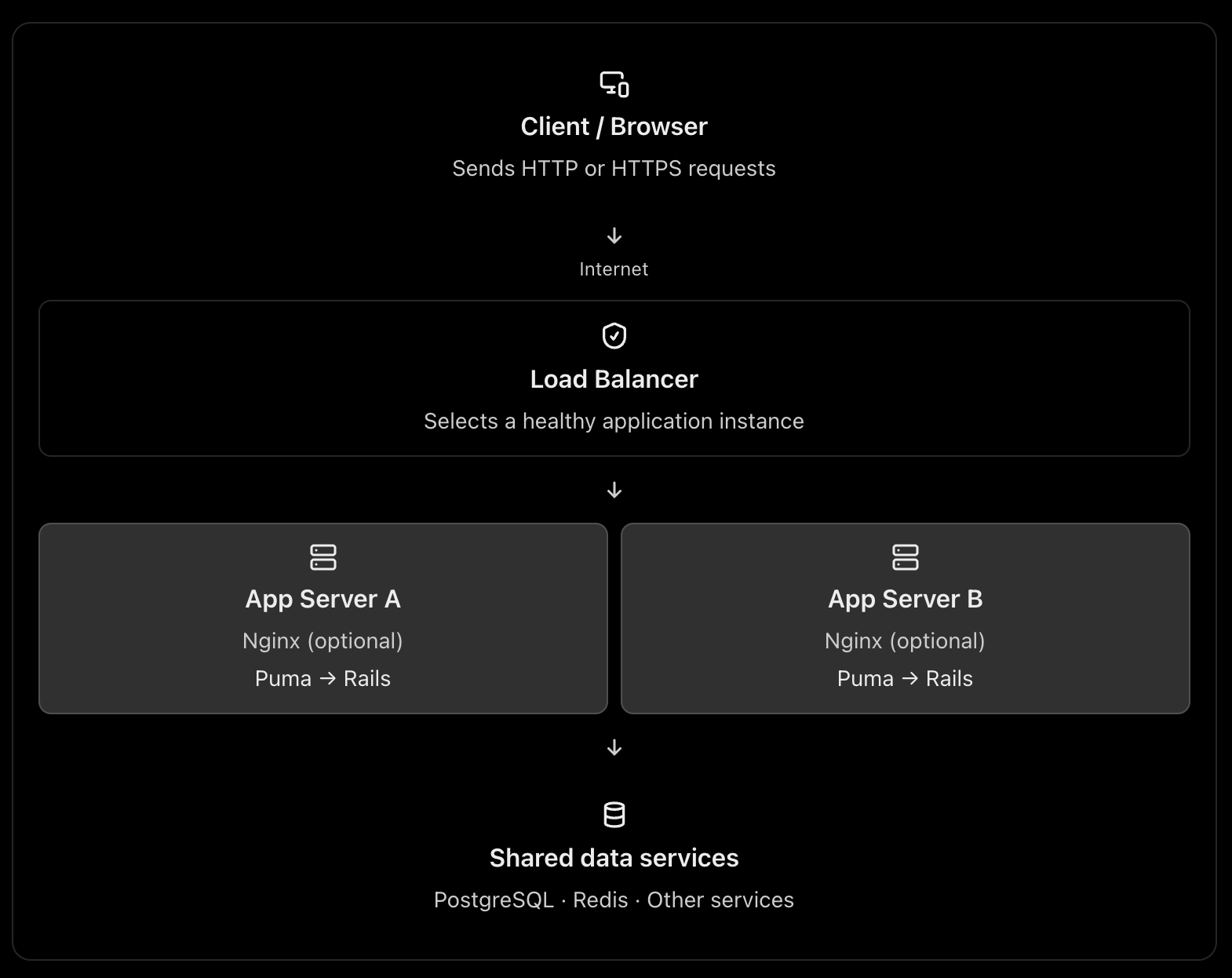
A typical production architecture looks like this:

This is one possible architecture, not a requirement for every web application. A load balancer can route directly to the application servers, and Nginx can itself act as a load balancer. See the official NGINX reverse proxy documentation and load-balancing documentation.

2. What is Nginx or Apache used for?

Nginx and Apache are web servers. They can also act as reverse proxies, routing requests to an application server such as Puma in Rails.

Think of Nginx as the reception desk of your application server.

It can receive a request, handle certain tasks itself, or forward the request to Rails.

A. Serving static files

Consider these requests:

GET /assets/application-abc123.css
GET /images/logo.png
GET /products

The first two requests may only need static files. They do not necessarily require Rails to execute any application code.

Nginx can serve those files directly. The third request typically needs Rails to query the database and build a response.

This avoids spending Rails application capacity on work that a web server can do efficiently. A CDN can serve many of these static assets even earlier in the request path. NGINX static-content documentation

B. Acting as a reverse proxy

Your Rails application might run on Puma at:

127.0.0.1:3000

Nginx listens on the public HTTP/HTTPS ports and forwards dynamic requests to Puma.

Browser
|
| HTTPS :443
v
Nginx
|
| HTTP on localhost:3000
v
Puma
|
v
Rails controllers → models → database

Nginx receives the response from Puma and sends it back to the browser.

C. Handling infrastructure concerns

Depending on its configuration, Nginx can also help with:

  • TLS/HTTPS termination.
  • Request and response buffering.
  • Compression and caching.
  • Request-size limits and timeouts.
  • Routing by hostname or URL path.

These capabilities help keep infrastructure concerns separate from your Rails business logic. They do require appropriate configuration; Nginx does not automatically solve every security or performance problem.

What about Apache?

Apache can serve static files, terminate TLS, reverse proxy requests, and distribute traffic. Nginx is a common choice for this role, but Apache is also valid.

You normally choose Nginx or Apache for a given reverse-proxy role, rather than installing both by default.

3. What is a load balancer?

A load balancer distributes incoming traffic across multiple application instances instead of sending every request to a single instance.

Imagine your Rails application is running on one server with Puma.

10,000 requests
|
v
Rails Server A

If the traffic grows, that single server may run out of CPU, memory, or available request-processing capacity.

You can run multiple application instances:

                10,000 requests
                       |
                       v
                Load Balancer
                 /          \
                v            v
          Rails Server A  Rails Server B
             Puma             Puma

The load balancer chooses a target according to its configured routing algorithm and health information. If a target becomes unhealthy, a properly configured load balancer can stop directing new requests to it. AWS Elastic Load Balancing documentation

Why is this useful?

Horizontal scaling: Add more application instances when traffic increases.

High availability: A failed instance does not necessarily take down the entire application.

Health checks: Avoid routing new requests to unhealthy instances.

Controlled deployments: Replace or remove instances gradually, when your deployment strategy supports it.

A load balancer does not make an individual Rails request faster by itself. Its main purpose is to distribute work and improve availability and scalability.

4. Why not send requests directly to the application server?

You absolutely can. The question is whether doing so is appropriate for your deployment.

For example, you could expose Puma directly:

Browser → Puma :3000 → Rails → PostgreSQL

This is technically possible. In a small deployment or a managed platform, it can be perfectly reasonable.

But consider what happens in a more demanding production environment.

ConcernApp server directly exposedReverse proxy / load balancer
Static filesMay consume app-server capacityCan be served separately
HTTPSMust be configured at the app or another layerCan terminate TLS at the proxy/LB
Multiple instancesNeeds a routing strategyCan distribute traffic
Unhealthy instancesNeeds separate handlingCan use health checks
Request limits and bufferingDepends on app serverCan be handled at the proxy
Application isolationPublic app-server port may be exposedCan keep app instances on private networks

The architectural reason is separation of responsibilities. Puma is responsible for accepting requests and running your Rails application. The proxy or load balancer handles traffic-management responsibilities around it.

One caveat: the proxy is not automatically a security boundary. You still need firewall rules, correct forwarded-header handling, application security, and suitable network configuration.

5. The three architectures you should know

Architecture A: One server – small application

Everything may run on one virtual machine, although PostgreSQL could be a separate managed service.

Here, Nginx acts as a reverse proxy, but it is not distributing traffic across multiple machines. This is a reasonable starting point for many Rails applications.

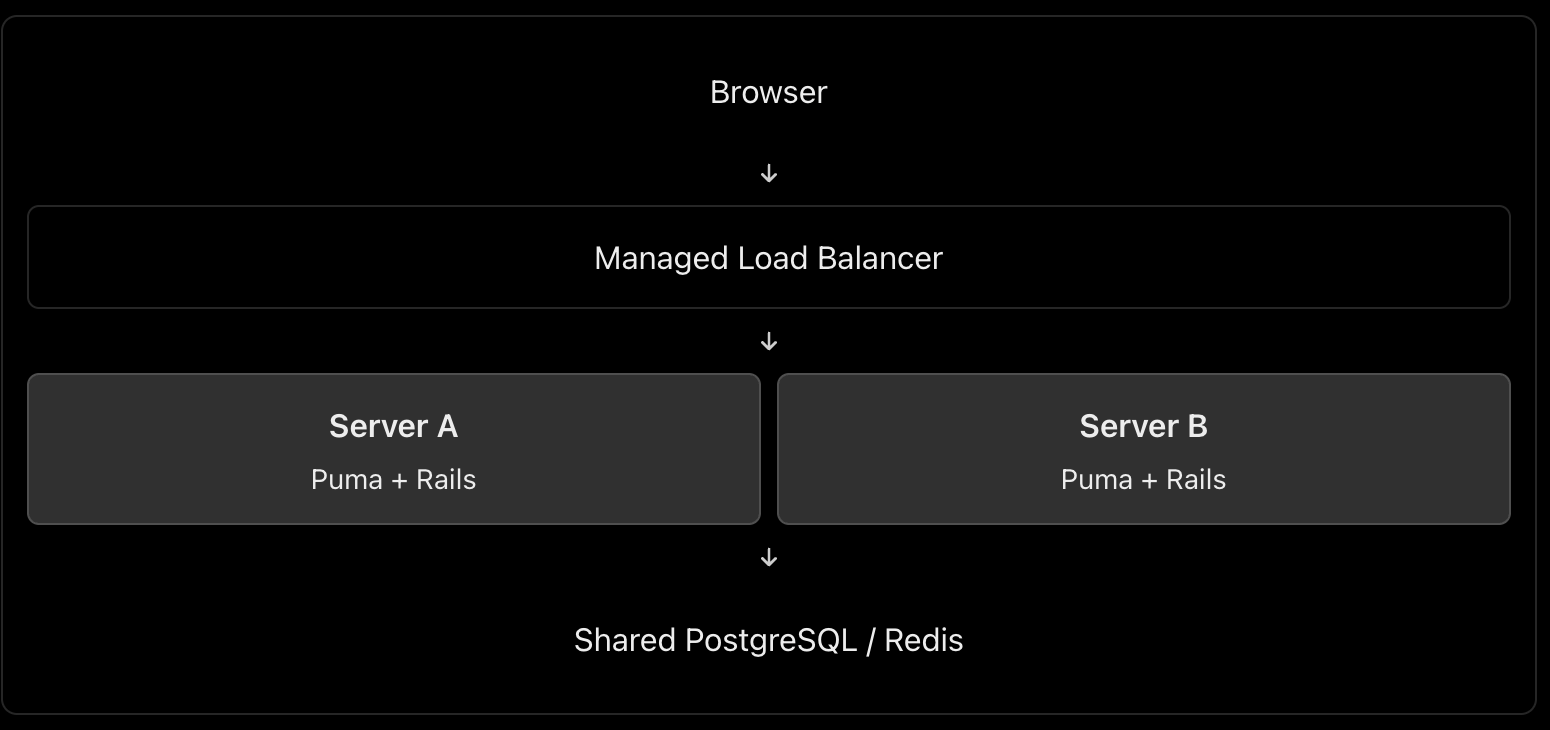
Architecture B: Multiple servers – production scaling

In this architecture, you might use AWS Application Load Balancer or Google Cloud Load Balancing in front of multiple application instances.

Do you also need Nginx on each application server? Not necessarily. The managed load balancer can route traffic directly to Puma or the application container, if that setup is supported and correctly secured. Add Nginx when you need the functionality it provides.

Architecture C: Larger application with a CDN

Browser
|
v
CDN / WAF
|
v
Managed Load Balancer
|
+---- Rails Instance A
|
+---- Rails Instance B
|
+---- Rails Instance C
|
v
Managed PostgreSQL
Redis / Background Jobs

This setup adds edge caching and potentially web-application firewall protection before traffic reaches the load balancer. Static assets can be served from the CDN, while dynamic requests are sent to Rails.

The exact design depends on your cloud provider, traffic volume, reliability targets, and operational budget.

6. Can Nginx itself be a load balancer?

Yes. This is an important int. point.

Nginx can reverse-proxy requests to one application instance or load-balance them across several upstream instances. These are two uses of the same technology. NGINX load-balancing documentation

For example:

http {
upstream rails_app {
server 10.0.1.10:3000;
server 10.0.1.11:3000;
}
server {
listen 80;
server_name shop.example.com;
location / {
proxy_set_header Host $host;
proxy_set_header X-Forwarded-For $proxy_add_x_forwarded_for;
proxy_set_header X-Forwarded-Proto $scheme;
proxy_pass http://rails_app;
}
}
}

This configuration illustrates Nginx distributing requests between two upstream Rails application servers. It is a simplified example, not a complete production configuration; TLS, trusted proxy settings, health monitoring, timeouts, and network restrictions must be addressed as appropriate.

Notice that a load balancer describes a role, not necessarily a separate physical server or a separate technology.

7. What is the best architecture for a Rails application?

My default recommendation would be:

  • Small application or early-stage product: Nginx → Puma → Rails, with PostgreSQL. Keep it simple.
  • Production application requiring horizontal scaling and high availability: A managed load balancer → multiple Rails instances, plus a managed database and shared services where needed. Use Nginx on the instances only when its features justify it.
  • High-traffic application: Add a CDN/WAF, caching, background workers, monitoring, and database scaling according to measured bottlenecks.

For a cloud-hosted Rails application, I would generally prefer a managed load balancer over maintaining my own public-facing load-balancing tier, when the platform offers one that meets the requirements.

The most important things are not the number of components but eliminating single points of failure where required, protecting application instances from unintended public access, monitoring performance, and scaling the actual bottleneck.

Int. answer

You could summarize it this way:

“Nginx or Apache acts as a web server and reverse proxy. It can serve static assets, terminate TLS, and forward dynamic requests to an application server such as Puma. A load balancer distributes incoming requests among multiple healthy application instances, improving scalability and availability. Nginx can also perform load balancing itself, so they don’t necessarily have to be separate components. For a small Rails application, Nginx → Puma is sufficient. For a horizontally scaled production application, I’d typically use a managed load balancer in front of multiple application instances, with Nginx on each instance only if needed.”

That demonstrates that you understand both the purpose of each component and when the extra infrastructure is worth the complexity.

Explain the following

1. How do you replicate application server instances? Is containerization best?

Yes, containers are an excellent default for many modern deployments, but they are not mandatory.

Suppose your Rails application runs on Puma.

                    Load Balancer
                   /      |      \
                  v       v       v
              Rails A  Rails B  Rails C
              Puma     Puma     Puma
                  \       |       /
                   PostgreSQL

Each instance runs the same application version.

How to implement it

  1. Containerize the Rails app using Docker. Build an image containing Ruby, gems, application code and required runtime dependencies.
  2. Deploy multiple replicas using a platform such as AWS ECS, Kubernetes, or a managed container service.
  3. Put a load balancer in front to route requests to healthy instances.
  4. Keep instances stateless. Store persistent data in PostgreSQL, shared cache/session stores in Redis when needed, and uploaded files in object storage such as S3.
  5. Configure health checks, monitoring and autoscaling. Deploy new application versions through a controlled rollout.

Docker documents the use of production deployment configurations and orchestration for scaling applications. Docker production guide

Important: Replicating a server manually is possible, but deploying the same immutable image is more consistent and repeatable. You can also replicate virtual machines without containers.

2. What does a CDN do? What is Cloudflare?

A CDN (Content Delivery Network) caches and serves content from locations distributed around the world.

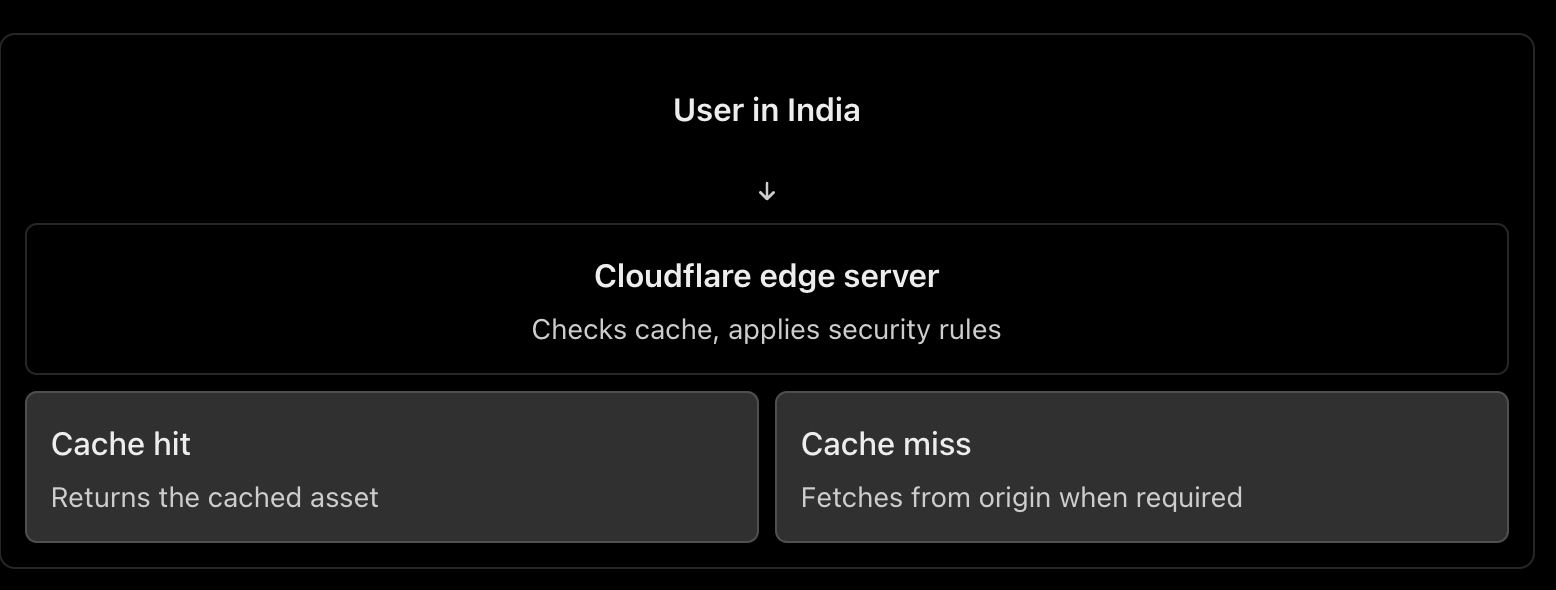
For example, your Rails application serves a product page containing JavaScript, CSS and product images. Cloudflare can cache eligible assets closer to users, reducing response latency, origin traffic and bandwidth usage. HTML pages containing personalized data should not be cached indiscriminately. Cloudflare CDN documentation

Other Cloudflare benefits

  • DNS hosting: Manage domain records.
  • DDoS protection: Help absorb or mitigate abusive traffic.
  • Web Application Firewall (WAF): Filter requests matching security rules.
  • TLS/HTTPS: Manage certificates and encrypt client connections.
  • Load balancing: Route traffic to healthy origins or regions.

How does Cloudflare work as a load balancer?

You configure a load balancer with pools of origins and health monitors.

For example:

shop.example.com
|
v
Cloudflare Load Balancer
|
+------ Region A (healthy)
| |
| App servers
|
+------ Region B (healthy)
|
App servers

Cloudflare can steer traffic between these origins according to the configured policy and health. If an origin becomes unhealthy, it can stop sending traffic to it. Cloudflare Load Balancing

Remember: CDN caching and load balancing are different jobs. Cloudflare can provide both, but load balancing is a separate feature from basic CDN proxying.

3. What is DNS, and how do we configure it?

DNS (Domain Name System) translates human-readable domain names into information needed to locate services on the internet.

For example:

shop.example.com
|
v
DNS lookup
|
v
IP address / destination
|
v
Web server or load balancer

Common DNS records include:

RecordPurposeExample
AMaps a name to an IPv4 addressshop.example.com → 203.0.113.10
AAAAMaps a name to an IPv6 addressMaps to an IPv6 address
CNAMEPoints a name to another hostnamewww → shop.example.com
MXSpecifies mail serversEmail delivery
TXTStores text used for verification and email securityDomain verification, SPF

Configuration steps

  1. Register a domain through a domain registrar.
  2. Choose a DNS provider, such as Cloudflare or your cloud provider.
  3. Configure the domain’s authoritative nameservers at the registrar if switching DNS providers.
  4. Create the required records. For example, point shop.example.com to your public load balancer, or to Cloudflare when its proxy is enabled.
  5. Verify the records and configure the appropriate TTL (how long DNS answers can be cached).

Cloudflare explains the common record types and how to create them in its DNS documentation.

One distinction: DNS resolves names; it does not process the HTTP request itself. DNS round-robin using multiple IPs is not equivalent to a health-aware load balancer.

4. How do we configure HTTPS, and how does it work?

HTTPS is HTTP carried over TLS (Transport Layer Security).

Setup

  1. Obtain a TLS certificate for your domain from a trusted certificate authority, such as Let’s Encrypt, or use a suitable managed certificate.
  2. Configure the public-facing server or load balancer to listen on HTTPS, normally port 443.
  3. Configure certificate renewal.
  4. Redirect HTTP traffic to HTTPS and enable HSTS after verifying the HTTPS deployment.
  5. If a CDN or load balancer sits in front of Rails, configure encryption on the upstream connection as well.

How TLS works

When a browser connects over HTTPS:

  1. The browser and server negotiate TLS parameters.
  2. The server presents its certificate.
  3. The browser checks the certificate’s validity and domain name.
  4. They securely establish session keys.
  5. HTTP data is encrypted and protected against undetected modification while in transit.

TLS protects the connection. It does not automatically secure your database, authenticate application users, or eliminate application vulnerabilities. MDN: TLS

With Cloudflare

The connection normally has two segments:

Browser ← HTTPS/TLS → Cloudflare
Cloudflare ← HTTPS/TLS → Origin server

Choose Full (strict) when possible. It encrypts both segments and validates the origin certificate. Avoid a configuration that encrypts only the browser-to-Cloudflare connection while leaving the Cloudflare-to-origin connection unencrypted. Cloudflare encryption modes

5. What happens when a user types HTTP vs HTTPS?

Suppose the user enters http://shop.example.com.

  • The browser connects using HTTP, normally on port 80.
  • The server or proxy responds with a permanent redirect, such as 301, to https://shop.example.com.
  • The browser makes a new connection over HTTPS on port 443.
HTTP :80
|
| 301 redirect
v
HTTPS :443
|
v
Rails application

Important: The initial HTTP request is not encrypted, even if it gets redirected immediately. Enable HSTS after HTTPS is correctly configured. Browsers that have learned the HSTS policy will automatically upgrade subsequent HTTP attempts to HTTPS. MDN: HSTS and HTTP redirection

If the user enters HTTPS directly and the certificate is invalid or expired, the browser will show a security warning or block the connection.

6. How do you prevent security issues even after enabling HTTPS?

HTTPS protects data in transit, but attackers can still exploit vulnerable application code, stolen credentials, exposed servers and incorrect permissions.

Use multiple layers of protection:

  • Keep the OS, web server, Rails, Ruby and dependencies patched.
  • Configure firewalls so only required ports are accessible.
  • Do not expose database ports publicly.
  • Use least-privilege database accounts and secure secret management.
  • Add WAF rules, rate limiting and DDoS protection.
  • Enforce authentication, authorization and input validation in Rails.
  • Monitor logs, suspicious activity, failed logins and security alerts.

For a useful checklist, follow the current OWASP Top 10: 2025, which includes broken access control, security misconfiguration, software supply-chain failures, cryptographic failures and injection.

7. Major web security concerns and how to handle them

Here is the short, point-by-point checklist you asked for.

Security concernWhere to protectWhat to do
DDoS and abusive trafficCloudflare / edgeEnable DDoS protection, appropriate WAF rules and rate limits.
Exposed servers and portsFirewall / networkExpose only required ports; restrict origin access to trusted upstreams.
TLS misconfigurationCDN / load balancer / web serverUse valid certificates, HTTPS redirects and TLS on upstream connections.
Injection and XSSRails applicationUse safe database queries, validate inputs and encode output.
Broken access control / IDORRails applicationCheck resource-level authorization on every sensitive operation.
Brute-force attacksEdge / RailsRate-limit authentication endpoints, use MFA where appropriate and detect repeated failures.
Vulnerable dependenciesCI/CD pipelineScan and patch dependencies; review changes and protect the build pipeline.
Data leaks and secrets exposureRails / database / loggingRestrict database access, manage secrets safely and redact sensitive logs.
MisconfigurationEvery layerHarden defaults, remove debug modes, restrict admin endpoints and audit configuration.
Missing detection and recoveryMonitoring / operationsCentralize logs, alert on suspicious activity and test backups and incident-response procedures.

These areas align with the risks described in OWASP Top 10: 2025.

8. What should you configure in Rails and its servers?

A. Rails application

  • HTTPS: Enable config.force_ssl = true in production, with proxy and forwarded-protocol settings configured correctly.
  • Host validation: Configure config.hosts with your expected domains.
  • Authentication and authorization: Use secure authentication, strong access policies and resource-level permission checks.
  • SQL injection: Use Active Record parameterization; avoid building SQL with untrusted string interpolation.
  • CSRF: Keep CSRF protection enabled for browser-based session authentication. For APIs, choose suitable token authentication and explicitly configure CORS.
  • Sessions: Use secure, HttpOnly and appropriate SameSite cookie settings.
  • Security headers: Configure Content Security Policy (CSP) and other suitable response headers.
  • Secrets and logs: Use Rails credentials or a secrets manager, redact passwords and tokens, and never commit secrets.
  • Validation and uploads: Validate data on the server, restrict file types and sizes, and store uploads safely.
  • Dependencies and testing: Run Brakeman, dependency vulnerability checks and automated security tests in CI.

Rails documents these protections in its Security Guide and Configuration Guide.

B. Nginx / Apache

  • Configure TLS properly if it terminates HTTPS.
  • Redirect HTTP to HTTPS.
  • Set request body-size limits, sensible timeouts and appropriate rate limits.
  • Configure correct proxy headers and trust only known upstreams.
  • Avoid exposing server version details and unnecessary endpoints.

C. Load balancer / Cloudflare

  • Enable health checks and route only to healthy backends.
  • Use TLS between the load balancer and application servers where appropriate.
  • Restrict direct access to the origin so attackers cannot simply bypass Cloudflare’s protections.
  • Configure WAF rules, DDoS mitigation and rate limits.
  • Ensure client IP headers are trusted only when they come from the configured proxy.
  • Use least-privilege credentials and monitor security events.

D. Database / infrastructure

  • Keep PostgreSQL on a private network.
  • Use least-privilege database roles and encrypted connections where required.
  • Store secrets outside source control and rotate them when exposed.
  • Patch servers and containers, enforce access controls, monitor logs and test backups.

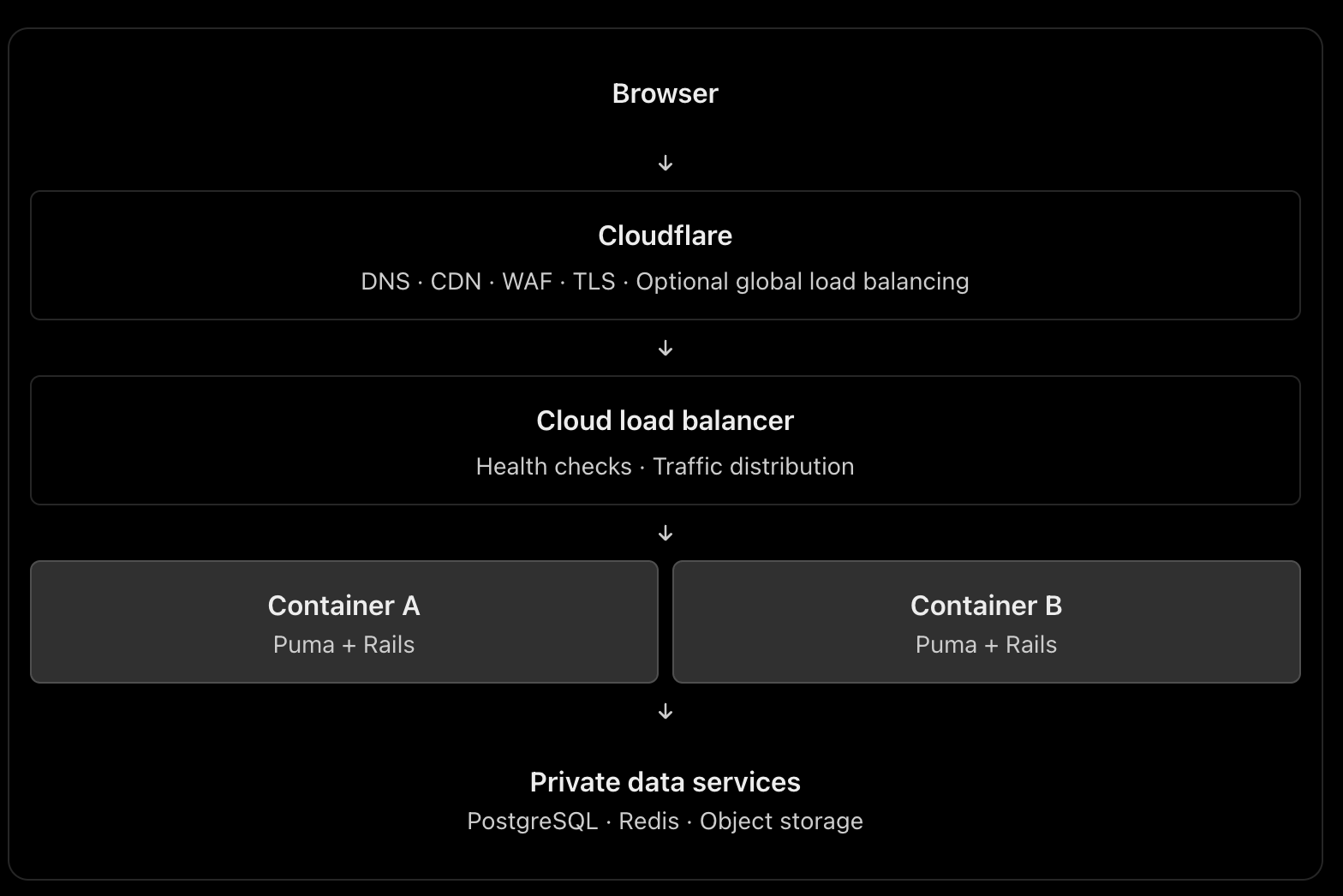
Recommended architecture to remember

This is a scalable reference architecture, not a requirement to use every component. For a smaller application, you may use Cloudflare plus one server running Nginx and Puma. Add managed load balancing and multiple replicas when availability and traffic requirements justify them. If Cloudflare performs global load balancing, the additional cloud load balancer may or may not be necessary.

The principal engineering lesson: HTTPS protects communication, Cloudflare helps protect and accelerate traffic, a load balancer distributes work, and Rails must still enforce application-level security. No single component replaces the others.

Writing Effective Test Cases 🚧 for Your Ruby on Rails Model: A Guide

When it comes to building robust and maintainable applications, writing test cases is a crucial practice. In this guide, I will walk you through writing effective test cases for a Ruby on Rails model using a common model name, “Task.” The concepts discussed here are applicable to any model in your Rails application.

Why Write Test Cases?

Writing test cases is essential for several reasons:

  1. Bug Detection: Test cases help uncover and fix bugs before they impact users.
  2. Regression Prevention: Tests ensure that new code changes do not break existing functionality.
  3. Documentation: Well-written test cases serve as documentation for your codebase, making it easier for other developers to understand and modify the code.
  4. Refactoring Confidence: Tests provide the confidence to refactor code knowing that you won’t introduce defects.
  5. Collaboration: Tests facilitate collaboration within development teams by providing a common set of expectations.

Now, let’s dive into creating test cases for a Ruby on Rails model.

Model: Task

We will use a model called “Task” as an example. Tasks might represent items on a to-do list, items in a project management system, or any other entity that requires tracking and management.

Setting Up the Environment

Before writing test cases, ensure that your Ruby on Rails application is set up correctly with the testing framework of your choice. Rails typically uses MiniTest or RSpec for testing. For this guide, we’ll use MiniTest.

# Gemfile
group :test do
  gem 'minitest'
  # Other testing gems...
end

After updating your Gemfile, run bundle install to install the testing gems. Ensure your test database is set up and up-to-date by running bin/rails db:test:prepare.

Writing Test Cases

Model Validation

The first set of test cases should focus on validating the model’s attributes. For our Task model, we might want to ensure that the title is present and within an acceptable length range.

# test/models/task_test.rb

require 'test_helper'

class TaskTest < ActiveSupport::TestCase
  test "should not save task without title" do
    task = Task.new
    assert_not task.save, "Saved the task without a title"
  end

  test "should save task with valid title" do
    task = Task.new(title: "A valid task title")
    assert task.save, "Could not save the task with a valid title"
  end
end
Testing Associations

In Rails, models often have associations with other models. For example, a Task might belong to a User. You can write test cases to ensure these associations work correctly.

# test/models/task_test.rb

class TaskTest < ActiveSupport::TestCase
  # ...

  test "task should belong to a user" do
    user = User.create(name: "John")
    task = Task.new(title: "Task", user: user)
    assert_equal user, task.user, "Task does not belong to the correct user"
  end
end
Custom Model Methods

If your model contains custom methods, ensure they behave as expected. For example, if you have a method that returns the completion status of a task, test it.

# test/models/task_test.rb

class TaskTest < ActiveSupport::TestCase
  # ...

  test "task should return completion status" do
    task = Task.new(title: "Task", completed: false)
    assert_equal "Incomplete", task.completion_status
    task.completed = true
    assert_equal "Complete", task.completion_status
  end
end
Scopes

Scopes allow you to define common queries for your models. Write test cases to ensure scopes return the expected results.

# test/models/task_test.rb

class TaskTest < ActiveSupport::TestCase
  # ...

  test "completed scope should return completed tasks" do
    Task.create(title: "Completed Task", completed: true)
    Task.create(title: "Incomplete Task", completed: false)

    completed_tasks = Task.completed
    assert_equal 1, completed_tasks.length
    assert_equal "Completed Task", completed_tasks.first.title
  end
end

Running Tests

You can run your tests with the following command:

bin/rails test

This command will execute all the test cases you’ve written in your test files.

Conclusion

Writing test cases is an essential practice in building reliable and maintainable Ruby on Rails applications. In this guide, we’ve explored how to write effective test cases for a model using a common model name, “Task.” These principles can be applied to test any model in your Rails application.

By writing comprehensive test cases, you ensure that your application functions correctly, maintains quality over time, and makes collaboration within your development team more efficient.

Happy testing!

Rails 6.1 introduce ‘compact_blank’

Before Rails 6 we used to remove the blank values from Array and Hash by using other available methods.

Before:

  [...].delete_if(&:blank?)
  {....}.delete_if { |_k, v| v.blank? }
OR
  [...].reject(&:blank?)
  ...

From now, Rails 6.1.3.1 onwards you can use the module Enumerable’s compact_blank and compact_blank! methods.

Now we can use:

[1, "", nil, 2, " ", [], {}, false, true].compact_blank
=> [1, 2, true]

['', nil, 8, [], {}].compact_blank
=> [8]

{ a: "", b: 1, c: nil, d: [], e: false, f: true }.compact_blank
=> {:b=>1, :f=>true}

The method compact_blank! is a destructive method (handle with care) for compact_blank.

As a Rails developer, I am grateful for this method because there are many scenarios where we find ourselves replicating this code.

Basic Software installation| Moving micro-services into AWS EC2 instance – Part 1

As I mentioned in the previous post, I have decided to move away from micro-services. To achieve this, I am taking an AWS EC2 instance and configuring each micro-service on this instance. For this setup, I am using an Ubuntu 16.04 machine because my application setup is a bit old. However, if you have newer versions of Rails, Ruby, etc., you may want to choose Ubuntu 20.04.

Our setup includes Ruby on Rails (5.2.1) micro-services (5-10 in number), a NodeJS application, a Sinatra Application, and an Angular 9.1 Front-End Application.

To begin, go to the AWS EC2 home page and select an Ubuntu 16.04 machine with default configurations and SSH enabled.

https://ap-south-1.console.aws.amazon.com/ec2/v2/home

Now login to this new instance and install all the packages we needed for our setup.

Software Installation

Update the package list.

sudo apt-get update

Install Ruby dependencies.

sudo apt-get install ruby-dev
sudo apt-get install libxml2-dev
sudo apt-get install libxslt-dev
sudo apt-get install graphviz

Install NodeJS

curl -sL https://deb.nodesource.com/setup_10.x | sudo -E bash -
sudo apt-get install -y nodejs
node -v

Install yarn and other dependencies.

curl -sS https://dl.yarnpkg.com/debian/pubkey.gpg | sudo apt-key add -
echo "deb https://dl.yarnpkg.com/debian/ stable main" | sudo tee /etc/apt/sources.list.d/yarn.list
sudo apt-get update
sudo apt-get install git-core zlib1g-dev build-essential libssl-dev libreadline-dev libyaml-dev libsqlite3-dev sqlite3 libxml2-dev libxslt1-dev libcurl4-openssl-dev software-properties-common libffi-dev nodejs yarn

Install Mysql 5.7 (Remember this is for Ubuntu 16.04, 18.04 versions)

sudo apt-get install mysql-server-5.7 mysql-client-core-5.7 libmysqlclient-dev
sudo service mysql status # or
systemctl status mysql
username: <your-username>, password: <your-password>

You can also try
mysql_secure_installation, if you use other mysql version.

Note that if you are setting up Ubuntu 20.04, there is a significant change in MySQL, as the version of MySQL is now 8.0 instead of 5.7. If you have applications running in MySQL 5.7, it is recommended that you set up and use Ubuntu 16.04 or 18.04.

We will continue the installation process in our next post.

Our Challenges with Microservices on AWS ECS

As part of our startup, our predecessors chose to use micro-services for our new website as it is a trending technology.

This decision has many benefits, such as:

  • Scaling a website becomes much easier when using micro-services, as each service can be scaled independently based on its individual needs.
  • The loosely coupled nature of micro-services also allows for easier development and maintenance, as changes to one service do not affect the functionality of other services.
  • Additionally, deployment can be focused on each individual service, making the overall process more efficient.
  • Micro-services also allow for the use of different technologies for each service, providing greater flexibility and the ability to choose the best tools for each task.
  • Finally, testing can be concentrated on one service at a time, allowing for more thorough and effective testing, which can result in higher quality code and a better user experience.

In developing our application with micro-services, we considered the potential problems that we may face in the future. However, it is important to note that we also need to consider whether these problems will have a significant impact compared to the potential disadvantages of using micro-services.

One factor to keep in mind is that our website is currently experiencing low traffic and we are acquiring clients gradually. As such, we need to consider whether the benefits of micro-services outweigh any potential drawbacks for our particular situation.

Regardless, some potential issues with micro-services include increased complexity and overhead in development, as well as potential performance issues when integrating multiple services. Additionally, managing multiple services and ensuring they communicate effectively can also be a challenge.

Despite the benefits of micro-services, we have faced some issues in implementing them. One significant challenge is the increased complexity of deployment and maintenance that comes with having multiple services. This can require more time and resources to manage and can potentially increase the likelihood of errors.

Additionally, the cost of using AWS ECS for hosting all of the micro-services can be higher than using other hosting solutions for a less traffic website. This is something to consider when weighing the benefits and drawbacks of using micro-services for our specific needs.

Another challenge we have faced is managing dependencies between services, which can be difficult to avoid. When one service goes offline, it can cause issues with other services, leading to a “No Service” issue on the website.

Finally, it can be very difficult to go back to a monolithic application even if we combine 3-4 services together, as they may use different software or software versions. This can make it challenging to make changes or updates to the application as a whole.

It is important to carefully consider whether micro-service architecture is the best fit for your business and current situation. If you have a less used website or are just starting your business, it may not be necessary or cost-effective to implement micro-services.

It is important to take the time to evaluate the benefits and drawbacks of using micro-services for your specific needs and budget. Keep in mind that hosting multiple micro-services can come with additional costs, so be prepared to pay a minimum amount for hosting if you decide to go this route.

Ultimately, the decision to use micro-services should be based on a thorough assessment of your business needs and available resources, rather than simply following a trend or industry hype.

Set up:

  • Used AWS ECS (ec2 launch type) with services and task definitions defined
  • 11 Micro-services, 11 containers are spinning
  • Cost: Rs.12k ($160) per month

Workaround:

  • Consider using AWS Fargate type but not sure these issues get resolved
  • Deploy all the services in one EC2 Instance without using ECS

Setup Rspec, factory bot and database cleaner for Rails 5.2.6

To configure the best test suite in Rails using the RSpec framework and other supporting libraries, such as Factory Bot and Database Cleaner, we’ll remove the Rails native test folder and related configurations.

To begin, we’ll add the necessary gems to our Gemfile:

group :development, :test do
  # Rspec testing module and needed libs
  gem 'factory_bot_rails', '5.2.0'
  gem 'rspec-rails', '~> 4.0.0'
end

group :test do
  # db cleaner for test suite 
  gem 'database_cleaner-active_record', '~> 2.0.1'
end

Now do

bunde install # this installs all the above gems

If your Rails application already includes the built-in Rails test suite, you’ll need to remove it in order to use the RSpec module instead.

I recommend using RSpec over the Rails native test module, as RSpec provides more robust helpers and mechanisms for testing.

To disable the Rails test suite, navigate to the application.rb file and comment out the following line:

# require 'rails/test_unit/railtie'

inside the class Application add this line:

# Don't generate system test files.
config.generators.system_tests = nil

Remove the native rails test folder:

rm -r test/

We use factories over fixtures. Remove this line from rails_helper.rb

config.fixture_path = "#{::Rails.root}/spec/fixtures"

and modify this line to:

config.use_transactional_fixtures = false # instead of true

This is for preventing rails to generate the native test files when we run rails generators.

Database Cleaner

Now we configure the database cleaner that is used for managing data in our test cycles.

Open rails_helper.rb file and require that module

require 'rspec/rails'
require 'database_cleaner'  # <= add here

Note: Use only if you run integration tests with capybara or dealing with javascript codes in the test suite.

“Capybara spins up an instance of our Rails app that can’t see our test data transaction so even tho we’ve created a user in our tests, signing in will fail because to the Capybara run instance of our app, there are no users.”

I experienced database credentials issues:

➜ rspec
An error occurred while loading ./spec/models/user_spec.rb.
Failure/Error: ActiveRecord::Migration.maintain_test_schema!

Mysql2::Error::ConnectionError:
  Access denied for user 'username'@'localhost' (using password: NO)

Initially, I planned to use Database Cleaner, but later I realized that an error I was experiencing was actually due to a corrupted credentials.yml.enc file. I’m not sure how it happened.

To check if your credentials are still intact, try editing the file and verifying that the necessary information is still present.

EDITOR="code --wait" bin/rails credentials:edit

Now in the Rspec configuration block we do the Database Cleaner configuration.

Add the following file:

spec/support/database_cleaner.rb

Inside, add the following:

# DB cleaner using database cleaner library
RSpec.configure do |config|
  # This says that before the entire test suite runs, clear 
  # the test database out completely
  config.before(:suite) do
    DatabaseCleaner.strategy = :transaction
    DatabaseCleaner.clean_with(:truncation)
  end

  # This sets the default database cleaning strategy to 
  # be transactions
  config.before(:each) do
    DatabaseCleaner.strategy = :transaction
  end

  # include this if you uses capybara integration tests
  config.before(:each, :js => true) do
    DatabaseCleaner.strategy = :truncation
  end

  # These lines hook up database_cleaner around the beginning 
  # and end of each test, telling it to execute whatever 
  # cleanup strategy we selected
  config.before(:each) do
    DatabaseCleaner.start
  end

  config.after(:each) do
    DatabaseCleaner.clean
  end
end

and be sure to require this file in rails_helper.rb

require 'rspec/rails'
require 'database_cleaner'
require_relative 'support/database_cleaner'  # <= here

Configure Factories

Note: We use factories over fixtures because factories provide better features that make writing test cases an easy task.

Create a folder to generate the factories:

mkdir spec/factories

Rails generators will automatically generate factory files for models inside this folder.

A generator for model automatically creating the following files:

spec/models/model_spec.rb
spec/factories/model.rb

Now lets load Factory bot configuration to rails test suite.

Add the following file:

spec/support/factory_bot.rb

and be sure to require this file in rails_helper.rb

require 'rspec/rails'
require 'database_cleaner'
require_relative 'support/database_cleaner'
require_relative 'support/factory_bot'  # <= here

You can see the following line commented

# Dir[Rails.root.join('spec', 'support', '**', '*.rb')].sort.each { |f| require f }

You can uncomment the line to make all factories available in your test suite, but I don’t recommend this approach as it can slow down test execution. Instead, it’s better to load each factory as needed.

Here’s the final version of the rails_helper.rb file. Note that we won’t be using Capybara for integration tests, so we’re not including the database_cleaner configuration:

# This file is copied to spec/ when you run 'rails generate rspec:install'
require 'spec_helper'
ENV['RAILS_ENV'] ||= 'test'
require File.expand_path('../config/environment', __dir__)
# Prevent database truncation if the environment is production
abort('The Rails environment is running in production mode!') if Rails.env.production?
require 'rspec/rails'
require_relative 'support/factory_bot'

# Checks for pending migrations and applies them before tests are run.
# If you are not using ActiveRecord, you can remove these lines.
begin
  ActiveRecord::Migration.maintain_test_schema!
rescue ActiveRecord::PendingMigrationError => e
  puts e.to_s.strip
  exit 1
end
RSpec.configure do |config|
  # If you're not using ActiveRecord, or you'd prefer not to run each of your
  # examples within a transaction, remove the following line or assign false
  # instead of true.
  config.use_transactional_fixtures = false

  config.infer_spec_type_from_file_location!

  # Filter lines from Rails gems in backtraces.
  config.filter_rails_from_backtrace!
  # arbitrary gems may also be filtered via:
  # config.filter_gems_from_backtrace("gem name")
end

A spec directory look something like this:

spec/
  controllers/
    user_controller_spec.rb
    product_controller_spec.rb
  factories/
    user.rb
    product.rb
  models/
    user_spec.rb
    product_spec.rb
  mailers/
    mailer_spec.rb
  services/
    service_spec.rb  
  rails_helper.rb
  spec_helper.rb

References:

https://github.com/rspec/rspec-rails
https://relishapp.com/rspec/rspec-rails/docs
https://github.com/thoughtbot/factory_bot/blob/master/GETTING_STARTED.md#configure-your-test-suite
https://github.com/DatabaseCleaner/database_cleaner

Model Specs

Lets generate a model spec. A model spec is used to test smaller parts of the system, such as classes or methods.

# RSpec also provides its own spec file generators
➜ rails generate rspec:model user
      create  spec/models/user_spec.rb
      invoke  factory_bot
      create    spec/factories/users.rb

Now run the rpsec command. That’s it. You can see the output from rspec.

➜ rspec
*

Pending: (Failures listed here are expected and do not affect your suite's status)

  1) Item add some examples to (or delete) /home/.../spec/models/user_spec.rb
     # Not yet implemented
     # ./spec/models/user_spec.rb:4

Finished in 0.00455 seconds (files took 1.06 seconds to load)
1 example, 0 failures, 1 pending

Lets discuss how to write a perfect model spec in the next lesson.

Rubocop loading issue on VScode

If you are facing issue to load rubocop plugin to your VS code try the following steps to fix it.

The error message will be something like:

rubocop on VScode not working.Error “rubocop is not executable”

  1. First you have to ensure that you have installed ruby in your machine. if you are using docker containers for your project, ruby is installed inside the containers and VS Code cannot find it.
  2. Next install rubocop gem in your machine
                 $ gem install rubocop

3. Next take

  VS Code -> Settings -> search for 'rubocop' in Ruby > Rubocop: Execute Path

add the output of the following command:

        $ which rubocop

4. Reload the rubocop plugin from VS Code.

Now VS Code will get to execute rubocop.

A Ruby on Rails Application without models

This blog is a quick walkthrough of creating a Ruby On Rails application without a model.

Find Rails new options from here:
https://gist.github.com/abhilashak/3c0c62fa62b2f7a439c417b68d032575

Find Gemfile options from here:

http://bundler.io/v1.2/gemfile.html

Install Ruby/Rails using rbenv

$ touch .rbenv-gemsets
$ echo project-name > .rbenv-gemsets
$ rbenv gemset active
$ rbenv install 2.5.3
$ gem install bundler
$ rbenv rehash
$ gem install rails -v 5.2.9
$ rbenv rehash
$ rails new my-new-porject --skip-active-record --skip-bundle -v 5.2.9

Add in Gemfile:

ruby “2.5.3”

comment jbuilder, we don’t need it.

# gem 'jbuilder', '~> 2.8’

Move rbenv gems file to new rails app folder

$ mv .rbenv-gemsets my-new-porject

$ touch .ruby-version

$ echo 2.5.3 > .ruby-version

$ gem install bundler

$ bundle

$ ruby -v
ruby 2.5.3p105 (2018-10-18 revision 65156) [x86_64-darwin18]

Start Rails server:

$ rails s

Gemfile add:

# Bootstrap Theme

gem 'bootstrap', '~> 4.3.0’

# Slim template Engine

gem 'slim', '>=4.0.1’

Do Bundle Install

$ bundle

Rename css to scss because we use bootsrap mixins and variables that work with scss files

$ mv app/assets/stylesheets/application.css app/assets/stylesheets/application.scss

Import Bootstrap styles in app/assets/stylesheets/application.scss:

// Custom bootstrap variables must be set or imported *before* bootstrap.
@import "bootstrap";

Then, remove all the *= require and *= require_tree statements from the Sass file. Instead, use @import to import Sass files.

Bootstrap JavaScript depends on jQuery
Add jquery-rails to Gemfile:

gem 'jquery-rails', '~> 4.3.4’

Bootstrap tooltips and popovers depend on popper.js for positioning.
Add Bootstrap dependencies and Bootstrap to your application.js:

//= require jquery3
//= require popper
//= require bootstrap-sprockets

While bootstrap-sprockets provides individual Bootstrap components for ease of debugging, you may alternatively require the concatenated bootstrap for faster compilation:

//= require jquery3
//= require popper
//= require bootstrap

Sass: Individual components

All Bootstrap opponents will be imported by default.
You can also import components explicitly. To start with a full list of modules copy _bootstrap.scss file into your assets as _bootstrap-custom.scss. Then comment out components you do not want from _bootstrap-custom. In the application Sass file, replace @import ‘bootstrap’ with:

@import 'bootstrap-custom';

Your application.css:

/*
 * This is a manifest file that'll be compiled into application.css, which will include all the files
 * listed below.
 *
 * Any CSS and SCSS file within this directory, lib/assets/stylesheets, or any plugin's
 * vendor/assets/stylesheets directory can be referenced here using a relative path.
 *
 * You're free to add application-wide styles to this file and they'll appear at the bottom of the
 * compiled file so the styles you add here take precedence over styles defined in any other CSS/SCSS
 * files in this directory. Styles in this file should be added after the last require_* statement.
 * It is generally better to create a new file per style scope.
 *
 */

/*Custom bootstrap variables must be set or imported *before* bootstrap.
  The available variables can be found: 
  https://github.com/twbs/bootstrap-rubygem/blob/master/assets/stylesheets/bootstrap/_variables.scss
*/
@import "bootstrap";

Your application.js File:

// This is a manifest file that'll be compiled into application.js, which will include all the files
// listed below.
//
// Any JavaScript/Coffee file within this directory, lib/assets/javascripts, or any plugin's
// vendor/assets/javascripts directory can be referenced here using a relative path.
//
// It's not advisable to add code directly here, but if you do, it'll appear at the bottom of the
// compiled file. JavaScript code in this file should be added after the last require_* statement.
//
// Read Sprockets README (https://github.com/rails/sprockets#sprockets-directives) for details
// about supported directives.
//
//= require rails-ujs
//= require turbolinks
//= require_tree .
//= require jquery3
//= require popper
//= require bootstrap-sprockets

You can check sample bootstrap forms here:

https://bootsnipp.com/snippets/featured/login-amp-signup-forms-in-panel

Remove cable.js from javascripts # we don’t need this for now