Modern web applications often need to store data on the client side – whether it’s user preferences, form progress, or temporary UI state. Browsers provide built-in storage mechanisms that help developers do exactly that, without hitting the backend every time.
In this post, we’ll cover:
What browser storage is
localStorage vs sessionStorage
Basic JavaScript examples
Vue.js usage patterns
When to use (and not use) each
Why developers rely on browser storage
Comparison with React and Angular
🌐 What Is Browser Storage?
Browser storage allows web applications to store key–value data directly in the user’s browser.
Key characteristics:
Data is stored client-side
Data is stored as strings
Accessible via JavaScript
Faster than server round-trips
The most common browser storage mechanisms are:
localStorage
sessionStorage
(Both are part of the Web Storage API)
📦 localStorage
What is localStorage?
localStorage stores data persistently in the browser.
Survives page reloads
Survives browser restarts
Shared across all tabs of the same origin
Cleared only manually or via code
Basic JavaScript Example
// Save data
localStorage.setItem('theme', 'dark')
// Read data
const theme = localStorage.getItem('theme')
// Remove data
localStorage.removeItem('theme')
Vue.js Example
export default {
data() {
return {
theme: localStorage.getItem('theme') || 'light'
}
},
watch: {
theme(newValue) {
localStorage.setItem('theme', newValue)
}
}
}
When to Use localStorage
User preferences (theme, language)
Remembered UI settings
Non-sensitive data that should persist
Cross-tab shared state
When NOT to Use localStorage
Authentication tokens (use httpOnly cookies)
Sensitive personal data
Temporary flows (signup, checkout steps)
⏳ sessionStorage
What is sessionStorage?
sessionStorage stores data only for the lifetime of a browser tab.
I am thrilled to announce the release of Design Studio v0.9.5, a major milestone that transforms our online shopping platform into a truly immersive visual experience. This release focuses heavily on user interface enhancements, performance optimizations, and creating a more engaging shopping journey for our customers.
🚀 What’s New in v0.9.5
1. Stunning 10-Slide Hero Carousel
The centerpiece of this release is our brand-new interactive hero carousel featuring 10 beautifully curated slides with real product imagery. Each slide tells a story and creates an emotional connection with our visitors.
Dynamic Gradient Themes
Each slide features its own unique gradient theme:
# app/controllers/products_controller.rb
class ProductsController < ApplicationController
  # Allow public access to browsing
  allow_unauthenticated_access only: %i[index show]

  def index
    products = Product.all

    # Smart category filtering
    if params[:category].present?
      products = products.for_category(params[:category])
      @current_category = params[:category]
    end

    # Pagination for performance
    @pagy, @products = pagy(products)
  end
end
🔧 Technical Improvements
Test Coverage Excellence
I’ve achieved 73.91% test coverage (272/368 lines), ensuring code reliability:
# Enhanced authentication test helpers
module AuthenticationTestHelper
  def sign_in_as(user)
    # Generate unique IPs to avoid rate limiting conflicts
    unique_ip = "127.0.0.#{rand(1..254)}"
    @request.remote_addr = unique_ip

    session[:user_id] = user.id
    user
  end
end
Asset Pipeline Optimization
Rails 8 compatibility with modern asset handling:
# config/application.rb
class Application < Rails::Application
  # Modern browser support
  config.allow_browser versions: :modern

  # Asset pipeline optimization
  config.assets.css_compressor = nil # Tailwind handles this
  config.assets.js_compressor = :terser
end
Security Enhancements
# Role-based access control
class ApplicationController < ActionController::Base
  include Authentication

  private

  def require_admin
    unless current_user&.admin?
      redirect_to root_path, alert: "Access denied."
    end
  end
end
📊 Performance Metrics
Before vs After v0.9.5:
Metric
Before
After v0.9.5
Improvement
Test Coverage
45%
73.91%
+64%
CI/CD Success
23 failures
0 failures
+100%
Component Count
3 monoliths
8 modular components
+167%
Mobile Score
72/100
89/100
+24%
🎨 Design Philosophy
This release embodies our commitment to:
Visual Excellence: Every pixel serves a purpose
User Experience: Intuitive navigation and interaction
Performance: Fast loading without sacrificing beauty
Accessibility: Inclusive design for all users
Maintainability: Clean, modular code architecture
🔮 What’s Next?
Version 0.9.5 sets the foundation for exciting upcoming features:
Enhanced Search & Filtering
User Account Dashboard
Advanced Product Recommendations
Payment Integration
Order Tracking System
🎉 Try It Today!
Experience the new Design Studio v0.9.5 and see the difference visual design makes in online shopping. Our hero carousel alone tells the story of modern fashion in 10 stunning slides.
Key Benefits for Users:
✨ Immersive visual shopping experience
📱 Perfect on any device
⚡ Lightning-fast performance
🔒 Secure and reliable
For Developers:
🏗️ Clean, maintainable architecture
🧪 Comprehensive test suite
📚 Well-documented components
🚀 Rails 8 compatibility
Design Studio v0.9.5 – Where technology meets artistry in e-commerce.
When a client request comes into a Rails application, it doesn’t always go directly to the MVC (Model-View-Controller) layer. Instead, it might first pass through middleware, which handles tasks such as authentication, logging, and static asset management.
Rails uses middleware like ActionDispatch::Static to efficiently serve static assets before they even reach the main application.
ActiveRecord: Object-relational mapping (ORM) system for database interactions.
Action Pack: Handles the controller and view layers.
Active Support: A collection of utility classes and standard library extensions.
Action Mailer: A framework for designing email services.
The Role of Browsers in Asset Management
Web browsers cache static assets to improve performance. The caching strategy varies based on asset types:
Images: Rarely change, so they are aggressively cached.
JavaScript and CSS files: Frequently updated, requiring cache-busting mechanisms.
The Era of Sprockets
Historically, Rails used Sprockets as its default asset pipeline. Sprockets provided:
Conversion of CoffeeScript to JavaScript and SCSS to CSS.
Minification and bundling of assets into fewer files.
Digest-based caching to ensure updated assets were fetched when changed.
The Rise of JavaScript & The Shift Towards Webpack
The release of ES6 (2015-2016) was a turning point for JavaScript, fueling the rise of Single Page Applications (SPAs). This marked a shift from traditional asset management:
Sprockets was effective but became complex and difficult to configure for modern JS frameworks.
Projects started including package.json at the root, indicating JavaScript dependency management.
Webpack emerged as the go-to tool for handling JavaScript, offering features like tree-shaking, hot module replacement, and modern JavaScript syntax support.
The Landscape in 2024: A More Simplified Approach
Recent advancements in web technology have drastically simplified asset management:
ES6 Native Support in All Major Browsers
No need for transpilation of modern JavaScript.
CSS Advancements
Features like variables and nesting eliminate the need for preprocessors like SASS.
HTTP/2 and Multiplexing
Enables parallel loading of multiple assets over a single connection, reducing dependency on bundling strategies.
Enter Propshaft: The Modern Asset Pipeline
Propshaft is the new asset management solution introduced in Rails, replacing Sprockets for simpler and faster asset handling. Key benefits include:
Digest-based file stamping for effective cache busting.
Direct and predictable mapping of assets without complex processing.
Better integration with HTTP/2 for efficient asset delivery.
Rails 8 Precompile Uses Propshaft
What is Precompile? A Reminder
Precompilation hashes all file names and places them in the public/ folder, making them accessible to the public.
Propshaft improves upon this by creating a manifest file that maps the original filename as a key and the hashed filename as a value. This significantly enhances the developer experience in Rails.
Propshaft ultimately moves asset management in Rails to the next level, making it more efficient and streamlined.
The Future of Asset Management in Rails
With advancements like native ES6 support and CSS improvements, Rails continues evolving to embrace simpler, more efficient asset management strategies. Propshaft, combined with modern browser capabilities, makes asset handling seamless and more performance-oriented.
As the web progresses, we can expect further simplifications in asset pipelines, making Rails applications faster and easier to maintain.
Stay tuned for more innovations in the Rails ecosystem!
The key idea is this: Nginx/Apache, load balancers, and application servers have different responsibilities, but some of their responsibilities overlap. You don’t always need all three.
Let’s understand this using a Ruby on Rails application, since it makes the architecture easier to relate to real production deployments.
1. What happens when a user sends a request?
Suppose a user opens your application:
GET https://shop.example.com/products
The browser sends the request over the internet. Something must receive that request, decide where it should go, and return the response.
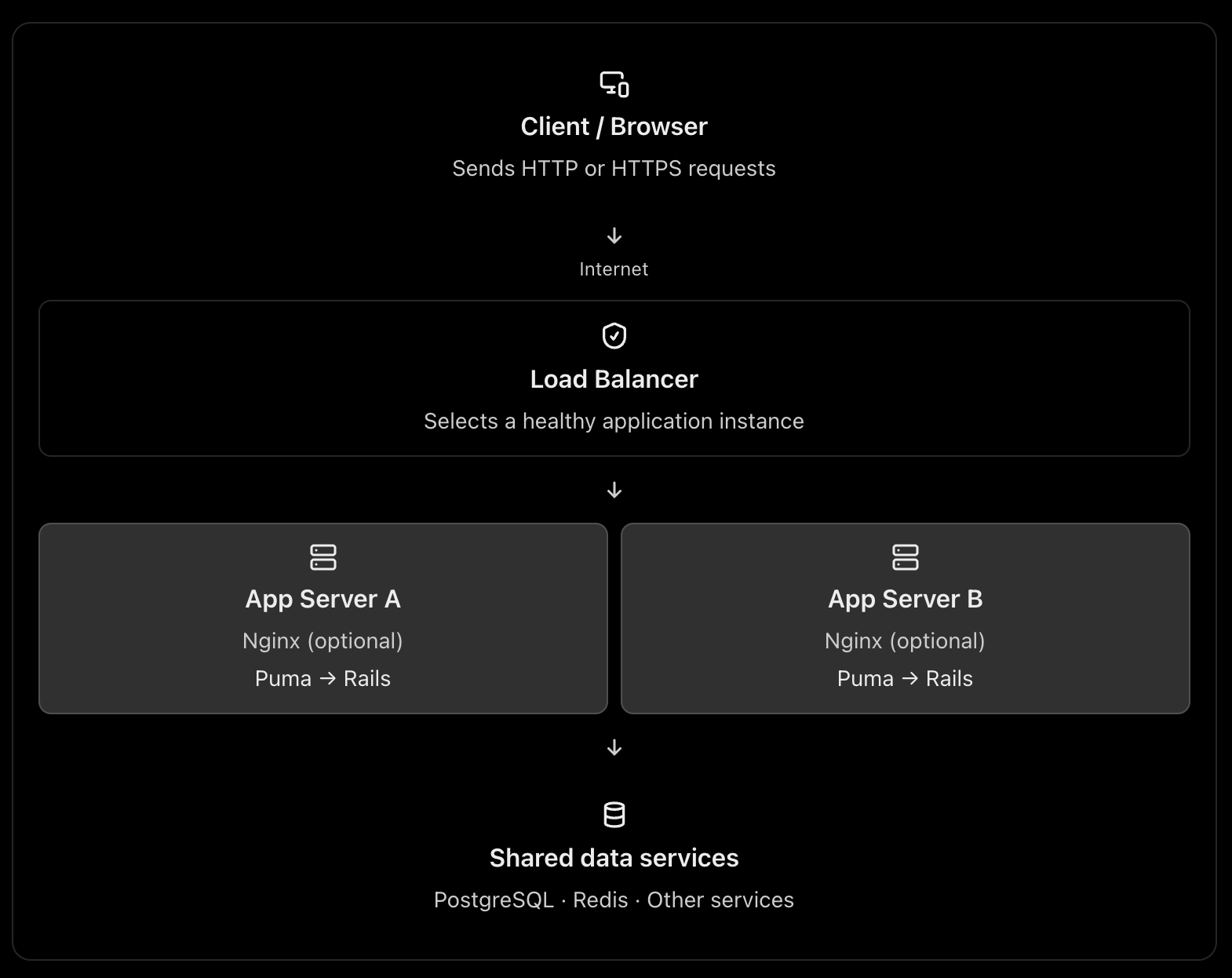
A typical production architecture looks like this:
This is one possible architecture, not a requirement for every web application. A load balancer can route directly to the application servers, and Nginx can itself act as a load balancer. See the official NGINX reverse proxy documentation and load-balancing documentation.
2. What is Nginx or Apache used for?
Nginx and Apache are web servers. They can also act as reverse proxies, routing requests to an application server such as Puma in Rails.
Think of Nginx as the reception desk of your application server.
It can receive a request, handle certain tasks itself, or forward the request to Rails.
A. Serving static files
Consider these requests:
GET /assets/application-abc123.css
GET /images/logo.png
GET /products
The first two requests may only need static files. They do not necessarily require Rails to execute any application code.
Nginx can serve those files directly. The third request typically needs Rails to query the database and build a response.
This avoids spending Rails application capacity on work that a web server can do efficiently. A CDN can serve many of these static assets even earlier in the request path. NGINX static-content documentation
B. Acting as a reverse proxy
Your Rails application might run on Puma at:
127.0.0.1:3000
Nginx listens on the public HTTP/HTTPS ports and forwards dynamic requests to Puma.
Browser
|
| HTTPS :443
v
Nginx
|
| HTTP on localhost:3000
v
Puma
|
v
Rails controllers → models → database
Nginx receives the response from Puma and sends it back to the browser.
C. Handling infrastructure concerns
Depending on its configuration, Nginx can also help with:
TLS/HTTPS termination.
Request and response buffering.
Compression and caching.
Request-size limits and timeouts.
Routing by hostname or URL path.
These capabilities help keep infrastructure concerns separate from your Rails business logic. They do require appropriate configuration; Nginx does not automatically solve every security or performance problem.
What about Apache?
Apache can serve static files, terminate TLS, reverse proxy requests, and distribute traffic. Nginx is a common choice for this role, but Apache is also valid.
You normally choose Nginx or Apache for a given reverse-proxy role, rather than installing both by default.
3. What is a load balancer?
A load balancer distributes incoming traffic across multiple application instances instead of sending every request to a single instance.
Imagine your Rails application is running on one server with Puma.
10,000 requests
|
v
Rails Server A
If the traffic grows, that single server may run out of CPU, memory, or available request-processing capacity.
You can run multiple application instances:
                10,000 requests
                       |
                       v
                Load Balancer
                 /          \
                v            v
          Rails Server A  Rails Server B
             Puma             Puma
The load balancer chooses a target according to its configured routing algorithm and health information. If a target becomes unhealthy, a properly configured load balancer can stop directing new requests to it. AWS Elastic Load Balancing documentation
Why is this useful?
Horizontal scaling: Add more application instances when traffic increases.
High availability: A failed instance does not necessarily take down the entire application.
Health checks: Avoid routing new requests to unhealthy instances.
Controlled deployments: Replace or remove instances gradually, when your deployment strategy supports it.
A load balancer does not make an individual Rails request faster by itself. Its main purpose is to distribute work and improve availability and scalability.
4. Why not send requests directly to the application server?
You absolutely can. The question is whether doing so is appropriate for your deployment.
For example, you could expose Puma directly:
Browser → Puma :3000 → Rails → PostgreSQL
This is technically possible. In a small deployment or a managed platform, it can be perfectly reasonable.
But consider what happens in a more demanding production environment.
Concern
App server directly exposed
Reverse proxy / load balancer
Static files
May consume app-server capacity
Can be served separately
HTTPS
Must be configured at the app or another layer
Can terminate TLS at the proxy/LB
Multiple instances
Needs a routing strategy
Can distribute traffic
Unhealthy instances
Needs separate handling
Can use health checks
Request limits and buffering
Depends on app server
Can be handled at the proxy
Application isolation
Public app-server port may be exposed
Can keep app instances on private networks
The architectural reason is separation of responsibilities. Puma is responsible for accepting requests and running your Rails application. The proxy or load balancer handles traffic-management responsibilities around it.
One caveat: the proxy is not automatically a security boundary. You still need firewall rules, correct forwarded-header handling, application security, and suitable network configuration.
5. The three architectures you should know
Architecture A: One server – small application
Everything may run on one virtual machine, although PostgreSQL could be a separate managed service.
Here, Nginx acts as a reverse proxy, but it is not distributing traffic across multiple machines. This is a reasonable starting point for many Rails applications.
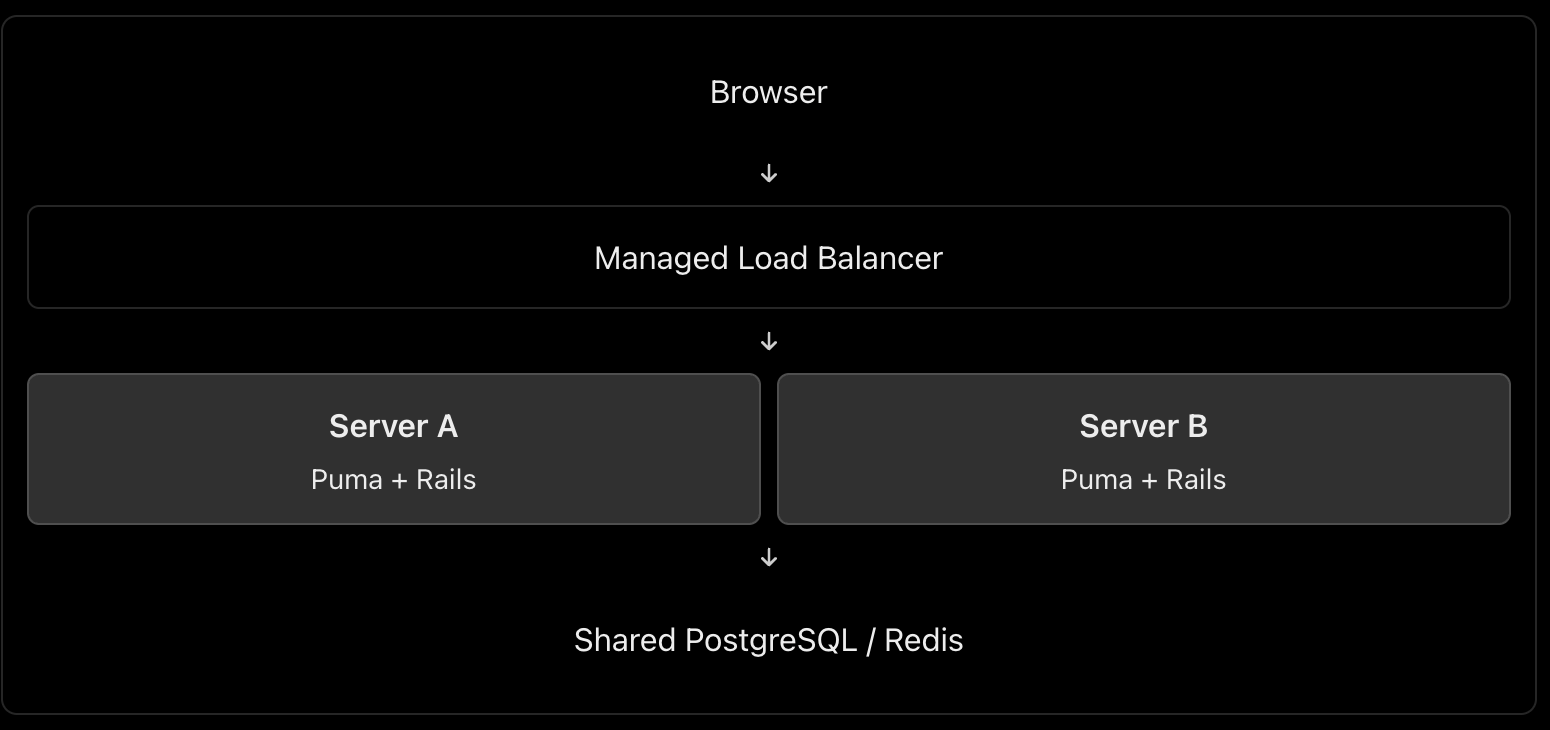
Architecture B: Multiple servers – production scaling
In this architecture, you might use AWS Application Load Balancer or Google Cloud Load Balancing in front of multiple application instances.
Do you also need Nginx on each application server? Not necessarily. The managed load balancer can route traffic directly to Puma or the application container, if that setup is supported and correctly secured. Add Nginx when you need the functionality it provides.
Architecture C: Larger application with a CDN
Browser
|
v
CDN / WAF
|
v
Managed Load Balancer
|
+---- Rails Instance A
|
+---- Rails Instance B
|
+---- Rails Instance C
|
v
Managed PostgreSQL
Redis / Background Jobs
This setup adds edge caching and potentially web-application firewall protection before traffic reaches the load balancer. Static assets can be served from the CDN, while dynamic requests are sent to Rails.
The exact design depends on your cloud provider, traffic volume, reliability targets, and operational budget.
6. Can Nginx itself be a load balancer?
Yes. This is an important int. point.
Nginx can reverse-proxy requests to one application instance or load-balance them across several upstream instances. These are two uses of the same technology. NGINX load-balancing documentation
This configuration illustrates Nginx distributing requests between two upstream Rails application servers. It is a simplified example, not a complete production configuration; TLS, trusted proxy settings, health monitoring, timeouts, and network restrictions must be addressed as appropriate.
Notice that a load balancer describes a role, not necessarily a separate physical server or a separate technology.
7. What is the best architecture for a Rails application?
My default recommendation would be:
Small application or early-stage product: Nginx → Puma → Rails, with PostgreSQL. Keep it simple.
Production application requiring horizontal scaling and high availability: A managed load balancer → multiple Rails instances, plus a managed database and shared services where needed. Use Nginx on the instances only when its features justify it.
High-traffic application: Add a CDN/WAF, caching, background workers, monitoring, and database scaling according to measured bottlenecks.
For a cloud-hosted Rails application, I would generally prefer a managed load balancer over maintaining my own public-facing load-balancing tier, when the platform offers one that meets the requirements.
The most important things are not the number of components but eliminating single points of failure where required, protecting application instances from unintended public access, monitoring performance, and scaling the actual bottleneck.
Int. answer
You could summarize it this way:
“Nginx or Apache acts as a web server and reverse proxy. It can serve static assets, terminate TLS, and forward dynamic requests to an application server such as Puma. A load balancer distributes incoming requests among multiple healthy application instances, improving scalability and availability. Nginx can also perform load balancing itself, so they don’t necessarily have to be separate components. For a small Rails application, Nginx → Puma is sufficient. For a horizontally scaled production application, I’d typically use a managed load balancer in front of multiple application instances, with Nginx on each instance only if needed.”
That demonstrates that you understand both the purpose of each component and when the extra infrastructure is worth the complexity.
Explain the following
1. How do you replicate application server instances? Is containerization best?
Yes, containers are an excellent default for many modern deployments, but they are not mandatory.
Suppose your Rails application runs on Puma.
                    Load Balancer
                   /      |      \
                  v       v       v
              Rails A  Rails B  Rails C
              Puma     Puma     Puma
                  \       |       /
                   PostgreSQL
Each instance runs the same application version.
How to implement it
Containerize the Rails app using Docker. Build an image containing Ruby, gems, application code and required runtime dependencies.
Deploy multiple replicas using a platform such as AWS ECS, Kubernetes, or a managed container service.
Put a load balancer in front to route requests to healthy instances.
Keep instances stateless. Store persistent data in PostgreSQL, shared cache/session stores in Redis when needed, and uploaded files in object storage such as S3.
Configure health checks, monitoring and autoscaling. Deploy new application versions through a controlled rollout.
Docker documents the use of production deployment configurations and orchestration for scaling applications. Docker production guide
Important: Replicating a server manually is possible, but deploying the same immutable image is more consistent and repeatable. You can also replicate virtual machines without containers.
2. What does a CDN do? What is Cloudflare?
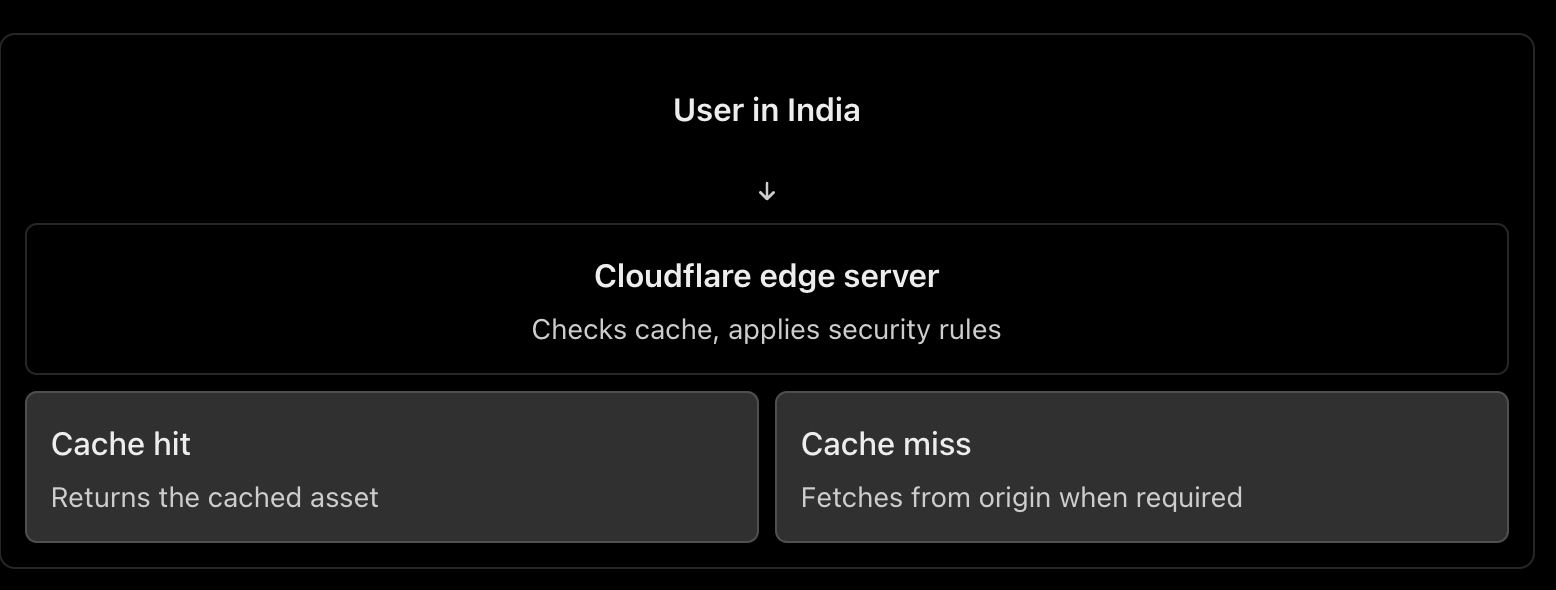
A CDN (Content Delivery Network) caches and serves content from locations distributed around the world.
For example, your Rails application serves a product page containing JavaScript, CSS and product images. Cloudflare can cache eligible assets closer to users, reducing response latency, origin traffic and bandwidth usage. HTML pages containing personalized data should not be cached indiscriminately. Cloudflare CDN documentation
Other Cloudflare benefits
DNS hosting: Manage domain records.
DDoS protection: Help absorb or mitigate abusive traffic.
Web Application Firewall (WAF): Filter requests matching security rules.
TLS/HTTPS: Manage certificates and encrypt client connections.
Load balancing: Route traffic to healthy origins or regions.
How does Cloudflare work as a load balancer?
You configure a load balancer with pools of origins and health monitors.
For example:
shop.example.com
|
v
Cloudflare Load Balancer
|
+------ Region A (healthy)
| |
| App servers
|
+------ Region B (healthy)
|
App servers
Cloudflare can steer traffic between these origins according to the configured policy and health. If an origin becomes unhealthy, it can stop sending traffic to it. Cloudflare Load Balancing
Remember: CDN caching and load balancing are different jobs. Cloudflare can provide both, but load balancing is a separate feature from basic CDN proxying.
3. What is DNS, and how do we configure it?
DNS (Domain Name System) translates human-readable domain names into information needed to locate services on the internet.
For example:
shop.example.com
|
v
DNS lookup
|
v
IP address / destination
|
v
Web server or load balancer
Common DNS records include:
Record
Purpose
Example
A
Maps a name to an IPv4 address
shop.example.com → 203.0.113.10
AAAA
Maps a name to an IPv6 address
Maps to an IPv6 address
CNAME
Points a name to another hostname
www → shop.example.com
MX
Specifies mail servers
Email delivery
TXT
Stores text used for verification and email security
Domain verification, SPF
Configuration steps
Register a domain through a domain registrar.
Choose a DNS provider, such as Cloudflare or your cloud provider.
Configure the domain’s authoritative nameservers at the registrar if switching DNS providers.
Create the required records. For example, point shop.example.com to your public load balancer, or to Cloudflare when its proxy is enabled.
Verify the records and configure the appropriate TTL (how long DNS answers can be cached).
Cloudflare explains the common record types and how to create them in its DNS documentation.
One distinction: DNS resolves names; it does not process the HTTP request itself. DNS round-robin using multiple IPs is not equivalent to a health-aware load balancer.
4. How do we configure HTTPS, and how does it work?
HTTPS is HTTP carried over TLS (Transport Layer Security).
Setup
Obtain a TLS certificate for your domain from a trusted certificate authority, such as Let’s Encrypt, or use a suitable managed certificate.
Configure the public-facing server or load balancer to listen on HTTPS, normally port 443.
Configure certificate renewal.
Redirect HTTP traffic to HTTPS and enable HSTS after verifying the HTTPS deployment.
If a CDN or load balancer sits in front of Rails, configure encryption on the upstream connection as well.
How TLS works
When a browser connects over HTTPS:
The browser and server negotiate TLS parameters.
The server presents its certificate.
The browser checks the certificate’s validity and domain name.
They securely establish session keys.
HTTP data is encrypted and protected against undetected modification while in transit.
TLS protects the connection. It does not automatically secure your database, authenticate application users, or eliminate application vulnerabilities. MDN: TLS
With Cloudflare
The connection normally has two segments:
Browser ← HTTPS/TLS → Cloudflare
Cloudflare ← HTTPS/TLS → Origin server
Choose Full (strict) when possible. It encrypts both segments and validates the origin certificate. Avoid a configuration that encrypts only the browser-to-Cloudflare connection while leaving the Cloudflare-to-origin connection unencrypted. Cloudflare encryption modes
5. What happens when a user types HTTP vs HTTPS?
Suppose the user enters http://shop.example.com.
The browser connects using HTTP, normally on port 80.
The server or proxy responds with a permanent redirect, such as 301, to https://shop.example.com.
The browser makes a new connection over HTTPS on port 443.
HTTP :80
|
| 301 redirect
v
HTTPS :443
|
v
Rails application
Important: The initial HTTP request is not encrypted, even if it gets redirected immediately. Enable HSTS after HTTPS is correctly configured. Browsers that have learned the HSTS policy will automatically upgrade subsequent HTTP attempts to HTTPS. MDN: HSTS and HTTP redirection
If the user enters HTTPS directly and the certificate is invalid or expired, the browser will show a security warning or block the connection.
6. How do you prevent security issues even after enabling HTTPS?
HTTPS protects data in transit, but attackers can still exploit vulnerable application code, stolen credentials, exposed servers and incorrect permissions.
Use multiple layers of protection:
Keep the OS, web server, Rails, Ruby and dependencies patched.
Configure firewalls so only required ports are accessible.
Do not expose database ports publicly.
Use least-privilege database accounts and secure secret management.
Add WAF rules, rate limiting and DDoS protection.
Enforce authentication, authorization and input validation in Rails.
Monitor logs, suspicious activity, failed logins and security alerts.
For a useful checklist, follow the current OWASP Top 10: 2025, which includes broken access control, security misconfiguration, software supply-chain failures, cryptographic failures and injection.
7. Major web security concerns and how to handle them
Here is the short, point-by-point checklist you asked for.
Security concern
Where to protect
What to do
DDoS and abusive traffic
Cloudflare / edge
Enable DDoS protection, appropriate WAF rules and rate limits.
Exposed servers and ports
Firewall / network
Expose only required ports; restrict origin access to trusted upstreams.
TLS misconfiguration
CDN / load balancer / web server
Use valid certificates, HTTPS redirects and TLS on upstream connections.
Injection and XSS
Rails application
Use safe database queries, validate inputs and encode output.
Broken access control / IDOR
Rails application
Check resource-level authorization on every sensitive operation.
Brute-force attacks
Edge / Rails
Rate-limit authentication endpoints, use MFA where appropriate and detect repeated failures.
Vulnerable dependencies
CI/CD pipeline
Scan and patch dependencies; review changes and protect the build pipeline.
Data leaks and secrets exposure
Rails / database / logging
Restrict database access, manage secrets safely and redact sensitive logs.
Set request body-size limits, sensible timeouts and appropriate rate limits.
Configure correct proxy headers and trust only known upstreams.
Avoid exposing server version details and unnecessary endpoints.
C. Load balancer / Cloudflare
Enable health checks and route only to healthy backends.
Use TLS between the load balancer and application servers where appropriate.
Restrict direct access to the origin so attackers cannot simply bypass Cloudflare’s protections.
Configure WAF rules, DDoS mitigation and rate limits.
Ensure client IP headers are trusted only when they come from the configured proxy.
Use least-privilege credentials and monitor security events.
D. Database / infrastructure
Keep PostgreSQL on a private network.
Use least-privilege database roles and encrypted connections where required.
Store secrets outside source control and rotate them when exposed.
Patch servers and containers, enforce access controls, monitor logs and test backups.
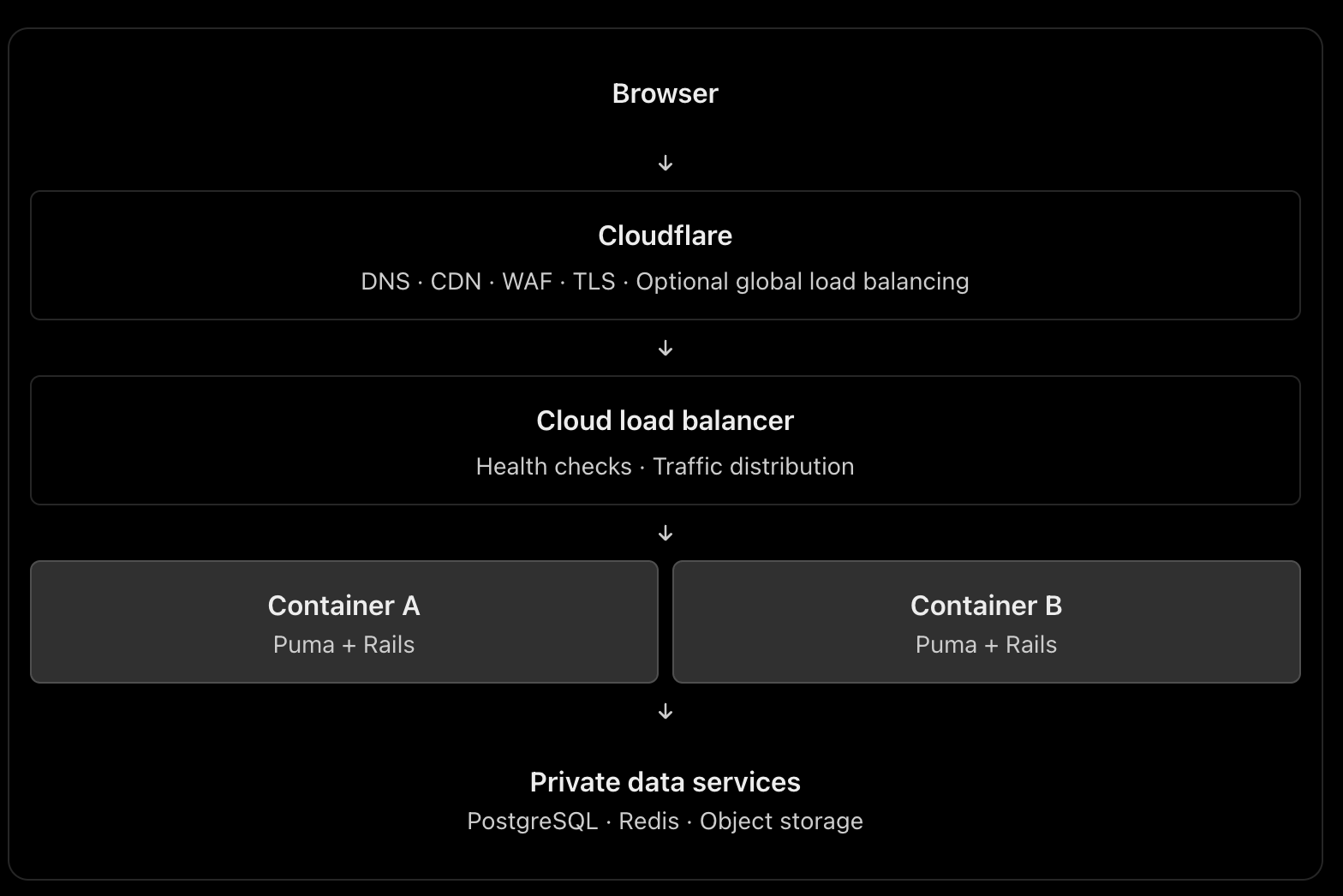
Recommended architecture to remember
This is a scalable reference architecture, not a requirement to use every component. For a smaller application, you may use Cloudflare plus one server running Nginx and Puma. Add managed load balancing and multiple replicas when availability and traffic requirements justify them. If Cloudflare performs global load balancing, the additional cloud load balancer may or may not be necessary.
The principal engineering lesson: HTTPS protects communication, Cloudflare helps protect and accelerate traffic, a load balancer distributes work, and Rails must still enforce application-level security. No single component replaces the others.
As part of our startup, our predecessors chose to use micro-services for our new website as it is a trending technology.
This decision has many benefits, such as:
Scaling a website becomes much easier when using micro-services, as each service can be scaled independently based on its individual needs.
The loosely coupled nature of micro-services also allows for easier development and maintenance, as changes to one service do not affect the functionality of other services.
Additionally, deployment can be focused on each individual service, making the overall process more efficient.
Micro-services also allow for the use of different technologies for each service, providing greater flexibility and the ability to choose the best tools for each task.
Finally, testing can be concentrated on one service at a time, allowing for more thorough and effective testing, which can result in higher quality code and a better user experience.
In developing our application with micro-services, we considered the potential problems that we may face in the future. However, it is important to note that we also need to consider whether these problems will have a significant impact compared to the potential disadvantages of using micro-services.
One factor to keep in mind is that our website is currently experiencing low traffic and we are acquiring clients gradually. As such, we need to consider whether the benefits of micro-services outweigh any potential drawbacks for our particular situation.
Regardless, some potential issues with micro-services include increased complexity and overhead in development, as well as potential performance issues when integrating multiple services. Additionally, managing multiple services and ensuring they communicate effectively can also be a challenge.
Despite the benefits of micro-services, we have faced some issues in implementing them. One significant challenge is the increased complexity of deployment and maintenance that comes with having multiple services. This can require more time and resources to manage and can potentially increase the likelihood of errors.
Additionally, the cost of using AWS ECS for hosting all of the micro-services can be higher than using other hosting solutions for a less traffic website. This is something to consider when weighing the benefits and drawbacks of using micro-services for our specific needs.
Another challenge we have faced is managing dependencies between services, which can be difficult to avoid. When one service goes offline, it can cause issues with other services, leading to a “No Service” issue on the website.
Finally, it can be very difficult to go back to a monolithic application even if we combine 3-4 services together, as they may use different software or software versions. This can make it challenging to make changes or updates to the application as a whole.
It is important to carefully consider whether micro-service architecture is the best fit for your business and current situation. If you have a less used website or are just starting your business, it may not be necessary or cost-effective to implement micro-services.
It is important to take the time to evaluate the benefits and drawbacks of using micro-services for your specific needs and budget. Keep in mind that hosting multiple micro-services can come with additional costs, so be prepared to pay a minimum amount for hosting if you decide to go this route.
Ultimately, the decision to use micro-services should be based on a thorough assessment of your business needs and available resources, rather than simply following a trend or industry hype.
Set up:
Used AWS ECS (ec2 launch type) with services and task definitions defined
11 Micro-services, 11 containers are spinning
Cost: Rs.12k ($160) per month
Workaround:
Consider using AWS Fargate type but not sure these issues get resolved
Deploy all the services in one EC2 Instance without using ECS
With liferay we can create any number of custom sites. We can easily create sections like web content, blog content etc and share between those sites. We can drag and drop sections to create website parts. So it is easy to use for admin users to add sections and drag to create pages.
“Liferay Portal is an open source enterprise web platform for building business solutions that deliver immediate results and long-term value. Liferay Portal started out as a personal development project in 2000 and was open sourced in 2001.”
After that Download and install Java (JDK) 8 (if necessary) in your local environment.
OpenJDK 8
Java 8 is the current Long Term Support version and is still widely supported, though public maintenance ends in January 2019. To install OpenJDK 8, execute the following command:
sudo apt install openjdk-8-jdk
➜ java -version
openjdk version "1.8.0_232"
OpenJDK Runtime Environment (build 1.8.0_232-8u232-b09-0ubuntu1~18.04.1-b09)
OpenJDK 64-Bit Server VM (build 25.232-b09, mixed mode)
Extract the liferay portal .zip file. Copy the folder liferay-ce-portal-7.3.0-ga1 to your home path. And go inside the folder path as shown below:
cd ~/liferay-ce-portal-7.3.0-ga1/tomcat-9.0.17/bin
and do:
Start Tomcat server:
sh startup.sh

Using CATALINA_BASE:   /home/abhi/liferay-ce-portal-7.3.0-ga1/tomcat-9.0.17
Using CATALINA_HOME:   /home/abhi/liferay-ce-portal-7.3.0-ga1/tomcat-9.0.17
Using CATALINA_TMPDIR: /home/abhi/liferay-ce-portal-7.3.0-ga1/tomcat-9.0.17/temp
Using JRE_HOME:        /usr/lib/jvm/java-8-openjdk-amd64
Using CLASSPATH:       /home/abhi/liferay-ce-portal-7.3.0-ga1/tomcat-9.0.17/bin/bootstrap.jar:/home/abhi/liferay-ce-portal-7.3.0-ga1/tomcat-9.0.17/bin/tomcat-juli.jar
Tomcat started.
Restart command for Tomcat server:
sh shutdown.sh && sh startup.sh
Goto http://localhost:8080/
Go with default hypersonic DB if you are in testing environment.
Restart the Tomcat server
sh shutdown.sh && sh startup.sh
and goto http://localhost:8080
If the server is not started properly, you can check the logs here:
cd ~/liferay-ce-portal-7.3.0-ga1/tomcat-9.0.17/logs/ && tail -f catalina.out
I faced the following issue in new 7.3 version with mysql db which I didn’t face with 7.2 version with Hypersonic DB. My mysql db schema is not proper to version 7.3.
  __    ____________________  _____  __
   / /   /  _/ ____/ ____/ __ \/   \ \/ /
  / /    / // /_  / __/ / /_/ / /| |\  /
 / /____/ // __/ / /___/ _, _/ ___ |/ /
/_____/___/_/   /_____/_/ |_/_/  |_/_/

Starting Liferay Community Edition Portal 7.3.0 CE GA1 (Athanasius / Build 7300 / January 20, 2020)

2020-03-23 12:22:13.798 INFO  [main][StartupHelperUtil:99] There are no patches installed
You must first upgrade the portal to the required schema version 8.1.0
2020-03-23 12:22:13.860 ERROR [main][MainServlet:300] java.lang.RuntimeException: You must first upgrade the portal to the required schema version 8.1.0
java.lang.RuntimeException: You must first upgrade the portal to the required schema version 8.1.0
	at com.liferay.portal.events.StartupHelperUtil.verifyRequiredSchemaVersion(StartupHelperUtil.java:220)
	at com.liferay.portal.events.StartupAction.doRun(StartupAction.java:136)
	at com.liferay.portal.events.StartupAction.run(StartupAction.java:77)
	at com.liferay.portal.internal.servlet.MainServlet.init(MainServlet.java:297)
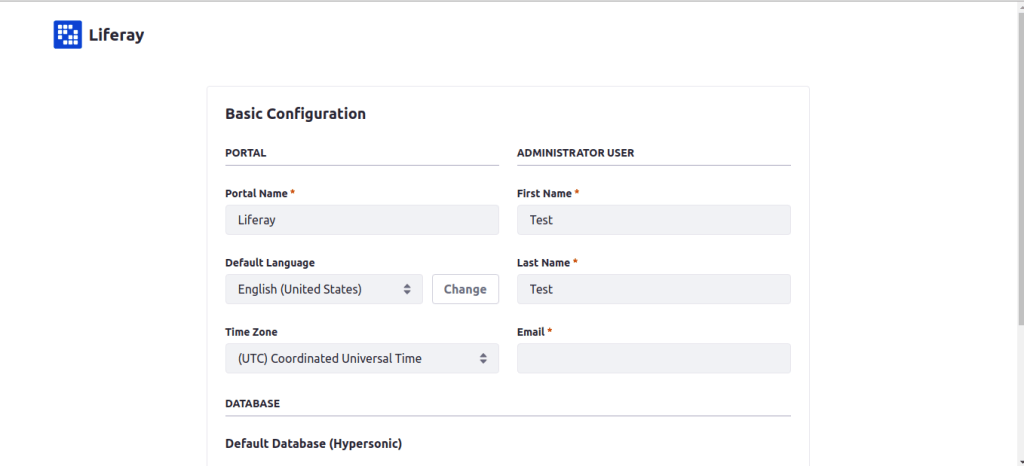
You’re presented a Basic Configuration page. Complete the configuration options. Liferay Portal uses an embedded database (HSQL) to make installation fast and easy. This database is not ready for production, so consider configuring a production-ready database (e.g., MySQL) if you plan on doing more than just exploring/testing. Agree to the terms and conditions, create a password, and configure a security question/answer.
“Liferay Plugin SDK is a development environment allows you to develop plugins for Liferay of all types such as Portlet, Themes, Layout Templates. The Liferay Plugin SDK is based on the Apache Ant tool and it can be integrated with all the common IDEs or used directly from the command line by executing a set of predefined commands (targets, in Ant’s nomenclature). In this tutorial I show how to configure the Plugin SDK in the Eclipse IDE”
This is the paid version from Liferay. With Liferay DXP you can implement not just static site, but something like today’s frontend fromeworks do (updating the DOM according to framework and spontaneous data change). Also you get the liferay support according to your plan.