Part 3 – Passenger, Nginx and the Request Lifecycle (deep dive)

Overview / Goal

In Part 3 we explain how Passenger sits behind Nginx in an API-only Rails app, where caching belongs in the stack, how to safely cache API responses (or avoid caching sensitive ones), and how to verify behavior. This part covers Passenger role, request lifecycle, and API response caching strategy.


1) Passenger’s role in a Rails API app — what it is and how it plugs into Nginx

What is Passenger?
Passenger (Phusion Passenger) is an application server that runs Ruby apps (Rails) and integrates tightly with web servers such as Nginx. It manages application processes, handles spawning, lifecycle, zero-downtime restarts, and serves Rack apps directly without a separate reverse-proxy layer.

Why using Passenger in your stack matters:

  • Nginx serves static files directly (fast).
  • If a request cannot be served as a static file, Nginx hands it to Passenger, which invokes your Rails app (API).
  • Passenger takes care of Ruby processes, workers, memory limits, restarts, etc., reducing operational complexity compared to orchestrating your own Puma cluster + systemd.

Typical nginx + passenger snippet (conceptual)

server {
  listen 443 ssl http2;
  server_name api.mydomain.com www.mydomain.com;
  root /apps/mydomain/current/public;

  passenger_enabled on;
  passenger_ruby /apps/mydomain/shared/ruby;
  passenger_min_instances 2;
  passenger_max_pool_size 6;
  passenger_preload_bundler on;

  # static + caching rules here ...
  location / {
    # fallback: handover to passenger (Rails)
    passenger_enabled on;
  }
}

Passenger is enabled per-server or per-location. Static files under root are resolved by nginx first — Passenger only gets requests that do not map to files (or that you explicitly route to Passenger).


2) Request lifecycle (browser → Nginx → Passenger → Rails API)

A canonical sequence for a request to your site:

  1. Browser requests https://www.mydomain.com/some/path (or /vite/index-ABC.js, or /api/v1/products).
  2. Nginx checks if the request maps to a static file under root /apps/mydomain/current/public.
    • If file exists → serve it directly and attach headers (Cache-Control, etc.).
    • If not → pass the request to Passenger.
  3. Passenger receives the request and dispatches it to a Rails process.
  4. Rails API processes the request (controllers -> models -> DB) and produces a response JSON or status.
  5. Rails returns the response to Passenger → Passenger returns it to Nginx → Nginx returns it to the browser.

Key layers where caching can occur:

  • Client-side (browser) — controlled by Cache-Control returned from server.
  • Reverse-proxy or CDN — e.g., Cloudflare, Fastly, CloudFront; caching behavior influenced by s-maxage and surrogate headers.
  • Application caching (Rails/Redis) — memoization or precomputed JSON payloads to reduce DB cost.
  • Nginx (edge) caching — possible for static assets; less common for dynamic Rails responses when using Passenger (but possible with proxying setups).

3) Where API caching should sit (principles)

Because your Rails app is API-only, you should carefully control caching:

  • Static assets (JS/CSS/fonts/images) = Nginx (1-year for hashed assets).
  • API responses (JSON) = usually short-lived or uncached unless content is highly cacheable and non-sensitive. If cached:
    • Prefer caching at CDN layer (s-maxage) or using application-level caching (Rails + Redis).
    • Use cache validation (ETag, Last-Modified) to enable conditional requests and 304 responses.
  • Sensitive endpoints (auth, user-specific data) = never cached publicly. Use Cache-Control: no-store, private.

4) Cache-Control and related headers for APIs — recommended practices

Important response headers and their recommended usage

  • Cache-Control:
    • no-store — do not store response anywhere (safest for sensitive data).
    • no-cache — caches may store but must revalidate with origin before use (useful if you want caching but require revalidation).
    • private — response intended for a single user; shared caches (CDNs) must not store it.
    • public — response may be stored by browsers and CDNs.
    • max-age=SECONDS — TTL in seconds.
    • s-maxage=SECONDS — TTL for shared caches (CDNs); supersedes max-age for shared caches.
    • must-revalidate / proxy-revalidate — force revalidation after expiration.
    • stale-while-revalidate / stale-if-error — allow stale responses while revalidation or in case of errors (good for resilience).
  • ETag:
    • Strong validator; server generates a value representing resource state. Client includes If-None-Match on subsequent requests. Server returns 304 Not Modified if ETag matches.
  • Last-Modified and If-Modified-Since:
    • Based on timestamp; less precise than ETag but simple.
  • Vary:
    • Tells caches that responses vary by certain request headers (e.g., Vary: Accept-Encoding or Vary: Authorization).

Example header patterns

  • Public, CDN cacheable API (e.g., public product listings): Cache-Control: public, max-age=60, s-maxage=300, stale-while-revalidate=30 ETag: "abc123" Vary: Accept-Encoding
    • Browser caches for 60s. CDN caches for 300s. Meanwhile allow stale while revalidate.
  • User-specific / sensitive responses: Cache-Control: private, no-store, no-cache, must-revalidate
    • Prevents sharing.
  • No caching (strict): Cache-Control: no-store

5) How to add caching headers in a Rails API controller (practical examples)

Because you run an API-only app, prefer setting headers in controllers selectively for GET endpoints you consider safe to cache.

Basic manual header (safe and explicit):

class Api::V1::ProductsController < ApplicationController
  def index
    @products = Product.popular.limit(20)
    # set short-lived cache for 60 seconds for browsers
    response.set_header('Cache-Control', 'public, max-age=60, s-maxage=300, stale-while-revalidate=30')
    render json: @products
  end
end

Using conditional GET with ETag / Last-Modified:

class Api::V1::ProductsController < ApplicationController
  def show
    product = Product.find(params[:id])
    # This helps return 304 Not Modified if product hasn't changed
    if stale?(etag: product, last_modified: product.updated_at)
      render json: product
    end
  end
end

Notes: stale? and fresh_when are provided by ActionController::ConditionalGet. In an API-only app these helper methods are normally available, but confirm by checking your ApplicationController inheritance; if not, you can use response.set_header('ETag', ...) directly.

Setting ETag manually:

etag_value = Digest::SHA1.hexdigest(product.updated_at.to_i.to_s + product.id.to_s)
response.set_header('ETag', "\"#{etag_value}\"")
# then Rails will respond with 304 if If-None-Match matches


6) Important rules for API caching

  • Only cache GET responses. Never cache responses to POST, PUT, PATCH, DELETE.
  • Do not cache user-specific or sensitive info in shared caches. Use private or no-store.
  • Prefer CDN caching (s-maxage) for public endpoints. Use s-maxage to instruct CDNs to keep content longer than browsers.
  • Use ETags or Last-Modified for validation to reduce bandwidth and get 304 responses.
  • Consider short TTLs and stale-while-revalidate to reduce origin load while keeping content fresh.
  • Version your API (e.g., /api/v1/) so you can change caching behavior on new releases without conflicting with old clients.

7) Nginx + Passenger and caching for API endpoints — what to do (and what to avoid)

  • Avoid using Nginx proxy cache with Passenger by default. Passenger is not a reverse proxy; it’s an app server. Nginx can use proxy_cache for caching upstream responses, but that pattern is more common when you proxy to a separate Puma/Unicorn backend via proxy_pass. With Passenger, it’s simpler and safer to set cache headers in Rails and let CDNs or clients respect them.
  • If you want edge caching in Nginx, it is technically possible to enable fastcgi_cache/proxy_cache patterns if you have an upstream; use caution — caching dynamic JSON responses at the web server is tricky and must be carefully invalidated.

Recommended: set caching headers in Rails (as shown), then let a CDN (Cloudflare/Fastly/CloudFront) apply caching and invalidation; Passenger remains the process manager for Rails.


8) Example: making a public, cacheable endpoint safe and CDN-friendly

class Api::V1::PublicController < ApplicationController
  def top_offers
    data = Offer.top(10) # expensive query
    response.set_header('Cache-Control', 'public, max-age=120, s-maxage=600, stale-while-revalidate=30')
    # Optionally set ETag
    fresh_when(etag: Digest::SHA1.hexdigest(data.map(&:updated_at).join(',')))
    render json: data
  end
end

  • max-age=120 → browsers cache for 2 minutes
  • s-maxage=600 → CDN caches for 10 minutes
  • stale-while-revalidate=30 → CDN/browsers may serve stale for 30s while origin revalidates

9) Passenger vs Puma — quick comparison (for API deployments)

Passenger

  • Pros:
    • Tight nginx integration (simpler config).
    • Auto-manages application processes; zero-downtime restarts are straightforward (passenger-config restart-app).
    • Good defaults for concurrency and memory management.
  • Cons:
    • Less flexible for custom proxy patterns (compared to running Puma behind nginx).
    • Some advanced caching/proxy setups are easier with a dedicated reverse-proxy architecture.

Puma (common alternative)

  • Pros:
    • Lightweight, highly configurable; often used behind nginx as reverse proxy.
    • Works well in containerized environments (Docker/Kubernetes).
    • Easy to pair with systemd or process managers and to horizontally scale workers.
  • Cons:
    • Requires extra process management & reverse proxying (nginx proxy_pass) configuration.
    • Slightly more operational overhead vs Passenger.

For an API-only Rails app with static assets served by nginx, Passenger is a great choice when you want fewer moving pieces. Puma + nginx gives more flexibility if you need advanced proxy caching or plan to run in a container orchestration platform.

I’ll continue with Part 4 covering Redis caching (optional), invalidation strategies, testing, debugging, commands, examples of common pitfalls and a final checklist.


Part 2: Caching Strategy for Vue + Rails API with Nginx

In Part 1, we explored the request flow between Nginx, Vue (frontend), and Rails (API backend). We also covered how Nginx routes traffic and why caching matters in such a setup.

Now in Part 2, we’ll go deeper into asset caching strategies — specifically tailored for a Rails API-only backend + Vue frontend deployed with Nginx.

🔑 The Core Idea

  • HTML files (like vite.html) should never be cached. They are the entry point of the SPA and change frequently.
  • Hashed assets (like /vite/index-G34XebCm.js) can be cached for 1 year safely, because the hash ensures cache-busting.
  • Non-hashed assets (images, fonts, legacy JS/CSS) should get short-term caching (e.g., 1 hour).

This split ensures fast repeat visits while avoiding stale deploys.

📂 Example: Files in public/vite/

Your build pipeline (via Vite) outputs hashed assets like:

vite/
  index-G34XebCm.js
  DuckType-CommonsRegular-CSozX1Vl.otf
  Allergens-D48ns5vN.css
  LoginModal-DR9oLFAS.js

Notice the random-looking suffixes (G34XebCm, D48ns5vN) — these are hashes. They change whenever the file content changes.

➡️ That’s why they’re safe to cache for 1 year: a new deploy creates new filenames, so the browser will fetch fresh assets.

By contrast, files like:

assets/
  15_minutes.png
  Sky_background.png

do not have hashes. If you update them, the filename doesn’t change, so the browser might keep showing stale content if cached too long. These need shorter cache lifetimes.


🛠️ Final Nginx Caching Configuration

Here’s the Nginx cache snippet tuned for your setup:

# =====================
# HTML (always no-cache)
# =====================
location = /vite.html {
    add_header Cache-Control "no-cache";
}

location ~* \.html$ {
    add_header Cache-Control "no-cache";
}

# ==============================
# Hashed Vue/Vite assets (1 year)
# ==============================
location ^~ /vite/ {
    add_header Cache-Control "public, max-age=31536000, immutable";
}

# ==================================================
# Other static assets (non-hashed) - 1 hour caching
# ==================================================
location ~* \.(?:js|css|woff2?|ttf|otf|eot|jpg|jpeg|png|gif|svg|ico)$ {
    add_header Cache-Control "public, max-age=3600";
}

🔍 Explanation

  • location = /vite.html → explicitly disables caching for the SPA entry file.
  • location ~* \.html$ → covers other .html files just in case.
  • location ^~ /vite/ → everything inside /vite/ (all hashed JS/CSS/images/fonts) gets 1 year caching.
  • Final block → fallback for other static assets like /assets/*.png, with only 1-hour cache.

⚠️ What Happens If We Misconfigure?

  • If you cache .html → new deploys won’t show up, users may stay stuck on the old app shell.
  • If you cache non-hashed images for 1 year → product images may stay stale even after updates.
  • If you don’t use immutable on hashed assets → browsers may still revalidate unnecessarily.

🏗️ Real-World Examples

  • GitLab uses a similar strategy with hashed Webpack assets, caching them long-term via Nginx and Cloudflare.
  • Discourse does long-term caching of fingerprinted JS/CSS, but keeps HTML dynamic with no-cache.
  • Basecamp (Rails + Hotwire) fingerprints all assets, leveraging 1-year immutable caching.

These projects rely heavily on content hashing + Nginx headers — exactly what we’re setting up here.

✅ Best Practices Recap

  1. Always fingerprint (hash) assets in production builds.
  2. Cache HTML for 0 seconds, JS/CSS hashed files for 1 year.
  3. Use immutable for hashed assets.
  4. Keep non-hashed assets on short lifetimes or rename them when updated.

This ensures smooth deploys, lightning-fast repeat visits, and no stale content issues.

📌 In Part 3, we’ll go deeper into Rails + Passenger integration, showing how Rails API responses fit into this caching strategy (and what not to cache at the API layer).


Part 1: Understanding Request Flow and Caching in a Rails + Vue + Nginx Setup

Introduction

When building modern web applications, performance is a critical factor for user experience and SEO. In setups that combine Rails (for backend logic) with Vue 3 (for the frontend), and Nginx + Passenger as the web server layer, developers must understand how requests flow through the system and how caching strategies can maximize efficiency. Without a clear understanding, issues such as stale content, redundant downloads, or poor Google PageSpeed scores can creep in.

In this series, we will break down the architecture into three detailed parts. In this first part, we’ll look at the basic request flow, why caching is needed, and the specific caching strategies applied for different types of assets (HTML, hashed Vue assets, images, fonts, and SEO files).

🔹 1. Basic Request Flow

Let’s first understand how a browser request travels through our stack. In a Rails + Vue + Nginx setup, the flow is layered so that Nginx acts as the gatekeeper, serving static files directly and passing dynamic requests to Rails via Passenger. This ensures maximum efficiency.

Browser Request (user opens https://mydomain.com)
      |
      v
+-------------------------+
|        Nginx            |
| - Serves static files   |
| - Adds cache headers    |
| - Redirects HTTP → HTTPS|
+-------------------------+
      |
      |---> /public/vite/*   (hashed Vue assets: JS, CSS, images)
      |---> /public/assets/* (general static files, fonts, images)
      |---> /public/*.html   (entry files, e.g. vite.html)
      |---> /sitemap.xml, robots.txt
      |
      v
+-------------------------+
| Passenger + Rails       |
| - Handles API requests  |
| - Renders dynamic views |
| - Business logic        |
+-------------------------+
      |
      v
Browser receives response

Key takeaways:

  • Nginx is optimized for serving static files and does this without invoking Rails.
  • Hashed Vue assets live in /public/vite/ and are safe for long-term caching.
  • HTML entry files like vite.html should never be cached aggressively, as they bootstrap the application.
  • Rails only handles requests that cannot be resolved by static files (APIs, dynamic content, authentication, etc.).

🔹 2. Why Caching Matters

Every time a user visits your site, the browser requests resources such as JavaScript, CSS, images, and fonts. Without caching, the browser re-downloads these assets on every visit, leading to:

  • Slower page load times
  • Higher bandwidth usage
  • Poorer SEO scores (Google PageSpeed penalizes missing caching headers)
  • Increased server load

Caching helps by instructing browsers to reuse resources when possible. However, caching needs to be carefully tuned:

  • Static, versioned assets (like hashed JS files) should be cached for a long time.
  • Dynamic or frequently changing files (like HTML, sitemap.xml) should bypass cache.
  • Non-hashed assets (like assets/*.png) can be cached for a shorter duration.

🔹 3. Caching Strategy in Detail

1. Hashed Vue Assets (/vite/ folder)

Files built by Vite include a content hash in their filenames (e.g., index-B34XebCm.js). This ensures that when the file content changes, the filename changes as well. Browsers see this as a new resource and download it fresh. This makes it safe to cache these files aggressively:

location /vite/ {
    expires 1y;
    add_header Cache-Control "public, immutable";
}

This tells browsers to cache these files for a year, and the immutable directive prevents unnecessary revalidation.

2. HTML Files (vite.html and others)

HTML files should always be fresh because they reference the latest asset filenames. If an old HTML file is cached, it might point to outdated JS or CSS, breaking the app. Therefore, HTML must always be served with no-cache:

location ~* \.html$ {
    add_header Cache-Control "no-cache";
}

This forces browsers to check the server every time before using the file.

3. Other Static Assets (images, fonts, non-hashed JS/CSS)

Some assets in /public/assets/ do not have hashed filenames (e.g., logo.png). Caching these too aggressively could cause stale content issues. A shorter cache period (like 1 hour) is a safe balance:

location ~* \.(?:js|css|woff2?|ttf|otf|eot|jpg|jpeg|png|gif|svg|ico)$ {
    expires 1h;
    add_header Cache-Control "public";
}

4. SEO Files (sitemap.xml, robots.txt)

Search engines like Google frequently re-fetch sitemap.xml and robots.txt to keep their index up-to-date. If these files are cached, crawlers may miss recent updates. To avoid this, they should always bypass cache:

location = /sitemap.xml {
    add_header Cache-Control "no-cache";
}
location = /robots.txt {
    add_header Cache-Control "no-cache";
}

🔹 4. Summary Diagram

The diagram below illustrates the request flow and caching rules:

Browser Request
      |
      v
+------------------+          +-------------------+
|      Nginx       |          | Passenger + Rails |
|------------------|          |-------------------|
| - Serves /vite/* |          | - Dynamic APIs    |
|   (1y immutable) |          | - Auth flows      |
| - Serves .html   |          | - Business logic  |
|   (no-cache)     |          +-------------------+
| - Serves assets/*|
|   (1h cache)     |
| - Serves SEO     |
|   (no-cache)     |
+------------------+
      |
      v
Response to Browser

Let’s bring in some real-world examples from well-known Rails projects so you can see how this fits into practice:

🔹 Example 1: Discourse (Rails + Ember frontend, served via Nginx + Passenger)

  • Request flow:
    • Nginx serves all static JS/CSS files that are fingerprinted (application-9f2c01f2b3f.js).
    • Rails generates these during asset precompilation.
    • Fingerprinting ensures cache-busting (like our vite/index-B34XebCm.js).
  • Caching:
    • In their Nginx config, Discourse sets: location ~ ^/assets/ { expires 1y; add_header Cache-Control "public, immutable"; }
    • All .html responses (Rails views) are marked no-cache.
    • This is exactly the same principle we applied for our /vite/ folder.

🔹 Example 2: GitLab (Rails + Vue frontend, Nginx load balancer)

  • Request flow:
    • GitLab has Vue components bundled by Webpack (similar to Vite in our case).
    • Nginx first checks /public/assets/ for compiled frontend assets.
    • If not found → request is passed to Rails via Passenger.
  • Caching:
    • GitLab sets very aggressive caching for hashed assets, because they change only when a new release is deployed: location ~ ^/assets/.*-[a-f0-9]{32}\.(js|css|png|jpg|svg)$ { expires max; add_header Cache-Control "public, immutable"; }
    • Non-hashed files (like /uploads/ user content) get shorter caching (1 hour or 1 day).
    • HTML pages rendered by Rails = no-cache.

🔹 Example 3: Basecamp (Rails + Hotwire, Nginx + Passenger)

  • Request flow:
    • Their entrypoint is still HTML (application.html.erb) served via Rails.
    • Static assets (CSS/JS/images) precompiled into /public/assets.
    • Nginx serves these directly, without touching Rails.
  • Caching:
    • Rails generates digest-based file names (like style-4f8d9d7.css).
    • Nginx rule: location /assets { expires 1y; add_header Cache-Control "public, immutable"; }
    • Same idea: hashed = long cache, HTML = no cache.

👉 What this shows:

  • All large Rails projects (Discourse, GitLab, Basecamp) follow the same caching pattern we’re doing:
    • HTML → no-cache
    • Hashed assets (fingerprinted by build tool) → 1 year, immutable
    • Non-hashed assets → shorter cache (1h–1d)

So what we’re implementing in our setup is the industry standard. ✅

Conclusion

In this part, we established the foundation for how requests move through Nginx, Vue, and Rails, and why caching plays such an essential role in performance and reliability. The key principles are:

  • Hashed files = cache long term
  • HTML and SEO files = never cache
  • Non-hashed static assets = short cache
  • Rails/Passenger handles only dynamic requests

In Part 2, we’ll dive deeper into writing a complete Nginx configuration for Rails + Vue, covering gzip compression, HTTP/2 optimizations, cache busting, and optional Vue Router history mode support.


🔐 Understanding TLS in Web: How HTTPS Works and Performance Considerations

Secure communication over HTTPS is powered by TLS (Transport Layer Security). In this post, we’ll explore:

  • The TLS handshake step by step
  • Performance impacts and optimizations
  • Real-world examples and a visual diagram

❓ Why TLS Matters

The Problem with Plain HTTP

  • Data in plaintext: Every header, URL, form field (including passwords) is exposed.
  • Easy to intercept: Public Wi‑Fi or malicious network nodes can read or tamper with requests.

With TLS, your browser and server create a secure, encrypted tunnel, protecting confidentiality and integrity.

The TLS Handshake 🤝🏻 (Simplified)

Below is a diagram illustrating the core steps of a TLS 1.2 handshake. TLS 1.3 is similar but reduces round trips:

Handshake Breakdown

  1. ClientHello
    • Announces TLS version, cipher suites, and random nonce.
  2. ServerHello + Certificate
    • Server selects parameters and presents its X.509 certificate (with public key).
  3. Key Exchange
    • Client encrypts a “pre-master secret” with the server’s public key.
  4. ChangeCipherSpec & Finished
    • Both sides notify each other that future messages will be encrypted, then exchange integrity-checked “Finished” messages.

Once complete, all application data (HTTP requests/responses) flows through a symmetric cipher (e.g., AES), which is fast and secure.

⚡ Performance: Overhead and Optimizations

🕒 Latency Costs

  • Full TLS 1.2 handshake: ~2 extra network round‑trips (100–200 ms).
  • TLS 1.3 handshake: Only 1 RTT — significantly faster.

Key Optimizations

🔧 Technique🎁 Benefit
Session ResumptionSkip full handshake using session tickets
HTTP/2 + Keep‑AliveReuse one TCP/TLS connection for many requests
TLS 1.3Fewer round trips; optional 0‑RTT data
ECDSA CertificatesFaster cryptography than RSA
TLS Offloading/CDNHardware or edge servers handle encryption

💻 Real-World Example: Enabling TLS in Rails

  1. Obtain a Certificate (Let’s Encrypt, commercial CA)
  2. Configure Nginx (example snippet)
server {
  listen 443 ssl http2;
  server_name example.com;

  ssl_certificate     /etc/letsencrypt/live/example.com/fullchain.pem;
  ssl_certificate_key /etc/letsencrypt/live/example.com/privkey.pem;

  ssl_protocols       TLSv1.2 TLSv1.3;
  ssl_ciphers         HIGH:!aNULL:!MD5;

  location / {
    proxy_pass http://localhost:3000;
    proxy_set_header Host $host;
    proxy_set_header X-Forwarded-Proto https;
  }
}

  1. Force HTTPS in Rails
# config/environments/production.rb file
config.force_ssl = true

With this setup, Rails responds only over encrypted channels, and browsers automatically redirect HTTP to HTTPS.

📊 Measuring Impact

Run curl -w to compare:

# HTTP
✗ curl -o /dev/null -s -w "HTTP time: %{time_total}s\n" "http://railsdrop.com"
HTTP time: 0.634649s

# HTTPS
✗ curl -o /dev/null -s -w "HTTP time: %{time_total}s\n" "https://railsdrop.com"
HTTP time: 1.571834s

Typical difference is milliseconds once session resumption and keep‑alive take effect.

✅ Key Takeaways

  • TLS handshake uses asymmetric crypto to establish a symmetric key, then encrypts all traffic.
  • TLS 1.3 and optimizations (resumption, HTTP/2) minimize latency.
  • Modern hardware and CDNs make HTTPS nearly as fast as HTTP.
  • Always enable TLS for any site handling sensitive data.

🔗 Secure your apps today—HTTPS is no longer optional!

Learn Web: Key ideas – Nginx/Apache, load balancers

The key idea is this: Nginx/Apache, load balancers, and application servers have different responsibilities, but some of their responsibilities overlap. You don’t always need all three.

Let’s understand this using a Ruby on Rails application, since it makes the architecture easier to relate to real production deployments.

1. What happens when a user sends a request?

Suppose a user opens your application:

GET https://shop.example.com/products

The browser sends the request over the internet. Something must receive that request, decide where it should go, and return the response.

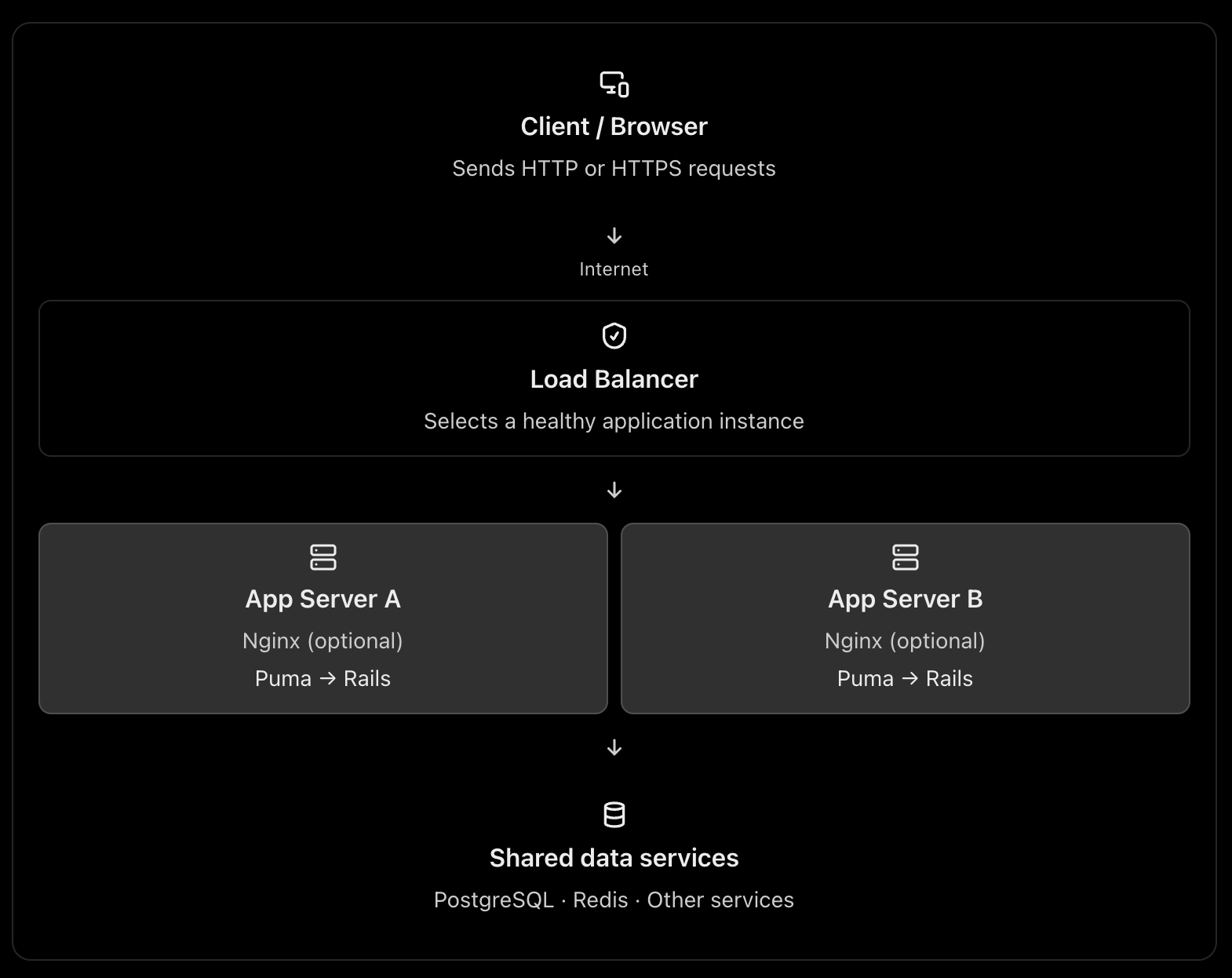
A typical production architecture looks like this:

This is one possible architecture, not a requirement for every web application. A load balancer can route directly to the application servers, and Nginx can itself act as a load balancer. See the official NGINX reverse proxy documentation and load-balancing documentation.

2. What is Nginx or Apache used for?

Nginx and Apache are web servers. They can also act as reverse proxies, routing requests to an application server such as Puma in Rails.

Think of Nginx as the reception desk of your application server.

It can receive a request, handle certain tasks itself, or forward the request to Rails.

A. Serving static files

Consider these requests:

GET /assets/application-abc123.css
GET /images/logo.png
GET /products

The first two requests may only need static files. They do not necessarily require Rails to execute any application code.

Nginx can serve those files directly. The third request typically needs Rails to query the database and build a response.

This avoids spending Rails application capacity on work that a web server can do efficiently. A CDN can serve many of these static assets even earlier in the request path. NGINX static-content documentation

B. Acting as a reverse proxy

Your Rails application might run on Puma at:

127.0.0.1:3000

Nginx listens on the public HTTP/HTTPS ports and forwards dynamic requests to Puma.

Browser
|
| HTTPS :443
v
Nginx
|
| HTTP on localhost:3000
v
Puma
|
v
Rails controllers → models → database

Nginx receives the response from Puma and sends it back to the browser.

C. Handling infrastructure concerns

Depending on its configuration, Nginx can also help with:

  • TLS/HTTPS termination.
  • Request and response buffering.
  • Compression and caching.
  • Request-size limits and timeouts.
  • Routing by hostname or URL path.

These capabilities help keep infrastructure concerns separate from your Rails business logic. They do require appropriate configuration; Nginx does not automatically solve every security or performance problem.

What about Apache?

Apache can serve static files, terminate TLS, reverse proxy requests, and distribute traffic. Nginx is a common choice for this role, but Apache is also valid.

You normally choose Nginx or Apache for a given reverse-proxy role, rather than installing both by default.

3. What is a load balancer?

A load balancer distributes incoming traffic across multiple application instances instead of sending every request to a single instance.

Imagine your Rails application is running on one server with Puma.

10,000 requests
|
v
Rails Server A

If the traffic grows, that single server may run out of CPU, memory, or available request-processing capacity.

You can run multiple application instances:

                10,000 requests
                       |
                       v
                Load Balancer
                 /          \
                v            v
          Rails Server A  Rails Server B
             Puma             Puma

The load balancer chooses a target according to its configured routing algorithm and health information. If a target becomes unhealthy, a properly configured load balancer can stop directing new requests to it. AWS Elastic Load Balancing documentation

Why is this useful?

Horizontal scaling: Add more application instances when traffic increases.

High availability: A failed instance does not necessarily take down the entire application.

Health checks: Avoid routing new requests to unhealthy instances.

Controlled deployments: Replace or remove instances gradually, when your deployment strategy supports it.

A load balancer does not make an individual Rails request faster by itself. Its main purpose is to distribute work and improve availability and scalability.

4. Why not send requests directly to the application server?

You absolutely can. The question is whether doing so is appropriate for your deployment.

For example, you could expose Puma directly:

Browser → Puma :3000 → Rails → PostgreSQL

This is technically possible. In a small deployment or a managed platform, it can be perfectly reasonable.

But consider what happens in a more demanding production environment.

ConcernApp server directly exposedReverse proxy / load balancer
Static filesMay consume app-server capacityCan be served separately
HTTPSMust be configured at the app or another layerCan terminate TLS at the proxy/LB
Multiple instancesNeeds a routing strategyCan distribute traffic
Unhealthy instancesNeeds separate handlingCan use health checks
Request limits and bufferingDepends on app serverCan be handled at the proxy
Application isolationPublic app-server port may be exposedCan keep app instances on private networks

The architectural reason is separation of responsibilities. Puma is responsible for accepting requests and running your Rails application. The proxy or load balancer handles traffic-management responsibilities around it.

One caveat: the proxy is not automatically a security boundary. You still need firewall rules, correct forwarded-header handling, application security, and suitable network configuration.

5. The three architectures you should know

Architecture A: One server – small application

Everything may run on one virtual machine, although PostgreSQL could be a separate managed service.

Here, Nginx acts as a reverse proxy, but it is not distributing traffic across multiple machines. This is a reasonable starting point for many Rails applications.

Architecture B: Multiple servers – production scaling

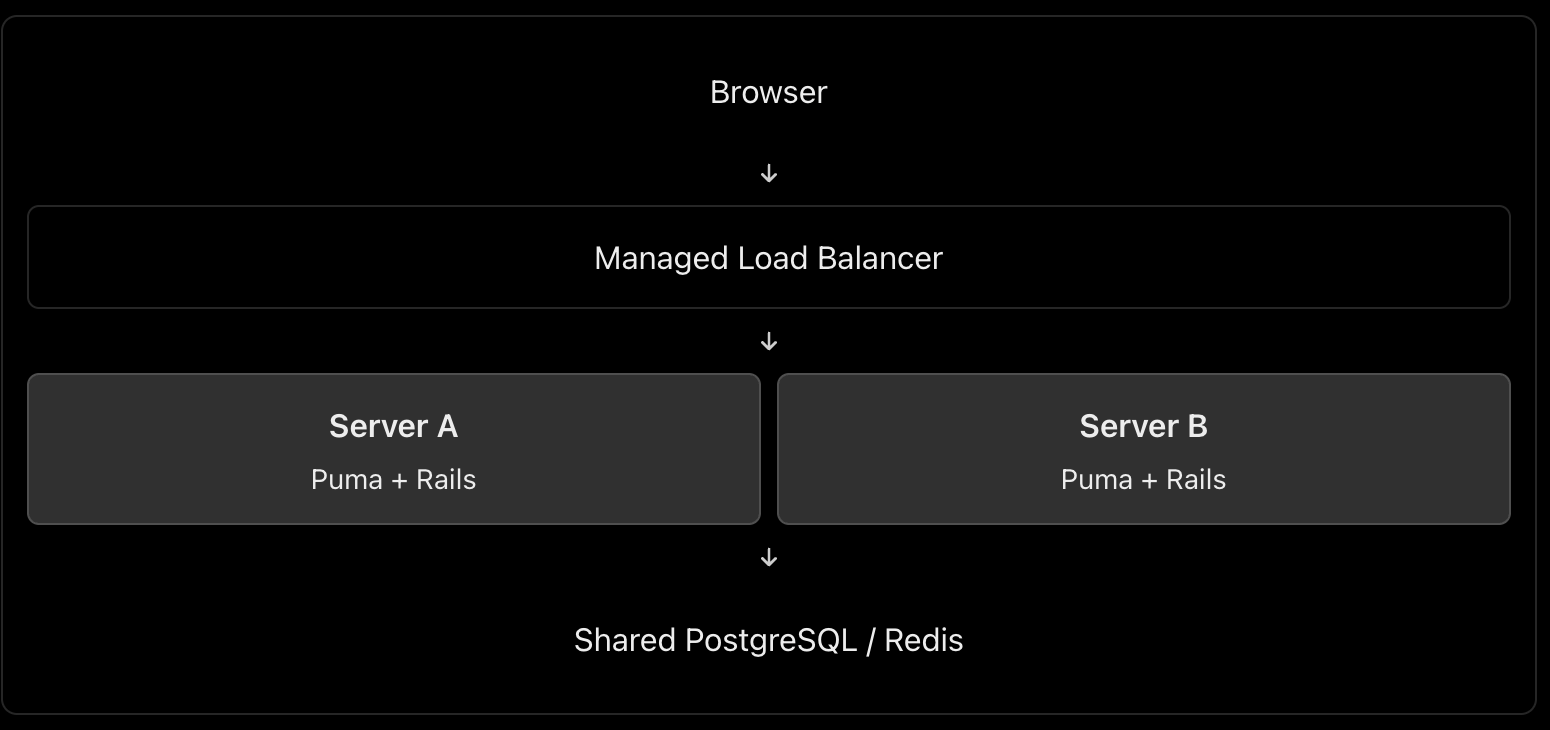
In this architecture, you might use AWS Application Load Balancer or Google Cloud Load Balancing in front of multiple application instances.

Do you also need Nginx on each application server? Not necessarily. The managed load balancer can route traffic directly to Puma or the application container, if that setup is supported and correctly secured. Add Nginx when you need the functionality it provides.

Architecture C: Larger application with a CDN

Browser
|
v
CDN / WAF
|
v
Managed Load Balancer
|
+---- Rails Instance A
|
+---- Rails Instance B
|
+---- Rails Instance C
|
v
Managed PostgreSQL
Redis / Background Jobs

This setup adds edge caching and potentially web-application firewall protection before traffic reaches the load balancer. Static assets can be served from the CDN, while dynamic requests are sent to Rails.

The exact design depends on your cloud provider, traffic volume, reliability targets, and operational budget.

6. Can Nginx itself be a load balancer?

Yes. This is an important int. point.

Nginx can reverse-proxy requests to one application instance or load-balance them across several upstream instances. These are two uses of the same technology. NGINX load-balancing documentation

For example:

http {
upstream rails_app {
server 10.0.1.10:3000;
server 10.0.1.11:3000;
}
server {
listen 80;
server_name shop.example.com;
location / {
proxy_set_header Host $host;
proxy_set_header X-Forwarded-For $proxy_add_x_forwarded_for;
proxy_set_header X-Forwarded-Proto $scheme;
proxy_pass http://rails_app;
}
}
}

This configuration illustrates Nginx distributing requests between two upstream Rails application servers. It is a simplified example, not a complete production configuration; TLS, trusted proxy settings, health monitoring, timeouts, and network restrictions must be addressed as appropriate.

Notice that a load balancer describes a role, not necessarily a separate physical server or a separate technology.

7. What is the best architecture for a Rails application?

My default recommendation would be:

  • Small application or early-stage product: Nginx → Puma → Rails, with PostgreSQL. Keep it simple.
  • Production application requiring horizontal scaling and high availability: A managed load balancer → multiple Rails instances, plus a managed database and shared services where needed. Use Nginx on the instances only when its features justify it.
  • High-traffic application: Add a CDN/WAF, caching, background workers, monitoring, and database scaling according to measured bottlenecks.

For a cloud-hosted Rails application, I would generally prefer a managed load balancer over maintaining my own public-facing load-balancing tier, when the platform offers one that meets the requirements.

The most important things are not the number of components but eliminating single points of failure where required, protecting application instances from unintended public access, monitoring performance, and scaling the actual bottleneck.

Int. answer

You could summarize it this way:

“Nginx or Apache acts as a web server and reverse proxy. It can serve static assets, terminate TLS, and forward dynamic requests to an application server such as Puma. A load balancer distributes incoming requests among multiple healthy application instances, improving scalability and availability. Nginx can also perform load balancing itself, so they don’t necessarily have to be separate components. For a small Rails application, Nginx → Puma is sufficient. For a horizontally scaled production application, I’d typically use a managed load balancer in front of multiple application instances, with Nginx on each instance only if needed.”

That demonstrates that you understand both the purpose of each component and when the extra infrastructure is worth the complexity.

Explain the following

1. How do you replicate application server instances? Is containerization best?

Yes, containers are an excellent default for many modern deployments, but they are not mandatory.

Suppose your Rails application runs on Puma.

                    Load Balancer
                   /      |      \
                  v       v       v
              Rails A  Rails B  Rails C
              Puma     Puma     Puma
                  \       |       /
                   PostgreSQL

Each instance runs the same application version.

How to implement it

  1. Containerize the Rails app using Docker. Build an image containing Ruby, gems, application code and required runtime dependencies.
  2. Deploy multiple replicas using a platform such as AWS ECS, Kubernetes, or a managed container service.
  3. Put a load balancer in front to route requests to healthy instances.
  4. Keep instances stateless. Store persistent data in PostgreSQL, shared cache/session stores in Redis when needed, and uploaded files in object storage such as S3.
  5. Configure health checks, monitoring and autoscaling. Deploy new application versions through a controlled rollout.

Docker documents the use of production deployment configurations and orchestration for scaling applications. Docker production guide

Important: Replicating a server manually is possible, but deploying the same immutable image is more consistent and repeatable. You can also replicate virtual machines without containers.

2. What does a CDN do? What is Cloudflare?

A CDN (Content Delivery Network) caches and serves content from locations distributed around the world.

For example, your Rails application serves a product page containing JavaScript, CSS and product images. Cloudflare can cache eligible assets closer to users, reducing response latency, origin traffic and bandwidth usage. HTML pages containing personalized data should not be cached indiscriminately. Cloudflare CDN documentation

Other Cloudflare benefits

  • DNS hosting: Manage domain records.
  • DDoS protection: Help absorb or mitigate abusive traffic.
  • Web Application Firewall (WAF): Filter requests matching security rules.
  • TLS/HTTPS: Manage certificates and encrypt client connections.
  • Load balancing: Route traffic to healthy origins or regions.

How does Cloudflare work as a load balancer?

You configure a load balancer with pools of origins and health monitors.

For example:

shop.example.com
|
v
Cloudflare Load Balancer
|
+------ Region A (healthy)
| |
| App servers
|
+------ Region B (healthy)
|
App servers

Cloudflare can steer traffic between these origins according to the configured policy and health. If an origin becomes unhealthy, it can stop sending traffic to it. Cloudflare Load Balancing

Remember: CDN caching and load balancing are different jobs. Cloudflare can provide both, but load balancing is a separate feature from basic CDN proxying.

3. What is DNS, and how do we configure it?

DNS (Domain Name System) translates human-readable domain names into information needed to locate services on the internet.

For example:

shop.example.com
|
v
DNS lookup
|
v
IP address / destination
|
v
Web server or load balancer

Common DNS records include:

RecordPurposeExample
AMaps a name to an IPv4 addressshop.example.com → 203.0.113.10
AAAAMaps a name to an IPv6 addressMaps to an IPv6 address
CNAMEPoints a name to another hostnamewww → shop.example.com
MXSpecifies mail serversEmail delivery
TXTStores text used for verification and email securityDomain verification, SPF

Configuration steps

  1. Register a domain through a domain registrar.
  2. Choose a DNS provider, such as Cloudflare or your cloud provider.
  3. Configure the domain’s authoritative nameservers at the registrar if switching DNS providers.
  4. Create the required records. For example, point shop.example.com to your public load balancer, or to Cloudflare when its proxy is enabled.
  5. Verify the records and configure the appropriate TTL (how long DNS answers can be cached).

Cloudflare explains the common record types and how to create them in its DNS documentation.

One distinction: DNS resolves names; it does not process the HTTP request itself. DNS round-robin using multiple IPs is not equivalent to a health-aware load balancer.

4. How do we configure HTTPS, and how does it work?

HTTPS is HTTP carried over TLS (Transport Layer Security).

Setup

  1. Obtain a TLS certificate for your domain from a trusted certificate authority, such as Let’s Encrypt, or use a suitable managed certificate.
  2. Configure the public-facing server or load balancer to listen on HTTPS, normally port 443.
  3. Configure certificate renewal.
  4. Redirect HTTP traffic to HTTPS and enable HSTS after verifying the HTTPS deployment.
  5. If a CDN or load balancer sits in front of Rails, configure encryption on the upstream connection as well.

How TLS works

When a browser connects over HTTPS:

  1. The browser and server negotiate TLS parameters.
  2. The server presents its certificate.
  3. The browser checks the certificate’s validity and domain name.
  4. They securely establish session keys.
  5. HTTP data is encrypted and protected against undetected modification while in transit.

TLS protects the connection. It does not automatically secure your database, authenticate application users, or eliminate application vulnerabilities. MDN: TLS

With Cloudflare

The connection normally has two segments:

Browser ← HTTPS/TLS → Cloudflare
Cloudflare ← HTTPS/TLS → Origin server

Choose Full (strict) when possible. It encrypts both segments and validates the origin certificate. Avoid a configuration that encrypts only the browser-to-Cloudflare connection while leaving the Cloudflare-to-origin connection unencrypted. Cloudflare encryption modes

5. What happens when a user types HTTP vs HTTPS?

Suppose the user enters http://shop.example.com.

  • The browser connects using HTTP, normally on port 80.
  • The server or proxy responds with a permanent redirect, such as 301, to https://shop.example.com.
  • The browser makes a new connection over HTTPS on port 443.
HTTP :80
|
| 301 redirect
v
HTTPS :443
|
v
Rails application

Important: The initial HTTP request is not encrypted, even if it gets redirected immediately. Enable HSTS after HTTPS is correctly configured. Browsers that have learned the HSTS policy will automatically upgrade subsequent HTTP attempts to HTTPS. MDN: HSTS and HTTP redirection

If the user enters HTTPS directly and the certificate is invalid or expired, the browser will show a security warning or block the connection.

6. How do you prevent security issues even after enabling HTTPS?

HTTPS protects data in transit, but attackers can still exploit vulnerable application code, stolen credentials, exposed servers and incorrect permissions.

Use multiple layers of protection:

  • Keep the OS, web server, Rails, Ruby and dependencies patched.
  • Configure firewalls so only required ports are accessible.
  • Do not expose database ports publicly.
  • Use least-privilege database accounts and secure secret management.
  • Add WAF rules, rate limiting and DDoS protection.
  • Enforce authentication, authorization and input validation in Rails.
  • Monitor logs, suspicious activity, failed logins and security alerts.

For a useful checklist, follow the current OWASP Top 10: 2025, which includes broken access control, security misconfiguration, software supply-chain failures, cryptographic failures and injection.

7. Major web security concerns and how to handle them

Here is the short, point-by-point checklist you asked for.

Security concernWhere to protectWhat to do
DDoS and abusive trafficCloudflare / edgeEnable DDoS protection, appropriate WAF rules and rate limits.
Exposed servers and portsFirewall / networkExpose only required ports; restrict origin access to trusted upstreams.
TLS misconfigurationCDN / load balancer / web serverUse valid certificates, HTTPS redirects and TLS on upstream connections.
Injection and XSSRails applicationUse safe database queries, validate inputs and encode output.
Broken access control / IDORRails applicationCheck resource-level authorization on every sensitive operation.
Brute-force attacksEdge / RailsRate-limit authentication endpoints, use MFA where appropriate and detect repeated failures.
Vulnerable dependenciesCI/CD pipelineScan and patch dependencies; review changes and protect the build pipeline.
Data leaks and secrets exposureRails / database / loggingRestrict database access, manage secrets safely and redact sensitive logs.
MisconfigurationEvery layerHarden defaults, remove debug modes, restrict admin endpoints and audit configuration.
Missing detection and recoveryMonitoring / operationsCentralize logs, alert on suspicious activity and test backups and incident-response procedures.

These areas align with the risks described in OWASP Top 10: 2025.

8. What should you configure in Rails and its servers?

A. Rails application

  • HTTPS: Enable config.force_ssl = true in production, with proxy and forwarded-protocol settings configured correctly.
  • Host validation: Configure config.hosts with your expected domains.
  • Authentication and authorization: Use secure authentication, strong access policies and resource-level permission checks.
  • SQL injection: Use Active Record parameterization; avoid building SQL with untrusted string interpolation.
  • CSRF: Keep CSRF protection enabled for browser-based session authentication. For APIs, choose suitable token authentication and explicitly configure CORS.
  • Sessions: Use secure, HttpOnly and appropriate SameSite cookie settings.
  • Security headers: Configure Content Security Policy (CSP) and other suitable response headers.
  • Secrets and logs: Use Rails credentials or a secrets manager, redact passwords and tokens, and never commit secrets.
  • Validation and uploads: Validate data on the server, restrict file types and sizes, and store uploads safely.
  • Dependencies and testing: Run Brakeman, dependency vulnerability checks and automated security tests in CI.

Rails documents these protections in its Security Guide and Configuration Guide.

B. Nginx / Apache

  • Configure TLS properly if it terminates HTTPS.
  • Redirect HTTP to HTTPS.
  • Set request body-size limits, sensible timeouts and appropriate rate limits.
  • Configure correct proxy headers and trust only known upstreams.
  • Avoid exposing server version details and unnecessary endpoints.

C. Load balancer / Cloudflare

  • Enable health checks and route only to healthy backends.
  • Use TLS between the load balancer and application servers where appropriate.
  • Restrict direct access to the origin so attackers cannot simply bypass Cloudflare’s protections.
  • Configure WAF rules, DDoS mitigation and rate limits.
  • Ensure client IP headers are trusted only when they come from the configured proxy.
  • Use least-privilege credentials and monitor security events.

D. Database / infrastructure

  • Keep PostgreSQL on a private network.
  • Use least-privilege database roles and encrypted connections where required.
  • Store secrets outside source control and rotate them when exposed.
  • Patch servers and containers, enforce access controls, monitor logs and test backups.

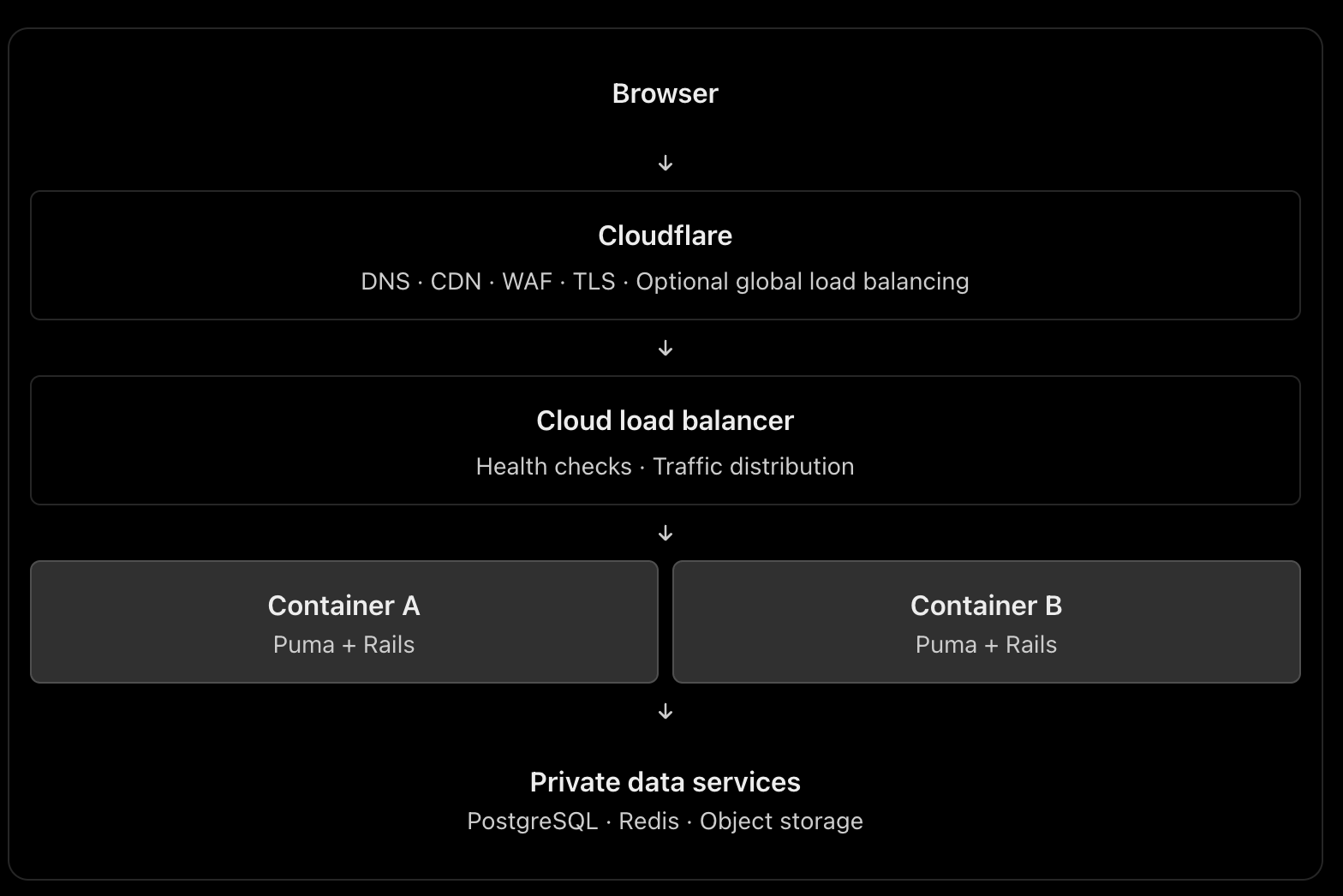
Recommended architecture to remember

This is a scalable reference architecture, not a requirement to use every component. For a smaller application, you may use Cloudflare plus one server running Nginx and Puma. Add managed load balancing and multiple replicas when availability and traffic requirements justify them. If Cloudflare performs global load balancing, the additional cloud load balancer may or may not be necessary.

The principal engineering lesson: HTTPS protects communication, Cloudflare helps protect and accelerate traffic, a load balancer distributes work, and Rails must still enforce application-level security. No single component replaces the others.

Setup Nginx, SSL , Firewall | Moving micro-services into AWS EC2 instance – Part 4

Install Nginx proxy server. Nginx also act like a load-balacer which is helpful for the balancing of network traffic.

sudo apt-get update
sudo apt-get install nginx

Commands to stop, start, restart, check status

sudo systemctl stop nginx
sudo systemctl start nginx
sudo systemctl restart nginx

# after making configuration changes
sudo systemctl reload nginx
sudo systemctl disable nginx
sudo systemctl enable nginx

Install SSL – Letsencrypt

Install packages needed for ssl

sudo add-apt-repository ppa:certbot/certbot
sudo apt-get update
sudo apt-get install python-certbot-nginx

Install the SSL Certificate:

certbot -d '*.domain.com' -d domain.com --manual --preferred-challenges dns certonly

Your certificate and chain have been saved at:
   /etc/letsencrypt/live/domain.com/fullchain.pem

Your key file has been saved at:
   /etc/letsencrypt/live/domain.com/privkey.pem
SSL certificate auto renewal

Let’s Encrypt’s certificates are valid for 90 days. To automatically renew the certificates before they expire, the certbot package creates a cronjob which will run twice a day and will automatically renew any certificate 30 days before its expiration.

Since we are using the certbot webroot plug-in once the certificate is renewed we also have to reload the nginx service. To do so append –renew-hook “systemctl reload nginx” to the /etc/cron.d/certbot file so as it looks like this:

/etc/cron.d/certbot
0 */12 * * * root test -x /usr/bin/certbot -a \! -d /run/systemd/system && perl -e 'sleep int(rand(3600))' && certbot -q renew --renew-hook "systemctl reload nginx"

To test the renewal process, use the certbot –dry-run switch:

sudo certbot renew --dry-run

Renew your EXPIRED certificate this way:

sudo certbot --force-renewal -d '*.domain.com' -d domain.com --manual --preferred-challenges dns certonly

Are you OK with your IP being logged?
- - - - - - - - - - - - - - - - - - - - - - - - - - - - - - - - - - - - - - - -
(Y)es/(N)o: Y

- - - - - - - - - - - - - - - - - - - - - - - - - - - - - - - - - - - - - - - -
Please deploy a DNS TXT record under the name
_acme-challenge.<domain>.com with the following value:

O3bpxxxxxxxxxxxxxxxxxxxxxxxxxxY4TnNo

Before continuing, verify the record is deployed.
- - - - - - - - - - - - - - - - - - - - - - - - - - - - - - - - - - - - - - - -
Press Enter to Continue

You need to update the DNS txt record for _acme-challenge.<domain>.com

sudo systemctl restart nginx # restart nginx to take effect

Configure the Firewall

Next, we’ll update our firewall to allow HTTPS traffic.

Check firewall status in the system. If it is inactive enable firewall.

sudo ufw status # check status

# enable firewall
sudo ufw enable
sudo ufw allow ssh
sudo ufw allow OpenSSH

Enable particular ports where your micro-services are running. Example:

sudo ufw allow 4031/tcp # Authentication service
sudo ufw allow 4131/tcp # File service
sudo ufw allow 4232/tcp # Search service

You can delete the ‘Authentication service’ firewall rule by:

sudo ufw delete allow 4031/tcp