
Let’s create an application for managing Tasks which are created by different users. Let’s use React UI for quick data response. The app consists of CRUD operations of Tasks, Authentication of users using JWT-Tokens, Authorization of users for their tasks.
Technology stack
Here’s the technology stack we use in our application.
| Layer | Technology | Purpose |
|---|---|---|
| Backend | Ruby on Rails 8.1+ | REST API |
| Database | PostgreSQL | Persistent storage |
| Frontend | React | UI |
| Language | TypeScript | Static typing |
| Build tool | Vite | Frontend development/build |
| UI library | Fluent UI React v9 | Components and styling |
| HTTP | Fetch API initially | API communication |
| Server cache | TanStack Query | API data caching |
| Global state | Redux Toolkit | Shared client-side state |
| Testing backend | RSpec | API and model tests |
| Testing frontend | Vitest + React Testing Library | Component tests |
| Containers | Docker + Docker Compose | Containerization |
| CI/CD | GitHub Actions | Automation and deployment |
Check ruby current version.
$ ruby -v

ruby 3.4.1 (2024-12-25 revision 48d4efcb85)
Check the security patches and updates of your version.
https://www.ruby-lang.org/en/downloads/releases
Then update the latest compatible version.
$ mise use -g ruby@3.4.12

(2026-10-23 revision 366f5fdc00)
To uninstall Ruby using mise, run mise uninstall ruby@ to delete a specific installed version.
$ mise uninstall ruby@3.4.1
Install latest ruby version that you need.
Switch between versions globally:
$ mise use -g ruby@3.4.12

$ mise use -g ruby@4.0.9
Check all needed versions exists:
ruby -v
gem -v
rails -v
node -v
npm -v
psql --version
Check Postgres versions available here: https://www.postgresql.org/download/macosx/
Download the one of the latest one if you have currently installed the old version.
$ brew install postgresql@18

Installing postgresql@18
==> Pouring postgresql@18--18.7.arm64_tahoe.bottle.tar.gz
Warning: postgresql@18 was installed but not linked because postgresql@14 is already linked.
To link this version, run:
brew link postgresql@18

$ brew link postgresql@18
Unlinking /opt/homebrew/Cellar/postgresql@14/14.17_1... 2165 symlinks removed.
Linking /opt/homebrew/Cellar/postgresql@18/18.7... 812 symlinks created.
$ psql --version
psql (PostgreSQL) 18.7 (Homebrew)
Update node js:
$ node -v
v24.14.0
install the latest Long-Term Support release
$ nvm install --lts
Installing latest LTS version.
Downloading and installing node v26.13.1...
Downloading https://nodejs.org/dist/v26.13.1/node-v26.13.1-darwin-arm64.tar.xz...
Computing checksum with sha256sum
Checksums matched!
Now using node v26.13.1 (npm v11.20.0)
Create app folder:
$ mkdir rails-react-task-manager
$ cd rails-react-task-manager
$ git init -b main
We want to manage the backend, frontend, Docker configuration and CI/CD workflows in one repository.
Update ruby gems:
A new release of RubyGems is available: 4.0.20 → 4.0.24!
See https://github.com/ruby/rubygems/blob/v4.0.24/CHANGELOG.md for the changes since 4.0.20.
Run `gem update --system 4.0.24` to update your installation
Install Rails:
check rails newest versions: https://rubygems.org/gems/rails/versions
$ gem install rails -v '~> 8.1.0'
Note: Pessimistic version constraint. Using -v “~> 8.1.0” installs the latest patch release within the 8.1 series (such as 8.1.4.1) while avoiding unintended jumps to future minor or major versions
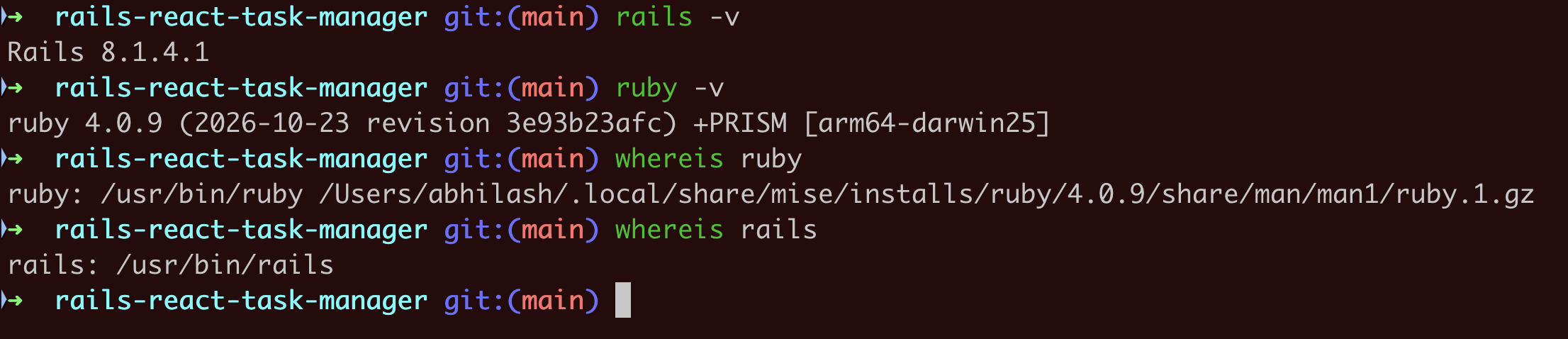
Reopen the shell and check:
Create a github repository
name it: rails-react-task-manager
$ git remote add origin git@github.com:<username>/rails-react-task-manager.git
Problem 1:
The first problem I am facing is the command rails new already has the folders:
.git, .github, .gitattributes, .gitignore etc inside rails app.
So when I try to push the rails app:
git add backend/
error: 'backend/' does not have a commit checked out
error: unable to index file 'backend/'
fatal: adding files failed
This happens because Rails automatically initializes a Git repository when you run rails new.
Solution: Keep only one Git repository
Since we’re building a monorepo, we want Git initialized only at the project root.
Remove only the nested Git metadata:
rm -rf backend/.git
| Type | When to Use It | Example |
|---|---|---|
chore | Upgrading packages, libraries, or runtime versions | chore: update Node.js version or chore(deps): bump lodash |
feat | Adding a new feature or capability for the user. | feat: add user login via OAuth |
fix | Patching a bug in the application code. | fix: resolve crash on checkout page |
refactor | Restructuring production code without changing its behavior. | refactor: simplify auth helper logic |
docs | Updating READMEs, comments, or API guides. | docs: add setup instructions |
style | Fixing formatting, whitespace, or missing semicolons. | style: format files with Prettier |
test | Adding or updating unit and integration tests. | test: add unit tests for cart total |
build / ci | Making dedicated changes to build systems or CI pipelines (used by teams that prefer stricter categories over chore). | ci: cache node_modules in pipeline |

