
The key idea is this: Nginx/Apache, load balancers, and application servers have different responsibilities, but some of their responsibilities overlap. You don’t always need all three.
Let’s understand this using a Ruby on Rails application, since it makes the architecture easier to relate to real production deployments.
1. What happens when a user sends a request?
Suppose a user opens your application:
GET https://shop.example.com/products
The browser sends the request over the internet. Something must receive that request, decide where it should go, and return the response.
A typical production architecture looks like this:
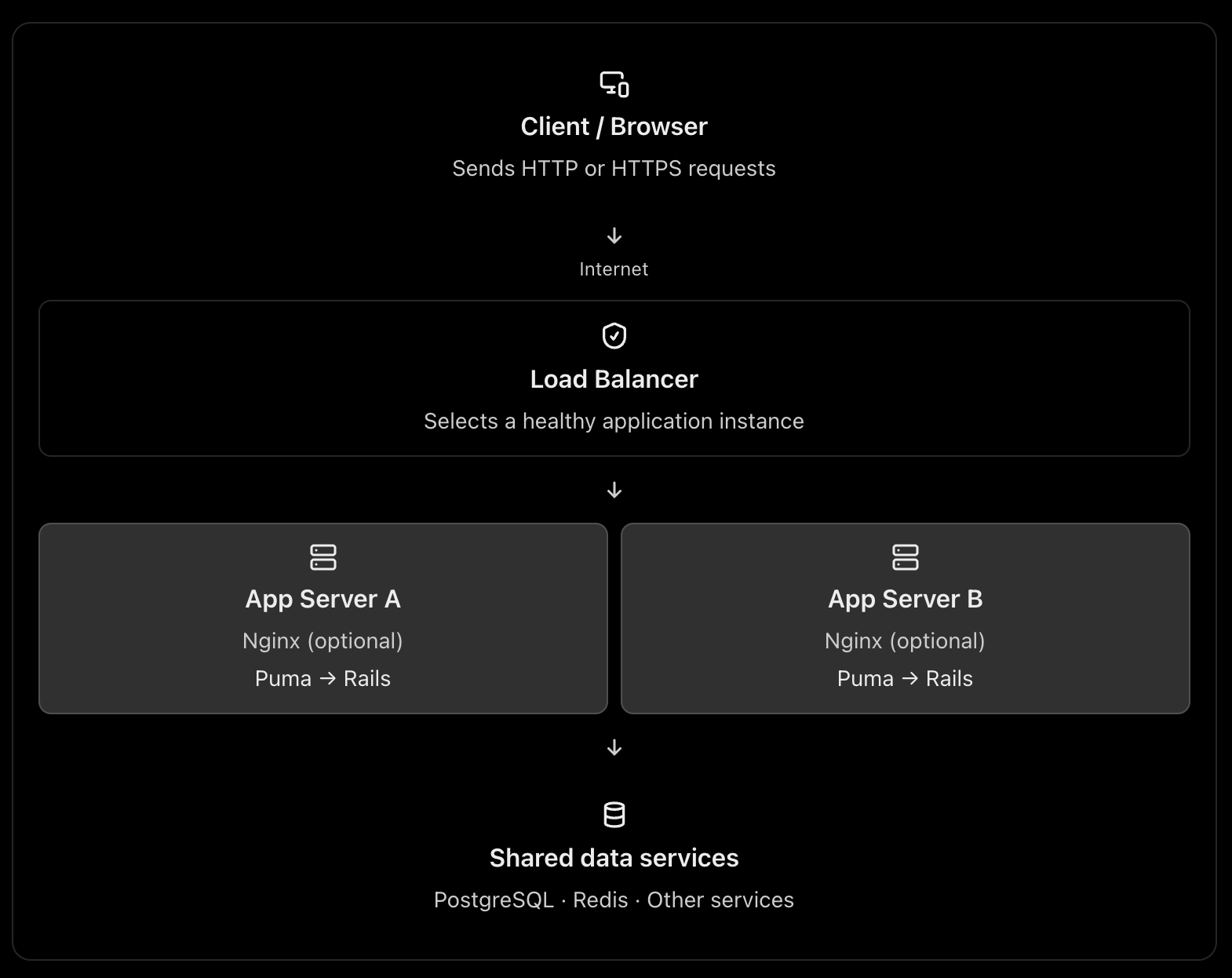
This is one possible architecture, not a requirement for every web application. A load balancer can route directly to the application servers, and Nginx can itself act as a load balancer. See the official NGINX reverse proxy documentation and load-balancing documentation.
2. What is Nginx or Apache used for?
Nginx and Apache are web servers. They can also act as reverse proxies, routing requests to an application server such as Puma in Rails.
Think of Nginx as the reception desk of your application server.
It can receive a request, handle certain tasks itself, or forward the request to Rails.
A. Serving static files
Consider these requests:
GET /assets/application-abc123.cssGET /images/logo.pngGET /products
The first two requests may only need static files. They do not necessarily require Rails to execute any application code.
Nginx can serve those files directly. The third request typically needs Rails to query the database and build a response.
This avoids spending Rails application capacity on work that a web server can do efficiently. A CDN can serve many of these static assets even earlier in the request path. NGINX static-content documentation
B. Acting as a reverse proxy
Your Rails application might run on Puma at:
127.0.0.1:3000
Nginx listens on the public HTTP/HTTPS ports and forwards dynamic requests to Puma.
Browser | | HTTPS :443 vNginx | | HTTP on localhost:3000 vPuma | vRails controllers → models → database
Nginx receives the response from Puma and sends it back to the browser.
C. Handling infrastructure concerns
Depending on its configuration, Nginx can also help with:
- TLS/HTTPS termination.
- Request and response buffering.
- Compression and caching.
- Request-size limits and timeouts.
- Routing by hostname or URL path.
These capabilities help keep infrastructure concerns separate from your Rails business logic. They do require appropriate configuration; Nginx does not automatically solve every security or performance problem.
What about Apache?
Apache can serve static files, terminate TLS, reverse proxy requests, and distribute traffic. Nginx is a common choice for this role, but Apache is also valid.
You normally choose Nginx or Apache for a given reverse-proxy role, rather than installing both by default.
3. What is a load balancer?
A load balancer distributes incoming traffic across multiple application instances instead of sending every request to a single instance.
Imagine your Rails application is running on one server with Puma.
10,000 requests | vRails Server A
If the traffic grows, that single server may run out of CPU, memory, or available request-processing capacity.
You can run multiple application instances:
                10,000 requests
                       |
                       v
                Load Balancer
                 /          \
                v            v
          Rails Server A  Rails Server B
             Puma             Puma
The load balancer chooses a target according to its configured routing algorithm and health information. If a target becomes unhealthy, a properly configured load balancer can stop directing new requests to it. AWS Elastic Load Balancing documentation
Why is this useful?
Horizontal scaling: Add more application instances when traffic increases.
High availability: A failed instance does not necessarily take down the entire application.
Health checks: Avoid routing new requests to unhealthy instances.
Controlled deployments: Replace or remove instances gradually, when your deployment strategy supports it.
A load balancer does not make an individual Rails request faster by itself. Its main purpose is to distribute work and improve availability and scalability.
4. Why not send requests directly to the application server?
You absolutely can. The question is whether doing so is appropriate for your deployment.
For example, you could expose Puma directly:
Browser → Puma :3000 → Rails → PostgreSQL
This is technically possible. In a small deployment or a managed platform, it can be perfectly reasonable.
But consider what happens in a more demanding production environment.
| Concern | App server directly exposed | Reverse proxy / load balancer |
|---|---|---|
| Static files | May consume app-server capacity | Can be served separately |
| HTTPS | Must be configured at the app or another layer | Can terminate TLS at the proxy/LB |
| Multiple instances | Needs a routing strategy | Can distribute traffic |
| Unhealthy instances | Needs separate handling | Can use health checks |
| Request limits and buffering | Depends on app server | Can be handled at the proxy |
| Application isolation | Public app-server port may be exposed | Can keep app instances on private networks |
The architectural reason is separation of responsibilities. Puma is responsible for accepting requests and running your Rails application. The proxy or load balancer handles traffic-management responsibilities around it.
One caveat: the proxy is not automatically a security boundary. You still need firewall rules, correct forwarded-header handling, application security, and suitable network configuration.
5. The three architectures you should know
Architecture A: One server – small application

Everything may run on one virtual machine, although PostgreSQL could be a separate managed service.
Here, Nginx acts as a reverse proxy, but it is not distributing traffic across multiple machines. This is a reasonable starting point for many Rails applications.
Architecture B: Multiple servers – production scaling
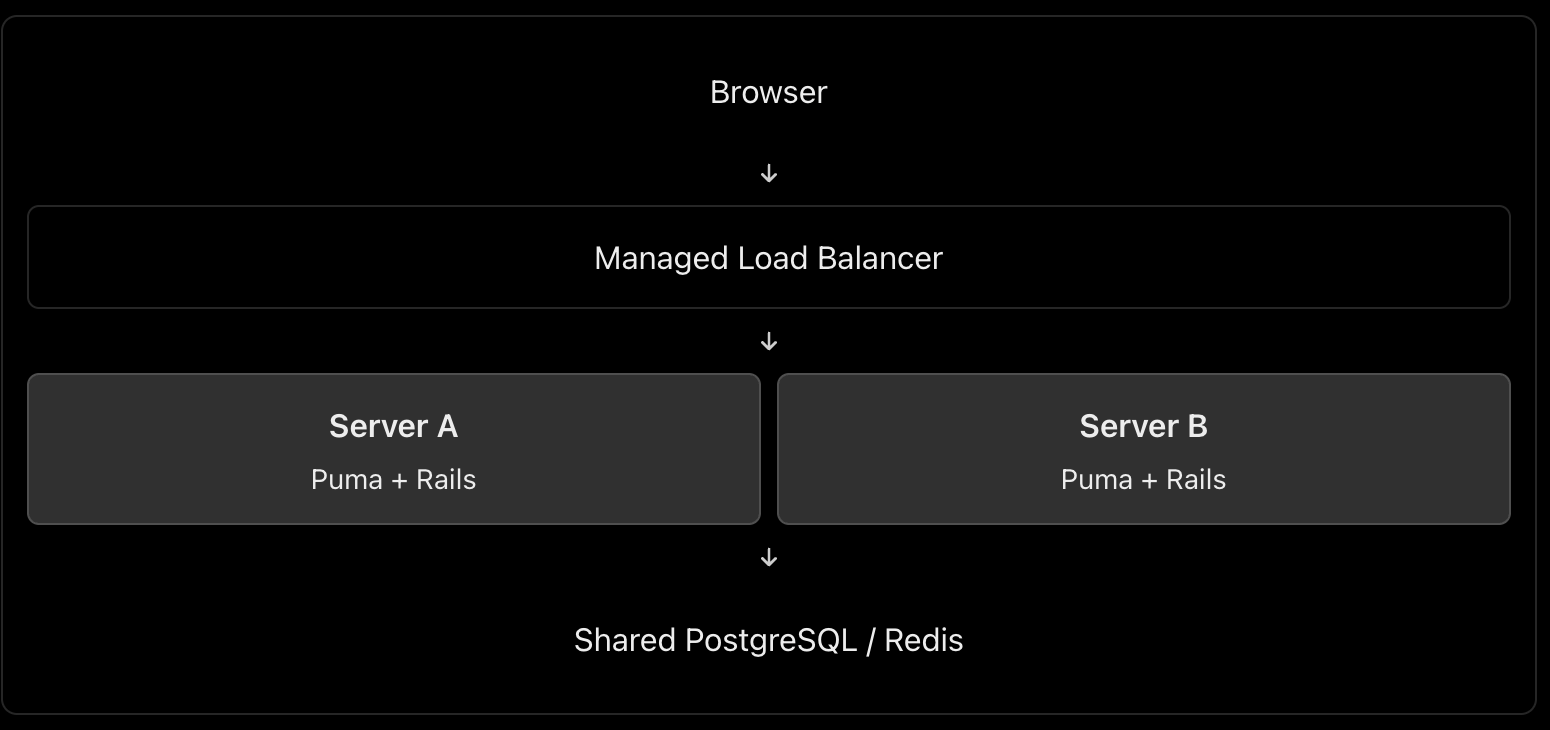
In this architecture, you might use AWS Application Load Balancer or Google Cloud Load Balancing in front of multiple application instances.
Do you also need Nginx on each application server? Not necessarily. The managed load balancer can route traffic directly to Puma or the application container, if that setup is supported and correctly secured. Add Nginx when you need the functionality it provides.
Architecture C: Larger application with a CDN
Browser | vCDN / WAF | vManaged Load Balancer | +---- Rails Instance A | +---- Rails Instance B | +---- Rails Instance C | v Managed PostgreSQL Redis / Background Jobs
This setup adds edge caching and potentially web-application firewall protection before traffic reaches the load balancer. Static assets can be served from the CDN, while dynamic requests are sent to Rails.
The exact design depends on your cloud provider, traffic volume, reliability targets, and operational budget.
6. Can Nginx itself be a load balancer?
Yes. This is an important int. point.
Nginx can reverse-proxy requests to one application instance or load-balance them across several upstream instances. These are two uses of the same technology. NGINX load-balancing documentation
For example:
http { upstream rails_app { server 10.0.1.10:3000; server 10.0.1.11:3000; } server { listen 80; server_name shop.example.com; location / { proxy_set_header Host $host; proxy_set_header X-Forwarded-For $proxy_add_x_forwarded_for; proxy_set_header X-Forwarded-Proto $scheme; proxy_pass http://rails_app; } }}
This configuration illustrates Nginx distributing requests between two upstream Rails application servers. It is a simplified example, not a complete production configuration; TLS, trusted proxy settings, health monitoring, timeouts, and network restrictions must be addressed as appropriate.
Notice that a load balancer describes a role, not necessarily a separate physical server or a separate technology.
7. What is the best architecture for a Rails application?
My default recommendation would be:
- Small application or early-stage product: Nginx → Puma → Rails, with PostgreSQL. Keep it simple.
- Production application requiring horizontal scaling and high availability: A managed load balancer → multiple Rails instances, plus a managed database and shared services where needed. Use Nginx on the instances only when its features justify it.
- High-traffic application: Add a CDN/WAF, caching, background workers, monitoring, and database scaling according to measured bottlenecks.
For a cloud-hosted Rails application, I would generally prefer a managed load balancer over maintaining my own public-facing load-balancing tier, when the platform offers one that meets the requirements.
The most important things are not the number of components but eliminating single points of failure where required, protecting application instances from unintended public access, monitoring performance, and scaling the actual bottleneck.
Int. answer
You could summarize it this way:
“Nginx or Apache acts as a web server and reverse proxy. It can serve static assets, terminate TLS, and forward dynamic requests to an application server such as Puma. A load balancer distributes incoming requests among multiple healthy application instances, improving scalability and availability. Nginx can also perform load balancing itself, so they don’t necessarily have to be separate components. For a small Rails application, Nginx → Puma is sufficient. For a horizontally scaled production application, I’d typically use a managed load balancer in front of multiple application instances, with Nginx on each instance only if needed.”
That demonstrates that you understand both the purpose of each component and when the extra infrastructure is worth the complexity.
Explain the following
1. How do you replicate application server instances? Is containerization best?
Yes, containers are an excellent default for many modern deployments, but they are not mandatory.
Suppose your Rails application runs on Puma.
                    Load Balancer
                   /      |      \
                  v       v       v
              Rails A  Rails B  Rails C
              Puma     Puma     Puma
                  \       |       /
                   PostgreSQL
Each instance runs the same application version.
How to implement it
- Containerize the Rails app using Docker. Build an image containing Ruby, gems, application code and required runtime dependencies.
- Deploy multiple replicas using a platform such as AWS ECS, Kubernetes, or a managed container service.
- Put a load balancer in front to route requests to healthy instances.
- Keep instances stateless. Store persistent data in PostgreSQL, shared cache/session stores in Redis when needed, and uploaded files in object storage such as S3.
- Configure health checks, monitoring and autoscaling. Deploy new application versions through a controlled rollout.
Docker documents the use of production deployment configurations and orchestration for scaling applications. Docker production guide
Important: Replicating a server manually is possible, but deploying the same immutable image is more consistent and repeatable. You can also replicate virtual machines without containers.
2. What does a CDN do? What is Cloudflare?
A CDN (Content Delivery Network) caches and serves content from locations distributed around the world.
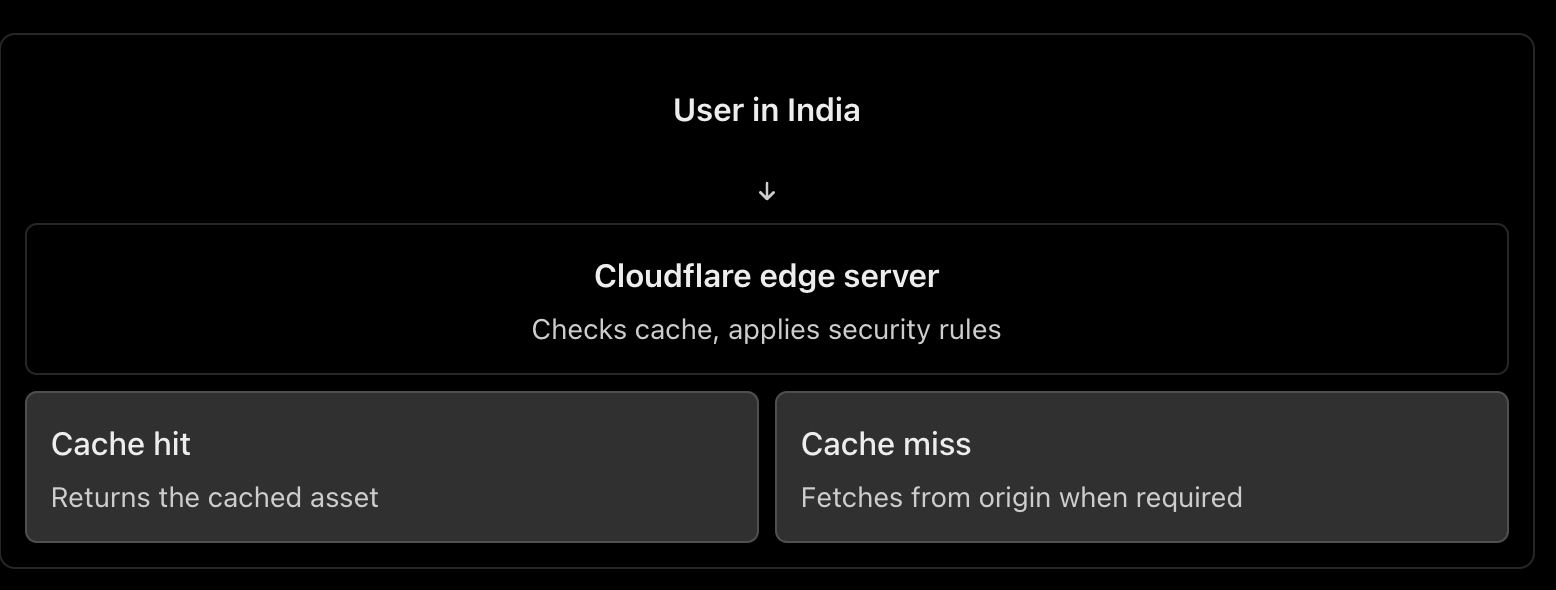
For example, your Rails application serves a product page containing JavaScript, CSS and product images. Cloudflare can cache eligible assets closer to users, reducing response latency, origin traffic and bandwidth usage. HTML pages containing personalized data should not be cached indiscriminately. Cloudflare CDN documentation
Other Cloudflare benefits
- DNS hosting: Manage domain records.
- DDoS protection: Help absorb or mitigate abusive traffic.
- Web Application Firewall (WAF): Filter requests matching security rules.
- TLS/HTTPS: Manage certificates and encrypt client connections.
- Load balancing: Route traffic to healthy origins or regions.
How does Cloudflare work as a load balancer?
You configure a load balancer with pools of origins and health monitors.
For example:
shop.example.com | vCloudflare Load Balancer | +------ Region A (healthy) | | | App servers | +------ Region B (healthy) | App servers
Cloudflare can steer traffic between these origins according to the configured policy and health. If an origin becomes unhealthy, it can stop sending traffic to it. Cloudflare Load Balancing
Remember: CDN caching and load balancing are different jobs. Cloudflare can provide both, but load balancing is a separate feature from basic CDN proxying.
3. What is DNS, and how do we configure it?
DNS (Domain Name System) translates human-readable domain names into information needed to locate services on the internet.
For example:
shop.example.com | vDNS lookup | vIP address / destination | vWeb server or load balancer
Common DNS records include:
| Record | Purpose | Example |
|---|---|---|
A | Maps a name to an IPv4 address | shop.example.com → 203.0.113.10 |
AAAA | Maps a name to an IPv6 address | Maps to an IPv6 address |
CNAME | Points a name to another hostname | www → shop.example.com |
MX | Specifies mail servers | Email delivery |
TXT | Stores text used for verification and email security | Domain verification, SPF |
Configuration steps
- Register a domain through a domain registrar.
- Choose a DNS provider, such as Cloudflare or your cloud provider.
- Configure the domain’s authoritative nameservers at the registrar if switching DNS providers.
- Create the required records. For example, point
shop.example.comto your public load balancer, or to Cloudflare when its proxy is enabled. - Verify the records and configure the appropriate TTL (how long DNS answers can be cached).
Cloudflare explains the common record types and how to create them in its DNS documentation.
One distinction: DNS resolves names; it does not process the HTTP request itself. DNS round-robin using multiple IPs is not equivalent to a health-aware load balancer.
4. How do we configure HTTPS, and how does it work?
HTTPS is HTTP carried over TLS (Transport Layer Security).
Setup
- Obtain a TLS certificate for your domain from a trusted certificate authority, such as Let’s Encrypt, or use a suitable managed certificate.
- Configure the public-facing server or load balancer to listen on HTTPS, normally port
443. - Configure certificate renewal.
- Redirect HTTP traffic to HTTPS and enable HSTS after verifying the HTTPS deployment.
- If a CDN or load balancer sits in front of Rails, configure encryption on the upstream connection as well.
How TLS works
When a browser connects over HTTPS:
- The browser and server negotiate TLS parameters.
- The server presents its certificate.
- The browser checks the certificate’s validity and domain name.
- They securely establish session keys.
- HTTP data is encrypted and protected against undetected modification while in transit.
TLS protects the connection. It does not automatically secure your database, authenticate application users, or eliminate application vulnerabilities. MDN: TLS
With Cloudflare
The connection normally has two segments:
Browser ← HTTPS/TLS → CloudflareCloudflare ← HTTPS/TLS → Origin server
Choose Full (strict) when possible. It encrypts both segments and validates the origin certificate. Avoid a configuration that encrypts only the browser-to-Cloudflare connection while leaving the Cloudflare-to-origin connection unencrypted. Cloudflare encryption modes
5. What happens when a user types HTTP vs HTTPS?
Suppose the user enters http://shop.example.com.
- The browser connects using HTTP, normally on port
80. - The server or proxy responds with a permanent redirect, such as
301, tohttps://shop.example.com. - The browser makes a new connection over HTTPS on port
443.
HTTP :80 | | 301 redirect vHTTPS :443 | vRails application
Important: The initial HTTP request is not encrypted, even if it gets redirected immediately. Enable HSTS after HTTPS is correctly configured. Browsers that have learned the HSTS policy will automatically upgrade subsequent HTTP attempts to HTTPS. MDN: HSTS and HTTP redirection
If the user enters HTTPS directly and the certificate is invalid or expired, the browser will show a security warning or block the connection.
6. How do you prevent security issues even after enabling HTTPS?
HTTPS protects data in transit, but attackers can still exploit vulnerable application code, stolen credentials, exposed servers and incorrect permissions.
Use multiple layers of protection:
- Keep the OS, web server, Rails, Ruby and dependencies patched.
- Configure firewalls so only required ports are accessible.
- Do not expose database ports publicly.
- Use least-privilege database accounts and secure secret management.
- Add WAF rules, rate limiting and DDoS protection.
- Enforce authentication, authorization and input validation in Rails.
- Monitor logs, suspicious activity, failed logins and security alerts.
For a useful checklist, follow the current OWASP Top 10: 2025, which includes broken access control, security misconfiguration, software supply-chain failures, cryptographic failures and injection.
7. Major web security concerns and how to handle them
Here is the short, point-by-point checklist you asked for.
| Security concern | Where to protect | What to do |
|---|---|---|
| DDoS and abusive traffic | Cloudflare / edge | Enable DDoS protection, appropriate WAF rules and rate limits. |
| Exposed servers and ports | Firewall / network | Expose only required ports; restrict origin access to trusted upstreams. |
| TLS misconfiguration | CDN / load balancer / web server | Use valid certificates, HTTPS redirects and TLS on upstream connections. |
| Injection and XSS | Rails application | Use safe database queries, validate inputs and encode output. |
| Broken access control / IDOR | Rails application | Check resource-level authorization on every sensitive operation. |
| Brute-force attacks | Edge / Rails | Rate-limit authentication endpoints, use MFA where appropriate and detect repeated failures. |
| Vulnerable dependencies | CI/CD pipeline | Scan and patch dependencies; review changes and protect the build pipeline. |
| Data leaks and secrets exposure | Rails / database / logging | Restrict database access, manage secrets safely and redact sensitive logs. |
| Misconfiguration | Every layer | Harden defaults, remove debug modes, restrict admin endpoints and audit configuration. |
| Missing detection and recovery | Monitoring / operations | Centralize logs, alert on suspicious activity and test backups and incident-response procedures. |
These areas align with the risks described in OWASP Top 10: 2025.
8. What should you configure in Rails and its servers?
A. Rails application
- HTTPS: Enable
config.force_ssl = truein production, with proxy and forwarded-protocol settings configured correctly. - Host validation: Configure
config.hostswith your expected domains. - Authentication and authorization: Use secure authentication, strong access policies and resource-level permission checks.
- SQL injection: Use Active Record parameterization; avoid building SQL with untrusted string interpolation.
- CSRF: Keep CSRF protection enabled for browser-based session authentication. For APIs, choose suitable token authentication and explicitly configure CORS.
- Sessions: Use secure,
HttpOnlyand appropriateSameSitecookie settings. - Security headers: Configure Content Security Policy (CSP) and other suitable response headers.
- Secrets and logs: Use Rails credentials or a secrets manager, redact passwords and tokens, and never commit secrets.
- Validation and uploads: Validate data on the server, restrict file types and sizes, and store uploads safely.
- Dependencies and testing: Run Brakeman, dependency vulnerability checks and automated security tests in CI.
Rails documents these protections in its Security Guide and Configuration Guide.
B. Nginx / Apache
- Configure TLS properly if it terminates HTTPS.
- Redirect HTTP to HTTPS.
- Set request body-size limits, sensible timeouts and appropriate rate limits.
- Configure correct proxy headers and trust only known upstreams.
- Avoid exposing server version details and unnecessary endpoints.
C. Load balancer / Cloudflare
- Enable health checks and route only to healthy backends.
- Use TLS between the load balancer and application servers where appropriate.
- Restrict direct access to the origin so attackers cannot simply bypass Cloudflare’s protections.
- Configure WAF rules, DDoS mitigation and rate limits.
- Ensure client IP headers are trusted only when they come from the configured proxy.
- Use least-privilege credentials and monitor security events.
D. Database / infrastructure
- Keep PostgreSQL on a private network.
- Use least-privilege database roles and encrypted connections where required.
- Store secrets outside source control and rotate them when exposed.
- Patch servers and containers, enforce access controls, monitor logs and test backups.
Recommended architecture to remember
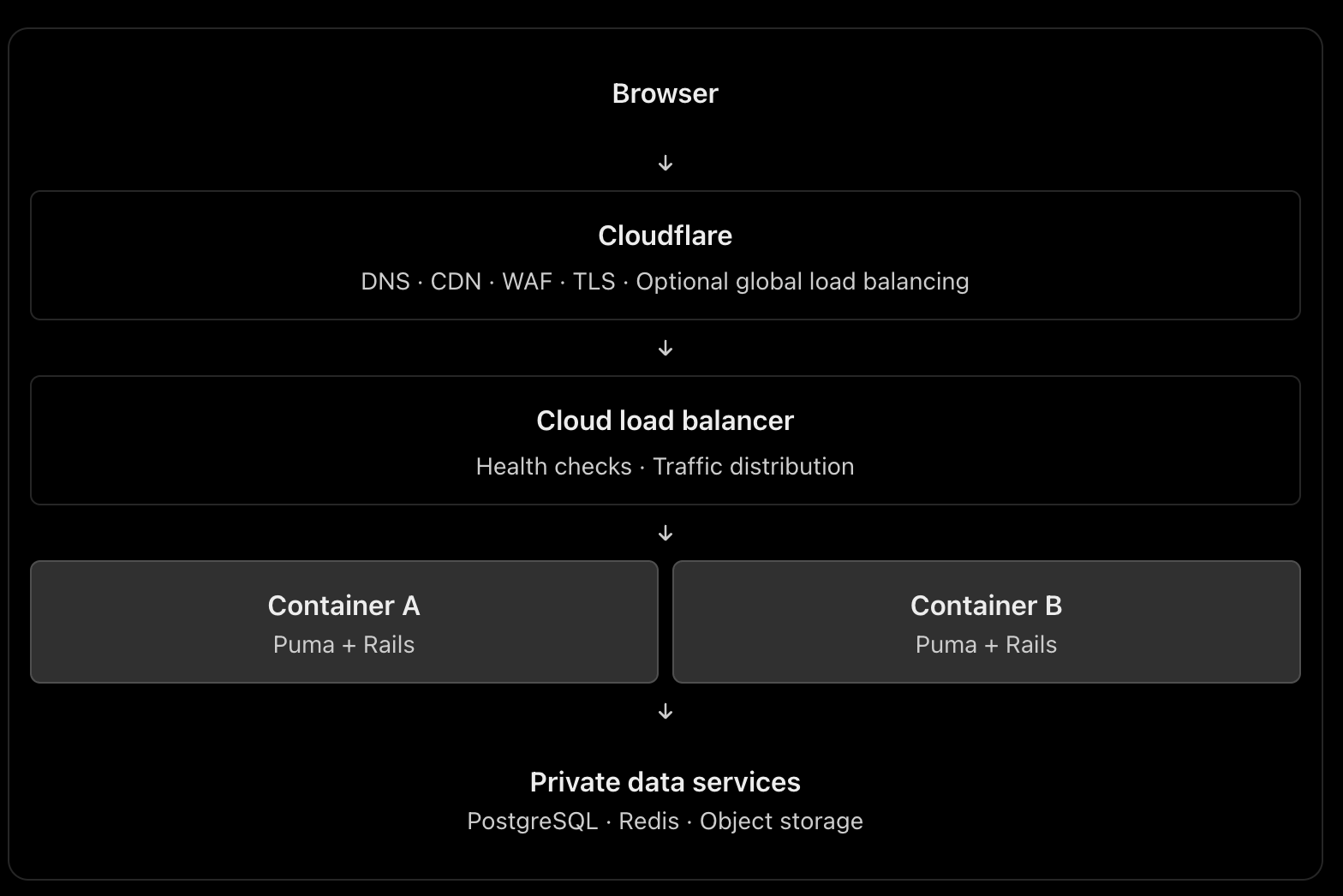
This is a scalable reference architecture, not a requirement to use every component. For a smaller application, you may use Cloudflare plus one server running Nginx and Puma. Add managed load balancing and multiple replicas when availability and traffic requirements justify them. If Cloudflare performs global load balancing, the additional cloud load balancer may or may not be necessary.
The principal engineering lesson: HTTPS protects communication, Cloudflare helps protect and accelerate traffic, a load balancer distributes work, and Rails must still enforce application-level security. No single component replaces the others.

