
Create the User model
Now let’s start building our actual Rails application.
I want to start with the User model rather than Task, because our application will have JWT authentication and every task must belong to an authenticated user. We’ll introduce RefreshSession when we implement JWT refresh tokens.
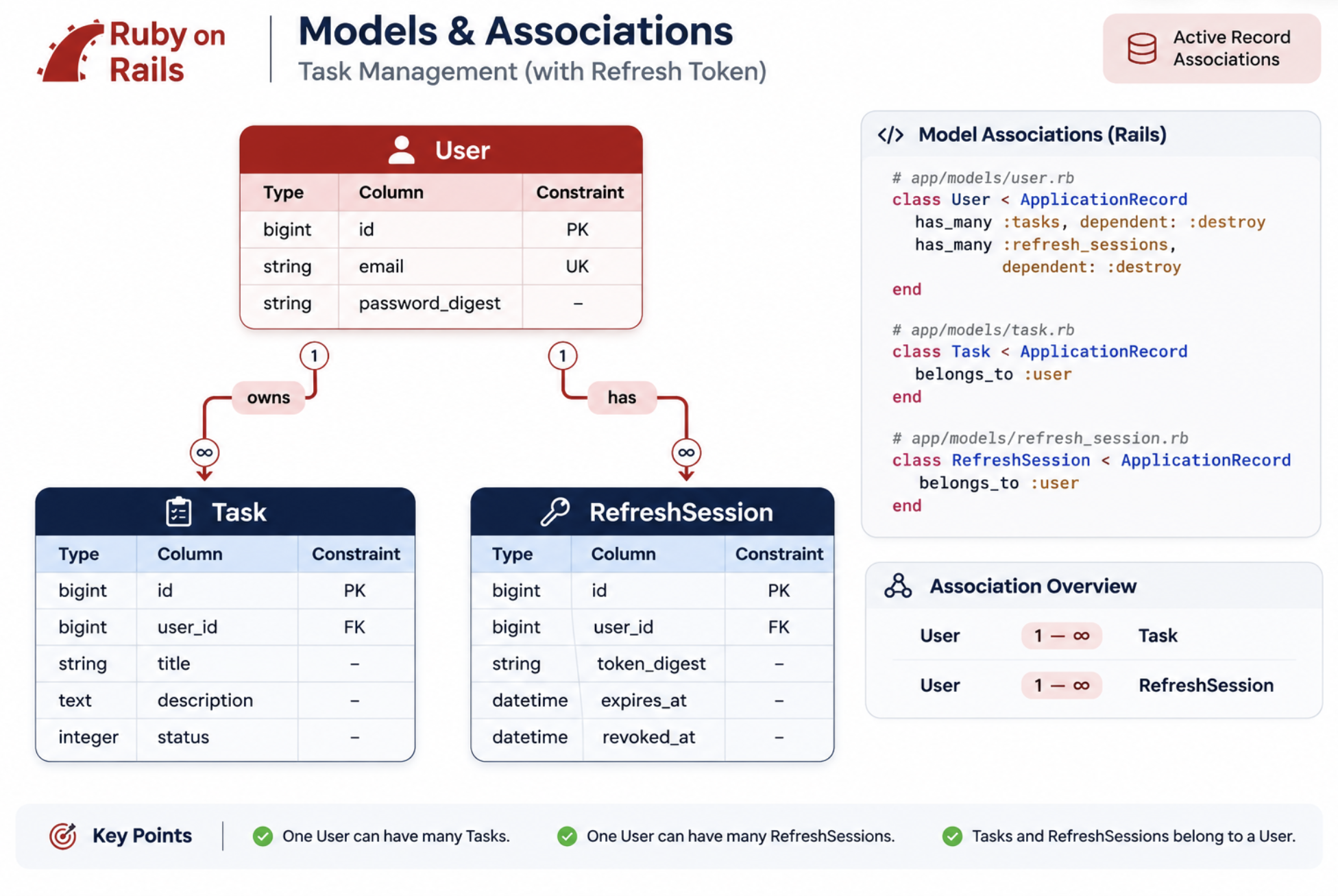
Install bcrypt
Rails provides has_secure_password, which uses bcrypt for password hashing.
Uncomment this to backend/Gemfile: gem "bcrypt", "~> 3.1.7" and do bundle install
Why bcrypt?
We should never store users’ actual passwords in the database. Instead, bcrypt hashes the password using a salt. Rails provides password authentication functionality through has_secure_password. We’ll explore password hashing, verification and authentication in detail when implementing JWT login.
Generate User model
rails g model User email:string password_digest:string
      invoke  active_record
      create    db/migrate/20261117085319_create_users.rb
      create    app/models/user.rb
      invoke    rspec
      create      spec/models/user_spec.rb
Notice invoking rspec, because we configured rspec generators. Notice that we’re using password_digest, not password. has_secure_password provides a virtual password attribute and stores its hash in password_digest
Review the migration
Make these database-level changes:
emailmust not be NULL.password_digestmust not be NULL.- Add a unique, case-insensitive index for email.
class CreateUsers < ActiveRecord::Migration[8.1]
  def change
    create_table :users do |t|
      t.string :email, null: false
      t.string :password_digest, null: false

      t.timestamps
    end

    add_index :users, "lower(email)", unique: true, name: :idx_users_lower_email
  end
end
Run:
rails db:prepare -t
Inspect db/schema.rb. You should see the users table with the expected columns and index.
Checklist
- Add bcrypt to Gemfile.
- Generate User model.
- Add database constraints.
- Add case-insensitive unique email index.
- Run migrations successfully.
- Inspect
schema.rb. - Commit changes.
We’ll introduce has_secure_password, email normalization, validations, described_class, build_stubbed vs new and proper model specs. We’ll also begin understanding how RSpec interacts with ActiveRecord and PostgreSQL.
Let’s implement our first real Rails model behaviour and write meaningful RSpec tests against it.
User model, validations and password security
in User model add: has_secure_password
What does this provide? When you assign: user.password = "my-secret-password" Rails automatically generates a bcrypt password digest and stores it in: user.password_digest
It also provides: user.authenticate("my-secret-password")
The behaviour is:
| Input | Result |
|---|---|
| Correct password | Returns the user object |
| Incorrect password | Returns false |
Important things to understand:
has_secure_password provides these validations automatically:
- Password must be present when creating a new record.
- Password cannot exceed 72 bytes.
- Password confirmation is checked when you supply
password_confirmation.
It does not enforce a minimum password length or complexity. We’ll discuss our password policy when implementing registration. Also, bcrypt’s 72-byte limit is a byte limit, not necessarily a 72-character limit.
Normalize the email address
onsider these inputs:
"Abhilash@Example.com"" abhilash@example.com ""ABHILASH@EXAMPLE.COM"
We want to store a consistent representation: abhilash@example.com
Rails provides an attribute normalization API. Add this to your model:
normalizes :email, with: ->(email) { email.strip.downcase }
Why use normalizes?
- Normalization happens when an attribute is assigned or validated.
- It keeps email representation consistent.
- You don’t need to remember to call
.strip.downcasein every controller.
Rails has supported
normalizessince Rails 7.1.
Add email validations
Add validations for:
- Email presence.
- Email uniqueness, case-insensitive.
Use Rails validations rather than implementing custom validation methods for these requirements.
Important architectural distinction:
We’re using two protections for uniqueness:
- ActiveRecord uniqueness validation – provides a useful validation error to the application.
- PostgreSQL unique index – protects the database against concurrent duplicate inserts.
Neither replaces the other.
Note: Our earlier lower(email) unique index is important here. The validation and database constraint must enforce the same case-insensitive uniqueness rule.
Understand the complete model behaviour
Your model should now have three responsibilities:
User
 ├── Password security
 │    └── has_secure_password
 │
 ├── Email normalization
 │    └── normalizes
 │
 └── Email validations
      ├── presence
      └── case-insensitive uniqueness

