
We maintain a simple rule: Controllers orchestrate HTTP. Services perform business operations. Models enforce domain and persistence rules. Blueprints control API representation.
This separation is enough for our current application and scales reasonably well without over-engineering. Our next step remains React application structure and API integration. We’ll leave the optional backend refactoring and additional model tests until later.
I will introduce one important architectural improvement: a separate authenticated API base controller. This keeps registration and login public while protecting all Task endpoints automatically.
Step 4.5 – JWT authentication and protected Task APIs
1. Create Api::V1::BaseController
Create:
mkdir -p app/controllers/api/v1

touch app/controllers/api/v1/base_controller.rb
Our controller hierarchy will be:
ApplicationController
       |
       ├── RegistrationsController
       |
       ├── SessionsController
       |
       └── Api::V1::BaseController
                  |
                  └── TasksController
Why this design?
- Registration doesn’t require authentication.
- Login doesn’t require authentication.
- Task endpoints require authentication.
- We don’t need to repeat authentication callbacks in every Task controller.
Rails API controllers support before_action callbacks.
Implement BaseController
backend/app/controllers/api/v1/base_controller.rb
class Api::V1::BaseController < ApplicationController
  before_action :authenticate_request!

  attr_reader :current_user

  rescue_from ActiveRecord::RecordNotFound, with: :render_not_found

  private

  def authenticate_request!
    authorization = request.headers["Authorization"].to_s

    match = authorization.match(/\ABearer\s+(\S+)\z/i)

    return render_unauthorized unless match

    payload = Authentication::TokenVerifier.verify(match[1])

    return render_unauthorized unless payload

    user_id = payload["sub"]

    unless user_id.is_a?(String) && user_id.match?(/\A[1-9]\d*\z/)
      return render_unauthorized
    end

    @current_user = User.find_by(id: user_id)

    render_unauthorized unless @current_user
  end

  def render_unauthorized
    render json: {
      errors: ["Unauthorized"]
    }, status: :unauthorized
  end

  def render_not_found
    render json: {
      errors: ["Resource not found"]
    }, status: :not_found
  end
end
Understand the authentication process
A. Extract the Bearer token authorization = request.headers["Authorization"]
React will send: Authorization: Bearer eyJhbGciOiJIUzI1NiJ9...
We extract the token after Bearer.
B. Verify the JWT payload = Authentication::TokenVerifier.verify(token)
Our existing service verifies the signature, algorithm and claims.
C. Identify the User User.find_by(id: payload["sub"])
Why query the database? JWT verification proves the token was signed by our application. It doesn’t prove that the user still exists or hasn’t been deleted.
D. Expose current_user
We use: attr_reader :current_user
All child controllers can now access: current_user. This becomes the foundation for authorization.
Q) Our base controller has helper codes like regExp matching and extract Bearer from headers. How can we clean the code?
As our application grows, we should avoid turning controllers into large classes containing authentication, serialization, cookie management and business logic.
My recommendation is to use private controller methods for controller-specific operations, Controller Concerns for reusable controller behaviour, and Service Objects for business logic.
But don’t extract every private method into a separate file. That can make a small application unnecessarily complicated.
1. Where should controller helper methods go?
Let’s establish some conventions for our project.
| Responsibility | Recommended location |
|---|---|
| Request parameter filtering | Controller private methods |
| HTTP response handling | Controller private methods |
| Authentication logic | Service objects |
| JWT generation and verification | app/services/authentication/ |
| Refresh-token management | app/services/authentication/ |
| Cookie management | Controller private methods or controller concern |
| Shared authentication callbacks | app/controllers/concerns/ |
| JSON serialization | app/blueprints/ |
| Model business rules | ActiveRecord models |
| Shared API authentication | Api::V1::BaseController |
Rails provides app/controllers/concerns specifically for reusable controller behaviour. Rails also recommends keeping helper methods that aren’t controller actions private.
Our recommended backend structure
backend/app/
│
├── blueprints/
│   ├── user_blueprint.rb
│   ├── session_blueprint.rb
│   └── task_blueprint.rb
│
├── controllers/
│   ├── application_controller.rb
│   │
│   ├── api/
│   │   └── v1/
│   │       ├── base_controller.rb
│   │       ├── registrations_controller.rb
│   │       ├── sessions_controller.rb
│   │       └── tasks_controller.rb
│   │
│   └── concerns/
│       └── api/
│           └── v1/
│               └── refresh_cookie.rb  # Only when shared
│
├── models/
│   ├── user.rb
│   ├── task.rb
│   └── refresh_session.rb
│
└── services/
    └── authentication/
        ├── base.rb
        ├── error.rb
        ├── access_token.rb
        ├── token_verifier.rb
        └── refresh_token.rb
This is sufficient. We don’t need repositories, interactors or additional architectural layers.
2. What should we do with our existing SessionsController?
Let’s examine its methods.
| Existing method | My recommendation |
|---|---|
login_params | Keep private in SessionsController |
render_session | Keep private; it orchestrates an HTTP response |
render_invalid_credentials | Keep private |
set_refresh_cookie | Keep private for now |
clear_refresh_cookie | Keep private for now |
verify_frontend_origin! | Keep private for now |
authenticate_request! | Move responsibility to BaseController |
| JWT generation | Already correctly extracted to AccessToken |
| JWT verification | Already correctly extracted to TokenVerifier |
| Refresh-token operations | Already correctly extracted to RefreshToken |
Why not move everything into concerns?
A concern is useful when multiple controllers share meaningful behaviour.
For example, if both SessionsController and another controller need the same cookie management:
app/
└── controllers/
    └── concerns/
        └── api/
            └── v1/
                └── refresh_cookie.rb
But currently SessionsController owns those operations. Extracting them now doesn’t provide much benefit.
Also, don’t move cookie-setting methods into app/helpers. Rails helpers are primarily intended for view presentation, not HTTP cookie management or business logic.
2. Create TaskBlueprint
Create: touch app/blueprints/task_blueprint.rb
backend/app/blueprints/task_blueprint.rb:
class TaskBlueprint < Blueprinter::Base
  identifier :id

  fields :title, :description, :status, :created_at, :updated_at
end
We deliberately exclude user_id from the normal frontend representation. The frontend doesn’t need to decide ownership.
3. Create TasksController
Create: touch app/controllers/api/v1/tasks_controller.rb
Implement the CRUD actions.
class Api::V1::TasksController < Api::V1::BaseController
  before_action :set_task, only: %i[show update destroy]

  def index
    tasks = current_user.tasks.order(created_at: :desc)

    render json: TaskBlueprint.render_as_hash(
      tasks,
      root: :data
    ), status: :ok
  end

  def show
    render_task
  end

  def create
    task = current_user.tasks.new(task_params)

    if task.save
      render json: TaskBlueprint.render_as_hash(
        task,
        root: :data
      ), status: :created
    else
      render_validation_errors(task)
    end
  end

  def update
    if @task.update(task_params)
      render_task
    else
      render_validation_errors(@task)
    end
  end

  def destroy
    @task.destroy!
    head :no_content
  end

  private

  def set_task
    @task = current_user.tasks.find(params[:id])
  end

  def task_params
    params.require(:task).permit(:title, :description, :status)
  end

  def render_task
    render json: TaskBlueprint.render_as_hash(
      @task,
      root: :data
    ), status: :ok
  end

  def render_validation_errors(task)
    render json: {
      errors: task.errors.full_messages
    }, status: :unprocessable_entity
  end
end
4. Important Rails security lesson
Look closely at this line: @task = current_user.tasks.find(params[:id])
This is one of the most important lines in our application.
Consider:
User A -> Task 10
User B -> Task 20
User A sends: GET /api/v1/tasks/20
If we write: Task.find(params[:id])
User A can retrieve User B’s task. This is an IDOR (Insecure Direct Object Reference) / broken object-level authorization vulnerability.
Instead: current_user.tasks.find(params[:id])
Rails searches only within the authenticated user’s tasks.
If User A requests Task 20, Rails raises ActiveRecord::RecordNotFound and our controller returns 404 Not Found. Notice that strong parameters alone cannot prevent this vulnerability. We need ownership checks at the query level.
5. Configure Task routes
Update config/routes.rb:
namespace :api do
  namespace :v1 do
    post "auth/register", to: "registrations#create"

    post "auth/login", to: "sessions#create"
    post "auth/refresh", to: "sessions#refresh"
    delete "auth/logout", to: "sessions#destroy"

    resources :tasks, only: %i[index show create update destroy]
  end
end
Check:
rails routes -g tasks
      Prefix Verb   URI Pattern                 Controller#Action
api_v1_tasks GET    /api/v1/tasks(.:format)     api/v1/tasks#index
             POST   /api/v1/tasks(.:format)     api/v1/tasks#create
 api_v1_task GET    /api/v1/tasks/:id(.:format) api/v1/tasks#show
             PATCH  /api/v1/tasks/:id(.:format) api/v1/tasks#update
             PUT    /api/v1/tasks/:id(.:format) api/v1/tasks#update
             DELETE /api/v1/tasks/:id(.:format) api/v1/tasks#destroy
Expected routes:
| Method | Endpoint | Action |
|---|---|---|
| GET | /api/v1/tasks | index |
| GET | /api/v1/tasks/:id | show |
| POST | /api/v1/tasks | create |
| PATCH | /api/v1/tasks/:id | update |
| DELETE | /api/v1/tasks/:id | destroy |
6. Task API request specs
Here are the essential request specs.
Create: touch spec/requests/api/v1/tasks_spec.rb
backend/spec/requests/api/v1/tasks_spec.rb:
require "rails_helper"

RSpec.describe "API V1 Tasks", type: :request do
  let(:user) { create(:user) }
  let(:token) { Authentication::AccessToken.issue(user) }

  let(:headers) do
    { "Authorization" => "Bearer #{token}" }
  end

  let(:endpoint) { "/api/v1/tasks" }

  describe "GET /api/v1/tasks" do
    it "returns only the authenticated user's tasks" do
      tasks = create_list(:task, 2, user: user)
      create(:task) # Another user's task

      get endpoint, headers: headers

      expect(response).to have_http_status(:ok)

      ids = response.parsed_body["data"].pluck("id")

      expect(ids).to match_array(tasks.pluck(:id))
    end

    it "rejects requests without a JWT" do
      get endpoint

      expect(response).to have_http_status(:unauthorized)
    end

    it "rejects invalid JWT" do
      get endpoint, headers: {
        "Authorization" => "Bearer invalid-token"
      }

      expect(response).to have_http_status(:unauthorized)
    end
  end

  describe "GET /api/v1/tasks/:id" do
    it "returns an owned task" do
      task = create(:task, user: user)

      get "#{endpoint}/#{task.id}", headers: headers

      expect(response).to have_http_status(:ok)
      expect(response.parsed_body.dig("data", "id")).to eq(task.id)
    end

    it "does not expose another user's task" do
      another_user_task = create(:task)

      get "#{endpoint}/#{another_user_task.id}", headers: headers

      expect(response).to have_http_status(:not_found)
    end
  end

  describe "POST /api/v1/tasks" do
    let(:task_params) do
      {
        task: {
          title: "Learn React",
          description: "Understand React hooks",
          status: "pending"
        }
      }
    end

    it "creates a task for the authenticated user" do
      expect {
        post endpoint, params: task_params, headers: headers
      }.to change(Task, :count).by(1)

      expect(response).to have_http_status(:created)

      task = Task.find(response.parsed_body.dig("data", "id"))

      expect(task.user_id).to eq(user.id)
    end

    it "does not allow assigning another user through user_id" do
      another_user = create(:user)

      params = task_params.deep_merge(
        task: { user_id: another_user.id }
      )

      post endpoint, params: params, headers: headers

      created_task = Task.find(response.parsed_body.dig("data", "id"))

      expect(created_task.user_id).to eq(user.id)
    end

    it "returns validation errors for invalid task" do
      params = {
        task: { title: nil }
      }

      post endpoint, params: params, headers: headers

      expect(response).to have_http_status(:unprocessable_entity)
      expect(response.parsed_body["errors"]).to be_present
    end
  end

  describe "PATCH /api/v1/tasks/:id" do
    it "updates an owned task" do
      task = create(:task, user: user)

      patch "#{endpoint}/#{task.id}",
            params: { task: { title: "Updated task" } },
            headers: headers

      expect(response).to have_http_status(:ok)
      expect(task.reload.title).to eq("Updated task")
    end

    it "cannot update another user's task" do
      task = create(:task)

      patch "#{endpoint}/#{task.id}",
            params: { task: { title: "Hacked" } },
            headers: headers

      expect(response).to have_http_status(:not_found)
      expect(task.reload.title).not_to eq("Hacked")
    end
  end

  describe "DELETE /api/v1/tasks/:id" do
    it "deletes an owned task" do
      task = create(:task, user: user)

      expect {
        delete "#{endpoint}/#{task.id}", headers: headers
      }.to change(Task, :count).by(-1)

      expect(response).to have_http_status(:no_content)
    end

    it "cannot delete another user's task" do
      task = create(:task)

      expect {
        delete "#{endpoint}/#{task.id}", headers: headers
      }.not_to change(Task, :count)

      expect(response).to have_http_status(:not_found)
    end
  end
end
One detail: create(:task) automatically creates a different user because of our Task factory association. This is useful for testing cross-user access.
7. Run backend tests
bin/rails db:migrate
bin/rails db:test:prepare
Run: bundle exec rspec spec/requests/api/v1/tasks_spec.rb
Then: bundle exec rspec
8. Our backend is now ready for React
Backend milestone
Our API endpoints
| Method | Endpoint | Authentication |
|---|---|---|
| POST | /api/v1/auth/register | Public |
| POST | /api/v1/auth/login | Public |
| POST | /api/v1/auth/refresh | Refresh cookie |
| DELETE | /api/v1/auth/logout | Refresh cookie |
| GET | /api/v1/tasks | JWT |
| GET | /api/v1/tasks/:id | JWT |
| POST | /api/v1/tasks | JWT |
| PATCH | /api/v1/tasks/:id | JWT |
| DELETE | /api/v1/tasks/:id | JWT |
There is one remaining production consideration: access JWTs remain valid for their ten-minute lifetime even after refresh-session logout or revocation. Our current design accepts this bounded revocation delay. Immediate revocation would require additional server-side checks.
Next: React application
We’ll now start frontend development.
Our first milestones will be:
- Inspect Vite’s generated structure and understand
main.tsxandApp.tsx. - Install Fluent UI React v9.
- Create the Task Manager two-panel layout.
- Set up TypeScript API types and an API client.
- Build Login and Registration forms.
- Implement JWT storage in React memory and refresh handling.
- Build the task list and selected-task details.
- Introduce hooks, TanStack Query and Redux Toolkit as needed.
- Cover React loading performance, lazy loading and code splitting.
I recommend starting GitHub Actions now, before React. Because we already have a Rails backend with RSpec tests, PostgreSQL, JWT services and request specs. This is the ideal point to introduce CI.
I would follow this order:
- Now: GitHub Actions – automate backend RSpec tests.
- Next: React development.
- After React: Extend GitHub Actions to run frontend linting, TypeScript checks, tests and production builds.
- Later: Docker and Docker Compose, followed by Docker image build verification in CI.
- CD: Leave deployment automation out of scope, as planned.
This also teaches you an important engineering practice: CI should evolve alongside the application, rather than being added only after development is complete.
Step 1 – Understand GitHub Actions
What is GitHub Actions?
GitHub Actions is a CI/CD automation platform integrated into GitHub. For our project, we’ll initially use only CI (Continuous Integration).
Imagine this workflow:
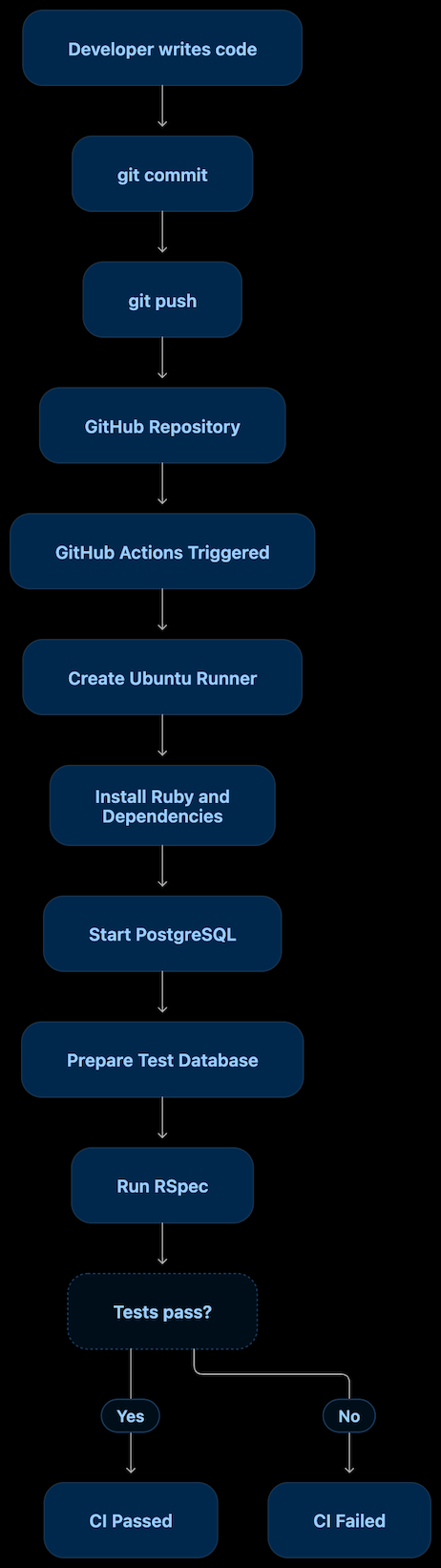
We push code. GitHub automatically creates a temporary environment, installs the dependencies, starts PostgreSQL and runs your tests.
We don’t need your MacBook to be running for this.
Understand the terminology
Before writing YAML, understand these concepts.
| Term | Meaning | Our example |
|---|---|---|
| Workflow | Complete automation definition | Backend CI |
| Event / Trigger | What starts a workflow | push |
| Job | A group of related steps | RSpec job |
| Runner | Machine executing a job | ubuntu-latest |
| Step | Individual operation | Install Ruby |
| Action | Reusable automation component | actions/checkout |
| Service | Container dependency for a job | PostgreSQL |
| Artifact | File produced by a workflow | Test reports |
| Secret | Sensitive configuration | Deployment credentials |
These concepts will be reused when we introduce Docker and frontend CI.
Where do we create workflow files?
Remember our repository structure:
rails-react-task-manager/
│
├── backend/
│   ├── app/
│   ├── config/
│   ├── spec/
│   ├── Gemfile
│   └── Gemfile.lock
│
├── frontend/
│
└── .github/
    └── workflows/
        └── backend-ci.yml
Important GitHub discovers workflow files from the repository root’s .github/workflows/ directory, not backend/.github/workflows/.
Create the directory:
mkdir -p .github/workflows

touch .github/workflows/backend-ci.yml
Step 2 – Configure our first Backend CI workflow
We’ll create a workflow that runs RSpec whenever backend code is pushed or a pull request targets main.
One small change to JWT configuration
Remember our JWT signing secret is currently loaded from Rails credentials. Our GitHub runner won’t have your local config/master.key.
We should not copy your production Rails master key into GitHub Actions just to run tests.
In Authentication::Base, update the secret lookup:
secret = ENV["JWT_SECRET_KEY"].presence ||
         Rails.application.credentials.dig(:jwt, :secret_key)
This gives us two options:
- CI and production can provide a secret through the environment.
- Local development can continue using Rails encrypted credentials.
Also update the secret helper in your JWT specs to use the same lookup:
let(:secret) do
  ENV["JWT_SECRET_KEY"].presence ||
    Rails.application.credentials.dig(:jwt, :secret_key)
end
We’ll provide a disposable test-only key inside the workflow. It is deliberately not a production secret.
CI: Add PostgreSQL configuration in database.yml
Rails doesn’t necessarily include username, password, host and port explicitly in the generated PostgreSQL configuration. Rails can use PostgreSQL’s default connection settings, environment variables or a DATABASE_URL.
For our project, I recommend explicitly configuring the connection values using environment variables.
Open: backend/config/database.yml
Use:
# Shared PostgreSQL configuration
default: &default
  adapter: postgresql
  encoding: unicode

  host: <%= ENV.fetch("PGHOST", "127.0.0.1") %>
  port: <%= ENV.fetch("PGPORT", 5432) %>

  username: <%= ENV.fetch("PGUSER", ENV.fetch("USER", "postgres")) %>
  password: <%= ENV["PGPASSWORD"] %>

  # Maximum ActiveRecord connections per process
  max_connections: <%= ENV.fetch("RAILS_MAX_THREADS", 5) %>

development:
  <<: *default
  database: backend_development

test:
  <<: *default
  database: backend_test

production:
  <<: *default
  url: <%= ENV["DATABASE_URL"] %>
Where do these values come from?
Local development
For your MacBook:
PGHOST=127.0.0.1
PGPORT=5432
PGUSER=<your-postgresql-role>
PGPASSWORD=<your-password-if-configured>
You can identify your actual PostgreSQL role by running:
psql -h 127.0.0.1 -p 5432 -d postgres -c "SELECT current_user;"
The USER fallback assumes your PostgreSQL role matches your macOS username. Override PGUSER when that isn’t true.
GitHub Actions
Our existing workflow already defines:
env:
  PGHOST: 127.0.0.1
  PGPORT: 5432
  PGUSER: postgres
  PGPASSWORD: postgres
These values will be picked up automatically by database.yml.
Notice that:
test:
  <<: *default
  database: backend_test
matches the PostgreSQL service database configured in our workflow.
I recommend starting GitHub Actions now, before React. Your reasoning is correct.
We already have a Rails backend with RSpec tests, PostgreSQL, JWT services and request specs. This is the ideal point to introduce CI.
I would follow this order:
- Now: GitHub Actions – automate backend RSpec tests.
- Next: React development.
- After React: Extend GitHub Actions to run frontend linting, TypeScript checks, tests and production builds.
- Later: Docker and Docker Compose, followed by Docker image build verification in CI.
- CD: Leave deployment automation out of scope, as planned.
This also teaches you an important engineering practice: CI should evolve alongside the application, rather than being added only after development is complete.
2. Write the workflow
Open: .github/workflows/backend-ci.yml
Add:
name: Backend CI

# When should GitHub execute this workflow?
on:
  push:
    paths:
      - "backend/**"
      - ".github/workflows/backend-ci.yml"

  pull_request:
    branches:
      - main
    paths:
      - "backend/**"
      - ".github/workflows/backend-ci.yml"

  #workflow_dispatch:

# Minimum permissions required by this workflow.
permissions:
  contents: read

# Cancel older runs when new commits arrive on the same branch.
concurrency:
  group: backend-ci-${{ github.workflow }}-${{ github.ref }}
  cancel-in-progress: true

jobs:
  rspec:
    name: RSpec - Ruby 4.0.9 / PostgreSQL 18
    runs-on: ubuntu-latest

    # PostgreSQL runs as a service container.
    services:
      postgres:
        image: postgres:18

        env:
          POSTGRES_USER: postgres
          POSTGRES_PASSWORD: postgres
          POSTGRES_DB: backend_test

        ports:
          - 5432:5432

        options: >-
          --health-cmd "pg_isready -U postgres -d backend_test"
          --health-interval 10s
          --health-timeout 5s
          --health-retries 5

    # Environment variables available to all job steps.
    env:
      RAILS_ENV: test

      PGHOST: 127.0.0.1
      PGPORT: 5432
      PGUSER: postgres
      PGPASSWORD: postgres

      # Test-only JWT secret. Never reuse in production.
      JWT_SECRET_KEY: ci-only-jwt-signing-secret-do-not-use-in-production

    # Commands run from the backend directory.
    defaults:
      run:
        working-directory: backend

    steps:
      # Step 1: Download repository code.
      - name: Checkout repository
        uses: actions/checkout@v6

      # Step 2: Install Ruby and dependencies.
      - name: Setup Ruby
        uses: ruby/setup-ruby@v1
        with:
          ruby-version: "4.0.9"
          bundler-cache: true
          working-directory: backend

      # Step 3: Create and migrate test database.
      - name: Prepare test database
        run: bin/rails db:prepare

      # Step 4: Execute RSpec suite.
      - name: Run RSpec
        run: bundle exec rspec
This follows GitHub’s current Ruby CI guidance, including actions/checkout@v6 and ruby/setup-ruby@v1. The Ruby setup action supports Ruby 4.0.9 and automatically caches Bundler dependencies when bundler-cache: true is enabled.
Before running it, check backend/config/database.yml: its test configuration should use backend_test and allow the PGHOST, PGUSER, PGPASSWORD and PGPORT environment variables to control the PostgreSQL connection. The service container is configured with those credentials.
3. Understand every section
Let’s break down the important configuration.
A. on – workflow triggers
on:
  push:
  pull_request:
  workflow_dispatch:
These represent three different ways of starting the workflow.
| Trigger | What happens |
|---|---|
push | Runs when you push backend code |
pull_request | Runs when you create or update a PR targeting main |
workflow_dispatch | Allows you to manually run the workflow |
We also added path filters.
paths:
  - "backend/**"
This means changes to the backend trigger backend CI. Later, frontend-only changes can run their own workflow without unnecessarily running Rails tests.
B. jobs – independent tasks
jobs:
  rspec:
A workflow can contain multiple jobs. For example, our future workflow architecture could have:
Backend CI
├── RSpec
├── RuboCop
└── Security checks

Frontend CI
├── Oxlint
├── TypeScript
├── Vitest
└── Production build
Each job runs independently unless we explicitly configure dependencies between jobs.
C. runs-on – runner
runs-on: ubuntu-latest
This means GitHub will provide an Ubuntu virtual machine to run our job. Other options include:
- Windows
- macOS
- Self-hosted runners
We’ll start with Ubuntu because it’s suitable for our Rails and PostgreSQL environment.
D. services – PostgreSQL
services:
  postgres:
    image: postgres:18
This starts PostgreSQL in a Docker container.
GitHub Actions Runner
       |
       ├── Ruby 4.0.9
       ├── Rails 8.1
       ├── RSpec
       |
       └── PostgreSQL Service
                  |
                  └── Port 5432
Understand this line:
ports:
  - 5432:5432
This maps the PostgreSQL container’s port 5432 to port 5432 on the runner.
The health-cmd makes GitHub wait until PostgreSQL is ready before executing subsequent steps. We’re learning container networking here, which will become useful when we configure Docker Compose.
E. actions/checkout
uses: actions/checkout@v6
Downloads your repository source code into the runner’s working directory. Without this, your runner wouldn’t have access to your Rails application files.
F. ruby/setup-ruby
- uses: ruby/setup-ruby@v1
  with:
    ruby-version: "4.0.9"
    bundler-cache: true
This action:
- Installs the specified Ruby version.
- Sets up Bundler.
- Installs gems from
Gemfile.lock. - Caches installed gems for subsequent workflow runs.
We don’t need a separate bundle install step.
G. Database preparation
- name: Prepare test database
  run: bin/rails db:prepare
This creates the test database if it doesn’t exist and applies pending migrations. We use RAILS_ENV: test because we want to prepare the test database.
H. Run RSpec
- name: Run RSpec
  run: bundle exec rspec
This executes our complete RSpec suite. If a test fails, this step fails and GitHub marks the workflow as failed.
Step 3 – Push and observe the workflow
From your repository root:
git status

git add .

git commit -m "ci: add backend rspec workflow"

git push
Now open GitHub repository.
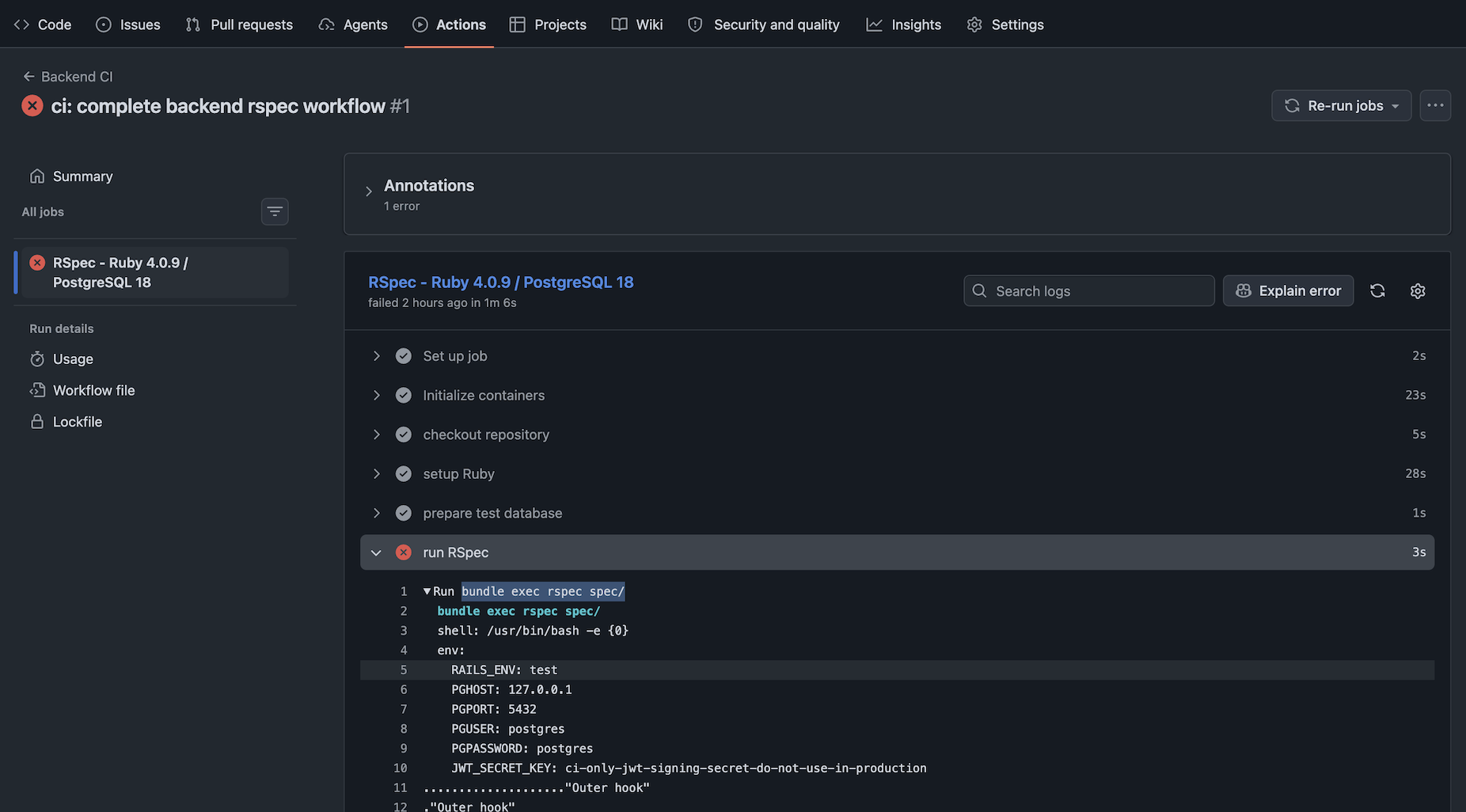
Navigate to: GitHub repository → Actions → Backend CI
We can see our workflow executing.
Expected result: – All four stages should pass.
- Checkout repository.
- Setup Ruby.
- Prepare test database.
- Run RSpec.
We can click the RSpec job to see each step’s logs.
Step 4 – Understand what happens when a test fails
Backend CI failed
JWT::SignatureError:
       No verification key available
     # ./spec/services/authentication/token_verifier_spec.rb:10:in 'block (2 levels) in <main>'
     # ./spec/services/authentication/token_verifier_spec.rb:52:in 'block (4 levels) in <main>'
We have a warning too.
/home/runner/work/rails-react-task-manager/rails-react-task-manager/backend/vendor/bundle/ruby/4.0.0/gems/rspec-rails-8.1.0/lib/rspec/rails/matchers/have_http_status.rb:219: warning: Status code :unprocessable_entity is deprecated and will be removed in a future version of Rack. Please use :unprocessable_content instead.
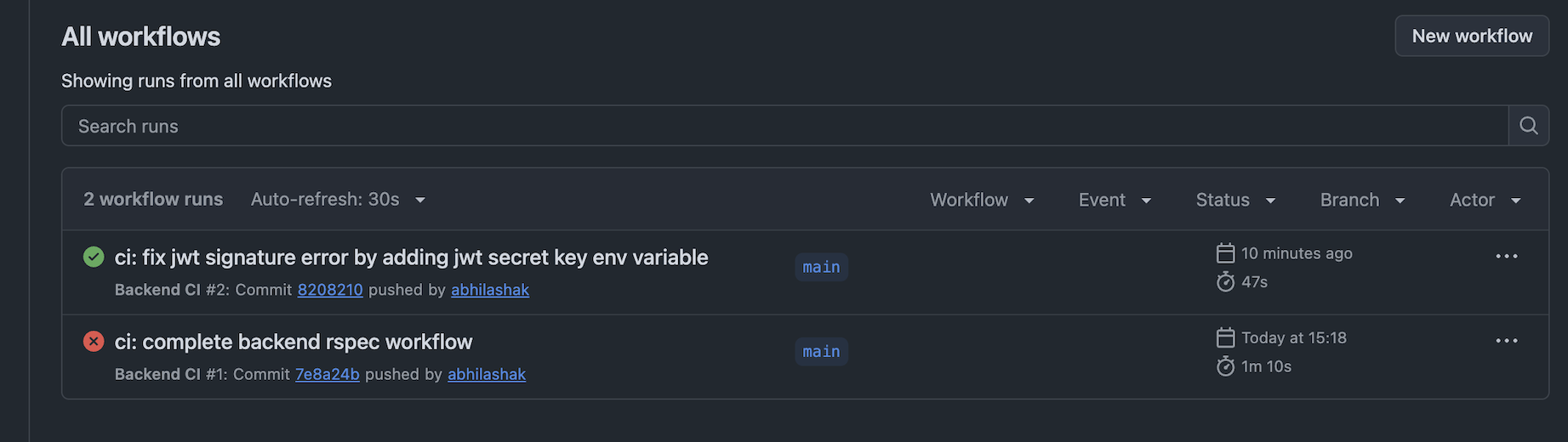
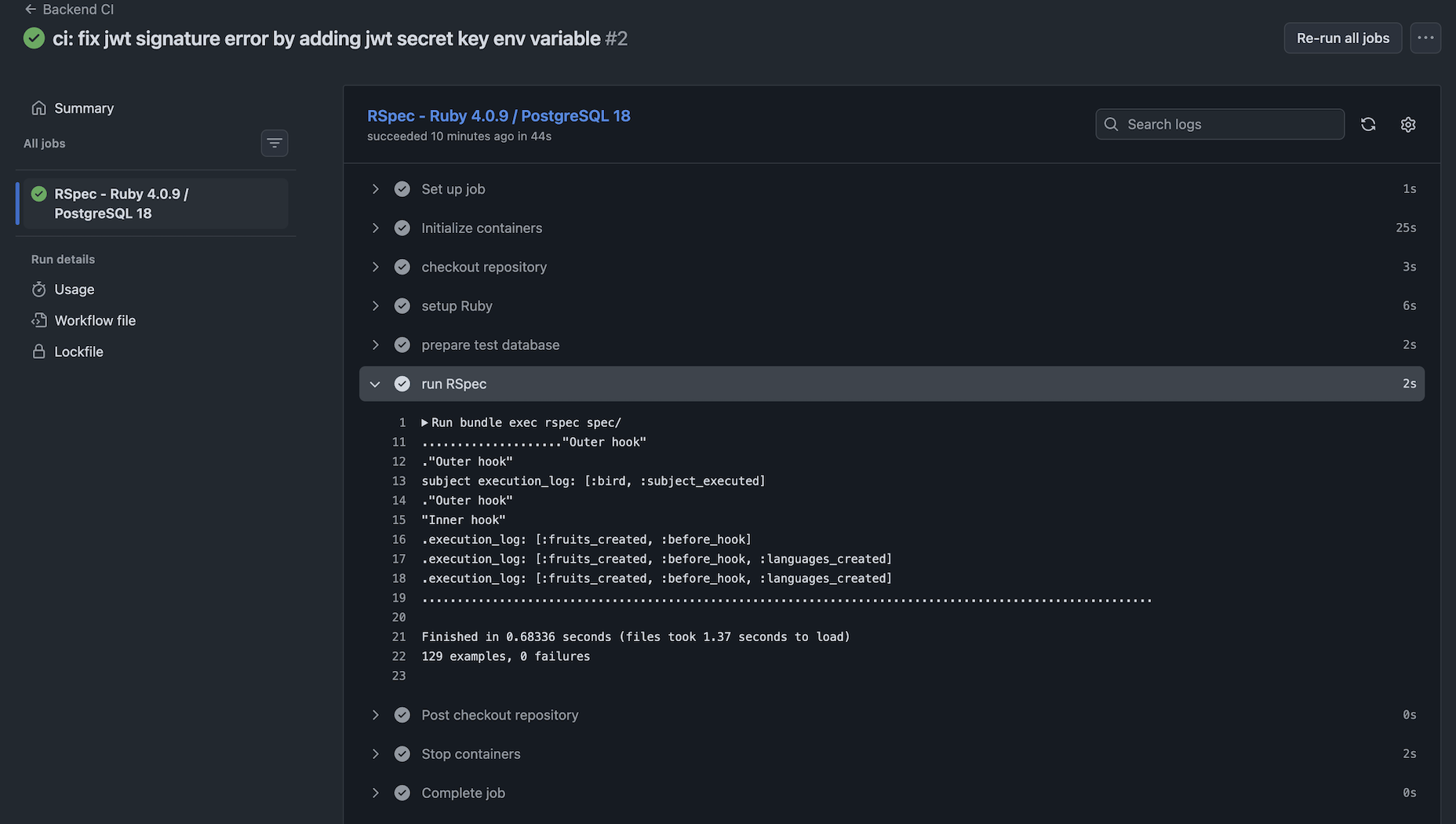
Now we have something failed in CI. Let us see what’s the problem and fix it. and push again. The next workflow should pass. This is the fundamental CI feedback loop.
Issue Fixed: We missed ENV variable checks in token verifier spec file.
require "rails_helper"

RSpec.describe Authentication::TokenVerifier do
  let(:user) { create(:user) }
  let(:secret) { ENV["JWT_SECRET_KEY"].presence || Rails.application.credentials.dig(:jwt, :secret_key) }
Git Push again and check the Actions.
Step 5 – A few production practices to remember
The initial workflow is deliberately small. We’ll improve it incrementally.
1. Protect the main branch
Once the workflow is successful, configure GitHub branch protection or a ruleset to require the Backend CI status check before merging pull requests.
2. Pin GitHub Actions versions
We’re using version tags for this first learning exercise.
For production repositories, GitHub recommends pinning third-party actions to verified, full-length commit SHAs to protect against mutable-tag supply-chain attacks. Dependabot can help maintain those versions.
3. Keep permissions minimal
We have:
permissions:
   contents: read
Our tests don’t need permission to push commits, modify pull requests or publish packages.
Once Backend CI is green, we’ll start React development immediately. We’ll add the frontend CI workflow once the React application has its first working components. This way, we learn GitHub Actions using the actual application rather than separate artificial examples.


