Installing ⚙️ and Setting Up 🔧 Ruby 3.4, Rails 8.0 and IDE on macOS in 2025

Ruby on Rails is a powerful framework for building web applications. If you’re setting up your development environment on macOS in 2025, this guide will walk you through installing Ruby 3.4, Rails 8, and a best IDE for development.

1. Installing Ruby and Rails

“While macOS comes with Ruby pre-installed, it’s often outdated and can’t be upgraded easily. Using a version manager like Mise allows you to install the latest Ruby version, switch between versions, and upgrade as needed.” – Rails guides

Install Dependencies

Run the following command to install essential dependencies (takes time):

brew install openssl@3 libyaml gmp rust

…..
==> Installing rust dependency: libssh2, readline, sqlite, python@3.13, pkgconf
==> Installing rust

zsh completions have been installed to:
/opt/homebrew/share/zsh/site-functions
==> Summary
🍺 /opt/homebrew/Cellar/rust/1.84.1: 3,566 files, 321.3MB
==> Running brew cleanup rust…
==> openssl@3
A CA file has been bootstrapped using certificates from the system
keychain. To add additional certificates, place .pem files in
/opt/homebrew/etc/openssl@3/certs

and run
/opt/homebrew/opt/openssl@3/bin/c_rehash
==> rust
zsh completions have been installed to:
/opt/homebrew/share/zsh/site-functions

Install Mise Version Manager

curl https://mise.run | sh
echo 'eval "$(~/.local/bin/mise activate zsh)"' >> ~/.zshrc
source ~/.zshrc

Install Ruby and Rails

mise use -g ruby@3
mise ruby@3.4.1 ✓ installed
mise ~/.config/mise/config.toml tools: ruby@3.4.1

ruby --version   # output Ruby 3.4.1

gem install rails

# reload terminal and check
rails --version  # output Rails 8.0.1

For additional guidance, refer to these resources:


2. Installing an IDE for Ruby on Rails Development

Choosing the right Integrated Development Environment (IDE) is crucial for productivity. Here are some popular options:

RubyMine

  • Feature-rich and specifically designed for Ruby on Rails.
  • Includes debugging tools, database integration, and smart code assistance.
  • Paid software that can be resource-intensive.

Sublime Text

  • Lightweight and highly customizable.
  • Requires plugins for additional functionality.

Visual Studio Code (VS Code) (Recommended)

  • Free and open-source.
  • Excellent plugin support.

Install VS Code

Follow the official installation guide.

Enable GitHub Copilot for AI-assisted coding:

  1. Open VS Code.
  2. Sign in with your GitHub account.
  3. Enable Copilot from the extensions panel.

To use VS Code from the terminal, ensure code is added to your $PATH:

  1. Open Command Palette (Cmd+Shift+P).
  2. Search for Shell Command: Install 'code' command in PATH.
  3. Restart your terminal and try: code .

3. Your 15 Essential VS Code Extensions for Ruby on Rails

To enhance your development workflow, install the following VS Code extensions:

  1. GitHub Copilot – AI-assisted coding (already installed).
  2. vscode-icons – Better file and folder icons.
  3. Tabnine AI – AI autocompletion for JavaScript and other languages.
  4. Ruby & Ruby LSP – Language support and linting.
  5. ERB Formatter/Beautify – Formats .erb files (requires htmlbeautifier gem): gem install htmlbeautifier
  6. ERB Helper Tags – Autocomplete for ERB tags.
  7. GitLens – Advanced Git integration.
  8. Ruby Solargraph – Provides code completion and inline documentation (requires solargraph gem): gem install solargraph
  9. Rails DB Schema – Auto-completion for Rails database schema.
  10. ruby-rubocop – Ruby linting and auto-formatting (requires rubocop gem): gem install rubocop
  11. endwise – Auto-adds end keyword in Ruby.
  12. Output Colorizer – Enhances syntax highlighting in log files.
  13. Auto Rename Tag – Automatically renames paired HTML/Ruby tags.
  14. Highlight Matching Tag – Highlights matching tags for better visibility.
  15. Bracket Pair Colorizer 2 – Improved bracket highlighting.

Conclusion

By following this guide, you’ve successfully set up a robust Ruby on Rails development environment on macOS. With Mise for version management, Rails installed, and VS Code configured with essential extensions, you’re ready to start building Ruby on Rails applications.

Part 2: https://railsdrop.com/2025/03/22/setup-rails-8-app-rubocop-actiontext-image-processing-part-2

Happy Rails setup! 🚀

The Evolution of Asset 📑 Management in Web and Ruby on Rails

Understanding Middleware in Rails

When a client request comes into a Rails application, it doesn’t always go directly to the MVC (Model-View-Controller) layer. Instead, it might first pass through middleware, which handles tasks such as authentication, logging, and static asset management.

Rails uses middleware like ActionDispatch::Static to efficiently serve static assets before they even reach the main application.

ActionDispatch::Static Documentation

“This middleware serves static files from disk, if available. If no file is found, it hands off to the main app.”

Where Are Static Files Stored?

Rails stores static assets in the public/ directory, and ActionDispatch::Static ensures these are served efficiently without hitting the Rails stack.

Core Components of Ruby on Rails – A reminder

To understand asset management evolution, let’s quickly revisit Rails’ core components:

  • ActiveRecord: Object-relational mapping (ORM) system for database interactions.
  • Action Pack: Handles the controller and view layers.
  • Active Support: A collection of utility classes and standard library extensions.
  • Action Mailer: A framework for designing email services.

The Role of Browsers in Asset Management

Web browsers cache static assets to improve performance. The caching strategy varies based on asset types:

  • Images: Rarely change, so they are aggressively cached.
  • JavaScript and CSS files: Frequently updated, requiring cache-busting mechanisms.

The Era of Sprockets

Historically, Rails used Sprockets as its default asset pipeline. Sprockets provided:

  • Conversion of CoffeeScript to JavaScript and SCSS to CSS.
  • Minification and bundling of assets into fewer files.
  • Digest-based caching to ensure updated assets were fetched when changed.

The Rise of JavaScript & The Shift Towards Webpack

The release of ES6 (2015-2016) was a turning point for JavaScript, fueling the rise of Single Page Applications (SPAs). This marked a shift from traditional asset management:

  • Sprockets was effective but became complex and difficult to configure for modern JS frameworks.
  • Projects started including package.json at the root, indicating JavaScript dependency management.
  • Webpack emerged as the go-to tool for handling JavaScript, offering features like tree-shaking, hot module replacement, and modern JavaScript syntax support.

The Landscape in 2024: A More Simplified Approach

Recent advancements in web technology have drastically simplified asset management:

  1. ES6 Native Support in All Major Browsers
    • No need for transpilation of modern JavaScript.
  2. CSS Advancements
    • Features like variables and nesting eliminate the need for preprocessors like SASS.
  3. HTTP/2 and Multiplexing
    • Enables parallel loading of multiple assets over a single connection, reducing dependency on bundling strategies.

Enter Propshaft: The Modern Asset Pipeline

Propshaft is the new asset management solution introduced in Rails, replacing Sprockets for simpler and faster asset handling. Key benefits include:

  • Digest-based file stamping for effective cache busting.
  • Direct and predictable mapping of assets without complex processing.
  • Better integration with HTTP/2 for efficient asset delivery.

Rails 8 Precompile Uses Propshaft

What is Precompile? A Reminder

Precompilation hashes all file names and places them in the public/ folder, making them accessible to the public.

Propshaft improves upon this by creating a manifest file that maps the original filename as a key and the hashed filename as a value. This significantly enhances the developer experience in Rails.

Propshaft ultimately moves asset management in Rails to the next level, making it more efficient and streamlined.

The Future of Asset Management in Rails

With advancements like native ES6 support and CSS improvements, Rails continues evolving to embrace simpler, more efficient asset management strategies. Propshaft, combined with modern browser capabilities, makes asset handling seamless and more performance-oriented.

As the web progresses, we can expect further simplifications in asset pipelines, making Rails applications faster and easier to maintain.

Stay tuned for more innovations in the Rails ecosystem!

Happy Rails Coding! 🚀

Ruby Coding Problems – Part 1: Basics (String & Array)

Common patterns: iteration, hashing, two-pointer, basic transformations. Try each yourself first – ask for solutions/hints per question when ready.

  1. Reverse a string without using .reverse
    reverse_string("hello") => "olleh"
  2. Palindrome check
    palindrome?("racecar") => true
    palindrome?("hello") => false
  3. Count vowels
    count_vowels("programming") => 3
  4. Find max in array without .max
    find_max([3, 7, 2, 9, 4]) => 9
  5. Remove duplicates from array, preserve order
    remove_duplicates([1,2,2,3,1,4]) => [1,2,3,4]
  6. FizzBuzz (1 to n)
    fizzbuzz(15) => ["1","2","Fizz","4","Buzz",...,"FizzBuzz"]
  7. Anagram check
    anagram?("listen", "silent") => true
  8. Sum of array, no .sum
    array_sum([1,2,3,4]) => 10
  9. Capitalize each word (title case), no .capitalize on whole string
    title_case("the ruby language") => "The Ruby Language"
  10. Find second largest number
    second_largest([4, 1, 9, 7, 9]) => 7
  11. Find Alice and Bob spending amounts
    details = [{ amount: 2500, requestor: 'Alice', id: 23 }...
  12. Pattern Check
    pattern_check("{()}") # => true
  13. Rotate the given String
    rotate('angel', 4) # => "lange"

1. Reverse a string without using .reverse

Concept

1. finding the last string character index to find the last string character first

2. then decreasing the index to find the upto the first character

def reverse_string(str)
  last_str_index = str.length - 1
  result = ""
  
  while last_str_index >= 0
    result << str[last_str_index]

    last_str_index -= 1
  end

  result
end

puts reverse_string("hello")
puts reverse_string("programming")

Solution 2: Another way without using Index variables

def reverse_string(str)
  str.each_char.reduce("") { |result, char| char + result }
end

Concept

Prepend each character to an accumulator instead of appending – that flips the order without touching any index. each_char + reduce replaces the while-loop/counter entirely.

2. Palindrome check

def palindrome?(str)
  first_char_index = 0
  last_char_index = str.length - 1

  while first_char_index < last_char_index
    if str[first_char_index] != str[last_char_index]
      return false 
    end

    first_char_index += 1
    last_char_index -= 1
  end

  return true
end

p palindrome?("ala")
p palindrome?("alla")
p palindrome?("racecar")
p palindrome?("car")

Concept

  1. Two pointer approach

Two indices start at opposite ends of the string and move toward each other, comparing elements pairwise:

  • first_char_index starts at 0, last_char_index starts at length - 1
  • Each iteration compares str[first] vs str[last] – if they ever mismatch, it can’t be a palindrome, so return immediately
  • Otherwise, both pointers move inward (first += 1, last -= 1) until they meet or cross (first < last becomes false)
  • If the loop finishes without a mismatch, all mirrored pairs matched → palindrome

Why this pattern in general: it’s the go-to when you need to compare elements from both ends of a sequence without extra space – palindromes, reversing in-place, “sorted array pair sum” problems, container/water-trapping problems all reuse this exact skeleton (two indices, converge or diverge, one comparison per step).

One edge case worth saying out loud in an interview: this correctly handles even-length (abba) and odd-length (aba, middle char never gets compared to itself) without any special-casing – that’s often a follow-up question.

3. Count vowels

1. Without Using Array#each or any other Enumerable methods

def count_vowels(str)
  vowels = ['a', 'e', 'i', 'o', 'u']
  vowel_count = 0
  first = 0 

  while first <= str.length - 1
    if vowels.include?(str[first])
      vowel_count += 1
    end

    first += 1
  end

  vowel_count
end


p count_vowels("programming")
p count_vowels("ala")
p count_vowels("Grow your audience by promoting your content")

Concept

  1. Using a pointer

2. Using Enumerable#count

# using `Enumerable#count`

def count_vowels(str)
  vowels = ['a', 'e', 'i', 'o', 'u']

  str.each_char.count { |char| vowels.include?(char.downcase) }
end

p count_vowels("programming")
p count_vowels("ala")
p count_vowels("Grow your audience by promoting your content A")

Enumerable#count

The Enumerable#count method in Ruby returns the number of elements in a collection, optionally filtering them based on an item or a truthy block criterion.

[10, 20, 30].count 
# => 3

{ a: 1, b: 2 }.count 
# => 2

[1, 2, 4, 2, 1, 2].count(2) 
# => 3

["apple", "banana", "apple"].count("apple") 
# => 2

# Count numbers greater than 10
[5, 12, 8, 18, 3].count { |num| num > 10 } 
# => 2

# Count odd numbers using symbol-to-proc syntax
[1, 2, 3, 4, 5].count(&:odd?) 
# => 3

# With a Hash, it yields both the key and the value
{ candy: 5, apples: 2, cookies: 10 }.count { |key, value| value > 4 } 
# => 2

3. Using Enumerable#select

# using `String#each_char` and `Enumerable#select`

def count_vowels(str)
  vowels = ['a', 'e', 'i', 'o', 'u']
  
  str.each_char.select { |char| vowels.include?(char.downcase) }.size
end

p count_vowels("programming")
p count_vowels("ala")
p count_vowels("Grow your audience by promoting your content A")

In Ruby, Enumerable#select (Aka filter, find_all) is an inbuilt method used to filter a collection by evaluating each element against a given block and returning only the items for which the block evaluates to true.

collection.select { |element| condition }

With a block: Returns a new collection containing all elements that match the condition.
Without a block: Returns an Enumerator object.
Aliases: filter and find_all are exact aliases and perform identically

reject –> The opposite of select; returns all elements that evaluate to false.

find / detect –> Returns only the first element that matches the condition, then stops iterating.

## Array
numbers = [1, 2, 3, 4, 5, 6]

# Using block syntax to get even numbers
even_numbers = numbers.select { |num| num.even? }
# => [2, 4, 6]

# Short-hand symbol-to-proc syntax
even_numbers = numbers.select(&:even?)
# => [2, 4, 6]

## Hash
scores = { alice: 95, bob: 65, charlie: 82 }

# Filter for scores greater than 70
passing = scores.select { |name, score| score > 70 }
# => {:alice=>95, :charlie=>82}

users = [
  { name: "Alice", active: true },
  { name: "Bob", active: false },
  { name: "Charlie", active: true }
]

active_users = users.select { |user| user[:active] }
# => [{:name=>"Alice", :active=>true}, {:name=>"Charlie", :active=>true}]

4. Using Array#each

In Ruby, each is not actually a method defined by the Enumerable module itself; instead, it is a method requirement that your class must implement.

The Enumerable module acts as a mixin that provides collection-handling capabilities (like .map, .select and .reduce). However, for those methods to function, your custom collection class must define its own #each method to yield items sequentially.

# using `String#split` and `Array#each`

def count_vowels(str)
  vowels = ['a', 'e', 'i', 'o', 'u']
  vowel_count = 0
  
  str.split('').each do |char|  
    vowel_count += 1 if vowels.include?(char) 
  end

  vowel_count
end

p count_vowels("programming")
p count_vowels("ala")
p count_vowels("Grow your audience by promoting your content")

Best: Solution 2 (each_char.count)

def count_vowels(str)
vowels = ['a', 'e', 'i', 'o', 'u']
str.each_char.count { |char| vowels.include?(char.downcase) }
end

count with a block is built exactly for “how many elements satisfy this predicate” – it says what you want, not how to accumulate it. One line of actual logic, no throwaway accumulator variable. This is what a senior Ruby dev would write.

Why the others rank lower:

  • Solution 1 (your index/while version): correct, but same critique as Q1 – manual pointer + counter for something Enumerable does in one call. Fine as a “let me show I understand the mechanics” opener, but don’t lead with it if asked for idiomatic Ruby.
  • Solution 3 (select.size): works, but wasteful – select builds an intermediate array just to throw it away and count its size. count does the same job without the allocation. Small thing, but an interviewer watching for efficiency awareness will notice.
  • Solution 4 (split('').each): split('') allocates a full array up front; each_char iterates lazily without materializing one. Also reintroduces the manual counter that count eliminates. Weakest of the four.

4. Find max in array without .max

# using `Array#each`

def find_max(array)
  max = nil

  array.each do |num|
    max = num if max.nil? || num > max
  end
  
  max
end

p find_max([])
p find_max([3, 7, 2, 9, 4])
p find_max([32, 7, 29, 79, 41])

This is actually the idiomatic version – no index needed since each gives you the values directly, and seeding max with nil (instead of array[0] or 0) correctly handles edge cases: empty array returns nil instead of crashing or silently returning wrong data, and it works for negative-only arrays where seeding with 0 would be a bug.

Concept:

  1. linear scan with running accumulator

Track the best-seen-so-far value in a variable, compare each new element against it, update when you find something better. This is the base pattern behind max/min, and generalizes directly to “find the element matching some condition” problems (max by custom criteria, longest string, etc.).

One thing worth saying in an interview: this is O(n) time, O(1) space and it’s actually not worse than Array#max – that’s what .max does internally too.

Only nitpick: num > max – if you want strict correctness on the first iteration, walk through it: max is nil, max.nil? short-circuits true, so num > max never evaluates against nil (which would raise). Good – that’s intentional short-circuit ordering, not luck. Just make sure you can explain why the order of the || matters if asked.

5. Remove duplicates from array, preserve order

Using Array#uniq

def remove_duplicates(array)
  array.uniq
end

remove_duplicates([1,2,2,3,1,4]) => [1,2,3,4]

Without using uniq, select etc.

At First I tried to iterate over array using array index and deleting the duplicated value, then pass the mutated array recursively into the Method. This cause issue like: mutating array (via .delete) while iterating over it with each_with_index – the index no longer matches the shrinking array, so later lookups go out of bounds and return nil.

X - WRONG
array.each_with_index do |num, index|
other_nums = array[(index + 1)..-1]
other_nums.each do |next_num|
if num == next_num # duplicate num
uniq_nums << array.delete(num) # store duplicated
# find duplicate without duplicated num
remove_duplicates(array, uniq_nums)
end
end
end
uniq_nums + array

Nested loops (which is what pushed me to O(n²) and the mutation trap in the first place)

General rule: never mutate a collection you’re actively iterating over. This is a classic bug.

Fix – hash-based “seen” tracker, single pass, no uniq/select:

def remove_duplicates(array)
  seen = {}

  array.each do |num|
    seen[num] = true unless seen[num]
  end

  seen.keys
end

p remove_duplicates([1, 2, 2, 3, 1, 4, 3])
p remove_duplicates([7, 4, 2, 7, 2, 8, 4])
p remove_duplicates([8, 1, 0, 8, 0, 0, 1, 5, 6])

Concept:

  1. seen-set / membership tracking

Use a hash as an O(1) lookup table for “have I encountered this before?” instead of nested loops. Single pass:

  • New value → mark it seen, keep it
  • Already seen → skip it, original order preserved naturally since you only append once per unique value

This pattern is the backbone of dedup, “first unique element” – same seen/counts hash idea reused everywhere. No recursion needed;

6. FizzBuzz (1 to n)

The Fizz Buzz problem requires writing a program that prints or returns numbers from 1 to a given integer n, replacing multiples of 3 with “Fizz”, multiples of 5 with “Buzz”, and multiples of both 3 and 5 with “FizzBuzz”.

https://leetcode.com/problems/fizz-buzz/description

The Rules

For every integer i from 1 to n:

  • Print “FizzBuzz” if i is divisible by both 3 and 5 (i.e., a multiple of 15).
  • Print “Fizz” if i is divisible only by 3.
  • Print “Buzz” if i is divisible only by 5.
  • Print the number itself as a string if none of the above conditions match.

Example (n = 15)

If n = 15, the output sequence looks like this:
1, 2, "Fizz", 4, "Buzz", "Fizz", 7, 8, "Fizz", "Buzz", 11, "Fizz", 13, 14, "FizzBuzz"

def fizzbuzz(limit)
  result = []
  (1..limit).each do |num|
      if num % 15 == 0
        result << "FizzBuzz"
      elsif num % 3 == 0
        result << "Fizz"
      elsif num % 5 == 0
        result << "Buzz"
      else
        result << num.to_s
      end
  end
  
  result
end

p fizzbuzz(15)
p fizzbuzz(30)

Concept:

  1. range iteration + conditional branching, no state carried between iterations (unlike Q5’s seen hash) – each number is judged independently, so a simple each with if/elsif is the correct tool, nothing fancier needed.

One idiomatic variant worth knowing for interviews, using map instead of manual array-building:

def fizzbuzz(limit)
  (1..limit).map do |num|
    if num % 15 == 0
      "FizzBuzz"
    elsif num % 3 == 0
      "Fizz"
    elsif num % 5 == 0
      "Buzz"
    else
      num.to_s
    end
  end
end

7. Anagram check

def anagram?(first, second)
  return false unless first.length == second.length

  first_count_hash = Hash.new(0)
  second_count_hash = Hash.new(0)

  first.each_char {|char| first_count_hash[char] += 1 }
  second.each_char {|char| second_count_hash[char] += 1 }

  first_count_hash == second_count_hash
end

p anagram?("listen", "silent")
p anagram?("note", "tone")
p anagram?("act", "cat")
p anagram?("earth", "heart")
p anagram?("earth", "hears")

Fix – frequency count comparison (no sort, no mutation, no uniq/tally even):

CONcept

  1. frequency-count comparison

Two strings are anagrams iff they have identical character-frequency distributions. Build a count hash for each string (Hash.new(0) gives a default of 0 so += 1 works without checking key? first), then compare the two hashes directly – Ruby’s Hash#== checks all key-value pairs match, regardless of insertion order.

This is the same “seen/counts” hash idea from Q5, reused again – frequency-count hashes are one of the most repeated tools across string/array interview problems (anagrams, first-unique-char, “group anagrams,” character-frequency questions). Worth internalizing as your default first move whenever a problem involves counting occurrences of something.

8. Sum of array, no .sum

Using Array#inject

def array_sum(array)
  array.inject(:+)
end

Without using Array#inject

# without using .sum, .inject
def array_sum(array)
  return "provide non-empty array" if array.empty?

  sum = 0
  array.each do |num|
    sum += num
  end

  sum
end

p array_sum([1,2,3,4])
p array_sum([2,72,1,0])

Correct Solution. each with an accumulator is the right idiom here – this is one of the few cases where a keeping-total variable isn’t a code smell, because you genuinely need to carry state (the sum) across iterations, unlike Q6’s FizzBuzz where each element was independent.

Concept:

  1. accumulator pattern

Since I am avoiding .sum/.inject here specifically, Good to say explicitly: “In production I’d use .sum; writing it manually to show the mechanics.”

9. Capitalize each word (title case), no .capitalize on whole string

def title_case(sentence)
  sentence.split.map { |word| word[0].upcase + word[1..] }.join(' ')
end

p title_case("the ruby language")

Concept:

  1. split → transform each element → rejoin. split (whitespace-aware, collapses multiple spaces automatically) → map for a 1-to-1 word transform (same reasoning as Q6’s FizzBuzz – independent per-element transform, no accumulator needed) → join to reassemble.

10. Find second largest number

# this has one BUG - check below

def second_largest(array)
  return nil if array.length < 2

  second_largest = array.first
  largest = array.first

  array[1..].each do |num|
    if num > largest
      second_largest = largest
      largest = num
    elsif num < largest && num > second_largest
      second_largest = num
    end
  end

  second_largest
end


p second_largest([4, 1, 9, 7, 9])
p second_largest([4, 3, 2, 3, 4])
p second_largest([50, 100, 150, 200])

Concept:

  1. single-pass dual-tracking – same accumulator idea as Q4/Q8, but tracking two running values instead of one, with an ordering dependency between them (you can only correctly update second_largest relative to where largest currently stands, which is why the elsif must re-check against both bounds, not just one).

BUG FOUND:

second_largest([4, 3, 2, 3, 4]) => 4 X WRONG - Why?

Good catch – real bug. Walk through it:

largest = second_largest = 4 (both seeded to array.first)

The real problem: initializing both trackers to the same value creates a chicken-and-egg lockout – second_largest can only be beaten by something bigger, but it started at the max, so nothing (except a new largest) can ever unseat it.

Fix – seed with -Infinity, don’t assume array.first is a valid second-place candidate:

# FIXED

def second_largest(array)
  return nil if array.length < 2

  largest = second_largest = -Float::INFINITY

  array.each do |num|
    if num > largest
      second_largest = largest
      largest = num
    elsif num > second_largest && num != largest
      second_largest = num
    end
  end

  second_largest
end

Concept refinement:

  1. dual-tracker pattern (Q10 original) + -Float::INFINITY, not real array values – this is the standard idiom for “find min/max/second-max” problems specifically because it guarantees the first comparison always succeeds and updates correctly – good to be able to answer each one individually if an interviewer pushes on “why did you add that condition?”

NOTE: This is a good one to remember: never seed a running-max/min tracker with an actual data element unless you’re certain it can’t create a lockout — -Infinity/nil-then-check (like your Q4 find_max) are the safe patterns.

11. Find Alice and Bob spending amount from orders

Qn) Find the total amount spend by Alice and Bob

details = [
  { amount: 2500, requestor: 'Alice', id: 23 },
  { amount: 2500, requestor: 'John', id: 22 },
  { amount: 1500, requestor: 'Bob', id: 21 },
  { amount: 1500, requestor: 'Alice', id: 23 },
  { amount: 1000, requestor: 'Bob', id: 21 },
  { amount: 500, requestor: 'Sera', id: 20 }
]

Answer:

# Answer 1 (filter + each + accumulator)

result = Hash.new(0)
filters = ["Alice", "Bob"]
details.filter { |order| filters.include?(order[:requestor]) }
       .each {|order| result[order[:requestor]] += order[:amount]  } 

puts result
# Answer 2 (filter + group_by + each_pair + reduce + accumulator)

filters = ["Alice", "Bob"]

result = []

details.filter {|order| filters.include?(order[:requestor]) }
       .group_by {|order| order[:requestor]}
       .each_pair { |user, orders| result << { "#{user}": orders.reduce(0) {|sum, order| sum += order[:amount] } } }

puts result

12. Pattern check

Qn) Find the expression pattern match correctly with words included in it

# my solution

def pattern_check(pattern = "")
  return true if pattern.empty?

  pairs_hash = {
    "{" => "}",
    "(" => ")",
    " " => " "
  }

  symbols = pattern.split("")
  last_index = symbols.size - 1
  first_half = last_index / 2

  # p symbols

  idx = 0
  while (idx <= first_half)
    symbol = symbols[idx]
    pair = symbols[last_index - idx]

    # p "symbol: #{symbol}"
    # p "pair index: #{last_index - idx}"
    # p "static pair symbol: #{pairs_hash[symbol]}"
    # p "pair symbol received: #{pair}"
    
    if symbol.match(/\w+/) && pair.match(/\w+/)
      idx += 1
      next
    end

    unless pairs_hash[symbol] == pair
      return false
    end
    
    idx += 1
  end

  return true
end

p pattern_check("{()}") # => true

p pattern_check("{(})") # => false

p pattern_check("{( text )}") # => true

The above solution is based on Two Pointer approach and is not correct.

Check for the correct solution (Stack Approach) here: https://railsdrop.com/what-the-question-is-actually-asking/

12. Rotate the given String

Qn) Rotate the string characters n times, n is the position given.


def rotate(str, position)
  initial_pos = 0
  while initial_pos < position
    str << str[0] && str[0] = ""
    
    initial_pos += 1
  end
  
  str
end

name = "angel"

p rotate(name, 4)
=> "lange"

Learning C to Understand Ruby – Part 2: Memory, Pointers and the Ruby Object Model

In Part 1, I looked at why learning C can be valuable for a Ruby developer-not to replace Ruby, but to understand what happens underneath it.

This time, we go closer to the machine.

The concepts are simple:

memory, addresses, pointers, stack, heap.

But they completely change the way you think about Ruby objects.


Everything ultimately becomes memory

Consider this Ruby code:

name = "Ruby"

At the Ruby level, we think:

name → "Ruby"

At the machine level, however, something must exist in memory.

There is storage for the string’s data, metadata describing the object, and some mechanism for Ruby to refer to that object.

The exact representation is an implementation detail, but the important idea is:

Ruby objects ultimately have a physical representation in memory.

C lets us see memory directly.


Memory has addresses

Consider:

int number = 42;

The variable has a value:

42

but it also occupies some location in memory.

We can ask C for that location:

printf("%p", (void *)&number);

The & operator means:

Give me the address of number.

You might see something like:

0x7ffee1234abc

The actual address is not important.

The concept is.

Memory
0x7ffee1234abc
↓
[42]

Now we have crossed an important boundary.

We are no longer thinking only about values.

We are thinking about where those values live.


A pointer stores an address

C lets us store that address:

int number = 42;
int *ptr = &number;

Now:

number
↓
[42]
ptr
↓
[address of number]

And:

printf("%d", *ptr);

The * dereferences the pointer.

It means:

Go to the address stored in ptr and access the value there.

So:

*ptr = 100;

changes the original variable:

number = 100

This is one of C’s defining characteristics.

You can explicitly work with addresses and the data behind them.


Ruby references are not C pointers

This is an important distinction.

Ruby variables behave somewhat like references from a conceptual perspective, but Ruby does not expose raw memory addresses and pointer arithmetic in normal Ruby code.

For example:

name = "Ruby"
other = name

You can think:

name
│
└────→ String object
other
│
└────→ same String object

But Ruby does not let you simply say:

"Take this address and add 8 bytes."

C does.

That difference is fundamental.

Ruby gives you an object model.

C gives you memory-level primitives from which many such abstractions can be built.


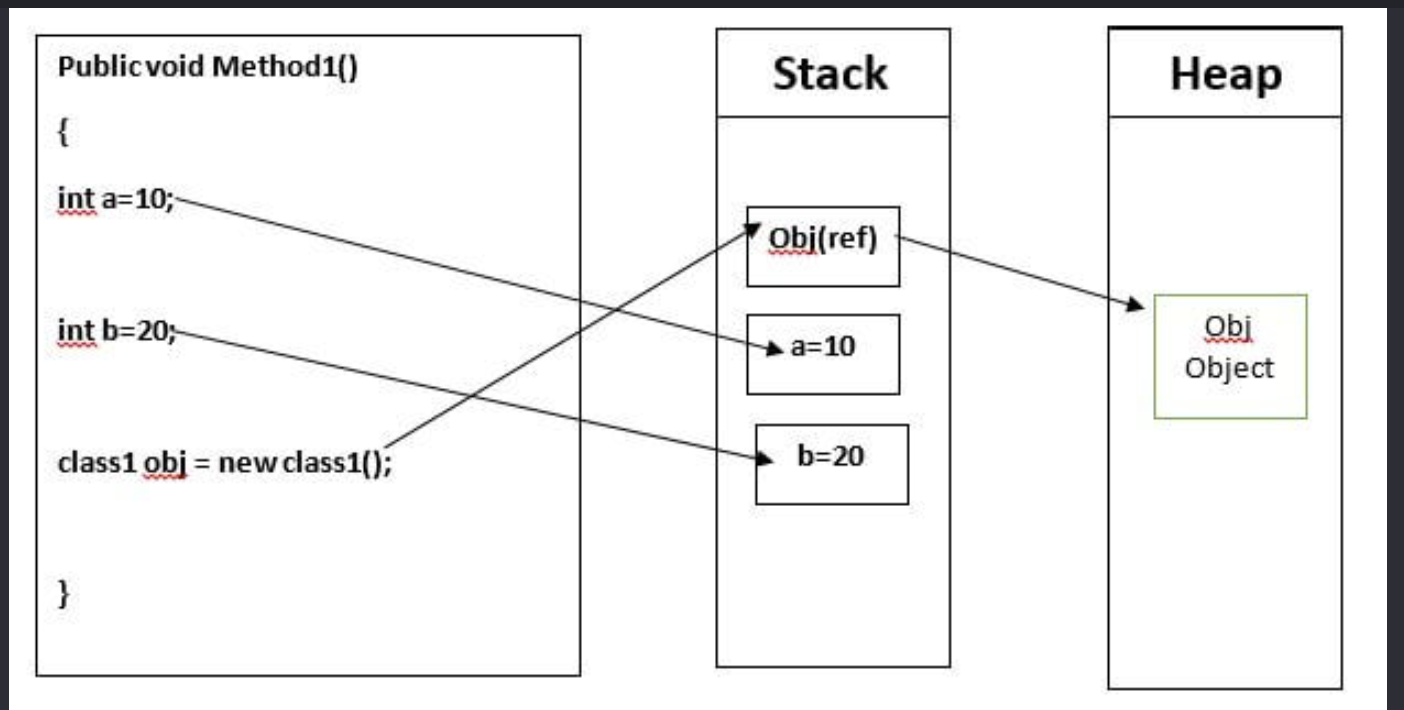
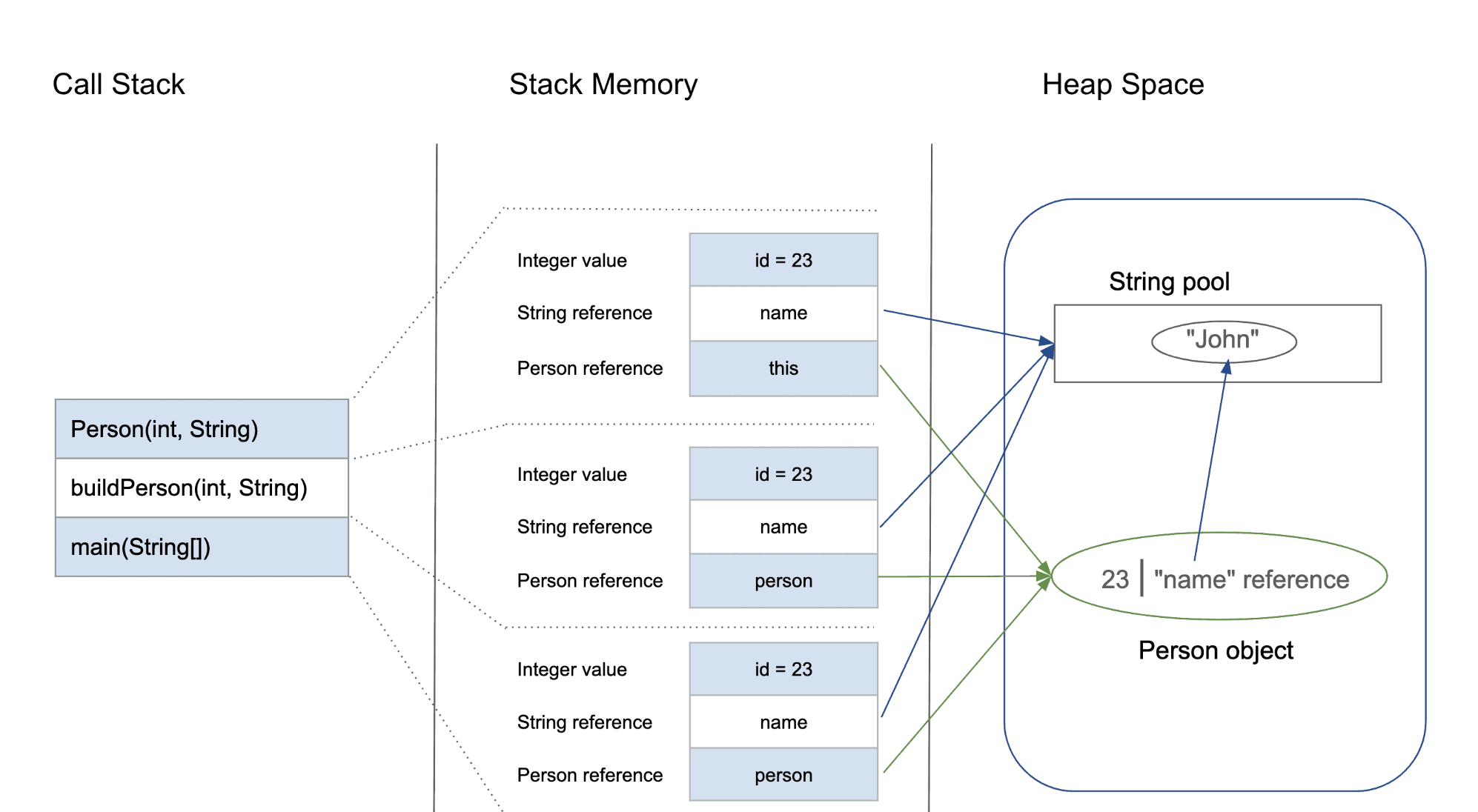
Stack and heap

Now we reach another important concept.

A running program uses memory in different ways. Two areas you’ll encounter immediately are the stack and the heap.

Consider:

void calculate() {
int number = 42;
}

The local variable has automatic storage associated with the function’s execution.

Conceptually:

Stack
calculate()
┌───────────────┐
│ number = 42 │
└───────────────┘

When the function returns, that stack storage is no longer needed.

Dynamic allocation is different:

int *number = malloc(sizeof(int));
*number = 42;

Now memory is allocated dynamically.

Conceptually:

Stack
┌───────────────┐
│ number │──────┐
└───────────────┘ │
↓
Heap
┌────────┐
│ 42 │
└────────┘

And C expects you to eventually release it:

free(number);

This explicit ownership model is one of the biggest differences between C and Ruby.

C always need to know, how large a piece of data is and where do I put it. Everything in C is something like: name + address + value


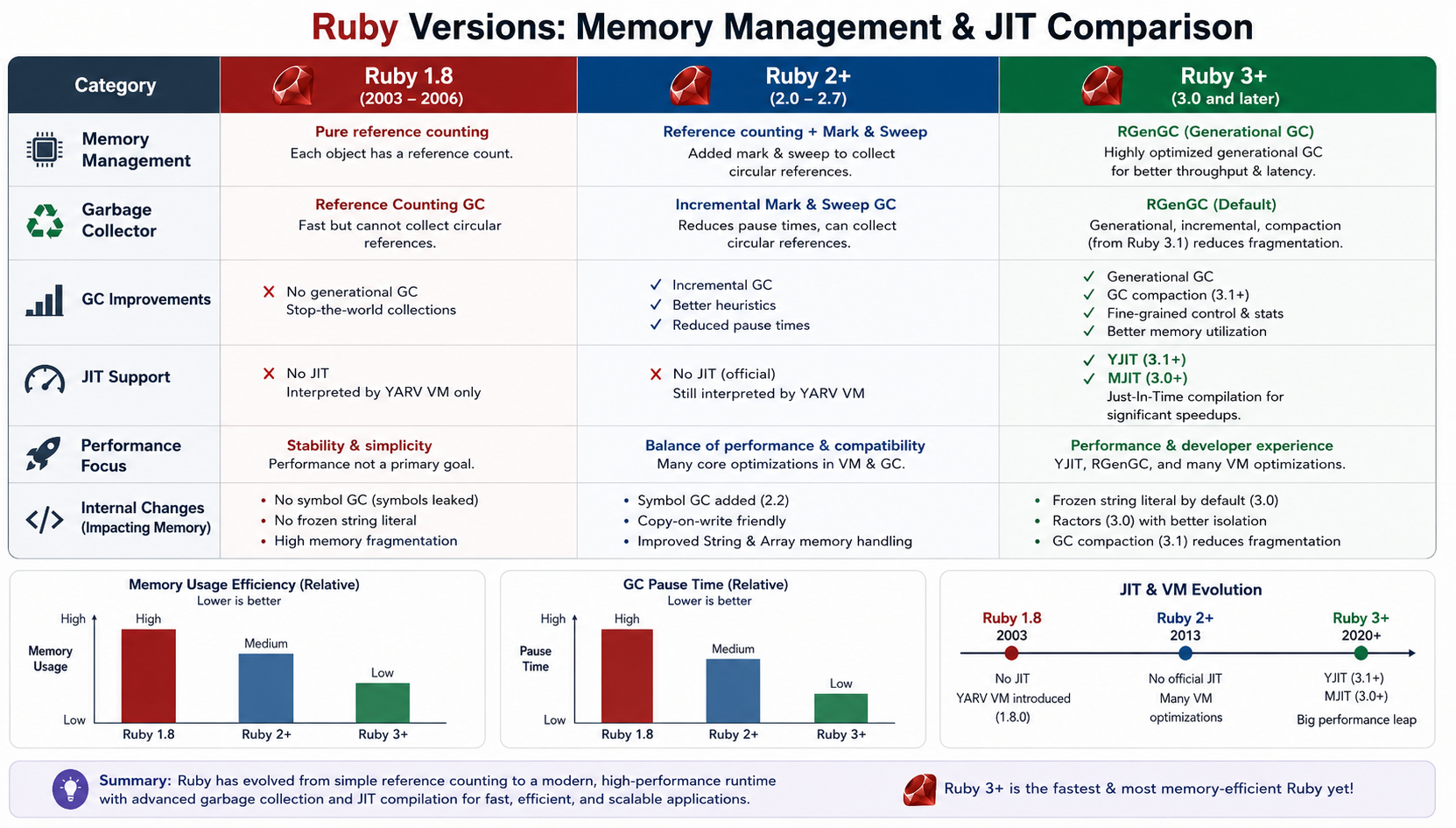
Ruby Memory Management – JIT Comparision

Check: https://docs.ruby-lang.org/en/3.4/yjit/yjit_md.html


Ruby’s heap becomes a much more interesting subject

In Ruby, you normally write:

user = User.new

and never ask:

Who called malloc?
Where exactly is this object?
Who will release its memory?

Ruby’s runtime manages those details.

The object is allocated under Ruby’s memory-management system and the garbage collector tracks object reachability and determines when memory can be reclaimed.

So rather than:

Application → malloc → free

you generally experience:

Ruby code
↓
Ruby runtime
↓
allocation
↓
Ruby heap
↓
GC

Learning C makes that second model much easier to reason about.


The fascinating part: VALUE

Now we arrive at one of the concepts that makes CRuby internals especially interesting.

In CRuby, Ruby values are represented internally using a type called:

VALUE

You will encounter VALUE everywhere when reading the Ruby C implementation and C extension APIs.

Conceptually, you can think of it as:

the low-level representation Ruby uses to pass around Ruby values inside the runtime.

For example, a Ruby C API function may look conceptually like:

VALUE rb_str_new_cstr(const char *ptr);

and C extension methods often receive and return VALUEs.

That means your Ruby object:

"hello"

does not remain some abstract concept all the way down.

CRuby represents it using its internal object/value machinery.


Not every Ruby value is simply a pointer

This is where Ruby becomes particularly interesting.

A common beginner assumption is:

Ruby object = pointer to heap object

That’s useful as a rough mental model, but it isn’t the whole story.

CRuby uses a representation that can encode certain immediate values directly rather than allocating a separate heap object for every value.

Integers are a classic example.

So when you write:

number = 42

you shouldn’t automatically imagine:

number
↓
heap object containing 42

The runtime has specialized representations for some Ruby values.

This is one reason looking at CRuby internals is so educational.

A high-level statement such as:

“Ruby variables point to objects”

is useful, but the implementation is much more nuanced.


Why this matters for a Ruby developer

Let’s take:

a = 10
b = 10

At the Ruby language level, you care that both variables represent the integer 10.

After learning some C and Ruby internals, you start asking different questions:

Are these separate objects?
Is 10 heap allocated?
How does CRuby represent integers?
How does Ruby distinguish integers from ordinary heap objects?
What exactly is stored in VALUE?

Those are much deeper questions.

And they lead directly into:

  • immediate values
  • object flags
  • object headers
  • pointer tagging
  • garbage collection
  • object allocation
  • Ruby’s internal data structures

Pointers explain something else: object identity

Ruby lets us ask:

a = Object.new
b = a
a.equal?(b)
# => true

Why?

Because both variables refer to the same object.

Conceptually:

a ─────┐
↓
[Object]
↑
│
b ─────┘

C gives you the vocabulary to understand this relationship:

reference
address
pointer
memory location

Again, Ruby intentionally hides the actual pointer from application code.

But the underlying concept of “multiple references to the same object” remains.


The danger of C is also the lesson

Ruby protects you from many classes of memory errors.

In C, you can easily write:

int *ptr = malloc(sizeof(int));
*ptr = 42;
free(ptr);
*ptr = 100;

Now you’re accessing memory after it has been released.

That’s a use-after-free.

You can also leak memory:

int *ptr = malloc(sizeof(int));
/* forgot free(ptr) */

Or write outside an allocated buffer:

int numbers[10];
numbers[100] = 42;

These bugs are difficult precisely because C gives you so much control.

And that is the paradox:

The freedom that makes C powerful is the same freedom that makes it dangerous.

Ruby takes many of these responsibilities away from you.


The real payoff

After learning these concepts, this Ruby code:

users = 10_000.times.map { User.new }

starts looking different.

Instead of only seeing:

Ruby objects

you can begin thinking:

Ruby objects
↓
object representation
↓
memory allocation
↓
references
↓
Ruby heap
↓
garbage collector

And when a Rails application starts consuming hundreds of megabytes of memory, that mental model becomes much more useful.

You can ask better questions.

Not just:

“Why is Rails using so much memory?”

but:

“What objects are being allocated, how long do they remain reachable, and how does Ruby’s allocator and GC interact with that workload?”

That’s a much more senior-level way of investigating the problem.


Where we go next

We have now established the foundation:

C
↓
Memory
↓
Addresses
↓
Pointers
↓
Stack / Heap
↓
Ruby references
↓
VALUE
↓
CRuby object representation

The next step gets even more interesting:

What does a Ruby object actually look like inside CRuby?

We’ll look at concepts such as object headers, RBasic, type information, flags, heap allocation, and how the garbage collector sees Ruby objects.

That’s where the gap between:

User.new

and:

VALUE obj;

starts to disappear.

Happy Learning! 🚀

Learning C to Understand Ruby: A Senior Ruby Developer’s Journey – Part 1

As a Ruby developer, I have spent years enjoying one of Ruby’s biggest strengths: abstraction.

In Rails, I can write:

users = User.where(active: true)

and focus on the business problem rather than memory allocation, pointers, system calls or CPU instructions.

That is exactly why Ruby is productive.

But recently, I started asking a different question:

What is actually happening underneath my Ruby code?

What happens when Ruby creates an object?
Where does that object live?
Who allocates the memory?
Who releases it?
What does an array really look like internally?
What happens when Ruby calls a method?

And that leads to an interesting realization:

Learning C is not necessarily about moving away from Ruby. It can be a way of understanding Ruby at a much deeper level.

This is the first part of that journey.


Ruby hides the machine – intentionally

Consider this:

user = User.new

At the Ruby level, this is trivial.

But conceptually, a lot more is happening.

Ruby needs to:

  1. Represent the object.
  2. Allocate memory for it.
  3. Initialize its internal state.
  4. Keep track of the object for garbage collection.
  5. Maintain references between objects.
  6. Eventually reclaim its memory.

Ruby handles these details for us.

That abstraction is one of the reasons we love Ruby.

But it also means that most Ruby developers don’t need to think about the actual machine.

C removes much of that abstraction.


C forces you to think about memory

In C, you quickly encounter things like:

int number = 42;

and:

int *ptr = &number;

The second line introduces a concept that Ruby normally keeps away from you: the memory address of a value.

You can explicitly allocate memory:

int *numbers = malloc(100 * sizeof(int));

and explicitly release it:

free(numbers);

That changes your mental model.

Instead of thinking only in terms of:

objects
methods
classes

you begin thinking about:

memory
addresses
bytes
layouts
allocation
lifetime
references

And this is extremely useful when trying to understand Ruby internally.


Ruby objects are still data in memory

Take a simple Ruby value:

name = "Abhilash"

As a Ruby developer, you normally think:

name → String

A lower-level mindset makes you ask:

name
  ↓
Ruby value/reference
  ↓
Object representation
  ↓
Memory
  ↓
Bytes

Ruby doesn’t magically escape the laws of computing.

At some point, that string has to exist in memory.

The same is true for:

Array
Hash
Integer
String
User

They all ultimately have machine-level representations.

Learning C helps you become curious about those representations.


Stack vs Heap

One of the first concepts worth learning in C is the difference between stack and heap memory.

For example:

void example() {
    int number = 10;
}

The local variable has automatic storage duration associated with the function’s execution.

Dynamic allocation looks different:

int *number = malloc(sizeof(int));
*number = 10;

free(number);

Now the program explicitly controls the allocation and lifetime.

This distinction is extremely important when later studying Ruby’s memory management.

Ruby objects are managed by the runtime rather than by application code using malloc and free directly.

That leads naturally to the next question:

Who manages Ruby’s heap?

The answer takes us into the Ruby garbage collector.


Garbage collection becomes much easier to understand

A Ruby developer typically learns:

“Ruby has a garbage collector, so I don’t need to manually free objects.”

That’s correct, but incomplete.

Once you understand manual memory management in C, garbage collection becomes much more interesting.

You can start thinking about:

Object allocation
       ↓
Heap
       ↓
References
       ↓
Object becomes unreachable
       ↓
Garbage collector
       ↓
Memory can be reclaimed

Instead of viewing GC as some magical Ruby feature, you begin seeing it as a runtime memory-management strategy.

That distinction is important.

Ruby didn’t eliminate memory management.

It automated memory management.


C also teaches you that data layout matters

Consider:

struct User {
    int id;
    char name[50];
};

You are explicitly describing a data structure’s layout.

You begin thinking about questions such as:

  • How many bytes does this structure occupy?
  • How are fields aligned?
  • Are objects contiguous?
  • How efficiently will the CPU access them?
  • What happens to cache locality?

Ruby normally shields you from these concerns.

But when performance suddenly matters, these concepts become valuable.

For example, processing millions of objects isn’t only about algorithmic complexity.

Memory access patterns can matter too.

This is one reason understanding low-level systems concepts can make you a better high-level developer.


Then there is the most interesting part: Ruby itself uses C

This is where the journey becomes particularly relevant to Ruby developers.

The standard Ruby implementation, CRuby, is largely implemented in C.

That means the language we write:

array.map(&:name)

eventually reaches a runtime implemented at a much lower level.

Conceptually:

Ruby code
   ↓
Ruby parser / VM
   ↓
CRuby runtime
   ↓
Operating system
   ↓
CPU / memory

Once you start reading Ruby’s C source code, concepts that initially look mysterious start becoming understandable:

VALUE
Ruby objects
references
object allocation
method dispatch
garbage collection
VM execution

And suddenly C stops being just another programming language.

It becomes a lens through which you can inspect Ruby itself.


Why should a senior Rails developer care?

You don’t need to write your next Rails application in C.

That isn’t the point.

The goal is to develop a deeper mental model.

When you write:

100_000.times do
User.new
end

you should eventually be able to think beyond the Ruby syntax.

You start wondering:

How many allocations?

Where are those objects stored?

How does GC discover them?

What references exist?

How much memory is being consumed?

What happens when these objects become unreachable?

What is the runtime doing while my Ruby code executes?

Those questions are far more valuable than memorizing another Rails API.


The goal of this journey

My objective isn’t:

“Become a C programmer.”

It is:

Become a Ruby developer who understands what Ruby is doing underneath.

And the roadmap becomes surprisingly clear:

C fundamentals
      ↓
Pointers & memory
      ↓
Stack & heap
      ↓
Processes & system calls
      ↓
C programming at system level
      ↓
CRuby internals
      ↓
Ruby VM
      ↓
Garbage collection
      ↓
Ruby C extensions

The interesting part is that the deeper you go into C, the less mysterious Ruby becomes.

Ruby’s abstractions don’t disappear.

You simply start seeing what is behind them.

And for me, that is the real power of learning C as a Ruby developer.

Part 2 will start with the most important foundation: memory, pointers, stack, heap and how these concepts map to the Ruby object model.

For Part 2, I’d make memory + pointers + stack/heap → Ruby objects. That is where this series can become genuinely fascinating for an experienced Ruby developer.

Happy Learning! 🚀

The Magic of +”” and -“” in Ruby

Demystifying Unary String Operators for Performance and Safety

Ruby is renowned for its developer happiness and elegant syntax. It’s a language where common tasks often read like natural English. However, beneath this friendly surface lie powerful, slightly esoteric features designed for fine-grained control and performance optimization. One such feature – often puzzling to newcomers and occasionally overlooked by seasoned developers – is the use of unary operators on strings: specifically, +”” and -“” .

If you’ve ever dug into the source code of popular Ruby gems like Rails or sidekiq, you might have stumbled across a line like this and paused:

buffer = +""

What exactly is happening here? Why not just write buffer = “” ? Let’s dive into the mechanics, the advantages, and why this tiny symbol makes a significant difference.

The Problem: The Frozen String Literal Pragma

To understand +”” , we first have to understand a major shift in Ruby’s approach to memory management.

Historically, every time you declared a string literal in Ruby, a new object was created in memory. If you had a loop that printed “hello” 1,000 times, Ruby instantiated 1,000 distinct string objects, creating work for the garbage collector.
To combat this, Ruby 2.3 introduced the frozen string literal pragma:

frozen_string_literal: true

When placed at the top of a file, this magic comment instructs Ruby to freeze all string literals in that file. A frozen string cannot be modified. They become constants in memory, drastically reducing object allocations. This is considered a best practice in modern Ruby development.

However, this introduces a new problem. What if you want to build a string dynamically using append operations ( << )?

frozen_string_literal: true
buffer = ""
buffer << "Hello" # => FrozenError (can't modify frozen String)

The Solution: The Unary Plus ( +”” )

Enter the unary + operator. Introduced in Ruby 2.3 alongside the frozen string pragma, + explicitly unfreezes a string literal, returning a mutable copy.

frozen_string_literal: true
buffer = +""
buffer << "Hello "
buffer << "World"
puts buffer # => "Hello World"

In short: +”” says to Ruby, “I know frozen strings are enabled here, but I specifically need this particular string to be mutable because I plan to change it.”

Why is this better than String.new ?

You could achieve the same result using String.new .

buffer = String.new

Functionally, +”” and String.new achieve the same goal. However, +”” is generally preferred in the Ruby community for a few reasons:
* Brevity: It’s significantly shorter and reads more like a literal assignment.
* Idiomatic: It has become the recognized standard idiom in modern Ruby libraries.
* Performance (Micro-optimization): Historically, evaluating the literal +”” was marginally faster than the method dispatch required for String.new , although modern Ruby versions have largely leveled this playing field.

The Counterpart: The Unary Minus ( -“” )

If + unfreezes a string, what does – do? The unary minus does the opposite: it
guarantees a string is frozen and deduplicated.

frozen_string_literal: false (or omitted)
str1 = -"immutable"
str2 = -"immutable"
puts str1.object_id == str2.object_id # => true
str1 << " change" # => FrozenError (can't modify frozen String)

When you use – , Ruby checks an internal “frozestring” table. If a frozen string with the identical content already exists, it returns a reference to that existing object rather than creating a new one. This is equivalent to calling “immutable”.freeze , but it is syntactically cleaner when used inline.

Why Do Developers Miss This?

If these operators are so useful, why aren’t they universally understood?
* It’s visually subtle: The difference between “” and +”” is a single character. It’s easy for the eyes to glide over it during code review or while casually reading a library’s source code.
* It relies on file-level pragmas: If you aren’t in the habit of using #
frozen_string_literal: true
in your projects, you rarely encounter the
FrozenError that necessitates +”” . Many smaller scripts or older legacy
applications run without the pragma, meaning a regular “” works fine as a
mutable buffer.
* It feels “un-Ruby-like”: Ruby is usually explicit and readable (e.g., [1,
2].empty? ). Using arithmetic operators like + and – on strings to control memory allocation feels a bit like C-style pointer manipulation, which breaks the mental model some developers have of the language.

Best Practices & Takeaways

To write modern, performant, and safe Ruby code, adopt these habits:
* Always freeze by default: Add # frozen_string_literal: true to the top of all new Ruby files. It’s an easy win for memory efficiency.
* Use +”” for buffers: When you need to incrementally build a string using << ,
initialize it with +”” .
* Avoid += in loops: Building strings with += creates a new object on every iteration, regardless of pragmas. Always prefer appending to a mutable buffer with << .

BAD (Creates 1001 string objects)
frozen_string_literal: true
result = +""
1000.times { result += "a" }
GOOD (Creates 1 mutable string object and modifies it in place)
frozen_string_literal: true
result = +""
1000.times { result << "a" }

The unary operators + and – on strings are small, esoteric features that pack a
significant punch. Understanding them not only helps you write better code but also enables you to read and understand the source code of the Ruby ecosystem’s most robust libraries.

Files

Download PDF:

Happy Rubying!

Ruby Equality: The Full Picture ==, ===, eql? and equal?

To truly master equality in Ruby, you need to look at four distinct methods. Beyond == and ===, Ruby uses eql? for strict value and type checking, and equal? for strict object identity.

Here is how they stack up:

Method / OperatorPurposeStrictness LevelCore Behavior
==Value EqualityLooseReturns true if values are equivalent (e.g., 1 == 1.0 is true).
===Case EqualityContextualUsed in case/when. Checks membership, type matching, or regex matching (Class === instance).
eql?Hash Key EqualityStrictChecks if values and types match. Used by Ruby under the hood to look up keys in a Hash.
equal?Object IdentityAbsoluteChecks if both sides point to the exact same object in memory (object_id). Never override this.

1. Hash Equality (eql?)

While == will convert numbers to compare them, eql? requires them to be the exact same class.

1 == 1.0 # => true
1.eql?(1.0) # => false (Integer vs Float)
# Why it matters: Hash keys use eql?
hash = {}
hash[1] = "Integer One"
hash[1.0] = "Float One"
puts hash.keys # => [1, 1.0] (They are treated as completely separate keys!)

2. Identity Equality (equal?)

This is the ultimate test of identity. It checks if the two variables point to the same slot in your computer’s memory.

str1 = "hello"
str2 = "hello"
str1 == str2 # => true (Same value)
str1.equal?(str2) # => false (Different objects in memory)
str3 = str1
str1.equal?(str3) # => true (Both variables point to the exact same object)

How to Override Equality in Custom Classes

When you build your own objects, Ruby doesn’t automatically know what makes two instances “equal.” By default, custom objects inherit == from Object, which behaves like equal? (identity checking).

To fix this, you should override ==. When you override ==, it is best practice to also alias it to ===.

Here is a clean, modern implementation for a custom class:

class Product
attr_reader :id, :name
def initialize(id, name)
@id = id
@name = name
end
# 1. Define custom value equality
def ==(other)
# Ensure the other object is actually a Product or subclass
return false unless other.is_a?(Product)
# Consider them equal if their IDs match
self.id == other.id
end
# 2. Make case equality behave exactly the same way
alias_method :===, :==
end
prod1 = Product.new(101, "Laptop")
prod2 = Product.new(101, "MacBook Pro") # Same ID, different name string
# Testing our custom equality
puts prod1 == prod2 # => true (Because IDs match)
puts prod1 === prod2 # => true (Works seamlessly in case statements!)

Ruby Equality: In Detail

Ruby gives you four ways to compare things. Most developers use == everywhere and wonder why things break. Here’s what’s actually happening under the hood – and when to reach for each one.

The Four Operators at a Glance

MethodQuestion it asksDefault defined in
==Are you equivalent in value?BasicObject
===Do you belong to this category?Object (delegates to ==)
eql?Same value and type?Object (delegates to ==)
equal?Are you the exact same object in memory?BasicObject (never override)

== – Value Equality (The Workhorse)

This is what you use 95% of the time. == asks: are these equivalent?

1 == 1.0 # => true (Integer vs Float, Ruby coerces)
"hello" == "hello" # => true (same content, different objects)
[1, 2] == [1, 2] # => true

The key thing: == is just a method. Every class can override it. Here’s what that looks like:

class Money
attr_reader :amount, :currency
def initialize(amount, currency)
@amount = amount
@currency = currency
end
def ==(other)
return false unless other.is_a?(Money)
amount == other.amount && currency == other.currency
end
end
Money.new(100, "USD") == Money.new(100, "USD") # => true
Money.new(100, "USD") == Money.new(100, "GBP") # => false

Watch out: If you override ==, also override hash or your objects will break in hashes and sets. More on that below.

=== – Case Equality (The Pattern Matcher)

This one is subtle. === powers case/when and asks: does the right side belong to the category defined by the left side?

# Under the hood, case/when calls ===
case status_code
when 200 # Integer#=== → 200 === 200
when 300..399 # Range#=== → range.include?(code)
when /^5\d{2}/ # Regexp#=== → regex.match?(code)
end

Each class defines what “belonging” means:

(1..10) === 5 # => true - range membership
/\d+/ === "123" # => true - regex match
String === "hello" # => true - is it an instance of String?
:ok === :ok # => true - falls back to ==

You can exploit this directly:

matchers = [Integer, /error/, (500..599)]
matchers.any? { |m| m === value } # polymorphic dispatch, zero if/else

Rule of thumb: Don’t call === explicitly in most code. It’s a framework-level tool. Let case/when use it.

eql? – Type-Strict Equality

eql? asks: same value AND same type?

1 == 1.0 # => true (== coerces)
1.eql?(1.0) # => false (different types)
1.eql?(1) # => true
"a".eql?("a") # => true

The critical contract: eql? and hash are paired. Ruby uses eql? to resolve hash key collisions. If two objects are eql?, they must return the same hash value.

# This is why 1 and 1.0 are NOT the same Hash key
h = {}
h[1] = "integer"
h[1.0] = "float"
h # => {1 => "integer", 1.0 => "float"} - two separate keys!
1.hash # => some_number
1.0.hash # => different_number (on most Ruby versions)

When to override eql?:

class Point
attr_reader :x, :y
def initialize(x, y) = @x, @y = x, y
def ==(other)
other.is_a?(Point) && x == other.x && y == other.y
end
def eql?(other)
other.is_a?(Point) && x.eql?(other.x) && y.eql?(other.y)
end
def hash
[x, y].hash # delegate to Array#hash - safe and correct
end
end
p1 = Point.new(1, 2)
p2 = Point.new(1, 2)
{p1 => "origin"}.fetch(p2) # => "origin" ✓
Set.new([p1, p2]).size # => 1 ✓

If you skip hash when overriding eql?, your objects will behave erratically in Hash and Set. Always define all three together.

equal? – Identity Equality (Object Identity)

This checks if two references point to the exact same object in memory. It’s Ruby’s object_id check in method form.

a = "hello"
b = "hello"
c = a
a == b # => true (same value)
a.equal?(b) # => false (different objects)
a.equal?(c) # => true (same object)

Never override equal?. It’s the only reliable way to check object identity. Ruby’s internals depend on it.

Practical use: checking if a method was given a sentinel value vs. a user-provided nil:

UNSET = Object.new # unique sentinel
def fetch(key, default = UNSET)
if default.equal?(UNSET)
# no default provided - raise if missing
else
# use default
end
end

The Override Contract

Here’s what you must implement together:

Override == → consider eql? and hash
Override eql? → must override hash
Override hash → must override eql?

A complete, production-ready value object:

class CurrencyAmount
attr_reader :cents, :currency
def initialize(cents, currency)
@cents = Integer(cents)
@currency = currency.to_s.upcase.freeze
freeze
end
def ==(other)
other.is_a?(CurrencyAmount) &&
cents == other.cents &&
currency == other.currency
end
alias eql? ==
def hash
[self.class, cents, currency].hash
end
def ===(other) # optional: for case/when support
self == other
end
def to_s = "#{cents} #{currency}"
def inspect = "#<CurrencyAmount #{self}>"
end

Note alias eql? == – when == and eql? have identical semantics (which they often should for value objects), alias instead of duplicating code.

Quick Decision Guide

Need to compare values? → ==
Building a case/when or pattern? → === (implicit)
Using objects as Hash keys or in Set? → eql? + hash
Checking object identity/sentinel? → equal?

The Spaceship Operator: Bonus Round

If you’re implementing ==, consider also implementing <=> and including Comparable:

class Version
include Comparable
attr_reader :major, :minor, :patch
def <=>(other)
return nil unless other.is_a?(Version)
[major, minor, patch] <=> [other.major, other.minor, other.patch]
end
end

Comparable gives you <, >, <=, >=, between?, and clamp for free. == is derived from <=> returning 0. Clean and complete.

Key Takeaways

  • == is for value equivalence – override it for domain objects
  • === is for categorization – used by case/when, rarely called directly
  • eql? and hash are inseparable – implement both or neither
  • equal? is object identity – never override it
  • The full contract for hashable value objects: ==, eql?, hash – all consistent

Ruby’s equality system looks like redundancy until you hit a Hash bug at 2am. Now you won’t.


Writing Effective Test Cases 🚧 for Your Ruby on Rails Model: A Guide

When it comes to building robust and maintainable applications, writing test cases is a crucial practice. In this guide, I will walk you through writing effective test cases for a Ruby on Rails model using a common model name, “Task.” The concepts discussed here are applicable to any model in your Rails application.

Why Write Test Cases?

Writing test cases is essential for several reasons:

  1. Bug Detection: Test cases help uncover and fix bugs before they impact users.
  2. Regression Prevention: Tests ensure that new code changes do not break existing functionality.
  3. Documentation: Well-written test cases serve as documentation for your codebase, making it easier for other developers to understand and modify the code.
  4. Refactoring Confidence: Tests provide the confidence to refactor code knowing that you won’t introduce defects.
  5. Collaboration: Tests facilitate collaboration within development teams by providing a common set of expectations.

Now, let’s dive into creating test cases for a Ruby on Rails model.

Model: Task

We will use a model called “Task” as an example. Tasks might represent items on a to-do list, items in a project management system, or any other entity that requires tracking and management.

Setting Up the Environment

Before writing test cases, ensure that your Ruby on Rails application is set up correctly with the testing framework of your choice. Rails typically uses MiniTest or RSpec for testing. For this guide, we’ll use MiniTest.

# Gemfile
group :test do
  gem 'minitest'
  # Other testing gems...
end

After updating your Gemfile, run bundle install to install the testing gems. Ensure your test database is set up and up-to-date by running bin/rails db:test:prepare.

Writing Test Cases

Model Validation

The first set of test cases should focus on validating the model’s attributes. For our Task model, we might want to ensure that the title is present and within an acceptable length range.

# test/models/task_test.rb

require 'test_helper'

class TaskTest < ActiveSupport::TestCase
  test "should not save task without title" do
    task = Task.new
    assert_not task.save, "Saved the task without a title"
  end

  test "should save task with valid title" do
    task = Task.new(title: "A valid task title")
    assert task.save, "Could not save the task with a valid title"
  end
end
Testing Associations

In Rails, models often have associations with other models. For example, a Task might belong to a User. You can write test cases to ensure these associations work correctly.

# test/models/task_test.rb

class TaskTest < ActiveSupport::TestCase
  # ...

  test "task should belong to a user" do
    user = User.create(name: "John")
    task = Task.new(title: "Task", user: user)
    assert_equal user, task.user, "Task does not belong to the correct user"
  end
end
Custom Model Methods

If your model contains custom methods, ensure they behave as expected. For example, if you have a method that returns the completion status of a task, test it.

# test/models/task_test.rb

class TaskTest < ActiveSupport::TestCase
  # ...

  test "task should return completion status" do
    task = Task.new(title: "Task", completed: false)
    assert_equal "Incomplete", task.completion_status
    task.completed = true
    assert_equal "Complete", task.completion_status
  end
end
Scopes

Scopes allow you to define common queries for your models. Write test cases to ensure scopes return the expected results.

# test/models/task_test.rb

class TaskTest < ActiveSupport::TestCase
  # ...

  test "completed scope should return completed tasks" do
    Task.create(title: "Completed Task", completed: true)
    Task.create(title: "Incomplete Task", completed: false)

    completed_tasks = Task.completed
    assert_equal 1, completed_tasks.length
    assert_equal "Completed Task", completed_tasks.first.title
  end
end

Running Tests

You can run your tests with the following command:

bin/rails test

This command will execute all the test cases you’ve written in your test files.

Conclusion

Writing test cases is an essential practice in building reliable and maintainable Ruby on Rails applications. In this guide, we’ve explored how to write effective test cases for a model using a common model name, “Task.” These principles can be applied to test any model in your Rails application.

By writing comprehensive test cases, you ensure that your application functions correctly, maintains quality over time, and makes collaboration within your development team more efficient.

Happy testing!

Rails 6.1 introduce ‘compact_blank’

Before Rails 6 we used to remove the blank values from Array and Hash by using other available methods.

Before:

  [...].delete_if(&:blank?)
  {....}.delete_if { |_k, v| v.blank? }
OR
  [...].reject(&:blank?)
  ...

From now, Rails 6.1.3.1 onwards you can use the module Enumerable’s compact_blank and compact_blank! methods.

Now we can use:

[1, "", nil, 2, " ", [], {}, false, true].compact_blank
=> [1, 2, true]

['', nil, 8, [], {}].compact_blank
=> [8]

{ a: "", b: 1, c: nil, d: [], e: false, f: true }.compact_blank
=> {:b=>1, :f=>true}

The method compact_blank! is a destructive method (handle with care) for compact_blank.

As a Rails developer, I am grateful for this method because there are many scenarios where we find ourselves replicating this code.

Setup Ruby, ruby-build, rbenv-gemset | Conclusion – Moving micro-services into AWS EC2 instance – Part 3

In this post let’s setup Ruby and ruby gemsets for each project, so that your package versions are maintained.

Install ruby-build # ruby-build is a command-line utility for rbenv

git clone https://github.com/rbenv/ruby-build.git ~/.rbenv/plugins/ruby-build

# Add ruby build path

echo 'export PATH="$HOME/.rbenv/plugins/ruby-build/bin:$PATH"' >> ~/.bashrc # OR
echo 'export PATH="$HOME/.rbenv/plugins/ruby-build/bin:$PATH"' >> ~/.zshrc

# load it

source ~/.bashrc # OR
source ~/.zshrc


For Mac users – iOS users


# verify rbenv
curl -fsSL https://github.com/rbenv/rbenv-installer/raw/main/bin/rbenv-doctor | bash

If you are using zsh add the following to `~/.zshrc`

# rbenv configuration
eval "$(rbenv init -)"
export RUBY_CONFIGURE_OPTS="--with-openssl-dir=$(brew --prefix openssl@1.1)"

Install Ruby 2.5.1 using rbenv

rbenv install 2.5.1

rbenv global 2.5.1 # to make this version as default

ruby -v # must display 2.5.1 if installed correctly

which ruby # must show the fully qualified path of the executable

echo "gem: --no-document" > ~/.gemrc # to skip documentation while installing gem

rbenv rehash # latest version of rbenv apparently don't need this. Nevertheless, lets use it to avoid surprises.

gem env home # See related details

# If a new version of ruby was installed, ensure RubyGems is up to date.
gem update --system --no-document


Install rbenv gemset – https://github.com/jf/rbenv-gemset

git clone git://github.com/jf/rbenv-gemset.git ~/.rbenv/plugins/rbenv-gemset

If you are getting following issue:

fatal: remote error:
  The unauthenticated git protocol on port 9418 is no longer supported.
# Fix
 git clone https://github.com/jf/rbenv-gemset.git ~/.rbenv/plugins/rbenv-gemset

Now clone your project and go inside the project folder -Micro-service folder (say my-project) which has Gemfile in it and do the following commands.

cd my-project

my-project $ rbenv gemset init # NOTE: this will create the gemset under the current ruby version.

my-project $ rbenv gemset list # list all gemsets

my-project $ rbenv gemset active # check this in project folder

my-project $ gem install bundler -v '1.6.0'

my-project $ rbenv rehash

my-project $ bundle install  # install all the gems for the project inside the gemset.

my-project $ rails s -e production # start rails server
my-project $ puma -e production -p 3002 -C config/puma.rb # OR start puma server
# OR start the server you have configured with rails. 

Do this for all the services and see how this is running. The above will install all the gems inside the project gemset that acts like a namespace.

So our aim is to setup all the ruby micro-services in the same machine.

  • I started 10 services together in AWS EC2 (type: t3.small).
  • Database is running in t2.small instance with 2 volumes (EBS) attached.
  • For Background job DB (redis) is running in t2.micro instance.

So for 3 ec2 instance + 2 EBS volumes –$26 + elastic IP addresses ( aws charges some amount – $7.4) 1 month duration, it costs me around $77.8, almost 6k rupees. That means we reduced the aws-cloud cost to half of the previous cost.