
Learning C to Understand Ruby – Part 2: Memory, Pointers and the Ruby Object Model

In Part 1, I looked at why learning C can be valuable for a Ruby developer-not to replace Ruby, but to understand what happens underneath it.

This time, we go closer to the machine.

The concepts are simple:

memory, addresses, pointers, stack, heap.

But they completely change the way you think about Ruby objects.


Everything ultimately becomes memory

Consider this Ruby code:

name = "Ruby"

At the Ruby level, we think:

name → "Ruby"

At the machine level, however, something must exist in memory.

There is storage for the string’s data, metadata describing the object, and some mechanism for Ruby to refer to that object.

The exact representation is an implementation detail, but the important idea is:

Ruby objects ultimately have a physical representation in memory.

C lets us see memory directly.


Memory has addresses

Consider:

int number = 42;

The variable has a value:

42

but it also occupies some location in memory.

We can ask C for that location:

printf("%p", (void *)&number);

The & operator means:

Give me the address of number.

You might see something like:

0x7ffee1234abc

The actual address is not important.

The concept is.

Memory
0x7ffee1234abc
[42]

Now we have crossed an important boundary.

We are no longer thinking only about values.

We are thinking about where those values live.


A pointer stores an address

C lets us store that address:

int number = 42;
int *ptr = &number;

Now:

number
[42]
ptr
[address of number]

And:

printf("%d", *ptr);

The * dereferences the pointer.

It means:

Go to the address stored in ptr and access the value there.

So:

*ptr = 100;

changes the original variable:

number = 100

This is one of C’s defining characteristics.

You can explicitly work with addresses and the data behind them.


Ruby references are not C pointers

This is an important distinction.

Ruby variables behave somewhat like references from a conceptual perspective, but Ruby does not expose raw memory addresses and pointer arithmetic in normal Ruby code.

For example:

name = "Ruby"
other = name

You can think:

name
└────→ String object
other
└────→ same String object

But Ruby does not let you simply say:

"Take this address and add 8 bytes."

C does.

That difference is fundamental.

Ruby gives you an object model.

C gives you memory-level primitives from which many such abstractions can be built.


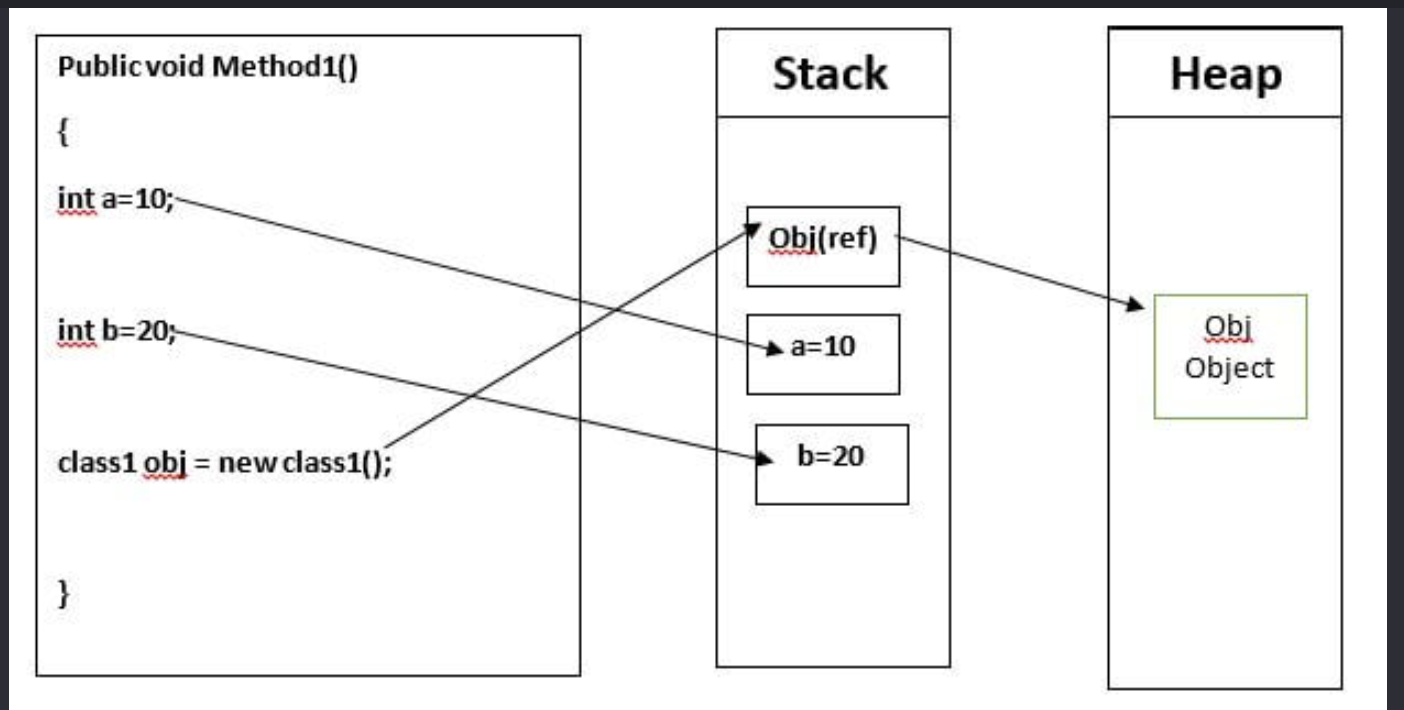
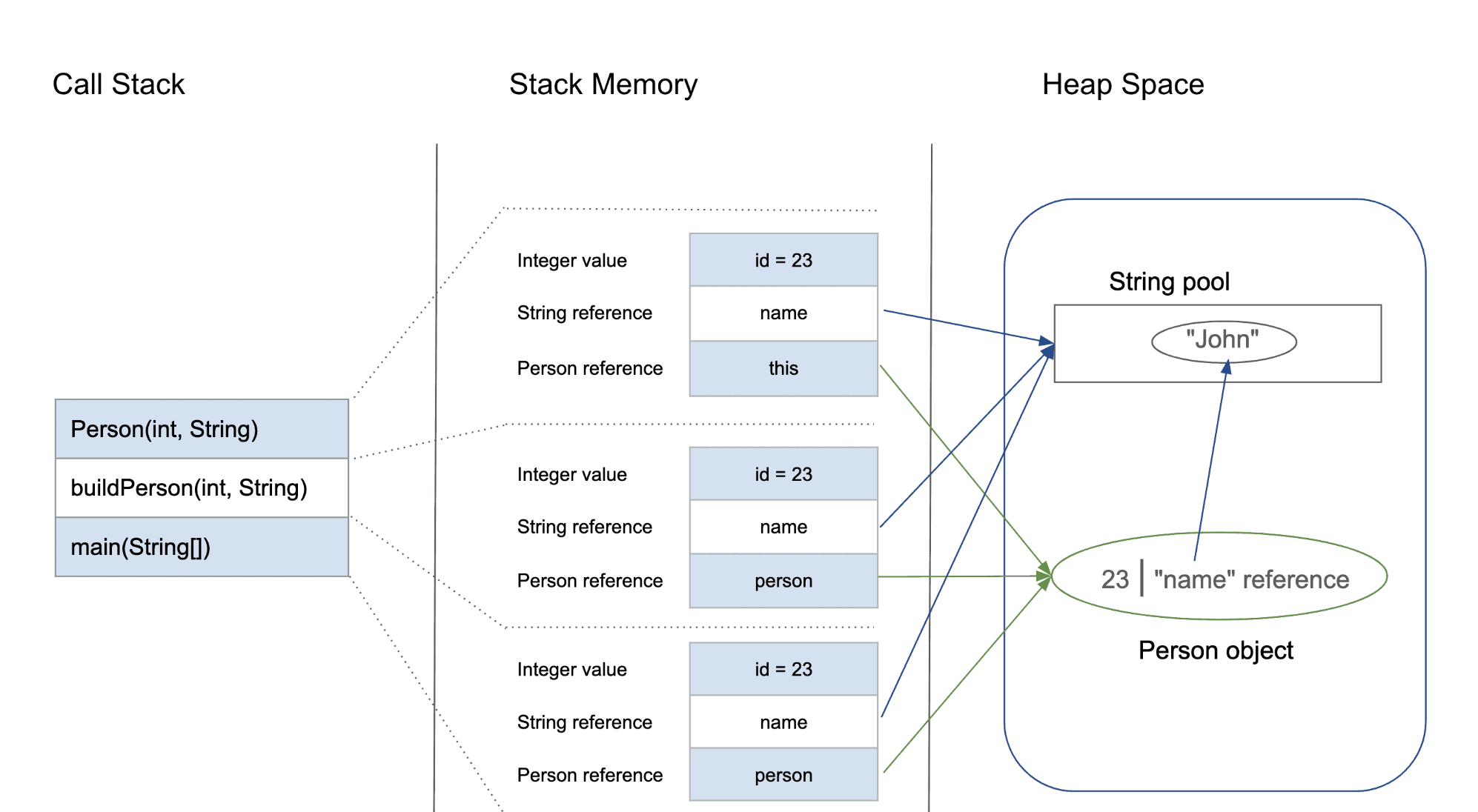
Stack and heap

Now we reach another important concept.

A running program uses memory in different ways. Two areas you’ll encounter immediately are the stack and the heap.

Consider:

void calculate() {
int number = 42;
}

The local variable has automatic storage associated with the function’s execution.

Conceptually:

Stack
calculate()
┌───────────────┐
│ number = 42 │
└───────────────┘

When the function returns, that stack storage is no longer needed.

Dynamic allocation is different:

int *number = malloc(sizeof(int));
*number = 42;

Now memory is allocated dynamically.

Conceptually:

Stack
┌───────────────┐
│ number │──────┐
└───────────────┘ │
Heap
┌────────┐
│ 42 │
└────────┘

And C expects you to eventually release it:

free(number);

This explicit ownership model is one of the biggest differences between C and Ruby.

C always need to know, how large a piece of data is and where do I put it. Everything in C is something like: name + address + value
Ruby Memory Management – JIT Comparision
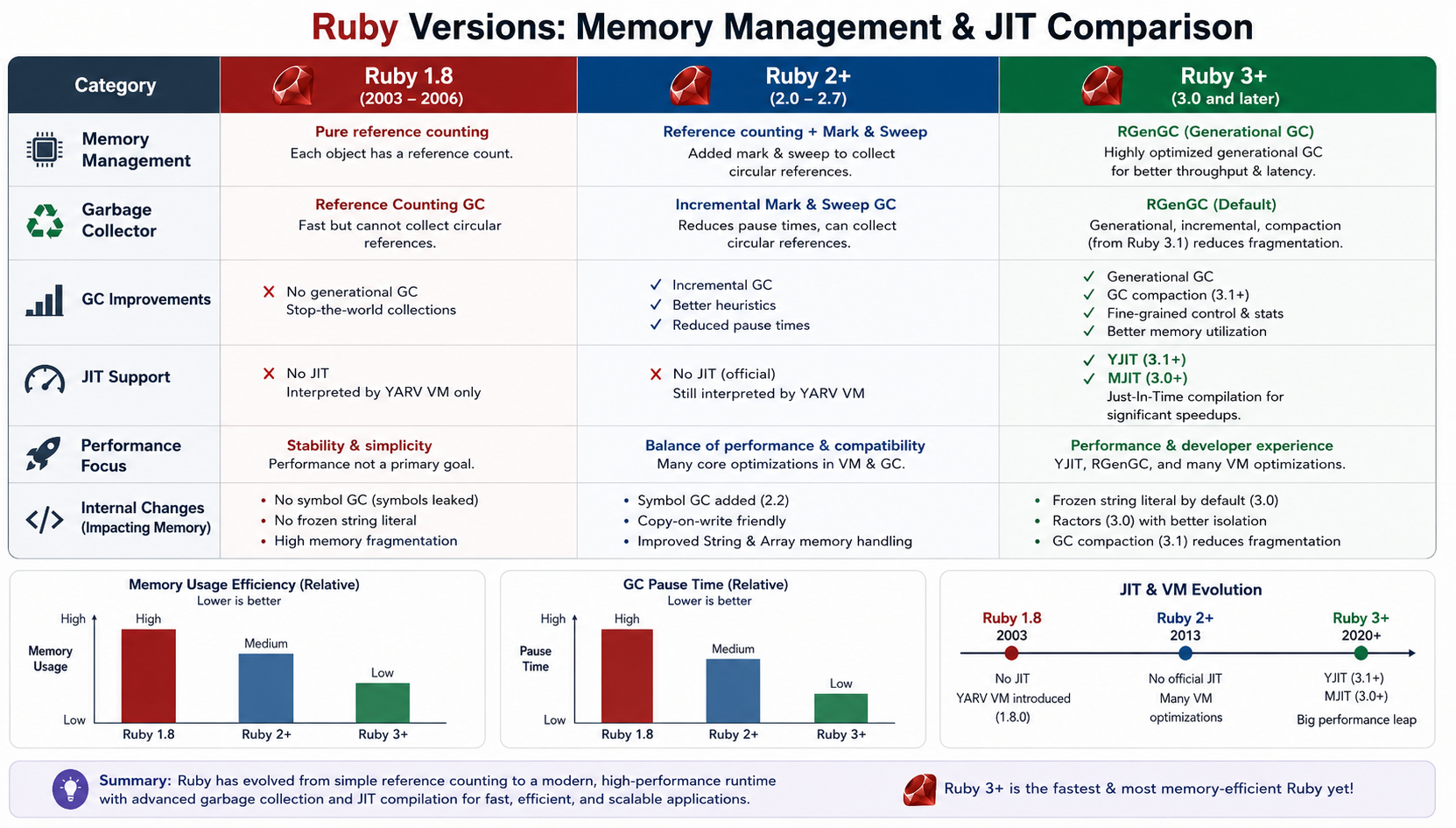
Check: https://docs.ruby-lang.org/en/3.4/yjit/yjit_md.html


Ruby’s heap becomes a much more interesting subject

In Ruby, you normally write:

user = User.new

and never ask:

Who called malloc?
Where exactly is this object?
Who will release its memory?

Ruby’s runtime manages those details.

The object is allocated under Ruby’s memory-management system and the garbage collector tracks object reachability and determines when memory can be reclaimed.

So rather than:

Application → malloc → free

you generally experience:

Ruby code
Ruby runtime
allocation
Ruby heap
GC

Learning C makes that second model much easier to reason about.


The fascinating part: VALUE

Now we arrive at one of the concepts that makes CRuby internals especially interesting.

In CRuby, Ruby values are represented internally using a type called:

VALUE

You will encounter VALUE everywhere when reading the Ruby C implementation and C extension APIs.

Conceptually, you can think of it as:

the low-level representation Ruby uses to pass around Ruby values inside the runtime.

For example, a Ruby C API function may look conceptually like:

VALUE rb_str_new_cstr(const char *ptr);

and C extension methods often receive and return VALUEs.

That means your Ruby object:

"hello"

does not remain some abstract concept all the way down.

CRuby represents it using its internal object/value machinery.


Not every Ruby value is simply a pointer

This is where Ruby becomes particularly interesting.

A common beginner assumption is:

Ruby object = pointer to heap object

That’s useful as a rough mental model, but it isn’t the whole story.

CRuby uses a representation that can encode certain immediate values directly rather than allocating a separate heap object for every value.

Integers are a classic example.

So when you write:

number = 42

you shouldn’t automatically imagine:

number
heap object containing 42

The runtime has specialized representations for some Ruby values.

This is one reason looking at CRuby internals is so educational.

A high-level statement such as:

“Ruby variables point to objects”

is useful, but the implementation is much more nuanced.


Why this matters for a Ruby developer

Let’s take:

a = 10
b = 10

At the Ruby language level, you care that both variables represent the integer 10.

After learning some C and Ruby internals, you start asking different questions:

Are these separate objects?
Is 10 heap allocated?
How does CRuby represent integers?
How does Ruby distinguish integers from ordinary heap objects?
What exactly is stored in VALUE?

Those are much deeper questions.

And they lead directly into:

  • immediate values
  • object flags
  • object headers
  • pointer tagging
  • garbage collection
  • object allocation
  • Ruby’s internal data structures

Pointers explain something else: object identity

Ruby lets us ask:

a = Object.new
b = a
a.equal?(b)
# => true

Why?

Because both variables refer to the same object.

Conceptually:

a ─────┐
[Object]
b ─────┘

C gives you the vocabulary to understand this relationship:

reference
address
pointer
memory location

Again, Ruby intentionally hides the actual pointer from application code.

But the underlying concept of “multiple references to the same object” remains.


The danger of C is also the lesson

Ruby protects you from many classes of memory errors.

In C, you can easily write:

int *ptr = malloc(sizeof(int));
*ptr = 42;
free(ptr);
*ptr = 100;

Now you’re accessing memory after it has been released.

That’s a use-after-free.

You can also leak memory:

int *ptr = malloc(sizeof(int));
/* forgot free(ptr) */

Or write outside an allocated buffer:

int numbers[10];
numbers[100] = 42;

These bugs are difficult precisely because C gives you so much control.

And that is the paradox:

The freedom that makes C powerful is the same freedom that makes it dangerous.

Ruby takes many of these responsibilities away from you.


The real payoff

After learning these concepts, this Ruby code:

users = 10_000.times.map { User.new }

starts looking different.

Instead of only seeing:

Ruby objects

you can begin thinking:

Ruby objects
object representation
memory allocation
references
Ruby heap
garbage collector

And when a Rails application starts consuming hundreds of megabytes of memory, that mental model becomes much more useful.

You can ask better questions.

Not just:

“Why is Rails using so much memory?”

but:

“What objects are being allocated, how long do they remain reachable, and how does Ruby’s allocator and GC interact with that workload?”

That’s a much more senior-level way of investigating the problem.


Where we go next

We have now established the foundation:

C
Memory
Addresses
Pointers
Stack / Heap
Ruby references
VALUE
CRuby object representation

The next step gets even more interesting:

What does a Ruby object actually look like inside CRuby?

We’ll look at concepts such as object headers, RBasic, type information, flags, heap allocation, and how the garbage collector sees Ruby objects.

That’s where the gap between:

User.new

and:

VALUE obj;

starts to disappear.

Happy Learning! 🚀
Learning C to Understand Ruby: A Senior Ruby Developer’s Journey – Part 1

As a Ruby developer, I have spent years enjoying one of Ruby’s biggest strengths: abstraction.

In Rails, I can write:

users = User.where(active: true)

and focus on the business problem rather than memory allocation, pointers, system calls or CPU instructions.

That is exactly why Ruby is productive.

But recently, I started asking a different question:

What is actually happening underneath my Ruby code?

What happens when Ruby creates an object?
Where does that object live?
Who allocates the memory?
Who releases it?
What does an array really look like internally?
What happens when Ruby calls a method?

And that leads to an interesting realization:

Learning C is not necessarily about moving away from Ruby. It can be a way of understanding Ruby at a much deeper level.

This is the first part of that journey.


Ruby hides the machine – intentionally

Consider this:

user = User.new

At the Ruby level, this is trivial.

But conceptually, a lot more is happening.

Ruby needs to:

  1. Represent the object.
  2. Allocate memory for it.
  3. Initialize its internal state.
  4. Keep track of the object for garbage collection.
  5. Maintain references between objects.
  6. Eventually reclaim its memory.

Ruby handles these details for us.

That abstraction is one of the reasons we love Ruby.

But it also means that most Ruby developers don’t need to think about the actual machine.

C removes much of that abstraction.


C forces you to think about memory

In C, you quickly encounter things like:

int number = 42;

and:

int *ptr = &number;

The second line introduces a concept that Ruby normally keeps away from you: the memory address of a value.

You can explicitly allocate memory:

int *numbers = malloc(100 * sizeof(int));

and explicitly release it:

free(numbers);

That changes your mental model.

Instead of thinking only in terms of:

objects
methods
classes

you begin thinking about:

memory
addresses
bytes
layouts
allocation
lifetime
references

And this is extremely useful when trying to understand Ruby internally.


Ruby objects are still data in memory

Take a simple Ruby value:

name = "Abhilash"

As a Ruby developer, you normally think:

name → String

A lower-level mindset makes you ask:

name
  ↓
Ruby value/reference
  ↓
Object representation
  ↓
Memory
  ↓
Bytes

Ruby doesn’t magically escape the laws of computing.

At some point, that string has to exist in memory.

The same is true for:

Array
Hash
Integer
String
User

They all ultimately have machine-level representations.

Learning C helps you become curious about those representations.


Stack vs Heap

One of the first concepts worth learning in C is the difference between stack and heap memory.

For example:

void example() {
    int number = 10;
}

The local variable has automatic storage duration associated with the function’s execution.

Dynamic allocation looks different:

int *number = malloc(sizeof(int));
*number = 10;

free(number);

Now the program explicitly controls the allocation and lifetime.

This distinction is extremely important when later studying Ruby’s memory management.

Ruby objects are managed by the runtime rather than by application code using malloc and free directly.

That leads naturally to the next question:

Who manages Ruby’s heap?

The answer takes us into the Ruby garbage collector.


Garbage collection becomes much easier to understand

A Ruby developer typically learns:

“Ruby has a garbage collector, so I don’t need to manually free objects.”

That’s correct, but incomplete.

Once you understand manual memory management in C, garbage collection becomes much more interesting.

You can start thinking about:

Object allocation
       ↓
Heap
       ↓
References
       ↓
Object becomes unreachable
       ↓
Garbage collector
       ↓
Memory can be reclaimed

Instead of viewing GC as some magical Ruby feature, you begin seeing it as a runtime memory-management strategy.

That distinction is important.

Ruby didn’t eliminate memory management.

It automated memory management.


C also teaches you that data layout matters

Consider:

struct User {
    int id;
    char name[50];
};

You are explicitly describing a data structure’s layout.

You begin thinking about questions such as:

  • How many bytes does this structure occupy?
  • How are fields aligned?
  • Are objects contiguous?
  • How efficiently will the CPU access them?
  • What happens to cache locality?

Ruby normally shields you from these concerns.

But when performance suddenly matters, these concepts become valuable.

For example, processing millions of objects isn’t only about algorithmic complexity.

Memory access patterns can matter too.

This is one reason understanding low-level systems concepts can make you a better high-level developer.


Then there is the most interesting part: Ruby itself uses C

This is where the journey becomes particularly relevant to Ruby developers.

The standard Ruby implementation, CRuby, is largely implemented in C.

That means the language we write:

array.map(&:name)

eventually reaches a runtime implemented at a much lower level.

Conceptually:

Ruby code
   ↓
Ruby parser / VM
   ↓
CRuby runtime
   ↓
Operating system
   ↓
CPU / memory

Once you start reading Ruby’s C source code, concepts that initially look mysterious start becoming understandable:

VALUE
Ruby objects
references
object allocation
method dispatch
garbage collection
VM execution

And suddenly C stops being just another programming language.

It becomes a lens through which you can inspect Ruby itself.


Why should a senior Rails developer care?

You don’t need to write your next Rails application in C.

That isn’t the point.

The goal is to develop a deeper mental model.

When you write:

100_000.times do
User.new
end

you should eventually be able to think beyond the Ruby syntax.

You start wondering:

How many allocations?

Where are those objects stored?

How does GC discover them?

What references exist?

How much memory is being consumed?

What happens when these objects become unreachable?

What is the runtime doing while my Ruby code executes?

Those questions are far more valuable than memorizing another Rails API.


The goal of this journey

My objective isn’t:

“Become a C programmer.”

It is:

Become a Ruby developer who understands what Ruby is doing underneath.

And the roadmap becomes surprisingly clear:

C fundamentals
      ↓
Pointers & memory
      ↓
Stack & heap
      ↓
Processes & system calls
      ↓
C programming at system level
      ↓
CRuby internals
      ↓
Ruby VM
      ↓
Garbage collection
      ↓
Ruby C extensions

The interesting part is that the deeper you go into C, the less mysterious Ruby becomes.

Ruby’s abstractions don’t disappear.

You simply start seeing what is behind them.

And for me, that is the real power of learning C as a Ruby developer.

Part 2 will start with the most important foundation: memory, pointers, stack, heap and how these concepts map to the Ruby object model.

For Part 2, I’d make memory + pointers + stack/heap → Ruby objects. That is where this series can become genuinely fascinating for an experienced Ruby developer.

Happy Learning! 🚀

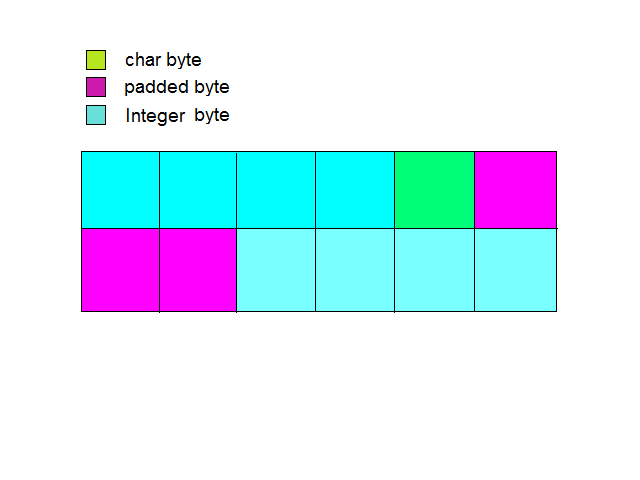
What is padding in C?

In C what is meant by padding of bits? Consider the following structure,

struct number {
int a;
char b;
int c;
};


What is the size of this structure? An integer takes 4 bytes, char takes 1 and the third integer 4 bytes. Total 9 bytes. This is wrong. We can see the size of the structure is 12 bytes. What happens here? the compiler pads 3 bytes to char element. This is for proper alignment. In a 32 bit processor it checks the next data only after 32 bits. Else the compiler will have related problems. Now the compiler knows each data is 4 bytes wider. So the benefits.

Is the study of pointers in C is easy?

Here explains a little about pointers.  Yes the pointers are easy, of course. But take care in your building path. If you go through pointers deeply, you will see the complexity.

In C address is only for l-values. It can be a variable or something. If we assign p = &a, the type of p is int * – pointer to an integer. type of ‘a’ is int and type of ‘&a’ is int *. C language is a weakly typed language. ie when we use assignment,  C allows to assign the right most thing to the left most without checking the types of these two.

int *p;
p = 1;
*p = 10;
Consider the above statements in C. We declared p as a pointer variable. Then 1 is assigned to p. In the third statement 10 is assigning to the memory location 1. What about the memory location 1, is there exists a memory address 1. Usually not. If yes, of course it isn’t accessible. OS allows the program to access only within a particular memory location. This is Memory protection. If OS takes no care about memory protection what happens? In that system so many programs are running and two programs want to store data on say 2000 th location then what happens? The programs access wrong data.

int *p;
p = 0;
*p = 10;

By executing above statements there is no error at compile time. Why? C takes zero as a pointer.

Its easy to go further.

Programming in C: Essential Points on Constants

Constants play a crucial role in C programming, providing fixed values that do not change during program execution. Here are some important points to remember when dealing with constants in C:

Integer Constants

  1. Long Constants: A long integer constant is written with an ‘L’ or ‘l’ suffix. For example: long num1 = 1234567697L; long num2 = 567874338l; // Avoid using 'l' (lowercase) as it can be confused with '1'
  2. Unsigned Constants: An unsigned integer constant is written with a ‘U’ or ‘u’ suffix: unsigned int positiveNum = 40000U;
  3. Unsigned Long Constants: These constants have both ‘U’ and ‘L’ suffixes: unsigned long bigPositiveNum = 123456789UL;

Floating-Point Constants

Floating-point constants must contain a decimal point, an exponent (e.g., 1e-1), or both. They are automatically treated as double unless explicitly declared otherwise:

double pi = 3.14159;
float gravity = 9.8F;
double smallValue = 1.23e-4;  // 1.23 × 10⁻⁴

Octal and Hexadecimal Representation

Integer values can be specified in decimal, octal, or hexadecimal notation:

int decimalNum = 31;  // Decimal
int octalNum = 031;   // Octal (leading 0 means octal, equivalent to 25 in decimal)
int hexNum = 0x1F;    // Hexadecimal (leading 0x means hex, equivalent to 31 in decimal)

Character and String Constants

  1. Character Constants: A character constant is essentially an integer representing the corresponding ASCII value. char ch = 'A'; // ASCII value is 65
  2. String Constants (String Literals): A string constant is a sequence of characters enclosed in double quotes. char greeting[] = "Hello, C!";

Constant Expressions

A constant expression is an expression that consists only of constants. Such expressions are evaluated at compile time.

#define PI 3.14159
const int maxValue = 100;
int area = 5 * 10; // Constant expression evaluated at compile-time

Constants in Control Flow Statements

  1. Switch Statements: Each case label must be associated with an integer constant or a constant expression. switch (choice) { case 1: printf("Option 1 selected\n"); break; case 2 + 1: // Constant expression printf("Option 3 selected\n"); break; default: printf("Invalid option\n"); }
  2. Continue Statement:
    • In while and do-while loops, continue immediately jumps to the condition check.
    • In for loops, it moves to the increment step.
    • It does not apply to switch statements.
    for (int i = 0; i < 5; i++) { if (i == 2) continue; // Skips printing '2' printf("%d ", i); } Output: 0 1 3 4

By keeping these fundamental points in mind, you can write cleaner and more efficient C programs.

Programming in C: Important Points on Operators

Operators play a crucial role in C programming, enabling efficient computations and manipulations. Here are some key points to remember about C operators:

1. Cast Operator Precedence

The cast operator () has the same high precedence as other unary operators like sizeof, !, &, *, +, and -. This means that type conversions occur before most binary operations.

Example:

#include <stdio.h>

int main() {
    int x = 10;
    int y = 3;
    double result = (double)x / y; // Casts x to double before division
    printf("%f\n", result); // Output: 3.333333
    return 0;
}

2. Increment and Decrement Operators

The increment (++) and decrement (--) operators can only be applied to variables, not to expressions or constants.

Invalid Example:

(int)10++; // Error: Cannot apply increment to a constant expression

Valid Example:

int a = 5;
a++; // Valid, modifies the variable

3. Bitwise Shift Operators

Bitwise shift operators (<<, >>) allow shifting bits left or right, typically used for performance optimizations or low-level programming.

Right Shift (>>)

The right shift operator moves bits to the right and discards excess bits. The behavior for signed integers is implementation-defined (logical or arithmetic shift).

Example:

#include <stdio.h>

int main() {
    int var = 32; // Binary: 00100000
    int shifted = var >> 2; // Binary: 00001000 (8 in decimal)
    printf("%d\n", shifted); // Output: 8
    return 0;
}

Here, var is shifted 2 positions to the right. The empty bit positions are filled with zeroes for unsigned integers.

Left Shift (<<)

The left shift operator moves bits to the left, filling the empty positions with zeros.

Example:

int b = 5;   // Binary: 00000101
int c = b << 3; // Binary: 00101000 (40 in decimal)
printf("%d\n", c); // Output: 40

4. Bitwise Operators and Integral Types

Bitwise operators (&, |, ^, ~, <<, >>) can only be used with integral types (such as int, char, long). They do not work with floating-point numbers (float, double).

Invalid Example:

float f = 5.5;
int result = f >> 1; // Error: Bitwise shift not allowed on floating-point numbers

Summary

  • The cast operator has the same precedence as other unary operators.
  • Increment (++) and decrement (--) apply only to variables, not expressions or constants.
  • Bitwise shift operators (>>, <<) operate only on integral types and cannot be used with floating-point numbers.
  • The behavior of right shift on negative numbers is implementation-dependent.

By keeping these rules in mind, you can avoid common pitfalls when working with operators in C.

Programming in C: Important Points on Data Types

Understanding int and short

The size of int in C can be either 16-bit or 32-bit, depending on the machine architecture and compiler implementation. Generally:

  • On older 16-bit systems, int is 16 bits.
  • On modern 32-bit and 64-bit systems, int is 32 bits.
  • short is often 16 bits, though it can vary based on the compiler.

Signed and Unsigned Characters

The signed and unsigned qualifiers can be applied to char. However, whether plain char (i.e., without signed or unsigned specified) is signed or unsigned is machine-dependent. This can affect operations involving negative values. For portability, it’s best to explicitly declare signed char or unsigned char when working with character data.

Implicit Type Conversions

When assigning between different data types, implicit conversions occur:

  • If x is float and i is int, the assignment x = i; converts i to float.
  • Conversely, i = x; truncates x to an integer, losing the decimal portion.

Understanding these implicit conversions is crucial to avoid unexpected results.

Specifying Types Correctly in Expressions

When writing expressions, you must ensure that constant arithmetic follows correct type rules. Consider the following example:

(float) a = (b - 18) * 7 / 9;

In this case, the constant division 7 / 9 is treated as integer division, which results in 0 (since both operands are integers). To ensure correct floating-point computation, use:

(float) a = (b - 18) * 7.0 / 9.0;

or explicitly cast part of the expression:

(float) a = (float)(b - 18) * 7 / 9;

This prevents unintended truncation and ensures proper floating-point arithmetic.

Integer Ranges Depend on Machine Architecture

The range of int and float types is machine-dependent. For example, on a system where int is 16 bits:

  • The total number of values is 2^16 = 65536.
  • Signed integers range from -32,768 to 32,767 (65536 / 2).

On a 32-bit system, the signed integer range extends to -2,147,483,648 to 2,147,483,647 (2^31).

Conditional Expressions and Type Conversion

Consider the following expression:

(n > 0) ? f : n;

where f is float and n is int. According to C’s type promotion rules, the entire expression evaluates to float regardless of the condition because float has a higher rank than int. This implicit promotion ensures consistency in expression evaluation.

Additional Considerations

  • Use sizeof() to determine data type sizes on different systems.
  • Be mindful of type conversions in mixed arithmetic operations.
  • Explicit casting is preferred when converting between types to avoid surprises.
  • Understand integer overflows, especially when working with large values.

By following these principles, you can write more predictable and portable C code!

Programming in C: Important Points to Remember About Variables

When working with variables in C, it’s crucial to follow best practices and be aware of certain language-specific behaviors. Here are some key points to keep in mind:

1. Avoid Variable Names That Start with an Underscore (_)

  • Variable names beginning with an underscore are often reserved for system and library routines. Using them can lead to unexpected conflicts.
  • Example (should be avoided): int _count = 10; // Might conflict with system-level identifiers
  • Instead, use meaningful names without underscores at the beginning: int count = 10;

2. Case Sensitivity in Variable Names

  • C distinguishes between uppercase and lowercase letters in variable names.
  • Example: int value = 10; int Value = 20; // Different from 'value' printf("%d %d", value, Value); // Output: 10 20

3. Significance of Name Length

  • At least the first 31 characters of an internal identifier (such as a variable or function name) are significant. This means that names longer than 31 characters might be truncated depending on the compiler.
  • Example: int thisIsAVeryLongVariableNameButOnlyFirst31CharactersMatter = 100;

4. External Variable Names and Linkers

  • External names (used in global scope) may be subject to restrictions imposed by the assembler or linker, rather than the C language itself.
  • Example: extern int globalCounter;

5. Character Set and Signedness

  • The C standard guarantees that characters in the machine’s standard printing character set will never have a negative value when stored in a char variable. However, whether char is signed or unsigned by default depends on the compiler and architecture.
  • Example: char c = 'A'; printf("%d", c); // Will always be non-negative for printable characters

Additional Tips:

  • Use meaningful and descriptive variable names to improve code readability.
  • Follow naming conventions, such as using snake_case or camelCase depending on coding standards.
  • Initialize variables before use to prevent undefined behavior.
  • Prefer const or enum over #define for defining constants.

By keeping these points in mind, you can write more robust and maintainable C programs.

Programming in C: A Small Note on Functions

Functions play a fundamental role in C programming, providing modularity, reusability, and better code organization. This article explores some key aspects of C functions, including their behavior, return values, and compilation.

Basic Function Concepts

Standard library functions like printf(), getchar(), and putchar() are commonly used in C. A C function cannot be split across multiple files; each function must be fully defined in one file.

The main Function and Return Values

The main function is the entry point of any C program. It returns an integer value, typically:

  • 0 for normal termination
  • A nonzero value for erroneous termination

Example:

#include <stdio.h>

int main() {
    printf("Hello, World!\n");
    return 0; // Indicates successful execution
}

Function Prototypes and Argument Handling

A function prototype must match its definition and usage. If the number of actual arguments exceeds the number of formal parameters, the extra arguments are ignored. Conversely, if fewer arguments are passed, the missing parameters may contain garbage values.

Example:

#include <stdio.h>

void greet(char *name) {
    printf("Hello, %s!\n", name);
}

int main() {
    greet("Alice", "ExtraArg"); // Compiler warning: too many arguments
    return 0;
}

Variable Scope and Persistence

  • Automatic variables (local variables) do not retain their values across function calls unless declared as static.
  • Static variables retain their values between function calls.

Example:

#include <stdio.h>

void counter() {
    static int count = 0; // Retains value across calls
    count++;
    printf("Count: %d\n", count);
}

int main() {
    counter();
    counter();
    counter();
    return 0;
}

Output:

Count: 1
Count: 2
Count: 3

Return Statements and Garbage Values

A function must return a value if it is declared with a non-void return type. Failing to return a value results in undefined behavior.

Example:

int faultyFunction() {
    // No return statement (causes garbage value to be returned)
}

int main() {
    int value = faultyFunction();
    printf("Returned value: %d\n", value); // Unpredictable result
    return 0;
}

Compilation Across Multiple Files

C allows functions to be spread across multiple source files. Compilation can be done using the gcc command:

$ gcc main.c fun1.c fun2.c -o my_program

This links all object files together to produce the final executable.

Undefined Order of Function Execution

In an expression like:

x = function1() + function2();

The order of execution of function1() and function2() is unspecified. The C standard does not dictate which function gets evaluated first, leading to potential unpredictability in results.

Example:

#include <stdio.h>

int function1() {
    printf("Executing function1\n");
    return 5;
}

int function2() {
    printf("Executing function2\n");
    return 10;
}

int main() {
    int x = function1() + function2();
    printf("x = %d\n", x);
    return 0;
}

Output order may vary, so avoid relying on execution sequence in such cases.

Conclusion

Understanding C functions, their behavior, and proper usage is crucial for writing robust and portable code. Following best practices such as defining proper prototypes, handling return values correctly, and being aware of evaluation order can help avoid unexpected bugs in C programs.

Programming in C: A Small Note on Arrays

Arrays in C are collections of elements of the same data type, stored in contiguous memory locations. They are indexed starting from 0, and the subscript (index) used to access an array element can be an expression that evaluates to an integer.

Accessing Arrays and Bounds

It is important to note that accessing an array outside its declared bounds does not necessarily produce an error, but it leads to undefined behavior. This means that the program may read or write unintended memory locations, potentially causing crashes or unexpected results.

Example of an Array Declaration

If an array is declared as:

int array[10] = {10};

  • The first element (array[0]) is initialized to 10.
  • All remaining elements (array[1] to array[9]) are automatically initialized to 0.

Incorrect Declaration Example

A common mistake in character array initialization:

char alpha[3] = {a, b, c};  // Incorrect

Here, a, b, and c are not enclosed in single quotes, so the compiler will not recognize them as character literals.

Correct Declaration Example

To correctly initialize a character array, use single quotes for characters:

char alpha[3] = {'a', 'b', 'c'};

Alternatively, a string (null-terminated character array) can be declared as:

char alpha[] = "abc";  // Automatically allocates space for 'a', 'b', 'c', and '\0'

Array Indexing with Expressions

C allows the use of expressions as array indices. For example:

int numbers[5] = {10, 20, 30, 40, 50};
int index = 2;
printf("%d", numbers[index + 1]);  // Output: 40

This flexibility allows dynamic indexing in programs.

Avoiding Out-of-Bounds Access

To prevent accessing elements outside the valid range, always ensure that indices are within the defined size of the array:

int arr[5] = {1, 2, 3, 4, 5};
int idx = 6;  // Out of bounds

if (idx >= 0 && idx < 5) {
    printf("%d", arr[idx]);
} else {
    printf("Index out of bounds!\n");
}

Summary

  • Arrays in C have zero-based indexing.
  • Accessing an index outside the declared range results in undefined behavior.
  • Partial initialization of an array fills the remaining elements with zeros (for static or global arrays).
  • Character arrays should use single quotes for characters ('a', 'b') and double quotes for strings ("abc").
  • Always validate array indices to prevent unintended memory access.

Understanding these fundamentals helps in writing safe and efficient C programs.