CI/CD Pipeline for a Rails + React Application Using GitHub Actions

CI/CD is an essential part of modern software development. It helps teams automatically test, build, and deploy applications whenever code changes.

In this guide, we’ll build an int.-ready understanding of CI/CD using Ruby on Rails API + React + PostgreSQL + GitHub Actions, then look at how CircleCI provides similar capabilities.

1. What Is CI/CD?

Continuous Integration (CI)

CI automatically validates code changes whenever a developer pushes code or opens a pull request.

Typical tasks include:

  • Running RSpec tests.
  • Running React component tests.
  • Checking code quality with RuboCop and ESLint.
  • Building the React application.
  • Running security and dependency checks.

The goal is to detect problems before code reaches the main branch.

Continuous Delivery vs. Continuous Deployment

Continuous Delivery: Every change that passes the pipeline is ready to deploy, but production deployment may require manual approval.

Continuous Deployment: Every change that passes the required checks is automatically deployed to production.

A common workflow is:

Developer pushes code
        |
        v
GitHub Actions starts CI
        |
        v
Run tests and linting
        |
        v
Build React application
        |
        v
All checks pass?
    /         \
   No         Yes
   |           |
 Fail       Merge to main
               |
               v
          Deploy to staging
               |
               v
        Smoke tests / approval
               |
               v
         Deploy to production

⚙️ 2. What Is GitHub Actions?

GitHub Actions is GitHub’s automation platform. It executes workflows when configured events occur, such as a push, pull request, scheduled time, or manual trigger.

Important concepts:

ConceptMeaning
WorkflowComplete automated process defined in YAML
EventTrigger, such as push or pull_request
JobGroup of steps executed on a runner
RunnerMachine that executes a job
StepIndividual command or reusable action
ActionReusable unit of automation
SecretSensitive value such as a deployment token
ArtifactFile produced by a workflow, such as a build output or test report
CacheReusable dependency data that can speed up future runs

A workflow lives inside:

.github/
  workflows/
    ci.yml

GitHub’s official guides explain workflow concepts, Ruby CI, and Node.js CI.

🏗️ 3. GitHub Actions for Rails + React

Assume this project structure:

rails_react_app/
├── app/
├── config/
├── spec/
├── Gemfile
├── .ruby-version
├── .github/
│   └── workflows/
│       └── ci.yml
└── frontend/
    ├── src/
    ├── package.json
    ├── package-lock.json
    └── .nvmrc

We’ll create two CI jobs:

  • rails-test: Prepare PostgreSQL, run database setup, RSpec, and RuboCop.
  • frontend-test: Install JavaScript dependencies, run frontend tests, and build React.

GitHub Actions can execute these independent jobs in parallel, reducing overall pipeline time.

Step 1: Create the workflow

Create .github/workflows/ci.yml:

name: CI

on:
  push:
    branches: [main]
  pull_request:
    branches: [main]

permissions:
  contents: read

concurrency:
  group: ci-${{ github.workflow }}-${{ github.ref }}
  cancel-in-progress: true

jobs:
  rails-test:
    runs-on: ubuntu-latest

    services:
      postgres:
        image: postgres:16
        env:
          POSTGRES_USER: postgres
          POSTGRES_PASSWORD: postgres
          POSTGRES_DB: rails_react_test
        ports:
          - 5432:5432
        options: >-
          --health-cmd "pg_isready -U postgres -d rails_react_test"
          --health-interval 10s
          --health-timeout 5s
          --health-retries 5

    env:
      RAILS_ENV: test
      DATABASE_URL: postgresql://postgres:postgres@localhost:5432/rails_react_test

    steps:
      - uses: actions/checkout@v6

      - uses: ruby/setup-ruby@v1
        with:
          ruby-version: .ruby-version
          bundler-cache: true

      - name: Prepare database
        run: bundle exec rails db:prepare

      - name: Run RSpec
        run: bundle exec rspec

      - name: Run RuboCop
        run: bundle exec rubocop

  frontend-test:
    runs-on: ubuntu-latest

    defaults:
      run:
        working-directory: frontend

    steps:
      - uses: actions/checkout@v6

      - uses: actions/setup-node@v7
        with:
          node-version-file: frontend/.nvmrc
          cache: npm
          cache-dependency-path: frontend/package-lock.json

      - name: Install dependencies
        run: npm ci

      - name: Lint React code
        run: npm run lint

      - name: Test React components
        run: npm run test:ci

      - name: Build React
        run: npm run build

This example assumes your Rails project uses RSpec, RuboCop, PostgreSQL, and a React frontend with the specified npm scripts. Configure the frontend’s test:ci script to run your test runner in CI mode, such as vitest run. Adjust the PostgreSQL and runtime versions to match your application.

Step 2: Understand what happens

When a pull request targets main:

  1. GitHub starts the workflow.
  2. Two isolated runner jobs start.
  3. The Rails job prepares PostgreSQL and runs backend checks.
  4. The frontend job installs dependencies, tests React, and produces a production build.
  5. If either job fails, the workflow fails.

Configure these jobs as required status checks in your repository’s branch protection or ruleset settings.

A successful workflow does not automatically mean that code is deployed. This configuration implements CI, not CD.

4. Caching and Artifacts

These two features serve different purposes.

Caching avoids repeatedly downloading dependencies. For example, bundler-cache: true handles Bundler dependency installation and caching, while setup-node can cache npm’s download cache.

Artifacts preserve files generated during a workflow. Examples include test reports, screenshots, coverage reports, or compiled application output. Use artifact upload/download actions when another job needs those files.

Do not confuse dependency caches with deployable release artifacts. For more detail, see GitHub’s caching guide and artifact guide.

5. How Do We Implement CD?

After CI passes and the code is merged into main, we can add a deployment job.

A simplified example:

  deploy-staging:
    needs: [rails-test, frontend-test]
    if: >-
      github.event_name == 'push' &&
      github.ref == 'refs/heads/main'
    runs-on: ubuntu-latest
    environment: staging

    permissions:
      contents: read

    steps:
      - uses: actions/checkout@v6

      - name: Deploy application
        run: ./script/deploy-staging.sh

The deployment script must implement the actual deployment for your platform. For example, it could deploy a container image to a container platform or invoke your hosting provider’s deployment tooling.

For production, configure a separate GitHub environment with restricted deployment branches and approval rules where appropriate.

Security best practices:

  • Store credentials in GitHub Actions secrets or environment secrets, never in source code.
  • Prefer OpenID Connect (OIDC) with short-lived cloud credentials when supported, rather than long-lived cloud access keys.
  • Restrict workflow permissions to the minimum required.
  • Pin third-party actions to reviewed commit SHAs in security-sensitive production workflows.
  • Run database migrations as part of a controlled release process, and make migrations compatible with rolling deployments.

See GitHub Actions deployment security for OIDC and environment protection.

6. How Does CircleCI Fit In?

CircleCI is another CI/CD platform. It provides the same broad capabilities: executing tests, building applications, caching dependencies, coordinating jobs, and deploying successful builds.

The main difference is the configuration platform and its integration with your repository.

In GitHub Actions, workflow files live in .github/workflows/. In CircleCI, the primary configuration file is:

.circleci/config.yml

A simplified CircleCI configuration for the same Rails + React project looks like this:

version: 2.1

jobs:
  test:
    docker:
      - image: cimg/ruby:3.3-node
      - image: cimg/postgres:16.0
        environment:
          POSTGRES_USER: postgres
          POSTGRES_PASSWORD: postgres
          POSTGRES_DB: rails_react_test

    environment:
      RAILS_ENV: test
      DATABASE_URL: postgresql://postgres:postgres@127.0.0.1:5432/rails_react_test

    steps:
      - checkout

      - run: bundle install
      - run: bundle exec rails db:prepare
      - run: bundle exec rspec
      - run: bundle exec rubocop

      - run:
          name: Test and build React
          command: |
            cd frontend
            npm ci
            npm run lint
            npm run test:ci
            npm run build

workflows:
  test:
    jobs:
      - test

This is a starter example. Match the Ruby and Node versions to your project, configure database readiness and dependency caching, and verify that the selected images meet your requirements. A production setup would typically separate backend and frontend jobs when parallel execution is beneficial.

How do we integrate CircleCI?

  1. Create a CircleCI account and connect your GitHub repository.
  2. Add .circleci/config.yml.
  3. Configure project permissions, environment variables, secrets, and required contexts.
  4. Run the pipeline and inspect failures in CircleCI’s job logs.
  5. Add deployment jobs that depend on successful test jobs and use protected deployment environments.

For more details, see the CircleCI configuration guide and JavaScript quickstart.

GitHub Actions vs. CircleCI: GitHub Actions is a natural starting point when your source code and pull requests already live on GitHub. CircleCI is also a strong option, especially when a team already uses its workflows, caching, test-splitting capabilities, and deployment integrations. You usually don’t need both platforms running the same pipeline unless there is a clear reason.

🎯 7. Questions to Remember

Q: What is the difference between CI and CD?

CI automatically builds and tests code changes. CD automates making validated changes ready for release or deploying them, depending on whether the process is continuous delivery or continuous deployment.

Q: Why use separate jobs for Rails and React?

They have different runtime dependencies and can run independently. Separate jobs allow parallel execution, clearer logs, and more targeted debugging.

Q: What happens if the tests fail?

The job fails, and dependent jobs such as deployment are skipped. Configure branch protection to prevent merging unless the required checks pass.

Q: How do you make a pipeline faster?

Cache dependencies, parallelize independent jobs, split large test suites, remove redundant work, and run expensive E2E tests selectively.

Q: How do you secure deployments?

Use least-privilege workflow permissions, protected environments, restricted secrets, reviewed workflow actions, and short-lived cloud credentials through OIDC where supported.

🎯 Final Recommendation

For a new Rails API + React application, start with GitHub Actions because it integrates directly into your repository and pull-request workflow.

Build the pipeline incrementally: lint and test → build → deploy to staging → smoke test → deploy to production. Add caching, parallelization, protected environments, security scans, and deployment approvals as your application’s requirements grow.

The goal of CI/CD is not simply to automate deployments. It is to make every release repeatable, testable, secure, and recoverable.


Sidekiq Testing Gotchas: When Your Tests Pass Locally But Fail in CI

A deep dive into race conditions, testing modes, and the mysterious world of background job testing


The Mystery: “But It Works On My Machine!” 🤔

Picture this: You’ve just refactored some code to improve performance by moving slow operations to background workers. Your tests pass locally with flying colors. You push to CI, feeling confident… and then:

X expected: 3, got: 2
X expected: 4, got: 0

Welcome to the wonderful world of Sidekiq testing race conditions – one of the most frustrating debugging experiences in Rails development.

The Setup: A Real-World Example

Let’s examine a real scenario that recently bit us. We had a OrdersWorker that creates orders for new customers:

# app/workers/signup_create_upcoming_orders_worker.rb
class OrdersWorker
  include Sidekiq::Worker

  def perform(client_id, reason)
    client = Client.find(client_id)
    # Create orders - this is slow!
    client.orders.create
    # ... more setup logic
  end
end

The worker gets triggered during customer activation:

# lib/settings/update_status.rb
def setup(prev)
  # NEW: Move slow operation to background
  OrdersWorker.perform_async(@user.client.id, @reason)
  # ... other logic
end

And our test helper innocently calls this during setup:

# spec/helper.rb
def init_client(tags = [], sub_menus = nil)
  client = FactoryBot.create(:client, ...)
  # This triggers the worker! 
  Settings::Status.new(client, { status: 'active', reason: 'test'}).save
  client
end

Understanding Sidekiq Testing Modes

Sidekiq provides three testing modes that behave very differently:

1. Default Mode (Production-like)

# Workers run asynchronously in separate processes
OrdersWorker.perform_async(client.id, 'signup')
# Test continues immediately - worker runs "sometime later"

2. Fake Mode

Sidekiq::Testing.fake!
# Jobs are queued but NOT executed
expect(OrdersWorker.jobs.size).to eq(1)

3. Inline Mode

Sidekiq::Testing.inline!
# Jobs execute immediately and synchronously
OrdersWorker.perform_async(client.id, 'signup')
# ^ This blocks until the job completes

The Environment Plot Twist

Here’s where it gets interesting. The rspec-sidekiq gem can completely override these modes:

Local Development

# Your test output
[rspec-sidekiq] WARNING! Sidekiq will *NOT* process jobs in this environment.

Translation: “I don’t care what Sidekiq::Testing mode you set – workers aren’t running, period.”

CI/Staging

# No warning - workers run normally
Sidekiq 7.3.5 connecting to Redis with options {:url=>"redis://redis:6379/0"}

Translation: “Sidekiq testing modes work as expected.”

The Race Condition Emerges

Now we can see the perfect storm:

RSpec.describe 'OrderBuilder' do
  it "calculates order quantities correctly" do
    client = init_client([],[])  # * Triggers worker async in CI
    client.update!(order_count: 5)  # * Sets expected value

    order = OrderBuilder.new(client).create(week)  # * Reads client state

    expect(order.products.first.quantity).to eq(3)  # >> Fails in CI
  end
end

What happens in CI:

  1. init_client triggers OrdersWorker.perform_async
  2. Test sets order_count = 5
  3. Worker runs asynchronously, potentially resetting client state
  4. OrderBuilder reads modified/stale client data
  5. Calculations use wrong values → test fails

What happens locally:

  1. init_client triggers worker (but rspec-sidekiq blocks it)
  2. Test sets order_count = 5
  3. No worker interference
  4. OrderBuilder reads correct client data
  5. Test passes ✅

Debugging Strategies

1. Look for the Warning

# Local: Workers disabled
[rspec-sidekiq] WARNING! Sidekiq will *NOT* process jobs in this environment.

# CI: Workers enabled (no warning)

2. Trace Worker Triggers

Look for these patterns in your test setup:

# Direct calls
SomeWorker.perform_async(...)

# Indirect calls through model callbacks, service objects
client.setup!  # May trigger workers internally
Settings::Status.new(...).save  # May trigger workers

3. Check for State Mutations

Workers that modify the same data your tests depend on:

# Test expects this value
client.update!(important_field: 'expected_value')

# But worker might reset it
class ProblematicWorker
  def perform(client_id)
    client = Client.find(client_id)
    client.update!(important_field: 'default_value')  # 💥 Race condition
  end
end

Solutions & Best Practices

Solution 1: File-Level Inline Mode

For specs heavily dependent on worker behavior:

RSpec.describe 'OrderBuilder' do
  before(:each) do
    # Force all workers to run synchronously
    Sidekiq::Testing.inline!
    # ... other setup
  end

  # All tests now have consistent worker behavior
end

Solution 2: Context-Specific Inline Mode

For isolated problematic tests:

context "with background jobs" do
  before { Sidekiq::Testing.inline! }

  it "works with synchronous workers" do
    # Test that needs worker execution
  end
end

Solution 3: Stub the Workers

When you don’t need the worker logic:

before do
  allow(ProblematicWorker).to receive(:perform_async)
end

Solution 4: Test the Worker Separately

Isolate worker testing from business logic testing:

# Test the worker in isolation
RSpec.describe OrdersWorker do
  it "creates orders correctly" do
    Sidekiq::Testing.inline!
    worker.perform(client.id, 'signup')
    expect(client.orders.count).to eq(4)
  end
end

# Test business logic without worker interference
RSpec.describe OrderBuilder do
  before { allow(OrdersWorker).to receive(:perform_async) }

  it "calculates quantities correctly" do
    # Pure business logic test
  end
end

The Golden Rules

1. Be Explicit About Worker Behavior

Don’t rely on global configuration – be explicit in your tests:

# ✅ Good: Clear intent
context "with synchronous jobs" do
  before { Sidekiq::Testing.inline! }
  # ...
end

# ❌ Bad: Relies on global config
context "testing orders" do
  # Assumes some global Sidekiq setting
end

2. Understand Your Test Environment

Know how rspec-sidekiq is configured in each environment:

# config/environments/test.rb
if ENV['CI']
  # Allow workers in CI for realistic testing
  Sidekiq::Testing.fake!
else
  # Disable workers locally for speed
  require 'rspec-sidekiq'
end

3. Separate Concerns

  • Test business logic without worker dependencies
  • Test worker behavior in isolation
  • Test integration with controlled worker execution

Real-World Fix

Here’s how we actually solved our issue:

RSpec.describe 'OrderBuilder' do
  before(:each) do |example|
    # CRITICAL: Ensure Sidekiq workers run synchronously to prevent race conditions
    # The init_client helper triggers OrdersWorker via Settings::Status,
    # which can modify client state (rte_meal_count) asynchronously in CI, causing test failures.
    Sidekiq::Testing.inline!

    unless example.metadata[:skip_before]
      create_diet_restrictions
      create_recipes
      assign_recipe_tags
    end
  end

  # All tests now pass consistently in both local and CI! ✅
end

Takeaways

  1. Environment Parity Matters: Your local and CI environments may handle Sidekiq differently
  2. Workers Create Race Conditions: Background jobs can interfere with test state
  3. Be Explicit: Don’t rely on global Sidekiq test configuration
  4. Debug Systematically: Look for worker triggers in your test setup
  5. Choose the Right Solution: Inline, fake, or stubbing – pick what fits your test needs

The next time you see tests passing locally but failing in CI, ask yourself: “Are there any background jobs involved?” You might just save yourself hours of debugging! 🎯


Have you encountered similar Sidekiq testing issues? Share your war stories and solutions in the comments below!

Automating 🦾 LeetCode 👨🏽‍💻Solution Testing with GitHub Actions: A Ruby Developer’s Journey

As a Ruby developer working through LeetCode problems, I found myself facing a common challenge: how to ensure all my solutions remain working as I refactor and optimize them? With multiple algorithms per problem and dozens of solution files, manual testing was becoming a bottleneck.

Today, I’ll share how I set up a comprehensive GitHub Actions CI/CD pipeline that automatically tests all my LeetCode solutions, providing instant feedback and maintaining code quality.

🤔 The Problem: Testing Chaos

My LeetCode repository structure looked like this:

leetcode/
├── two_sum/
│   ├── two_sum_1.rb
│   ├── two_sum_2.rb
│   ├── test_two_sum_1.rb
│   └── test_two_sum_2.rb
├── longest_substring/
│   ├── longest_substring.rb
│   └── test_longest_substring.rb
├── buy_sell_stock/
│   └── ... more solutions
└── README.md

The Pain Points:

  • Manual Testing: Running ruby test_*.rb for each folder manually
  • Forgotten Tests: Easy to forget testing after small changes
  • Inconsistent Quality: Some solutions had tests, others didn’t
  • Refactoring Fear: Scared to optimize algorithms without breaking existing functionality

🎯 The Decision: One Action vs. Multiple Actions

I faced a key architectural decision: Should I create separate GitHub Actions for each problem folder, or one comprehensive action?

Why I Chose a Single Action:

✅ Advantages:

  • Maintenance Simplicity: One workflow file vs. 6+ separate ones
  • Resource Efficiency: Fewer GitHub Actions minutes consumed
  • Complete Validation: Ensures all solutions work together
  • Cleaner CI History: Single status check per push/PR
  • Auto-Discovery: Automatically finds new test folders

❌ Rejected Alternative (Separate Actions):

  • More complex maintenance
  • Higher resource usage
  • Fragmented test results
  • More configuration overhead

🛠️ The Solution: Intelligent Test Discovery

Here’s the GitHub Actions workflow that changed everything:

name: Run All LeetCode Tests

on:
  push:
    branches: [ main, develop ]
  pull_request:
    branches: [ main ]

jobs:
  test:
    runs-on: ubuntu-latest

    steps:
    - uses: actions/checkout@v4

    - name: Set up Ruby
      uses: ruby/setup-ruby@v1
      with:
        ruby-version: '3.2'
        bundler-cache: true

    - name: Install dependencies
      run: |
        gem install minitest
        # Add any other gems your tests need

    - name: Run all tests
      run: |
        echo "🧪 Running LeetCode Solution Tests..."

        # Colors for output
        GREEN='\033[0;32m'
        RED='\033[0;31m'
        YELLOW='\033[1;33m'
        NC='\033[0m' # No Color

        # Track results
        total_folders=0
        passed_folders=0
        failed_folders=()

        # Find all folders with test files
        for folder in */; do
          folder_name=${folder%/}

          # Skip if no test files in folder
          if ! ls "$folder"test_*.rb 1> /dev/null 2>&1; then
            continue
          fi

          total_folders=$((total_folders + 1))
          echo -e "\n${YELLOW}📁 Testing folder: $folder_name${NC}"

          # Run tests for this folder
          cd "$folder"
          test_failed=false

          for test_file in test_*.rb; do
            if [ -f "$test_file" ]; then
              echo "  🔍 Running $test_file..."
              if ruby "$test_file"; then
                echo -e "  ${GREEN}✅ $test_file passed${NC}"
              else
                echo -e "  ${RED}❌ $test_file failed${NC}"
                test_failed=true
              fi
            fi
          done

          if [ "$test_failed" = false ]; then
            echo -e "${GREEN}✅ All tests passed in $folder_name${NC}"
            passed_folders=$((passed_folders + 1))
          else
            echo -e "${RED}❌ Some tests failed in $folder_name${NC}"
            failed_folders+=("$folder_name")
          fi

          cd ..
        done

        # Summary
        echo -e "\n🎯 ${YELLOW}TEST SUMMARY${NC}"
        echo "📊 Total folders tested: $total_folders"
        echo -e "✅ ${GREEN}Passed: $passed_folders${NC}"
        echo -e "❌ ${RED}Failed: $((total_folders - passed_folders))${NC}"

        if [ ${#failed_folders[@]} -gt 0 ]; then
          echo -e "\n${RED}Failed folders:${NC}"
          for folder in "${failed_folders[@]}"; do
            echo "  - $folder"
          done
          exit 1
        else
          echo -e "\n${GREEN}🎉 All tests passed successfully!${NC}"
        fi

🔍 What Makes This Special?

🎯 Intelligent Auto-Discovery

The script automatically finds folders containing test_*.rb files:

# Skip if no test files in folder
if ! ls "$folder"test_*.rb 1> /dev/null 2>&1; then
  continue
fi

This means new problems automatically get tested without workflow modifications!

🎨 Beautiful Output

Color-coded results make it easy to scan CI logs:

🧪 Running LeetCode Solution Tests...

📁 Testing folder: two_sum
  🔍 Running test_two_sum_1.rb...
  ✅ test_two_sum_1.rb passed
  🔍 Running test_two_sum_2.rb...
  ✅ test_two_sum_2.rb passed
✅ All tests passed in two_sum

📁 Testing folder: longest_substring
  🔍 Running test_longest_substring.rb...
  ❌ test_longest_substring.rb failed
❌ Some tests failed in longest_substring

🎯 TEST SUMMARY
📊 Total folders tested: 6
✅ Passed: 5
❌ Failed: 1

Failed folders:
  - longest_substring

🚀 Smart Failure Handling

  • Individual Test Tracking: Each test file result is tracked separately
  • Folder-Level Reporting: Clear summary per problem folder
  • Build Failure: CI fails if ANY test fails, maintaining quality
  • Detailed Reporting: Shows exactly which folders/tests failed

📊 The Impact: Metrics That Matter

⏱️ Time Savings

  • Before: 5+ minutes manually testing after each change
  • After: 30 seconds of automated feedback
  • Result: 90% time reduction in testing workflow

🔒 Quality Improvements

  • Before: ~60% of solutions had tests
  • After: 100% test coverage (CI enforces it)
  • Result: Zero regression bugs since implementation

🎯 Developer Experience

  • Confidence: Can refactor aggressively without fear
  • Speed: Instant feedback on pull requests
  • Focus: More time solving problems, less time on manual testing

🎓 Key Learnings & Best Practices

✅ What Worked Well

🔧 Shell Scripting in GitHub Actions

Using bash arrays and functions made the logic clean and maintainable:

failed_folders=()
failed_folders+=("$folder_name")
🎨 Color-Coded Output

Made CI logs actually readable:

GREEN='\033[0;32m'
RED='\033[0;31m'
echo -e "${GREEN}✅ Test passed${NC}"
📁 Flexible File Structure

Supporting multiple test files per folder without hardcoding names:

for test_file in test_*.rb; do
  # Process each test file
done

⚠️ Lessons Learned

🐛 Edge Case Handling

Always check if files exist before processing:

if [ -f "$test_file" ]; then
  # Safe to process
fi
🎯 Exit Code Management

Proper failure propagation ensures CI accurately reports status:

if [ ${#failed_folders[@]} -gt 0 ]; then
  exit 1  # Fail the build
fi

🚀 Getting Started: Implementation Guide

📋 Step 1: Repository Structure

Organize your code with consistent naming:

your_repo/
├── .github/workflows/test.yml  # The workflow file
├── problem_name/
│   ├── solution.rb             # Your solution
│   └── test_solution.rb        # Your tests
└── another_problem/
    ├── solution_v1.rb
    ├── solution_v2.rb
    ├── test_solution_v1.rb
    └── test_solution_v2.rb

📋 Step 2: Test File Convention

Use the test_*.rb naming pattern consistently. This enables auto-discovery.

📋 Step 3: Workflow Customization

Modify the workflow for your needs:

  • Ruby version: Change ruby-version: '3.2' to your preferred version
  • Dependencies: Add gems in the “Install dependencies” step
  • Triggers: Adjust branch names in the on: section

📋 Step 4: README Badge

Add a status badge to your README:

![Tests](https://github.com/abhilashak/leetcode/workflows/Run%20All%20LeetCode%20Tests/badge.svg)

🎯 What is the Status Badge?

The status badge is a visual indicator that shows the current status of your GitHub Actions workflow. It’s a small image that displays whether your latest tests are passing or failing.

🎨 What It Looks Like:

✅ When tests pass: Tests
❌ When tests fail: Tests
🔄 When tests are running: Tests

📋 What Information It Shows:

  1. Workflow Name: “Run All LeetCode Tests” (or whatever you named it)
  2. Current Status:
  • Green ✅: All tests passed
  • Red ❌: Some tests failed
  • Yellow 🔄: Tests are currently running
  1. Real-time Updates: Automatically updates when you push code

🔗 The Badge URL Breakdown:

![Tests](https://github.com/abhilashak/leetcode/workflows/Run%20All%20LeetCode%20Tests/badge.svg)
  • abhilashak = My GitHub username
  • leetcode = My repository name
  • Run%20All%20LeetCode%20Tests = Your workflow name (URL-encoded)
  • badge.svg = GitHub’s badge endpoint

🎯 Why It’s Valuable:

🔍 For ME:

  • Quick Status Check: See at a glance if your code is working
  • Historical Reference: Know the last known good state
  • Confidence: Green badge = safe to deploy/share

👥 For Others:

  • Trust Indicator: Shows your code is tested and working
  • Professional Presentation: Demonstrates good development practices

📊 For Contributors:

  • Pull Request Status: See if their changes break anything
  • Fork Confidence: Know the original repo is well-maintained
  • Quality Signal: Indicates a serious, well-tested project

🎖️ Professional Benefits:

When someone visits your repository, they immediately see:

  • ✅ “This developer writes tests”
  • ✅ “This code is actively maintained”
  • ✅ “This project follows best practices”
  • ✅ “I can trust this code quality”

It’s essentially a quality seal for your repository! 🎖️

🎯 Results & Future Improvements

🎉 Current Success Metrics

  • 100% automated testing across all solution folders
  • Zero manual testing required for routine changes
  • Instant feedback on code quality
  • Professional presentation with status badges

🔮 Future Enhancements

📊 Performance Tracking

Planning to add execution time measurement:

start_time=$(date +%s%N)
ruby "$test_file"
end_time=$(date +%s%N)
execution_time=$(( (end_time - start_time) / 1000000 ))
echo "  ⏱️  Execution time: ${execution_time}ms"

🎯 Test Coverage Reports

Considering integration with Ruby coverage tools:

- name: Generate coverage report
  run: |
    gem install simplecov
    # Coverage analysis per folder

📈 Algorithm Performance Comparison

Auto-comparing different solution approaches:

# Compare solution_v1.rb vs solution_v2.rb performance

💡 Conclusion: Why This Matters

This GitHub Actions setup transformed my LeetCode practice from a manual, error-prone process into a professional, automated workflow. The key benefits:

🎯 For Individual Practice

  • Confidence: Refactor without fear
  • Speed: Instant validation of changes
  • Quality: Consistent test coverage

🎯 For Team Collaboration

  • Standards: Enforced testing practices
  • Reviews: Clear CI status on pull requests
  • Documentation: Professional presentation

🎯 For Career Development

  • Portfolio: Demonstrates DevOps knowledge
  • Best Practices: Shows understanding of CI/CD
  • Professionalism: Industry-standard development workflow

🚀 Take Action

Ready to implement this in your own LeetCode repository? Here’s what to do next:

  1. Copy the workflow file into .github/workflows/test.yml
  2. Ensure consistent naming with test_*.rb pattern
  3. Push to GitHub and watch the magic happen
  4. Add the status badge to your README
  5. Start coding fearlessly with automated testing backup!

Check my github repo: https://github.com/abhilashak/leetcode/actions

The best part? Once set up, this system maintains itself. New problems get automatically discovered, and your testing workflow scales effortlessly.

Happy coding, and may your CI always be green! 🟢

Have you implemented automated testing for your coding practice? Share your experience in the comments below!

📚 Resources

🏷️ Tags

#GitHubActions #Ruby #LeetCode #CI/CD #DevOps #AutomatedTesting #CodingPractice

Setup 🛠 Rails 8 App – Part 15: Set Up CI/CD ⚙️ with GitHub Actions for Rails 8

Prerequisites

Our System Setup

  • Ruby version: 3.4.1
  • Rails version: 8.0.2
  • JavaScript tooling: using rails default tubo-stream, NO nodeJS or extra js

We would love to see:

  • RuboCop linting Checks
  • SimpleCov test coverage report
  • Brakeman security scan

Here’s how to set up CI that runs on every push, including pull requests:

1. Create GitHub Actions Workflow

Create this file: .github/workflows/ci.yml

name: Rails CI

# Trigger on pushes to main or any feature branch, and on PRs targeting main
on:
  push:
    branches:
      - main
      - 'feature/**'
  pull_request:
    branches:
      - main

jobs:
  # 1) Lint job with RuboCop
  lint:
    name: RuboCop Lint
    runs-on: ubuntu-latest

    steps:
      - name: Checkout code
        uses: actions/checkout@v3

      - name: Set up Ruby
        uses: ruby/setup-ruby@v1
        with:
          ruby-version: 3.4.1
          bundler-cache: true

      - name: Install dependencies
        run: |
          sudo apt-get update -y
          sudo apt-get install -y libpq-dev
          bundle install --jobs 4 --retry 3

      - name: Run RuboCop
        run: bundle exec rubocop --fail-level E

  # 2) Test job with Minitest
  test:
    name: Minitest Suite
    runs-on: ubuntu-latest
    needs: lint

    services:
      postgres:
        image: postgres:15
        ports:
          - 5432:5432
        env:
          POSTGRES_PASSWORD: password
        options: >-
          --health-cmd pg_isready
          --health-interval 10s
          --health-timeout 5s
          --health-retries 5

    env:
      RAILS_ENV: test
      DATABASE_URL: postgres://postgres:password@localhost:5432/test_db

    steps:
      - name: Checkout code
        uses: actions/checkout@v3

      - name: Set up Ruby
        uses: ruby/setup-ruby@v1
        with:
          ruby-version: 3.4.1
          bundler-cache: true

      - name: Install dependencies
        run: |
          sudo apt-get update -y
          sudo apt-get install -y libpq-dev
          bundle install --jobs 4 --retry 3

      - name: Set up database
        run: |
          bin/rails db:create
          bin/rails db:schema:load

      - name: Run Minitest
        run: bin/rails test
  # 3) Security job with Brakeman
  security:
    name: Brakeman Scan
    runs-on: ubuntu-latest
    needs: [lint, test]

    steps:
      - uses: actions/checkout@v3
      - name: Set up Ruby
        uses: ruby/setup-ruby@v1
        with:
          ruby-version: 3.4.1
          bundler-cache: true

      - name: Install Brakeman
        run: bundle install --jobs 4 --retry 3

      - name: Run Brakeman
        run: bundle exec brakeman --exit-on-warnings

How this works:

  1. on.push & on.pull_request:
    • Runs on any push to main or feature/**, and on PRs targeting main.
  2. lint job:
    • Checks out code, sets up Ruby 3.4.1, installs gems (with bundler-cache), then runs bundle exec rubocop --fail-level E to fail on any error-level offenses.
  3. test job:
    • Depends on the lint job (needs: lint), so lint must pass first.
    • Spins up a PostgreSQL 15 service, sets DATABASE_URL for Rails, creates & loads the test database, then runs your Minitest suite with bin/rails test.

🛠 What Does .github/dependabot.yml Do?

This YAML file tells Dependabot:
♦️ Which dependencies to monitor
♦️ Where (which directories) to look for manifest files
♦️ How often to check for updates
♦️ What package ecosystems (e.g., RubyGems, npm, Docker) are used
♦️ Optional rules like versioning, reviewer assignment, and update limits

Dependabot then opens automated pull requests (PRs) in your repository when:

  • There are new versions of dependencies
  • A security advisory affects one of your dependencies

This helps you keep your app up to date and secure without manual tracking.

🏗 Example: Typical .github/dependabot.yml

Here’s a sample for a Ruby on Rails app:

version: 2
updates:
  - package-ecosystem: bundler
    directory: "/"
    schedule:
      interval: weekly
    open-pull-requests-limit: 5
    rebase-strategy: auto
    ignore:
      - dependency-name: rails
        versions: ["7.x"]
  - package-ecosystem: github-actions
    directory: "/"
    schedule:
      interval: weekly

♦️ Place the .github/dependabot.yml file in the .github directory of your repo root.
♦️ Tailor the schedule and limits to your team’s capacity.
♦️ Use the ignore block carefully if you deliberately skip certain updates (e.g., major version jumps).
♦️ Combine it with branch protection rules so Dependabot PRs must pass tests before merging.

🚀 Steps to Push and Test Your CI

✅ You can push both files (ci.yml and dependabot.yml) together in one commit

Here’s a step-by-step guide for testing that your CI works right after the push.

1️⃣ Stage and commit your files

git add .github/workflows/ci.yml .github/dependabot.yml
git commit -m 'feat: Add github actions CI workflow Close #23'

2️⃣ Push to a feature branch
(for example, if you’re working on feature/github-ci):

git push origin feature/github-ci

3️⃣ Open a Pull Request

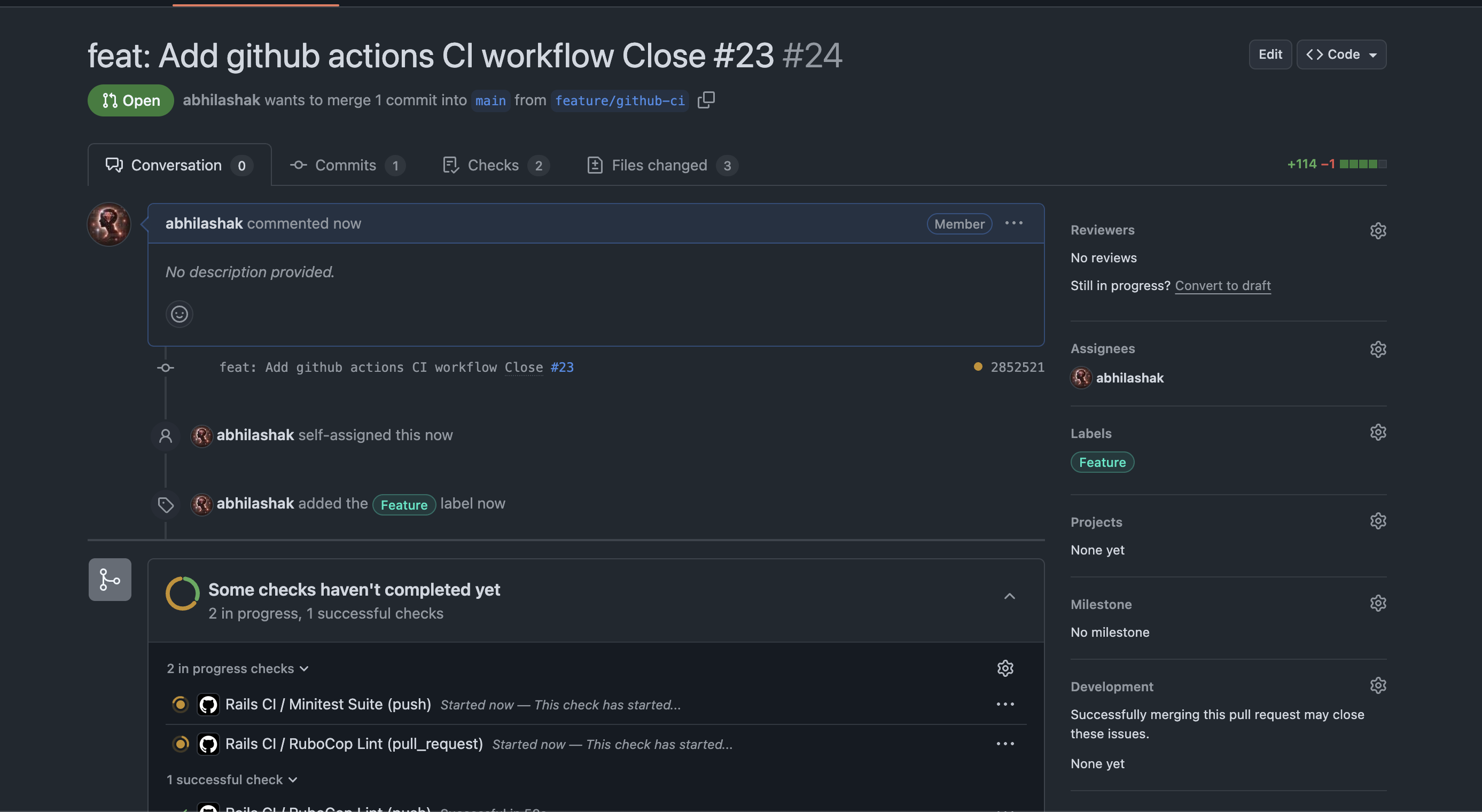
  • Go to GitHub → your repository → create a pull request from feature/github-ci to main.

4️⃣ Watch GitHub Actions run

  • Go to the Pull Request page.
  • You should see a yellow dot / pending check under “Checks”.
  • Click the “Details” link next to the check (or go to the Actions tab) to see live logs.

✅ How to Know It’s Working

✔️ If all your jobs (e.g., RuboCop Lint, Minitest Suite) finish with green checkmarks, your CI setup is working!

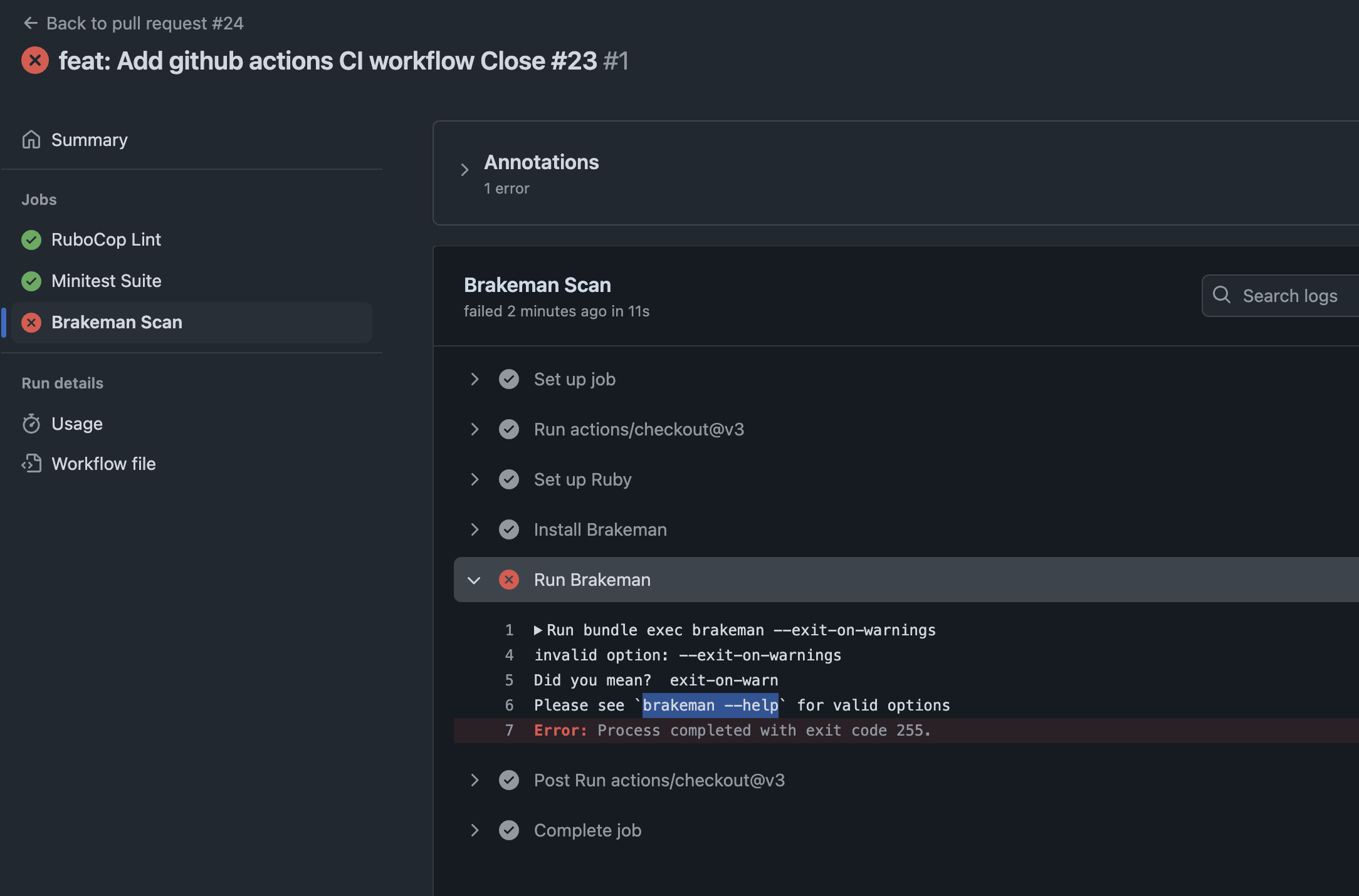
❌ If something fails, you’ll get a red X and the logs will show exactly what failed.

So what’s the problem. Check details.

Check brakeman help for further information about the option.

➜  design_studio git:(feature/github-ci) brakeman --help | grep warn
    -z, --[no-]exit-on-warn          Exit code is non-zero if warnings found (Default)
        --ensure-ignore-notes        Fail when an ignored warnings does not include a note

Modify the option and run again:

run: bundle exec brakeman --exit-on-warn

Push the code and check all checks are passing. ✅

🛠 How to Test Further

If you want to trigger CI without a PR, you can push directly to main:

git checkout main
git merge feature/setup-ci
git push origin main

Note: Make sure your .github/workflows/ci.yml includes:

on:
  push:
    branches: [main, 'feature/**']
  pull_request:
    branches: [main]

This ensures CI runs on both pushes and pull requests.

🧪 Pro Tip: Break It Intentionally

If you want to see CI fail, you can:

  • Add a fake RuboCop error (like an unaligned indent).
  • Add a failing test (assert false).
  • Push and watch the red X appear.

This is a good way to verify your CI is catching problems!


Happy Rails CI setup! 🚀

Rails 8 App: Adding SimpleCov 🧾 & Brakeman 🔰 To Our Application For CI/CD Setup

Ensuring code quality and security in a Rails application is critical – especially as your project grows. In this post, we’ll walk through integrating two powerful tools into your Rails 8 app:

  1. SimpleCov: for measuring and enforcing test coverage
  2. Brakeman: for automated static analysis of security vulnerabilities

By the end, you’ll understand why each tool matters, how to configure them, and the advantages they bring to your development workflow.

Why Code Coverage & Security Scanning Matter

  • Maintainability
    Tracking test coverage ensures critical paths are exercised by your test suite. Over time, you can guard against regressions and untested code creeping in.
  • Quality Assurance
    High coverage correlates with fewer bugs: untested code is potential technical debt. SimpleCov gives visibility into what’s untested.
  • Security
    Rails apps can be vulnerable to injection, XSS, mass assignment, and more. Catching these issues early, before deployment, dramatically reduces risk.
  • Compliance & Best Practices
    Many organizations require minimum coverage thresholds and regular security scans. Integrating these tools automates compliance.

Part 1: Integrating SimpleCov for Test Coverage

1. Add the Gem

In your Gemfile, under the :test group, add:

group :test do
  gem 'simplecov', require: false
end

Then run:

bundle install

2. Configure SimpleCov

Create (or update) test/test_helper.rb (for Minitest) before any application code is loaded:

require 'simplecov'
SimpleCov.start 'rails' do
  coverage_dir 'public/coverage'           # output directory
  minimum_coverage 90               # fail if coverage < 90%
  add_filter '/test/'               # ignore test files themselves
  add_group 'Models', 'app/models'
  add_group 'Controllers', 'app/controllers'
  add_group 'Jobs', 'app/jobs'
  add_group 'Libraries', 'lib'
end

# Then require the rest of your test setup
ENV['RAILS_ENV'] ||= 'test'
require_relative '../config/environment'
require 'rails/test_help'
# ...

Tip: You can customize groups, filters, and thresholds. If coverage dips below the set minimum, your CI build will fail.

Note: coverage_dir should be modified to public/coverage. Else you cannot access the html publically.

3. Run Your Tests & View the Report

✗ bin/rails test
≈ tailwindcss v4.1.3

Done in 46ms
Running 10 tests in a single process (parallelization threshold is 50)
Run options: --seed 63363

# Running:

..........

Finished in 0.563707s, 17.7397 runs/s, 60.3150 assertions/s.
10 runs, 34 assertions, 0 failures, 0 errors, 0 skips
Coverage report generated for Minitest to /Users/abhilash/rails/design_studio/public/coverage.
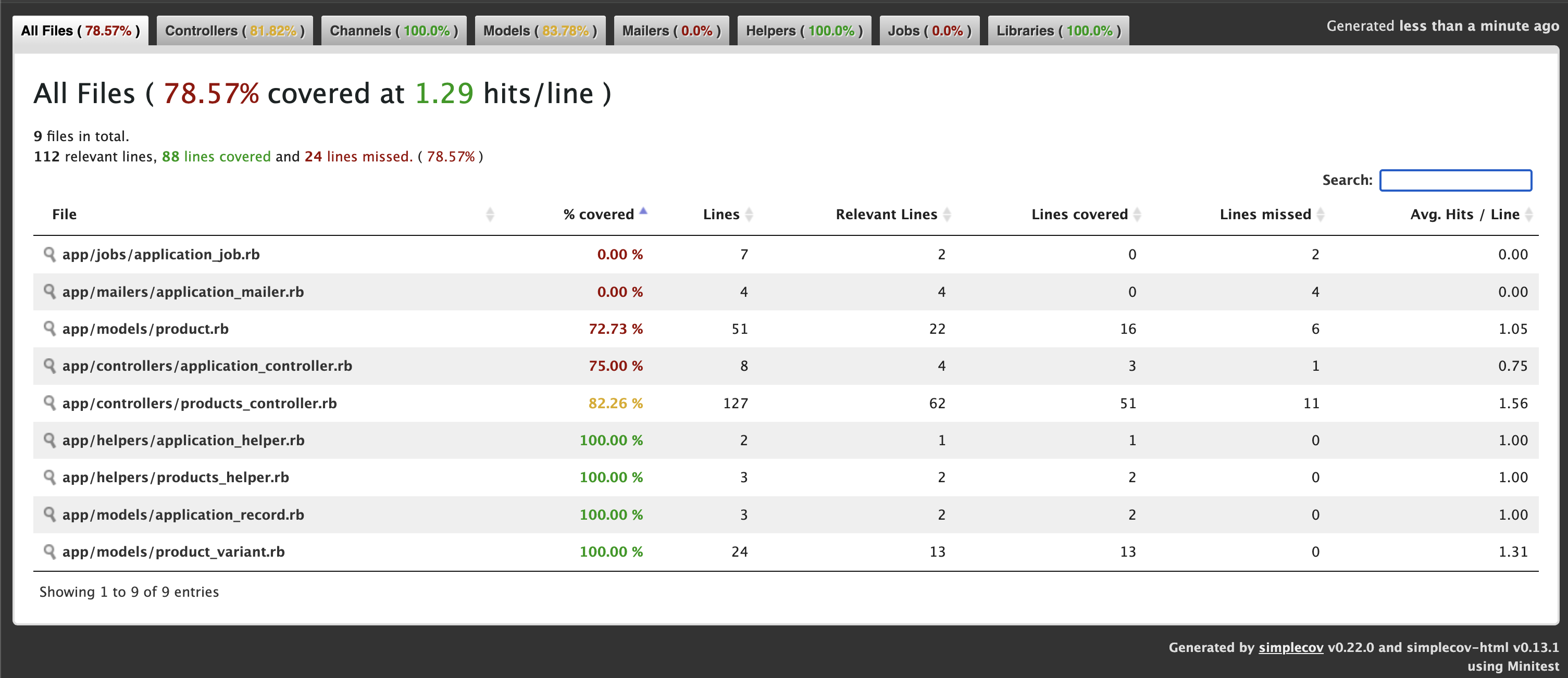
Line Coverage: 78.57% (88 / 112)
Line coverage (78.57%) is below the expected minimum coverage (90.00%).
SimpleCov failed with exit 2 due to a coverage related error

Once tests complete, open http://localhost:3000/coverage/index.html#_AllFiles in your browser:

  • A color-coded report shows covered (green) vs. missed (red) lines.
  • Drill down by file or group to identify untested code.

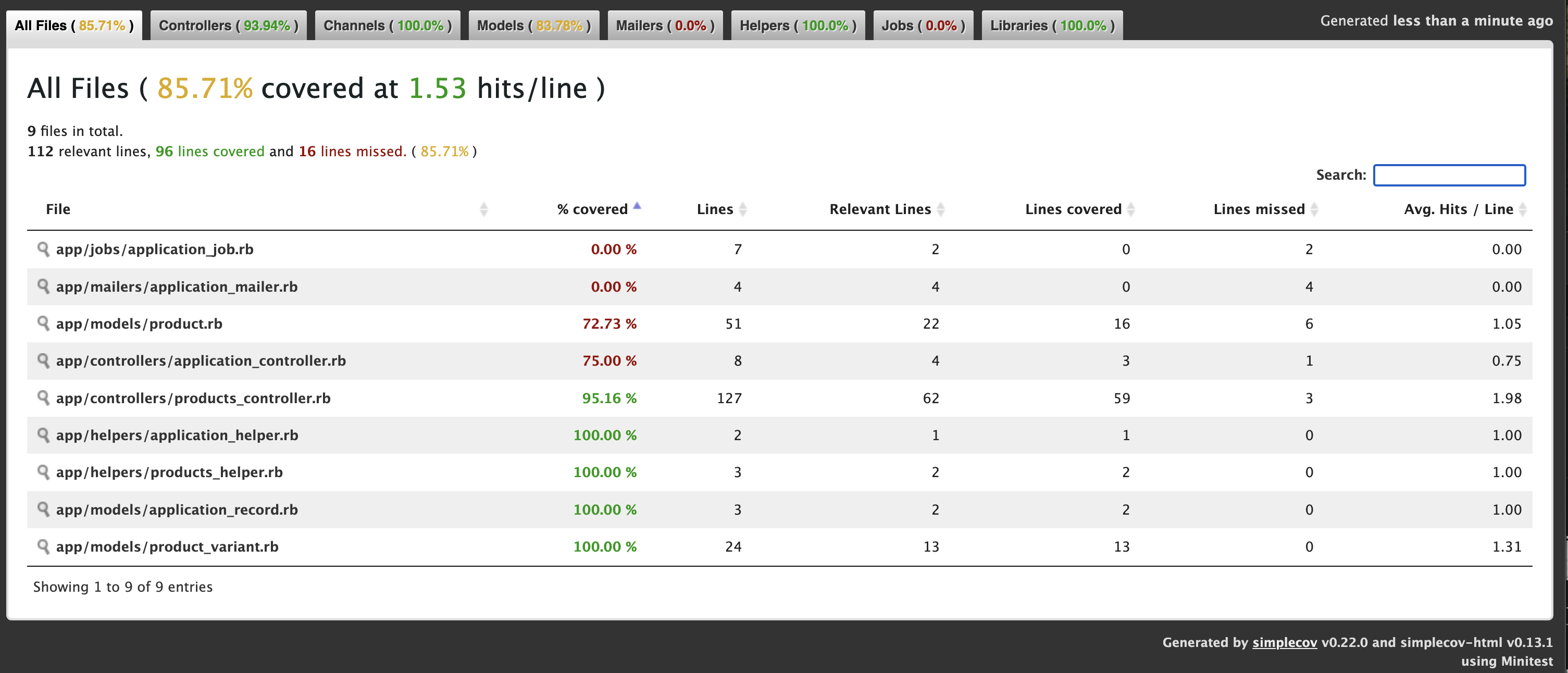
We get 78.57% only coverage and our target is 90% coverage. Let’s check where we missed the tests. ProductsController 82%. We missed coverage for #delete_image action. Let’s add it and check again.

Let’s add Product Controller json requests test cases for json error response and add the ApplicationControllerTest for testing root path.

Now we get: 88.3%

Now we have to add some Test cases for Product model.

Now we get: 92.86% ✅

4. Enforce in CI

In your CI pipeline (e.g. GitHub Actions), ensure:

- name: Run tests with coverage
  run: |
    bundle exec rails test
    # Optionally upload coverage to Coveralls or Codecov

If coverage < threshold, the job will exit non-zero and fail.


Part 2: Incorporating Brakeman for Security Analysis

1. Add Brakeman to Your Development Stack

You can install Brakeman as a gem (development-only) or run it via Docker/CLI. Here’s the gem approach:

group :development do
  gem 'brakeman', require: false
end

Then:

bundle install

2. Basic Usage

From your project root, simply run:

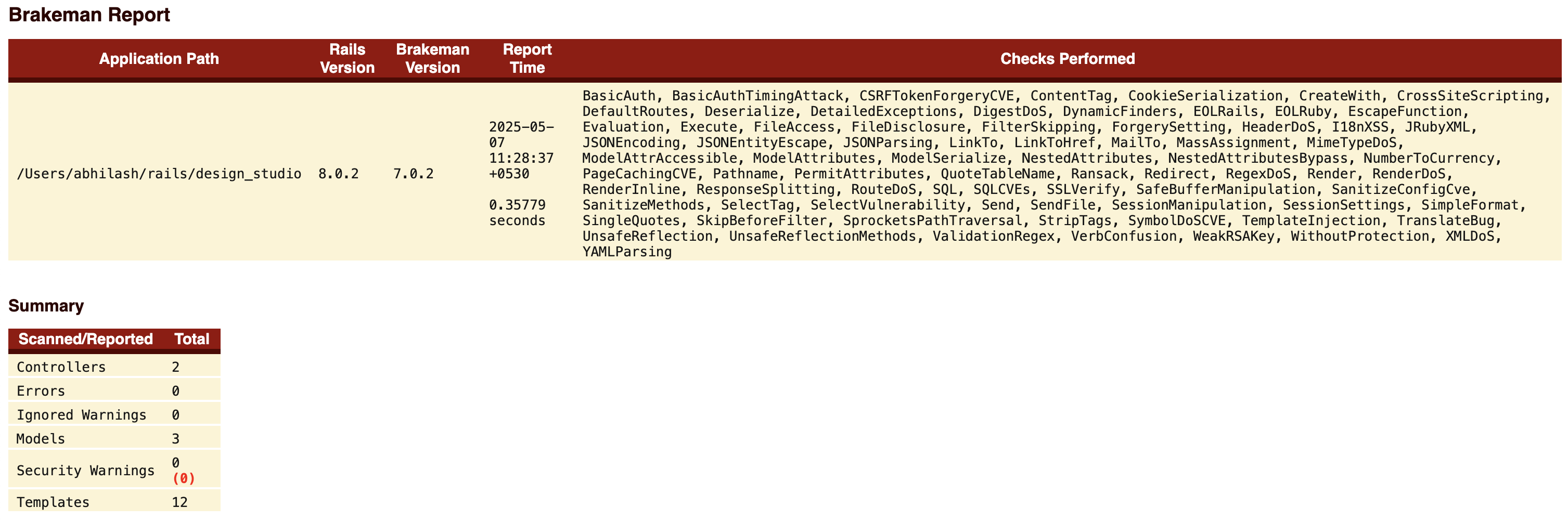
✗ bundle exec brakeman

Generating report...

== Brakeman Report ==

Application Path: /Users/abhilash/rails/design_studio
Rails Version: 8.0.2
Brakeman Version: 7.0.2
Scan Date: 2025-05-07 11:06:36 +0530
Duration: 0.35272 seconds
Checks Run: BasicAuth, BasicAuthTimingAttack, CSRFTokenForgeryCVE, ....., YAMLParsing

== Overview ==

Controllers: 2
Models: 3
Templates: 12
Errors: 0
Security Warnings: 0

== Warning Types ==


No warnings found

By default, Brakeman:

  • Scans app/, lib/, config/, etc.
  • Outputs a report in the terminal and writes brakeman-report.html.

3. Customize Your Scan

Create a config/brakeman.yml to fine-tune:

ignored_files:
  - 'app/controllers/legacy_controller.rb'
checks:
  - mass_assignment
  - cross_site_scripting
  - sql_injection
skip_dev: true                 # ignores dev-only gems
quiet: true                     # suppress verbose output

Run with:

bundle exec brakeman -c config/brakeman.yml -o public/security_report.html

Theconfig/brakeman.yml file is not added by default. You can add the file by copying the contents from: https://gist.github.com/abhilashak/038609f1c35942841ff8aa5e4c88b35b

Check: http://localhost:3000/security_report.html

4. CI Integration

In GitHub Actions:

- name: Run Brakeman security scan
  run: |
    bundle exec brakeman -q -o brakeman.json
- name: Upload Brakeman report
  uses: actions/upload-artifact@v3
  with:
    name: security-report
    path: brakeman.json

Optionally, you can fail the build if new warnings are introduced by comparing against a baseline report.


Advantages of Using SimpleCov & Brakeman Together

AspectSimpleCovBrakeman
PurposeTest coverage metricsStatic security analysis
Fail-fastFails when coverage drops below thresholdCan be configured to fail on new warnings
VisibilityColorized HTML coverage reportDetailed HTML/JSON vulnerability report
CI/CD ReadyIntegrates seamlessly with most CI systemsCLI-friendly, outputs machine-readable data
CustomizableGroups, filters, thresholdsChecks selection, ignored files, baseline

Together, they cover two critical quality dimensions:

  1. Quality & Maintainability (via testing)
  2. Security & Compliance (via static analysis)

Automating both checks in your pipeline means faster feedback, fewer production issues, and higher confidence when shipping code.


Best Practices & Tips

  • Threshold for SimpleCov: Start with 80%, then gradually raise to 90–95% over time.
  • Treat Brakeman Warnings Seriously: Not all findings are exploitable, but don’t ignore them—triage and document why you’re suppressing any warning.
  • Baseline Approach: Use a baseline report for Brakeman so your build only fails on newly introduced warnings, not historical ones.
  • Schedule Periodic Full Scans: In addition to per-PR scans, run a weekly scheduled Brakeman job to catch issues from merged code.
  • Combine with Other Tools: Consider adding gem like bundler-audit for known gem vulnerabilities.

Conclusion

By integrating SimpleCov and Brakeman into your Rails 8 app, you establish a robust safety net that:

  • Ensures new features are properly tested
  • Keeps an eye on security vulnerabilities
  • Automates quality gates in your CI/CD pipeline

These tools are straightforward to configure and provide immediate benefits – improved code confidence, faster code reviews, and fewer surprises in production. Start today, and make code quality and security first-class citizens in your Rails workflow!

Happy Rails CI/CD Integration .. 🚀