
Integrate AI with Rails: AI bootcamp for Developers – Day 7 – AI Response Streaming

Now let’s implement streaming. OpenRouter supports Server-Sent Events (SSE) when stream: true, and the current Ruby SDK exposes Chat Completions streaming through stream_raw; its higher-level stream helper is not available in every released SDK version. (OpenRouter)

We’ll keep the implementation practical and compatible with the SDK behavior you’re using.

Step 9 – Stream the AI response

What changes?

Currently:

Browser
  ↓
POST
  ↓
Rails waits for entire LLM response
  ↓
redirect

We want:

Browser
  ↓
POST
  ↓
Rails
  ↓
OpenRouter SSE stream
  ↓
token
token
token
token
  ↓
Browser

SSE is a long-lived HTTP response where the server sends incremental events. OpenRouter explicitly supports this with stream: true.

9.1 First, prove streaming works from Ruby

Before involving Rails, modify Ai::Client temporarily with a method:

def stream_chat(messages:, &on_delta)
  stream = @client.chat.completions.stream_raw(
    model: MODEL,
    messages: messages
  )

  stream.each do |chunk|
    delta = chunk.choices.first&.delta&.content
    on_delta.call(delta) if delta.present?
  end
end

The current SDK’s stream_raw returns an enumerable stream of chat completion chunks. (RubyDoc)

Now from Rails console:

conversation = Conversation.first

messages = Ai::PromptBuilder
  .new(conversation: conversation)
  .build

Then:

Ai::Client.new.stream_chat(messages: messages) do |delta|
  print delta
  $stdout.flush
end

You should see the answer appearing progressively:

Ruby is a programming language...

instead of getting the entire answer at once.

Why $stdout.flush?

Ruby can buffer stdout. Flushing makes each chunk visible immediately in the console.

9.2 Now expose streaming from Rails

Instead of making MessagesController#create wait for the completed response, we’ll create a streaming endpoint.

Open:

config/routes.rb

Add:

resources :conversations, only: [:create, :show] do
  resources :messages, only: [:create]
end

get "/conversations/:conversation_id/messages/stream",
    to: "messages#stream",
    as: :conversation_messages_stream

9.3 Add the streaming controller action

Open:

app/controllers/messages_controller.rb

Add:

include ActionController::Live

and:

def stream
  conversation = Conversation.find(params[:conversation_id])

  response.headers["Content-Type"] = "text/event-stream"
  response.headers["Cache-Control"] = "no-cache"
  response.headers["X-Accel-Buffering"] = "no"

  sse = SSE.new(response.stream)

  messages = Ai::PromptBuilder
    .new(conversation: conversation)
    .build

  content = +""

  begin
    Ai::Client.new.stream_chat(messages: messages) do |delta|
      next if delta.blank?

      content << delta

      sse.write(
        { content: delta },
        event: "message"
      )
    end

    sse.write(
      { done: true },
      event: "done"
    )
  ensure
    sse.close
    response.stream.close
  end
end

But Rails doesn’t provide SSE automatically.

Add:

include ActionController::Live

and use Rails’ ActionController::Live::SSE if available in our Rails 8.1 setup, or otherwise we can use the standard SSE format directly. Rails 8.1’s Live controller infrastructure is the relevant mechanism here.

To avoid another dependency, let’s actually use the raw SSE format ourselves.

Replace the sse.write(...) parts with:

response.stream.write(
  "event: message\n" \
  "data: #{JSON.generate(content: delta)}\n\n"
)

and completion:

response.stream.write(
  "event: done\n" \
  "data: #{JSON.generate(done: true)}\n\n"
)

So the complete action becomes:

include ActionController::Live

def stream
  conversation = Conversation.find(params[:conversation_id])

  response.headers["Content-Type"] = "text/event-stream"
  response.headers["Cache-Control"] = "no-cache"
  response.headers["X-Accel-Buffering"] = "no"

  messages = Ai::PromptBuilder
    .new(conversation: conversation)
    .build

  begin
    Ai::Client.new.stream_chat(messages: messages) do |delta|
      next if delta.blank?

      response.stream.write(
        "event: message\n" \
        "data: #{JSON.generate(content: delta)}\n\n"
      )
    end

    response.stream.write(
      "event: done\n" \
      "data: #{JSON.generate(done: true)}\n\n"
    )
  rescue IOError
    # Browser disconnected.
  ensure
    response.stream.close
  end
end

9.4 What’s happening?

The server sends chunks like:

event: message
data: {"content":"Ruby"}

event: message
data: {"content":" is"}

event: message
data: {"content":" a"}

event: message
data: {"content":" programming"}

That’s SSE.

The browser doesn’t need to wait for the entire LLM response.

9.5 Important limitation

Our current stream action is only streaming the display.

We are not yet persisting the final assistant message.

That’s deliberate.

The next iteration will accumulate:

content << delta

and after the stream finishes:

conversation.messages.create!(
role: :assistant,
content: content,
model: ...,
input_tokens: ...,
output_tokens: ...
)

So we ultimately want:

LLM
stream chunks
Browser
accumulate full response
PostgreSQL

9.6 Browser side

We can consume SSE with JavaScript:

const source = new EventSource(
  `/conversations/${conversationId}/messages/stream`
);

let content = "";

source.addEventListener("message", (event) => {
  const data = JSON.parse(event.data);

  content += data.content;

  document.querySelector("#assistant-response").innerHTML =
    content;
});

source.addEventListener("done", () => {
  source.close();
});

For our application, we’ll eventually use a Stimulus controller rather than inline JavaScript.

9.7 Don’t spend time styling this

Our immediate objective is proving:

LLM → SSE → Browser

Once you can see the response arriving incrementally, we’ve achieved the important part.

9.8 Commit

Once Ruby streaming works:

git add app/services/ai/client.rb
git commit -m "feat: stream LLM responses"
git push

Then we’ll wire the browser properly.


Int. knowledge from this step

You should now be able to explain:

What is SSE?

A persistent HTTP connection where the server pushes events to the client.

Why use it for AI?

Because LLM output naturally arrives incrementally, and streaming improves perceived latency.

Why not Action Cable?

WebSockets are bidirectional; SSE is simpler when the server primarily needs to push generated output to the browser.

Where does the LLM stream end?

At the Rails server, which consumes the provider’s SSE stream and forwards its own stream to the browser.

OpenRouter documents its AI streaming as SSE, while the Ruby SDK provides streaming chat-completion chunks through stream_raw.

Next step

Since ActionController::Live::SSE exists in Rails 8.1, let’s test the controller before committing.

One important point first: don’t test this through bin/rails server with WEBrick. Rails documents that WEBrick buffers responses, so Live streaming won’t behave correctly. Use our normal Puma server instead. (Ruby on Rails Guides)

1. First verify the route

Run:

bin/rails routes | grep stream

You should see our route, something like:

conversation_messages_stream
GET /conversations/:conversation_id/messages/stream

Then get a conversation ID:

bin/rails c
Conversation.last.id

For example:

1

Exit:

exit

2. Test with curl first

This is the easiest way to prove that the Rails endpoint is actually streaming.

Start Rails with Puma:

bin/rails server

Then in another terminal:

curl -N \
  -H "Accept: text/event-stream" \
  http://localhost:3000/conversations/1/messages/stream

Replace 1 with your real conversation ID.

Why -N?

curl -N means:

Don’t buffer the response.

Without it, you may receive everything at once and incorrectly conclude that streaming isn’t working.

3. What you should see

Because we’re using ActionController::Live::SSE, our response should look roughly like:

event: message
data: {"content":"Ruby"}
event: message
data: {"content":" is"}
event: message
data: {"content":" a"}
event: message
data: {"content":" programming"}
event: done
data: {"done":true}

The exact chunks will vary.

The important thing is that the output arrives progressively, not as one giant response at the end.

Rails’ SSE helper formats events and data for the text/event-stream response. (Ruby on Rails API)

4. Very important: our current stream action has a logical problem

Our current endpoint is probably something like:

def stream
  conversation = Conversation.find(params[:conversation_id])

  response.headers["Content-Type"] = "text/event-stream"

  sse = ActionController::Live::SSE.new(response.stream)

  messages = Ai::PromptBuilder
    .new(conversation: conversation)
    .build

  Ai::Client.new.stream_chat(messages: messages) do |delta|
    sse.write({ content: delta }, event: "message")
  end

  sse.write({ done: true }, event: "done")
ensure
  sse.close
end

This can stream the existing conversation, but it doesn’t receive a new user question.

Eventually our endpoint needs something like:

POST /conversations/:id/messages/stream

with:

content=Explain Ruby blocks

Otherwise we’re streaming whatever messages already exist in the conversation.

So for this first test, we’re only proving:

Rails
ActionController::Live
SSE
Browser/curl

We’ll fix the request lifecycle immediately afterward.

5. Test directly from the browser

You can also open the endpoint in Chrome:

http://localhost:3000/conversations/1/messages/stream

But I prefer curl -N for the first test because the browser doesn’t give you a very useful raw view of SSE events.

Rails’ documentation uses essentially this same pattern – writing to response.stream periodically and closing the stream in ensure. (Ruby on Rails Guides)


One architectural correction before we commit

Don’t commit our current streaming implementation yet.

we’ll change the flow to the proper one:

Browser
   │
   │ POST message
   ▼
MessagesController
   │
   ├── save user message
   │
   ▼
LLM streaming
   │
   ├── SSE chunk → Browser
   ├── SSE chunk → Browser
   ├── SSE chunk → Browser
   │
   ▼
Complete response
   │
   ▼
Save assistant message

That is the version worth keeping in our portfolio and discussing in an int. scenario. Rails requires the response headers to be set before the first stream write and requires the stream to be closed when finished. (Ruby on Rails API)

the next step will be to connect the actual user message → streaming endpoint → browser UI rather than having a standalone stream endpoint.


Debug:ActionController::Live::ClientDisconnected – 500 Internal Server Error

Yes – very likely from our rescue behavior, but the deeper issue is that ActionController::Live::ClientDisconnected is not the same exception as IOError in Rails 8.1.

Rails 8.1 explicitly has:

ActionController::Live::ClientDisconnected

as its own exception class. (Ruby on Rails API)

So this:

rescue IOError
# Browser disconnected

does not necessarily catch the exception you’re seeing.

Why the 500 appears

Our stream is working, then eventually the client closes the connection – or example:

  • browser finishes and closes the SSE connection
  • EventSource.close() is called
  • browser navigates/reloads
  • user closes the tab
  • network connection disappears

Rails detects that the client is gone while processing the Live response and raises:

ActionController::Live::ClientDisconnected

Rails’ Live processing happens in a separate thread, and once the response has been committed Rails handles exceptions differently from a normal controller request. (Ruby on Rails API)

Fix our rescue

add:

rescue ActionController::Live::ClientDisconnected
Rails.logger.info("SSE client disconnected")

You can optionally also handle IOError:

rescue ActionController::Live::ClientDisconnected, IOError
Rails.logger.info("SSE client disconnected")

And keep:

ensure
sse.close
end

So our action should have roughly:

begin
# streaming logic
rescue IOError
Rails.logger.debug(">>>>>>>>>>>>>> Error Occured: IOError")
rescue ActionController::Live::ClientDisconnected
Rails.logger.debug(">>>>>>>>>>>>>> SSE client disconnected")
ensure
sse.close
end

But there is an important point

Don’t interpret ClientDisconnected as an application failure.

It’s closer to:

Rails: "I'm streaming."
Browser: "I'm no longer listening."
Rails: "Okay."

For SSE, that’s a normal lifecycle event.

Why you’re seeing Completed 500

This is the part that initially looks strange.

With ActionController::Live, Rails starts processing the action in a separate thread. When an exception occurs after the response has already been committed/started streaming, Rails can’t behave like a normal controller request with a fresh 500 response. Rails’ Live implementation has special handling for committed responses and closes the stream after logging the exception.

So our log can be misleading:

Completed 500 Internal Server Error
ActionController::Live::ClientDisconnected

even though:

  • the user received the streamed answer successfully,
  • the connection closed normally afterward.

That’s exactly why I would treat ClientDisconnected separately from genuine application errors.


Fix Streaming issue: After entering the question the page get stuck

Our server logs are as follows:

Started POST "/conversations"
Processing by ConversationsController#create as TURBO_STREAM
Parameters: {"...., "conversation" => {"title" => "Tell me about Node js"}, "commit" => "Start conversation"}

Then goes to
Started GET "/conversations/13"
Processing by ConversationsController#show as TURBO_STREAM
Parameters: {"id" => "13"}
Rendering conversations/show.html.erb
200 OK

Then the page stuck on the Form: form_with in the conversations/show.html.erb.
the div streaming-response is blank and it is not going to messages controller#stream or I think it is not executing the chat_controller.js also.

Yes – the server logs strongly suggest the problem is before MessagesController#stream. The conversation page loads correctly, then the form submission isn’t triggering our Stimulus chat#submit.

The likely culprit is Turbo + Stimulus registration, not SSE.

Let’s debug it quickly in the right order.

1. First confirm Stimulus is actually loading

Open your browser DevTools → Console.

Put this temporarily at the top of:

app/javascript/controllers/chat_controller.js
import { Controller } from "@hotwired/stimulus"

console.log("chat_controller.js loaded")

export default class extends Controller {
  connect() {
    console.log("Chat controller connected")
  }

  submit(event) {
    console.log("Chat submit triggered")
    // existing code...
  }
}

Reload:

http://localhost:3000/conversations/13

You should see:

chat_controller.js loaded
Chat controller connected

If you don’t see these

Then the problem is Stimulus registration/import, not the form.

2. Check your Stimulus setup

Because you’re using Rails 8.1, check:

app/javascript/controllers/index.js

It should contain something similar to:

import { application } from "controllers/application"
import ChatController from "controllers/chat_controller"
application.register("chat", ChatController)

Depending on the Rails 8 application template/setup, your index.js may use automatic controller loading instead. The important thing is that chat_controller.js is being registered under:

chat

3. Check application.js

Open:

app/javascript/application.js

You should have the normal Rails setup, typically something along the lines of:

import "@hotwired/turbo-rails"
import "controllers"

The important line is:

import "controllers"

Without it, your Stimulus controllers won’t be registered.

4. Check the actual HTML generated by Rails

This is very important.

Inspect the form in Chrome DevTools.

You should see:

<form
  data-controller="chat"
  data-action="submit->chat#submit"
  ...
>

If you don’t see:

data-controller="chat"

then our view isn’t producing the attributes we expect.

Our form should look approximately like:

<%= form_with(
  url: conversation_messages_path(@conversation),
  method: :post,
  data: {
    controller: "chat",
    action: "submit->chat#submit"
  }
) do |form| %>

5. There is another issue in our previous implementation

This is important.

We currently have:

<%= form_with(... method: :post) %>

but the Stimulus controller is trying to create:

GET /conversations/:id/messages/stream

That means the normal Turbo form submission and our SSE request are two different mechanisms.

We don’t actually want Turbo submitting the form at all.

Let Stimulus own the submission.

Change the form to:

<%= form_with(
  url: conversation_messages_path(@conversation),
  method: :post,
  data: {
    controller: "chat",
    action: "submit->chat#submit",
    turbo: false
  }
) do |form| %>

  <%= form.text_area :content,
      rows: 4,
      placeholder: "Ask something..." %>

  <%= form.submit "Send" %>
<% end %>

<div id="streaming-response"></div>

The important addition is:

turbo: false

This prevents Turbo from hijacking the form submission.

6. But there’s a second problem: EventSource

Our previous controller used:

const source = new EventSource(streamUrl)

That means the browser makes:

GET /conversations/13/messages/stream

and that endpoint expects:

params[:content]

So the URL must contain:

?content=Tell+me+about+Node+js

Let’s make the controller simpler and more reliable.

Use:

app/javascripts/controllers/chat_controller.js

import { Controller } from "@hotwired/stimulus"

console.log("chat_controller.js loaded")

export default class extends Controller {
  connect() {
    console.log("Chat controller connected")
  }

  submit(event) {
    console.log("Chat submit triggered")

    event.preventDefault()

    const form = event.currentTarget
    const url = form.action
    const formData = new FormData(form)

    const responseElement = document.querySelector("#streaming-response")
    responseElement.textContent = ""

    const conversationId = url.match(/conversations\/(\d+)\/messages/)[1]
    const streamUrl = 
      `/conversations/${conversationId}/messages/stream?${new URLSearchParams(
          formData
        )}`

    const source = new EventSource(streamUrl)
    source.addEventListener("message", (event) => {
      const data = JSON.parse(event.data)

      responseElement.textContent += data.content
    })

    source.addEventListener("done", () => {
      source.close()

      // Reload for now so the persisted assistant message appears.
      window.location.reload()
    })

    source.onerror = () => {
      source.close()
      responseElement.textContent += "\n\n[AI stream disconnected]"
    }
  }
}

7. Verify the route

Run:

bin/rails routes | grep messages

You should have something like:

conversation_messages
conversation_messages_stream

Specifically:

GET /conversations/:conversation_id/messages/stream

If you don’t have that route, the browser will never reach:

MessagesController#stream

8. Test the route independently

Before testing Stimulus, prove the endpoint itself still works:

curl -N \
-H "Accept: text/event-stream" \
"http://localhost:3000/conversations/13/messages/stream?content=Explain%20Node.js"

Since you already confirmed SSE works, this should still stream.

9. Then test the browser

Reload the conversation page and open DevTools → Console.

When the page loads:

Chat controller connected

When you submit:

Chat submit triggered

Then open DevTools → Network.

You should see:

GET /conversations/13/messages/stream?content=...

and its response should remain open while the AI streams.

If you see that request, the pipeline is working:

Form
Stimulus
EventSource
GET /messages/stream
MessagesController#stream
LLM
SSE
Browser

10. Why our current log looks the way it does

You currently see:

POST /conversations
GET /conversations/13
Rendering conversations/show
200 OK

and nothing afterward.

That means:

Rails page rendering ✅
Stimulus submit ❌

The fact that we don’t see:

Started GET "/conversations/13/messages/stream"

is the strongest clue.

So don’t debug ActionController::Live or OpenRouter yet.

The problem is almost certainly:

Stimulus controller registration
OR
Turbo intercepting the form
OR
data-controller/data-action not present

Cheers! We solved it.
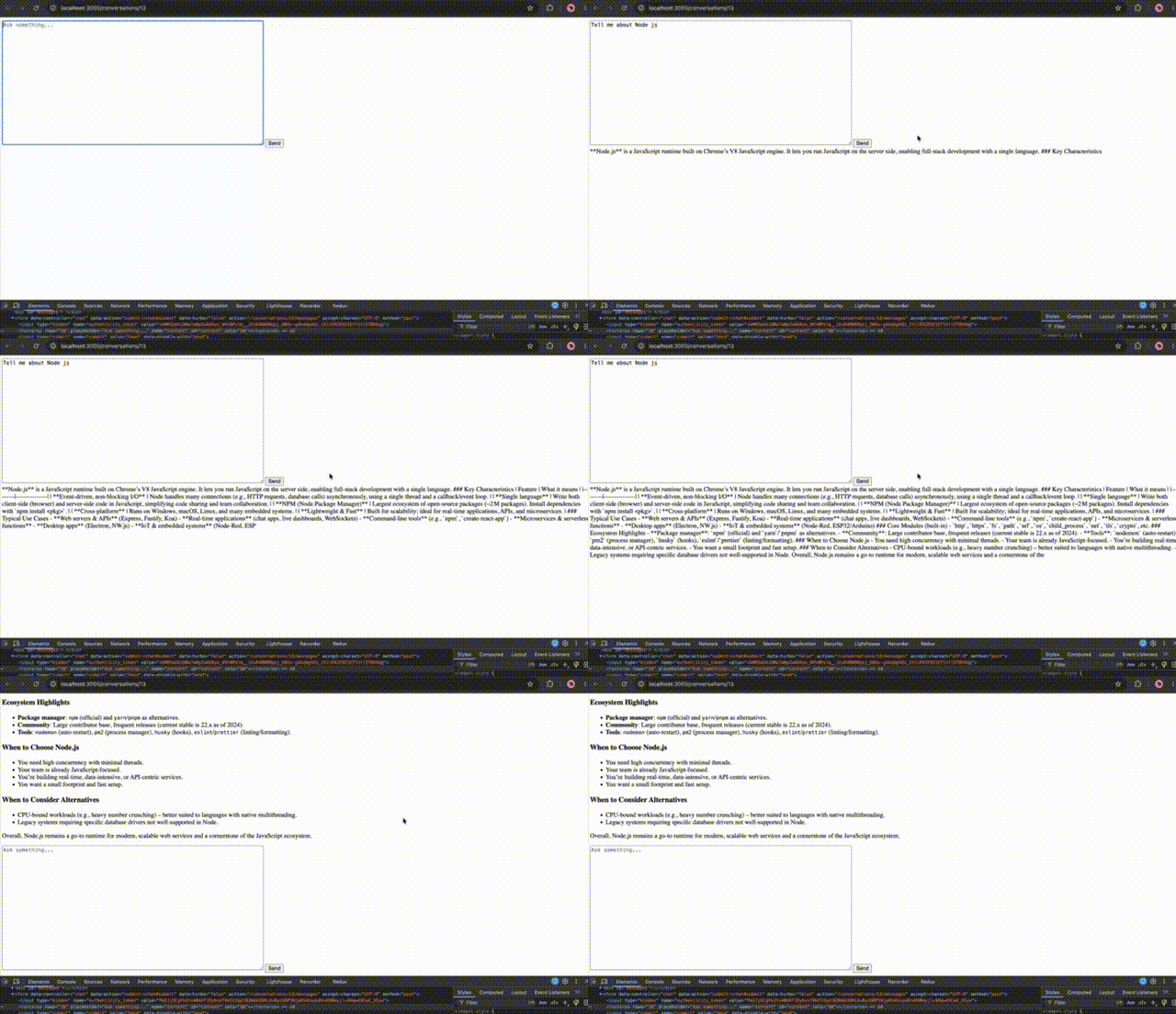

Recommended architectural change (Optional)

One option is we can stop using EventSource with a GET query parameter for the actual chat request.

It’s fine for learning SSE, but for a real AI application, sending the user prompt as:

GET /messages/stream?content=...

isn’t ideal.

We’ll eventually use:

POST /conversations/:id/messages

with fetch() and consume the streaming response body:

POST
Rails
LLM stream
ReadableStream
Browser

We have to keep the user’s message in the POST body and have a single request lifecycle.

But this make our current app/javascript/controllers/chat_controller.js to re-write completely. So let’s move on to the next step ASAP.

to be continued…

Understading Rails 8.1 Action Controller Live SSE

Modern applications often need to deliver information to the browser as it becomes available, rather than waiting until the entire controller action finishes.

Examples include:

  • Live progress updates
  • Long-running exports
  • Real-time dashboards
  • AI-generated responses
  • Build/deployment logs
  • Notifications
  • Server-side status updates
  • Streaming large files
  • Server-Sent Events (SSE)

Rails provides this capability through ActionController::Live.

Rails 8.1 also exposes a particularly useful companion class:

ActionController::Live::SSE

Together, they provide a relatively simple way to implement HTTP streaming and Server-Sent Events directly from a Rails controller.

One important clarification: ActionController::Live itself is not new in Rails 8.1. It has existed for several Rails versions. However, Rails 8.1 continues to provide and refine the streaming infrastructure, including configuration around execution-state sharing. The examples below are based on the Rails 8.1 API.


What is ActionController::Live?

Normally, a Rails controller behaves conceptually like this:

Browser
|
| HTTP request
v
Rails Controller
|
| execute entire action
|
| generate complete response
v
Browser receives response

For example:

def report
result = generate_report
render json: result
end

The browser generally waits until the action has generated its response.

With ActionController::Live, Rails can instead stream pieces of the response while the action is still executing:

Browser
|
| HTTP request
v
Rails Controller
|
| write chunk #1
|--------------------> Browser
|
| write chunk #2
|--------------------> Browser
|
| write chunk #3
|--------------------> Browser
|
| finish

Rails documents ActionController::Live as a module that allows controller actions to stream data to the client as it is written.


Basic ActionController::Live Example

A minimal controller looks like this:

class StreamsController < ApplicationController
  include ActionController::Live

  def show
    response.headers["Content-Type"] = "text/plain"

    5.times do |i|
      response.stream.write "Chunk #{i + 1}\n"
      sleep 1
    end
  ensure
    response.stream.close
  end
end

The important part is:

include ActionController::Live

and then:

response.stream.write(...)

Instead of constructing one large response, the controller writes directly to the response stream.

What happens internally?

Rails executes the streaming action in a separate thread so that the response can begin flowing to the client while the controller continues producing data. Rails 8.1 uses a dedicated cached thread-pool executor for live controller processing.

That distinction is extremely important for production applications.


What is Server-Sent Events?

ActionController::Live is the general streaming mechanism.

SSE is a specific protocol built on top of HTTP streaming.

Server-Sent Events allow the server to continuously send events to a browser over a long-lived HTTP connection.

The browser uses the standard JavaScript API:

const source = new EventSource("/events");
source.onmessage = event => {
console.log(event.data);
};

The communication is one-way:

Server --------------------> Browser

Unlike WebSockets:

Server <-------------------> Browser

SSE is therefore a good choice when the browser mainly needs to listen for server-side updates rather than continuously send messages back to the server. The browser’s EventSource API maintains the persistent connection and automatically handles reconnection.


ActionController::Live::SSE

Rails provides:

ActionController::Live::SSE

to make SSE formatting easier.

Instead of manually writing:

event: update
data: {"status":"processing"}

Rails can generate the SSE format for you.

The class accepts a stream:

sse = ActionController::Live::SSE.new(response.stream)

and then:

sse.write({ status: "processing" })

Rails converts non-string objects to JSON and writes them using SSE formatting.


Building a Rails SSE Endpoint

Let’s build a realistic example.

Controller

class NotificationsController < ApplicationController
  include ActionController::Live

  def index
    response.headers["Content-Type"] = "text/event-stream"
    response.headers["Cache-Control"] = "no-cache"

    sse = ActionController::Live::SSE.new(
      response.stream,
      retry: 3000
    )

    10.times do |i|
      sse.write(
        {
          message: "Notification #{i + 1}",
          timestamp: Time.current.iso8601
        },
        event: "notification",
        id: i + 1
      )

      sleep 2
    end
  ensure
    sse&.close
  end
end

Rails’ SSE implementation supports three primary options:

:event
:retry
:id

event identifies the event type, retry tells the browser how long to wait before reconnecting, and id becomes the event identifier used for Last-Event-ID on reconnect.


JavaScript Client

The browser can consume the endpoint using EventSource.

const source = new EventSource("/notifications");
source.addEventListener("notification", event => {
const data = JSON.parse(event.data);
console.log(data.message);
console.log(data.timestamp);
});
source.onerror = error => {
console.error("SSE connection error", error);
};

The browser automatically opens a persistent HTTP connection.

When Rails sends:

event: notification
id: 1
data: {"message":"Notification 1","timestamp":"..."}

the browser invokes:

source.addEventListener("notification", ...)

The SSE wire format is based on text fields such as event, data, id, and retry, with an empty line terminating each event.


ActionController::Live vs ActionController::Live::SSE

This distinction is worth remembering.

FeatureActionController::LiveActionController::Live::SSE
PurposeGeneric HTTP streamingSSE formatting
OutputArbitrary stream dataSSE events
Browser APIDepends on your protocolEventSource
JSON handlingYou handle itRails can serialize objects
Event namesManualBuilt in
Event IDsManualBuilt in
Reconnection supportManualSSE protocol support
Typical useCSV/file/log streamingNotifications/live updates

Think of it like this:

ActionController::Live
        |
        +---- response.stream.write
        |
        +---- send_stream
        |
        +---- SSE
                 |
                 +---- event
                 +---- data
                 +---- id
                 +---- retry


Streaming a Large CSV

ActionController::Live is not limited to SSE.

A very practical use case is exporting a large dataset.

Rails 8.1 exposes send_stream, specifically for generating data progressively rather than buffering the entire file in memory.

For example:

class ReportsController < ApplicationController
  include ActionController::Live

  def export
    send_stream(
      filename: "users.csv",
      type: "text/csv"
    ) do |stream|

      stream.write "id,email,created_at\n"

      User.find_each do |user|
        stream.write(
          "#{user.id},#{user.email},#{user.created_at.iso8601}\n"
        )
      end
    end
  end
end

This is much better than:

csv = User.find_each.map do |user|
  ...
end

send_data csv

for a very large export.

The second approach potentially builds a large amount of data in memory.

The streaming approach allows Rails to send the output progressively.


A Very Interesting Use Case: AI Streaming

Another practical use case is streaming generated text.

Imagine an AI API returns tokens incrementally:

Hello
Hello, I
Hello, I can
Hello, I can help
Hello, I can help you
...

Instead of waiting for the complete response:

response = ai_client.generate(...)
render json: response

you could expose a streaming endpoint:

class AiController < ApplicationController
  include ActionController::Live

  def stream
    response.headers["Content-Type"] = "text/event-stream"

    sse = ActionController::Live::SSE.new(
      response.stream,
      event: "token"
    )

    ai_client.stream(prompt) do |token|
      sse.write(
        {
          content: token
        }
      )
    end
  ensure
    sse&.close
  end
end

The browser can then update the UI immediately as chunks arrive.

This is one of the reasons HTTP streaming has become particularly relevant for modern applications.


Real-Time Notifications

A very common architecture is:

                    +----------------+
                    | Rails Server   |
                    +--------+-------+
                             |
                             | SSE
                             |
                    +--------v-------+
                    | Browser       |
                    +----------------+

For example:

class NotificationsController < ApplicationController
  include ActionController::Live

  def stream
    response.headers["Content-Type"] = "text/event-stream"

    sse = ActionController::Live::SSE.new(
      response.stream,
      event: "notification"
    )

    loop do
      notification = Notification.pending.first

      if notification
        sse.write(
          {
            id: notification.id,
            message: notification.message
          },
          id: notification.id
        )
      else
        # Heartbeat
        sse.write(": keep-alive")
      end

      sleep 2
    end
  ensure
    sse&.close
  end
end

However, this example introduces an important architectural question.

Where does the event come from?

Polling the database inside every open SSE request is usually not a scalable architecture.

For production systems, you will typically want an event source such as:

Database
|
v
Redis / PubSub / Message Broker
|
v
Rails SSE endpoint
|
v
Browser

That is a much better design than repeatedly querying the database from every connected client.


Heartbeats Matter

Long-lived HTTP connections can be terminated by proxies, load balancers, or infrastructure when no data is transferred for a while.

SSE supports comment messages such as:

: heartbeat

which browsers ignore as application events but still receive as stream traffic.

The SSE format explicitly allows comment lines, and they can be used to keep connections alive.

In Rails:

sse.write(": heartbeat")

or, depending on how you implement the stream, write an SSE comment directly to response.stream.

For an application with long periods of inactivity, heartbeat strategy should be considered part of your production design.


Reconnection and Last-Event-ID

One of the most useful SSE features is event IDs.

Suppose Rails sends:

id: 101
event: order_update
data: {"status":"paid"}

The browser remembers the last event ID.

If the connection is interrupted, the browser may reconnect and send:

Last-Event-ID: 101

Rails’ SSE class supports the id field specifically for this scenario.

Your controller can inspect it:

last_id = request.headers["Last-Event-ID"]

and resume appropriately:

updates = OrderUpdate.where("id > ?", last_id.to_i)
updates.find_each do |update|
sse.write(
update.attributes,
id: update.id,
event: "order_update"
)
end

This is significantly more robust than treating every reconnect as a completely new stream.


The Most Important ActionController::Live Caveat: Threads

This is probably the most important thing to understand before introducing ActionController::Live.

Rails executes the streaming action in a separate thread.

Therefore:

class MyController < ApplicationController
include ActionController::Live
def stream
# Runs in streaming execution context
end
end

should not be treated exactly like a normal synchronous controller action.

Rails explicitly warns that streaming actions need to be thread-safe and should not share unsafe mutable state between threads.

Avoid patterns such as:

@@shared_state = {}
@@shared_state[user_id] = ...

or other mutable global/class-level state unless it is deliberately designed for concurrent access.

Prefer:

Redis
Database
Message broker
Thread-safe abstractions

for shared state.


Rails 8.1: Execution State Sharing

Rails 8.1 exposes:

config.action_controller.live_streaming_excluded_keys

which controls which execution-state keys should not be copied into the streaming thread.

By default, Rails shares execution state from the parent thread.

One important example involves Active Record connection routing.

Rails documents this configuration for cases such as:

ActiveRecord::Base.connected_to(role: :reading) do
...
end

where the streaming thread might otherwise inherit the parent’s database connection context.

For example:

config.action_controller.live_streaming_excluded_keys =
[:active_record_connected_to_stack]

This is a more advanced Rails 8.1 consideration, but it demonstrates an important point:

Streaming is not just “normal controller code with response.stream.write.”

Execution context matters.


Headers Must Be Set Before Streaming

Once you start writing to the stream:

response.stream.write(...)

the response can be committed.

After the response is committed, you cannot safely modify headers.

Rails specifically documents that calling write or close commits the response.

Therefore do this:

response.headers["Content-Type"] = "text/event-stream"
response.headers["Cache-Control"] = "no-cache"
sse = ActionController::Live::SSE.new(response.stream)
sse.write(...)

Not:

sse.write(...)
response.headers["Cache-Control"] = "no-cache"

The second version is too late.


Always Close the Stream

This is another critical rule.

Always ensure the stream closes:

ensure
sse&.close
end

or:

ensure
response.stream.close
end

Rails explicitly warns that failing to close the stream can leave the socket open indefinitely.

A production implementation should therefore almost always look like:

begin
# streaming work
ensure
# close stream
end

Handling Client Disconnects

A browser can disappear at any time.

For example:

User closes tab
|
v
SSE connection disappears
|
v
Rails stream encounters disconnect

Rails exposes:

ActionController::Live::ClientDisconnected

for client disconnect situations.

You can handle it explicitly when appropriate:

rescue ActionController::Live::ClientDisconnected
Rails.logger.info("SSE client disconnected")
ensure
sse&.close
end

For long-running streams, disconnect handling is especially important because you don’t want server-side work continuing unnecessarily after the browser is gone.


Proxy and Middleware Buffering

A common mistake is to test streaming locally and assume production will behave identically.

You might write:

response.stream.write "hello"
sleep 5
response.stream.write "world"

and expect:

hello

to appear immediately.

But an intermediary could buffer the response.

Possible intermediaries include:

Browser
|
Load Balancer
|
Reverse Proxy
|
Nginx
|
Rails

Rails itself documents that response buffering can interfere with streaming, including interaction with Rack::ETag in relevant Rack versions.

Therefore streaming should always be tested through the same infrastructure path used in production.


SSE vs WebSockets vs Polling

This is one of the most important architectural decisions.

ApproachDirectionConnectionGood For
PollingClient → Server repeatedlyShortSimple updates
Long PollingMostly server → clientRepeated HTTPOlder architectures
SSEServer → ClientLong-lived HTTPNotifications/live feeds
WebSocketBidirectionalPersistent socketChat/games/collaboration
ActionController::LiveDepends on implementationStreaming HTTPGeneric streaming

Use SSE when:

Server -> Browser

is the dominant requirement.

Examples:

Order status
Build progress
Notifications
Stock updates
Live dashboard
AI text streaming
Import progress

Use WebSockets when:

Server <-> Browser

needs continuous two-way communication.

Examples:

Chat
Multiplayer applications
Collaborative editing
Interactive sessions

Use normal HTTP when:

You simply need:

request -> response

There is no reason to introduce streaming complexity for an ordinary CRUD endpoint.


Connection Scalability Is Different

A normal HTTP request may live for:

100 ms
500 ms
2 seconds

An SSE connection may remain open for:

5 minutes
30 minutes
several hours

That changes your capacity model.

Suppose:

10,000 users

each maintain an SSE connection.

That means your infrastructure potentially needs to support:

10,000 long-lived connections

You therefore need to think about:

Web server capacity
Worker/thread usage
File descriptors
Load balancers
Reverse proxies
Timeout configuration
Connection limits
Memory
Monitoring

There is also a browser-level consideration: SSE uses persistent HTTP connections, and connection limits can matter especially under HTTP/1.1; HTTP/2 changes the connection model by multiplexing streams.


Be Careful with Active Record Connections

A particularly important Rails concern is database connection usage.

Consider:

loop do
users = User.where(active: true)
...
sleep 1
end

inside every SSE request.

If you have hundreds or thousands of clients, you can easily end up with poor database behavior.

A better architecture is usually:

            Event Producer
                 |
       +---------+---------+
       |                   |
     Redis              Broker
       |                   |
       +---------+---------+
                 |
            Rails SSE
                 |
              Browser

The SSE request should ideally wait for events, rather than continuously hammer the database.


A Better Production Architecture

For example, imagine an order-management application.

When an order changes:

Order updated
|
v
Publish "order.updated"
|
v
Redis / PubSub
|
v
SSE connection
|
v
Browser updates UI

The Rails controller becomes primarily responsible for:

Connection
Subscribe
Receive event
Serialize event
Write SSE
Repeat

rather than:

Connection
Query database
Sleep
Query database
Sleep
Query database

That distinction becomes very important at scale.


Testing an SSE Endpoint

A browser test is useful, but curl is often even more convenient during development.

For example:

curl -N http://localhost:3000/notifications

The -N option prevents curl from buffering output, making the stream easier to observe.

You should see events arrive progressively:

event: notification
id: 1
data: {"message":"Notification 1"}
event: notification
id: 2
data: {"message":"Notification 2"}

This is a very useful debugging technique.


Testing ActionController::Live

For controller tests, streaming requires more consideration than a typical controller action because the response is not necessarily generated as one complete body.

The key things to test are:

Content-Type
Event names
Event IDs
Payload format
Connection termination
Client disconnect handling
Error handling

For example, conceptually:

assert_equal "text/event-stream", response.media_type

and verify that the generated body contains expected SSE fields.

For more complex streaming behavior, integration/system-level testing is generally more valuable than testing only internal controller implementation details.


A Clean SSE Controller Pattern

For a production-style controller, I prefer keeping the controller small:

class EventsController < ApplicationController
  include ActionController::Live

  def index
    prepare_stream_headers

    sse = ActionController::Live::SSE.new(
      response.stream,
      retry: 3_000
    )

    event_stream.each do |event|
      sse.write(
        event.payload,
        event: event.type,
        id: event.id
      )
    end
  rescue ActionController::Live::ClientDisconnected
    Rails.logger.info("SSE client disconnected")
  ensure
    sse&.close
  end

  private

  def prepare_stream_headers
    response.headers["Content-Type"] = "text/event-stream"
    response.headers["Cache-Control"] = "no-cache"
  end

  def event_stream
    # Redis / PubSub / broker subscription
  end
end

The controller handles HTTP concerns, while the event source is delegated elsewhere.

That separation becomes especially valuable when the event system grows.


Advantages of ActionController::Live

Lower time-to-first-byte

The server can start sending data before the complete operation has finished.

Lower memory usage for large streams

You don’t necessarily need to construct the entire response in memory first.

Native HTTP

There is no requirement for a completely different networking protocol.

SSE is simple for browser clients

The browser already provides:

EventSource

Automatic SSE reconnect behavior

SSE includes protocol support for reconnecting and event IDs.

Fits naturally into Rails controllers

You can continue using Rails authentication, routing, controllers, and application services while introducing streaming only where needed.


Disadvantages

Streaming is not free.

Threading complexity

ActionController::Live executes the action in a separate thread.

Long-lived connections

Unlike conventional requests, connections may remain open for long periods.

Capacity planning becomes important

Thousands of connected browsers can have a very different infrastructure impact than thousands of short requests.

Reverse-proxy configuration matters

Buffering and timeout behavior can break an otherwise-correct implementation.

Database usage can become dangerous

Naive polling inside every streaming connection can put significant pressure on PostgreSQL.

Operational complexity

Logging, monitoring, disconnects, reconnects, retries, and infrastructure timeouts all become part of the design.


When Should a Rails Developer Use It?

A good decision rule is:

Do I need data before the complete response is available?
            |
           Yes
            |
            v
Does the client only need server -> browser updates?
            |
         +--+--+
         |     |
        Yes    No
         |      |
         v      v
       SSE    WebSocket

For generic data/file streaming:

ActionController::Live

For browser-facing event streams:

ActionController::Live::SSE

For ordinary request/response APIs:

render json:

is usually the better choice.


What a Senior Rails Developer Should Know Before Using It

Before introducing ActionController::Live, I would explicitly answer these questions:

1. How long will the connection remain open?

Seconds?

Minutes?

Hours?

2. How many simultaneous clients could exist?

100?

1,000?

100,000?

3. What is the event source?

Database?

Redis?

Kafka?

Another service?

4. What happens when the client disconnects?

Can the server stop work immediately?

5. How will reconnects work?

Will events be lost?

Do you need id and Last-Event-ID?

6. What happens behind the load balancer?

Does it buffer?

Does it timeout idle connections?

7. Is your code thread-safe?

Remember that Rails executes Live actions in a separate thread.

8. How will you monitor connections?

You should be able to answer:

How many active SSE connections exist?
How long have they been open?
How many disconnected unexpectedly?
How many events are being delivered?
What is the event delivery latency?

Final Example

A compact Rails 8.1 SSE implementation can look like this:

class EventsController < ApplicationController
  include ActionController::Live

  def stream
    response.headers["Content-Type"] = "text/event-stream"
    response.headers["Cache-Control"] = "no-cache"

    sse = ActionController::Live::SSE.new(
      response.stream,
      retry: 3_000
    )

    10.times do |i|
      sse.write(
        {
          message: "Event #{i + 1}",
          timestamp: Time.current.iso8601
        },
        event: "update",
        id: i + 1
      )

      sleep 1
    end
  rescue ActionController::Live::ClientDisconnected
    Rails.logger.info("Client disconnected")
  ensure
    sse&.close
  end
end

And the client:

const events = new EventSource("/events/stream");
events.addEventListener("update", event => {
const data = JSON.parse(event.data);
console.log(data.message);
});
events.onerror = error => {
console.error("Connection error", error);
};

This small example demonstrates the complete concept:

ActionController::Live
HTTP streaming
ActionController::Live::SSE
text/event-stream
Browser EventSource
Real-time UI updates

Conclusion

ActionController::Live is Rails’ low-level mechanism for streaming HTTP responses while the controller is still producing them.

ActionController::Live::SSE builds on that mechanism to provide a convenient implementation of Server-Sent Events.

The most important distinction is:

Live = streaming mechanism
SSE = event-stream protocol

For modern Rails applications, this makes ActionController::Live particularly useful for large exports, progressive responses, logs, long-running operations, and AI output, while SSE is a strong fit for server-to-browser real-time updates.

But the real engineering challenge is usually not writing:

sse.write(...)

The difficult part is designing the surrounding system correctly:

Event source
Concurrency
Connection lifecycle
Reconnect strategy
Proxy/load-balancer behavior
Database/resource usage
Observability

That is where ActionController::Live moves from being a simple Rails API feature to a genuine production architecture decision.

References

Rails 8.1 ActionController::Live API: https://edgeapi.rubyonrails.org/classes/ActionController/Live.html

Rails 8.1 ActionController::Live::SSE API: https://api.rubyonrails.org/classes/ActionController/Live/SSE.html

Rails 8.1 release information:https://guides.rubyonrails.org/8_1_release_notes.html

MDN – Server-Sent Events and EventSource:

https://developer.mozilla.org/en-US/docs/Web/API/Server-sent_events/Using_server-sent_events

https://developer.mozilla.org/en-US/docs/Web/API/EventSource

Happy Implementing!