RuboCop 🕵🏻 Comes Built-in with Rails 7.2: A Game Changer for Ruby Developers

Ruby on Rails has always been about developer happiness and productivity. With Rails 7.2, the framework took a significant step forward by including RuboCop as a built-in tool for new applications. This feature continues in Rails 8.0 and represents a major shift in how Rails approaches code quality and consistency.

📋 Table of Contents

🤔 What is RuboCop?

RuboCop is a powerful static code analyzer, linter, and code formatter for Ruby. It enforces coding standards based on the community Ruby Style Guide and helps developers:

  • Maintain consistent code style across projects and teams
  • Identify potential bugs and code smells early
  • Automatically fix many style violations
  • Improve code readability and maintainability

Think of RuboCop as your personal code reviewer that never gets tired and always applies the same standards consistently.

📈 What This Means for Rails Developers

The inclusion of RuboCop as a default tool in Rails represents several significant changes:

🎯 Standardization Across the Ecosystem

  • Consistent code style across Rails applications
  • Reduced onboarding time for new team members
  • Easier code reviews with automated style checking

🚀 Improved Developer Experience

  • No more manual setup for basic linting
  • Immediate feedback on code quality
  • Built-in best practices from day one

📚 Educational Benefits

  • Learning tool for new Ruby developers
  • Enforcement of Ruby community standards
  • Gradual improvement of coding skills

⏰ Before Rails 7.2: The Manual Setup Era

🔧 Manual Installation Process

Before Rails 7.2, integrating RuboCop required several manual steps:

  1. Add to Gemfile:
gem 'rubocop', require: false
gem 'rubocop-rails', require: false
  1. Install dependencies:
bundle install
  1. Generate configuration:
rubocop --auto-gen-config
  1. Create .rubocop.yml manually:
inherit_from: .rubocop_todo.yml

AllCops:
  NewCops: enable
  Exclude:
    - 'db/schema.rb'
    - 'vendor/**/*'

Style/Documentation:
  Enabled: false

Metrics/LineLength:
  Max: 120

📊 Common Pain Points

  • Inconsistent setups across projects
  • Configuration drift between team members
  • Time spent on initial setup and maintenance
  • Different rule sets leading to confusion
  • Forgotten setup in new projects

🎉 After Rails 7.2, Rails 8.0: Built-in by Default

Automatic Integration

When you create a new Rails application:

rails new my_app

You automatically get:

  1. 📄 .rubocop.yml with omakase configuration
  2. 🔧 bin/rubocop executable
  3. 📦 rubocop-rails-omakase gem in Gemfile
  4. ⚙️ Pre-configured rules ready to use

📁 Default File Structure

my_app/
├── .rubocop.yml
├── bin/
│   └── rubocop
├── Gemfile (includes rubocop-rails-omakase)
└── ...

📋 Default Configuration

The default .rubocop.yml looks like:

# Omakase Ruby styling for Rails
inherit_gem:
  rubocop-rails-omakase: rubocop.yml

# Your own specialized rules go here

🔄 Before vs After: Key Differences

AspectBefore Rails 7.2After Rails 7.2
🔧 SetupManual, time-consumingAutomatic, zero-config
📊 ConsistencyVaries by project/teamStandardized omakase style
⏱️ Time to Start15-30 minutes setupImmediate
🎯 ConfigurationCustom, often overwhelmingMinimal, opinionated
📚 Learning CurveSteep for beginnersGentle, guided
🔄 MaintenanceManual updates neededManaged by Rails team

⚡ Advantages of Built-in RuboCop

👥 For Development Teams

🎯 Immediate Consistency

  • No configuration debates – omakase style provides sensible defaults
  • Faster onboarding for new team members
  • Consistent code reviews across all projects

🚀 Increased Productivity

  • Less time spent on style discussions
  • More focus on business logic
  • Automated code formatting saves manual effort

🏫 For Learning and Education

📖 Built-in Best Practices

  • Ruby community standards enforced by default
  • Immediate feedback on code quality
  • Educational comments in RuboCop output

🎓 Skill Development

  • Gradual learning of Ruby idioms
  • Understanding of performance implications
  • Code smell detection capabilities

🏢 For Organizations

📈 Code Quality

  • Consistent standards across all Rails projects
  • Reduced technical debt accumulation
  • Easier maintenance of legacy code

💰 Cost Benefits

  • Reduced code review time
  • Fewer bugs in production
  • Faster developer onboarding

🛠️ Working with RuboCop in Rails 7.2+

🚀 Getting Started

1. 🏃‍♂️ Running RuboCop

# Check your code
./bin/rubocop

# Auto-fix issues
./bin/rubocop -a

# Check specific files
./bin/rubocop app/models/user.rb

# Check with different format
./bin/rubocop --format json

2. 📊 Understanding Output

$ ./bin/rubocop
Inspecting 23 files
.......C..............

Offenses:

app/models/user.rb:15:81: C: Layout/LineLength: Line is too long. [95/80]
  def full_name; "#{first_name} #{last_name}"; end

1 file inspected, 1 offense detected, 1 offense autocorrectable

⚙️ Customizing Configuration

🎨 Adding Your Own Rules

Edit .rubocop.yml to add project-specific rules:

# Omakase Ruby styling for Rails
inherit_gem:
  rubocop-rails-omakase: rubocop.yml

# Your own specialized rules go here
Metrics/LineLength:
  Max: 120

Style/Documentation:
  Enabled: false

# Exclude specific files
AllCops:
  Exclude:
    - 'db/migrate/*'
    - 'config/routes.rb'

🔧 Common Customizations

# Allow longer lines in specs
Metrics/LineLength:
  Exclude:
    - 'spec/**/*'

# Disable specific cops for legacy code
Style/FrozenStringLiteralComment:
  Exclude:
    - 'app/legacy/**/*'

# Custom naming patterns
Naming/FileName:
  Exclude:
    - 'lib/tasks/*.rake'

🔄 Integration with Development Workflow

📝 Editor Integration

Most editors support RuboCop integration:

VS Code:

{
  "ruby.rubocop.executePath": "./bin/",
  "ruby.format": "rubocop"
}

RubyMine:

  • Enable RuboCop inspection in settings
  • Configure auto-format on save

🔧 Git Hooks

Add a pre-commit hook:

# .git/hooks/pre-commit
#!/bin/sh
./bin/rubocop --auto-correct

🏗️ CI/CD Integration

Add to your GitHub Actions:

name: RuboCop
on: [push, pull_request]
jobs:
  rubocop:
    runs-on: ubuntu-latest
    steps:
      - uses: actions/checkout@v3
      - uses: ruby/setup-ruby@v1
        with:
          bundler-cache: true
      - run: bundle exec rubocop

💡 How Rails Developers Can Make the Most of It

🎯 Best Practices for Teams

1. 📚 Start with Omakase, Evolve Gradually

# Begin with defaults
inherit_gem:
  rubocop-rails-omakase: rubocop.yml

# Add team-specific rules only when needed
Metrics/ClassLength:
  Max: 150  # Team prefers slightly longer classes

2. 🔄 Use Auto-correction Wisely

# Safe auto-corrections
./bin/rubocop -a

# All auto-corrections (review changes!)
./bin/rubocop -A

# Check what would be auto-corrected
./bin/rubocop --auto-correct --dry-run

3. 📈 Gradual Legacy Code Improvement

# Use rubocop_todo.yml for existing code
inherit_from: 
  - .rubocop_todo.yml

# Generate todo file for legacy code
# $ bundle exec rubocop --auto-gen-config

🛡️ Handling Violations

🎯 Prioritizing Fixes

  1. 🔴 High Priority: Security and bug-prone patterns
  2. 🟡 Medium Priority: Performance issues
  3. 🟢 Low Priority: Style preferences

📝 Selective Disabling

# Disable for specific lines
user_data = some_complex_hash # rubocop:disable Metrics/LineLength

# Disable for blocks
# rubocop:disable Metrics/AbcSize
def complex_method
  # Complex but necessary logic
end
# rubocop:enable Metrics/AbcSize

📊 Monitoring and Metrics

📈 Track Code Quality Over Time

# Generate reports
./bin/rubocop --format html -o rubocop_report.html

# Count violations
./bin/rubocop --format offenses

🎯 Team Goals

  • Reduce total offense count by 10% each sprint
  • Maintain zero violations for new code
  • Focus on specific cop families (Security, Performance)

🎯 The Rails Omakase Philosophy

🍱 What is “Omakase”?

“Omakase” (お任せ) is a Japanese phrase meaning “I’ll leave it up to you.” In the context of Rails and RuboCop, it represents:

  • 🎨 Curated choices by experienced developers
  • 🚀 Sensible defaults that work for most teams
  • ⚡ Reduced decision fatigue for developers
  • 📚 Opinionated but flexible approach

🎨 DHH’s Aesthetic Vision

The omakase rules reflect DHH’s personal coding preferences:

# Preferred style examples from omakase

# Multi-line method calls
user.update(
  name: "John",
  email: "john@example.com"
)

# String literals
"Hello world" # preferred over 'Hello world'

# Array and hash formatting
array = [
  first_item,
  second_item
]

hash = {
  key: value,
  another_key: another_value
}

🔄 Philosophy vs. Rigid Standards

Unlike tools that enforce uniform style across all Ruby code, the omakase approach:

  • 🎨 Celebrates Ruby’s expressiveness
  • 🏠 Provides a starting point for house styles
  • 🔧 Allows customization based on team needs
  • 📚 Educates rather than dictates

🚫 Opting Out (If You Must)

🏃‍♂️ Skip During Generation

# Create Rails app without RuboCop
rails new my_app --skip-rubocop

🗑️ Remove from Existing App

# Remove from Gemfile
gem 'rubocop-rails-omakase', require: false, group: [:development]

# Delete configuration
rm .rubocop.yml
rm bin/rubocop

# Update bundle
bundle install

🔄 Alternative: Replace with Custom Setup

# Replace omakase with custom setup
gem 'rubocop', require: false
gem 'rubocop-rails', require: false
gem 'rubocop-performance', require: false

🔮 Future Implications

📈 For the Rails Ecosystem

🌐 Standardization Benefits

  • Consistent code style across Rails applications
  • Easier gem development with shared standards
  • Improved code sharing between projects

🎓 Educational Impact

  • New developers learn best practices faster
  • Reduced confusion about Ruby style choices
  • Community alignment on coding standards

🛠️ Tool Evolution

🔧 Editor Support

  • Better IDE integration with standardized configs
  • Improved auto-completion based on common patterns
  • Enhanced refactoring tools with consistent style

🤖 AI Code Generation

  • Better AI-generated code following Rails conventions
  • Consistent output from coding assistants
  • Improved code suggestions in IDEs

🏢 Industry Impact

📊 Hiring and Onboarding

  • Faster developer onboarding with consistent standards
  • Easier code assessment during interviews
  • Reduced training time for Rails conventions

🔍 Code Review Process

  • Automated style checking reduces manual review time
  • Focus on logic rather than formatting
  • Consistent feedback across different reviewers

📚 Advanced Usage Patterns

🎯 Team-Specific Configurations

# .rubocop.yml for different team preferences
inherit_gem:
  rubocop-rails-omakase: rubocop.yml

# Backend team preferences
Metrics/MethodLength:
  Max: 15

# Frontend team (dealing with complex views)
Metrics/AbcSize:
  Exclude:
    - 'app/helpers/**/*'

# QA team (longer test descriptions)
Metrics/LineLength:
  Exclude:
    - 'spec/**/*'

🔄 Gradual Adoption Strategy

# Phase 1: Start with basics
AllCops:
  NewCops: enable
  Include:
    - 'app/models/**/*.rb'

# Phase 2: Expand to controllers
# AllCops:
#   Include:
#     - 'app/models/**/*.rb'
#     - 'app/controllers/**/*.rb'

# Phase 3: Full application
# AllCops:
#   Include:
#     - 'app/**/*.rb'

📊 Metrics and Reporting

# Generate detailed reports
./bin/rubocop --format json --out rubocop.json
./bin/rubocop --format html --out rubocop.html

# Focus on specific cop families
./bin/rubocop --only Layout
./bin/rubocop --only Security
./bin/rubocop --only Performance

📝 Conclusion

The inclusion of RuboCop as a built-in tool in Rails 8.0 (starting from 7.2) represents a significant evolution in the Rails ecosystem. This change brings numerous benefits:

🎯 Key Takeaways

  1. 🚀 Zero-configuration setup eliminates setup friction
  2. 📊 Consistent code quality across the Rails community
  3. 📚 Educational benefits for developers at all levels
  4. ⚡ Improved productivity through automation
  5. 🎨 Balanced approach between opinionated defaults and flexibility

🔮 Looking Forward

As the Rails community adapts to this change, we can expect:

  • Better code consistency across open-source Rails projects
  • Improved developer experience for newcomers
  • Enhanced tooling integration throughout the ecosystem
  • Continued evolution of the omakase philosophy

💡 Final Recommendations

  1. 🎯 Embrace the defaults initially – they’re well-considered
  2. 📚 Learn from violations rather than just fixing them
  3. 🔄 Customize gradually based on team needs
  4. 🤝 Use it as a teaching tool for junior developers
  5. 📈 Monitor improvements in code quality over time

The built-in RuboCop integration exemplifies Rails’ commitment to developer happiness and productivity. By providing sensible defaults while maintaining flexibility, Rails continues to evolve as a framework that scales with teams and projects of all sizes.

Whether you’re starting a new Rails project or maintaining an existing one, RuboCop’s integration offers an opportunity to improve code quality and developer experience with minimal effort. Embrace the omakase philosophy, customize where needed, and enjoy cleaner, more consistent Ruby code! 🎉


Have you started using RuboCop with Rails 8.0? Share your experiences and customizations in the comments below!

📖 Additional Resources


Happy Rails Setup! 🚀

Guide: What is Vue.js 🔭? Vue.js Best Practices | What is Vite ⚡?

Vue.js is a progressive JavaScript framework for building user interfaces and single-page applications, created by Evan You in 2014. Known for its gentle learning curve and developer-friendly approach, Vue combines the best aspects of React’s component-based architecture with Angular’s powerful templating system, while maintaining a smaller footprint and simpler syntax.

What makes Vue “progressive” is its incremental adoptability – you can start by sprinkling Vue into existing projects for small interactive components, or scale up to full-featured SPAs with routing, state management, and build tooling.

With its intuitive template syntax, reactive data binding, and excellent documentation, Vue has become the third pillar of modern frontend development alongside React and Angular, powering everything from small business websites to large-scale applications at companies like GitLab, Nintendo, and Adobe.

The framework’s philosophy of being approachable for beginners yet powerful for experts has earned it a passionate community and made it one of the most loved JavaScript frameworks, offering developers a perfect balance of simplicity, performance, and flexibility.

What We should do (Good)

  1. Single File Components: The template-script-style structure is correct and standard
  2. Component Decomposition: Split large component into smaller, focused ones
  3. Utility Extraction: Moved data generation to separate utility file
  4. Clear Separation: Each component has single responsibility

🔧 Additional Modularity Options:

  • Composables (Vue 3 specific):
// composables/useUsers.ts
export const useUsers = () => {
  const users = ref([])
  const loading = ref(false)
  
  const loadUsers = async () => { /* logic */ }
  
  return { users, loading, loadUsers }
}
  • External Stylesheets:
// composables/useUsers.ts
export const useUsers = () => {
  const users = ref([])
  const loading = ref(false)
  
  const loadUsers = async () => { /* logic */ }
  
  return { users, loading, loadUsers }
}
  • Shared Constants:
<style src="./UserCard.css" scoped></style>

📁 Recommended Structure:

// constants/userConfig.ts
export const USER_NAMES = ['Alex', 'Taylor', ...]

Summary of Best Practices:

What We should Fix:

  1. Centralized Configuration: All settings in one place
  2. Environment Variables: Use VITE_ prefixed vars for Vite
  3. Type Safety: TypeScript definitions for env vars
  4. Fallback Values: Defaults if env vars aren’t set
  5. Single Source of Truth: One config module

📁 File Structure:

src/
├── config/
│   ├── index.ts        # Main config
│   └── api.ts          # API client config
├── services/
│   └── UserService.ts  # Uses config.api.baseUrl
└── .env.example        # Example env file

🔧 To Use Different Environments:

Create different .env files:

  • .env.development
  • .env.staging
  • .env.production

💡 Benefits:

  • ✅ Environment-specific URLs
  • ✅ No hardcoded values
  • ✅ Type-safe configuration
  • ✅ Easy to maintain
  • ✅ Supports CI/CD pipelines

This is now following industry best practices for configuration management!

Show dates alternatives

  1. Move to utils: Create utils/dateFormatter.ts for reuse across components
  2. Use a library: Like date-fns or dayjs for better date formatting
  3. Keep it simple: Just use new Date().toLocaleDateString() inline

This cleanup follows the DRY principle – remove unused code to keep the codebase clean!

What is this line about?

<script type="module" src="/src/main.ts"></script>

What it does:

  • Entry Point: This script tag tells the browser to load and execute /src/main.ts as the starting point of your application
  • ES Modules: type=”module” enables modern JavaScript module syntax (import/export)
  • Vite Development: During development, Vite serves this file directly with hot module replacement
  • Build Process: During production build, Vite bundles everything and replaces this with the compiled assets

What’s in main.ts:

index.html 
    ↓ (loads)
main.ts 
    ↓ (creates Vue app)
App.vue 
    ↓ (uses router)
Your Components

What main.ts does:

  1. Imports styles: import './assets/main.css'
  2. Creates Vue app: createApp(App)
  3. Adds router: app.use(router)
  4. Mounts to DOM: app.mount('#app') (attaches to <div id="app"> in index.html)

Why this approach:

  • ✅ Modern: Uses ES modules instead of old <script> tags
  • ✅ Fast: Vite’s dev server with hot reload
  • ✅ Bundled: Automatically optimized for production
  • ✅ TypeScript: Direct TypeScript support without compilation step

This is the standard Vite + Vue 3 setup – very clean and modern!

What is Vite?

Vite is a modern build tool and development server for frontend development.

https://vite.dev/

Vite (pronounced “veet”, French for “fast”) is:

  • A build tool created by Evan You (creator of Vue.js)
  • A development server with extremely fast hot module replacement (HMR)
  • A bundler that uses Rollup for production builds

Why Vite exists:

Problem with traditional tools:
Old way (Webpack, etc.):
Bundle everything → Start dev server → Slow startup (30-60s)
Change code → Rebuild entire bundle → Slow updates (5-10s)
Vite’s solution:
Vite way:
Start dev server instantly → Serve modules directly → Fast startup (<1s)
Change code → Update only changed module → Fast updates (<100ms)

How Vite works:

Development Mode:

  1. ES Modules: Serves files directly to browser using native ES modules
  2. No bundling: Browser loads modules on-demand
  3. Instant startup: No need to bundle before starting
  4. Fast HMR: Only updates changed modules

Production Mode:

  1. Rollup bundling: Creates optimized bundles
  2. Tree shaking: Removes unused code
  3. Code splitting: Splits into smaller chunks
  4. Minification: Compresses code

Vite vs Other Tools:

FeatureViteWebpackParcel
Dev startup< 1s30-60s10-20s
HMR speed< 100ms1-5s1-3s
Bundle sizeSmallMediumMedium
ConfigurationMinimalComplexZero-config

Your Project Structure:

user-management-ui/          # Vite project root
├── index.html              # Entry HTML (Vite serves this)
├── vite.config.ts          # Vite configuration
├── package.json            # Dependencies & scripts
├── src/
│   ├── main.ts            # App entry point
│   ├── App.vue            # Root component
│   └── components/        # Vue components
└── dist/                  # Built files (after npm run build)

Vite Configuration:

Your Vite Setup:
  1. Vue Plugin: vue() – Handles .vue files
  2. DevTools: vueDevTools() – Vue debugging tools
  3. Alias: @ points to src/ folder (that’s why you can import from '@/types/user')

Vite Commands:

npm run dev     # Start development server (fast)
npm run build   # Build for production (optimized)
npm run preview # Preview production build locally

Benefits for your project:

✅ Fast Development: Instant server start, fast updates

✅ Vue Support: Built-in .vue file handling

✅ TypeScript: Native TypeScript support

✅ Hot Reload: Changes appear instantly

✅ Modern: Uses latest web standards

✅ Small Bundle: Optimized production builds

Why choose Vite over alternatives:

  • Speed: 10-100x faster than Webpack in development
  • Simplicity: Minimal configuration needed
  • Modern: Uses native ES modules
  • Popular: Adopted by Vue, React, Svelte communities
  • Maintained: Actively developed by Vue team

Vite has been massively adopted across the frontend ecosystem! Here are the major users:

🏗️ Frontend Frameworks

Official Support:

  • Vue 3 – Vite is the default build tool
  • React – create-vite templates available
  • Svelte – SvelteKit uses Vite
  • Solid.js – Official Vite integration
  • Lit – Web Components framework
  • Preact – Lightweight React alternative

🌐 Major Companies & Products

Tech Giants:

  • Google – Uses Vite for internal projects
  • Shopify – Hydrogen (React framework)
  • GitLab – Frontend build tooling
  • Alibaba – Various frontend projects
  • ByteDance – Internal tooling

Popular Tools & Platforms:

  • Storybook – Component development
  • Vitest – Testing framework (built by Vite team)
  • Nuxt 3 – Vue.js framework
  • SvelteKit – Svelte’s app framework
  • Astro – Static site generator
  • Fresh – Deno’s web framework

📊 Framework Templates

When you create new projects:

# React
npm create vite@latest my-react-app -- --template react-ts

# Vue  
npm create vue@latest my-vue-app

# Svelte
npm create svelte@latest my-svelte-app

# Solid
npm create solid@latest my-solid-app

🏢 Enterprise Adoption

Startups to Fortune 500:

  • Stripe – Payment processing UI
  • Discord – Web client components
  • Notion – Web application parts
  • Linear – Project management tool
  • Vercel – Frontend development platform
  • Netlify – JAMstack platform

📈 Usage Statistics (2024)

  • NPM Downloads: 30+ million/month
  • GitHub Stars: 65,000+
  • Community: 400+ contributors
  • Framework Support: 20+ official templates

🔧 Meta-Frameworks Using Vite

Nuxt 3      → Vue + Vite
SvelteKit   → Svelte + Vite  
SolidStart  → Solid + Vite
Astro       → Multi-framework + Vite
Qwik City   → Qwik + Vite

💼 Why Companies Choose Vite

  1. Developer Experience: 10-100x faster development
  2. Performance: Smaller bundles, faster builds
  3. Modern: Native ES modules, latest standards
  4. Flexibility: Works with any framework
  5. Maintenance: Actively maintained by Evan You’s team
  6. Ecosystem: Rich plugin ecosystem

Setup 🛠 Rails 8 App – Part 17: Fix Github actions, Mini-test 🗜️ Test Cases With Cursor AI ➘

Hello friends, in this post lets look into the issues we faced after integrating:

  1. Sessions for users (sign in functionality)
  2. Order, Order items models and the related code base

Check our Github actions failure cases here: https://github.com/MIRA-Designs/design_studio/actions/runs/14953772366/job/42006659413?pr=31

What is working?

  • Rubocop linting checks
  • Test cases – Fails
  • Brakeman security scan – Pending

Why the issue?

I made a mistake of integrating the sessions with Order and Order items model (I used the help of Co-piolet for improvement). I have only written the test cases for sessions. Why I made this mistake? Because for last some days the development was not happening in our design_studio project. So I was curious to do so many things at a time and I cannot control myself 🙂

Now what’s next?

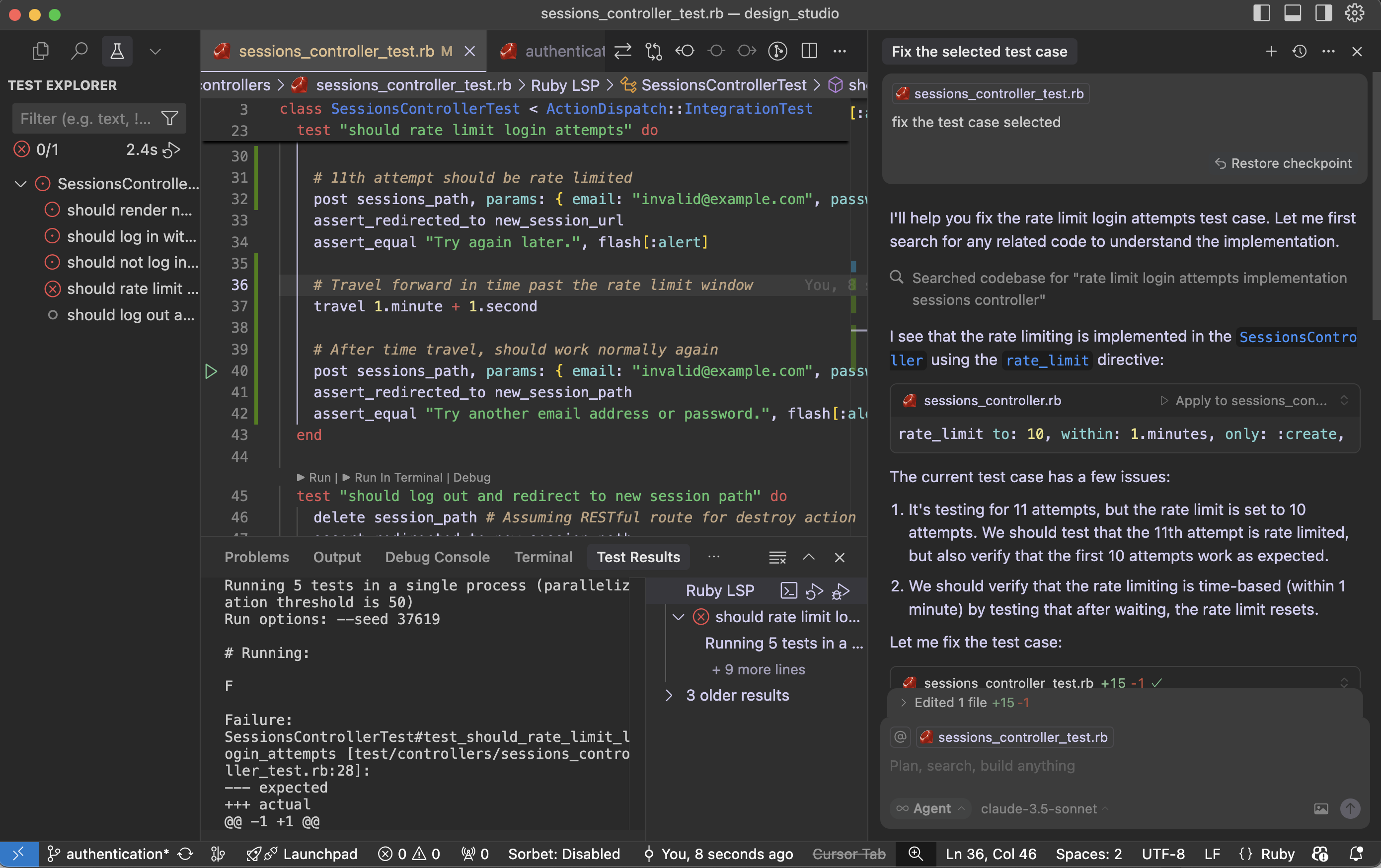
Let’s solve the test cases issues. First I cannot get ‘why this test cases for Rate limit issue is happening’. I have to research on this. I want to try Cursor – how it works with these kind of scenarios. Cursor provide me details about exact issue in our test cases and updated for me. I was happy that I saved some time.

Let’s see What is the findings of cursor:

The current test case has few issues:

  1. It’s testing for 11 attempts, but the rate limit is set to 10 attempts. We should test that the 11th attempt is rate limited, but also verify that the first 10 attempts work as expected.
  2. We should verify that the rate limiting is time-based (within 1 minute) by testing that after waiting, the rate limit resets.

Fix the test case:

Cursor updated the test case to properly test the rate limiting functionality. Here’s what the improved test does:

  1. First, it makes 10 attempts and verifies that each attempt gets the normal “invalid credentials” response
  2. Then it makes the 11th attempt and verifies that it gets rate limited with the “Try again later” message
  3. Finally, it uses Rails’ travel helper to move forward in time past the rate limit window (1 minute + 1 second) and verifies that the rate limit has been reset by making another attempt

This test now properly verifies:

  • The rate limit threshold (10 attempts)
  • The rate limit behavior (redirect with “Try again later” message)
  • The rate limit duration (1 minute)
  • The rate limit reset after the time window expires

The test is now more thorough and matches the actual implementation in the SessionsController.

Run the test case with the fix:

Failure:
SessionsControllerTest#test_should_rate_limit_login_attempts [test/controllers/sessions_controller_test.rb:34]:
--- expected
+++ actual
@@ -1 +1 @@
-"Try again later."
+"Try another email address or password."

the problem is that the rate limiting is happening at the controller level using rate_limit, but our test isn’t properly simulating real-world timing. Let me modify the test to ensure we’re making the requests within the 1-minute window and properly testing the rate limiting.

We fixed it and still the issues are not solved:

# Running:
F
Failure:
SessionsControllerTest#test_should_rate_limit_login_attempts [test/controllers/sessions_controller_test.rb:36]:
--- expected
+++ actual
@@ -1 +1 @@
-"Try again later."
+"Try another email address or password."

bin/rails test test/controllers/sessions_controller_test.rb:23

The issue may be with our SessionsController rate_limit directive. That is not working in test environment. I had this doubt. Let’s see what cursor tell us regarding this:

Looking at the SessionsController, the rate limiting is implemented using Rails’ rate_limit macro, but it seems the rate limiting might not be working as expected in the test environment. Let’s try to debug this by checking if we need to enable rate limiting in the test environment or if there’s a different approach needed.

Cursor suggested Rails cache setup and wipe out cache:

require "test_helper"

class SessionsControllerTest < ActionDispatch::IntegrationTest
  setup do
    # Use memory store for rate limiting in tests
    Rails.cache = ActiveSupport::Cache::MemoryStore.new
  end

  teardown do
    Rails.cache.clear
  end

  ......

The test environment is configured to use :null_store for caching, which means rate limiting won’t work. Let’s modify the test environment configuration:

environments/test.rb:

- config.cache_store = :null_store
+ config.cache_store = :memory_store

Cursor made two important changes:

  1. Changed the test environment’s cache store from :null_store to :memory_store to ensure rate limiting works properly
  2. Added a consistent IP address in the test requests using 
    headers: { REMOTE_ADDR: “192.168.1.1” } 
    since rate limiting is typically done based on the client’s IP address

The test should now work correctly because:

  1. We have proper caching enabled in the test environment
  2. We’re using a consistent IP address for all requests, which is what rate limiting typically uses to track requests
  3. We’re still maintaining the time window with travel_to and travel
  4. The cache is cleared between tests to ensure a clean state

Try running the test again – it should now properly detect when the rate limit is exceeded on the 11th request.

Running 5 tests in a single process (parallelization threshold is 50)
Run options: --seed 55394

# Running:
.

Finished in 1.222473s, 0.8180 runs/s, 28.6305 assertions/s.
1 runs, 35 assertions, 0 failures, 0 errors, 0 skips
Coverage report generated for Unit Tests to /Users/abhilash/rails/design_studio/public/coverage.
Line Coverage: 21.37% (81 / 379)

Works!! Cursor – you beauty.

Let us see why the fix worked:

  1. The main issue was that the test environment was using :null_store for caching, which effectively disabled all caching. Since Rails’ rate limiting feature relies on caching to track request counts, it wasn’t working properly.
  2. By changing to :memory_store, we enabled proper caching in the test environment, allowing the rate limiting to track requests.
  3. Adding the consistent IP address (REMOTE_ADDR: “192.168.1.1”) in the test requests was also important because Rails’ rate limiting typically uses the client’s IP address as part of the cache key to track requests per client.
  4. The test structure ensures clean state by:
  • Using setup to initialize a fresh cache store for each test
  • Using teardown to clear the cache after each test
  • Using travel_to to ensure consistent timing for rate limit windows
  • Using consistent IP addresses for request tracking

This is a good example of how testing rate limiting requires careful consideration of the entire environment, including caching, timing, and request attributes. The test now properly verifies that:

  • Users can make up to 10 attempts within a minute
  • The 11th attempt gets rate limited
  • After waiting for a minute, they can try again

I may need some more time to get the fact that: “Rails’ rate limiting feature relies on caching to track request counts”. Here is the importance of AI tool like cursor. It saved a lot of my debugging time.

Guide: Rails 8 API Application – Authentication 🔐 mechanisms | Sample Rails API app with Rspec Test cases

When building a Rails API app, you typically need token-based authentication instead of cookie-based sessions (which are more common in full-stack Rails apps). Here are the most common authentication mechanisms you can use in a Rails API-only application:

🔐 1. Token-Based Authentication

Most Common & Recommended for APIs

a. JWT (JSON Web Tokens)

  • Gems: jwt, knock, devise-jwt
  • How it works: After login, the server issues a JWT token which the client must include in the Authorization header (Bearer <token>) in subsequent requests.
  • Pros:
    • Stateless, scalable.
    • Widely supported across mobile and frontend frameworks.
  • Cons:
    • Tokens can’t be invalidated easily without extra measures (e.g., a blacklist).

b. Token-based Auth with Devise + TokenAuthenticatable

  • Gems: devise_token_auth
  • Uses Devise under the hood.
  • Stores tokens on the server (in DB), enabling logout and token revocation.
  • Compatible with React Native and SPAs.

🔐 2. OAuth 2.0 / OmniAuth (for Third-party Logins)

  • Gems: omniauth, doorkeeper
  • Use when you want users to log in via:
    • Google
    • Facebook
    • GitHub
  • Doorkeeper is often used to implement OAuth 2 provider (if you’re exposing your API to other apps).
  • Best when integrating external identity providers.

🔐 3. API Key Authentication

  • Useful for machine-to-machine communication or when exposing APIs to third-party developers.
  • Each user/client is assigned a unique API key.
  • Example: Authorization: Token token=abc123
  • You store the API key in the DB and verify it on each request.
  • Lightweight and easy to implement.

🔐 4. HTTP Basic Authentication

  • Simple and built-in with Rails (authenticate_or_request_with_http_basic).
  • Not suitable for production unless combined with HTTPS and only used for internal/testing tools.

👉🏻 Choosing the Right Auth Mechanism

Use CaseRecommended Method
Mobile app or frontend SPAJWT (devise-jwt / knock)
Internal API between servicesAPI key
Want email/password with token authdevise_token_auth
External login via Google/GitHubomniauth + doorkeeper
OAuth2 provider for third-party devsdoorkeeper
Quick-and-dirty internal authHTTP Basic Auth

🔄 How JWT Authentication Works — Step by Step

1. User Logs In

  • The client (e.g., React app, mobile app) sends a POST /login request with email/password.
  • Your Rails API validates the credentials.
  • If valid, it generates a JWT token and sends it back to the client.
{
  "token": "eyJhbGciOiJIUzI1NiIsInR5cCI6IkpXVCJ9..."
}

2. Client Stores the Token

  • The client stores the token in localStorage, sessionStorage, or memory (for SPAs), or a secure storage for mobile apps.

3. Client Sends Token on Requests

  • For any subsequent request to protected resources, the client includes the JWT in the Authorization header:
Authorization: Bearer eyJhbGciOiJIUzI1NiIsInR5cCI6IkpXVCJ9...

4. Server Verifies the Token

  • Rails extracts the token, decodes it using a secret key, and verifies:
    • The signature is valid.
    • The token is not expired.
    • The user ID (or sub claim) is valid.

If everything checks out, the request is allowed to proceed.

5. Token Expiration

  • Tokens usually include an exp (expiration) claim, e.g., 15 minutes, 1 hour, etc.
  • After expiration, the client must log in again or use a refresh token flow if supported.

🔒 Security: Is JWT Secure?

JWT can be secure, if used correctly. Here’s a breakdown:

✅ Security Benefits

FeatureWhy It Helps
StatelessNo session storage needed; scales easily
SignedThe token is signed (HMAC or RSA), so it can’t be tampered with
CompactSent in headers; easy to pass around
Exp claimTokens expire automatically after a period

⚠️ Security Considerations

IssueDescriptionMitigation
Token theftIf an attacker steals the token, they can impersonate the user.Always use HTTPS. Avoid storing tokens in localStorage if possible.
No server-side revocationTokens can’t be invalidated until they expire.Use short-lived access tokens + refresh tokens or token blacklist (DB).
Long token lifespanLonger expiry means higher risk if leaked.Keep exp short (e.g., 15–30 min). Use refresh tokens if needed.
Poor secret handlingIf your secret key leaks, anyone can forge tokens.Store your JWT_SECRET in environment variables, never in code.
JWT stored in localStorageSusceptible to XSS attacks in web apps.Use HttpOnly cookies when possible, or protect against XSS.
Algorithm confusionAttacker could force a weak algorithm.Always validate the algorithm (alg) on decoding. Use only HMAC or RSA.

🧪 Example Token (Decoded)

A typical JWT has three parts:

eyJhbGciOiJIUzI1NiIsInR5cCI6IkpXVCJ9.
eyJ1c2VyX2lkIjoxLCJleHAiOjE3MDAwMDAwMDB9.
SflKxwRJSMeKKF2QT4fwpMeJf36POk6yJV_adQssw5c

Breakdown:

  1. Header (Base64-encoded JSON)
{
  "alg": "HS256",
  "typ": "JWT"
}

  1. Payload
{
  "user_id": 1,
  "exp": 1700000000
}

  1. Signature
  • HMAC-SHA256 hash of header + payload + secret key.

🛡 Best Practices for JWT in Rails API

  • Use devise-jwt or knock to handle encoding/decoding securely.
  • Set short token lifetimes (exp claim).
  • Use HTTPS only.
  • Consider implementing refresh tokens for session continuation.
  • Avoid token storage in localStorage unless you trust your frontend.
  • Rotate secrets periodically (invalidate tokens when secrets change).

Now Let’s create a sample Rails API application and test what we learned.

🧱 Sample Rails API web app: Prerequisites

  • A Rails 8 app with --api mode enabled: rails new my_api_app --api
  • A User model with email and password_digest.
  • We’ll use bcrypt for password hashing.

✅ Step 1: Add Required Gems

In your Gemfile:

gem 'jwt'
gem 'bcrypt'

Then run:

bundle install

✅ Step 2: Generate the User Model

rails g model User email:string password_digest:string
rails db:migrate

In app/models/user.rb:

class User < ApplicationRecord
  has_secure_password
end

Now you can create users with secure passwords.

✅ Step 3: Create JWT Helper Module

Create a service object or helper to encode/decode tokens.

app/lib/json_web_token.rb (create the lib folder if needed):

# app/lib/json_web_token.rb
class JsonWebToken
  SECRET_KEY = Rails.application.credentials.secret_key_base

  def self.encode(payload, exp = 24.hours.from_now)
    payload[:exp] = exp.to_i
    JWT.encode(payload, SECRET_KEY)
  end

  def self.decode(token)
    decoded = JWT.decode(token, SECRET_KEY)[0]
    HashWithIndifferentAccess.new(decoded)
  rescue JWT::DecodeError => e
    nil
  end
end

✅ Step 4: Create the Authentication Controller

rails g controller auth

app/controllers/auth_controller.rb:

class AuthController < ApplicationController
  def login
    user = User.find_by(email: params[:email])

    if user&.authenticate(params[:password])
      token = JsonWebToken.encode(user_id: user.id)
      render json: { token: token }, status: :ok
    else
      render json: { error: 'Invalid credentials' }, status: :unauthorized
    end
  end
end

✅ Step 5: Protect Other Endpoints with Authentication

Make a reusable authenticate_request method.

app/controllers/application_controller.rb:

class ApplicationController < ActionController::API
  before_action :authenticate_request

  attr_reader :current_user

  private

  def authenticate_request
    header = request.headers['Authorization']
    token = header.split(' ').last if header.present?

    if token
      decoded = JsonWebToken.decode(token)
      @current_user = User.find_by(id: decoded[:user_id]) if decoded
    end

    render json: { error: 'Unauthorized' }, status: :unauthorized unless @current_user
  end
end

Now all your controllers inherit this behaviour unless you skip_before_action.

✅ Step 6: Add Routes

config/routes.rb:

Rails.application.routes.draw do
  post '/login', to: 'auth#login'

  get '/profile', to: 'users#profile' # Example protected route
end

✅ Step 7: Example Protected Controller

rails g controller users

app/controllers/users_controller.rb:

class UsersController < ApplicationController
  def profile
    render json: { id: current_user.id, email: current_user.email }
  end
end

🧪 Test It Out (Example)

Step 1: Create a User (via Rails Console)

User.create!(email: "test@example.com", password: "password123")

Step 2: Login via POST /login

POST /login
Content-Type: application/json

{
  "email": "test@example.com",
  "password": "password123"
}

Response:

{ "token": "eyJhbGciOi..." }

Step 3: Use Token in Authenticated Request

GET /profile
Authorization: Bearer eyJhbGciOi...

🔒 Extras You Might Add Later

  • Token expiration errors
  • Refresh tokens
  • Token revocation (e.g., a blacklist table)
  • Roles/permissions inside the token (e.g., admin claims)

Let’s now write RSpec tests for the JWT-based authentication flow we just set up in your Rails API app.

Assumptions

  • You already have:
    • A User model with email and password_digest
    • An AuthController with login
    • A UsersController with a protected profile action
    • JWT auth logic in JsonWebToken

🔧 Step 1: Add RSpec & Factory Bot

In your Gemfile (if not already added):

group :development, :test do
  gem 'rspec-rails'
  gem 'factory_bot_rails'
end

group :test do
  gem 'faker'
end

Then install:

bundle install
rails generate rspec:install


🏭 Step 2: Setup Factory for User

spec/factories/users.rb:

FactoryBot.define do
  factory :user do
    email { Faker::Internet.email }
    password { 'password123' }
    password_confirmation { 'password123' }
  end
end


🧪 Step 3: Auth Request Specs

spec/requests/auth_spec.rb:

require 'rails_helper'

RSpec.describe 'Authentication', type: :request do
  let!(:user) { create(:user, password: 'password123') }

  describe 'POST /login' do
    context 'with valid credentials' do
      it 'returns a JWT token' do
        post '/login', params: { email: user.email, password: 'password123' }

        expect(response).to have_http_status(:ok)
        expect(JSON.parse(response.body)).to include('token')
      end
    end

    context 'with invalid credentials' do
      it 'returns unauthorized' do
        post '/login', params: { email: user.email, password: 'wrong' }

        expect(response).to have_http_status(:unauthorized)
        expect(JSON.parse(response.body)).to include('error')
      end
    end
  end
end


🔒 Step 4: Profile (Protected) Request Specs

spec/requests/users_spec.rb:

require 'rails_helper'

RSpec.describe 'Users', type: :request do
  let!(:user) { create(:user) }
  let(:token) { JsonWebToken.encode(user_id: user.id) }

  describe 'GET /profile' do
    context 'with valid token' do
      it 'returns user profile' do
        get '/profile', headers: { 'Authorization' => "Bearer #{token}" }

        expect(response).to have_http_status(:ok)
        json = JSON.parse(response.body)
        expect(json['email']).to eq(user.email)
      end
    end

    context 'without token' do
      it 'returns unauthorized' do
        get '/profile'
        expect(response).to have_http_status(:unauthorized)
      end
    end

    context 'with invalid token' do
      it 'returns unauthorized' do
        get '/profile', headers: { 'Authorization' => 'Bearer invalid.token' }
        expect(response).to have_http_status(:unauthorized)
      end
    end
  end
end

📦 Final Tips

  • Run tests with: bundle exec rspec
  • You can stub JsonWebToken.decode in unit tests if needed to isolate auth logic.


The Container ⛴️ Revolution: How Docker 🐳 Transformed Dev & What’s Ahead

Containerization has reshaped the way we build, ship, and run applications. From simplifying dependency management to enabling micro-services architectures at scale, containers and orchestration platforms like Kubernetes have become cornerstones of modern DevOps. In this post, we’ll explore:

  1. What are containers, and what is containerization?
  2. A brief history and evolution of Kubernetes.
  3. Docker: what it is, how it works, and why it matters.
  4. When Docker emerged and the context before and after.
  5. The impact on the development lifecycle.
  6. Docker’s relevance in 2025 and beyond.
  7. Use cases: when to use—or avoid—Docker.
  8. Feature evolution in Docker.
  9. The future of Docker and containerization in web development.
  10. Where Do Developers Get Containers? How Do They Find the Right Ones?
  11. What Is Docker Hub? How Do You Use It?
  12. Can You Use Docker Without Docker Hub?

1. What Are Containers ⛴️ and What Is Containerization?

  • Containers are lightweight, standalone units that package an application’s code along with its dependencies (libraries, system tools, runtime) into a single image.
  • Containerization is the process of creating, deploying, and running applications within these containers.
  • Unlike virtual machines, containers share the host OS kernel and isolate applications at the process level, resulting in minimal overhead, rapid startup times, and consistent behavior across environments.

Key benefits of containerization

  • Portability: “Build once, run anywhere” consistency across dev, test, and prod.
  • Efficiency: Higher density—hundreds of containers can run on a single host.
  • Isolation: Separate dependencies and runtime environments per app.
  • Scalability: Containers can be replicated and orchestrated quickly.

2. ☸️ Kubernetes: A Brief History and Evolution

  • Origins (2014–2015): Google donated its internal Borg system concepts to the Cloud Native Computing Foundation (CNCF), and Kubernetes 1.0 was released in July 2015.
  • Key milestones:
    • 2016–2017: Rapid ecosystem growth—Helm (package manager), StatefulSets, DaemonSets.
    • 2018–2019: CRDs (Custom Resource Definitions) and Operators enabled richer automation.
    • 2020–2022: Focus on security (Pod Security Admission), multi-cluster federation (KubeFed), and edge computing.
    • 2023–2025: Simplified configurations (Kustomize built-in), tighter GitOps integrations, serverless frameworks (Knative).

Why Kubernetes matters

  • Automated scheduling & self-healing: Pods restart on failure; replicas ensure availability.
  • Declarative model: Desired state is continuously reconciled.
  • Extensibility: CRDs and Operators let you automate almost any workflow.

3. What Is Docker 🐳 and How It Works?

  • Docker is an open-source platform introduced in 2013 that automates container creation, distribution, and execution.
  • Core components:
    • Dockerfile: Text file defining how to build your image (base image, dependencies, commands).
    • Docker Engine: Runtime that builds, runs, and manages containers.
    • Docker Hub (and other registries): Repositories for sharing images.

How Docker works

  1. Build: docker build reads a Dockerfile, producing a layered image.
  2. Ship: docker push uploads the image to a registry.
  3. Run: docker run instantiates a container from the image, leveraging Linux kernel features (namespaces, cgroups) for isolation.

4. When Did Docker Emerge, and Why?

  • Launch: March 13, 2013, with the first open-source release of Docker 0.1 by dotCloud (now Docker, Inc.).
  • Why Docker?
    • Prior container tooling (LXC) was fragmented and complex.
    • Developers needed a standardized, user-friendly workflow for packaging apps.
    • Docker introduced a simple CLI, robust image layering, and a vibrant community ecosystem almost overnight.

5. Scenario Before and After Docker: Shifting the Development Lifecycle ♻️

AspectBefore DockerAfter Docker
Environment parity“It works on my machine” frustrations.Identical containers in dev, test, prod.
Dependency hellManual installs; conflicts between apps.Encapsulated in image layers; side-by-side.
CI/CD pipelinesCustom scripts per environment.Standard docker builddocker run steps.
ScalingVM spin-ups with heavy resource use.Rapid container spin-up, minimal overhead.
IsolationLesser isolation; port conflicts.Namespace and cgroup isolation per container.

Docker transformed workflows by making builds deterministic, tests repeatable, and deployments faster—key enablers of continuous delivery and microservices.


6. Should We Use Docker in 2025?

Absolutely—Docker (and its underlying container technologies) remains foundational in 2025:

  • Cloud-native architectures place containers at their core.
  • Serverless platforms often run functions inside containers (AWS Lambda, Azure Functions).
  • Edge deployments leverage containers for lightweight, consistent runtimes.
  • Developer expectations: Instant local environments via docker-compose.

However, the ecosystem has matured, and alternatives like Podman (daemonless) and lightweight sandboxing (Firecracker VMs) also coexist.


7. When to Use or Not Use Docker

Use CaseDocker Fits Well?Notes
Microservices / APIs✔ YesIndividual services packaged and scaled independently.
Monolithic apps✔ Generally beneficialSimplifies env setup, but added container overhead may be minimal.
High-load, high-latency apps✔ Yes, with orchestration (K8s).Autoscaling, rolling updates, resource quotas critical.
Simple frontend only apps✔ YesServe static assets via lightweight Nginx container.
Legacy desktop-style apps⚠️ MaybeMight add unnecessary complexity if no cloud target.

Key considerations

  • Use Docker for consistent environments, CI/CD integration, and horizontal scaling.
  • Avoid Docker when low latency on bare metal is paramount, or where container overhead cannot be tolerated (e.g., certain HPC workloads).

8. Is Docker Evolving? Key Feature 🧩Highlights

Docker continues to innovate:

  • Rootless mode (runs without root privileges) for enhanced security.
  • BuildKit improvements for faster, cache-efficient image builds.
  • Docker Extensions for community-driven tooling inside the Docker Desktop UI.
  • Improved Windows support with Windows containers and WSL2 integrations.
  • OCI compliance: Better compatibility with other runtimes (runc, crun) and registries.

9. Is Docker Needed for Future Web Development? What’s Next?

  • Containerization as standard: Even if Docker itself evolves or gives way to new runtimes, the model of packaging apps in isolated, immutable units is here to stay.
  • Serverless + containers: The blending of function-as-a-service and container workloads will deepen.
  • Edge computing: Tiny, specialized containers will power IoT and edge gateways.
  • Security focus: Sandboxing (gVisor, Firecracker) and supply-chain scanning will become default.

While tooling names may shift, the core paradigm—lightweight, reproducible application environments—remains indispensable.


10. Where Do Developers Get Containers? How Do They Find the Right Ones?

Developers get containers in the form of Docker images, which are blueprints for running containers.

These images can come from:

  • Docker Hub (most popular)
  • Private registries like GitHub Container Registry, AWS ECR, Google Container Registry, etc.
  • Custom-built images using Dockerfile

When looking for the right image, developers usually:

  • Search Docker Hub or other registries (e.g., redis, nginx, node, postgres)
  • Use official images, which are verified and maintained by Docker or vendors
  • Use community images, but carefully—check for:
    • Dockerfile transparency
    • Recent updates
    • Number of pulls and stars
    • Trust status (verified publisher)

Example search:
If you want Redis:

docker search redis


11. What Is Docker Hub? How Do You Use It?

Docker Hub is Docker’s official cloud-based registry service where:

  • Developers publish, store, share, and distribute container images.
  • It hosts both public (free and open) and private (restricted access) repositories.

Key Features:

  • Official images (e.g., python, mysql, ubuntu)
  • User & org accounts
  • Web UI for managing repositories
  • Pull/push image support
  • Image tags (e.g., node:18-alpine)

Basic usage:

🔍 Find an image
You can search on https://hub.docker.com or via CLI:

docker search nginx

📥 Pull an image

docker pull nginx:latest

▶️ Run a container from it

docker run -d -p 80:80 nginx

📤 Push your image

  1. Log in:
docker login

  1. Tag and push:
docker tag myapp myusername/myapp:1.0  
docker push myusername/myapp:1.0


12. Can You Use Docker Without Docker Hub?

Yes, absolutely!
You don’t have to use Docker Hub if you prefer alternatives or need a private environment.

Alternatives:

  • Private Docker Registry: Host your own with registry:2 image docker run -d -p 5000:5000 --name registry registry:2
  • GitHub Container Registry (GHCR)
  • Amazon ECR, Google GCR, Azure ACR
  • Harbor – open-source enterprise container registry

Use case examples:

  • Enterprise teams: often use private registries for security and control.
  • CI/CD pipelines: use cloud provider registries like ECR or GCR for tighter cloud integration.
  • Offline deployments: air-gapped environments use custom registries or local tarball image transfers.

✅ Summary

QuestionAnswer
Where do devs get containers?From Docker Hub, private registries, or by building their own images.
What is Docker Hub?A public registry for discovering, pulling, and sharing Docker images.
Can Docker work without Docker Hub?Yes—via self-hosted registries or cloud provider registries.

Conclusion

From Docker’s debut in 2013 to Kubernetes’ rise in 2015 and beyond, containerization has fundamentally altered software delivery. In 2025, containers are ubiquitous: in microservices, CI/CD, serverless platforms, and edge computing. Understanding when—and why—to use Docker (or its successors) is critical for modern developers. As the ecosystem evolves, containerization principles will underpin the next generation of web and cloud-native applications.

Happy Dockerizing! 🚀


What Is Cursor🧊 AI? Why It’s Changing the Way We Code 👨🏻‍💻 in 2025

In a world increasingly defined by intelligent automation, Cursor AI has emerged as a next-generation AI-powered code editor redefining how developers – from beginners to seasoned experts – build software. Imagine an editor like VS Code but powered by the intelligence of ChatGPT, designed to help you think, debug, and code faster. Cursor AI is that vision realized.

In this post, we’ll explore:

  • What Cursor AI is
  • How it evolved
  • How to install Cursor AI on your MacBook
  • Why it matters today
  • How development feels with vs without Cursor AI
  • Pros and cons
  • How it affects experienced vs new developers
  • Best practices for experienced developers using it

Check our first post about cursor here: https://railsdrop.com/2025/04/11/evolution-cursor-ai-overview-install-macos/


🧠 What Is Cursor AI?

Cursor AI is a developer-first AI code editor, built on top of Visual Studio Code, with AI deeply integrated into the editing experience. It’s designed to work contextually – meaning it doesn’t just generate generic code snippets, it understands your codebase, folder structure, and logic.

Key features:

  • Context-aware AI coding assistant
  • Instant code refactoring
  • Inline documentation generation
  • Bug fixing suggestions
  • Built-in ChatGPT-style panel
  • AI code generation for entire files, functions, or blocks

In essence, it turns your editor into a pair programmer that understands your exact project.


🧬 The Evolution of Cursor AI

The journey of Cursor AI started with the rise of GitHub Copilot and ChatGPT in 2022–2023. As these tools showed the value of AI-assisted development, developers demanded more context-aware, editor-native, and codebase-integrated AI tooling.

As of 29 April 2025, ~40% of code committed by professional engineers using Cursor is generated by Cursor!

Timeline of Evolution:

  1. 2023: VS Code extensions like Copilot led the charge in AI-assisted code completion.
  2. Late 2023: ChatGPT APIs brought conversational code help into tools.
  3. 2024: Cursor AI launched with the vision of full-context development, integrating the editor with ChatGPT and file-tree understanding.
  4. 2025: Cursor AI adds real-time debugging help, AI test generation, and full-project understanding with minimal configuration.

Cursor AI wasn’t just a plugin—it was a full-blown editor that replaces VS Code and integrates AI from the ground up.

Check below for the words of Google CEO Sundar Pichai:

✨ Check google’s Veo 3 – An art video generated-model


💻 How to Install Cursor AI on macOS

Installing Cursor AI on your MacBook is easy.

Step-by-Step Installation:

  1. Go to the official website: https://www.cursor.so
  2. Click “Download for macOS”
  3. Once the .dmg file is downloaded, open it and drag the Cursor app to Applications.
  4. Open the app. You may need to give permissions via System Settings > Privacy & Security.
  5. Log in using your GitHub or Google account.
  6. Optionally connect your OpenAI API key (for custom models or paid usage).

Cursor AI will sync your settings like any modern IDE, and you’re ready to go!


🌐 Why Cursor AI Matters in the Modern Coding Era

Software development is no longer just about writing code—it’s about writing good, secure, and maintainable code faster. Cursor AI helps with:

  • 🚀 Speed: Complete entire components in seconds
  • 🧠 Knowledge: Understands your codebase like a team member
  • 🐞 Debugging: Pinpoints issues and suggests fixes
  • 🧪 Testing: Helps write unit tests and specs instantly
  • ✍️ Docs: Auto-generates internal documentation

In the AI-assisted future of work, tools like Cursor AI aren’t optional—they’re multipliers.


🆚 Development With vs. Without Cursor AI

FeatureWith Cursor AIWithout Cursor AI
Code generationInstantly generated with contextManual and slower
Bug fixingOne-click suggestionsManual debugging, Stack Overflow
Learning curveSmooth with AI helpSteeper, especially for beginners
DocumentationAuto-generated inline docsTime-consuming, often skipped
RefactoringAssisted refactors in secondsManual, error-prone
AI integrationNative and seamlessPlugin-based or absent

The difference is stark: with Cursor AI, coding feels like a team sport—even if you’re solo.


Advantages and Disadvantages of Cursor AI

✅ Advantages:

  • Full codebase context for suggestions
  • Conversational AI built into the IDE
  • Quick refactors and fixes
  • Makes pair programming obsolete
  • Beginner-friendly with pro-level capabilities

❌ Disadvantages:

  • Limited to Cursor editor (not VS Code extension)
  • May over-rely on AI for thinking/debugging
  • Occasional hallucinations or wrong suggestions
  • Internet connection required
  • Premium features may require subscription or OpenAI key

👶 Freshers vs 🧠 Experienced Developers: How Cursor AI Affects Them

For Freshers:

  • Pros:
    • Less intimidating learning experience
    • AI explains code and errors
    • Boosts confidence and learning speed
  • Cons:
    • May hinder learning fundamentals if overused
    • Risk of blindly accepting AI suggestions

For Experienced Developers:

  • Pros:
    • Supercharges productivity
    • Speeds up prototyping and testing
    • Handles boilerplate and repetitive tasks
  • Cons:
    • Still requires strong judgment to verify AI output
    • Context overload may cause distraction if unmanaged

🧩 How Experienced Developers Can Fully Utilize Cursor AI

Here’s a practical strategy:

✅ Do:

  1. Use AI for context-aware code completions—especially for large files.
  2. Refactor in seconds by selecting blocks and using the AI menu.
  3. Write test specs from user stories with the help of the chat assistant.
  4. Ask AI to explain or find bugs across files or functions.
  5. Generate documentation, migration files, or even setup scripts.

❌ Don’t:

  • Rely solely on AI for business logic or architecture decisions
  • Accept code blindly—always review suggestions
  • Skip writing your own tests
  • Forget to version control your AI-generated changes

Pro Tip 💡:

Use AI for what it’s best at—pattern recognition and code generation—but keep the human creativity and design decisions in your hands.


✨ Final Thoughts

Cursor AI is not just a trend – it’s a transformation. It represents a shift toward context-aware, AI-first development environments that do more than autocomplete – they collaborate.

Whether you’re a Rails engineer, a React hacker, or a full-stack product builder, Cursor AI is like adding a genius teammate to your IDE.


🧱 Up Next: Building a Rails + React App Using Cursor AI

In the next blog post, we’ll build a full Rails + React app from scratch using Cursor AI—watch how it writes your models, React components, routes, and tests like magic.


Stay tuned! 🚀

📕 Guide: Mini-test 🧪 VS Rspec 🔬 in Rails Applications

When choosing between RSpec and Minitest for writing tests in a Ruby on Rails application, both are solid options, but the best choice depends on your project goals, team preferences, and ecosystem alignment.

♦️ Use RSpec if:

  • You want a rich DSL for expressive, readable tests (describe, context, it, etc.).
  • You’re working on a large project or with a team familiar with RSpec.
  • You want access to a larger ecosystem of gems/plugins (e.g., FactoryBot, Shoulda Matchers).
  • You like writing spec-style tests and separating tests by type (spec/models, spec/controllers, etc.).

Example RSpec syntax:

describe User do
  it "is valid with a name and email" do
    user = User.new(name: "Alice", email: "alice@example.com")
    expect(user).to be_valid
  end
end


♦️ Use Minitest if:

  • You prefer simplicity and speed — it’s built into Rails and requires no setup.
  • You value convention over configuration and a more Ruby-like test style.
  • You’re working on a small-to-medium project or want to avoid extra dependencies.
  • You like tests integrated with rails test without RSpec’s additional structure.

Example Minitest syntax:

class UserTest < ActiveSupport::TestCase
  test "is valid with a name and email" do
    user = User.new(name: "Alice", email: "alice@example.com")
    assert user.valid?
  end
end


🚦Recommendation:

  • Go with RSpec if you want a full-featured testing suite, lots of documentation, and are okay with learning a custom DSL.
  • Stick with Minitest if you want fast boot time, minimal dependencies, and simpler syntax.

Below is a side-by-side comparison of RSpec and Minitest in a Rails 8 context. For each aspect—setup, syntax, assertions, fixtures/factories, controller tests, etc.—you’ll see how you’d do the same thing in RSpec (left) versus Minitest (right). Wherever possible, the examples mirror each other so you can quickly spot the differences.


1. Setup & Configuration

AspectRSpecMinitest
Gem inclusionAdd to your Gemfile:
ruby<br>group :development, :test do<br> gem 'rspec-rails', '~> 6.0' # compatible with Rails 8<br>end<br>Then run:bash<br>bundle install<br>rails generate rspec:install<br>This creates spec/ directory with spec/spec_helper.rb and spec/rails_helper.rb.
Built into Rails. No extra gems required. When you generate your app, Rails already configures Minitest.By default you have test/ directory with test/test_helper.rb.

2. Folder Structure

TypeRSpecMinitest
Model specs/testsspec/models/user_spec.rbtest/models/user_test.rb
Controller specs/testsspec/controllers/users_controller_spec.rbtest/controllers/users_controller_test.rb
Request specs/testsspec/requests/api/v1/users_spec.rb (or spec/requests/…)test/integration/api/v1/users_test.rb
Fixture/Factory filesspec/factories/*.rb (with FactoryBot or similar)test/fixtures/*.yml
Helper filesspec/support/... (you can require them via rails_helper.rb)test/helpers/... (auto-loaded via test_helper.rb)

3. Basic Model Validation Example

RSpec (spec/models/user_spec.rb)

# spec/models/user_spec.rb
require 'rails_helper'

RSpec.describe User, type: :model do
  context "validations" do
    it "is valid with a name and email" do
      user = User.new(name: "Alice", email: "alice@example.com")
      expect(user).to be_valid
    end

    it "is invalid without an email" do
      user = User.new(name: "Alice", email: nil)
      expect(user).not_to be_valid
      expect(user.errors[:email]).to include("can't be blank")
    end
  end
end

Minitest (test/models/user_test.rb)

# test/models/user_test.rb
require "test_helper"

class UserTest < ActiveSupport::TestCase
  test "valid with a name and email" do
    user = User.new(name: "Alice", email: "alice@example.com")
    assert user.valid?
  end

  test "invalid without an email" do
    user = User.new(name: "Alice", email: nil)
    refute user.valid?
    assert_includes user.errors[:email], "can't be blank"
  end
end


4. Using Fixtures vs. Factories

RSpec (with FactoryBot)

  1. Gemfile: group :development, :test do gem 'rspec-rails', '~> 6.0' gem 'factory_bot_rails' end
  2. Factory definition (spec/factories/users.rb): # spec/factories/users.rb FactoryBot.define do factory :user do name { "Bob" } email { "bob@example.com" } end end
  3. Spec using factory: # spec/models/user_spec.rb require 'rails_helper' RSpec.describe User, type: :model do it "creates a valid user via factory" do user = FactoryBot.build(:user) expect(user).to be_valid end end

Minitest (with Fixtures or Minitest Factories)

  1. Default fixture (test/fixtures/users.yml):
    alice: name: Alice email: alice@example.com bob: name: Bob email: bob@example.com
  2. Test using fixture:
    # test/models/user_test.rb
    require "test_helper"
    class UserTest < ActiveSupport::TestCase
    test "fixture user is valid" do
    user = users(:alice) assert user.valid?
    end
    end
  3. (Optional) Using minitest-factory_bot:
    If you prefer factory style, you can add gem 'minitest-factory_bot', define factories similarly under test/factories, and then: # test/models/user_test.rb require "test_helper" class UserTest < ActiveSupport::TestCase include FactoryBot::Syntax::Methods test "factory user is valid" do user = build(:user) assert user.valid? end end

5. Assertions vs. Expectations

CategoryRSpec (expectations)Minitest (assertions)
Check truthinessexpect(some_value).to be_truthyassert some_value
Check false/nilexpect(value).to be_falseyrefute value
Equalityexpect(actual).to eq(expected)assert_equal expected, actual
Inclusionexpect(array).to include(item)assert_includes array, item
Change/Count differenceexpect { action }.to change(Model, :count).by(1)assert_difference 'Model.count', 1 do <br> action<br>end
Exception raisedexpect { code }.to raise_error(ActiveRecord::RecordNotFound)assert_raises ActiveRecord::RecordNotFound do<br> code<br>end

Example: Testing a Creation Callback

RSpec:

# spec/models/post_spec.rb
require 'rails_helper'

RSpec.describe Post, type: :model do
  it "increments Post.count by 1 when created" do
    expect { Post.create!(title: "Hello", content: "World") }
      .to change(Post, :count).by(1)
  end
end

Minitest:

# test/models/post_test.rb
require "test_helper"

class PostTest < ActiveSupport::TestCase
  test "creation increases Post.count by 1" do
    assert_difference 'Post.count', 1 do
      Post.create!(title: "Hello", content: "World")
    end
  end
end


6. Controller (Request/Integration) Tests

6.1 Controller‐Level Test

RSpec (spec/controllers/users_controller_spec.rb)

# spec/controllers/users_controller_spec.rb
require 'rails_helper'

RSpec.describe UsersController, type: :controller do
  let!(:user) { FactoryBot.create(:user) }

  describe "GET #show" do
    it "returns http success" do
      get :show, params: { id: user.id }
      expect(response).to have_http_status(:success)
    end

    it "assigns @user" do
      get :show, params: { id: user.id }
      expect(assigns(:user)).to eq(user)
    end
  end

  describe "POST #create" do
    context "with valid params" do
      let(:valid_params) { { user: { name: "Charlie", email: "charlie@example.com" } } }

      it "creates a new user" do
        expect {
          post :create, params: valid_params
        }.to change(User, :count).by(1)
      end

      it "redirects to user path" do
        post :create, params: valid_params
        expect(response).to redirect_to(user_path(User.last))
      end
    end

    context "with invalid params" do
      let(:invalid_params) { { user: { name: "", email: "" } } }

      it "renders new template" do
        post :create, params: invalid_params
        expect(response).to render_template(:new)
      end
    end
  end
end

Minitest (test/controllers/users_controller_test.rb)
# test/controllers/users_controller_test.rb
require "test_helper"

class UsersControllerTest < ActionDispatch::IntegrationTest
  setup do
    @user = users(:alice)  # from fixtures
  end

  test "should get show" do
    get user_url(@user)
    assert_response :success
    assert_not_nil assigns(:user)   # note: assigns may need enabling in Rails 8
  end

  test "should create user with valid params" do
    assert_difference 'User.count', 1 do
      post users_url, params: { user: { name: "Charlie", email: "charlie@example.com" } }
    end
    assert_redirected_to user_url(User.last)
  end

  test "should render new for invalid params" do
    post users_url, params: { user: { name: "", email: "" } }
    assert_response :success        # renders :new with 200 status by default
    assert_template :new
  end
end

Note:

  • In Rails 8, controller tests are typically integration tests (ActionDispatch::IntegrationTest) rather than old‐style unit tests. RSpec’s type: :controller still works, but you can also use type: :request (see next section).
  • assigns(...) is disabled by default in modern Rails controller tests. In Minitest, you might enable it or test via response body or JSON instead.

6.2 Request/Integration Test

RSpec Request Spec (spec/requests/users_spec.rb)
# spec/requests/users_spec.rb
require 'rails_helper'

RSpec.describe "Users API", type: :request do
  let!(:user) { FactoryBot.create(:user) }

  describe "GET /api/v1/users/:id" do
    it "returns the user in JSON" do
      get api_v1_user_path(user), as: :json
      expect(response).to have_http_status(:ok)
      json = JSON.parse(response.body)
      expect(json["id"]).to eq(user.id)
      expect(json["email"]).to eq(user.email)
    end
  end

  describe "POST /api/v1/users" do
    let(:valid_params) { { user: { name: "Dana", email: "dana@example.com" } } }

    it "creates a user" do
      expect {
        post api_v1_users_path, params: valid_params, as: :json
      }.to change(User, :count).by(1)
      expect(response).to have_http_status(:created)
    end
  end
end

Minitest Integration Test (test/integration/users_api_test.rb)
# test/integration/users_api_test.rb
require "test_helper"

class UsersApiTest < ActionDispatch::IntegrationTest
  setup do
    @user = users(:alice)
  end

  test "GET /api/v1/users/:id returns JSON" do
    get api_v1_user_path(@user), as: :json
    assert_response :success
    json = JSON.parse(response.body)
    assert_equal @user.id, json["id"]
    assert_equal @user.email, json["email"]
  end

  test "POST /api/v1/users creates a user" do
    assert_difference 'User.count', 1 do
      post api_v1_users_path, params: { user: { name: "Dana", email: "dana@example.com" } }, as: :json
    end
    assert_response :created
  end
end


7. Testing Helpers, Mailers, and Jobs

Test TypeRSpec ExampleMinitest Example
Helper Specspec/helpers/application_helper_spec.rbruby<br>describe ApplicationHelper do<br> describe "#formatted_date" do<br> it "formats correctly" do<br> expect(helper.formatted_date(Date.new(2025,1,1))).to eq("January 1, 2025")<br> end<br> end<br>endtest/helpers/application_helper_test.rbruby<br>class ApplicationHelperTest < ActionView::TestCase<br> test "formatted_date outputs correct format" do<br> assert_equal "January 1, 2025", formatted_date(Date.new(2025,1,1))<br> end<br>end
Mailer Specspec/mailers/user_mailer_spec.rbruby<br>describe UserMailer, type: :mailer do<br> describe "#welcome_email" do<br> let(:user) { create(:user, email: "test@example.com") }<br> let(:mail) { UserMailer.welcome_email(user) }<br> it "renders subject" do<br> expect(mail.subject).to eq("Welcome!")<br> end<br> it "sends to correct recipient" do<br> expect(mail.to).to eq([user.email])<br> end<br> end<br>endtest/mailers/user_mailer_test.rbruby<br>class UserMailerTest < ActionMailer::TestCase<br> test "welcome email" do<br> user = users(:alice)<br> mail = UserMailer.welcome_email(user)<br> assert_equal "Welcome!", mail.subject<br> assert_equal [user.email], mail.to<br> assert_match "Hello, #{user.name}", mail.body.encoded<br> end<br>end
Job Specspec/jobs/process_data_job_spec.rbruby<br>describe ProcessDataJob, type: :job do<br> it "queues the job" do<br> expect { ProcessDataJob.perform_later(123) }.to have_enqueued_job(ProcessDataJob).with(123)<br> end<br>endtest/jobs/process_data_job_test.rbruby<br>class ProcessDataJobTest < ActiveJob::TestCase<br> test "job is enqueued" do<br> assert_enqueued_with(job: ProcessDataJob, args: [123]) do<br> ProcessDataJob.perform_later(123)<br> end<br> end<br>end

8. Mocking & Stubbing

TechniqueRSpecMinitest
Stubbing a methodruby<br>allow(User).to receive(:send_newsletter).and_return(true)<br>ruby<br>User.stub(:send_newsletter, true) do<br> # ...<br>end<br>
Mocking an objectruby<br>mailer = double("Mailer")<br>expect(mailer).to receive(:deliver).once<br>allow(UserMailer).to receive(:welcome).and_return(mailer)<br>ruby<br>mailer = Minitest::Mock.new<br>mailer.expect :deliver, true<br>UserMailer.stub :welcome, mailer do<br> # ...<br>end<br>mailer.verify<br>

9. Test Performance & Boot Time

  • RSpec
    • Slower boot time because it loads extra files (rails_helper.rb, support files, matchers).
    • Rich DSL can make tests slightly slower, but you get clearer, more descriptive output.
  • Minitest
    • Faster boot time since it’s built into Rails and has fewer abstractions.
    • Ideal for a smaller codebase or when you want minimal overhead.

Benchmarks:
While exact numbers vary, many Rails 8 teams report ~20–30% faster test suite runtime on Minitest vs. RSpec for comparable test counts. If speed is critical and test suite size is moderate, Minitest edges out.


10. Community, Ecosystem & Plugins

FeatureRSpecMinitest
PopularityBy far the most popular Rails testing framework⸺heavily used, many tutorials.Standard in Rails. Fewer third-party plugins than RSpec, but has essential ones (e.g., minitest-rails, minitest-factory_bot).
Common plugins/gems• FactoryBot• Shoulda Matchers (for concise model validations)• Database Cleaner (though Rails 8 encourages use_transactional_tests)• Capybara built-in support• minitest-rails-capybara (for integration/feature specs)• minitest-reporters (improved output)• minitest-factory_bot
Learning curveLarger DSL to learn (e.g., describe, context, before/let/subject, custom matchers).Minimal DSL—familiar Ruby methods (assert, refute, etc.).
Documentation & tutorialsAbundant (RSPEC official guides, many blog posts, StackOverflow).Good coverage in Rails guides; fewer dedicated tutorials but easy to pick up if you know Ruby.
CI IntegrationExcellent support in CircleCI, GitHub Actions, etc. Many community scripts to parallelize RSpec.Equally easy to integrate; often faster out of the box due to fewer dependencies.

11. Example: Complex Query Test (Integration of AR + Custom Validation)

RSpec

# spec/models/order_spec.rb
require 'rails_helper'

RSpec.describe Order, type: :model do
  describe "scopes and validations" do
    before do
      @user       = FactoryBot.create(:user)
      @valid_attrs = { user: @user, total_cents: 1000, status: "pending" }
    end

    it "finds only completed orders" do
      FactoryBot.create(:order, user: @user, status: "completed")
      FactoryBot.create(:order, user: @user, status: "pending")
      expect(Order.completed.count).to eq(1)
    end

    it "validates total_cents is positive" do
      order = Order.new(@valid_attrs.merge(total_cents: -5))
      expect(order).not_to be_valid
      expect(order.errors[:total_cents]).to include("must be greater than or equal to 0")
    end
  end
end

Minitest

# test/models/order_test.rb
require "test_helper"

class OrderTest < ActiveSupport::TestCase
  setup do
    @user = users(:alice)
    @valid_attrs = { user: @user, total_cents: 1000, status: "pending" }
  end

  test "scope .completed returns only completed orders" do
    Order.create!(@valid_attrs.merge(status: "completed"))
    Order.create!(@valid_attrs.merge(status: "pending"))
    assert_equal 1, Order.completed.count
  end

  test "validates total_cents is positive" do
    order = Order.new(@valid_attrs.merge(total_cents: -5))
    refute order.valid?
    assert_includes order.errors[:total_cents], "must be greater than or equal to 0"
  end
end


12. When to Choose Which?

  • Choose RSpec if …
    1. You want expressive, English-like test descriptions (describe, context, it).
    2. Your team is already comfortable with RSpec.
    3. You need a large ecosystem of matchers/plugins (e.g., shoulda-matchers, faker, etc.).
    4. You prefer separating specs into spec/ with custom configurations in rails_helper.rb and spec_helper.rb.
  • Choose Minitest if …
    1. You want zero additional dependencies—everything is built into Rails.
    2. You value minimal configuration and convention over configuration.
    3. You need faster test suite startup and execution.
    4. Your tests are simple enough that a minimal DSL is sufficient.

13. 📋 Summary Table

FeatureRSpecMinitest
Built-in with RailsNo (extra gem)Yes
DSL Readability“describe/context/it” blocks → very readablePlain Ruby test classes & methods → idiomatic but less English-like
Ecosystem & PluginsVery rich (FactoryBot, Shoulda, etc.)Leaner, but you can add factories & reporters if needed
Setup/Boot TimeSlower (loads extra config & DSL)Faster (built-in)
Fixtures vs. Factory preferenceFactoryBot (by convention)Default YAML fixtures or optionally minitest-factory_bot
Integration Test SupportBuilt-in type: :requestBuilt-in ActionDispatch::IntegrationTest
Community AdoptionMore widely adopted for large Rails teamsStandard for many smaller Rails projects

✍️ Final Note

  • If you’re just starting out and want something up and running immediately—Minitest is the simplest path since it requires no extra gems. You can always add more complexity later (e.g., add minitest-factory_bot or minitest-reporters).
  • If you plan to write a lot of tests—model validations, request specs, feature specs, etc.—with very expressive descriptions (and you don’t mind a slightly longer boot time), RSpec tends to be the de facto choice in many Rails codebases.

Feel free to pick whichever aligns best with your team’s style. Both ecosystems are mature and well-documented.

A Complete Information About Ruby on Rails Gems 💎, Gemfile 📑

In a Rails Gemfile, the require: false option tells Bundler not to automatically load the gem when your Rails application starts. Here’s what it means and when to use it:

What It Does

gem 'some_gem', require: false
  • Without require: false: The gem is automatically required (loaded) when your Rails app boots
  • With require: false: The gem is installed but won’t be loaded until you explicitly require it

When to Use It

  1. Performance Optimization: For gems you don’t need in all environments (like development-only tools)
  2. Conditional Loading: When you only need a gem in specific circumstances
  3. Reduced Memory Usage: Avoids loading unnecessary gems into memory
  4. Avoid Naming Conflicts: If a gem might conflict with others when loaded

Example Usage

# Only load in development
group :development do
  gem 'brakeman', require: false
end

# Load manually when needed
gem 'nokogiri', require: false

# Then in your code:
def parse_xml
  require 'nokogiri'
  # use Nokogiri...
end

Common Gems That Use This

  • Testing tools (RSpec, Cucumber)
  • Performance monitoring tools
  • Debugging tools (byebug, pry)
  • Gems used only in rake tasks

Remember that without require: false, Bundler will automatically require the gem, which is the default behavior for most gems in your application.

to be continued.. 🚀


Deep Dive into Essential 🛍️ Ruby and Ruby on Rails Concepts

Ruby and Ruby on Rails are rich, expressive, and powerful technologies that make web development both elegant and productive. In this post, we’ll explore some critical concepts that developers often encounter, along with detailed explanations, advantages, disadvantages, and real-world Rails examples.


1. Garbage Collection (GC) in Ruby

Ruby’s VM uses a mark‑and‑sweep collector with generational enhancements to reduce pause times.

How it works

  1. Generational Division: Objects are split into young (eden/survivor) and old generations. Young objects are collected more frequently.
  2. Mark Phase: It traverses from root nodes (globals, stack, constants) marking reachable objects.
  3. Sweep Phase: Clears unmarked (garbage) objects.
  4. Compaction (in newer versions): Optionally compacts memory to reduce fragmentation.
# Trigger a minor GC (young generation)
GC.start(full_mark: false)
# Trigger a major GC (both generations)
GC.start(full_mark: true)

Benefits

  • Automatic memory management: Developers focus on logic, not free/delete calls.
  • Generational optimizations: Short‑lived objects reclaimed quickly, improving throughput.

Drawbacks

  • Pause times: Full GC can cause latency spikes.
  • Tuning complexity: Advanced apps may require tuning GC parameters (e.g., RUBY_GC_HEAP_GROWTH_FACTOR).

Rails Example

Large Rails apps (e.g., Sidekiq workers) monitor GC.stat to detect memory bloat:

stats = GC.stat
puts "Allocated objects: #{stats[:total_allocated_objects]}"


2. ActiveRecord: joins, preload, includes, eager_load

ActiveRecord provides tools to fetch associations efficiently and avoid the N+1 query problem.

MethodSQL GeneratedBehaviorProsCons
joinsINNER JOINFilters by associated tableEfficient filtering; single queryDoesn’t load associated objects fully
preload2 separate queriesLoads parent then child separatelyAvoids N+1; simple to useTwo queries; might fetch unnecessary data
includesJOIN or 2 queriesAuto‑decides between JOIN or preloadFlexible; avoids N+1 automaticallyHarder to predict SQL; can generate large JOINs
eager_loadLEFT OUTER JOINForces single JOIN queryAlways one query with dataLarge result sets; potential data duplication

Examples

# joins: Filter variants with women category products
> ProductVariant.joins(:product).where(product: {category: 'women'})
  ProductVariant Load (3.4ms)  SELECT "product_variants".* FROM "product_variants" INNER JOIN "products" "product" ON "product"."id" = "product_variants"."product_id" WHERE "product"."category" = 'women'

# preload: Load variants separately
> products = Product.preload(:variants).limit(10)
  Product Load (1.4ms)  SELECT "products".* FROM "products" /* loading for pp */ LIMIT 10 
  ProductVariant Load (0.5ms)  SELECT "product_variants".* FROM "product_variants" WHERE "product_variants"."product_id" IN (14, 15, 32)
> products.each { |product| product.variants.size}

# includes: Smart loading
products = > Product.includes(:variants).where("category = ?", 'women')
  Product Load (1.7ms)  SELECT "products".* FROM "products" WHERE (category = 'women') /* loading for pp */ LIMIT 11 
  ProductVariant Load (0.8ms)  SELECT "product_variants".* FROM "product_variants" WHERE "product_variants"."product_id" IN (14, 15)

# eager_load: Always join
Product.eager_load(:variants).where(variants: { stock_quantity: 5 })
> Product.eager_load(:variants).where(variants: { stock_quantity: 5 })
  SQL (3.1ms)  SELECT DISTINCT "products"."id" FROM "products" LEFT OUTER JOIN "product_variants" "variants" ON "variants"."product_id" = "products"."id" WHERE "variants"."stock_quantity" = 5 LIMIT 11 

  SQL (1.6ms)  SELECT "products"."id" AS t0_r0, "products"."description" AS t0_r1, "products"."category" AS t0_r2, "products"."created_at" AS t0_r3, "products"."updated_at" AS t0_r4, "products"."name" AS t0_r5, "products"."rating" AS t0_r6, "products"."brand" AS t0_r7, "variants"."id" AS t1_r0, "variants"."product_id" AS t1_r1, "variants"."sku" AS t1_r2, "variants"."mrp" AS t1_r3, "variants"."price" AS t1_r4, "variants"."discount_percent" AS t1_r5, "variants"."size" AS t1_r6, "variants"."color" AS t1_r7, "variants"."stock_quantity" AS t1_r8, "variants"."specs" AS t1_r9, "variants"."created_at" AS t1_r10, "variants"."updated_at" AS t1_r11 FROM "products" LEFT OUTER JOIN "product_variants" "variants" ON "variants"."product_id" = "products"."id" WHERE "variants"."stock_quantity" = 5 AND "products"."id" = 15 

When to Use

  • joins: Filtering, counting, or conditions across tables.
  • preload: You only need associated objects later, with less risk of huge joins.
  • includes: Default choice; let AR decide.
  • eager_load: Complex filtering on associations in one query.

3. Achieving Multiple Inheritance via Mixins

Ruby uses modules as mixins to simulate multiple inheritance.

Pattern

module Auditable
  def audit(message)
    puts "Audit: #{message}"
  end
end

module Taggable
  def tag(*names)
    @tags = names
  end
end

class Article
  include Auditable, Taggable
end

article = Article.new
tag "ruby", "rails"
audit "Created article"

Benefits

  • Code reuse: Share behavior across unrelated classes.
  • Separation of concerns: Each module encapsulates specific functionality.

Drawbacks

  • Method conflicts: Last included module wins; resolve with Module#prepend or alias_method.

Rails Example: Concerns

# app/models/concerns/trackable.rb
module Trackable
  extend ActiveSupport::Concern

  included do
    after_create :track_create
  end

  def track_create
    AnalyticsService.log(self)
  end
end

class User < ApplicationRecord
  include Trackable
end


4. Thread vs Fiber

Ruby offers preemptive threads and cooperative fibers for concurrency.

AspectThreadFiber
SchedulingOS-level, preemptiveRuby-level, manual (Fiber.yield/ resume)
OverheadHigher (context switch cost)Lower (lightweight)
Use CasesParallel I/O, CPU-bound (with GVL caveat)Managing event loops, non-blocking flows
GVL ImpactAll threads share GIL (Global VM Lock)Fibers don’t bypass GVL

Thread Example

threads = 5.times.map do
  Thread.new { sleep 1; puts "Done in thread #{Thread.current.object_id}" }
end
threads.each(&:join)

Fiber Example

fiber1 = Fiber.new do
  puts "Fiber1 start"
  Fiber.yield
  puts "Fiber1 resume"
end

fiber2 = Fiber.new do
  puts "Fiber2 start"
  fiber1.resume
  puts "Fiber2 resume"
end

fiber2.resume  # orchestrates both fibers

Rails Example: Action Cable

Action Cable uses EventMachine or async fibers to handle multiple WebSocket connections efficiently.


5. Proc vs Lambda

Both are callable objects, but differ in return behavior and argument checks.

FeatureProcLambda
Return semanticsreturn exits enclosing methodreturn exits lambda only
Argument checkingLenient (extra args discarded)Strict (ArgumentError on mismatch)
ContextCarries method contextMore like an anonymous method

Examples

def demo_proc
  p = Proc.new { return "from proc" }
  p.call
  return "after proc"
end

def demo_lambda
  l = -> { return "from lambda" }
  l.call
  return "after lambda"
end
puts demo_proc   # => "from proc"
puts demo_lambda # => "after lambda"

Rails Example: Callbacks

# Using a lambda for a conditional callback
class User < ApplicationRecord
  after_save -> { Analytics.track(self) }, if: -> { saved_change_to_email? }
end


6. Exception Handling in Ruby

Ruby’s exception model is dynamic and flexible.

Syntax

begin
  risky_operation
rescue SpecificError => e
  handle_error(e)
rescue AnotherError
  fallback
else
  puts "No errors"
ensure
  cleanup_resources
end

Benefits

  • Granular control: Multiple rescue clauses per exception class.
  • Flow control: rescue can be used inline (foo rescue nil).

Drawbacks

  • Performance: Raising/catching exceptions is costly.
  • Overuse: Rescuing StandardError broadly can hide bugs.

Rails Example: Custom Exceptions

class PaymentError < StandardError; end

def process_payment
  raise PaymentError, "Insufficient funds" unless valid_funds?
rescue PaymentError => e
  errors.add(:base, e.message)
end


7. Key Ruby on Rails Modules

Rails is modular, each gem serves a purpose:

ModulePurposeBenefits
ActiveRecordORM: models to DB tablesDRY queries, validations, callbacks
ActionControllerControllers: request/response cycleFilters, strong parameters
ActionViewView templates (ERB, Haml)Helpers, partials
ActiveModelModel conventions for non-DB classesValidations, callbacks without DB
ActiveJobJob framework (sidekiq, resque adapters)Unified API for background jobs
ActionMailerEmail composition & deliveryInterceptors, mailer previews
ActionCableWebSocket supportStreams, channels
ActiveStorageFile uploads & CDN integrationDirect uploads, variants
ActiveSupportUtility extensions (core extensions, inflections)Time calculations, i18n, concerns support

8. Method Visibility: public, protected, private

Visibility controls encapsulation and API design.

ModifierAccess FromUse Case
publicEverywherePublic API methods
privateSame instance onlyHelper methods not meant for external use
protectedInstances of same class or subclassesComparison or interaction between related objects
class Account
  def transfer(to, amount)
    validate_balance(amount)
    to.deposit(amount)
  end

  private

  def validate_balance(amount)
    raise "Insufficient" if balance < amount
  end

  protected

  def balance
    @balance
  end
end

Advantages

  • Encapsulation: Hides implementation details.
  • Inheritance control: Fine‑grained access for subclasses.

Disadvantages

  • Rigidity: Can complicate testing private methods.
  • Confusion: Protected rarely used, often misunderstood.
Above Summary

By diving deeper into these core concepts, you’ll gain a solid understanding of Ruby’s internals, ActiveRecord optimizations, module mixins, concurrency strategies, callable objects, exception patterns, Rails modules, and visibility controls. Practice these patterns in your own projects to fully internalize their benefits and trade‑offs.

Other Ruby on Rails Concepts 💡

Now, we’ll explore several foundational topics in Ruby on Rails, complete with detailed explanations, code examples, and a balanced look at advantages and drawbacks.

1. Rack and Middleware

Check our post: https://railsdrop.com/2025/04/07/inside-rails-the-role-of-rack-and-middleware/

What is Rack?
Rack is the Ruby interface between web servers (e.g., Puma, Unicorn) and Ruby web frameworks (Rails, Sinatra). It standardizes how HTTP requests and responses are handled, enabling middleware stacking and pluggable request processing.

Middleware
Rack middleware are modular components that sit in the request/response pipeline. Each piece can inspect, modify, or short-circuit requests before they reach your Rails app, and likewise inspect or modify responses before they go back to the client.

# lib/simple_logger.rb
class SimpleLogger
  def initialize(app)
    @app = app
  end

  def call(env)
    Rails.logger.info("[Request] #{env['REQUEST_METHOD']} #{env['PATH_INFO']}")
    status, headers, response = @app.call(env)
    Rails.logger.info("[Response] status=#{status}")
    [status, headers, response]
  end
end

# config/application.rb
config.middleware.use SimpleLogger

Benefits:

  • Cross-cutting concerns (logging, security, caching) can be isolated.
  • Easily inserted, removed, or reordered.

Drawbacks:

  • Overuse can complicate request flow.
  • Harder to trace when many middlewares are chained.

2. The N+1 Query Problem

What is N+1?
Occurs when Rails executes one query to load a collection, then an additional query for each record when accessing an association.

@users = User.all                # 1 query
@users.each { |u| u.posts.count } # N additional queries

Total: N+1 queries.

Prevention: use eager loading (includes, preload, eager_load).

@users = User.includes(:posts)
@users.each { |u| u.posts.count } # still 2 queries only

Benefits of Eager Loading:

  • Dramatically reduces SQL round-trips.
  • Improves response times for collections.

Drawbacks:

  • May load unnecessary data if associations aren’t used.
  • Can lead to large, complex SQL (especially with eager_load).

3. Using Concerns

What are Concerns?
Modules under app/models/concerns (or app/controllers/concerns) to extract and share reusable logic.

# app/models/concerns/archivable.rb
module Archivable
  extend ActiveSupport::Concern

  included do
    scope :archived, -> { where(archived: true) }
  end

  def archive!
    update!(archived: true)
  end
end

# app/models/post.rb
class Post < ApplicationRecord
  include Archivable
end

When to Extract:

  • Shared behavior across multiple models/controllers.
  • To keep classes focused and under ~200 lines.

Benefits:

  • Promotes DRY code.
  • Encourages separation of concerns.

Drawbacks:

  • Can mask complexity if overused.
  • Debugging call stacks may be less straightforward.

4. HABTM vs. Has Many Through

HABTM (has_and_belongs_to_many):

  • Simple many-to-many with a join table without a Rails model.
class Post < ApplicationRecord
  has_and_belongs_to_many :tags
end

Has Many Through:

  • Use when the join table has additional attributes or validations.
class Tagging < ApplicationRecord
  belongs_to :post
  belongs_to :tag
  validates :tagged_by, presence: true
end

class Post < ApplicationRecord
  has_many :taggings
  has_many :tags, through: :taggings
end

Benefits & Drawbacks:

PatternBenefitsDrawbacks
HABTMMinimal setup; fewer filesCannot store metadata on relationship
Has Many ThroughFull join model control; validationsMore boilerplate; extra join model to maintain

5. Controller Hooks (Callbacks)

Rails controllers provide before_action, after_action, and around_action callbacks.

class ArticlesController < ApplicationController
  before_action :authenticate_user!
  before_action :set_article, only: %i[show edit update destroy]

  def show; end

  private

  def set_article
    @article = Article.find(params[:id])
  end
end

Use Cases:

  • Authentication/authorization
  • Parameter normalization
  • Auditing/logging

Benefits:

  • Centralize pre- and post-processing logic.
  • Keep actions concise.

Drawbacks:

  • Overuse can obscure the action’s core logic.
  • Callback order matters and can introduce subtle bugs.

6. STI vs. Polymorphic Associations vs. Ruby Inheritance

FeatureSTIPolymorphicPlain Ruby Inheritance
DB StructureSingle table + type columnSeparate tables + *_type + *_idNo DB persistence
FlexibilitySubclasses share schemaCan link many models to oneFull OOP, no DB ties
When to UseSubtypes with similar attributesComments, attachments across modelsPure Ruby services, utilities

STI Example:

class Vehicle < ApplicationRecord; end
class Car < Vehicle; end
class Truck < Vehicle; end

All in vehicles table, differentiated by type.

Polymorphic Example:

class Comment < ApplicationRecord
  belongs_to :commentable, polymorphic: true
end

class Post < ApplicationRecord
  has_many :comments, as: :commentable
end

Benefits & Drawbacks:

  • STI: simple table; limited when subclasses diverge on columns.
  • Polymorphic: very flexible; harder to enforce foreign-key constraints.
  • Ruby Inheritance: best for non-persistent logic; no DB coupling.

7. rescue_from in Rails API Controllers

rescue_from declares exception handlers at the controller (or ApplicationController) level:

class Api::BaseController < ActionController::API
  rescue_from ActiveRecord::RecordNotFound, with: :render_not_found
  rescue_from ActiveRecord::RecordInvalid, with: :render_unprocessable_entity

  private

  def render_not_found(e)
    render json: { error: e.message }, status: :not_found
  end

  def render_unprocessable_entity(e)
    render json: { errors: e.record.errors.full_messages }, status: :unprocessable_entity
  end
end

Benefits:

  • Centralized error handling.
  • Cleaner action code without repetitive begin…rescue.

Drawbacks:

  • Must carefully order rescue_from calls (first match wins).
  • Overly broad handlers can mask unexpected bugs.
Summary

This post has covered advanced Rails concepts with practical examples, advantages, and pitfalls. By understanding these patterns, you can write cleaner, more maintainable Rails applications. Feedback and questions are welcome—let’s keep the conversation going!

Happy Rails Understanding! 🚀

Ruby Concepts 💠: Blocks, Constants, Meta-Programming, Enum

Here we will look into the detailed explanation of some Ruby concepts with practical examples, and real-world scenarios:

1. Handling Many Constants in a Ruby Class

Problem:
A class with numerous constants becomes cluttered and harder to maintain.

Solutions & Examples:

  1. Nested Module for Grouping:
   class HTTPClient
     module StatusCodes
       OK = 200
       NOT_FOUND = 404
       SERVER_ERROR = 500
     end

     def handle_response(code)
       case code
       when StatusCodes::OK then "Success"
       when StatusCodes::NOT_FOUND then "Page missing"
       end
     end
   end

Why: Encapsulating constants in a module improves readability and avoids namespace collisions.

  1. Dynamic Constants with const_set:
   class DaysOfWeek
     %w[MON TUE WED THU FRI SAT SUN].each_with_index do |day, index|
       const_set(day, index + 1)
     end
   end
   puts DaysOfWeek::MON # => 1

Use Case: Generate constants programmatically (e.g., days, months).

  1. External Configuration (YAML):
   # config/constants.yml
   error_codes:
     NOT_FOUND: 404
     SERVER_ERROR: 500
   class App
     CONSTANTS = YAML.load_file('config/constants.yml')
     def self.error_message(code)
       CONSTANTS['error_codes'].key(code)
     end
   end

Why: Centralize configuration for easy updates.


2. Meta-Programming: Dynamic Methods & Classes

Examples:

  1. define_method for Repetitive Methods:
   class User
     ATTRIBUTES = %w[name email age]

     ATTRIBUTES.each do |attr|
       define_method(attr) { instance_variable_get("@#{attr}") }
       define_method("#{attr}=") { |value| instance_variable_set("@#{attr}", value) }
     end
   end

   user = User.new
   user.name = "Alice"
   puts user.name # => "Alice"

Use Case: Auto-generate getters/setters for multiple attributes.

  1. Dynamic Classes with Class.new:
   Animal = Class.new do
     def speak
       puts "Animal noise!"
     end
   end

   dog = Animal.new
   dog.speak # => "Animal noise!"

Use Case: Generate classes at runtime (e.g., for plugins).

  1. class_eval for Modifying Existing Classes:
   String.class_eval do
     def shout
       upcase + "!"
     end
   end

   puts "hello".shout # => "HELLO!"

Why: Add/redefine methods in existing classes dynamically.


3. Why Classes Are Objects in Ruby

Explanation:

  • Every class is an instance of Class.
  String.class # => Class
  • Classes inherit from Module and ultimately Object, allowing them to have methods and variables:
  class Dog
    @count = 0 # Class instance variable
    def self.increment_count
      @count += 1
    end
  end
  • Real-World Impact: You can pass classes as arguments, modify them at runtime, and use them like any other object.

4. super Keyword: Detailed Usage

Examples:

  1. Implicit Argument Passing:
   class Vehicle
     def start_engine
       "Engine on"
     end
   end

   class Car < Vehicle
     def start_engine
       super + " (Vroom!)"
     end
   end

   puts Car.new.start_engine # => "Engine on (Vroom!)"
  1. Explicit super() for No Arguments:
   class Parent
     def greet
       "Hello"
     end
   end

   class Child < Parent
     def greet
       super() + " World!" # Explicitly call Parent#greet with no args
     end
   end

Pitfall: Forgetting () when overriding a method with parameters.


5. Blocks in Ruby Methods: Scenarios

A simple ruby method that accepts a block and executing via yield:

irb* def abhi_block
irb*   yield
irb*   yield
irb> end
=> :abhi_block
irb* abhi_block do.             # multi-line block
irb*   puts "*"*7
irb> end
*******
*******
irb> abhi_block { puts "*"*7 }. # single-line block
*******
*******
=> nil
irb* def abhi_block
irb*   yield 3
irb*   yield 7
irb*   yield 9
irb> end
=> :abhi_block
irb> abhi_block { |x| puts x }. # pass argument to block
3
7
9
=> nil

Note: We can call yield any number times that we want.

Proc

Procs are similar to blocks, however, they differ in that they may be saved to a variable to be used again and again. In Ruby, a proc can be called directly using the .call method.

To create Proc, we call new on the Proc class and follow it with the block of code

my_proc = Proc.new { |x| x*x*9 }
=> #<Proc:0x000000011f64ed38 (irb):34>

my_proc.call(6)
=> 324

> my_proc.call      # try to call without an argument
(irb):34:in 'block in <top (required)>': undefined method '*' for nil (NoMethodError)
lambda
> my_lambda = lambda { |x| x/3/5 }
=> #<Proc:0x000000011fe6fd28 (irb):44 (lambda)>

> my_lambda.call(233)
=> 15

> my_lambda = lambda.new { |x| x/3/5 } # wrong
in 'Kernel#lambda': tried to create Proc object without a block (ArgumentError)

> my_lambda = lambda                   # wrong
(irb):45:in 'Kernel#lambda': tried to create Proc object without a block (ArgumentError)

> my_lambda.call     # try to call without an argument
(irb):46:in 'block in <top (required)>': wrong number of arguments (given 0, expected 1) (ArgumentError)

Difference 1: lambda gets an ArgumentError if we call without an argument and Proc doesn’t.

Difference 2: lambda returns to its calling method rather than returning itself like Proc from its parent method.

irb* def proc_method
irb*   my_proc = Proc.new { return "Proc returns" }
irb*   my_proc.call
irb*   "Retun by proc_method"  # neaver reaches here
irb> end
=> :proc_method

irb> p proc_method
"Proc returns"
=> "Proc returns"
irb* def lambda_method
irb*   my_lambda = lambda { return 'Lambda returns' }
irb*   my_lambda.call
irb*   "Method returns"
irb> end
=> :lambda_method
irb(main):079> p lambda_method
"Method returns"
=> "Method returns"

Use Cases & Examples:

  1. Resource Management (File Handling):
   def open_file(path)
     file = File.open(path, 'w')
     yield(file) if block_given?
   ensure
     file.close
   end

   open_file('log.txt') { |f| f.write("Data") }

Why: Ensures the file is closed even if an error occurs.

  1. Custom Iterators:
   class MyArray
     def initialize(items)
       @items = items
     end

     def custom_each
       @items.each { |item| yield(item) }
     end
   end

   MyArray.new([1,2,3]).custom_each { |n| puts n * 2 }
  1. Timing Execution:
   def benchmark
     start = Time.now
     yield
     puts "Time taken: #{Time.now - start}s"
   end

   benchmark { sleep(2) } # => "Time taken: 2.0s"
Procs And Lambdas in Ruby

proc = Proc.new { puts "I am the proc block" }
lambda = lambda { puts "I am the lambda block"}

proc_test.call # => I am the proc block
lambda_test.call # => I am the lambda block

6. Enums in Ruby

Approaches:

  1. Symbols/Constants:
   class TrafficLight
     STATES = %i[red yellow green].freeze

     def initialize
       @state = STATES.first
     end

     def next_state
       @state = STATES[(STATES.index(@state) + 1) % STATES.size]
     end
   end
  1. Rails ActiveRecord Enum:
   class User < ActiveRecord::Base
     enum role: { admin: 0, user: 1, guest: 2 }
   end

   user = User.new(role: :admin)
   user.admin? # => true

Why: Generates helper methods like admin? and user.admin!.


7. Including Enumerable

Why Needed:

  • Enumerable methods (map, select, etc.) rely on each being defined.
  • Example Without Enumerable:
  class MyCollection
    def initialize(items)
      @items = items
    end

    def each(&block)
      @items.each(&block)
    end
  end

  # Without Enumerable:
  collection = MyCollection.new([1,2,3])
  collection.map { |n| n * 2 } # Error: Undefined method `map`
  • With Enumerable:
  class MyCollection
    include Enumerable
    # ... same as above
  end

  collection.map { |n| n * 2 } # => [2,4,6]

8. Class Variables (@@)

Example & Risks:

class Parent
  @@count = 0

  def self.count
    @@count
  end

  def increment
    @@count += 1
  end
end

class Child < Parent; end

Parent.new.increment
Child.new.increment
puts Parent.count # => 2 (Shared across Parent and Child)

Why Avoid: Subclasses unintentionally modify the same variable.
Alternative (Class Instance Variables):

class Parent
  @count = 0

  def self.count
    @count
  end

  def self.increment
    @count += 1
  end
end

9. Global Variables ($)

Example & Issues:

$logger = Logger.new($stdout)

def log_error(message)
  $logger.error(message) # Accessible everywhere
end

# Problem: Tight coupling; changing $logger affects all code.

When to Use: Rarely, for truly global resources like $stdout or $LOAD_PATH.
Alternative: Dependency injection or singleton classes.

class AppConfig
  attr_reader :logger

  def initialize(logger:)
    @logger = logger
  end

  def info(msg)
    @logger.info(msg)
  end
end

config = AppConfig.new(Logger.new($stdout))
info = config.info("Safe")


Summary:

  • Constants: Organize with modules or external files.
  • Meta-Programming: Use define_method/Class.new for dynamic code.
  • Classes as Objects: Enable OOP flexibility.
  • super: Call parent methods with/without arguments.
  • Blocks: Abstract setup/teardown or custom logic.
  • Enums: Simulate via symbols or Rails helpers.
  • Enumerable: Include it and define each.
  • Class/Global Variables: Rarely used due to side effects.

Enjoy Ruby! 🚀