
Up to now:
- Day 1: What is AI, LLM, Tokens, Context Window
- Day 2: Prompt Engineering, APIs, Tool Calling
- Day 3: RAG, Embeddings, Vector Databases
Now we’ll answer the question:
“How would you integrate AI into a Ruby on Rails application?”
Goal
By the end of today, you should be able to answer:
- How should AI code be organized in Rails?
- Which Ruby gems should I use?
- Where should prompts live?
- How should conversations be stored?
- How should streaming work?
- Where should Sidekiq be used?
- How should errors be handled?
- How do we control AI costs?
- What architecture would you use in production?
Part 1 – AI is Just Another External Service
One of the biggest mindset shifts is this:
Treat an LLM exactly like any other external service.
You’ve probably integrated:
- Stripe
- Twilio
- AWS S3
- SendGrid
- Google Maps
AI providers are similar.
Rails↓AI Service Object↓OpenAI / Anthropic / Gemini↓Response
The LLM should never become your application’s business logic.
Part 2 – High-Level Architecture
A production Rails application might look like:
Browser↓ChatsController↓Ai::ChatService↓PromptBuilder↓LLM Client↓LLM API↓ResponseFormatter↓Browser
Notice how each class has a single responsibility.
Part 3 – Recommended Folder Structure
A clean structure could look like:
app/ controllers/ chats_controller.rb services/ ai/ chat_service.rb prompt_builder.rb response_formatter.rb embedding_service.rb moderation_service.rb jobs/ ai_response_job.rb embedding_job.rb models/ conversation.rb message.rb
Avoid putting AI logic directly in controllers.
Part 4 – Service Objects
Bad:
class ChatsController < ApplicationController def create # 300 lines # prompt # API call # parse JSON # save db # stream response endend
Good:
class ChatsController < ApplicationController def create response = Ai::ChatService.new( current_user ).reply(params[:message]) render json: response endend
Everything else belongs inside the service layer.
Part 5 – Prompt Builder Pattern
Don’t concatenate strings all over the application.
Bad
prompt ="You are..." +params[:message] +"..."
Better
Ai::PromptBuilder.new( user: current_user, message: params[:message]).build
Why?
Because prompts evolve.
Keeping them centralized makes testing and maintenance much easier.
Answer
Prompts should be generated by dedicated classes or templates rather than being embedded in controllers.
Part 6 – LLM Client Wrapper
Never call the provider SDK from multiple places.
Instead:
Ai::Client
Example:
client.chat(messages)client.embed(text)client.moderate(text)
If your company later switches providers, only this layer needs to change.
Why This Matters
Imagine:
Today
Rails↓OpenAI
Next year
Rails↓Anthropic
If you’ve wrapped the provider behind Ai::Client, the rest of the application barely changes.
Part 7 – Conversation Storage
Should you store conversations?
Usually, yes.
Typical schema:
Conversationiduser_id
Messageconversation_idrolecontenttoken_countmodelcreated_at
Why store them?
- Resume chats
- Analytics
- Auditing
- Cost tracking
- User history
Part 8 – Streaming
Modern AI applications stream responses.
Instead of:
Waiting...Waiting...Entire response
Users see:
HelHelloHello AbhiHello Abhi,
Rails options:
- Turbo Streams
- Action Cable
- Server-Sent Events (SSE)
tip:
Streaming improves perceived responsiveness and user experience.
Part 9 – Where Sidekiq Fits
Not every AI request should happen synchronously.
Good candidates:
- PDF indexing
- Embedding generation
- Large summaries
- Batch document processing
- Scheduled AI reports
- Email generation
Example:
User uploads PDF↓Rails↓Sidekiq↓Extract↓Chunk↓Embeddings↓pgvector
This keeps request latency low.
Part 10 – Error Handling
AI APIs can fail.
Examples:
- Timeout
- Rate limit
- Invalid API key
- Network failure
- Provider outage
Don’t expose raw errors.
Bad:
HTTP 500Internal Server Error
Better:
The AI service is temporarily unavailable.Please try again shortly.
Retry transient failures where appropriate, but avoid retrying indefinitely.
Part 11 – Cost Optimization
This is increasingly asked in senior ints.
Every request costs money.
Strategies:
Cache repeated responses
Same question.
Same answer.
No need to regenerate every time if appropriate for the use case.
Choose the right model
Simple spelling correction?
Use a smaller, cheaper model.
Complex legal reasoning?
Use a more capable model.
Limit Conversation History
Don’t always send 200 previous messages.
Summarize older context when needed.
Stream
Streaming doesn’t reduce token costs, but it improves user experience.
Background Processing
Large AI tasks shouldn’t block web requests.
Part 12 – Security
Never trust AI output blindly.
Consider:
- Prompt injection
- User permissions
- Sensitive data
- PII
- Secrets
- Output validation
Example:
Suppose an AI suggests:
DROP TABLE users;
Your application should never execute generated SQL automatically.
AI output should be treated like any other untrusted input.
Part 13 – Logging
Useful things to log:
- Model used
- Response time
- Token usage
- API cost
- Errors
- Retry count
Avoid logging sensitive prompts or user data unless your privacy requirements allow it.
Part 14 – Monitoring
Production systems should track:
- latency
- token usage
- failures
- rate limits
- provider availability
- cost trends
Ints appreciate developers who think beyond implementation.
Part 15 – Testing AI Code
This surprises many developers.
Don’t write tests like:
expect(response) .to eq(...)
LLM output isn’t deterministic.
Instead:
Test:
- service objects
- prompt builder
- JSON parsing
- fallback behaviour
- tool invocation
- retries
- error handling
Stub the AI provider in unit tests.
Rails Example
allow(ai_client) .to receive(:chat) .and_return(mock_response)
Test your code – not the provider’s model.
Part 16 – Complete Production Architecture
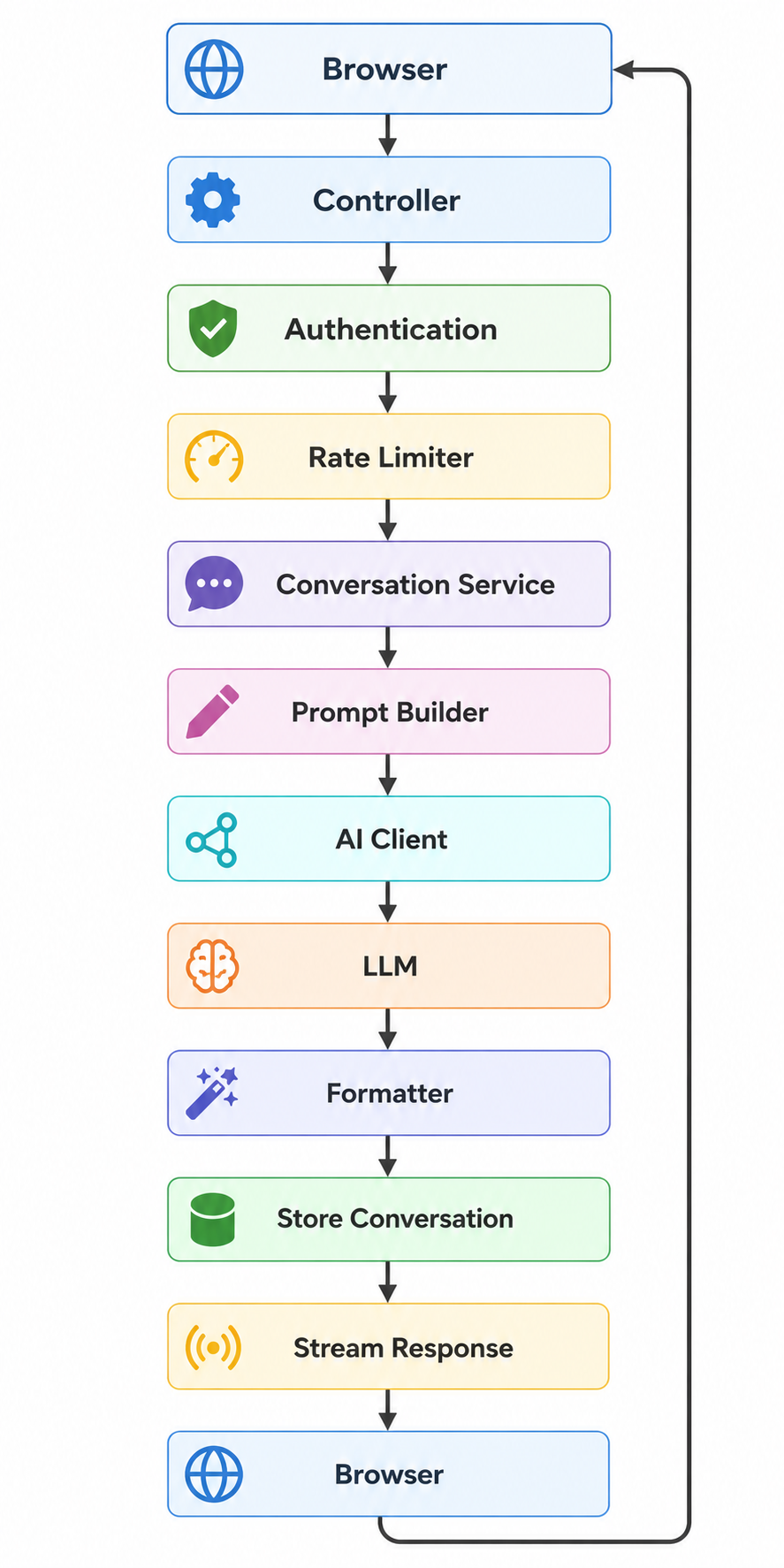
Notice:
Rails orchestrates everything.
The LLM is just one component.
Questions
Practice answering these.
Architecture
- Where should AI code live?
- Why use service objects?
- Why create an AI client wrapper?
Rails
- Should prompts live inside controllers?
- How should conversations be stored?
- Where would Sidekiq fit?
Production
- How do you reduce AI costs?
- How would you monitor an AI service?
- How should AI failures be handled?
- How should AI code be tested?
System Design
- Design an AI chat architecture.
- How would you support multiple AI providers?
- How would you stream responses?
- How would you secure AI endpoints?
Practical Exercise 1 – Design a Service Layer
Imagine you’re adding an AI feature to an existing Rails e-commerce application.
Sketch service classes such as:
Ai::ChatServiceAi::PromptBuilderAi::ClientAi::OrderAssistantAi::RecommendationService
For each class, define its single responsibility.
Practical Exercise 2 – Design Your Database
Design tables for:
usersconversationsmessages
Ask yourself:
- Should token usage be stored?
- Should the model name be stored?
- How will you calculate costs later?
Practical Exercise 3 – Failure Scenarios
Suppose the AI provider:
- returns a timeout,
- returns invalid JSON,
- hits a rate limit,
- is temporarily unavailable.
For each scenario, decide:
- Should the request be retried?
- Should it fail fast?
- What should the user see?
- What should be logged?
Thinking through these operational details is a hallmark of senior engineering.
Homework
- Draw the full Rails AI architecture from memory.
- Explain why AI belongs behind service objects.
- Explain why an
Ai::Clientabstraction is valuable. - Design a conversation schema.
- Explain how you would reduce token costs.
- Describe how you would test AI features without depending on live API calls.
- Answer all 14 questions aloud.
Senior System Design Challenge
Imagine this question:
“Build ChatGPT inside a Rails application.”
A strong answer would cover:
- Authentication and authorization
- Conversation and message storage
- Prompt builder
- AI client abstraction
- Streaming responses
- Background jobs for long-running tasks
- Rate limiting
- Caching
- Monitoring and observability
- Retry policies
- Cost tracking
- Security (prompt injection, access control, PII handling)
- Multi-provider support (OpenAI, Anthropic, Gemini)
- Testing strategy
Notice that only one piece of this architecture is the LLM itself. The rest is the kind of software engineering expertise expected from a senior Rails developer.
Day 5 Preview – AI Agents
The next topic is one of the fastest-growing areas in AI.
We’ll answer questions such as:
- What exactly is an AI Agent?
- How is an agent different from ChatGPT?
- What is an agentic workflow?
- What are tools?
- What is agent memory?
- What is planning?
- When do you need an agent versus a simple LLM call?
- How do you build an agent in a Rails application?
- How can an agent interact safely with your business logic?
By the end of Day 5, you’ll understand the concepts behind agent-based systems and be able to discuss and design simple AI agents confidently in Rails ints.
Happy AI Learning!

