
Right now we have following fields in Product Table:
create_table "products", force: :cascade do |t|
    t.string "title", null: false
    t.text "description"
    t.string "category"
    t.string "color"
    t.string "size", limit: 10
    t.decimal "mrp", precision: 7, scale: 2
    t.decimal "discount", precision: 7, scale: 2
    t.decimal "rating", precision: 2, scale: 1
    t.datetime "created_at", null: false
    t.datetime "updated_at", null: false
  end
If you examine the above table, there will be repetitive product items if consider for a size of an item there comes so many colours. We need to create different product rows for each size different colours.
So Let’s split the table into two.
1. Product Table
class CreateProducts < ActiveRecord::Migration[8.0]
  def change
    def change
      create_table :products do |t|
        t.string  :name
        t.text    :description
        t.string  :category   # women, men, kids, infants
        t.decimal :rating, precision: 2, scale: 1, default: 0.0

        t.timestamps
      end

      add_index :products, :category
    end
  end
end
2. Product Variant Table
class CreateProductVariants < ActiveRecord::Migration[8.0]
  def change
    create_table :product_variants do |t|
      t.references :product, null: false, foreign_key: true
      t.string  :sku, null: false
      t.decimal :price, precision: 10, scale: 2
      t.string  :size
      t.string  :color
      t.integer :stock_quantity, default: 0
      t.jsonb   :specs, default: {}, null: false

      t.timestamps
    end

    # GIN index for fast JSONB attribute searching
    add_index :product_variants, :specs, using: :gin
    add_index :product_variants, [ :product_id, :size, :color ], unique: true
    add_index :product_variants, :sku, unique: true
  end
end
Data normalization is a core concept in database design that helps organize data efficiently, eliminate redundancy, and ensure data integrity.
🔍 What Is Data Normalization?
Normalization is the process of structuring a relational database in a way that:
- Reduces data redundancy (no repeated data)
- Prevents anomalies in insert, update, or delete operations
- Improves data integrity
It breaks down large, complex tables into smaller, related tables and defines relationships using foreign keys.
🧐 Why Normalize?
| Problem Without Normalization | How Normalization Helps |
|---|---|
| Duplicate data everywhere | Moves repeated data into separate tables |
| Inconsistent values | Enforces rules and relationships |
| Hard to update data | Isolates each concept so it’s updated once |
| Wasted storage | Reduces data repetition |
📚 Normal Forms (NF)
Each Normal Form (NF) represents a level of database normalization. The most common are:
ite key (student_id, course_id), and student_name depends only on student_id, it should go into a separate table.
Think of normalization as organizing SQL tables to reduce duplication, inconsistency, and update problems.
1NF – First Normal Form
Rule: Each column should contain atomic/single values. No lists or repeating groups.
❌ Not 1NF
| id | name | phone_numbers |
|---|---|---|
| 1 | John | 9876, 8765 |
phone_numbers contains multiple values.
✅ 1NF
customers
| id | name |
|---|---|
| 1 | John |
customer_phones
| id | customer_id | phone |
|---|---|---|
| 1 | 1 | 9876 |
| 2 | 1 | 8765 |
Easy way to remember:
One cell = one value.
2NF – Second Normal Form
Rule: Must already be in 1NF, and every non-key column must depend on the whole primary key, not just part of it.
This matters mainly when you have a composite primary key.
❌ Not 2NF
Suppose:
order_items
| order_id | product_id | order_date | product_name | qty |
|---|---|---|---|---|
| 101 | 10 | 2026-09-12 | Laptop | 2 |
| 101 | 20 | 2026-09-12 | Mouse | 1 |
Primary key:
(order_id, product_id)
But:
order_date -> depends only on order_idproduct_name -> depends only on product_idqty -> depends on both
So order_date and product_name don’t depend on the whole key.
✅ 2NF
orders
| order_id | order_date |
|---|---|
| 101 | 2026-09-12 |
products
| product_id | product_name |
|---|---|
| 10 | Laptop |
| 20 | Mouse |
order_items
| order_id | product_id | qty |
|---|---|---|
| 101 | 10 | 2 |
| 101 | 20 | 1 |
Easy way to remember:
No column should depend on only part of a composite key.
3NF – Third Normal Form
Rule: Must be in 2NF, and non-key columns should not depend on other non-key columns.
❌ Not 3NF
employees
| employee_id | employee_name | dept_id | dept_name |
|---|---|---|---|
| 1 | John | 10 | Engineering |
| 2 | Mary | 10 | Engineering |
Here:
employee_id -> dept_iddept_id -> dept_name
So:
employee_id -> dept_name
indirectly.
dept_name depends on another non-key column (dept_id).
✅ 3NF
employees
| employee_id | employee_name | dept_id |
|---|---|---|
| 1 | John | 10 |
| 2 | Mary | 10 |
departments
| dept_id | dept_name |
|---|---|
| 10 | Engineering |
Easy way to remember:
Non-key columns should depend on the key, the whole key, and nothing but the key.
The simplest mental model
1NF↓No multiple values in one cell2NF↓No dependency on part of a composite key3NF↓No dependency between non-key columns
Or the classic int. phrase:
3NF: Every non-key attribute depends on the key, the whole key, and nothing but the key.
Int.-friendly example
1NF → "phone = 9876,8765" ❌ split into rows ✅2NF → (order_id, product_id) is the key order_date depends only on order_id ❌ move it to orders ✅3NF → dept_id -> dept_name dept_name shouldn't live in employees ✅ move it to departments
⚖️ Normalization vs. Denormalization
- ✅ Normalization = Good for consistency, long-term maintenance
- ⚠️ Denormalization = Good for performance in read-heavy systems (like reporting dashboards)
Use normalization as a default practice, then selectively denormalize if performance requires it.
Delete button example (Rails 7+)
<%= link_to "Delete Product",
              @product,
              data: { turbo_method: :delete, turbo_confirm: "Are you sure you want to delete this product?" },
              class: "inline-block px-4 py-2 bg-red-100 text-red-600 border border-red-300 rounded-md hover:bg-red-600 hover:text-white font-semibold transition duration-300 transform hover:scale-105" %>
💡 What’s Improved:
data: { turbo_confirm: ... }ensures compatibility with Turbo (Rails 7+).- Better button-like appearance (
bg,px,py,rounded, etc.). - Hover effects and transitions for a smooth UI experience.
Add Brand to products table
Let’s add brand column to the product table:
✗ rails g migration add_brand_to_products brand:string:
index
class AddBrandToProducts < ActiveRecord::Migration[8.0]
  def change
    # Add 'brand' column
    add_column :products, :brand, :string

    # Add index for brand
    add_index :products, :brand
  end
end
❗️Important Note:
❌ PostgreSQL does not support BEFORE or AFTER when adding a column.
Caused by:
PG::SyntaxError: ERROR:  syntax error at or near "BEFORE" (PG::SyntaxError)
LINE 1: ...LTER TABLE products ADD COLUMN brand VARCHAR(255) BEFORE des...
- PostgreSQL (default in Rails) does not support column order (they’re always returned in the order they were created).
- If you’re using MySQL, you could use raw SQL for positioning as shown below.
If I USE MySQL, I would like to see the brand name as first column of the table products. You can do that by changing the migration to:
class AddBrandToProducts < ActiveRecord::Migration[8.0]
  def up
    execute "ALTER TABLE products ADD COLUMN brand VARCHAR(255) BEFORE description;"
    add_index :products, :brand
  end

  def down
    remove_index :products, :brand
    remove_column :products, :brand
  end
end
Reverting Previous Migrations
You can use Active Record’s ability to rollback migrations using the revert method:
require_relative "20121212123456_example_migration"

class FixupExampleMigration < ActiveRecord::Migration[8.0]
  def change
    revert ExampleMigration

    create_table(:apples) do |t|
      t.string :variety
    end
  end
end
The revert method also accepts a block of instructions to reverse. This could be useful to revert selected parts of previous migrations.
Reference: https://guides.rubyonrails.org/active_record_migrations.html#reverting-previous-migrations
Product Index Page after applying NF:

Product Show Page after applying NF:

New Product Page after applying NF:
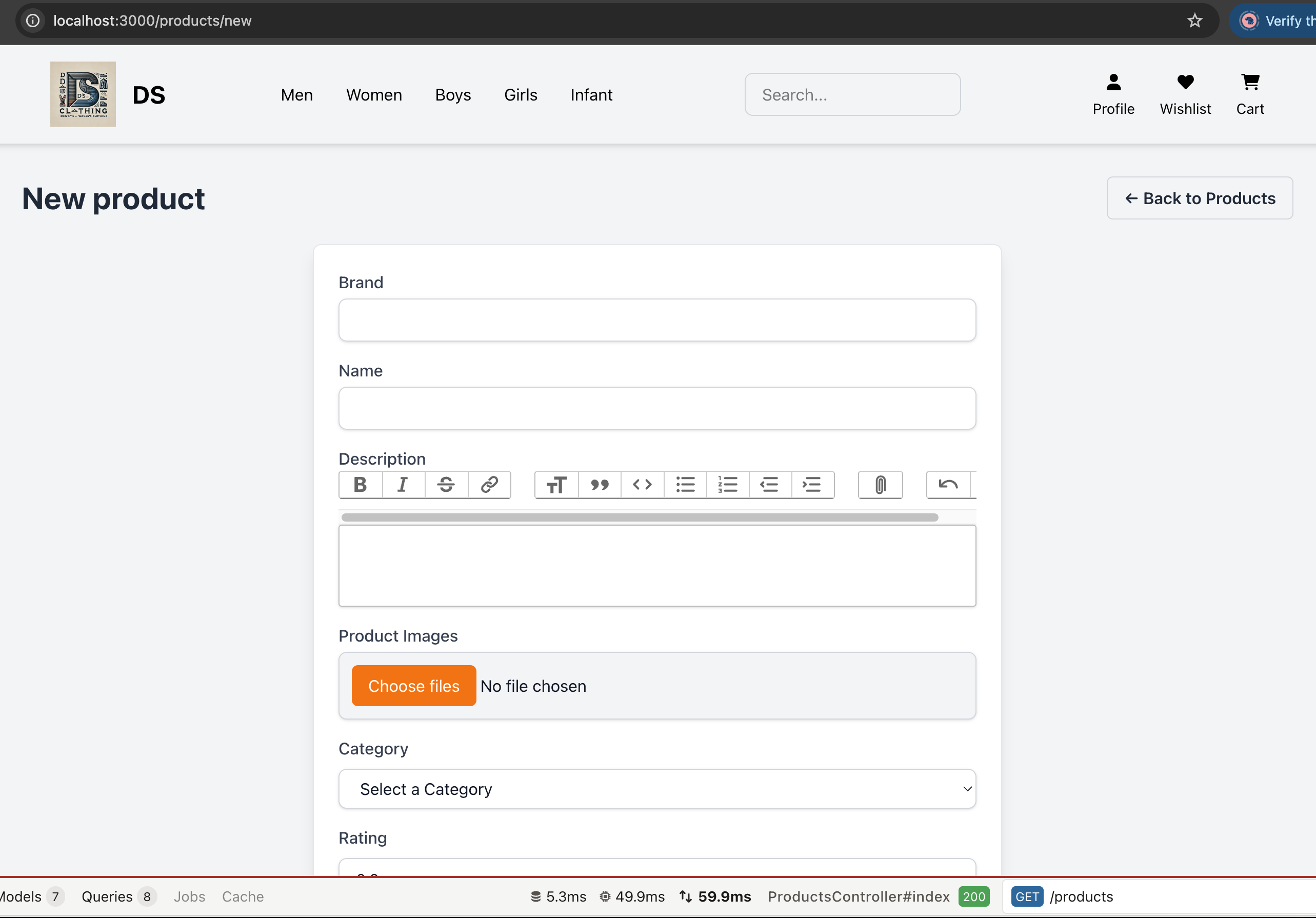
to be continued.. 🚀


One thought on “Setup 🛠 Rails 8 App – Part 12: Modify Product Schema – Apply Normalization”