
We had a problem making a LLM request to get the response due to the lack of remaining credits in the last part. Let’s solve it in this part using OpenRouter APIs. You can read more about this here: Openrouter ai- one api for multiple ai models
Let’s switch now to OpenRouter’s free-model tier rather than DeepSeek directly. As of April 2026, OpenRouter offers free models at $0 input/output pricing and its openrouter/free router automatically selects an available free model; the free plan currently has a 50-requests/day limit. (OpenRouter)
This is actually a useful improvement for our bootcamp because OpenRouter exposes an OpenAI-compatible API, so we can keep the openai Ruby SDK and change only the endpoint + API key + model. (OpenRouter)
Step 5.17 – Switch Ai::Client to OpenRouter Free
We are not changing our Rails architecture:
Rails ↓Ai::Client ↓OpenAI-compatible SDK ↓OpenRouter ↓Free LLM
1. Create an OpenRouter API key
Create an account at OpenRouter and create an API key.
It should look approximately like:
sk-or-v1-...
OpenRouter documents this flow in its free-model quickstart. (OpenRouter)
Do not paste the key here.
2. Change Rails credentials
We currently have:
openai: api_key: ...
Let’s change this to:
openrouter: api_key: OUR_OPENROUTER_KEY
Run:
bin/rails credentials:edit
Change:
openai: api_key: ...
to:
openrouter: api_key: ...
Save and exit.
3. Update Ai::Client
Open:
app/services/ai/client.rb
For now, use:
class Ai::Client
  MODEL = "openrouter/free"
  BASE_URL = "https://openrouter.ai/api/v1"

  def initialize
    @api_key = Rails.application.credentials.dig(:openrouter, :api_key)

    raise "OpenRouter API key is missing" if @api_key.blank?

    @client = OpenAI::Client.new(
      api_key: @api_key,
      base_url: BASE_URL
    )
  end

  def chat(message:)
    @client.chat.completions.create(
      model: MODEL,
      messages: [
        {
          role: "user",
          content: message
        }
      ]
    )
  end
end
OpenRouter explicitly documents using an OpenAI-compatible client by changing the base URL to:
https://openrouter.ai/api/v1
and then using the OpenAI-style chat completions API. (OpenRouter)
Important change
Previously we were using:
@client.responses.create(...)
Now we’re using:
@client.chat.completions.create(...)
That’s intentional. OpenRouter supports Responses API for its free router, but its OpenAI-compatible chat-completions interface is the simplest and most broadly compatible path for this exercise.
4. Test credentials first
Run:
bin/rails c
Then:
Rails.application.credentials.dig(:openrouter, :api_key)
Make sure it returns a value.
Don’t paste it here.
Then:
exit
5. Make the first free LLM request
Run:
bin/rails c
Then:
client = Ai::Client.new
And:
response = client.chat( message: "Explain Ruby blocks in simple terms.")
Now inspect:
response
Then:
response.choices.first.message.content
You should get the model’s response.
6. Inspect usage
Run:
response.usage
Then:
response.usage.prompt_tokens
and:
response.usage.completion_tokens
The exact response shape depends on the model/provider, so we’re intentionally inspecting it rather than assuming the field names.
OpenRouter Dashboard – token usage
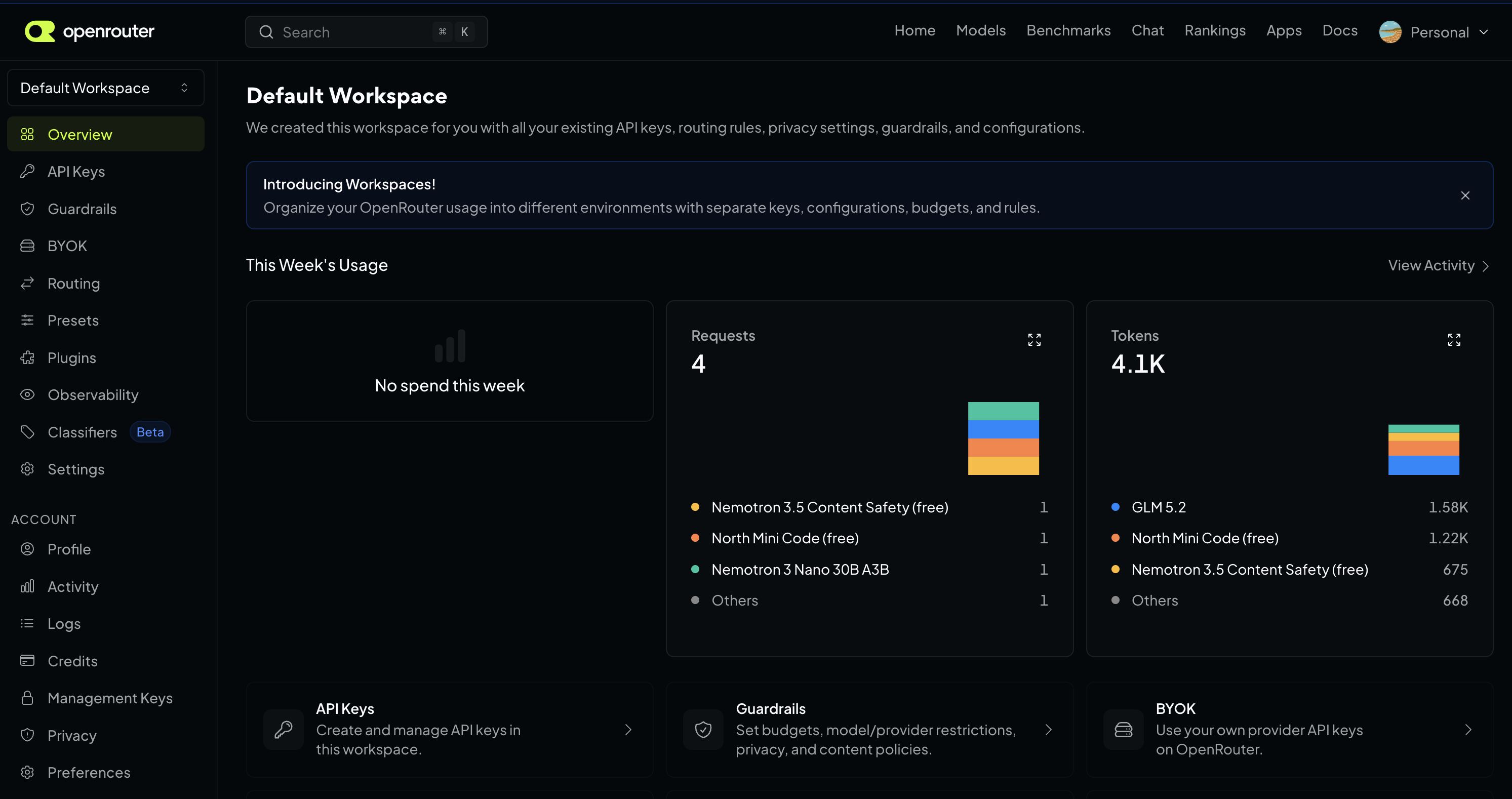
7. What did we just accomplish?
Our application has now become provider-independent at the architecture level:
                    Ai::Client
                        │
                 ┌──────┴──────┐
                 │             │
              Provider       Provider
                 │             │
              OpenAI       OpenRouter
                                │
                           Free Models
And later we can support:
OpenRouter
  ├── gpt-oss-20b
  ├── Nemotron
  ├── other free models
  └── paid models
OpenRouter currently lists multiple free models, including OpenAI’s gpt-oss-20b and NVIDIA Nemotron variants. (OpenRouter)
We won’t hard-code a specific free model yet because the free-model pool changes over time. openrouter/free is specifically designed to route requests to an available free model.
8. One important lesson
This change demonstrates a valuable architectural idea:
The LLM provider should be an implementation detail behind our AI service boundary.
Today:
Ai::Client → OpenRouter
Later:
Ai::Client → OpenAI
or:
Ai::Client → Anthropic
without changing:
ConversationMessageChatServiceControllersUI
That’s exactly why we created Ai::Client before integrating the provider.
Stop here
Do these steps in order:
bin/rails credentials:edit
Set:
openrouter: api_key: OUR_OPENROUTER_KEY
Then update Ai::Client as shown above and run:
bin/rails c
client = Ai::Client.newresponse = client.chat( message: "Explain Ruby blocks in simple terms.")
Then:
response.choices.first.message.content
Once that works, check the output:
➜  ai_assistant git:(main) ✗ rails c
Loading development environment (Rails 8.1.3.1)
ai-assistant(dev):001> client = Ai::Client.new
=>
#<Ai::Client:0x000000012d5ca138
...
ai-assistant(dev):002* response = client.chat(
ai-assistant(dev):003*   message: "How can I become an expert in Ruby language"
ai-assistant(dev):004> )
=>
#<OpenAI::Models::Chat::ChatCompletion:0x22c8 {id: "gen-1786952686-y1YoZ2KFkNMw6Le1xdp5", choices: [{finish_reason: :stop, index: 0, logpr...
ai-assistant(dev):005> response.choices.first.message.content
ai-assistant(dev):006>
=> "User Safety: safe" # our api not started working
ai-assistant(dev):002> conversation = Conversation.first
ai-assistant(dev):003* conversation.messages.order(:created_at).each do |message|
ai-assistant(dev):004*   puts "#{message.role}: #{message.content}"
ai-assistant(dev):005> end
  Message Load (9.9ms)  SELECT "messages".* FROM "messages" WHERE "messages"."conversation_id" = 1 ORDER BY "messages"."created_at" ASC /*application='AiAssistant'*/
user: What is Ruby? # our api not started working
user: What is Ruby? # our api not started working
user: What is Ruby? in 20 words
assistant: Ruby is a dynamic, object‑oriented language emphasizing developer happiness, known for elegant syntax and powerful, full‑featured, open‑source web framework Rails.
OpenRouter free model works!
Then we’ll immediately proceed to the next step: cleanly extracting the provider response and mapping it into our Message model, which is where the application starts becoming a real AI chat application rather than just an API experiment.
Create AI Chat Service, Store Messages
Now make the LLM response usable by Rails, persist it as a Message and introduce Ai::ChatService.
This is the point where our app changes from:
Rails → LLM API
to:
Rails ↓ChatService ↓Ai::Client ↓LLM ↓ChatService ↓Message ↓PostgreSQL
OpenRouter’s OpenAI-compatible API returns the normal chat-completions shape with choices[0].message.content, and the OpenAI Ruby SDK exposes typed response objects with hash-style access as well. (OpenRouter)
Step 6 – Clean up Ai::Client
We don’t want the rest of the application knowing about:
response.choices.first.message.content
That’s provider/SDK-specific knowledge.
Change app/services/ai/client.rb to:
class Ai::Client
  MODEL = "openrouter/free"
  BASE_URL = "https://openrouter.ai/api/v1"

  def initialize
    api_key = Rails.application.credentials.dig(:openrouter, :api_key)

    raise "OpenRouter API key is missing" if api_key.blank?

    @client = OpenAI::Client.new(
      api_key: api_key,
      base_url: BASE_URL
    )
  end

  def chat(message:)
    response = @client.chat.completions.create(
      model: MODEL,
      messages: [
        {
          role: "user",
          content: message
        }
      ]
    )

    {
      content: response.choices.first.message.content,
      model: response.model,
      input_tokens: response.usage.prompt_tokens,
      output_tokens: response.usage.completion_tokens
    }
  end
end
Now Ai::Client has a clean contract:
{ content: "...", model: "...", input_tokens: 123, output_tokens: 456}
The rest of Rails doesn’t care whether the provider uses choices, output_text, or something else.
Why this abstraction matters
Today:
Ai::Client → OpenRouter
Tomorrow:
Ai::Client → OpenAI
The rest of your application doesn’t change.
Step 7 – Test the new client
Run:
bin/rails c
Then:
client = Ai::Client.new
Then:
result = client.chat(message: "Explain Ruby blocks in two sentences.")
Inspect:
result
You should get something like:
{ content: "...", model: "...", input_tokens: 20, output_tokens: 40}
This is our internal application-level response.
Step 8 – Create Ai::ChatService
Now create:
app/services/ai/chat_service.rb
Code:
class Ai::ChatService
  def initialize(ai_client: Ai::Client.new)
    @ai_client = ai_client
  end

  def call(conversation:, user_message:)
    user_message_record = conversation.messages.create!(
      role: :user,
      content: user_message
    )

    result = @ai_client.chat(message: user_message)

    assistant_message = conversation.messages.create!(
      role: :assistant,
      content: result[:content],
      model: result[:model],
      input_tokens: result[:input_tokens],
      output_tokens: result[:output_tokens]
    )

    {
      user_message: user_message_record,
      assistant_message: assistant_message
    }
  end
end
This class is now responsible for the application workflow.
Notice the separation:
Ai::Client
How do I talk to the LLM provider?
Ai::ChatService
What should happen when a user sends a chat message?
That’s a very important Rails design boundary.
Step 9 – Test the full flow
Start console:
bin/rails c
Find your conversation:
conversation = Conversation.first
Then:
service = Ai::ChatService.new
Now:
result = service.call( conversation: conversation, user_message: "What is Ruby?")
Inspect:
result[:user_message]
and:
result[:assistant_message]
Now:
conversation.messages.order(:created_at).each do |message| puts "#{message.role}: #{message.content}"end
You should now have:
user: What is Ruby?assistant: Ruby is ...
Now we have a real persistent AI conversation.
Step 10 – Inspect PostgreSQL
Exit console:
exit
Then:
bin/rails dbconsole
Run:
SELECT
  id,
  conversation_id,
  role,
  model,
  input_tokens,
  output_tokens,
  content
FROM messages
ORDER BY id;
This is important because you’re seeing the complete lifecycle:
User input ↓Rails ↓LLM ↓AI response ↓Message record ↓PostgreSQL

Step 11 – Add a transaction
There’s a subtle production problem in our current service.
Imagine:
Save user message ✅Call AI ✅Save assistant message ❌
Now the conversation is incomplete.
At minimum, make the persistence workflow transactional:
class Ai::ChatService
  def initialize(ai_client: Ai::Client.new)
    @ai_client = ai_client
  end

  def call(conversation:, user_message:)
    conversation.transaction do
      user_message_record = conversation.messages.create!(
        role: :user,
        content: user_message
      )

      result = @ai_client.chat(message: user_message)

      assistant_message = conversation.messages.create!(
        role: :assistant,
        content: result[:content],
        model: result[:model],
        input_tokens: result[:input_tokens],
        output_tokens: result[:output_tokens]
      )

      {
        user_message: user_message_record,
        assistant_message: assistant_message
      }
    end
  end
end
Important nuance
The database transaction does not roll back an external LLM API call.
That’s a classic distributed-system issue:
PostgreSQL transaction +External API
The DB transaction protects your local writes, but it can’t undo the provider request.
Step 12 – Write the first test
Since you have a real service now, let’s test it.
Create:
test/services/ai/chat_service_test.rb
because Rails 8 defaults to Minitest.
Example:
require "test_helper"

class Ai::ChatServiceTest < ActiveSupport::TestCase
  test "persists user and assistant messages" do
    conversation = Conversation.create!(title: "Test")

    fake_client = Minitest::Mock.new

    fake_client.expect(
      :chat,
      {
        content: "Ruby is a programming language.",
        model: "test-model",
        input_tokens: 10,
        output_tokens: 8
      },
      [{ message: "What is Ruby?" }]
    )

    service = Ai::ChatService.new(ai_client: fake_client)

    service.call(
      conversation: conversation,
      user_message: "What is Ruby?"
    )

    assert_equal 2, conversation.messages.count
    assert conversation.messages.user.exists?
    assert conversation.messages.assistant.exists?

    fake_client.verify
  end
end
Run:
bin/rails test test/services/ai/chat_service_test.rb
The important idea is:
The test doesn’t call OpenRouter.
We replace the external dependency with a fake.
That’s exactly how we should test AI integrations.
Update the test
require "test_helper"

class Ai::ChatServiceTest < ActiveSupport::TestCase
  test "persists user and assistant messages" do
    conversation = Conversation.create!(title: "Test")

    fake_client = Minitest::Mock.new

    fake_client.expect(
      :chat,
      {
        content: "Ruby is a programming language.",
        model: "test-model",
        input_tokens: 10,
        output_tokens: 8
      },
      message: "What is Ruby?"
    )

    service = Ai::ChatService.new(ai_client: fake_client)

    service.call(
      conversation: conversation,
      user_message: "What is Ruby?"
    )

    assert_equal 2, conversation.messages.count

    user_message = conversation.messages.user.first
    assistant_message = conversation.messages.assistant.first

    assert_equal "What is Ruby?", user_message.content
    assert_equal "Ruby is a programming language.", assistant_message.content
    assert_equal "test-model", assistant_message.model
    assert_equal 10, assistant_message.input_tokens
    assert_equal 8, assistant_message.output_tokens

    fake_client.verify
  end
end
What We Have Now
We have crossed a significant milestone:
                ┌──────────────────┐
                │   Conversation   │
                └────────┬─────────┘
                         │
                         ▼
                ┌──────────────────┐
                │  ChatService     │
                └────────┬─────────┘
                         │
                         ▼
                ┌──────────────────┐
                │    Ai::Client    │
                └────────┬─────────┘
                         │
                         ▼
                ┌──────────────────┐
                │    OpenRouter    │
                │   Free LLM       │
                └────────┬─────────┘
                         │
                         ▼
                ┌──────────────────┐
                │ Assistant Msg    │
                └────────┬─────────┘
                         │
                         ▼
                    PostgreSQL
This gives you several int. concepts already:
LLM integration, service objects, provider abstraction, persistence, token tracking, transactions, external API boundaries, and testing.
Check our code in this repo: https://github.com/abhilashak/ai_assistant
Next: Step 7 – Conversation Memory + Prompt Builder
Right now, every request is independent.
We’ll change:
"What is Ruby?"
into:
System Prompt +Previous Messages +Current User Message ↓LLM
Then we’ll build Ai::PromptBuilder, add conversation history, and after that move quickly into the Chat UI + streaming.
to be continued …

