Useful Ruby 💎 Methods: A Short Guide – Scan, Inject With Performance Analysis

#scan Method

Finds all occurrences of a pattern in a string and returns them as an array.

The scan method in Ruby is a powerful string method that allows you to find all occurrences of a pattern in a string. It returns an array of matches, making it extremely useful for text processing and data extraction tasks.

Basic Syntax

string.scan(pattern) → array
string.scan(pattern) { |match| block } → string

Examples

Simple Word matching:

text = "hello world hello ruby"
matches = text.scan(/hello/)
puts matches.inspect
# Output: ["hello", "hello"]

Matching Multiple Patterns

text = "The quick brown fox jumps over the lazy dog"
matches = text.scan(/\b\w{3}\b/)  # Find all 3-letter words
puts matches.inspect
# Output: ["The", "fox", "the", "dog"]

1. Find All Matches

"hello world".scan(/\w+/) # => ["hello", "world"]  

2. Extract Numbers

"Age: 25, Price: $50".scan(/\d+/) # => ["25", "50"]  

3. Matching All Characters

"hello".scan(/./) { |c| puts c }
# Output:
# h
# e
# l
# l
# o

3. Capture Groups (Returns Arrays)

"Name: Alice, Age: 30".scan(/(\w+): (\w+)/)  
# => [["Name", "Alice"], ["Age", "30"]]  

When you use parentheses in your regex, scan returns arrays of captures:

text = "John: 30, Jane: 25, Alex: 40"
matches = text.scan(/(\w+): (\d+)/)
puts matches.inspect
# Output: [["John", "30"], ["Jane", "25"], ["Alex", "40"]]

4. Iterate with a Block

"a1 b2 c3".scan(/(\w)(\d)/) { |letter, num| puts "#{letter} -> #{num}" }  
# Output:  
# a -> 1  
# b -> 2  
# c -> 3  
text = "Prices: $10, $20, $30"
total = 0
text.scan(/\$(\d+)/) { |match| total += match[0].to_i }
puts total
# Output: 60

5. Case-Insensitive Search

"Ruby is COOL!".scan(/cool/i) # => ["COOL"]  

6. Extract Email Addresses

"Email me at test@mail.com".scan(/\S+@\S+/) # => ["test@mail.com"]  
text = "Contact us at support@example.com or sales@company.org"
emails = text.scan(/\b[A-Za-z0-9._%+-]+@[A-Za-z0-9.-]+\.[A-Za-z]{2,}\b/)
puts emails.inspect
# Output: ["support@example.com", "sales@company.org"]

Performance Characteristics: Ruby’s #scan Method

The #scan method is generally efficient for most common string processing tasks, but its performance depends on several factors:

  1. String length – Larger strings take longer to process
  2. Pattern complexity – Simple patterns are faster than complex regex
  3. Number of matches – More matches mean more memory allocation

Performance Considerations

1. Time Complexity 🧮

  • Best case: O(n) where n is string length
  • Worst case: O(n*m) for complex regex patterns (with backtracking)

2. Memory Usage 🧠

  • Creates an array with all matches
  • Each match is a new string object (memory intensive for large results)

Benchmark 📈 Examples

require 'benchmark'

large_text = "Lorem ipsum " * 10_000

# Simple word matching
Benchmark.bm do |x|
  x.report("simple scan:") { large_text.scan(/\w+/) }
  x.report("complex scan:") { large_text.scan(/(?:^|\s)(\w+)(?=\s|$)/) }
end

Typical results:

              user     system      total        real
simple scan:  0.020000   0.000000   0.020000 (  0.018123)
complex scan: 0.050000   0.010000   0.060000 (  0.054678)

Optimization Tips 💡

  1. Use simpler patterns when possible:
   # Slower
   text.scan(/(?:^|\s)(\w+)(?=\s|$)/)

   # Faster equivalent
   text.scan(/\b\w+\b/)
  1. Avoid capture groups if you don’t need them:
   # Slower (creates match groups)
   text.scan(/(\w+)/)

   # Faster
   text.scan(/\w+/)
  1. Use blocks to avoid large arrays:
   # Stores all matches in memory
   matches = text.scan(pattern)

   # Processes matches without storing
   text.scan(pattern) { |m| process(m) }
  1. Consider alternatives for very large strings:
   # For simple splits, String#split might be faster
   words = text.split

   # For streaming processing, use StringIO

When to Be Cautious ⚠️

  • Processing multi-megabyte strings
  • Using highly complex regular expressions
  • When you only need the first few matches (consider #match instead)

The #scan method is optimized for most common cases, but for performance-critical applications with large inputs, consider benchmarking alternatives.


#inject Method (aka #reduce)

Enumerable#inject takes two arguments: a base case and a block.

Each item of the Enumerable is passed to the block, and the result of the block is fed into the block again and iterate next item.

In a way the inject function injects the function between the elements of the enumerable. inject is aliased as reduce. You use it when you want to reduce a collection to a single value.

For example:

    product = [ 2, 3, 4 ].inject(1) do |result, next_value|
      result * next_value
    end
    product #=> 24

Purpose

  • Accumulates values by applying an operation to each element in a collection
  • Can produce a single aggregated result or a compound value

Basic Syntax

collection.inject(initial) { |memo, element| block } → object
collection.inject { |memo, element| block } → object
collection.inject(symbol) → object
collection.inject(initial, symbol) → object

Key Features

  1. Takes an optional initial value
  2. The block receives the memo (accumulator) and current element
  3. Returns the final value of the memo

👉 Examples

1. Summing Numbers

[1, 2, 3].inject(0) { |sum, n| sum + n } # => 6

2. Finding Maximum Value

[4, 2, 7, 1].inject { |max, n| max > n ? max : n } # => 7

3. Building a Hash

[:a, :b, :c].inject({}) { |h, k| h[k] = k.to_s; h }
# => {:a=>"a", :b=>""b"", :c=>"c"}

4. Symbol Shorthand (Ruby 1.9+)

[1, 2, 3].inject(:+) # => 6 (same as sum)
[1, 2, 3].inject(2, :*) # => 12 (2 * 1 * 2 * 3)

5. String Concatenation

%w[r u b y].inject("") { |s, c| s + c.upcase } # => "RUBY"

6. Counting Occurrences

words = %w[apple banana apple cherry apple]
words.inject(Hash.new(0)) { |h, w| h[w] += 1; h }
# => {"apple"=>3, "banana"=>1, "cherry"=>1}

Performance Characteristics: Ruby’s #inject Method

  1. Time Complexity: O(n) – processes each element exactly once
  2. Memory Usage:
  • Generally creates only one accumulator object
  • Avoids intermediate arrays (unlike chained map + reduce)

Benchmark 📈 Examples

require 'benchmark'

large_array = (1..1_000_000).to_a

Benchmark.bm do |x|
  x.report("inject:") { large_array.inject(0, :+) }
  x.report("each + var:") do
    sum = 0
    large_array.each { |n| sum += n }
    sum
  end
end

Typical results show inject is slightly slower than explicit iteration but more concise:

              user     system      total        real
inject:      0.040000   0.000000   0.040000 (  0.042317)
each + var:  0.030000   0.000000   0.030000 (  0.037894)

Optimization Tips 💡

  1. Use symbol shorthand when possible (faster than blocks):
   # Faster
   array.inject(:+)

   # Slower
   array.inject { |sum, n| sum + n }
  1. Preallocate mutable objects when building structures:
   # Good for hashes
   items.inject({}) { |h, (k,v)| h[k] = v; h }

   # Better for arrays
   items.inject([]) { |a, e| a << e.transform; a }
  1. Avoid unnecessary object creation in blocks:
   # Bad - creates new string each time
   strings.inject("") { |s, x| s + x.upcase }

   # Good - mutates original string
   strings.inject("") { |s, x| s << x.upcase }
  1. Consider alternatives for simple cases:
   # For simple sums
   array.sum # (Ruby 2.4+) is faster than inject(:+)

   # For concatenation
   array.join is faster than inject(:+)

When to Be Cautious ⚠️

  • With extremely large collections where memory matters
  • When the block operations are very simple (explicit loop may be faster)
  • When building complex nested structures (consider each_with_object)

The inject method provides excellent readability with generally good performance for most use cases.


Ruby MiniTest 🔬- Minimal replacement for test-unit

Minitest provides a complete suite of testing facilities supporting TDD, BDD, mocking, and benchmarking.

minitest/test is a small and incredibly fast unit testing framework. It provides a rich set of assertions to make your tests clean and readable.

minitest/spec is a functionally complete spec engine. It hooks onto minitest/test and seamlessly bridges test assertions over to spec expectations.

minitest/benchmark is an awesome way to assert the performance of your algorithms in a repeatable manner. Now you can assert that your newb co-worker doesn’t replace your linear algorithm with an exponential one!

minitest/mock by Steven Baker, is a beautifully tiny mock (and stub) object framework.

minitest/pride shows pride in testing and adds coloring to your test output

minitest/test_task – a full-featured and clean rake task generator.
– Minitest Github

♦️ Incredibly small and fast runner, but no bells and whistles.

Let’s take the given example in the doc, we’d like to test the following class:

class Meme
  def i_can_has_cheezburger?
    "OHAI!"
  end

  def will_it_blend?
    "YES!"
  end
end

🧪 Unit tests

Define your tests as methods beginning with test_.

require "minitest/autorun"

class TestMeme < Minitest::Test
  def setup
    @meme = Meme.new
  end

  def test_that_kitty_can_eat
    assert_equal "OHAI!", @meme.i_can_has_cheezburger?
  end

  def test_that_it_will_not_blend
    refute_match /^no/i, @meme.will_it_blend?
  end

  def test_that_will_be_skipped
    skip "test this later"
  end
end

setup ()

# File lib/minitest/test.rb, line 153
def setup; end

♦️ Runs before every test. Use this to set up before each test run.

The terms “unit test” and “spec” are often used in software testing, and while they can overlap, they have some key differences:

🧪 Unit Test vs 📋 Spec: Key Differences

🔬Unit Test

  • Purpose: Tests a single unit of code (typically a method, function, or class) in isolation
  • Scope: Very focused and narrow – tests one specific piece of functionality
  • Style: Usually follows a more traditional testing approach with setup, execution, and assertion
  • Framework examples: Minitest (like in your Ruby file), JUnit, pytest
  • Structure: Often uses test_ prefix or Test classes with assertion methods

📝 Spec (Specification)

  • Purpose: Describes the behavior and requirements of the system in a more readable, documentation-like format
  • Scope: Can cover unit-level, integration, or acceptance testing
  • Style: Uses natural language descriptions that read like specifications
  • Framework examples: RSpec, Jasmine, Mocha, Jest
  • Structure: Uses descriptive blocks like describe, it, should

⚖️ Key Differences

1. ✍️ Writing Style:

  • Unit Test
    def test_array_is_empty with assertions
  • Spec
    describe "when array is empty" do
    it "should return error message"

2. 👁️ Readability:

  • Unit Test: More code-focused, technical
  • Spec: More human-readable, business-focused

3. 🎯 Philosophy:

  • Unit Test: Test the implementation
  • Spec: Specify the behavior (BDD – Behavior Driven Development)

📊 Example Comparison

🏷️ Our current Minitest code:

def array_is_an_empty_array
  assert_equal 'Provide an array with length 2 or more', two_sum([], 9)
end

🎨 RSpec equivalent (spec style):

describe "two_sum" do
  context "when array is empty" do
    it "returns an error message" do
      expect(two_sum([], 9)).to eq('Provide an array with length 2 or more')
    end
  end
end

Both test the same functionality, but specs emphasize describing behavior in natural language, making them easier for non-technical stakeholders to understand. 🎉

🔬 Mini-test equivalent:

# frozen_string_literal: true

require 'minitest/spec'
require_relative 'two_sum'

describe "TwoSum" do
  describe "when array is empty" do
    it "returns an error message" do
      _(two_sum([], 9)).must_equal 'Provide an array with length 2 or more'
    end
  end
end

The underscore _() in Minitest spec style is a wrapper method that converts the value into an expectation object.

Here’s why it’s used:

🔍 Why the Underscore _()?
🎯 Purpose:

The _() method wraps your actual value and returns a special expectation object that has assertion methods like must_equal, must_be, etc.

⚙️ How it works:
# This:
_(two_sum([], 9)).must_equal 'Provide an array with length 2 or more'

# Is equivalent to:
# 1. two_sum([], 9) returns some value
# 2. _() wraps that value into an expectation object
# 3. .must_equal() is called on that expectation object
🔄 Alternative Syntaxes
1. 📝 Using expect() (more readable):
expect(two_sum([], 9)).must_equal 'Provide an array with length 2 or more'
2. 🔧 Using value() (explicit):
value(two_sum([], 9)).must_equal 'Provide an array with length 2 or more'
3. 🏷️ Traditional unit test style (no wrapper needed):
assert_equal 'Provide an array with length 2 or more', two_sum([], 9)
💡 Why underscore specifically?
  • Minimal syntax: _() is short and doesn’t clutter the code
  • Ruby convention: Underscore often indicates “throwaway” or “utility” variables
  • Non-conflicting: Unlikely to conflict with your method names
  • Chainable: Creates a fluent interface for assertions
🎨 Complete comparison:
# Spec style with underscore
_(result).must_equal expected

# Spec style with expect (more readable)
expect(result).must_equal expected

# Unit test style (no wrapper)
assert_equal expected, result

The expect() version is often preferred because it’s more self-documenting!

🎨 Alternative Spec Style with Expectation Syntax:

# frozen_string_literal: true

require 'minitest/spec'
require_relative 'two_sum'

describe "TwoSum" do
  describe "when array is empty" do
    it "returns an error message" do
      expect(two_sum([], 9)).must_equal 'Provide an array with length 2 or more'
    end
  end
end

⚖️ Key Differences in Minitest

🔧 Setup Required:
  • Unit Test: require 'minitest/test'
  • Spec: require 'minitest/spec'
✍️ Assertion Style:
  • Unit Test: assert_equal expected, actual
  • Spec: _(actual).must_equal expected or expect(actual).must_equal expected
🏗️ Structure:
  • Unit Test: Classes with test_ methods
  • Spec: describe blocks with it blocks
🎯 Readability:

Both styles work with Minitest, but the spec style reads more like natural language documentation, making it easier to understand the intended behavior! 

Excellent question! Let me clarify the relationship between TDD/BDD (methodologies) and RSpec/Minitest (testing frameworks):

Happy Testing!

A Complete Guide to Ruby on Rails Security Measures 🛡️

Ruby on Rails is known for its developer-friendly conventions, but it’s also built with security in mind. While the framework provides many features to guard against common threats, it’s up to developers to understand and apply them correctly.

In this post, we’ll walk through essential Rails security measures, tackle real-world threats, and share best practices – with examples for both API-only and full-stack Rails applications.

🚨 Common Web Threats Rails Helps Mitigate

  1. SQL Injection
  2. Cross-Site Scripting (XSS)
  3. Cross-Site Request Forgery (CSRF)
  4. Mass Assignment
  5. Session Hijacking
  6. Insecure Deserialization
  7. Insecure File Uploads
  8. Authentication & Authorization flaws

Let’s explore how Rails addresses these and what you can do to reinforce your app.


1. 🧱 SQL Injection

🛡️ Rails Protection:

Threat: Attackers inject malicious SQL through user inputs to read, modify, or delete database records

Rails uses Active Record with prepared statements to prevent SQL injection by default.

Arel: Build complex queries without string interpolation.

# Safe - uses bound parameters
User.where(email: params[:email])

# ❌ Dangerous - interpolates input directly
User.where("email = '#{params[:email]}'")

# Safe: Parameterized query
User.where("role = ? AND created_at > ?", params[:role], 7.days.ago)

# Using Arel for dynamic conditions
users = User.arel_table
def recent_admins
  User.where(users[:role].eq('admin').and(users[:created_at].gt(7.days.ago)))
end

Tip: Never use string interpolation to build SQL queries. Use .where, .find_by, or Arel methods.

Additional Measures

  • Whitelist Columns: Pass only known column names to dynamic ordering or filtering.
  • Gem: activerecord-security to raise errors on unsafe query methods.

2. 🧼 Cross-Site Scripting (XSS)

Threat: Injection of malicious JavaScript via user inputs, compromising other users’ sessions.

🛡️ Rails Protection

Content Security Policy (CSP): Limit sources of executable scripts.

# config/initializers/content_security_policy.rb
Rails.application.config.content_security_policy do |policy|
  policy.default_src :self
  policy.script_src  :self, :https
  policy.style_src   :self, :https
end

Auto-Escaping: <%= %> escapes HTML; <%== %> and raw do not.

Rails auto-escapes output in views.

<!-- Safe: Escaped -->
<%= user.bio %>

<!-- Unsafe: Unescaped (only use if trusted) -->
<%= raw user.bio %>

In API-only apps: Always sanitize any input returned in JSON if used in web contexts later.

Use gems:

  • sanitize gem to strip malicious HTML
  • loofah for more control (Loofah for robust HTML5 handling and scrubbers.)
# In models or controllers
clean_bio = Loofah.fragment(params[:bio]).scrub!(:prune).to_s

3. 🔐 Cross-Site Request Forgery (CSRF)

🔍 How CSRF Works (Example)

1.Victim logs in to bank.example.com, receiving a session cookie.

2. Attacker crafts a hidden form on attacker.com:

<form action="https://bank.example.com/transfer" method="POST">
  <input type="hidden" name="amount" value="1000">
  <input type="hidden" name="to_account" value="attacker_account">
</form>
<script>document.forms[0].submit();</script>

3. Victim visits attacker.com while still logged into the bank.

4. Browser auto-sends the bank session cookie with the forged POST—and the transfer goes through, because the bank sees a “legitimate” logged-in request.

🛡️ Rails’ CSRF Protection

Rails ships with built-in defenses against CSRF by embedding an unguessable token in forms and verifying it on each non-GET request.

1.protect_from_forgery

In ApplicationController, Rails by default includes:

class ApplicationController < ActionController::Base
  protect_from_forgery with: :exception
end

This causes Rails to raise an exception if the token is missing or invalid.

Refer: https://api.rubyonrails.org/classes/ActionController/RequestForgeryProtection/ClassMethods.html

2. Authenticity Token in Forms

All Rails form-builders (form_with, form_for, form_tag) automatically insert:

<input type="hidden" name="authenticity_token" value="…secure random…">

3.Meta Tag for AJAX

Rails also inserts in <head>:

<%= csrf_meta_tags %>

Which renders:

<meta name="csrf-param" content="authenticity_token" />
<meta name="csrf-token" content="…secure random…" />

Rails UJS or Turbo JS will read these and include the token on XHR/fetch requests.

4.Server-Side Verification

On each POST/PUT/PATCH/DELETE, Rails:

  • Extracts the token (from form param, header X-CSRF-Token, or query string).
  • Compares it to the session-stored token.
  • Rejects the request if they don’t match.

API-only apps:

CSRF is less relevant for stateless APIs using tokens, but if you use session-based authentication, enable CSRF protection:

# application_controller.rb
protect_from_forgery with: :exception

Thought for a couple of seconds

Cross-Site Request Forgery (CSRF) is an attack that tricks a user’s browser into submitting a request (e.g. form submission, link click) to your application without the user’s intention, leveraging the fact that the browser automatically includes credentials (cookies, basic auth headers, etc.) with each request.

🔧 Disabling or Customizing CSRF

♦️ Disable for APIs (stateless JSON endpoints):

class Api::BaseController < ActionController::API skip_before_action :verify_authenticity_token end

♦️ Use Null Session (allowing some API use without exception):

protect_from_forgery with: :null_session

✅ Key Takeaways

  • CSRF exploits the browser’s automatic credential sending.
  • Rails guards by inserting and validating an unguessable token.
  • Always keep protect_from_forgery with: :exception in your base controller for full-stack Rails apps.

4. 🛑 Mass Assignment Vulnerability

Threat: Attackers pass unexpected parameters to update sensitive attributes (e.g., admin=true).

Before Rails 4, mass assignment was a common issue. Now, strong parameters protect against it.

✅ Use Strong Parameters:

# ✅ Safe
def user_params
  params.require(:user).permit(:name, :email)
end

User.create(user_params)

# ❌ Unsafe
User.create(params[:user])

Pro tip: Don’t over-permit, especially with admin or role-based attributes.

Real-World Gotcha

  • Before permitting arrays or nested attributes, validate length and content.
params.require(:order).permit(:total, items: [:product_id, :quantity])

5. 🔒 Secure Authentication

Built-In: has_secure_password

Provides authenticate method.

Uses BCrypt with configurable cost.

# user.rb
class User < ApplicationRecord
  has_secure_password
  # optional: validates length, complexity
  validates :password, length: { minimum: 12 }, format: { with: /(?=.*\d)(?=.*[A-Z])/ }
end

Make sure you have a password_digest column. This uses bcrypt under the hood.

Using Devise

JWT: integrate with devise-jwt for stateless APIs.

Modules: Database Authenticatable, Confirmable, Lockable, Timeoutable, Trackable.

Devise gives you:

  • Password encryption
  • Lockable accounts
  • Timeoutable sessions
  • Token-based authentication for APIs (with devise-jwt)
# config/initializers/devise.rb
Devise.setup do |config|
  config.jwt do |jwt|
    jwt.secret = Rails.application.credentials.devise_jwt_secret
    jwt.dispatch_requests = [['POST', %r{^/login$}]]
    jwt.revocation_requests = [['DELETE', %r{^/logout$}]]
  end
end

6. 🧾 Authorization

Threat: Users access or modify resources beyond their permissions.

Never trust the frontend. Always check permissions server-side.

# ❌ Dangerous
redirect_to dashboard_path if current_user.admin?

# ✅ Use Pundit or CanCanCan
authorize @order

Gems:

  • pundit – lean policy-based authorization
  • cancancan – rule-based authorization

Pundit Example

# app/policies/article_policy.rb
class ArticlePolicy
  attr_reader :user, :article

  def initialize(user, article)
    @user = user
    @article = article
  end

  def update?
    user.admin? || article.author_id == user.id
  end
end

# In controller
def update
  @article = Article.find(params[:id])
  authorize @article
  @article.update!(article_params)
end

Use Existing Auditing Libraries

To track user actions including access, use:

For Rails 8 check the post for Rails own Authentication: https://railsdrop.com/2025/05/07/rails-8-implement-users-authentication-orders-order-items/

7. 🗃️ Secure File Uploads

Threat: Attackers upload malicious files (e.g., scripts, executables).

Use Active Storage securely:

<%= image_tag url_for(user.avatar) %>

Active Storage Best Practices

Validation:

class Photo < ApplicationRecord
  has_one_attached :image
  validate :image_type, :image_size

  private
  def image_type
    return unless image.attached?
    acceptable = ['image/jpeg', 'image/png']
    errors.add(:image, 'must be JPEG or PNG') unless acceptable.include?(image.content_type)
  end

  def image_size
    return unless image.attached?
    errors.add(:image, 'is too big') if image.byte_size > 5.megabytes
  end
end
  • Validate content type:
validates :avatar, content_type: ['image/png', 'image/jpg', 'image/jpeg']

  • Restrict file size.
  • Store uploads in private S3 buckets for sensitive data.
  • Private URLs for sensitive documents (e.g., contracts).
  • Virus Scanning: hook into after_upload to scan with ClamAV (or VirusTotal API).

8. 🧾 HTTP Headers & SSL

Rails helps with secure headers via secure_headers gem (https://github.com/github/secure_headers).

# config/initializers/secure_headers.rb
SecureHeaders::Configuration.default do |config|
  config.hsts = "max-age=31536000; includeSubDomains"
  config.x_frame_options = "DENY"
  config.x_content_type_options = "nosniff"
  config.x_xss_protection = "1; mode=block"
end

SSL/TLS Force HTTPS:

# config/environments/production.rb
config.force_ssl = true

Ensure HSTS is enabled:
# config/initializers/secure_headers.rb
Rails.application.config.middleware.insert_before 0, SecureHeaders::Middleware
SecureHeaders::Configuration.default do |config|
  config.hsts = "max-age=63072000; includeSubDomains; preload"
end

Key Headers

  • X-Frame-Options: DENY to prevent clickjacking.
  • X-Content-Type-Options: nosniff.
  • Referrer-Policy: strict-origin-when-cross-origin.

9. 🧪 Security Testing

  • Use brakeman to detect common vulnerabilities.
bundle exec brakeman

  • Add bundler-audit to scan for insecure gems.
bundle exec bundler-audit check --update

Check the post for more details: https://railsdrop.com/2025/05/05/rails-8-setup-simplecov-brakeman-for-test-coverage-security/

  • Fuzz & Pen Testing: Use tools like ZAP Proxy, OWASP ZAP.
  • Use RSpec tests for role restrictions, parameter whitelisting, and CSRF.
describe "Admin access" do
  it "forbids non-admins from deleting users" do
    delete admin_user_path(user)
    expect(response).to redirect_to(root_path)
  end
end

  • Continuous Integration – Integrate scans in CI pipeline (GitHub Actions example):
jobs:
  security:
    runs-on: ubuntu-latest
    steps:
      - uses: actions/checkout@v2
      - name: Brakeman
        run: bundle exec brakeman -o brakeman-report.html
      - name: Bundler Audit
        run: bundle exec bundler-audit check --update

Read the post: Setup 🛠 Rails 8 App – Part 15: Set Up CI/CD ⚙️ with GitHub Actions for Rails 8

10. 🔑 API Security (Extra Measures)

  • Use JWT or OAuth2 for stateless token authentication.
  • Set appropriate CORS headers.

Gem: `rack-cors` (https://github.com/cyu/rack-cors)

Add in your Gemfile:

gem 'rack-cors'
# config/initializers/cors.rb
Rails.application.config.middleware.insert_before 0, Rack::Cors do
  allow do
    origins 'your-frontend.com'
    resource '*',
      headers: :any,
      expose: ['Authorization'],
      methods: [:get, :post, :patch, :put, :delete, :options]
  end
end

  • Rate-limit endpoints with Rack::Attack

Include the Gem rack-attack (https://github.com/rack/rack-attack) to your Gemfile.

# In your Gemfile
gem 'rack-attack'
# config/initializers/rack_attack.rb

Rack::Attack.throttle('req/ip', limit: 60, period: 1.minute) do |req|
  req.ip
end

in Rails 8 we can use rate_limit for Controller actions like:

  rate_limit to: 10, within: 1.minutes, only: :create, with: -> { redirect_to new_session_url, alert: "Try again later." }

  • Pagination & Filtering: Prevent large payloads to avoid DoS.

📝 Summary: Best Practices Checklist

✅ Use Strong Parameters
✅ Escape output (no raw unless absolutely trusted)
✅ Sanitize user content
✅ Use Devise or Sorcery for auth
✅ Authorize every resource with Pundit or CanCanCan
✅ Store files safely and validate uploads
✅ Enforce HTTPS in production
✅ Regularly run Brakeman and bundler-audit
✅ Rate-limit APIs with Rack::Attack
✅ Keep dependencies up to date

🔐 Final Thought

Rails does a lot to keep you safe — but security is your responsibility. Follow these practices and treat every external input as potentially dangerous. Security is not a one-time setup — it’s an ongoing process.


Happy and secure coding! 🚀

Rails 8 App: Adding SimpleCov 🧾 & Brakeman 🔰 To Our Application For CI/CD Setup

Ensuring code quality and security in a Rails application is critical – especially as your project grows. In this post, we’ll walk through integrating two powerful tools into your Rails 8 app:

  1. SimpleCov: for measuring and enforcing test coverage
  2. Brakeman: for automated static analysis of security vulnerabilities

By the end, you’ll understand why each tool matters, how to configure them, and the advantages they bring to your development workflow.

Why Code Coverage & Security Scanning Matter

  • Maintainability
    Tracking test coverage ensures critical paths are exercised by your test suite. Over time, you can guard against regressions and untested code creeping in.
  • Quality Assurance
    High coverage correlates with fewer bugs: untested code is potential technical debt. SimpleCov gives visibility into what’s untested.
  • Security
    Rails apps can be vulnerable to injection, XSS, mass assignment, and more. Catching these issues early, before deployment, dramatically reduces risk.
  • Compliance & Best Practices
    Many organizations require minimum coverage thresholds and regular security scans. Integrating these tools automates compliance.

Part 1: Integrating SimpleCov for Test Coverage

1. Add the Gem

In your Gemfile, under the :test group, add:

group :test do
  gem 'simplecov', require: false
end

Then run:

bundle install

2. Configure SimpleCov

Create (or update) test/test_helper.rb (for Minitest) before any application code is loaded:

require 'simplecov'
SimpleCov.start 'rails' do
  coverage_dir 'public/coverage'           # output directory
  minimum_coverage 90               # fail if coverage < 90%
  add_filter '/test/'               # ignore test files themselves
  add_group 'Models', 'app/models'
  add_group 'Controllers', 'app/controllers'
  add_group 'Jobs', 'app/jobs'
  add_group 'Libraries', 'lib'
end

# Then require the rest of your test setup
ENV['RAILS_ENV'] ||= 'test'
require_relative '../config/environment'
require 'rails/test_help'
# ...

Tip: You can customize groups, filters, and thresholds. If coverage dips below the set minimum, your CI build will fail.

Note: coverage_dir should be modified to public/coverage. Else you cannot access the html publically.

3. Run Your Tests & View the Report

✗ bin/rails test
≈ tailwindcss v4.1.3

Done in 46ms
Running 10 tests in a single process (parallelization threshold is 50)
Run options: --seed 63363

# Running:

..........

Finished in 0.563707s, 17.7397 runs/s, 60.3150 assertions/s.
10 runs, 34 assertions, 0 failures, 0 errors, 0 skips
Coverage report generated for Minitest to /Users/abhilash/rails/design_studio/public/coverage.
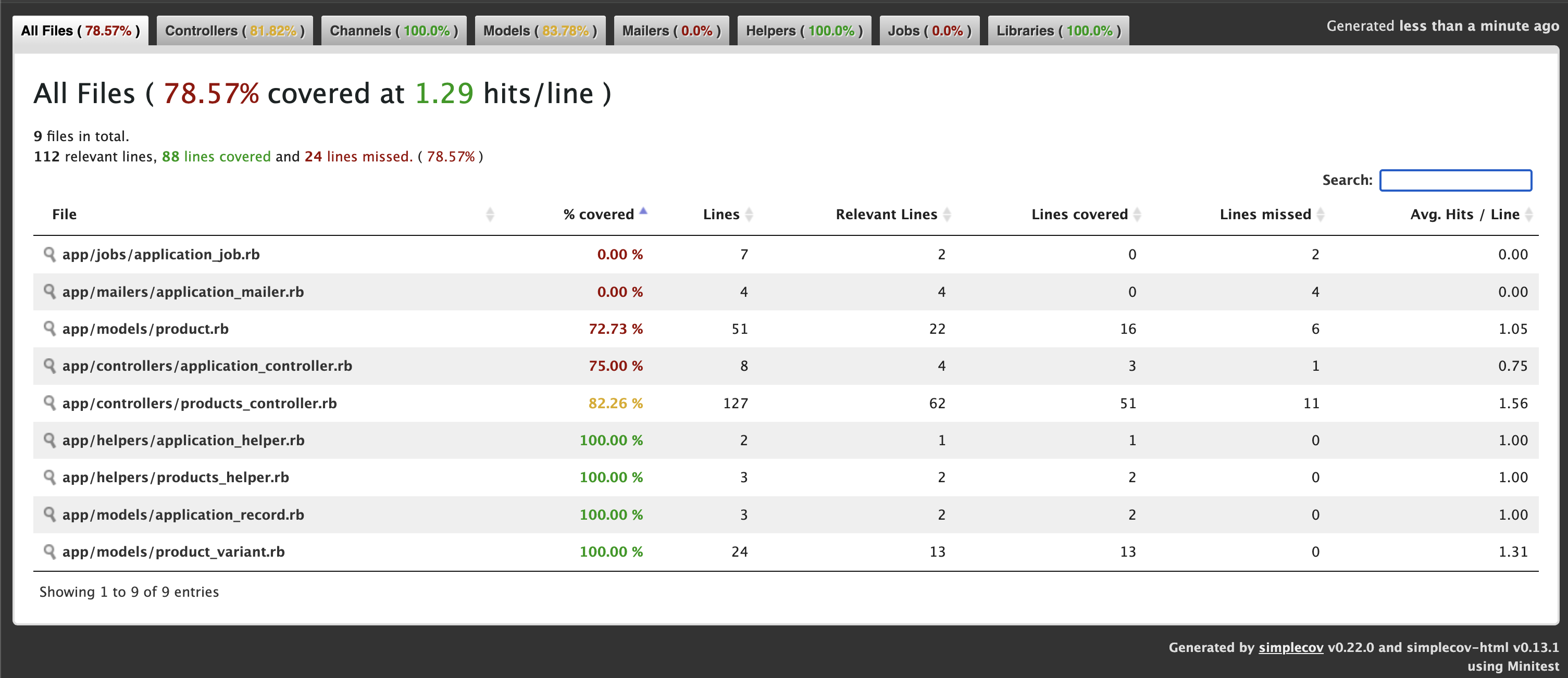
Line Coverage: 78.57% (88 / 112)
Line coverage (78.57%) is below the expected minimum coverage (90.00%).
SimpleCov failed with exit 2 due to a coverage related error

Once tests complete, open http://localhost:3000/coverage/index.html#_AllFiles in your browser:

  • A color-coded report shows covered (green) vs. missed (red) lines.
  • Drill down by file or group to identify untested code.

We get 78.57% only coverage and our target is 90% coverage. Let’s check where we missed the tests. ProductsController 82%. We missed coverage for #delete_image action. Let’s add it and check again.

Let’s add Product Controller json requests test cases for json error response and add the ApplicationControllerTest for testing root path.

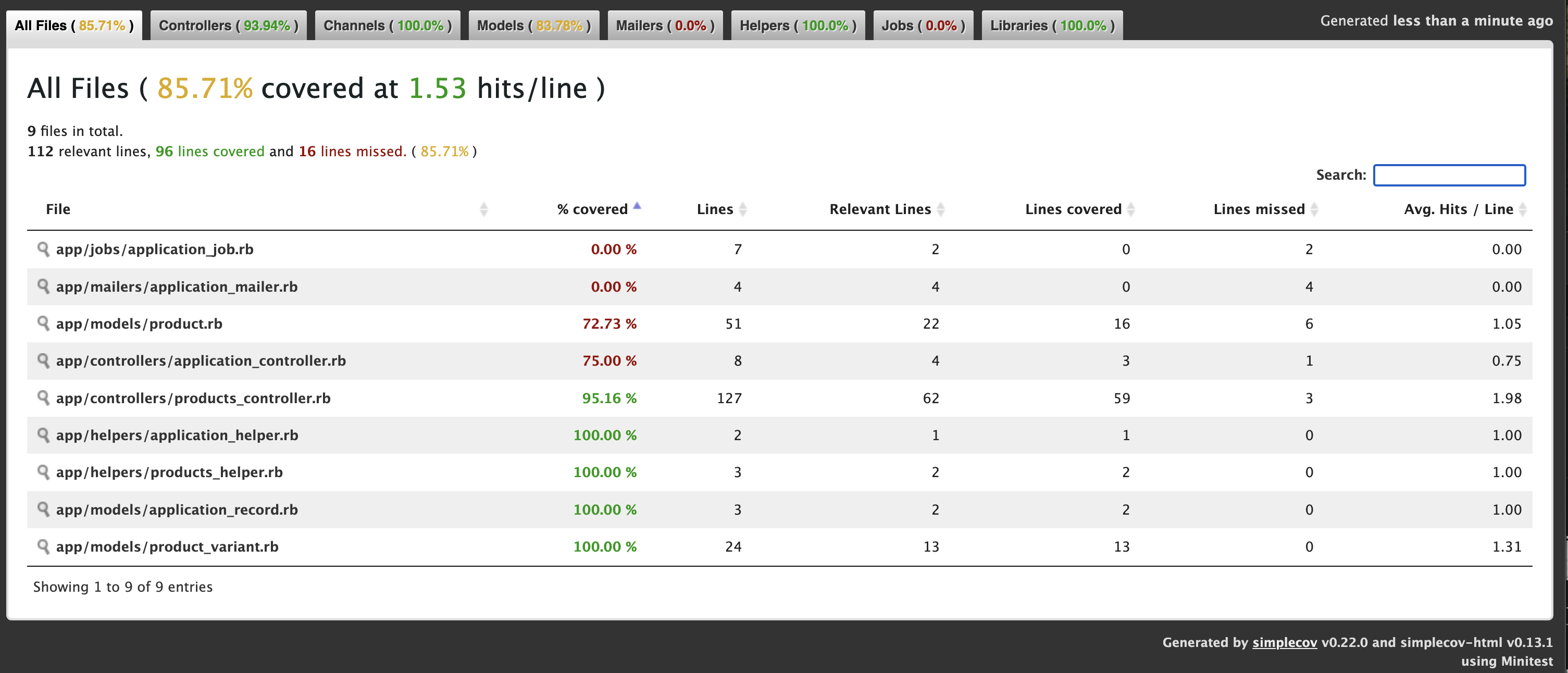
Now we get: 88.3%

Now we have to add some Test cases for Product model.

Now we get: 92.86% ✅

4. Enforce in CI

In your CI pipeline (e.g. GitHub Actions), ensure:

- name: Run tests with coverage
  run: |
    bundle exec rails test
    # Optionally upload coverage to Coveralls or Codecov

If coverage < threshold, the job will exit non-zero and fail.


Part 2: Incorporating Brakeman for Security Analysis

1. Add Brakeman to Your Development Stack

You can install Brakeman as a gem (development-only) or run it via Docker/CLI. Here’s the gem approach:

group :development do
  gem 'brakeman', require: false
end

Then:

bundle install

2. Basic Usage

From your project root, simply run:

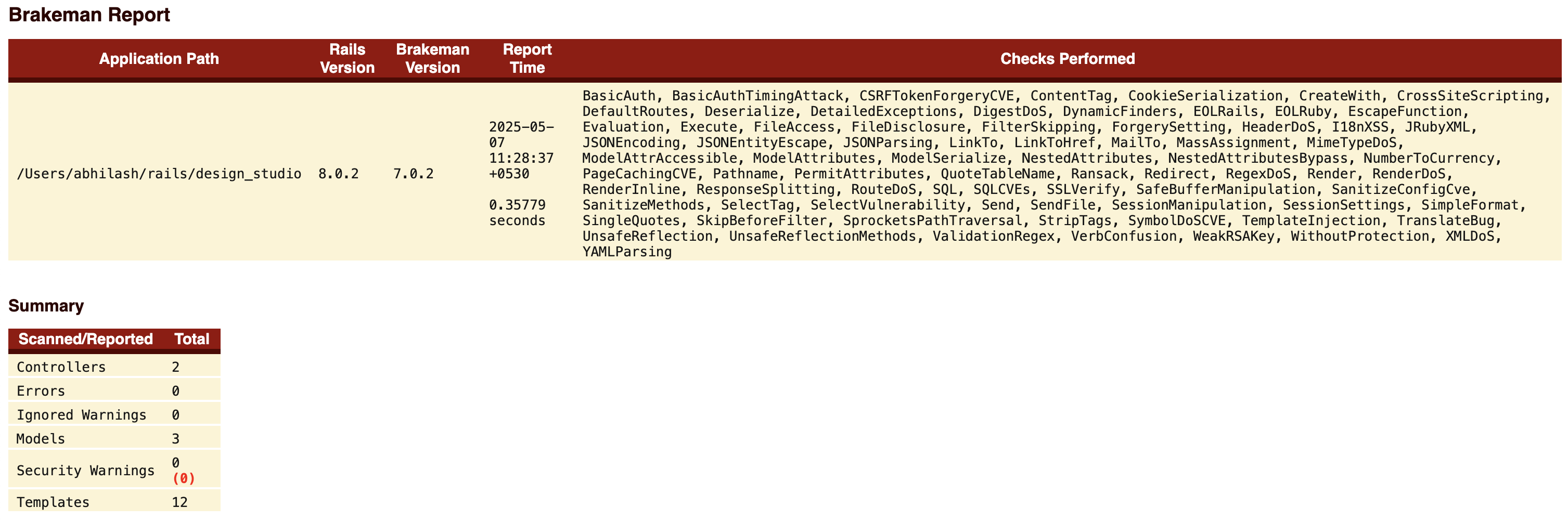
✗ bundle exec brakeman

Generating report...

== Brakeman Report ==

Application Path: /Users/abhilash/rails/design_studio
Rails Version: 8.0.2
Brakeman Version: 7.0.2
Scan Date: 2025-05-07 11:06:36 +0530
Duration: 0.35272 seconds
Checks Run: BasicAuth, BasicAuthTimingAttack, CSRFTokenForgeryCVE, ....., YAMLParsing

== Overview ==

Controllers: 2
Models: 3
Templates: 12
Errors: 0
Security Warnings: 0

== Warning Types ==


No warnings found

By default, Brakeman:

  • Scans app/, lib/, config/, etc.
  • Outputs a report in the terminal and writes brakeman-report.html.

3. Customize Your Scan

Create a config/brakeman.yml to fine-tune:

ignored_files:
  - 'app/controllers/legacy_controller.rb'
checks:
  - mass_assignment
  - cross_site_scripting
  - sql_injection
skip_dev: true                 # ignores dev-only gems
quiet: true                     # suppress verbose output

Run with:

bundle exec brakeman -c config/brakeman.yml -o public/security_report.html

Theconfig/brakeman.yml file is not added by default. You can add the file by copying the contents from: https://gist.github.com/abhilashak/038609f1c35942841ff8aa5e4c88b35b

Check: http://localhost:3000/security_report.html

4. CI Integration

In GitHub Actions:

- name: Run Brakeman security scan
  run: |
    bundle exec brakeman -q -o brakeman.json
- name: Upload Brakeman report
  uses: actions/upload-artifact@v3
  with:
    name: security-report
    path: brakeman.json

Optionally, you can fail the build if new warnings are introduced by comparing against a baseline report.


Advantages of Using SimpleCov & Brakeman Together

AspectSimpleCovBrakeman
PurposeTest coverage metricsStatic security analysis
Fail-fastFails when coverage drops below thresholdCan be configured to fail on new warnings
VisibilityColorized HTML coverage reportDetailed HTML/JSON vulnerability report
CI/CD ReadyIntegrates seamlessly with most CI systemsCLI-friendly, outputs machine-readable data
CustomizableGroups, filters, thresholdsChecks selection, ignored files, baseline

Together, they cover two critical quality dimensions:

  1. Quality & Maintainability (via testing)
  2. Security & Compliance (via static analysis)

Automating both checks in your pipeline means faster feedback, fewer production issues, and higher confidence when shipping code.


Best Practices & Tips

  • Threshold for SimpleCov: Start with 80%, then gradually raise to 90–95% over time.
  • Treat Brakeman Warnings Seriously: Not all findings are exploitable, but don’t ignore them—triage and document why you’re suppressing any warning.
  • Baseline Approach: Use a baseline report for Brakeman so your build only fails on newly introduced warnings, not historical ones.
  • Schedule Periodic Full Scans: In addition to per-PR scans, run a weekly scheduled Brakeman job to catch issues from merged code.
  • Combine with Other Tools: Consider adding gem like bundler-audit for known gem vulnerabilities.

Conclusion

By integrating SimpleCov and Brakeman into your Rails 8 app, you establish a robust safety net that:

  • Ensures new features are properly tested
  • Keeps an eye on security vulnerabilities
  • Automates quality gates in your CI/CD pipeline

These tools are straightforward to configure and provide immediate benefits – improved code confidence, faster code reviews, and fewer surprises in production. Start today, and make code quality and security first-class citizens in your Rails workflow!

Happy Rails CI/CD Integration .. 🚀

Setup 🛠 Rails 8 App – Part 10: PostgreSQL Into The Action

For a Ruby on Rails 8 application, the choice of database depends on your specific needs, but here’s a breakdown of the best options and when to use each:

PostgreSQL (Highly Recommended)

Best overall choice for most Rails apps.

Why:

  • First-class support in Rails.
  • Advanced features like full-text search, JSONB support, CTEs, window functions.
  • Strong consistency and reliability.
  • Scales well vertically and horizontally (with tools like Citus).
  • Used by: GitHub, Discourse, Basecamp, Shopify.

Use if:

  • You’re building a standard Rails web app or API.
  • You need advanced query features or are handling complex data types (e.g., JSON).

SQLite (For development/testing only)

  • Lightweight, file-based.
  • Fast and easy to set up.
  • But not recommended for production.

Use if:

  • You’re building a quick prototype or local dev/testing app.
  • NOT for multi-user production environments.

MySQL / MariaDB

  • Also supported by Rails.
  • Can work fine for simpler applications.
  • Lacks some advanced features (like robust JSON support or full Postgres-style indexing).
  • Not the default in many modern Rails setups.

Use if:

  • Your team already has MySQL infrastructure or legacy systems.
  • You need horizontal scaling with Galera Cluster or similar setups.

Others (NoSQL like MongoDB, Redis, etc.)

  • Use Redis for caching and background job data (not as primary DB).
  • Use MongoDB or other NoSQL only if your data model really demands it (e.g., unstructured documents, event sourcing).

Recommendation Summary:

Use CaseRecommended DB
Production web/API appPostgreSQL
Dev/prototyping/local testingSQLite
Legacy systems/MySQL infrastructureMySQL/MariaDB
Background jobs/cachingRedis
Special needs (e.g., documents)MongoDB (with caution)

If you’re starting fresh or building something scalable and modern with Rails 8, go with PostgreSQL.

Let’s break that down:

💬 What does “robust JSON support” mean?

PostgreSQL supports a special column type: json and jsonb, which lets you store structured JSON data directly in your database — like hashes or objects.

Why it matters:

  • You can store dynamic data without needing to change your schema.
  • You can query inside the JSON using SQL (->, ->>, @>, etc.).
  • You can index parts of the JSON — for speed.

🔧 Example:

You have a products table with a specs column that holds tech specs in JSON:

specs = {
  "color": "black",
  "brand": "Libas",
  "dimensions": {"chest": "34", "waist": "30", "shoulder": "13.5"}
}

You can query like:

SELECT * FROM products WHERE specs->>'color' = 'black';

Or check if the JSON contains a value:

SELECT * FROM products WHERE specs @> '{"brand": "Libas"}';

You can even index specs->>'color' to make these queries fast.


💬 What does “full Postgres-style indexing” mean?

PostgreSQL supports a wide variety of powerful indexing options, which improve query performance and flexibility.

⚙️ Types of Indexes PostgreSQL supports:

Index TypeUse Case
B-TreeDefault; used for most equality and range searches
GIN (Generalized Inverted Index)Fast indexing for JSON, arrays, full-text search
Partial IndexesIndex only part of the data (e.g., WHERE active = true)
Expression IndexesIndex a function or expression (e.g., LOWER(email))
Covering Indexes (INCLUDE)Fetch data directly from the index, avoiding table reads
  • B-Tree Indexes: B-tree indexes are more suitable for single-value columns.
  • When to Use GIN Indexes: When you frequently search for specific elements within arrays, JSON documents, or other composite data types.
  • Example for GIN Indexes: Imagine you have a table with a JSONB column containing document metadata. A GIN index on this column would allow you to quickly find all documents that have a specific author or belong to a particular category. 

Why does this matter for our shopping app?

  • We can store and filter products with dynamic specs (e.g., kurtas, shorts, pants) without new columns.
  • Full-text search on product names/descriptions.
  • Fast filters: color = 'red' AND brand = 'Libas' even if those are stored in JSON.
  • Index custom expressions like LOWER(email) for case-insensitive login.

💬 What are Common Table Expressions (CTEs)?

CTEs are temporary result sets you can reference within a SQL query — like defining a mini subquery that makes complex SQL easier to read and write.

WITH recent_orders AS (
  SELECT * FROM orders WHERE created_at > NOW() - INTERVAL '7 days'
)
SELECT * FROM recent_orders WHERE total > 100;

  • Breaking complex queries into readable parts.
  • Re-using result sets without repeating subqueries.
In Rails (via with from gems like scenic or with_cte):
Order
  .with(recent_orders: Order.where('created_at > ?', 7.days.ago))
  .from('recent_orders')
  .where('total > ?', 100)

💬 What are Window Functions?

Window functions perform calculations across rows related to the current row — unlike aggregate functions, they don’t group results into one row.

🔧 Example: Rank users by their score within each team:
SELECT
  user_id,
  team_id,
  score,
  RANK() OVER (PARTITION BY team_id ORDER BY score DESC) AS rank
FROM users;
Use cases:
  • Ranking rows (like leaderboards).
  • Running totals or moving averages.
  • Calculating differences between rows (e.g. “How much did this order increase from the last?”).
🛤 In Rails:

Window functions are available through raw SQL or Arel. Here’s a basic example:

User
  .select("user_id, team_id, score, RANK() OVER (PARTITION BY team_id ORDER BY score DESC) AS rank")

CTEs and Window functions are fully supported in PostgreSQL, making it the go-to DB for any Rails 8 app that needs advanced querying.

JSONB Support

JSONB stands for “JSON Binary” and is a binary representation of JSON data that allows for efficient storage and retrieval of complex data structures.

This can be useful when you have data that doesn’t fit neatly into traditional relational database tables, such as nested or variable-length data structures.

Absolutely — storing JSON in a relational database (like PostgreSQL) can be super powerful when used wisely. It gives you schema flexibility without abandoning the structure and power of SQL. Here are real-world use cases for using JSON columns in relational databases:

Here are real-world use cases for using JSON columns in relational databases:

🔧 1. Flexible Metadata / Extra Attributes

Let users store arbitrary attributes that don’t require schema changes every time.

Use case: Product variants, custom fields

t.jsonb :metadata

{
  "color": "red",
  "size": "XL",
  "material": "cotton"
}

=> Good when:

  • You can’t predict all the attributes users will need.
  • You don’t want to create dozens of nullable columns.

🎛️ 2. Storing Settings or Preferences

User or app settings that vary a lot.

Use case: Notification preferences, UI layout, feature toggles

{
  "email": true,
  "sms": false,
  "theme": "dark"
}

=> Easy to store and retrieve as a blob without complex joins.

🌐 3. API Response Caching

Store external API responses for caching or auditing.

Use case: Storing Stripe, GitHub, or weather API responses.

t.jsonb :api_response

=> Avoids having to map every response field into a column.

📦 4. Storing Logs or Events

Use case: Audit trails, system logs, user events

{
  "action": "login",
  "timestamp": "2025-04-18T10:15:00Z",
  "ip": "123.45.67.89"
}

=> Great for capturing varied data over time without a rigid schema.

📊 6. Embedded Mini-Structures

Use case: A form builder app storing user-created forms and fields.

{
  "fields": [
    { "type": "text", "label": "Name", "required": true },
    { "type": "email", "label": "Email", "required": false }
  ]
}

=> When each row can have nested, structured data — almost like a mini-document.

🕹️ 7. Device or Browser Info (User Agents)

Use case: Analytics, device fingerprinting

{
  "browser": "Safari",
  "os": "macOS",
  "version": "17.3"
}

=> You don’t need to normalize or query this often — perfect for JSON.


JSON vs JSONB in PostgreSQL

Use jsonb over json unless you need to preserve order or whitespace.

  • jsonb is binary format → faster and indexable
  • You can do fancy stuff like:
SELECT * FROM users WHERE preferences ->> 'theme' = 'dark';

Or in Rails:

User.where("preferences ->> 'theme' = ?", 'dark')

store and store_accessor

They let you treat JSON or text-based hash columns like structured data, so you can access fields as if they were real database columns.

🔹 store

  • Used to declare a serialized store (usually a jsonb, json, or text column) on your model.
  • Works best with key/value stores.

👉 Example:

Let’s say your users table has a settings column of type jsonb:

# migration
add_column :users, :settings, :jsonb, default: {}

Now in your model:

class User < ApplicationRecord
  store :settings, accessors: [:theme, :notifications], coder: JSON
end

You can now do this:

user.theme = "dark"
user.notifications = true
user.save

user.settings
# => { "theme" => "dark", "notifications" => true }

🔹 store_accessor

A lightweight version that only declares attribute accessors for keys inside a JSON column. Doesn’t include serialization logic — so you usually use it with a json/jsonb/text column that already works as a Hash.

👉 Example:

class User < ApplicationRecord
  store_accessor :settings, :theme, :notifications
end

This gives you:

  • user.theme, user.theme=
  • user.notifications, user.notifications=
🤔 When to Use Each?
FeatureWhen to Use
storeWhen you need both serialization and accessors
store_accessorWhen your column is already serialized (jsonb, etc.)

If you’re using PostgreSQL with jsonb columns — it’s more common to just use store_accessor.

Querying JSON Fields
User.where("settings ->> 'theme' = ?", "dark")

Or if you’re using store_accessor:

User.where(theme: "dark")

💡 But remember: you’ll only be able to query these fields efficiently if you’re using jsonb + proper indexes.


🔥 Conclusion:

  • PostgreSQL can store, search, and index inside JSON fields natively.
  • This lets you keep your schema flexible and your queries fast.
  • Combined with its advanced indexing, it’s ideal for a modern e-commerce app with dynamic product attributes, filtering, and searching.

To install and set up PostgreSQL on macOS, you have a few options. The most common and cleanest method is using Homebrew. Here’s a step-by-step guide:

Setup 🛠 Rails 8 App – Part 9: Setup ⚙️ CI/CD with GitHub Actions | Run Test Cases via VS Code Co-pilot

Switching to a feature-branch workflow with pull requests is a great move for team collaboration, code review, and better CI/CD practices. Here’s how you can transition our Rails 8 app to a proper CI/CD pipeline using GitHub and GitHub Actions.

🔄 Workflow Change: Feature Branch + Pull Request

1. Create a new branch for each feature/task:
git checkout -b feature/feature-name
2. Push it to GitHub:
git push origin feature/feature-name
3. Open a Pull Request on GitHub from feature/feature-name to main.
4. Enable branch protection (optional but recommended):

Note: You can set up branch protection rules in GitHub for free only on public repositories.

About protected branches

You can protect important branches by setting branch protection rules, which define whether collaborators can delete or force push to the branch and set requirements for any pushes to the branch, such as passing status checks or a linear commit history.

You can create a branch protection rule in a repository for a specific branch, all branches, or any branch that matches a name pattern you specify with fnmatch syntax. For example, to protect any branches containing the word release, you can create a branch rule for *release*

  • Go to your repo → SettingsBranches → Protect main.
  • Require pull request reviews before merging.
  • Require status checks to pass before merging (CI tests).

Check the link in your github account: https://github.com/<user-name>/<repo-name>/settings/branch_protection_rules/new

For creating the branch protection rules, you need to take the github business account OR Move your work into an organization (https://github.com/account/organizations/new).

GitHub Actions

Basically github actions allow us to run some actions (ex: testing the code) if an event occurs during the code changes/commit/push (it mostly related to a branch).

Our Goal: When we push to a feature branch test the code before merging it to the main branch so that we can ensure nothing is broken before going the code into live.

You can try the VS Code plugin for helping the Github Actions workflow (best for auto-complete the data we needed and auto-populate the env variables etc from our github account):

Sign in using your github account and grant access to the public repositories.

If you try to push to main branch, you will find the following error:

remote: error: GH006: Protected branch update failed for refs/heads/main.
remote:
remote: - Changes must be made through a pull request.
remote:
remote: - Cannot change this locked branch
To github.com:<username>/<project>.git
 ! [remote rejected] main -> main (protected branch hook declined)

We will be finishing Database and all other setup for our Web Application before starting CI/CD setup.

For the next part of CI/CD configuration check the post: https://railsdrop.com/2025/05/06/rails-8-ci-cd-setup-with-github-actions/

Let’s Start to Use VS Code Co-pilot For Test Creation/Execution

Test cases are Important for CI/CD setup. Our main focus will be running Rails test cases when integrating CI.

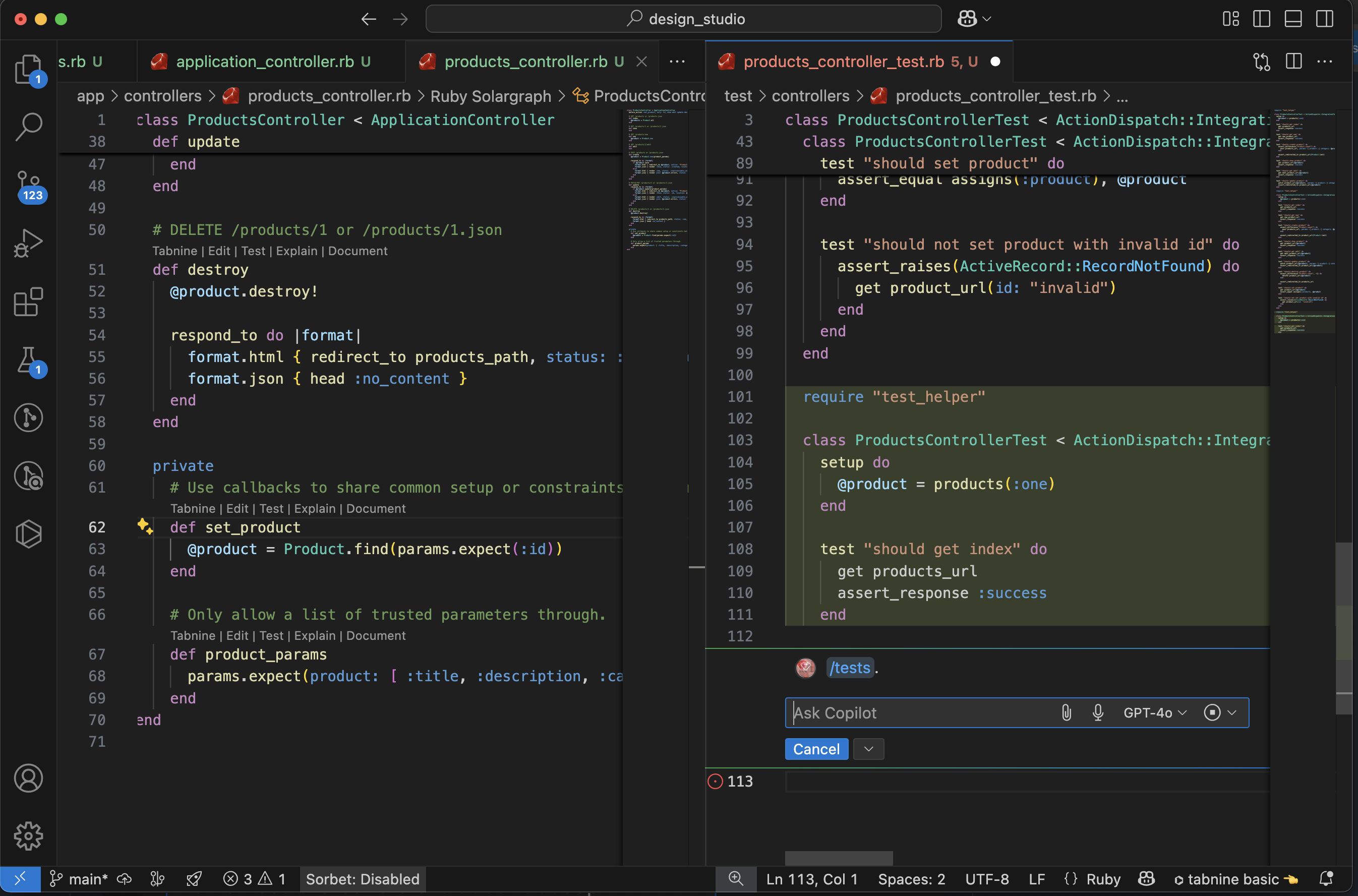
  • Generate Test using Co-pilot From Controller
  • Co-pilot Creates Tests
  • Co-pilot run Tests

  • Use Co-pilot to Fix Test Failures
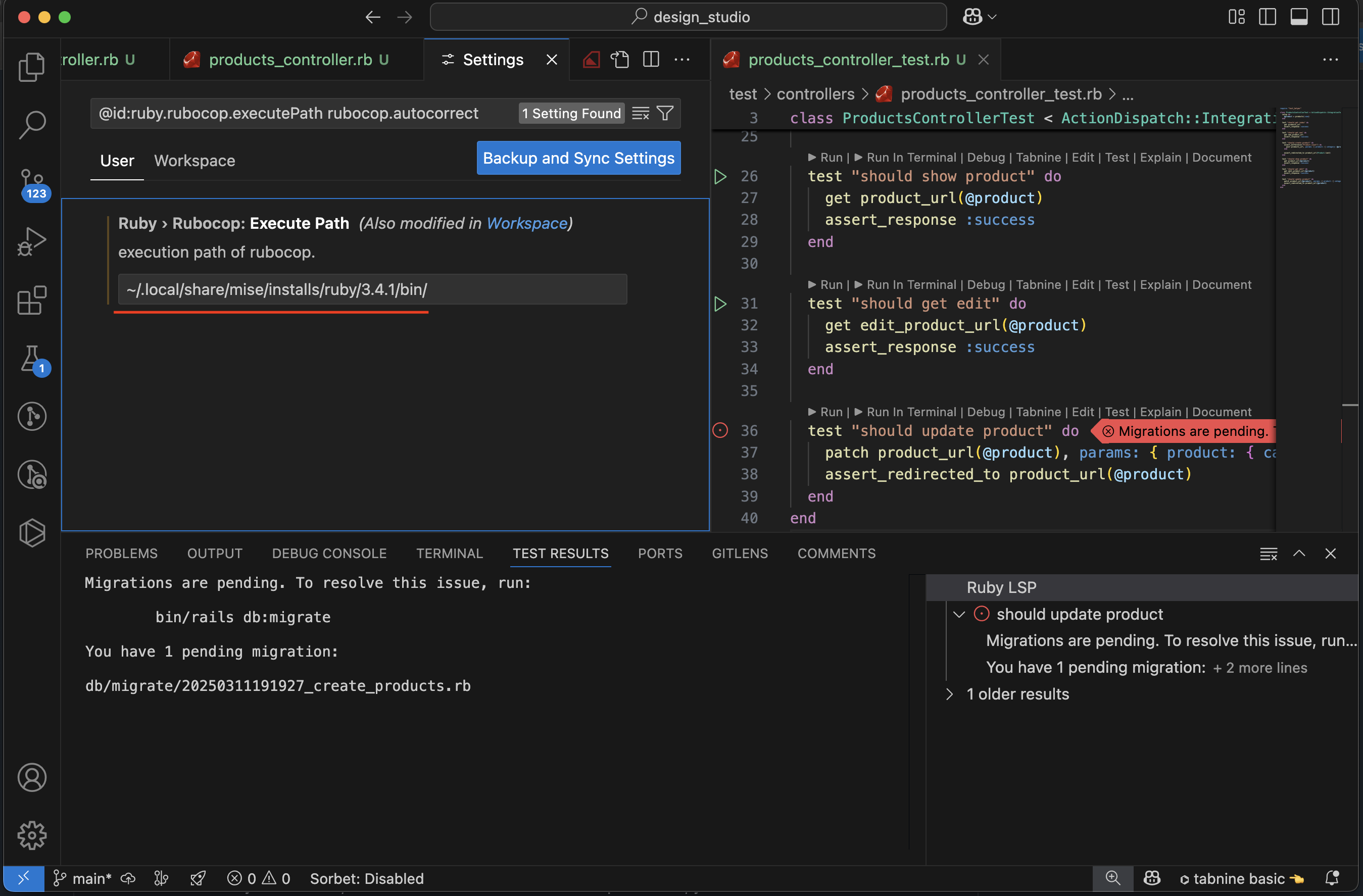
  • Test Results: Pending Migrations
  • Test Success: After Migration
  • VS Code: Check ruby Lint Symbol for details
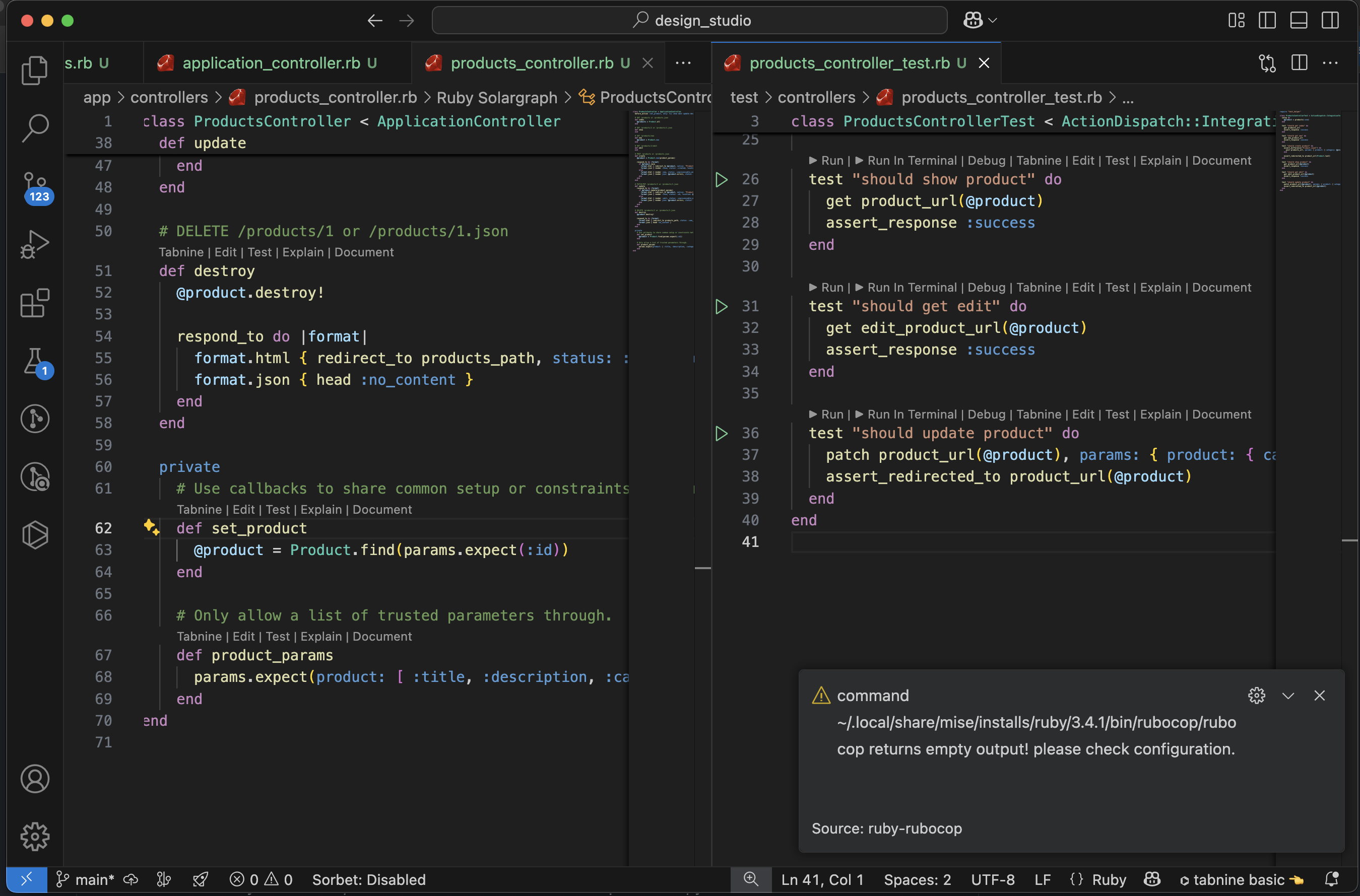
  • VS Code try to run Tests: Rubocop Path Issue
  • Fixed Rubocop Issue: All Test passes

Profiling 📊 Ruby on Rails 8 Applications: Essential Tools and Techniques

Introduction

Performance optimization is critical for delivering fast, responsive Rails applications. This comprehensive guide covers the most important profiling tools you should implement in your Rails 8 application, complete with setup instructions and practical examples.

Why Profiling Matters

Before diving into tools, let’s understand why profiling is essential:

  1. Identify bottlenecks: Pinpoint exactly which parts of your application are slowing things down
  2. Optimize resource usage: Reduce memory consumption and CPU usage
  3. Improve user experience: Faster response times lead to happier users
  4. Reduce infrastructure costs: Efficient applications require fewer server resources

Essential Profiling Tools for Rails 8

1. Rack MiniProfiler

What it does: Provides real-time profiling of your application’s performance directly in your browser.

Why it’s important: It’s the quickest way to see performance metrics without leaving your development environment.

Installation:

# Gemfile
gem 'rack-mini-profiler', group: :development

Usage example:
After installation, it automatically appears in your browser’s corner showing:

  • SQL query times
  • Ruby execution time
  • Memory allocation
  • Flamegraphs (with additional setup)

Advantages:

  • No configuration needed for basic setup
  • Shows N+1 query warnings
  • Integrates with Rails out of the box

GitHubhttps://github.com/MiniProfiler/rack-mini-profiler
Documentationhttps://miniprofiler.com/

2. Bullet

What it does: Detects N+1 queries, unused eager loading, and missing counter caches.

Why it’s important: N+1 queries are among the most common performance issues in Rails applications.

Installation:

# Gemfile
gem 'bullet', group: :development

Configuration:

# config/environments/development.rb
config.after_initialize do
  Bullet.enable = true
  Bullet.alert = true
  Bullet.bullet_logger = true
  Bullet.console = true
  Bullet.rails_logger = true
end

Example output:

GET /posts
USE eager loading detected
  Post => [:comments]
  Add to your query: Post.includes([:comments])

Advantages:

  • Catches common ORM performance issues early
  • Provides specific recommendations for fixes
  • Works across all environments

GitHubhttps://github.com/flyerhzm/bullet
Documentationhttps://github.com/flyerhzm/bullet/blob/master/README.md

3. Ruby Prof (and StackProf)

What it does: Low-level Ruby code profiler that shows exactly where time is being spent.

Why it’s important: When you need deep insight into method-level performance characteristics.

Installation:

# Gemfile
gem 'ruby-prof', group: :development
gem 'stackprof', group: :development

Usage example:

# In your controller or service object
result = RubyProf.profile do
  # Code you want to profile
end

printer = RubyProf::GraphPrinter.new(result)
printer.print(STDOUT, {})

For StackProf:

StackProf.run(mode: :cpu, out: 'tmp/stackprof.dump') do
  # Code to profile
end

Advantages:

  • Method-level granularity
  • Multiple output formats (call graphs, flamegraphs)
  • StackProf is sampling-based so has lower overhead

GitHubhttps://github.com/ruby-prof/ruby-prof
Documentationhttps://github.com/ruby-prof/ruby-prof/blob/master/README.md

StackProf Alternative:
GitHubhttps://github.com/tmm1/stackprof
Documentationhttps://github.com/tmm1/stackprof/blob/master/README.md

4. Memory Profiler

What it does: Tracks memory allocations and helps identify memory bloat.

Why it’s important: Memory issues can lead to slow performance and even crashes.

Installation:

# Gemfile
gem 'memory_profiler', group: :development

Usage example:

report = MemoryProfiler.report do
  # Code to profile
end

report.pretty_print(to_file: 'memory_report.txt')

Advantages:

  • Shows allocated objects by class and location
  • Tracks retained memory after GC
  • Helps find memory leaks

GitHubhttps://github.com/SamSaffron/memory_profiler
Documentationhttps://github.com/SamSaffron/memory_profiler/blob/master/README.md

5. Skylight

What it does: Production-grade application performance monitoring (APM).

Why it’s important: Understanding real-world performance characteristics is different from development profiling.

Installation:

# Gemfile
gem 'skylight'

Configuration:

# config/skylight.yml
production:
  authentication: [YOUR_AUTH_TOKEN]

Advantages:

  • Low-overhead production profiling
  • Endpoint-level performance breakdowns
  • Database query analysis
  • Exception tracking

Websitehttps://www.skylight.io
Documentationhttps://docs.skylight.io
GitHubhttps://github.com/skylightio/skylight-ruby

6. AppSignal

What it does: Full-stack performance monitoring and error tracking.

Why it’s important: Provides comprehensive insights across your entire application stack.

Installation:

# Gemfile
gem 'appsignal'

Then run:

bundle exec appsignal install YOUR_PUSH_API_KEY

Advantages:

  • Error tracking alongside performance
  • Host metrics integration
  • Background job monitoring
  • Magic Dashboard for quick insights

Websitehttps://appsignal.com
Documentationhttps://docs.appsignal.com/ruby
GitHubhttps://github.com/appsignal/appsignal-ruby

7. Derailed Benchmarks

What it does: Suite of benchmarks and performance tests for your application.

Why it’s important: Helps catch performance regressions before they hit production.

Installation:

# Gemfile
group :development, :test do
  gem 'derailed_benchmarks'
end

Usage examples:

# Memory usage at boot
bundle exec derailed bundle:mem

# Performance per route
bundle exec derailed exec perf:routes

Advantages:

  • CI-friendly performance testing
  • Memory usage analysis
  • Route-based performance testing

GitHubhttps://github.com/schneems/derailed_benchmarks
Documentationhttps://github.com/schneems/derailed_benchmarks/blob/master/README.md

8. Flamegraph Generation

What it does: Visual representation of where time is being spent in your application.

Why it’s important: Provides an intuitive way to understand call stacks and hot paths.

Installation:

# Gemfile
gem 'flamegraph'
gem 'stackprof' # if not already installed

Usage example:

Flamegraph.generate('flamegraph.html') do
  # Code to profile
end

Advantages:

  • Visual representation of performance
  • Easy to spot hot paths
  • Interactive exploration

GitHubhttps://github.com/SamSaffron/flamegraph
Documentationhttp://samsaffron.github.io/flamegraph/rails-startup.html

Additional Helpful Tools 🔧

9. Benchmark-ips

Benchmark-ips (iterations per second) is a superior benchmarking tool compared to Ruby’s standard Benchmark library. It provides:

  1. Iterations-per-second measurement – More intuitive than raw time measurements
  2. Statistical analysis – Shows standard deviation between runs
  3. Comparison mode – Easily compare different implementations
  4. Warmup phase – Accounts for JIT and cache warming effects

Benchmark-ips solves these problems and is particularly valuable for:

  • Comparing algorithm implementations
  • Testing performance optimizations
  • Benchmarking gem alternatives
  • Validating performance-critical code

GitHubhttps://github.com/evanphx/benchmark-ips
Documentationhttps://github.com/evanphx/benchmark-ips/blob/master/README.md

Installation
# Gemfile
gem 'benchmark-ips', group: :development
Basic Usage:
require 'benchmark/ips'

Benchmark.ips do |x|
  x.report("addition") { 1 + 2 }
  x.report("addition with to_s") { (1 + 2).to_s }
  x.compare!
end
Advanced Features:
Benchmark.ips do |x|
  x.time = 5 # Run each benchmark for 5 seconds
  x.warmup = 2 # Warmup time of 2 seconds
  
  x.report("Array#each") { [1,2,3].each { |i| i * i } }
  x.report("Array#map") { [1,2,3].map { |i| i * i } }
  
  # Add custom statistics
  x.config(stats: :bootstrap, confidence: 95)
  
  x.compare!
end
# Memory measurement
require 'benchmark/memory'

Benchmark.memory do |x|
  x.report("method1") { ... }
  x.report("method2") { ... }
  x.compare!
end

# Disable GC for more consistent results
Benchmark.ips do |x|
  x.config(time: 5, warmup: 2, suite: GCSuite.new)
end
Sample Output:
Warming up --------------------------------------
            addition    281.899k i/100ms
  addition with to_s    261.831k i/100ms
Calculating -------------------------------------
            addition      8.614M (± 1.2%) i/s -     43.214M in   5.015800s
  addition with to_s      7.017M (± 1.8%) i/s -     35.347M in   5.038446s

Comparison:
            addition:  8613594.0 i/s
  addition with to_s:  7016953.3 i/s - 1.23x slower

Key Advantages

  1. Accurate comparisons with statistical significance
  2. Warmup phase eliminates JIT/caching distortions
  3. Memory measurements available through extensions
  4. Customizable reporting with various statistics options

10. Rails Performance (Dashboard)

What is Rails Performance?

Rails Performance is a self-hosted alternative to New Relic/Skylight that provides:

  1. Request performance tracking
  2. Background job monitoring
  3. Slowest endpoints identification
  4. Error tracking
  5. Custom event monitoring
Why It’s Important

For teams that:

  • Can’t use commercial SaaS solutions
  • Need to keep performance data in-house
  • Want historical performance tracking
  • Need simple setup without complex infrastructure

GitHubhttps://github.com/igorkasyanchuk/rails_performance
Documentationhttps://github.com/igorkasyanchuk/rails_performance/blob/master/README.md

Installation
# Gemfile
gem 'rails_performance', group: :development

Then run:

rails g rails_performance:install
rake db:migrate
Configuration
# config/initializers/rails_performance.rb
RailsPerformance.setup do |config|
  config.redis = Redis.new # optional, will use Rails.cache otherwise
  config.duration = 4.hours # store requests for 4 hours
  config.enabled = Rails.env.production?
  config.http_basic_authentication_enabled = true
  config.http_basic_authentication_user_name = 'admin'
  config.http_basic_authentication_password = 'password'
end
Accessing the Dashboard:

After installation, access the dashboard at:

http://localhost:3000/rails/performance

Custom Tracking:

# Track custom events
RailsPerformance.trace("custom_event", tags: { type: "import" }) do
  # Your code here
end

# Track background jobs
class MyJob < ApplicationJob
  around_perform do |job, block|
    RailsPerformance.trace(job.class.name, tags: job.arguments) do
      block.call
    end
  end
end
# Add custom fields to requests
RailsPerformance.attach_extra_payload do |payload|
  payload[:user_id] = current_user.id if current_user
end

# Track slow queries
ActiveSupport::Notifications.subscribe("sql.active_record") do |*args|
  event = ActiveSupport::Notifications::Event.new(*args)
  if event.duration > 100 # ms
    RailsPerformance.trace("slow_query", payload: {
      sql: event.payload[:sql],
      duration: event.duration
    })
  end
end
Sample Dashboard Views:
  1. Requests Overview:
    • Average response time
    • Requests per minute
    • Slowest actions
  2. Detailed Request View:
    • SQL queries breakdown
    • View rendering time
    • Memory allocation
  3. Background Jobs:
    • Job execution time
    • Failures
    • Queue times
Key Advantages
  1. Self-hosted solution – No data leaves your infrastructure
  2. Simple setup – No complex dependencies
  3. Historical data – Track performance over time
  4. Custom events – Track any application events
  5. Background jobs – Full visibility into async processes

Implementing a Complete Profiling Strategy

For a comprehensive approach, combine these tools at different stages:

  1. Development:
  • Rack MiniProfiler (always on)
  • Bullet (catch N+1s early)
  • RubyProf/StackProf (for deep dives)
  1. CI Pipeline:
  • Derailed Benchmarks
  • Memory tests
  1. Production:
  • Skylight or AppSignal
  • Error tracking with performance context

Sample Rails 8 Configuration

Here’s how to set up a complete profiling environment in a new Rails 8 app:

# Gemfile

# Development profiling
group :development do
  # Basic profiling
  gem 'rack-mini-profiler'
  gem 'bullet'
  
  # Deep profiling
  gem 'ruby-prof'
  gem 'stackprof'
  gem 'memory_profiler'
  gem 'flamegraph'
  
  # Benchmarking
  gem 'derailed_benchmarks', require: false
  gem 'benchmark-ips'
  
  # Dashboard
  gem 'rails_performance'
end

# Production monitoring (choose one)
group :production do
  gem 'skylight'
  # or
  gem 'appsignal'
  # or
  gem 'newrelic_rpm' # Alternative option
end

Then create an initializer for development profiling:

# config/initializers/profiling.rb
if Rails.env.development?
  require 'rack-mini-profiler'
  Rack::MiniProfilerRails.initialize!(Rails.application)

  Rails.application.config.after_initialize do
    Bullet.enable = true
    Bullet.alert = true
    Bullet.bullet_logger = true
    Bullet.rails_logger = true
  end
end

Conclusion

Profiling your Rails 8 application shouldn’t be an afterthought. By implementing these tools throughout your development lifecycle, you’ll catch performance issues early, maintain a fast application, and provide better user experiences.

Remember:

  • Use development tools like MiniProfiler and Bullet daily
  • Run deeper profiles with RubyProf before optimization work
  • Monitor production with Skylight or AppSignal
  • Establish performance benchmarks with Derailed

With this toolkit, you’ll be well-equipped to build and maintain high-performance Rails 8 applications.

Enjoy Rails! 🚀

Setup 🛠 Rails 8 App – Part 8: Debugbar – Apply performance 📈 optimization

1. Integrate pagy for pagination

Why it’s the great choice:

  • Super fast and lightweight (~300x faster than Kaminari or WillPaginate).
  • No dependencies on Active Record or view helpers.
  • Very customizable and modular (can do Bootstrap/Tailwind/semantic UI integrations).
  • Supports metadata, responsive pagination, overflow handling, infinite scrolling, and JSON API pagination.
# Gemfile
# The Best Pagination Ruby Gem [https://ddnexus.github.io/pagy/]
gem "pagy", "~> 9.3" # omit patch digit

bundle install
Example Usage in Controller:
include Pagy::Backend

def index
  @pagy, @products = pagy(Product.all)
end

In Product Helper / Application Helper:
include Pagy::Frontend
In the View (ERB or HAML):
<%= pagy_nav(@pagy) %>
Add an initializer file

Download the file from: https://ddnexus.github.io/pagy/quick-start/

https://ddnexus.github.io/pagy/gem/config/pagy.rb

and save it into the config/initializers directory. Uncomment limit and size options.

Tailwind Support:
# In an initializer (e.g., config/initializers/pagy.rb)
Pagy::DEFAULT[:limit]       = 20                    # default
Pagy::DEFAULT[:size]        = 7                     # default
# Better user experience handled automatically
require "pagy/extras/overflow"
Pagy::DEFAULT[:overflow] = :last_page

I am getting a load error when I want tailwind css to apply to my views:

LoadError: cannot load such file -- pagy/extras/tailwind (LoadError)

Ahh it’s not supporting Tailwind CSS, and there is no tailwind file found in the Gem too!

Hmm..😟 Check below:

We can try to include the css manually, check: https://ddnexus.github.io/pagy/docs/api/stylesheets/#pagy-tailwind-css

Create a file pagy.tailwind.css and add the following:

.pagy {
    @apply flex space-x-1 font-semibold text-sm text-gray-500;
    a:not(.gap) {
      @apply block rounded-lg px-3 py-1 bg-gray-200;
      &:hover {
        @apply bg-gray-300;
      }
      &:not([href]) { /* disabled links */
        @apply text-gray-300 bg-gray-100 cursor-default;
      }
      &.current {
        @apply text-white bg-gray-400;
      }
    }
    label {
      @apply inline-block whitespace-nowrap bg-gray-200 rounded-lg px-3 py-0.5;
      input {
        @apply bg-gray-100 border-none rounded-md;
      }
    }
  }

Modify app/assets/tailwind/application.css :

@import "tailwindcss";
@import "./pagy.tailwind.css";

Restart your server and you got it!

Testing performance

You can see that in the query Tab in Debugbar, select * from products query has been replaced with limit query. But this is not the case where you go through the entire thousand hundreds of products, for example searching. We can think of view caching and SQL indexing for such a situation.

to be continued.. 🚀

Understanding Confusing 🧐 Ruby Concepts: Procfile, Rake, Rack, and More

Ruby has several terms that sound similar but serve different purposes. If you’ve ever been confused by things like Procfile, Rakefile, Rack, and Rake, this guide will clarify them all. Plus, we’ll cover additional tricky concepts you might have overlooked!

1. Procfile

What is it?

A Procfile is a text file used in deployment environments (like Heroku and Kamal) to specify how your application should be started.

Where is it used?

Platforms like Heroku, Kamal, and Foreman use Procfile to define process types (like web servers and workers).

Example:

web: bundle exec puma -C config/puma.rb
worker: bundle exec sidekiq

  • web: Starts the Puma web server.
  • worker: Runs background jobs using Sidekiq.

Check the post for details (Foreman): https://railsdrop.com/2025/03/26/setup-rails-8-app-part-4-tailwind-css-into-the-action/

2. Rake and Rakefile

What is Rake?

Rake is a task management tool for automating scripts in Ruby applications. It’s like Makefile but written in Ruby.

What is a Rakefile?

A Rakefile is a Ruby file where Rake tasks are defined.

Check Rails::Railtie.rake_tasks for more info.

Where is it used?

  • Rails applications (for tasks like database migrations and data seeding)
  • Standalone Ruby applications (for automating scripts)

Common Rake Commands in Rails:

rake db:migrate    # Run database migrations
rake db:seed       # Seed the database
rake routes        # Show all available routes

Example Custom Rake Task:

Create a file at lib/tasks/custom.rake:

namespace :custom do
  desc "Prints a greeting"
  task hello: :environment do
    puts "Hello from custom Rake task!"
  end
end

Run it with:

rake custom:hello

3. RackWhat is it?

Rack is a lightweight interface between Ruby web applications and web servers. It provides a simple way to handle HTTP requests and responses.

https://github.com/rack/rack

Checkout Rack in more detail: https://railsdrop.com/2025/04/07/inside-rails-the-role-of-rack-and-middleware/

4. Adding Middleware in a Rails 8 App

Checkout the post: https://railsdrop.com/2025/04/07/inside-rails-the-role-of-rack-and-middleware/

5. Other Confusing Ruby Concepts You Should Know

Gemfile vs. Gemspec

  • Gemfile: Defines dependencies for a Rails project (uses Bundler).
  • Gemspec: Defines dependencies and metadata for a Ruby gem.

Lambda vs. Proc

Both are used for defining anonymous functions, but behave differently:

lambda_example = -> { return "Lambda returns from itself" }
proc_example = Proc.new { return "Proc returns from the enclosing method" }

Safe Navigation Operator (&.)

user&.profile&.name  # Avoids NoMethodError if user or profile is nil

Symbol vs. String

:my_symbol  # Immutable, faster lookup
"my_string" # Mutable, slower lookup

&: Shortcut for Blocks

Ruby allows a shorthand syntax for passing methods as blocks using &:.

["hello", "world"].map(&:upcase)  # => ["HELLO", "WORLD"]

Equivalent to:

["hello", "world"].map { |word| word.upcase }

Single Splat (*) Operator

The * operator is used for handling variable-length arguments in methods.

def sum(*numbers)
  numbers.reduce(:+)
end

puts sum(1, 2, 3, 4)  # Output: 10

It can also be used for array expansion (spreads out Arrays):

arr = [1, 2, 3, 4]
> puts *arr
1
2
3
4
=> nil

odds = [3, 5, 7, 9]
puts *odds
>
3
5
7
9
=> nil

first_odd, *rest = odds
> puts rest
5
7
9
=> nil

We can also insert array elements into another Array. In the example below, odds elements are added to the numbers Array, starting from the position where *odds is called.

odds = [3, 5, 7, 9]
numbers = [1, 2, *odds, 10]
puts "numbers: #{numbers}"

# =>
# numbers: [1, 2, 3, 5, 7, 9, 10]

Double Splat (**) in Method Arguments

The ** operator is used to capture keyword arguments.

def greet(name:, **options)
  puts "Hello, #{name}!"
  puts "Options: #{options}"
end

greet(name: "Alice", age: 25, city: "New York")
# Output:
# Hello, Alice!
# Options: {:age=>25, :city=>"New York"}

What Are Keyword Arguments (kwargs) in Ruby?

(name:) in greet is an example of a keyword argument (kwargs).

Keyword arguments allow you to pass arguments to a method using explicit parameter names, making the code more readable and flexible.

Example: Using a Required Keyword Argument
def greet(name:)
  puts "Hello, #{name}!"
end

greet(name: "Alice")  # Output: Hello, Alice!
  • The name: argument must be provided, otherwise, Ruby will raise an error.
Example: Using Optional Keyword Arguments

You can provide default values for keyword arguments:

def greet(name: "Guest")
  puts "Hello, #{name}!"
end

greet        # Output: Hello, Guest!
greet(name: "Bob")  # Output: Hello, Bob!
Example: Combining Required and Optional Keyword Arguments
def greet(name:, age: nil)
  puts "Hello, #{name}!"
  puts "You are #{age} years old." if age
end

greet(name: "Alice", age: 25)
# Output:
# Hello, Alice!
# You are 25 years old.
Example: Capturing Extra Keyword Arguments with **options

The ** operator captures any additional keyword arguments passed to the method into a hash.

def greet(name:, **options)
  puts "Hello, #{name}!"
  puts "Additional Info: #{options}"
end

greet(name: "Alice", age: 25, city: "New York")
# Output:
# Hello, Alice!
# Additional Info: {:age=>25, :city=>"New York"}

**options collects { age: 25, city: "New York" } as a hash.

Check: https://www.ruby-lang.org/en/news/2019/12/12/separation-of-positional-and-keyword-arguments-in-ruby-3-0/

Also check the latest Ruby that is released last week:

Final Thoughts

Ruby has many terms that seem similar but have distinct uses. By understanding Procfile, Rake, Rack, and middleware in Rails 8, you’ll have a much clearer picture of how Ruby applications work under the hood. If you’re working on a Rails 8 app, take some time to explore these concepts further—they’ll definitely make your life easier!

Happy coding! 🚀

Setup 🛠 Rails 8 App – Part 5: Active Storage File Uploads 📤

Meanwhile we are setting up some UI for our app using Tailwind CSS, I have uploaded 2 images to our product in the rich text editor. Let’s discuss about this in this post.

Understanding Active Storage in Rails 8: A Deep Dive into Image Uploads

In our Rails 8 application, we recently tested uploading two images to a product using the rich text editor. This process internally triggers several actions within Active Storage. Let’s break down what happens behind the scenes.

How Active Storage Handles Image Uploads

When an image is uploaded, Rails 8 processes it through Active Storage, creating a new blob entry and storing it in the disk service. The following request is fired:

Processing by ActiveStorage::DirectUploadsController#create as JSON

Parameters: {"blob" => {"filename" => "floral-kurtha.jpg", "content_type" => "image/jpeg", "byte_size" => 107508, "checksum" => "GgNgNxxxxxxxjdPOLw=="}}

This request initiates a database entry in active_storage_blobs:

INSERT INTO "active_storage_blobs" ("key", "filename", "content_type", "service_name", "byte_size", "checksum", "created_at")
VALUES ('huk9dxxxxxxxx09e2cyiq', 'floral-kurtha.jpg', 'image/jpeg', 'local', 107312, 'Fxxxxxxd+bpRibo2EfvA==', '2025-03-31 08:10:07.232453')

Storing Files and Generating URLs

Once the blob entry is created, Rails stores the file on disk and generates a URL:

http://localhost:3000/rails/active_storage/disk/eyJfcmFpbHMiOnsiYSI6eyJxxxxxxx

This process triggers the ActiveStorage::DiskController, handling file storage via a PUT request:

Started PUT "/rails/active_storage/disk/eyJfcmFpbHMiOxxxxx"
Disk Storage (0.9ms) Uploaded file to key: hut9d0zxssxxxxxx
Completed 204 No Content in 96ms

Retrieving Images from Active Storage

After successfully storing the file, the application fetches the image via a GET request:

Started GET "/rails/active_storage/blobs/redirect/eyJfcmFpbHMiOxxxxxxxxxxfQ==--f9c556012577xxxxxxxxxxxxfa21/floral-kurtha-2.jpg"

This request is handled by:

Processing by ActiveStorage::Blobs::RedirectController#show as JPEG

The file is then served via the ActiveStorage::DiskController#show:

Redirected to http://localhost:3000/rails/active_storage/disk/eyJfcmFpbHMiOnsiZGxxxxxxxxxd048aae4ab5c30/floral-kurtha-2.jpg

Updating Records with Active Storage Attachments

When updating a product, the system also updates its associated images. The following Active Storage updates occur:

UPDATE "action_text_rich_texts" SET "body" = .... WHERE "action_text_rich_texts"."id" = 1

UPDATE "active_storage_blobs" SET "metadata" = '{"identified":true}' WHERE "active_storage_blobs"."id" = 3

INSERT INTO "active_storage_attachments" ("name", "record_type", "record_id", "blob_id", "created_at") VALUES ('embeds', 'ActionText::RichText', 1, 3, '2025-03-31 11:46:13.464597')

Additionally, Rails updates the updated_at timestamp of the associated records:

UPDATE "products" SET "updated_at" = '2025-03-31 11:46:13.523640' WHERE "products"."id" = 1

Best Practices for Active Storage in Rails 8

  1. Use Direct Uploads: This improves performance by uploading files directly to cloud storage (e.g., AWS S3, Google Cloud Storage) instead of routing them through your Rails server.
  2. Attach Images Efficiently: Use has_one_attached or has_many_attached for file associations in models.
  3. Avoid Serving Files via Rails: Use a CDN or proxy service to serve images instead of relying on Rails controllers.
  4. Clean Up Unused Blobs: Regularly remove orphaned blob records using ActiveStorage::Blob.unattached.destroy_all.
  5. Optimize Image Processing: Use variants (image.variant(resize: "300x300").processed) to generate resized images efficiently.

In Rails 8, Active Storage uses two main tables for handling file uploads:

1. active_storage_blobs Table

This table stores metadata about the uploaded files but not the actual files. Each row represents a unique file (or “blob”) uploaded to Active Storage.

Columns in active_storage_blobs Table:

  • id – Unique identifier for the blob.
  • key – A unique key used to retrieve the file.
  • filename – The original name of the uploaded file.
  • content_type – The MIME type (e.g., image/jpeg, application/pdf).
  • metadata – JSON data storing additional information (e.g., width/height for images).
  • service_name – The storage service (e.g., local, amazon, google).
  • byte_size – File size in bytes.
  • checksum – A checksum to verify file integrity.
  • created_at – Timestamp when the file was uploaded.

Example Entry in active_storage_blobs:

INSERT INTO "active_storage_blobs" 
("key", "filename", "content_type", "service_name", "byte_size", "checksum", "created_at") 
VALUES ('avevnp6eg1xxxxxxsz8it6267eou7', 'floral-kurtha-2.jpg', 'image/jpeg', 'local', 204800, '0U0cXxxxxxxxxx/1u47Szg==', '2025-03-31 11:45:07.232453');

👉 Purpose: This table acts as a record of stored files and their metadata.


2. active_storage_attachments Table

This table links blobs (files) to Active Record models. Instead of storing files directly in the database, Rails stores a reference to the blob.

Columns in active_storage_attachments Table:

  • id – Unique identifier for the attachment.
  • name – Name of the attachment (:avatar, :images, etc.).
  • record_type – The model type associated with the file (User, Post, etc.).
  • record_id – The ID of the record in the model (users.id, posts.id).
  • blob_id – The corresponding ID from active_storage_blobs.
  • created_at – Timestamp when the association was created.

Example Entry in active_storage_attachments:

INSERT INTO "active_storage_attachments" 
("name", "record_type", "record_id", "blob_id", "created_at") 
VALUES ('avatar', 'User', 1, 42, '2025-03-31 08:15:20.123456');

INSERT INTO "active_storage_attachments" 
("name", "record_type", "record_id", "blob_id", "created_at") 
VALUES ('embeds', 'ActionText::RichText', 1, 4, '2025-03-31 11:46:20.123456');

👉 Purpose: This table allows a single file to be attached to multiple records without duplicating the file itself.


Why Does Rails Need Both Tables?

  1. Separation of Concerns:
    • active_storage_blobs tracks the files themselves.
    • active_storage_attachments links them to models.
  2. Efficient File Management:
    • The same file can be used in multiple places without storing it multiple times.
    • If a file is no longer attached to any record, Rails can remove it safely.
  3. Supports Different Attachments:
    • A model can have different types of attachments (avatar, cover_photo, documents).
    • A single model can have multiple files attached (has_many_attached).

Example Usage in Rails 8

class User < ApplicationRecord
  has_one_attached :avatar   # Single file
  has_many_attached :photos  # Multiple files
end

When a file is uploaded, an entry is added to active_storage_blobs, and an association is created in active_storage_attachments.

How Rails Queries These Tables

user.avatar # Fetches from `active_storage_blobs` via `active_storage_attachments`
user.photos.each { |photo| puts photo.filename } # Fetches multiple attached files

Conclusion

Rails 8 uses two tables to decouple file storage from model associations, enabling better efficiency, flexibility, and reusability. This structure allows models to reference files without duplicating them, making Active Storage a powerful solution for file management in Rails applications. 🚀


Where Are Files Stored in Rails 8 by Default?

By default, Rails 8 stores uploaded files using Active Storage’s disk service, meaning files are saved in the storage/ directory within your Rails project.

Default Storage Location:

  • Files are stored in:
    storage/
    ├── cache/ (temporary files)
    ├── store/ (permanent storage)
    └── variant/ (image transformations like resizing)
  • The exact file path inside storage/ is determined by the key column in the active_storage_blobs table. For example, if a blob entry has: key = 'xyz123abcd' then the file is stored at: storage/store/xyz123abcd

How to Change the Storage Location?

You can configure storage in config/storage.yml. For example:

local:
  service: Disk
  root: <%= Rails.root.join("storage") %>

# Use bin/rails credentials:edit to set the AWS secrets (as aws:access_key_id|secret_access_key)
amazon:
  service: S3
  access_key_id: <%= Rails.application.credentials.dig(:aws, :access_key_id) %>
  secret_access_key: <%= Rails.application.credentials.dig(:aws, :secret_access_key) %>
  region: us-east-1
  bucket: your_own_bucket-<%= Rails.env %>

Then, update config/environments/development.rb (or production.rb) to use:

config.active_storage.service = :local  # or :amazon for S3


How to Get the Stored File Path in Rails 8 Active Storage

Since Rails stores files in a structured directory inside storage/, the actual file path can be determined using the key stored in the active_storage_blobs table.

Get the File Path in Local Storage

If you’re using the Disk service (default for development and test), you can retrieve the stored file path manually:

blob = ActiveStorage::Blob.last
file_path = Rails.root.join("storage", "store", blob.key)
puts file_path

🔹 Example Output:

/your_project/storage/store/xyz123abcd

💡 This path is internal and cannot be accessed directly from a browser.


How to Get the File URL

Instead of accessing the internal path, Active Storage provides methods to generate URLs for public access.

1. Generate a URL for Direct Access

If you want a publicly accessible URL, you can use:

Rails.application.routes.url_helpers.rails_blob_url(blob, host: "http://localhost:3000")

🔹 Example Output:

http://localhost:3000/rails/active_storage/blobs/redirect/eyJfcmFpbHMiO...--filename.jpg

This redirects to the actual file storage location.

2. Get a Temporary Signed URL

For direct storage services like S3 or Google Cloud Storage, you can generate a signed URL:

blob.service_url

🔹 Example Output (for S3 storage):

https://your-s3-bucket.s3.amazonaws.com/xyz123abcd?X-Amz-Signature=...

🔹 Example Output (for local storage, using Disk service):

http://localhost:3000/rails/active_storage/disk/eyJfcmFpbHMiO...

This signed URL expires after a set time (default is a few minutes).

3. Get a Variant URL for an Image

If your file is an image and you want a resized version, use:

variant = blob.variant(resize: "300x300").processed
Rails.application.routes.url_helpers.rails_representation_url(variant, host: "http://localhost:3000")

🔹 Example Output:

http://localhost:3000/rails/active_storage/representations/abcdxyz.../resize_300x300.jpg

Summary

TaskCommand
Get internal file pathRails.root.join("storage", "store", blob.key)
Get public file URLRails.application.routes.url_helpers.rails_blob_url(blob, host: "http://localhost:3000")
Get signed (temporary) URL (If your model has has_one/many_attached)blob.service_url
Get resized image URLRails.application.routes.url_helpers.rails_representation_url(blob.variant(resize: "300x300").processed, host: "http://localhost:3000")
  • Files are stored in the storage/ directory by default.
  • Use rails_blob_url or service_url to get an accessible URL.
  • Use variant to generate resized versions.
  • For production, it’s best to use a cloud storage service like Amazon S3.

Understanding has_one_attached and has_many_attached in Rails 8

Rails 8 provides a built-in way to handle file attachments through Active Storage. The key methods for attaching files to models are:

  1. has_one_attached – For a single file attachment.
  2. has_many_attached – For multiple file attachments.

Let’s break down what they do and why they are useful.

1. has_one_attached

This is used when a model should have a single file attachment. For example, a User model may have only one profile picture.

Usage:

class User < ApplicationRecord
  has_one_attached :avatar
end

How It Works:

  • When you upload a file, Active Storage creates an entry in the active_storage_blobs table.
  • The active_storage_attachments table links this file to the record.
  • If a new file is attached, the old one is automatically replaced.

Example: Attaching and Displaying an Image

user = User.find(1)
user.avatar.attach(io: File.open("/path/to/avatar.jpg"), filename: "avatar.jpg", content_type: "image/jpeg")

# Checking if an avatar exists
user.avatar.attached? # => true

# Displaying the image in a view
<%= image_tag user.avatar.variant(resize: "100x100").processed if user.avatar.attached? %>

2. has_many_attached

Use this when a model can have multiple file attachments. For instance, a Product model may have multiple images.

Usage:

class Product < ApplicationRecord
  has_many_attached :images
end

How It Works:

  • Multiple files can be attached to a single record.
  • Active Storage tracks all file uploads in the active_storage_blobs and active_storage_attachments tables.
  • Deleting an attachment removes it from storage.

Example: Attaching and Displaying Multiple Images

product = Product.find(1)
product.images.attach([
  { io: File.open("/path/to/image1.jpg"), filename: "image1.jpg", content_type: "image/jpeg" },
  { io: File.open("/path/to/image2.jpg"), filename: "image2.jpg", content_type: "image/jpeg" }
])

# Checking if images exist
product.images.attached? # => true

# Displaying all images in a view
<% if product.images.attached? %>
  <% product.images.each do |image| %>
    <%= image_tag image.variant(resize: "200x200").processed %>
  <% end %>
<% end %>

Benefits of Using has_one_attached & has_many_attached

  1. Simplifies File Attachments – Directly associates files with Active Record models.
  2. No Need for Extra Tables – Unlike some gems (e.g., CarrierWave), Active Storage doesn’t require additional tables for storing file paths.
  3. Easy Cloud Storage Integration – Works seamlessly with Amazon S3, Google Cloud Storage, and Azure.
  4. Variant Processing – Generates resized versions of images using variant (e.g., thumbnails).
  5. Automatic Cleanup – Old attachments are automatically removed when replaced.

Final Thoughts

Active Storage in Rails 8 provides a seamless way to manage file uploads, integrating directly with models while handling storage efficiently. By understanding how it processes uploads internally, we can better optimize performance and ensure a smooth user experience.

In an upcoming blog, we’ll dive deeper into Turbo Streams and how they enhance real-time updates in Rails applications.