Setup 🛠 Rails 8 App – Part 10: PostgreSQL Into The Action

For a Ruby on Rails 8 application, the choice of database depends on your specific needs, but here’s a breakdown of the best options and when to use each:

PostgreSQL (Highly Recommended)

Best overall choice for most Rails apps.

Why:

  • First-class support in Rails.
  • Advanced features like full-text search, JSONB support, CTEs, window functions.
  • Strong consistency and reliability.
  • Scales well vertically and horizontally (with tools like Citus).
  • Used by: GitHub, Discourse, Basecamp, Shopify.

Use if:

  • You’re building a standard Rails web app or API.
  • You need advanced query features or are handling complex data types (e.g., JSON).

SQLite (For development/testing only)

  • Lightweight, file-based.
  • Fast and easy to set up.
  • But not recommended for production.

Use if:

  • You’re building a quick prototype or local dev/testing app.
  • NOT for multi-user production environments.

MySQL / MariaDB

  • Also supported by Rails.
  • Can work fine for simpler applications.
  • Lacks some advanced features (like robust JSON support or full Postgres-style indexing).
  • Not the default in many modern Rails setups.

Use if:

  • Your team already has MySQL infrastructure or legacy systems.
  • You need horizontal scaling with Galera Cluster or similar setups.

Others (NoSQL like MongoDB, Redis, etc.)

  • Use Redis for caching and background job data (not as primary DB).
  • Use MongoDB or other NoSQL only if your data model really demands it (e.g., unstructured documents, event sourcing).

Recommendation Summary:

Use CaseRecommended DB
Production web/API appPostgreSQL
Dev/prototyping/local testingSQLite
Legacy systems/MySQL infrastructureMySQL/MariaDB
Background jobs/cachingRedis
Special needs (e.g., documents)MongoDB (with caution)

If you’re starting fresh or building something scalable and modern with Rails 8, go with PostgreSQL.

Let’s break that down:

💬 What does “robust JSON support” mean?

PostgreSQL supports a special column type: json and jsonb, which lets you store structured JSON data directly in your database — like hashes or objects.

Why it matters:

  • You can store dynamic data without needing to change your schema.
  • You can query inside the JSON using SQL (->, ->>, @>, etc.).
  • You can index parts of the JSON — for speed.

🔧 Example:

You have a products table with a specs column that holds tech specs in JSON:

specs = {
  "color": "black",
  "brand": "Libas",
  "dimensions": {"chest": "34", "waist": "30", "shoulder": "13.5"}
}

You can query like:

SELECT * FROM products WHERE specs->>'color' = 'black';

Or check if the JSON contains a value:

SELECT * FROM products WHERE specs @> '{"brand": "Libas"}';

You can even index specs->>'color' to make these queries fast.


💬 What does “full Postgres-style indexing” mean?

PostgreSQL supports a wide variety of powerful indexing options, which improve query performance and flexibility.

⚙️ Types of Indexes PostgreSQL supports:

Index TypeUse Case
B-TreeDefault; used for most equality and range searches
GIN (Generalized Inverted Index)Fast indexing for JSON, arrays, full-text search
Partial IndexesIndex only part of the data (e.g., WHERE active = true)
Expression IndexesIndex a function or expression (e.g., LOWER(email))
Covering Indexes (INCLUDE)Fetch data directly from the index, avoiding table reads
  • B-Tree Indexes: B-tree indexes are more suitable for single-value columns.
  • When to Use GIN Indexes: When you frequently search for specific elements within arrays, JSON documents, or other composite data types.
  • Example for GIN Indexes: Imagine you have a table with a JSONB column containing document metadata. A GIN index on this column would allow you to quickly find all documents that have a specific author or belong to a particular category. 

Why does this matter for our shopping app?

  • We can store and filter products with dynamic specs (e.g., kurtas, shorts, pants) without new columns.
  • Full-text search on product names/descriptions.
  • Fast filters: color = 'red' AND brand = 'Libas' even if those are stored in JSON.
  • Index custom expressions like LOWER(email) for case-insensitive login.

💬 What are Common Table Expressions (CTEs)?

CTEs are temporary result sets you can reference within a SQL query — like defining a mini subquery that makes complex SQL easier to read and write.

WITH recent_orders AS (
  SELECT * FROM orders WHERE created_at > NOW() - INTERVAL '7 days'
)
SELECT * FROM recent_orders WHERE total > 100;

  • Breaking complex queries into readable parts.
  • Re-using result sets without repeating subqueries.
In Rails (via with from gems like scenic or with_cte):
Order
  .with(recent_orders: Order.where('created_at > ?', 7.days.ago))
  .from('recent_orders')
  .where('total > ?', 100)

💬 What are Window Functions?

Window functions perform calculations across rows related to the current row — unlike aggregate functions, they don’t group results into one row.

🔧 Example: Rank users by their score within each team:
SELECT
  user_id,
  team_id,
  score,
  RANK() OVER (PARTITION BY team_id ORDER BY score DESC) AS rank
FROM users;
Use cases:
  • Ranking rows (like leaderboards).
  • Running totals or moving averages.
  • Calculating differences between rows (e.g. “How much did this order increase from the last?”).
🛤 In Rails:

Window functions are available through raw SQL or Arel. Here’s a basic example:

User
  .select("user_id, team_id, score, RANK() OVER (PARTITION BY team_id ORDER BY score DESC) AS rank")

CTEs and Window functions are fully supported in PostgreSQL, making it the go-to DB for any Rails 8 app that needs advanced querying.

JSONB Support

JSONB stands for “JSON Binary” and is a binary representation of JSON data that allows for efficient storage and retrieval of complex data structures.

This can be useful when you have data that doesn’t fit neatly into traditional relational database tables, such as nested or variable-length data structures.

Absolutely — storing JSON in a relational database (like PostgreSQL) can be super powerful when used wisely. It gives you schema flexibility without abandoning the structure and power of SQL. Here are real-world use cases for using JSON columns in relational databases:

Here are real-world use cases for using JSON columns in relational databases:

🔧 1. Flexible Metadata / Extra Attributes

Let users store arbitrary attributes that don’t require schema changes every time.

Use case: Product variants, custom fields

t.jsonb :metadata

{
  "color": "red",
  "size": "XL",
  "material": "cotton"
}

=> Good when:

  • You can’t predict all the attributes users will need.
  • You don’t want to create dozens of nullable columns.

🎛️ 2. Storing Settings or Preferences

User or app settings that vary a lot.

Use case: Notification preferences, UI layout, feature toggles

{
  "email": true,
  "sms": false,
  "theme": "dark"
}

=> Easy to store and retrieve as a blob without complex joins.

🌐 3. API Response Caching

Store external API responses for caching or auditing.

Use case: Storing Stripe, GitHub, or weather API responses.

t.jsonb :api_response

=> Avoids having to map every response field into a column.

📦 4. Storing Logs or Events

Use case: Audit trails, system logs, user events

{
  "action": "login",
  "timestamp": "2025-04-18T10:15:00Z",
  "ip": "123.45.67.89"
}

=> Great for capturing varied data over time without a rigid schema.

📊 6. Embedded Mini-Structures

Use case: A form builder app storing user-created forms and fields.

{
  "fields": [
    { "type": "text", "label": "Name", "required": true },
    { "type": "email", "label": "Email", "required": false }
  ]
}

=> When each row can have nested, structured data — almost like a mini-document.

🕹️ 7. Device or Browser Info (User Agents)

Use case: Analytics, device fingerprinting

{
  "browser": "Safari",
  "os": "macOS",
  "version": "17.3"
}

=> You don’t need to normalize or query this often — perfect for JSON.


JSON vs JSONB in PostgreSQL

Use jsonb over json unless you need to preserve order or whitespace.

  • jsonb is binary format → faster and indexable
  • You can do fancy stuff like:
SELECT * FROM users WHERE preferences ->> 'theme' = 'dark';

Or in Rails:

User.where("preferences ->> 'theme' = ?", 'dark')

store and store_accessor

They let you treat JSON or text-based hash columns like structured data, so you can access fields as if they were real database columns.

🔹 store

  • Used to declare a serialized store (usually a jsonb, json, or text column) on your model.
  • Works best with key/value stores.

👉 Example:

Let’s say your users table has a settings column of type jsonb:

# migration
add_column :users, :settings, :jsonb, default: {}

Now in your model:

class User < ApplicationRecord
  store :settings, accessors: [:theme, :notifications], coder: JSON
end

You can now do this:

user.theme = "dark"
user.notifications = true
user.save

user.settings
# => { "theme" => "dark", "notifications" => true }

🔹 store_accessor

A lightweight version that only declares attribute accessors for keys inside a JSON column. Doesn’t include serialization logic — so you usually use it with a json/jsonb/text column that already works as a Hash.

👉 Example:

class User < ApplicationRecord
  store_accessor :settings, :theme, :notifications
end

This gives you:

  • user.theme, user.theme=
  • user.notifications, user.notifications=
🤔 When to Use Each?
FeatureWhen to Use
storeWhen you need both serialization and accessors
store_accessorWhen your column is already serialized (jsonb, etc.)

If you’re using PostgreSQL with jsonb columns — it’s more common to just use store_accessor.

Querying JSON Fields
User.where("settings ->> 'theme' = ?", "dark")

Or if you’re using store_accessor:

User.where(theme: "dark")

💡 But remember: you’ll only be able to query these fields efficiently if you’re using jsonb + proper indexes.


🔥 Conclusion:

  • PostgreSQL can store, search, and index inside JSON fields natively.
  • This lets you keep your schema flexible and your queries fast.
  • Combined with its advanced indexing, it’s ideal for a modern e-commerce app with dynamic product attributes, filtering, and searching.

To install and set up PostgreSQL on macOS, you have a few options. The most common and cleanest method is using Homebrew. Here’s a step-by-step guide:

Setup 🛠 Rails 8 App – Part 1: Setup All Necessary Configurations | Ruby | Rails setup | Kamal | Rails Generations

Ruby on Rails 8 introduces several improvements that make development easier, more secure, and more maintainable. In this guide, we’ll walk through setting up a new Rails 8 application while noting the significant configurations and features that come out of the box.

1. Check Your Ruby and Rails Versions

If not installed Ruby 3.4 and Rails 8.0 please check: https://railsdrop.com/2025/02/11/installing-and-setup-ruby-3-rails-8-vscode-ide-on-macos-in-2025/

Before starting, ensure that you have the correct versions of Ruby and Rails installed:

$ ruby -v
ruby 3.4.1

$ rails -v
Rails 8.0.1

If you don’t have these versions installed, update them using your package manager or version manager (like rbenv or RVM).

2. Create a New Rails 8 Application

Run the following command to create a new Rails app:

$ rails new design_studio

Noteworthy Files and Directories Created

Here are some interesting files and directories that are generated with a new Rails 8 app:

 create  .ruby-version
 create  bin/brakeman
 create  bin/rubocop
 create  bin/docker-entrypoint
 create  .rubocop.yml
 create  .github/workflows
 create  .github/workflows/ci.yml
 create  config/cable.yml
 create  config/storage.yml
 create  config/initializers/content_security_policy.rb
 create  config/initializers/filter_parameter_logging.rb
 create  config/initializers/new_framework_defaults_8_0.rb

Key Takeaways:

  • Security & Code Quality Tools: Brakeman (security scanner) and RuboCop (code style linter) are included by default.
  • Docker Support: The presence of bin/docker-entrypoint suggests better built-in support for containerized deployment.
  • GitHub Actions Workflow: The .github/workflows/ci.yml file provides default CI configurations.
  • Enhanced Security: The content_security_policy.rb initializer helps enforce a strict security policy.
  • New Rails Defaults: The new_framework_defaults_8_0.rb initializer helps manage breaking changes in Rails 8.

Rails automatically creates the following during the creation of the rails new app.

a. Configuring Import Maps and Installing Turbo & Stimulus

Rails 8 still defaults to Import Maps for JavaScript package management, avoiding the need for Node.js and Webpack:

$ rails turbo:install stimulus:install

This creates the following files:

create    config/importmap.rb
create    app/javascript/controllers
create    app/javascript/controllers/index.js
create    app/javascript/controllers/hello_controller.js
append    config/importmap.rb

Key Takeaways:

  • Import Maps: Defined in config/importmap.rb, allowing dependency management without npm.
  • Hotwired Support: Turbo and Stimulus are automatically configured for modern front-end development.
  • Generated Controllers: Stimulus controllers are pre-configured inside app/javascript/controllers/.

b. Deploying with Kamal

Kamal simplifies deployment with Docker and Kubernetes. Rails 8 includes built-in support:

$ bundle binstubs kamal
$ bundle exec kamal init

This results in:

Created .kamal/secrets file
Created sample hooks in .kamal/hooks

Key Takeaways:

  • Automated Deployment Setup: Kamal provides easy-to-use deployment scripts.
  • Secret Management: The .kamal/secrets file ensures secure handling of credentials.
  • Deployment Hooks: Custom hooks allow pre- and post-deployment scripts for automation.

c. Setting Up Caching and Queues with Solid Cache, Queue, and Cable

NOTE: Rails automatically creates this for you while creating the rails app.

Rails 8 includes Solid Cache, Solid Queue, and Solid Cable for enhanced performance and scalability:

$ rails solid_cache:install solid_queue:install solid_cable:install

This creates:

create  config/cache.yml
create  db/cache_schema.rb
create  config/queue.yml

Key Takeaways:

  • Caching Support: config/cache.yml manages application-wide caching.
  • Database-Powered Queue System: Solid Queue simplifies background job management without requiring external dependencies like Sidekiq.
  • Real-Time WebSockets: Solid Cable offers Action Cable improvements for real-time features.

3. Rails 8 Migration Enhancements

Rails 8 provides new shortcuts and syntax improvements for database migrations:

NOT NULL Constraints with ! Shortcut

You can impose NOT NULL constraints directly from the command line using !:

# Example for not null constraints: 
➜ rails generate model User name:string!

Type Modifiers in Migrations

Rails 8 allows passing commonly used type modifiers directly via the command line. These modifiers are enclosed in curly braces {} after the field type.

# Example for model generation: 
➜ rails generate model Product name:string description:text
# Example for passing modifiers: 
➜ rails generate migration AddDetailsToProducts 'price:decimal{5,2}' supplier:references{polymorphic}

Generating a Scaffold for the Product Model

Let’s generate a complete scaffold for our Product model:

✗ rails generate scaffold product title:string! description:text category:string color:string 'size:string{10}' 'mrp:decimal{7,2}' 'discount:decimal{7,2}' 'rating:decimal{1,1}'
➜  design_studio git:(main) ✗ rails -v
Rails 8.0.1
➜  design_studio git:(main) ✗ ruby -v
ruby 3.4.1 (2024-12-25 revision 48d4efcb85) +PRISM [arm64-darwin24]
➜  design_studio git:(main) ✗ rails generate scaffold product title:string! description:text category:string color:string 'size:string{10}' 'mrp:decimal{7,2}' 'discount:decimal{7,2}' 'rating:decimal{1,1}'

Using the Rails Resource Generator

The rails g resource command is a powerful way to generate models, controllers, migrations, and routes all in one go. This is particularly useful when setting up RESTful resources in a Rails application.

Basic Syntax

➜ rails g resource product

This command creates the necessary files for a new resource, including:

  • A model (app/models/product.rb)
  • A migration file (db/migrate/)
  • A controller (app/controllers/product_controller.rb)
  • Routes in config/routes.rb
  • A test file (test/controllers/product_controller_test.rb or spec/)

Example Usage

To generate a Post resource with attributes:

➜ rails g resource Product title:string! description:text brand:references

This will:

  1. Create a Product model with title and description attributes.
  2. Add a brand_id foreign key as a reference.
  3. Apply a NOT NULL constraint on title (! shortcut).
  4. Generate a corresponding migration file.
  5. Set up routes automatically (resources :products).

Running the Migration

After generating a resource, apply the migration to update the database:

➜ rails db:migrate


Difference Between resource and scaffold

Rails provides both rails g resource and rails g scaffold, but they serve different purposes:

Featurerails g resourcerails g scaffold
Generates a Model
Generates a Migration
Generates a Controller✅ (empty actions)✅ (full CRUD actions)
Generates Views (HTML/ERB)✅ (index, show, new, edit, etc.)
Generates Routes
Generates Helper Files
Generates Tests
  • rails g resource is minimal—it generates only essential files without view templates. It’s useful when you want more control over how your views and controller actions are built.
  • rails g scaffold is more opinionated and generates full CRUD functionality with prebuilt forms and views, making it ideal for rapid prototyping.

If you need full CRUD functionality quickly, use scaffold. If you prefer a leaner setup with manual control over implementation, use resource.

Conclusion

Rails 8 significantly enhances the development experience with built-in security tools, CI/CD workflows, streamlined deployment via Kamal, and modern front-end support with Turbo & Stimulus. It also improves caching, background jobs, and real-time features with Solid tools.

These improvements make Rails 8 a robust framework for modern web applications, reducing the need for additional dependencies while keeping development efficient and secure.

Enjoy Rails! 🚀

🧬 Extracting and Joining on Ancestry Values in PostgreSQL: A Complete Guide

I am working on a project where we face issues in an ancestral path data in PostgreSql DB. Working with hierarchical data in PostgreSQL often involves dealing with ancestry paths stored as delimited strings. This comprehensive guide explores how to extract specific values from ancestry columns and utilize them effectively in join operations, complete with practical examples, troubleshooting tips and how I fixed the issues.

📋 Table of Contents

🎯 Introduction

PostgreSQL’s robust string manipulation capabilities make it ideal for handling complex hierarchical data structures. When working with ancestry values stored in text columns, you often need to extract specific parts of the hierarchy for data analysis, reporting, or joining operations.

This article demonstrates how to:

  • ✨ Extract values from ancestry strings using regular expressions
  • 🔗 Perform efficient joins on extracted ancestry data
  • 🛡️ Handle edge cases and avoid common pitfalls
  • ⚡ Optimize queries for better performance

❓ Problem Statement

📊 Scenario

Consider a projects table with an ancestry column containing hierarchical paths like:

-- Sample ancestry values
"6/4/5/3"     -- Parent chain: 6 → 4 → 5 → 3
"1/2"         -- Parent chain: 1 → 2
"9"           -- Single parent: 9
NULL          -- Root level project

🎯 Goal

We need to:

  1. Extract the last integer value from the ancestry path
  2. Use this value in a JOIN operation to fetch parent project data
  3. Handle edge cases like NULL values and malformed strings

🏗️ Understanding the Data Structure

📁 Table Structure

CREATE TABLE projects (
    id BIGINT PRIMARY KEY,
    name VARCHAR(255) NOT NULL,
    ancestry TEXT,  -- Stores parent hierarchy as "id1/id2/id3"
    created_at TIMESTAMP DEFAULT NOW()
);

-- Sample data
INSERT INTO projects (id, name, ancestry) VALUES
    (1, 'Root Project', NULL),
    (2, 'Department A', '1'),
    (3, 'Team Alpha', '1/2'),
    (4, 'Task 1', '1/2/3'),
    (5, 'Subtask 1A', '1/2/3/4');

🧭 Ancestry Path Breakdown

Project IDNameAncestryImmediate Parent
1Root ProjectNULLNone (root)
2Department A11
3Team Alpha1/22
4Task 11/2/33
5Subtask 1A1/2/3/44

🔧 Solution Overview

🎯 Core Approach

  1. 🔍 Pattern Matching: Use regex to identify the last number in the ancestry string
  2. ✂️ Value Extraction: Extract the matched value using regexp_replace()
  3. 🔄 Type Conversion: Cast the extracted string to the appropriate numeric type
  4. 🔗 Join Operation: Use the converted value in JOIN conditions

📝 Basic Query Structure

SELECT projects.*
FROM projects
LEFT OUTER JOIN projects AS parent_project 
    ON CAST(
        regexp_replace(projects.ancestry, '.*\/(\d+)$', '\1')
        AS BIGINT
    ) = parent_project.id
WHERE projects.ancestry IS NOT NULL;

📝 Regular Expression Deep Dive

🎯 Pattern Breakdown: .*\/(\d+)$

Let’s dissect this regex pattern:

.*      -- Match any characters (greedy)
\/      -- Match literal forward slash
(\d+)   -- Capture group: one or more digits
$       -- End of string anchor

📊 Pattern Matching Examples

Ancestry StringRegex MatchCaptured GroupResult
"6/4/5/3"5/33✅ 3
"1/2"1/22✅ 2
"9"No match❌ Original string
"abc/def"No match❌ Original string

🔧 Alternative Regex Patterns

-- For single-level ancestry (no slashes)
regexp_replace(ancestry, '^(\d+)$', '\1')

-- For extracting first parent instead of last
regexp_replace(ancestry, '^(\d+)\/.*', '\1')

-- For handling mixed delimiters (/ or -)
regexp_replace(ancestry, '.*[\/\-](\d+)$', '\1')

💻 Implementation Examples

🔧 Example 1: Basic Parent Lookup

-- Find each project with its immediate parent information
SELECT 
    p.id,
    p.name AS project_name,
    p.ancestry,
    parent.id AS parent_id,
    parent.name AS parent_name
FROM projects p
LEFT OUTER JOIN projects parent 
    ON CAST(
        regexp_replace(p.ancestry, '.*\/(\d+)$', '\1')
        AS BIGINT
    ) = parent.id
WHERE p.ancestry IS NOT NULL
ORDER BY p.id;

Expected Output:

 id | project_name | ancestry | parent_id | parent_name
----+--------------+----------+-----------+-------------
  2 | Department A | 1        |         1 | Root Project
  3 | Team Alpha   | 1/2      |         2 | Department A
  4 | Task 1       | 1/2/3    |         3 | Team Alpha
  5 | Subtask 1A   | 1/2/3/4  |         4 | Task 1

🎯 Example 2: Handling Edge Cases

-- Robust query that handles all edge cases
SELECT 
    p.id,
    p.name AS project_name,
    p.ancestry,
    CASE 
        WHEN p.ancestry IS NULL THEN 'Root Level'
        WHEN p.ancestry !~ '.*\/(\d+)$' THEN 'Single Parent'
        ELSE 'Multi-level'
    END AS hierarchy_type,
    parent.name AS parent_name
FROM projects p
LEFT OUTER JOIN projects parent ON 
    CASE 
        -- Handle multi-level ancestry
        WHEN p.ancestry ~ '.*\/(\d+)$' THEN
            CAST(regexp_replace(p.ancestry, '.*\/(\d+)$', '\1') AS BIGINT)
        -- Handle single-level ancestry
        WHEN p.ancestry ~ '^\d+$' THEN
            CAST(p.ancestry AS BIGINT)
        ELSE NULL
    END = parent.id
ORDER BY p.id;

📈 Example 3: Aggregating Child Counts

-- Count children for each project
WITH parent_child_mapping AS (
    SELECT 
        p.id AS child_id,
        CASE 
            WHEN p.ancestry ~ '.*\/(\d+)$' THEN
                CAST(regexp_replace(p.ancestry, '.*\/(\d+)$', '\1') AS BIGINT)
            WHEN p.ancestry ~ '^\d+$' THEN
                CAST(p.ancestry AS BIGINT)
            ELSE NULL
        END AS parent_id
    FROM projects p
    WHERE p.ancestry IS NOT NULL
)
SELECT 
    p.id,
    p.name,
    COUNT(pcm.child_id) AS direct_children_count
FROM projects p
LEFT JOIN parent_child_mapping pcm ON p.id = pcm.parent_id
GROUP BY p.id, p.name
ORDER BY direct_children_count DESC;

🚨 Common Errors and Solutions

Error 1: “invalid input syntax for type bigint”

Problem:

-- ❌ Incorrect: Casting entire ancestry string
CAST(projects.ancestry AS BIGINT) = parent.id

Solution:

-- ✅ Correct: Cast only the extracted value
CAST(
    regexp_replace(projects.ancestry, '.*\/(\d+)$', '\1') 
    AS BIGINT
) = parent.id

Error 2: Unexpected Results with Single-Level Ancestry

Problem: Single values like "9" don’t match the pattern .*\/(\d+)$

Solution:

-- ✅ Handle both multi-level and single-level ancestry
CASE 
    WHEN ancestry ~ '.*\/(\d+)$' THEN
        CAST(regexp_replace(ancestry, '.*\/(\d+)$', '\1') AS BIGINT)
    WHEN ancestry ~ '^\d+$' THEN
        CAST(ancestry AS BIGINT)
    ELSE NULL
END

Error 3: NULL Ancestry Values Causing Issues

Problem: NULL values can cause unexpected behaviour in joins

Solution:

-- ✅ Explicitly handle NULL values
WHERE ancestry IS NOT NULL 
AND ancestry != ''

🛡️ Complete Error-Resistant Query

SELECT 
    p.id,
    p.name AS project_name,
    p.ancestry,
    parent.id AS parent_id,
    parent.name AS parent_name
FROM projects p
LEFT OUTER JOIN projects parent ON 
    CASE 
        WHEN p.ancestry IS NULL OR p.ancestry = '' THEN NULL
        WHEN p.ancestry ~ '.*\/(\d+)$' THEN
            CAST(regexp_replace(p.ancestry, '.*\/(\d+)$', '\1') AS BIGINT)
        WHEN p.ancestry ~ '^\d+$' THEN
            CAST(p.ancestry AS BIGINT)
        ELSE NULL
    END = parent.id
ORDER BY p.id;

⚡ Performance Considerations

📊 Indexing Strategies

-- Create index on ancestry for faster pattern matching
CREATE INDEX idx_projects_ancestry ON projects (ancestry);

-- Create partial index for non-null ancestry values
CREATE INDEX idx_projects_ancestry_not_null 
ON projects (ancestry) 
WHERE ancestry IS NOT NULL;

-- Create functional index for extracted parent IDs
CREATE INDEX idx_projects_parent_id ON projects (
    CASE 
        WHEN ancestry ~ '.*\/(\d+)$' THEN
            CAST(regexp_replace(ancestry, '.*\/(\d+)$', '\1') AS BIGINT)
        WHEN ancestry ~ '^\d+$' THEN
            CAST(ancestry AS BIGINT)
        ELSE NULL
    END
) WHERE ancestry IS NOT NULL;

🔄 Query Optimization Tips

  1. 🎯 Use CTEs for Complex Logic
WITH parent_lookup AS (
    SELECT 
        id,
        CASE 
            WHEN ancestry ~ '.*\/(\d+)$' THEN
                CAST(regexp_replace(ancestry, '.*\/(\d+)$', '\1') AS BIGINT)
            WHEN ancestry ~ '^\d+$' THEN
                CAST(ancestry AS BIGINT)
        END AS parent_id
    FROM projects
    WHERE ancestry IS NOT NULL
)
SELECT p.*, parent.name AS parent_name
FROM parent_lookup p
JOIN projects parent ON p.parent_id = parent.id;
  1. ⚡ Consider Materialized Views for Frequent Queries
CREATE MATERIALIZED VIEW project_hierarchy AS
SELECT 
    p.id,
    p.name,
    p.ancestry,
    CASE 
        WHEN p.ancestry ~ '.*\/(\d+)$' THEN
            CAST(regexp_replace(p.ancestry, '.*\/(\d+)$', '\1') AS BIGINT)
        WHEN p.ancestry ~ '^\d+$' THEN
            CAST(p.ancestry AS BIGINT)
    END AS parent_id
FROM projects p;

-- Refresh when data changes
REFRESH MATERIALIZED VIEW project_hierarchy;

🛠️ Advanced Techniques

🔍 Extracting Multiple Ancestry Levels

-- Extract all ancestry levels as an array
SELECT 
    id,
    name,
    ancestry,
    string_to_array(ancestry, '/') AS ancestry_array,
    -- Get specific levels
    split_part(ancestry, '/', 1) AS level_1,
    split_part(ancestry, '/', 2) AS level_2,
    split_part(ancestry, '/', -1) AS last_level
FROM projects
WHERE ancestry IS NOT NULL;

🧮 Calculating Hierarchy Depth

-- Calculate the depth of each project in the hierarchy
SELECT 
    id,
    name,
    ancestry,
    CASE 
        WHEN ancestry IS NULL THEN 0
        ELSE array_length(string_to_array(ancestry, '/'), 1)
    END AS hierarchy_depth
FROM projects
ORDER BY hierarchy_depth, id;

🌳 Building Complete Hierarchy Paths

-- Recursive CTE to build full hierarchy paths
WITH RECURSIVE hierarchy_path AS (
    -- Base case: root projects
    SELECT 
        id,
        name,
        ancestry,
        name AS full_path,
        0 AS level
    FROM projects 
    WHERE ancestry IS NULL

    UNION ALL

    -- Recursive case: child projects
    SELECT 
        p.id,
        p.name,
        p.ancestry,
        hp.full_path || ' → ' || p.name AS full_path,
        hp.level + 1 AS level
    FROM projects p
    JOIN hierarchy_path hp ON 
        CASE 
            WHEN p.ancestry ~ '.*\/(\d+)$' THEN
                CAST(regexp_replace(p.ancestry, '.*\/(\d+)$', '\1') AS BIGINT)
            WHEN p.ancestry ~ '^\d+$' THEN
                CAST(p.ancestry AS BIGINT)
        END = hp.id
)
SELECT * FROM hierarchy_path
ORDER BY level, id;

✅ Best Practices

🎯 Data Validation

  1. ✅ Validate Ancestry Format on Insert/Update
-- Add constraint to ensure valid ancestry format
ALTER TABLE projects 
ADD CONSTRAINT check_ancestry_format 
CHECK (
    ancestry IS NULL 
    OR ancestry ~ '^(\d+)(\/\d+)*$'
);
  1. 🔍 Regular Data Integrity Checks
-- Find orphaned projects (ancestry points to non-existent parent)
SELECT p.id, p.name, p.ancestry
FROM projects p
WHERE p.ancestry IS NOT NULL
AND NOT EXISTS (
    SELECT 1 FROM projects parent
    WHERE parent.id = CASE 
        WHEN p.ancestry ~ '.*\/(\d+)$' THEN
            CAST(regexp_replace(p.ancestry, '.*\/(\d+)$', '\1') AS BIGINT)
        WHEN p.ancestry ~ '^\d+$' THEN
            CAST(p.ancestry AS BIGINT)
    END
);

🛡️ Error Handling

-- Function to safely extract parent ID
CREATE OR REPLACE FUNCTION extract_parent_id(ancestry_text TEXT)
RETURNS BIGINT AS $$
BEGIN
    IF ancestry_text IS NULL OR ancestry_text = '' THEN
        RETURN NULL;
    END IF;

    IF ancestry_text ~ '.*\/(\d+)$' THEN
        RETURN CAST(regexp_replace(ancestry_text, '.*\/(\d+)$', '\1') AS BIGINT);
    ELSIF ancestry_text ~ '^\d+$' THEN
        RETURN CAST(ancestry_text AS BIGINT);
    ELSE
        RETURN NULL;
    END IF;
EXCEPTION 
    WHEN OTHERS THEN
        RETURN NULL;
END;
$$ LANGUAGE plpgsql IMMUTABLE;

-- Usage
SELECT p.*, parent.name AS parent_name
FROM projects p
LEFT JOIN projects parent ON extract_parent_id(p.ancestry) = parent.id;

📊 Monitoring and Maintenance

-- Query to analyze ancestry data quality
SELECT 
    'Total Projects' AS metric,
    COUNT(*) AS count
FROM projects

UNION ALL

SELECT 
    'Projects with Ancestry' AS metric,
    COUNT(*) AS count
FROM projects 
WHERE ancestry IS NOT NULL

UNION ALL

SELECT 
    'Valid Ancestry Format' AS metric,
    COUNT(*) AS count
FROM projects 
WHERE ancestry ~ '^(\d+)(\/\d+)*$'

UNION ALL

SELECT 
    'Orphaned Projects' AS metric,
    COUNT(*) AS count
FROM projects p
WHERE p.ancestry IS NOT NULL
AND extract_parent_id(p.ancestry) NOT IN (SELECT id FROM projects);

📝 Conclusion

Working with ancestry data in PostgreSQL requires careful handling of string manipulation, type conversion, and edge cases. By following the techniques outlined in this guide, you can:

🎯 Key Takeaways

  1. 🔍 Use robust regex patterns to handle different ancestry formats
  2. 🛡️ Always handle edge cases like NULL values and malformed strings
  3. ⚡ Consider performance implications and use appropriate indexing
  4. ✅ Implement data validation to maintain ancestry integrity
  5. 🔧 Create reusable functions for complex extraction logic

💡 Final Recommendations

  • 🎯 Test thoroughly with various ancestry formats
  • 📊 Monitor query performance and optimize as needed
  • 🔄 Consider alternative approaches like ltree for complex hierarchies
  • 📚 Document your ancestry format for team members
  • 🛠️ Implement proper error handling in production code

The techniques demonstrated here provide a solid foundation for working with hierarchical data in PostgreSQL. Whether you’re building organizational charts, category trees, or project hierarchies, these patterns will help you extract and manipulate ancestry data effectively and reliably! 🚀


📖 Additional Resources

Understanding the Array Aggregation Function in PostgreSQL (array_agg)

PostgreSQL, also known as Postgres, is a powerful and feature-rich relational database management system. One of its notable features is the array aggregation function, array_agg, which allows you to aggregate values from multiple rows into a single array. In this blog post, we’ll explore how array_agg works, its applications, and considerations for performance.

How Does array_agg Work?

The array_agg function takes an expression as an argument and returns an array containing the values of that expression for all the rows that match the query. Let’s illustrate this with an example.

Consider a table called employees with columns id, name, and department. Suppose we want to aggregate all the names of employees belonging to the “Sales” department into an array. We can achieve this using the following query:

SELECT array_agg(name) AS sales_employees
FROM employees
WHERE department = 'Sales';

The result of this query will be a single row with a column named sales_employees, which contains an array of all the names of employees in the “Sales” department.

Usage of array_agg with Subqueries

The ability to get an array as the output opens up various possibilities, especially when used in subqueries. You can leverage this feature to aggregate data from related tables or filter results based on complex conditions.

For instance, imagine you have two tables, orders and order_items, where each order can have multiple items. You want to retrieve a list of orders along with an array of item names for each order. The following query achieves this:

SELECT o.order_id, (
  SELECT array_agg(oi.item_name)
  FROM order_items oi
  WHERE oi.order_id = o.order_id
) AS item_names
FROM orders o;

In this example, the subquery within the main query’s select list utilizes array_agg to aggregate item names from the order_items table, specific to each order.

Complex Query Example Using array_agg

To demonstrate a more complex scenario, let’s consider a database that stores books and their authors. We have three tables: books, authors, and book_authors (a join table that associates books with their respective authors).

Suppose we want to retrieve a list of books along with an array of author names for each book by alphabetical order. We can achieve this using a query that involves joins and array_agg:

SELECT b.title, array_agg(a.author_name ORDER BY a.author_name ASC) AS authors
FROM books b
JOIN book_authors ba ON b.book_id = ba.book_id
JOIN authors a ON ba.author_id = a.author_id
GROUP BY b.book_id;

In this query, we join the tables based on their relationships and use array_agg to aggregate author names into an array for each book. The GROUP BY clause ensures that each book’s array of author names is grouped correctly.

Performance Considerations

While array_agg is a powerful function, it’s essential to consider its performance implications, especially when working with large datasets. Aggregating values into arrays can be computationally intensive, and the resulting array can consume significant memory.

If you anticipate working with large result sets or complex queries involving array_agg, it’s worth optimizing your database schema, indexing relevant columns, and analyzing query performance using PostgreSQL’s built-in tools.

Additionally, consider whether array_agg is the most efficient solution for your specific use case. Sometimes, alternative approaches, such as using temporary tables or custom aggregate functions, might offer better performance.

Conclusion

The array_agg function in PostgreSQL provides a powerful mechanism for aggregating values into arrays. It offers flexibility and opens up opportunities for various applications, including subqueries and complex data manipulations. However, when working with large datasets, it’s crucial to be mindful of potential performance implications and explore optimization strategies accordingly.

PostgreSQL commands to remember

List of commands to remember using postgres DB managment system.

Login, Create user and password

# login to psql client
psql postgres # OR
psql -U postgres
create database mydb; # create db
create user abhilash with SUPERUSER CREATEDB CREATEROLE encrypted password 'abhilashPass!'; 
grant all privileges on database mydb to myuser; # add privileges

Connect to DB, List tables and users, functions, views, schema

\l # lists all the databases
\c dbname # connect to db
\dt # show tables
\d table_name # Describe a table
\dn # List available schema
\df #  List available functions
\dS [your_table_name] # List triggers
\dv # List available views
\du # lists all user accounts and roles 
\du+ # is the extended version which shows even more information.

Show history, save to file, edit using editor, execution time, help

SELECT version(); # version of psql
\g  # Execute the previous command
\s # Command history
\s filename # save Command history to a file
\i filename # Execute psql commands from a file
\? # help on psql commands
\h ALTER TABLE # To get help on specific PostgreSQL statement
\timing #  Turn on/off query execution time
\e # Edit command in your own editor
\e [function_name] # It is more useful when you edit a function in the editor. Do \df for functions
\o [file_name] # send all next query results to file
    \o out.txt
    \dt 
    \o # switch
    \dt

Change output, Quit psql

# Switch output options
\a command switches from aligned to non-aligned column output.
\H command formats the output to HTML format.
\q # quit psql

Reference: https://www.postgresqltutorial.com/postgresql-administration/psql-commands/

PostgreSQL Cheat Sheet

CREATE DATABASE

CREATE DATABASE dbName;

CREATE TABLE (with auto numbering integer id)

CREATE TABLE tableName (
 id serial PRIMARY KEY,
 name varchar(50) UNIQUE NOT NULL,
 dateCreated timestamp DEFAULT current_timestamp
);

Add a primary key

ALTER TABLE tableName ADD PRIMARY KEY (id);

Create an INDEX

CREATE UNIQUE INDEX indexName ON tableName (columnNames);

Backup a database (command line)

pg_dump dbName > dbName.sql

Backup all databases (command line)

pg_dumpall > pgbackup.sql

Run a SQL script (command line)

psql -f script.sql databaseName

Search using a regular expression

SELECT column FROM table WHERE column ~ 'foo.*';

The first N records

SELECT columns FROM table LIMIT 10;

Pagination

SELECT cols FROM table LIMIT 10 OFFSET 30;

Prepared Statements

PREPARE preparedInsert (int, varchar) AS
  INSERT INTO tableName (intColumn, charColumn) VALUES ($1, $2);
EXECUTE preparedInsert (1,'a');
EXECUTE preparedInsert (2,'b');
DEALLOCATE preparedInsert;

Create a Function

CREATE OR REPLACE FUNCTION month (timestamp) RETURNS integer 
 AS 'SELECT date_part(''month'', $1)::integer;'
LANGUAGE 'sql';

Table Maintenance

VACUUM ANALYZE table;

Reindex a database, table or index

REINDEX DATABASE dbName;

Show query plan

EXPLAIN SELECT * FROM table;

Import from a file

COPY destTable FROM '/tmp/somefile';

Show all runtime parameters

SHOW ALL;

Grant all permissions to a user

GRANT ALL PRIVILEGES ON table TO username;

Perform a transaction

BEGIN TRANSACTION 
 UPDATE accounts SET balance += 50 WHERE id = 1;
COMMIT;

Basic SQL

Get all columns and rows from a table

SELECT * FROM table;

Add a new row

INSERT INTO table (column1,column2)
VALUES (1, 'one');

Update a row

UPDATE table SET foo = 'bar' WHERE id = 1;

Delete a row

DELETE FROM table WHERE id = 1;

From: https://www.petefreitag.com/cheatsheets/postgresql/


Liferay 7.3: Create custom database services (service-builder)

STEP 1:

Open the IDE. Goto File -> New -> Liferay Module Project


Select `service-builder` as Template

Click Next. Provide the package name and click finish

After that you can see two folders are created (*-api and *-service) inside your workspace.

And three folders in the IDE

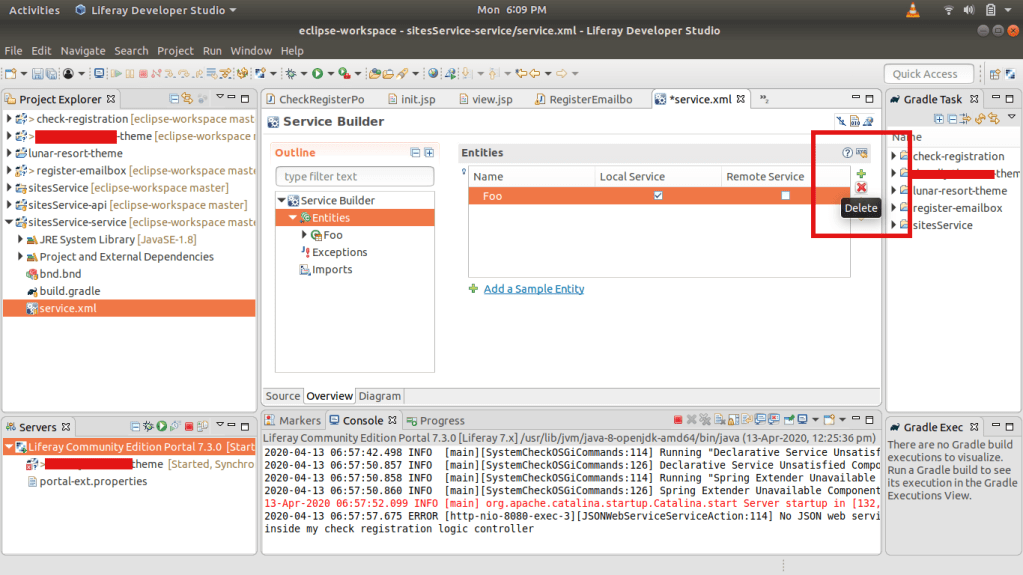
Open siteService-service and click on service.xml . Click on the Entities and delete the default Foo column

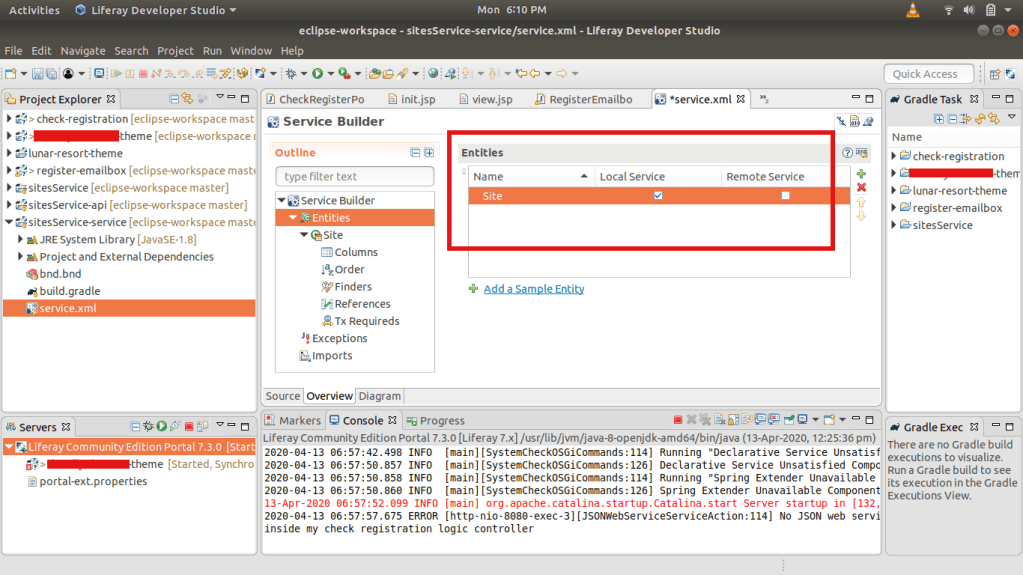
And then add the Entity named Site . It is just an Entity, that connects to the table.

Click on the Site Entity and provide the table name

Add the Table Name

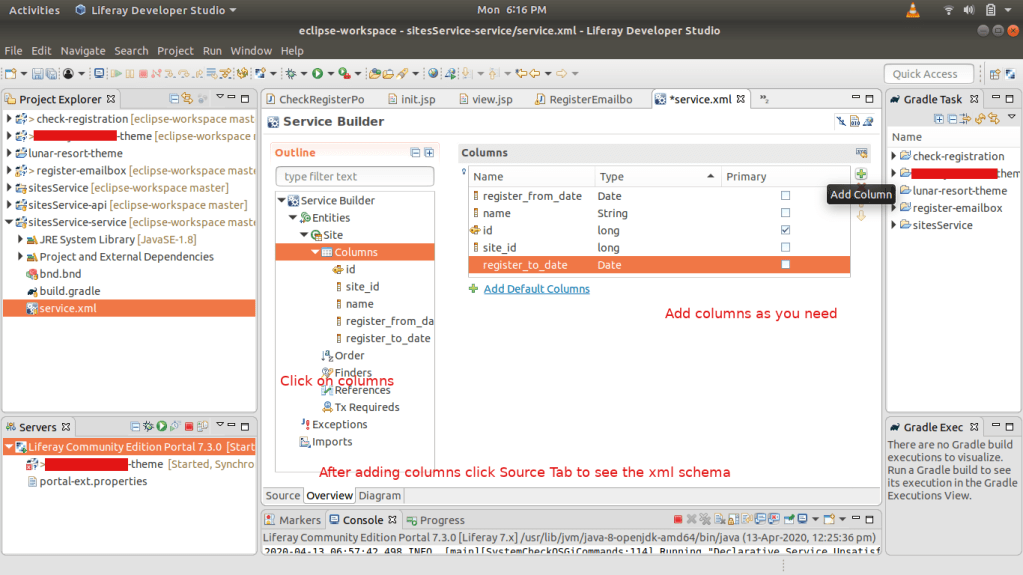
Add the columns as many as you want.

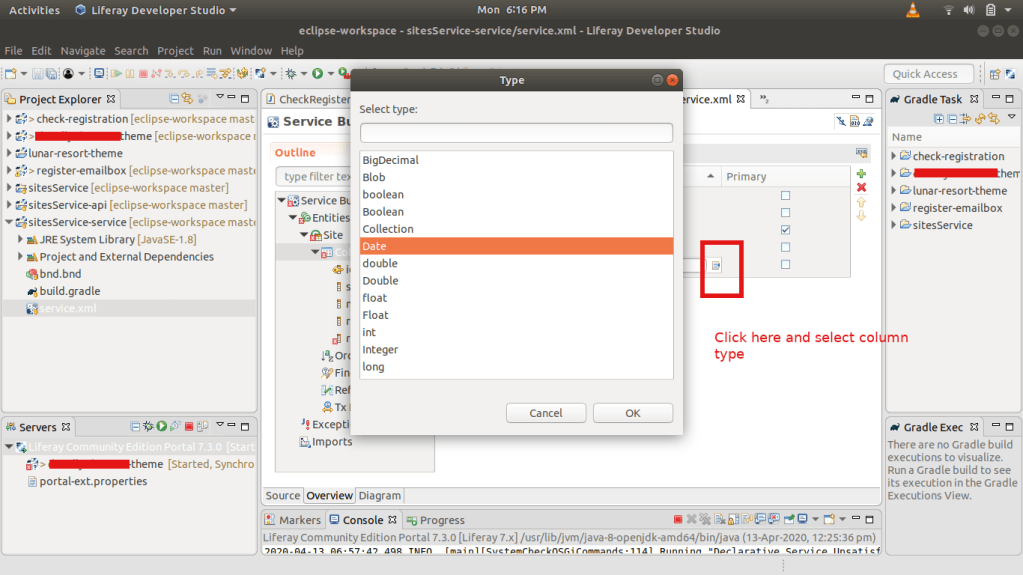
Select the column type from here:

Click on the Source Tab and you can see in the service.xml details of all columns that added.

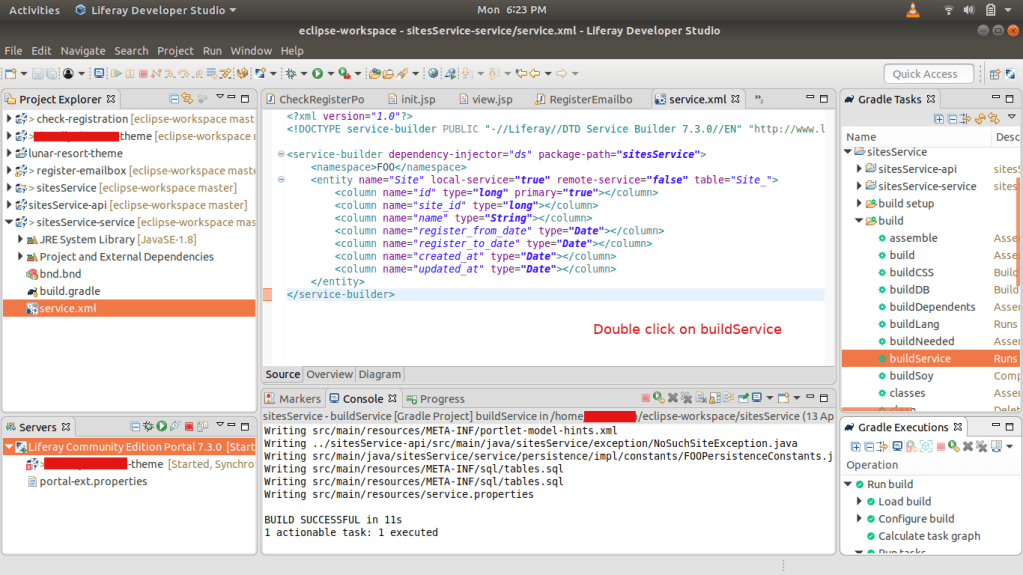
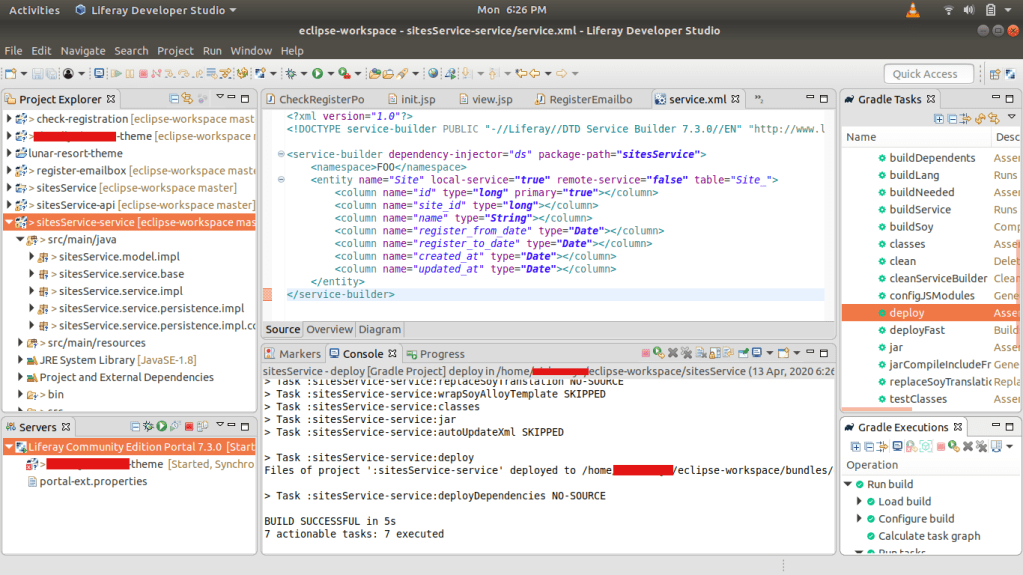
Double click on the buildService to build the new service and double click on the deploy to deploy the service.

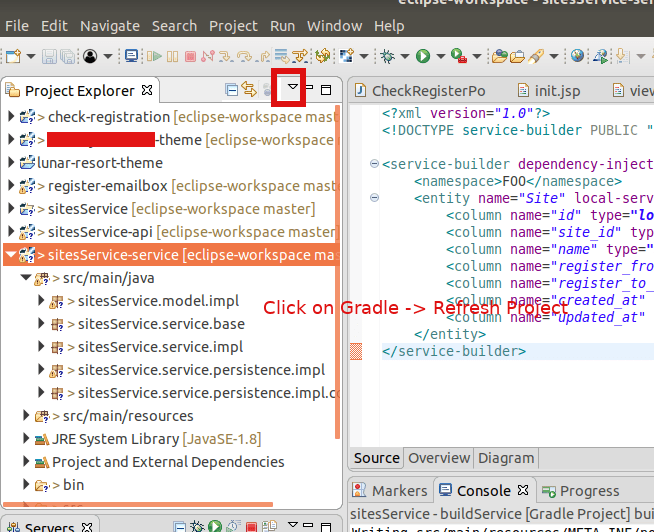
Now click on the down arrow and gradle -> refresh project. You can see the bundles created.

And the .jar bundles inside the osgi modules

Copy this *-api.jar file into the deploy folder of the server.

~/liferay-ce-portal-tomcat-7.3.0-ga1-20200127150653953/liferay-ce-portal-7.3.0-ga1/deploy

and then copy the *-service.jar into the same folder

You can see these are processing and started in the server logs.

INFO  [com.liferay.portal.kernel.deploy.auto.AutoDeployScanner][AutoDeployDir:263] Processing sitesService.api.jar

~/liferay-ce-portal-tomcat-7.3.0-ga1-20200127150653953/liferay-ce-portal-7.3.0-ga1/osgi/modules][BundleStartStopLogger:39] STARTED sitesService.api_1.0.0 [1115]

[com.liferay.portal.kernel.deploy.auto.AutoDeployScanner][AutoDeployDir:263] Processing sitesService.service.jar

~/liferay-ce-portal-tomcat-7.3.0-ga1-20200127150653953/liferay-ce-portal-7.3.0-ga1/osgi/modules][BundleStartStopLogger:39] STARTED sitesService.service_1.0.0 [1116]


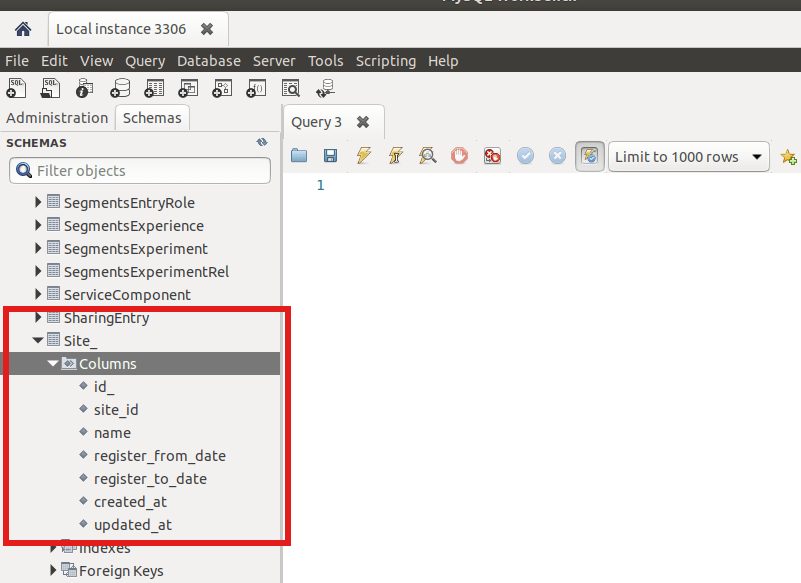
Now check the database, if the Site_ table with all columns are created or not

You can see the table and columns are created. In the next topic we discuss about adding services to this service builder.

Backup your system databases using Ruby backup gem

Install RVM (Or Rbenv) to manage your Ruby versions

 $ gpg --keyserver hkp://keys.gnupg.net --recv-keys 409B6B1796C275462A1703113804BB82D39DC0E3 7D2BAF1CF37B13E2069D6956105BD0E739499BDB
 $ curl -sSL https://get.rvm.io | bash 

Restart Terminal and type rvm -v

 $ rvm install 2.5
 $ rvm gemset create backup
 $ rvm gemset use backup
 $ gem install backup
 $ backup generate:model --trigger project_2_backup --archives --storages='s3' --compressor='gzip' --notifiers='mail' 
 Generated configuration file: '/home/ubuntu/Backup/config.rb'.
 Generated model file: '/home/ubuntu/Backup/models/project_2_backup.rb'.
 Usage:
   backup generate:model --trigger=TRIGGER
 Options:
   --trigger=TRIGGER
   [--config-path=CONFIG_PATH]  # Path to your Backup configuration directory
   [--databases=DATABASES]      # (mongodb, mysql, postgresql, redis, riak)
   [--storages=STORAGES]        # (cloudfiles, dropbox, ftp, local, ninefold, rsync, s3, scp, sftp)
   [--syncers=SYNCERS]          # (cloud_files, rsync_local, rsync_pull, rsync_push, s3)
   [--encryptors=ENCRYPTORS]    # (gpg, openssl)
   [--compressors=COMPRESSORS]  # (bzip2, gzip, lzma, pbzip2)
   [--notifiers=NOTIFIERS]      # (campfire, hipchat, mail, presently, prowl, twitter)
   [--archives]
   [--splitter]                 # use `--no-splitter` to disable
                               # Default: true 

Sample Model File

Add the following conf in Backup/models/project_2_backup.rb:

Example for mongodb

 database MongoDB do |db|
     db.name               = "db_name"
     db.username           = "db_username"
     db.password           = "db_pswd"
     db.host               = "localhost"
     db.port               = 27017 
     db.ipv6               = false
     #db.only_collections   = ["only", "these", "collections"]
     db.additional_options = ['--authenticationDatabase=admin']
     db.lock               = false
     db.oplog              = false
   end
   ## 
   # Amazon Simple Storage Service [Storage]
   #
   store_with S3 do |s3|
     # AWS Credentials
     s3.access_key_id     = "YOUR_ACCESS_KEY"
     s3.secret_access_key = "YOUR_SECRET_KEY"
     # Or, to use a IAM Profile:
     # s3.use_iam_profile = true
     s3.region            = "ap-southeast-2" 
     s3.bucket            = "bucket_name"
     s3.path              = "bucket_name_path"
     s3.keep              = 12
     # s3.keep              = Time.now - 2592000 # Remove all backups older than 1 month.
   end 

 # Notification mail infos
 notify_by Mail do |mail|
     mail.on_success           = true
     mail.on_warning           = true
     mail.on_failure           = true
     mail.from                 = "_____@gmail.com"
     mail.to                   = "____@___.com"
     mail.cc                   = "______@_____.com, _____@______.com"
     #mail.bcc                  = "bcc@email.com"
     #mail.reply_to             = "reply_to@email.com" 
     mail.address              = "smtp.gmail.com"
     mail.port                 = 587
     mail.domain               = "domain_name"
     mail.user_name            = "email_username"
     mail.password             = "email_password"
     mail.authentication       = "plain"
     mail.encryption           = :starttls
 end 

Once you’ve setup your configuration, check your work with:

$ backup check

If there are no errors, the check should report:

[2019/03/28 10:02:26][info] Configuration Check Succeeded.

Perform Backup:

$ backup perform --trigger project_2_backup

The Keep Option

keep a specified number of backups in storage. After each backup is performed, it will remove older backup package files based on the keep setting.

keep as a Number

If a number has been specified and once the keep limit has been reached, the oldest backup will be removed.

Note that if keep is set to 5, then the 6th backup will be transferred and stored, before the oldest is removed. So be sure you have space available for keep + 1 backups

keep as Time

When a Time object is set to keep it will keep backups until that time. Everything older than the set time will be removed.

Enable MongoDB Access Control

The default data directory for MongoDB is /data/db

This can be overridden by a dbpath option specified on the command line or in a configuration file.

If you install MongoDB via a package manager such as Homebrew or MacPorts these installs typically create a default data directory other than /data/db and set the dbpath in a configuration file.

You can check the dbpath by:

db.serverCmdLineOpts()

in your mongo shell

 "storage" : {
    "dbPath" : "/usr/local/var/mongodb"
 }, 

The following procedure first adds a user administrator to a MongoDB instance running without access control and then enables access control.

1.  Start MongoDB without access control.

$ mongod --port 27017 --dbpath /data/db1

2. Connect to the instance.

$ mongo --port 27017

3. Create the user administrator.

In the admin database, add a user with the userAdminAnyDatabase role. For example, the following creates the user myUserAdmin in the admin database:

Note: The database where you create the user (in this example, admin) is the user’s authentication database.

 > db.createUser(
 ...   {
 ...     user: "abhilash",
 ...     pwd: “password!“,
 ...     roles: [ { role: "userAdminAnyDatabase", db: "admin" } ]
 ...   }
 ... ) 

 Successfully added user: {
 "user" : "abhilash",
 "roles" : [
  {
    "role" : "userAdminAnyDatabase",
    "db" : "admin"
  }
 ]
 } 

Disconnect the mongo shell.

4. Re-start the MongoDB instance with access control.

$ mongod --auth --port 27017 --dbpath /usr/local/var/mongodb/db1

Clients that connect to this instance must now authenticate themselves as a MongoDB user.

 > db.auth();
 Error: auth expects either (username, password) or ({ user: username, pwd: password })
 0
 > db
 test 

** To authenticate during connection:

$ mongo --port 27017 -u "abhilash" -p "password!” --authenticationDatabase "admin"

** To authenticate after connecting

Connect the mongo shell

 $ mongo
 > use admin
 > db.auth("abhilash", “password!“ )
 > mongo
 MongoDB shell version v3.4.7
 connecting to: mongodb://127.0.0.1:27017
 MongoDB server version: 3.4.7
 Server has startup warnings:
 2018-01-22T10:32:18.027+0530 I CONTROL  [initandlisten]
 2018-01-22T10:32:18.027+0530 I CONTROL  [initandlisten] ** WARNING: Access control is not enabled for the database.
 2018-01-22T10:32:18.027+0530 I CONTROL  [initandlisten] **          Read and write access to data and configuration is unrestricted.
 2018-01-22T10:32:18.027+0530 I CONTROL  [initandlisten]
 > use admin
 switched to db admin
 > db
 admin
 > db.auth("abhilash", "password!”);
 1
 > use my_dbname;
 > db.createUser(
   {
     user: "vadmin",
     pwd: “pass111!”,
     roles: [ { role: "readWrite", db: "my_dbname" },
              { role: "read", db: "test" } ]
   }
 ) 

Reference:  Mongodb enable-authentication 

Mongodb how to Import / Export in Linux/Mac

For Importing a mongodb use the following command

$ mongodump --db database_name

This will dump the json/bson files into dump/db_name folder
Or specify a directory with -o option

$ mongodump --db database_name -o path_to_folder

By specifying username and password

$ mongodump --db database_name -o /path/to/folder/ --username=my_user --password="my_password"

For Exporting a mongodb use the following command

$  mongorestore --db database_name path_to_the_json_bson_files

path_to_the_json_bson_files => That we already imported and stored before.

Import one document

$ mongodump --db=db_name --collection=collection_name --out=path_to_folder_to_import
$ mongorestore --db=new_db_name --collection=collection_name path_to_folder_to_import/db_name/collection_name.bson