
We have enough practical experience with SSE right now. We don’t need to perfect the transport layer, lets move on to improve our production error handling architecture.
Step 12 – Production Hardening of the AI Integration
We’ll cover this as one compact step:
LLM request
 ├── timeout
 ├── rate limit
 ├── provider error
 ├── invalid response
 ├── logging
 └── token/cost tracking
12.1 Add a custom AI error
Create:
app/services/ai/error.rb
class Ai::Error < StandardError
end

class Ai::ProviderError < Ai::Error
end

class Ai::RateLimitError < Ai::Error
end

class Ai::TimeoutError < Ai::Error
end
This gives our application its own error vocabulary instead of exposing SDK/provider exceptions everywhere.
12.2 Wrap the provider call
In Ai::Client, wrap the API call.
Conceptually:
def chat(messages:)
  response = @client.chat.completions.create(
    model: MODEL,
    messages: messages
  )

  {
    content: response.choices.first.message.content,
    model: response.model,
    input_tokens: response.usage&.prompt_tokens,
    output_tokens: response.usage&.completion_tokens
  }
rescue Faraday::TooManyRequestsError => e
  raise Ai::RateLimitError, e.message
rescue Faraday::TimeoutError => e
  raise Ai::TimeoutError, e.message
rescue Faraday::Error => e
  raise Ai::ProviderError, e.message
end
The exact exception classes can depend on the SDK/version, so inspect the exception raised by your installed openai gem rather than blindly copying provider-specific classes.
The important architecture is:
OpenRouter/SDK error
        ↓
Ai::Client
        ↓
Ai::RateLimitError
Ai::TimeoutError
Ai::ProviderError
        ↓
Rails application
Your controllers don’t need to know OpenRouter’s exception hierarchy.
12.3 Add timeout thinking
Never allow an AI request to hang indefinitely.
A production system should have:
connection timeoutread/request timeout
and then either:
retry
or:
fail gracefully
depending on the failure.
A key int. answer:
Retry transient failures such as timeouts and 429s with bounded exponential backoff, but don’t blindly retry all errors.
12.4 Token tracking
We’re already storing:
input_tokensoutput_tokens
in messages.
That gives us an important operational capability:
conversation.messages.sum(:input_tokens)
and:
conversation.messages.sum(:output_tokens)
Now we can answer:
How many tokens did this conversation consume?
Later we can add pricing:
input tokens  × input price
+
output tokens × output price
=
estimated cost
Don’t hard-code provider pricing into the model. Pricing changes.
12.5 Add request timing
For a production AI application, latency is valuable.
In Ai::Client:
started_at = Process.clock_gettime(Process::CLOCK_MONOTONIC)

response = ...

latency_ms =
  ((Process.clock_gettime(Process::CLOCK_MONOTONIC) - started_at) * 1000).round
Then eventually store:
latency_ms
on the message or in a separate AI usage/event table.
This allows:
modeltokenslatencyerrors
to be correlated.
12.6 Don’t log prompts blindly
Avoid:
Rails.logger.info(params)
for AI endpoints.
User prompts may contain:
- PII
- secrets
- customer information
- proprietary company data
Log metadata instead:
conversation_idmodellatencytoken countserror type
rather than dumping the entire conversation into logs.
12.7 Add application-level rate limiting
An expensive AI endpoint should never be unrestricted.
Conceptually:
User
 ↓
Rate limit
 ↓
AI endpoint
 ↓
LLM
For example:
10 requests/minute/user
The exact limit depends on your application.
This protects:
- cost
- provider quotas
- abuse
- system capacity
12.8 What about retries?
Use something like:
Timeout      → retry
429          → retry with backoff
5xx          → retry with backoff
400          → don't retry
401          → don't retry
invalid input → don't retry
The exact mapping depends on the provider.
A useful int. phrase:
“I distinguish transient failures from permanent failures. For transient failures, I use a bounded number of retries with exponential (delay: 1,2,4,8,16 seconds) backoff.”
Step 13: Add AI Observability with admin Dashboard
Instead of merely saying we support observability, let’s build an actual AI Admin / Observability dashboard into the app. This will make the project much stronger because you can demonstrate that we thought beyond “call the LLM.”
We will track:
AI Request
├── provider
├── model
├── operation
├── status
├── conversation
├── message
├── input tokens
├── output tokens
├── estimated cost
├── latency
├── started/completed timestamps
├── retry count
├── HTTP status
├── error class
├── error message
├── request ID
├── streamed?
└── metadata
And the admin UI will have:
/admin/ai_requests

AI Observability
-------------------------------------------------
Total Requests       127
Successful           119
Failed                 8
Total Input Tokens  45,230
Total Output Tokens 18,921
Avg Latency          2.34 sec
Estimated Cost       $0.00 / N/A
-------------------------------------------------

Recent AI Requests
-------------------------------------------------
Time | Model | Status | Tokens | Latency | Error
-------------------------------------------------
...
Then clicking a request gives the complete details.
Step 12A – Create AiRequest
We’ll call the model AiRequest.
This is not the AI message itself.
Remember:
Message
    ↓
What the user/assistant said

AiRequest
    ↓
What happened while talking to the LLM
That distinction is important.
1. Generate the model
Run:
bin/rails g model AiRequest \
  conversation:references \
  message:references \
  provider:string \
  model:string \
  operation:string \
  status:string \
  input_tokens:integer \
  output_tokens:integer \
  estimated_cost:decimal \
  latency_ms:integer \
  retry_count:integer \
  http_status:integer \
  request_id:string \
  error_class:string \
  error_message:text \
  started_at:datetime \
  completed_at:datetime \
  streamed:boolean \
  metadata:jsonb
You can also use one line:
bin/rails g model AiRequest conversation:references message:references provider:string model:string operation:string status:string input_tokens:integer output_tokens:integer estimated_cost:decimal latency_ms:integer retry_count:integer http_status:integer request_id:string error_class:string error_message:text started_at:datetime completed_at:datetime streamed:boolean metadata:jsonb
Step 12B – Migration
Open the generated migration.
Change it to:
class CreateAiRequests < ActiveRecord::Migration[8.1]
  def change
    create_table :ai_requests do |t|
      t.references :conversation, null: true, foreign_key: true
      t.references :message, null: true, foreign_key: true

      t.string :provider, null: false
      t.string :model, null: false
      t.string :operation, null: false
      t.string :status, null: false

      t.integer :input_tokens
      t.integer :output_tokens

      t.decimal :estimated_cost, precision: 12, scale: 8

      t.integer :latency_ms
      t.integer :retry_count, null: false, default: 0
      t.integer :http_status

      t.string :request_id

      t.string :error_class
      t.text :error_message

      t.datetime :started_at
      t.datetime :completed_at

      t.boolean :streamed, null: false, default: false

      t.jsonb :metadata, null: false, default: {}

      t.timestamps
    end

    add_index :ai_requests, :status
    add_index :ai_requests, :provider
    add_index :ai_requests, :model
    add_index :ai_requests, :created_at
    add_index :ai_requests, :request_id, unique: true
  end
end
Why are conversation and message nullable?
Because not every AI operation has to belong to a chat message.
Later we might have:
AI embedding requestAI summarizationAI classificationAI agent tool call
So:
conversation_id = NULLmessage_id = NULL
can still be valid.
Step 12C – Run migration
bin/rails db:migrate
Then verify:
bin/rails dbconsole
\d ai_requests
Step 12D – Create the model
Open:
app/models/ai_request.rb
Use:
class AiRequest < ApplicationRecord
  belongs_to :conversation, optional: true
  belongs_to :message, optional: true

  enum :status, {
    pending: "pending",
    success: "success",
    failed: "failed",
    rate_limited: "rate_limited",
    timeout: "timeout"
  }, validate: true

  validates :provider, :model, :operation, :status, presence: true

  scope :recent, -> { order(created_at: :desc) }
  scope :successful, -> { where(status: :success) }
  scope :failed_requests, -> { where.not(status: :success) }

  def duration_seconds
    return unless latency_ms

    latency_ms / 1000.0
  end

  def total_tokens
    input_tokens.to_i + output_tokens.to_i
  end
end
Step 12E – Add reverse associations
Open:
app/models/conversation.rb
Add:
has_many :ai_requests, dependent: :nullify
So:
class Conversation < ApplicationRecord
  has_many :messages, dependent: :destroy
  has_many :ai_requests, dependent: :nullify
end
And in:
app/models/message.rb
add:
has_many :ai_requests, dependent: :nullify
So:
class Message < ApplicationRecord
  belongs_to :conversation

  has_many :ai_requests, dependent: :nullify

  enum :role, {
    user: "user",
    assistant: "assistant",
    system: "system"
  }, validate: true
end
Step 12F – Why AiRequest instead of putting everything in Message?
This is an important architectural decision.
A message answers:
What was said?
An AI request answers:
What happened while generating it?
For example:
Message
--------------------
role: assistant
content: "Ruby is..."
while:
AiRequest
--------------------
provider: openrouter
model: ...
status: success
input_tokens: 240
output_tokens: 120
latency_ms: 1840
retry_count: 0
http_status: 200
This separation is much cleaner.
Step 12G – Generate the Admin Controller
Run:
bin/rails g controller Admin::AiRequests index show
This creates:
app/controllers/admin/ai_requests_controller.rb

app/views/admin/ai_requests/index.html.erb
app/views/admin/ai_requests/show.html.erb
Step 12H – Admin routes
Open:
config/routes.rb
Add:
namespace :admin do
  resources :ai_requests, only: %i[index show]
end
So your routes become something like:
Rails.application.routes.draw do
  resources :conversations, only: [:create, :show] do
    resources :messages, only: [:create]
  end

  namespace :admin do
    resources :ai_requests, only: %i[index show]
  end

  root "conversations#new"
end
Check:
bin/rails routes | grep ai_requests
You should get:
/admin/ai_requests/admin/ai_requests/:id
Step 12I – Admin Controller
Open:
app/controllers/admin/ai_requests_controller.rb
Use:
class Admin::AiRequestsController < ApplicationController
  before_action :authenticate_admin!

  def index
    @ai_requests = AiRequest
      .includes(:conversation, :message)
      .recent
      .limit(100)

    @total_requests = AiRequest.count

    @successful_requests =
      AiRequest.successful.count

    @failed_requests =
      AiRequest.failed_requests.count

    @total_input_tokens =
      AiRequest.sum(:input_tokens)

    @total_output_tokens =
      AiRequest.sum(:output_tokens)

    @average_latency =
      AiRequest.where.not(latency_ms: nil).average(:latency_ms)

    @estimated_cost =
      AiRequest.sum(:estimated_cost)
  end

  def show
    @ai_request = AiRequest.includes(
      :conversation,
      :message
    ).find(params[:id])
  end

  private

  def authenticate_admin!
    authenticate_or_request_with_http_basic("AI Admin") do |username, password|
      username == Rails.application.credentials.dig(:admin, :username) &&
        password == Rails.application.credentials.dig(:admin, :password)
    end
  end
end
This means the admin dashboard isn’t publicly accessible.
Step 12J – Configure Admin Credentials
Run:
bin/rails credentials:edit
Add:
admin: username: admin password: CHANGE_ME
Obviously use a proper password locally.
Then:
bin/rails c
Verify:
Rails.application.credentials.dig(:admin, :username)
and:
Rails.application.credentials.dig(:admin, :password)
Step 12K – Admin Index View
Open:
app/views/admin/ai_requests/index.html.erb
Use:
<h1>AI Observability</h1>

<section>
  <h2>Summary</h2>

  <dl>
    <dt>Total Requests</dt>
    <dd><%= @total_requests %></dd>

    <dt>Successful</dt>
    <dd><%= @successful_requests %></dd>

    <dt>Failed</dt>
    <dd><%= @failed_requests %></dd>

    <dt>Input Tokens</dt>
    <dd><%= number_with_delimiter(@total_input_tokens) %></dd>

    <dt>Output Tokens</dt>
    <dd><%= number_with_delimiter(@total_output_tokens) %></dd>

    <dt>Average Latency</dt>
    <dd>
      <%= @average_latency ? "#{@average_latency.round} ms" : "N/A" %>
    </dd>

    <dt>Estimated Cost</dt>
    <dd>
      <%= @estimated_cost ? number_to_currency(@estimated_cost) : "N/A" %>
    </dd>
  </dl>
</section>

<hr>

<h2>Recent Requests</h2>

<table>
  <thead>
    <tr>
      <th>ID</th>
      <th>Time</th>
      <th>Provider</th>
      <th>Model</th>
      <th>Operation</th>
      <th>Status</th>
      <th>Tokens</th>
      <th>Latency</th>
      <th>Retries</th>
      <th>HTTP</th>
    </tr>
  </thead>

  <tbody>
    <% @ai_requests.each do |request| %>
      <tr>
        <td>
          <%= link_to request.id,
              admin_ai_request_path(request) %>
        </td>

        <td>
          <%= request.created_at.strftime("%Y-%m-%d %H:%M:%S") %>
        </td>

        <td><%= request.provider %></td>

        <td><%= request.model %></td>

        <td><%= request.operation %></td>

        <td><%= request.status %></td>

        <td><%= number_with_delimiter(request.total_tokens) %></td>

        <td>
          <%= request.latency_ms ? "#{request.latency_ms} ms" : "N/A" %>
        </td>

        <td><%= request.retry_count %></td>

        <td><%= request.http_status || "N/A" %></td>
      </tr>
    <% end %>
  </tbody>
</table>
Step 12L – Request Detail View
Open:
app/views/admin/ai_requests/show.html.erb
Use:
<h1>AI Request #<%= @ai_request.id %></h1>

<p>
  <%= link_to "← Back to AI Requests",
      admin_ai_requests_path %>
</p>

<table>
  <tbody>
    <tr>
      <th>Provider</th>
      <td><%= @ai_request.provider %></td>
    </tr>

    <tr>
      <th>Model</th>
      <td><%= @ai_request.model %></td>
    </tr>

    <tr>
      <th>Operation</th>
      <td><%= @ai_request.operation %></td>
    </tr>

    <tr>
      <th>Status</th>
      <td><%= @ai_request.status %></td>
    </tr>

    <tr>
      <th>Streamed</th>
      <td><%= @ai_request.streamed? ? "Yes" : "No" %></td>
    </tr>

    <tr>
      <th>Input Tokens</th>
      <td><%= @ai_request.input_tokens || "N/A" %></td>
    </tr>

    <tr>
      <th>Output Tokens</th>
      <td><%= @ai_request.output_tokens || "N/A" %></td>
    </tr>

    <tr>
      <th>Total Tokens</th>
      <td><%= @ai_request.total_tokens %></td>
    </tr>

    <tr>
      <th>Estimated Cost</th>
      <td>
        <%= @ai_request.estimated_cost || "N/A" %>
      </td>
    </tr>

    <tr>
      <th>Latency</th>
      <td>
        <%= @ai_request.latency_ms ?
            "#{@ai_request.latency_ms} ms" :
            "N/A" %>
      </td>
    </tr>

    <tr>
      <th>Retries</th>
      <td><%= @ai_request.retry_count %></td>
    </tr>

    <tr>
      <th>HTTP Status</th>
      <td><%= @ai_request.http_status || "N/A" %></td>
    </tr>

    <tr>
      <th>Request ID</th>
      <td><%= @ai_request.request_id || "N/A" %></td>
    </tr>

    <tr>
      <th>Started At</th>
      <td><%= @ai_request.started_at || "N/A" %></td>
    </tr>

    <tr>
      <th>Completed At</th>
      <td><%= @ai_request.completed_at || "N/A" %></td>
    </tr>

    <tr>
      <th>Conversation</th>
      <td>
        <% if @ai_request.conversation %>
          <%= link_to(
            "##{@ai_request.conversation.id}",
            conversation_path(@ai_request.conversation)
          ) %>
        <% else %>
          N/A
        <% end %>
      </td>
    </tr>

    <tr>
      <th>Message</th>
      <td>
        <%= @ai_request.message_id || "N/A" %>
      </td>
    </tr>

    <tr>
      <th>Error Class</th>
      <td><%= @ai_request.error_class || "N/A" %></td>
    </tr>

    <tr>
      <th>Error Message</th>
      <td>
        <pre><%= @ai_request.error_message || "N/A" %></pre>
      </td>
    </tr>

    <tr>
      <th>Metadata</th>
      <td>
        <pre><%= JSON.pretty_generate(@ai_request.metadata) %></pre>
      </td>
    </tr>
  </tbody>
</table>
Step 12M – Create some test data
Before wiring the real AI request into this table, let’s verify the admin UI independently.
Run:
bin/rails c
Create:
AiRequest.create!(
  provider: "openrouter",
  model: "openrouter/free",
  operation: "chat",
  status: :success,
  input_tokens: 120,
  output_tokens: 80,
  latency_ms: 1530,
  retry_count: 0,
  http_status: 200,
  request_id: SecureRandom.uuid,
  started_at: 2.seconds.ago,
  completed_at: Time.current,
  streamed: true
)
Then open:
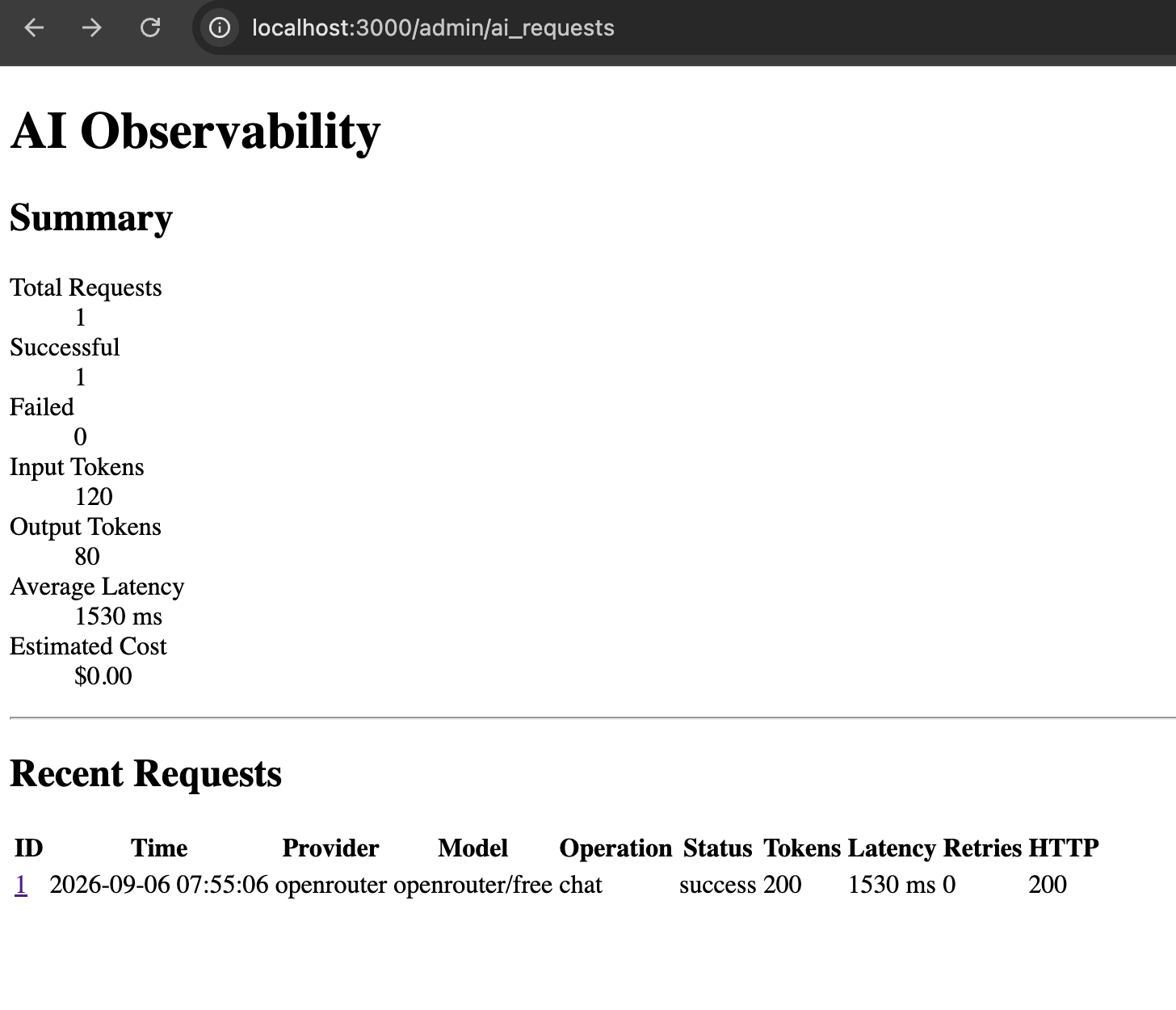
http://localhost:3000/admin/ai_requests
Browser authentication should ask for:
Username:Password:
Use your configured admin credentials.
You should see:
AI Observability

Total Requests      1
Successful          1
Failed              0
Input Tokens        120
Output Tokens        80
Average Latency    1530 ms
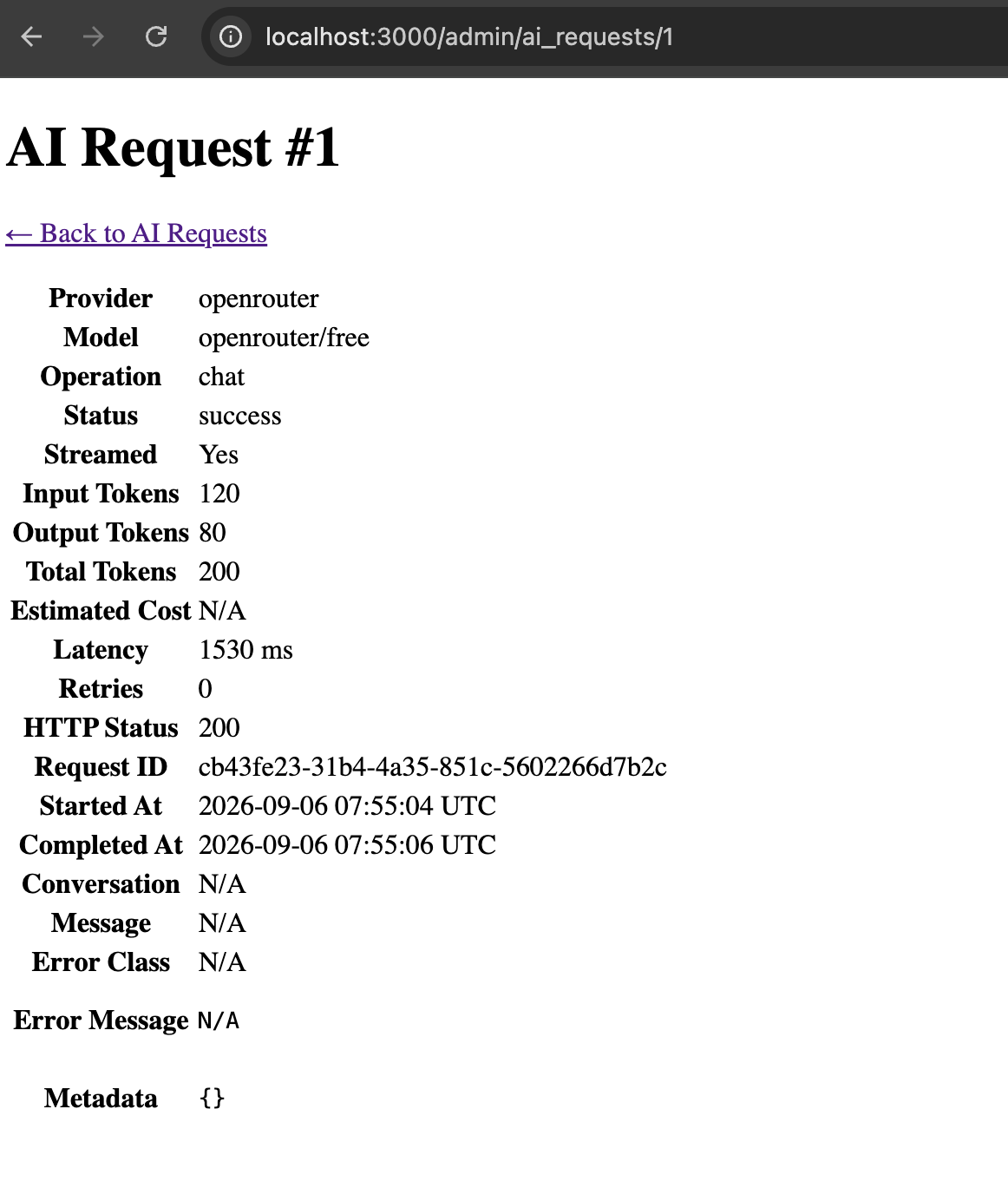
Click the request ID and you’ll see the complete details.
Step 12N – Now connect this to the real AI request
This is the important part.
We don’t want:
AI request ↓nothing stored
We want:
ChatService
     ↓
AiRequest.pending
     ↓
Ai::Client
     ↓
LLM
     ↓
AiRequest.success
Eventually:
                 AiRequest
                    │
       ┌────────────┼─────────────┐
       ▼            ▼             ▼
    Message    Conversation      LLM
       │                          │
       └──────────────┬───────────┘
                      ▼
                Admin Dashboard
We’ll modify Ai::ChatService to create and update the record around the provider call.
For the non-streaming path first, use this structure:
class Ai::ChatService
  def initialize(
    ai_client: Ai::Client.new,
    prompt_builder_class: Ai::PromptBuilder
  )
    @ai_client = ai_client
    @prompt_builder_class = prompt_builder_class
  end

  def call(conversation:, user_message:)
    conversation.transaction do
      user_message_record = conversation.messages.create!(
        role: :user,
        content: user_message
      )

      messages = @prompt_builder_class
        .new(conversation: conversation)
        .build

      ai_request = conversation.ai_requests.create!(
        message: user_message_record,
        provider: "openrouter",
        model: Ai::Client::MODEL,
        operation: "chat",
        status: :pending,
        streamed: false,
        started_at: Time.current,
        request_id: SecureRandom.uuid
      )

      started_at = Process.clock_gettime(Process::CLOCK_MONOTONIC)

      begin
        result = @ai_client.chat(messages: messages)

        latency_ms =
          (
            Process.clock_gettime(Process::CLOCK_MONOTONIC) -
            started_at
          ) * 1000

        assistant_message = conversation.messages.create!(
          role: :assistant,
          content: result[:content],
          model: result[:model],
          input_tokens: result[:input_tokens],
          output_tokens: result[:output_tokens]
        )

        ai_request.update!(
          message: assistant_message,
          status: :success,
          input_tokens: result[:input_tokens],
          output_tokens: result[:output_tokens],
          latency_ms: latency_ms.round,
          completed_at: Time.current,
          http_status: 200
        )

        assistant_message
      rescue => e
        ai_request.update!(
          status: :failed,
          error_class: e.class.name,
          error_message: e.message,
          completed_at: Time.current
        )

        raise
      end
    end
  end
end
One important architecture note
I used:
rescue => e
here only to demonstrate recording unexpected failures.
In the final production version, we’ll distinguish:
timeoutrate limitprovider errorinvalid responseunexpected application bug
and map them to the proper AiRequest.status.
That’s coming immediately after this.
Why this dashboard is worth having
You now have a tangible answer to questions like:
How would you monitor an AI application?
You can say:
“I record each AI invocation separately from the conversation message itself. I track provider, model, status, latency, token consumption, retries, HTTP status and error information, then expose that through an internal observability dashboard.”
Then show page:
/admin/ai_requests
That’s much stronger than saying:
“I would use logging.”
One thing I deliberately did NOT add
I don’t recommend storing the complete prompt by default in AiRequest.
Why?
Because prompts can contain:
PIIcustomer dataconfidential company informationsecrets
Instead we can later store safe metadata such as:
{ "message_count": 8, "prompt_tokens": 1200, "temperature": 0.2}
and keep sensitive content under the normal conversation access controls.
Issue 1:Fix AI Response: User Safety
Currently when I tested I get the AI Response like:User Safety: safeResponse Safety: safe
This is a model-selection problem, not a Rails problem.
The response:
User Safety: safeResponse Safety: safe
is characteristic of a content-safety/guardrail model, not a normal conversational model. OpenRouter currently lists Nemotron 3.5 Content Safety (free) as a moderation model whose intended output is exactly safety classifications such as User Safety and Response Safety. (OpenRouter)
Because we’re using:
MODEL = "openrouter/free"
OpenRouter is free to route that request to an available free model. The free-model router is explicitly designed to select among available free models, so you shouldn’t use it when you need a stable application behavior. (OpenRouter)
Fix: choose an actual chat model
For our course, let’s use a specific free conversational model instead of:
MODEL = "openrouter/free"
A good current option is:
MODEL = "openai/gpt-oss-20b:free"
OpenRouter lists free models separately, including general-purpose models; the exact free catalog changes over time.
Change Ai::Client
Open:
app/services/ai/client.rb
Change:
MODEL = "openrouter/free"
to:
MODEL = "openai/gpt-oss-20b:free"
Then test:
bin/rails c
client = Ai::Client.newresult = client.chat( messages: [ { role: "user", content: "Why Node.js as a backend?" } ])puts result[:content]
We should now get an actual explanatory answer rather than the safety classification.
Why I want a specific model for our project
This is actually a valuable AI engineering lesson.
Current approach
Ai::Client ↓openrouter/free ↓??? model
The model can change depending on routing.
Better application architecture
Ai::Client ↓specific model ↓predictable behavior
For production systems, model choice should generally be deliberate rather than an accidental consequence of a router.
The openrouter/free router is useful for experimentation, but for our course we’ll use an explicit free model so our behavior stays understandable. OpenRouter itself recommends openrouter/free as a convenient way to sample available free models, which is precisely why it shouldn’t be treated as a fixed model identity.
One more thing: our RAG work needs an embedding model
Don’t use the chat model for embeddings.
We’ll have:
Chat:openai/gpt-oss-20b:freeEmbeddings:separate embedding model
OpenRouter currently lists free embedding models as well, including NVIDIA’s Nemotron 3 Embed 1B, which is specifically intended for retrieval/RAG. (OpenRouter)
We’ll choose the embedding model separately when we implement Ai::EmbeddingService.
For now
Make this one-line change:
MODEL = "openai/gpt-oss-20b:free"
After that, we’ll continue with Step 13 – generating embeddings and storing the first real vector in document_chunks.
Issue 2: OpenAI::Errors::NotFoundError
Our server Log:
OpenAI::Errors::NotFoundError ({url: "https://openrouter.ai/api/v1/chat/completions", status: 404, body: {error: {message: "This model is unavailable for free. The paid version is available now - use this slug instead: openai/gpt-oss-20b", code: 404}, user_id: ...
Since we’re using the openai Ruby SDK, our rescue layer should use OpenAI::Errors::*, not Faraday exceptions. The SDK maps HTTP status codes such as 400, 401, 403, 404, 409, 422, 429 and 500+ into its own typed exceptions, and it has separate APIConnectionError / APITimeoutError classes. (https://github.com/openai/openai-ruby/blob/main/lib/openai/errors.rb)
Also, our 404 message tells us something important:
OpenRouter’s current free catalog does include
openai/gpt-oss-20b:free, but free endpoints can change availability. (OpenRouter)
Our earlier 404 specifically said that the endpoint was unavailable for free at that moment and suggested the paid slug. Since OpenRouter currently lists the :free variant as free, this looks like provider/availability inconsistency, not that our slug was fundamentally wrong. OpenRouter also notes that free variants are rate-limited and availability can vary. (OpenRouter)
1. Fix the model
Let’s use the explicit free model again:
MODEL = "openai/gpt-oss-20b:free"
OpenRouter currently lists that exact slug as free with zero input/output pricing. (OpenRouter)
If that endpoint temporarily fails, we can switch to another currently listed free model rather than using openrouter/free.
2. Fix Ai::Client error handling
Also change our Ai::Client chat rescues from: Faraday::TooManyRequestsError
Faraday::TimeoutError
Faraday::Error
to: similar to: OpenAI::Errors::NotFoundError etc,

check: https://github.com/openai/openai-ruby/blob/main/lib/openai/errors.rb
Let’s use the actual SDK error hierarchy.
The important classes are:
OpenAI::Errors::BadRequestErrorOpenAI::Errors::AuthenticationErrorOpenAI::Errors::PermissionDeniedErrorOpenAI::Errors::NotFoundErrorOpenAI::Errors::ConflictErrorOpenAI::Errors::UnprocessableEntityErrorOpenAI::Errors::RateLimitErrorOpenAI::Errors::InternalServerErrorOpenAI::Errors::APIConnectionErrorOpenAI::Errors::APITimeoutError
The current SDK maps HTTP 404 → NotFoundError, 429 → RateLimitError, and 500+ → InternalServerError. (GitHub)
So replace our old Faraday rescues entirely.
app/services/ai/client.rb
Use:
class Ai::Client
  MODEL = "openai/gpt-oss-20b:free"
  BASE_URL = "https://openrouter.ai/api/v1"

  def initialize
    api_key = Rails.application.credentials.dig(:openrouter, :api_key)

    raise "OpenRouter API key is missing" if api_key.blank?

    @client = OpenAI::Client.new(
      api_key: api_key,
      base_url: BASE_URL
    )
  end

  def chat(messages:)
    response = @client.chat.completions.create(
      model: MODEL,
      messages: messages
    )

    {
      content: response.choices.first.message.content,
      model: response.model,
      input_tokens: response.usage&.prompt_tokens,
      output_tokens: response.usage&.completion_tokens
    }
  rescue OpenAI::Errors::RateLimitError => e
    raise Ai::RateLimitError, e.message

  rescue OpenAI::Errors::APITimeoutError => e
    raise Ai::TimeoutError, e.message

  rescue OpenAI::Errors::APIConnectionError => e
    raise Ai::ProviderError, e.message

  rescue OpenAI::Errors::BadRequestError,
          OpenAI::Errors::AuthenticationError,
          OpenAI::Errors::PermissionDeniedError,
          OpenAI::Errors::NotFoundError,
          OpenAI::Errors::ConflictError,
          OpenAI::Errors::UnprocessableEntityError,
          OpenAI::Errors::InternalServerError,
          OpenAI::Errors::APIStatusError => e
    raise Ai::ProviderError, e.message
  end
end
The specific NotFoundError you just encountered will therefore be caught here:
rescue OpenAI::Errors::NotFoundError => e
and converted into our application-level:
Ai::ProviderError
3. Why keep Ai::*Error?
This is the architecture we want:
OpenRouter / OpenAI SDK
          ↓
OpenAI::Errors::NotFoundError
          ↓
      Ai::Client
          ↓
    Ai::ProviderError
          ↓
     ChatService
          ↓
 Rails application
Your Rails code shouldn’t care whether the provider throws:
OpenAI::Errors::NotFoundError
or some completely different exception tomorrow.
That’s precisely why our abstraction exists.
4. But don’t catch everything as ProviderError
There’s an important distinction.
We should not do:
rescue StandardError => e raise Ai::ProviderErrorend
because a programming bug such as:
NoMethodError
would then masquerade as an LLM provider failure.
Keep provider/API exceptions mapped, but let genuine application bugs surface.
5. Our current custom errors are good
We already created:
class Ai::Error < StandardErrorendclass Ai::ProviderError < Ai::Errorendclass Ai::RateLimitError < Ai::Errorendclass Ai::TimeoutError < Ai::Errorend
That’s still a good design.
Now the relationship is:
OpenAI::Errors::RateLimitError ↓Ai::RateLimitError
OpenAI::Errors::APITimeoutError ↓Ai::TimeoutError
OpenAI::Errors::NotFoundError ↓Ai::ProviderError
6. Test the actual exception
Since we currently have a 404 issue, this is a useful test.
In Rails console:
bin/rails c
Then, Try the request with the unavailable model if you want to verify the mapping:
client = Ai::Client.new

client.chat(
  messages: [
    {
      role: "user",
      content: "Why Node.js as a backend?"
    }
  ]
)
You should now receive:
Ai::ProviderError
rather than:
OpenAI::Errors::NotFoundError
That proves our abstraction is working.
Happy Rails AI Integration!

