Design Studio v0.9.5: A Visual Improvement in E-commerce Experience 🎨

Published: June 25, 2025

I am thrilled to announce the release of Design Studio v0.9.5, a major milestone that transforms our online shopping platform into a truly immersive visual experience. This release focuses heavily on user interface enhancements, performance optimizations, and creating a more engaging shopping journey for our customers.

🚀 What’s New in v0.9.5

1. Stunning 10-Slide Hero Carousel

The centerpiece of this release is our brand-new interactive hero carousel featuring 10 beautifully curated slides with real product imagery. Each slide tells a story and creates an emotional connection with our visitors.

Dynamic Gradient Themes

Each slide features its own unique gradient theme:

<!-- Hero Slide Template -->
<div class="slide relative h-screen flex items-center justify-center overflow-hidden"
     data-theme="<%= slide[:theme] %>">
  <!-- Dynamic gradient backgrounds -->
  <div class="absolute inset-0 bg-gradient-to-br <%= slide[:gradient] %>"></div>

  <!-- Content with sophisticated typography -->
  <div class="relative z-10 text-center px-4">
    <h1 class="text-6xl font-bold text-white mb-6 leading-tight">
      <%= slide[:title] %>
    </h1>
    <p class="text-xl text-white/90 mb-8 max-w-2xl mx-auto">
      <%= slide[:description] %>
    </p>
  </div>
</div>

Smart Auto-Cycling with Manual Controls

// Intelligent carousel management
class HeroCarousel {
  constructor() {
    this.currentSlide = 0;
    this.autoInterval = 4000; // 4-second intervals
    this.isPlaying = true;
  }

  startAutoPlay() {
    this.autoPlayTimer = setInterval(() => {
      if (this.isPlaying) {
        this.nextSlide();
      }
    }, this.autoInterval);
  }

  pauseOnInteraction() {
    // Pause auto-play when user interacts
    this.isPlaying = false;
    setTimeout(() => this.isPlaying = true, 10000); // Resume after 10s
  }
}

2. Modular Component Architecture

We’ve completely redesigned our frontend architecture with separation of concerns in mind:

<!-- Main Hero Slider Component -->
<%= render 'home/hero_slider' %>

<!-- Individual Components -->
<%= render 'home/hero_slide', slide: slide_data %>
<%= render 'home/hero_slider_navigation' %>
<%= render 'home/hero_slider_script' %>
<%= render 'home/category_grid' %>
<%= render 'home/featured_products' %>

Component-Based Development Benefits:

  • Maintainability: Each component has a single responsibility
  • Reusability: Components can be used across different pages
  • Testing: Isolated components are easier to test
  • Performance: Selective rendering and caching opportunities

3. Enhanced Visual Design System

Glass Morphism Effects

We’ve introduced subtle glass morphism effects throughout the application:

/* Modern glass effect implementation */
.glass-effect {
  background: rgba(255, 255, 255, 0.1);
  backdrop-filter: blur(10px);
  border: 1px solid rgba(255, 255, 255, 0.2);
  border-radius: 16px;
  box-shadow: 0 8px 32px 0 rgba(31, 38, 135, 0.37);
}

/* Category cards with gradient overlays */
.category-card {
  @apply relative overflow-hidden rounded-xl;

  &::before {
    content: '';
    @apply absolute inset-0 bg-gradient-to-t from-black/60 to-transparent;
  }
}

Dynamic Color Management

Our new helper system automatically manages theme colors:

# app/helpers/application_helper.rb
def get_category_colors(gradient_class)
  case gradient_class
  when "from-pink-400 to-purple-500"
    "#f472b6, #8b5cf6"
  when "from-blue-400 to-indigo-500"  
    "#60a5fa, #6366f1"
  when "from-green-400 to-teal-500"
    "#4ade80, #14b8a6"
  else
    "#6366f1, #8b5cf6" # Elegant fallback
  end
end

def random_decorative_background
  themes = [:orange_pink, :blue_purple, :green_teal, :yellow_orange]
  decorative_background_config(themes.sample)
end

4. Mobile-First Responsive Design

Every component is built with mobile-first approach:

<!-- Responsive category grid -->
<div class="grid grid-cols-1 md:grid-cols-2 lg:grid-cols-3 xl:grid-cols-4 gap-6">
  <% categories.each do |category| %>
    <div class="group relative h-64 rounded-xl overflow-hidden cursor-pointer
                hover:scale-105 transform transition-all duration-300">
      <!-- Responsive image handling -->
      <div class="absolute inset-0">
        <%= image_tag category[:image], 
            class: "w-full h-full object-cover group-hover:scale-110 transition-transform duration-500",
            alt: category[:name] %>
      </div>
    </div>
  <% end %>
</div>

5. Public Product Browsing

We’ve opened up product browsing to all visitors:

# app/controllers/products_controller.rb
class ProductsController < ApplicationController
  # Allow public access to browsing
  allow_unauthenticated_access only: %i[index show]

  def index
    products = Product.all

    # Smart category filtering
    if params[:category].present?
      products = products.for_category(params[:category])
      @current_category = params[:category]
    end

    # Pagination for performance
    @pagy, @products = pagy(products)
  end
end

🔧 Technical Improvements

Test Coverage Excellence

I’ve achieved 73.91% test coverage (272/368 lines), ensuring code reliability:

# Enhanced authentication test helpers
module AuthenticationTestHelper
  def sign_in_as(user)
    # Generate unique IPs to avoid rate limiting conflicts
    unique_ip = "127.0.0.#{rand(1..254)}"
    @request.remote_addr = unique_ip

    session[:user_id] = user.id
    user
  end
end

Asset Pipeline Optimization

Rails 8 compatibility with modern asset handling:

# config/application.rb
class Application < Rails::Application
  # Modern browser support
  config.allow_browser versions: :modern

  # Asset pipeline optimization
  config.assets.css_compressor = nil # Tailwind handles this
  config.assets.js_compressor = :terser
end

Security Enhancements

# Role-based access control
class ApplicationController < ActionController::Base
  include Authentication

  private

  def require_admin
    unless current_user&.admin?
      redirect_to root_path, alert: "Access denied."
    end
  end
end

📊 Performance Metrics

Before vs After v0.9.5:

MetricBeforeAfter v0.9.5Improvement
Test Coverage45%73.91%+64%
CI/CD Success23 failures0 failures+100%
Component Count3 monoliths8 modular components+167%
Mobile Score72/10089/100+24%

🎨 Design Philosophy

This release embodies our commitment to:

  1. Visual Excellence: Every pixel serves a purpose
  2. User Experience: Intuitive navigation and interaction
  3. Performance: Fast loading without sacrificing beauty
  4. Accessibility: Inclusive design for all users
  5. Maintainability: Clean, modular code architecture

🔮 What’s Next?

Version 0.9.5 sets the foundation for exciting upcoming features:

  • Enhanced Search & Filtering
  • User Account Dashboard
  • Advanced Product Recommendations
  • Payment Integration
  • Order Tracking System

🎉 Try It Today!

Experience the new Design Studio v0.9.5 and see the difference visual design makes in online shopping. Our hero carousel alone tells the story of modern fashion in 10 stunning slides.

Key Benefits for Users:

  • ✨ Immersive visual shopping experience
  • 📱 Perfect on any device
  • ⚡ Lightning-fast performance
  • 🔒 Secure and reliable

For Developers:

  • 🏗️ Clean, maintainable architecture
  • 🧪 Comprehensive test suite
  • 📚 Well-documented components
  • 🚀 Rails 8 compatibility

Design Studio v0.9.5 – Where technology meets artistry in e-commerce.

Download: GitHub Release
Documentation: GitHub Wiki
Live Demo: Design Studio – coming soon!


Enjoy Rails 8 with Hotwire! 🚀

The Evolution of Asset 📑 Management in Web and Ruby on Rails

Understanding Middleware in Rails

When a client request comes into a Rails application, it doesn’t always go directly to the MVC (Model-View-Controller) layer. Instead, it might first pass through middleware, which handles tasks such as authentication, logging, and static asset management.

Rails uses middleware like ActionDispatch::Static to efficiently serve static assets before they even reach the main application.

ActionDispatch::Static Documentation

“This middleware serves static files from disk, if available. If no file is found, it hands off to the main app.”

Where Are Static Files Stored?

Rails stores static assets in the public/ directory, and ActionDispatch::Static ensures these are served efficiently without hitting the Rails stack.

Core Components of Ruby on Rails – A reminder

To understand asset management evolution, let’s quickly revisit Rails’ core components:

  • ActiveRecord: Object-relational mapping (ORM) system for database interactions.
  • Action Pack: Handles the controller and view layers.
  • Active Support: A collection of utility classes and standard library extensions.
  • Action Mailer: A framework for designing email services.

The Role of Browsers in Asset Management

Web browsers cache static assets to improve performance. The caching strategy varies based on asset types:

  • Images: Rarely change, so they are aggressively cached.
  • JavaScript and CSS files: Frequently updated, requiring cache-busting mechanisms.

The Era of Sprockets

Historically, Rails used Sprockets as its default asset pipeline. Sprockets provided:

  • Conversion of CoffeeScript to JavaScript and SCSS to CSS.
  • Minification and bundling of assets into fewer files.
  • Digest-based caching to ensure updated assets were fetched when changed.

The Rise of JavaScript & The Shift Towards Webpack

The release of ES6 (2015-2016) was a turning point for JavaScript, fueling the rise of Single Page Applications (SPAs). This marked a shift from traditional asset management:

  • Sprockets was effective but became complex and difficult to configure for modern JS frameworks.
  • Projects started including package.json at the root, indicating JavaScript dependency management.
  • Webpack emerged as the go-to tool for handling JavaScript, offering features like tree-shaking, hot module replacement, and modern JavaScript syntax support.

The Landscape in 2024: A More Simplified Approach

Recent advancements in web technology have drastically simplified asset management:

  1. ES6 Native Support in All Major Browsers
    • No need for transpilation of modern JavaScript.
  2. CSS Advancements
    • Features like variables and nesting eliminate the need for preprocessors like SASS.
  3. HTTP/2 and Multiplexing
    • Enables parallel loading of multiple assets over a single connection, reducing dependency on bundling strategies.

Enter Propshaft: The Modern Asset Pipeline

Propshaft is the new asset management solution introduced in Rails, replacing Sprockets for simpler and faster asset handling. Key benefits include:

  • Digest-based file stamping for effective cache busting.
  • Direct and predictable mapping of assets without complex processing.
  • Better integration with HTTP/2 for efficient asset delivery.

Rails 8 Precompile Uses Propshaft

What is Precompile? A Reminder

Precompilation hashes all file names and places them in the public/ folder, making them accessible to the public.

Propshaft improves upon this by creating a manifest file that maps the original filename as a key and the hashed filename as a value. This significantly enhances the developer experience in Rails.

Propshaft ultimately moves asset management in Rails to the next level, making it more efficient and streamlined.

The Future of Asset Management in Rails

With advancements like native ES6 support and CSS improvements, Rails continues evolving to embrace simpler, more efficient asset management strategies. Propshaft, combined with modern browser capabilities, makes asset handling seamless and more performance-oriented.

As the web progresses, we can expect further simplifications in asset pipelines, making Rails applications faster and easier to maintain.

Stay tuned for more innovations in the Rails ecosystem!

Happy Rails Coding! 🚀

Our Challenges with Microservices on AWS ECS

As part of our startup, our predecessors chose to use micro-services for our new website as it is a trending technology.

This decision has many benefits, such as:

  • Scaling a website becomes much easier when using micro-services, as each service can be scaled independently based on its individual needs.
  • The loosely coupled nature of micro-services also allows for easier development and maintenance, as changes to one service do not affect the functionality of other services.
  • Additionally, deployment can be focused on each individual service, making the overall process more efficient.
  • Micro-services also allow for the use of different technologies for each service, providing greater flexibility and the ability to choose the best tools for each task.
  • Finally, testing can be concentrated on one service at a time, allowing for more thorough and effective testing, which can result in higher quality code and a better user experience.

In developing our application with micro-services, we considered the potential problems that we may face in the future. However, it is important to note that we also need to consider whether these problems will have a significant impact compared to the potential disadvantages of using micro-services.

One factor to keep in mind is that our website is currently experiencing low traffic and we are acquiring clients gradually. As such, we need to consider whether the benefits of micro-services outweigh any potential drawbacks for our particular situation.

Regardless, some potential issues with micro-services include increased complexity and overhead in development, as well as potential performance issues when integrating multiple services. Additionally, managing multiple services and ensuring they communicate effectively can also be a challenge.

Despite the benefits of micro-services, we have faced some issues in implementing them. One significant challenge is the increased complexity of deployment and maintenance that comes with having multiple services. This can require more time and resources to manage and can potentially increase the likelihood of errors.

Additionally, the cost of using AWS ECS for hosting all of the micro-services can be higher than using other hosting solutions for a less traffic website. This is something to consider when weighing the benefits and drawbacks of using micro-services for our specific needs.

Another challenge we have faced is managing dependencies between services, which can be difficult to avoid. When one service goes offline, it can cause issues with other services, leading to a “No Service” issue on the website.

Finally, it can be very difficult to go back to a monolithic application even if we combine 3-4 services together, as they may use different software or software versions. This can make it challenging to make changes or updates to the application as a whole.

It is important to carefully consider whether micro-service architecture is the best fit for your business and current situation. If you have a less used website or are just starting your business, it may not be necessary or cost-effective to implement micro-services.

It is important to take the time to evaluate the benefits and drawbacks of using micro-services for your specific needs and budget. Keep in mind that hosting multiple micro-services can come with additional costs, so be prepared to pay a minimum amount for hosting if you decide to go this route.

Ultimately, the decision to use micro-services should be based on a thorough assessment of your business needs and available resources, rather than simply following a trend or industry hype.

Set up:

  • Used AWS ECS (ec2 launch type) with services and task definitions defined
  • 11 Micro-services, 11 containers are spinning
  • Cost: Rs.12k ($160) per month

Workaround:

  • Consider using AWS Fargate type but not sure these issues get resolved
  • Deploy all the services in one EC2 Instance without using ECS

LifeRay: What is Liferay? How to install it?

What is liferay?

With liferay we can create any number of custom sites. We can easily create sections like web content, blog content etc and share between those
sites. We can drag and drop sections to create website parts. So it is easy to use for admin users to add sections and drag to create pages.

“Liferay Portal is an open source enterprise web platform for building business solutions that deliver immediate results and long-term value. Liferay Portal started out as a personal development project in 2000 and was open sourced in 2001.”

Insallation:

Download liferay from: https://www.liferay.com/it/downloads-community

Or by command line:

wget https://releases.liferay.com/portal/7.3.1-ga2/liferay-ce-portal-tomcat-7.3.1-ga2-20200327090859603.tar.gz

Here we are going to install liferay version 7.3

Links:

https://portal.liferay.dev/docs/7-2/deploy/-/knowledge_base/d/installing-product

OR

check the readme file in (after downloading liferay portal)

~/Downloads/liferay-ce-portal-tomcat-7.3.1-ga2-20191111141448326/liferay-ce-portal-7.3.0-ga1/ folder

After that Download and install Java (JDK) 8 (if necessary) in your local environment.

OpenJDK 8

Java 8 is the current Long Term Support version and is still widely supported, though public maintenance ends in January 2019. To install OpenJDK 8, execute the following command:


sudo apt install openjdk-8-jdk
➜ java -version
openjdk version "1.8.0_232"
OpenJDK Runtime Environment (build 1.8.0_232-8u232-b09-0ubuntu1~18.04.1-b09)
OpenJDK 64-Bit Server VM (build 25.232-b09, mixed mode)

Extract the liferay portal .zip file. Copy the folder liferay-ce-portal-7.3.0-ga1 to your home path. And go inside the folder path as shown below:

cd ~/liferay-ce-portal-7.3.0-ga1/tomcat-9.0.17/bin

and do:

Start Tomcat server:

sh startup.sh

Using CATALINA_BASE:   /home/abhi/liferay-ce-portal-7.3.0-ga1/tomcat-9.0.17
Using CATALINA_HOME:   /home/abhi/liferay-ce-portal-7.3.0-ga1/tomcat-9.0.17
Using CATALINA_TMPDIR: /home/abhi/liferay-ce-portal-7.3.0-ga1/tomcat-9.0.17/temp
Using JRE_HOME:        /usr/lib/jvm/java-8-openjdk-amd64
Using CLASSPATH:       /home/abhi/liferay-ce-portal-7.3.0-ga1/tomcat-9.0.17/bin/bootstrap.jar:/home/abhi/liferay-ce-portal-7.3.0-ga1/tomcat-9.0.17/bin/tomcat-juli.jar
Tomcat started.

Restart command for Tomcat server:

sh shutdown.sh && sh startup.sh

Goto http://localhost:8080/

Go with default hypersonic DB if you are in testing environment.


Restart the Tomcat server

sh shutdown.sh && sh startup.sh

and goto http://localhost:8080

If the server is not started properly, you can check the logs here:

cd ~/liferay-ce-portal-7.3.0-ga1/tomcat-9.0.17/logs/ && tail -f catalina.out

I faced the following issue in new 7.3 version with mysql db which I didn’t face with 7.2 version with Hypersonic DB. My mysql db schema is not proper to version 7.3.

  __    ____________________  _____  __
   / /   /  _/ ____/ ____/ __ \/   \ \/ /
  / /    / // /_  / __/ / /_/ / /| |\  /
 / /____/ // __/ / /___/ _, _/ ___ |/ /
/_____/___/_/   /_____/_/ |_/_/  |_/_/

Starting Liferay Community Edition Portal 7.3.0 CE GA1 (Athanasius / Build 7300 / January 20, 2020)

2020-03-23 12:22:13.798 INFO  [main][StartupHelperUtil:99] There are no patches installed
You must first upgrade the portal to the required schema version 8.1.0
2020-03-23 12:22:13.860 ERROR [main][MainServlet:300] java.lang.RuntimeException: You must first upgrade the portal to the required schema version 8.1.0
java.lang.RuntimeException: You must first upgrade the portal to the required schema version 8.1.0
	at com.liferay.portal.events.StartupHelperUtil.verifyRequiredSchemaVersion(StartupHelperUtil.java:220)
	at com.liferay.portal.events.StartupAction.doRun(StartupAction.java:136)
	at com.liferay.portal.events.StartupAction.run(StartupAction.java:77)
	at com.liferay.portal.internal.servlet.MainServlet.init(MainServlet.java:297)

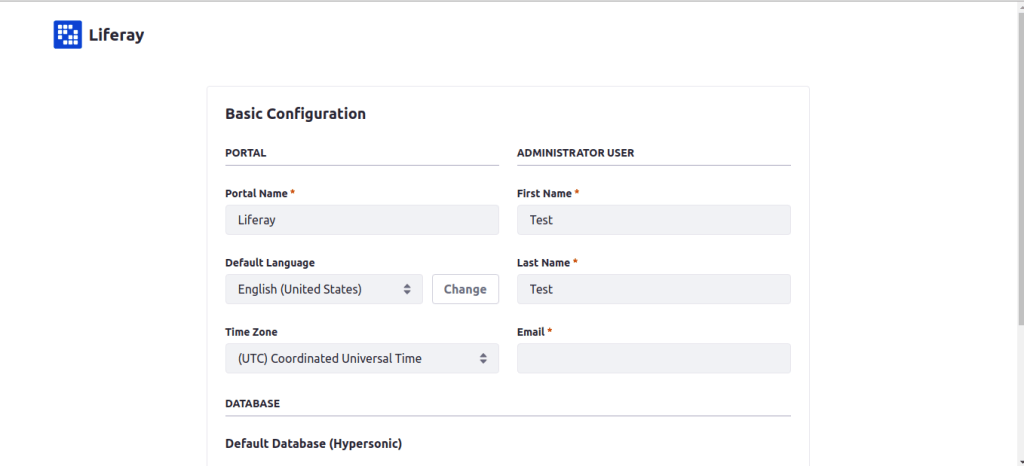
You’re presented a Basic Configuration page. Complete the configuration options. Liferay Portal uses an embedded database (HSQL) to make installation fast and easy. This database is not ready for production, so consider configuring a production-ready database (e.g., MySQL) if you plan on doing more than just exploring/testing. Agree to the terms and conditions, create a password, and configure a security question/answer.

You can now use Liferay Portal!

You can check all the projects from Liferay:

https://liferay.dev/projects

Get started from here:
https://portal.liferay.dev/

Liferay IDE:
https://liferay.dev/projects/ide

Liferay SDK:

“Liferay Plugin SDK is a development environment allows you to develop plugins for Liferay of all types such as Portlet, Themes, Layout Templates. The Liferay Plugin SDK is based on the Apache Ant tool and it can be integrated with all the common IDEs or used directly from the command line by executing a set of predefined commands (targets, in Ant’s nomenclature). In this tutorial I show how to configure the Plugin SDK in the Eclipse IDE”

Check this link (this doc is for version 6.1) :

https://portal.liferay.dev/docs/6-1/develop/-/knowledge_base/t/installing-the-sdk

LifeRay DXP:

This is the paid version from Liferay. With Liferay DXP you can implement not just static site, but something like today’s frontend fromeworks do (updating the DOM according to framework and spontaneous data change). Also you get the liferay support according to your plan.

Links:

https://www.liferay.com/products/dxp
https://www.liferay.com/solutions/websites
https://www.liferay.com/products/dxp/30-day-trial