Rails 8 Tests: 🔄 TDD vs 🎭 BDD | System Tests

Test‑Driven Development (TDD) and Behavior‑Driven Development (BDD) are complementary testing approaches that help teams build robust, maintainable software by defining expected behaviour before writing production code. In TDD, developers write small, focused unit tests that fail initially, then implement just enough code to make them pass, ensuring each component meets its specification. BDD extends this idea by framing tests in a global language that all stakeholders—developers, QA, and product owners—can understand, using human-readable scenarios to describe system behaviour. While TDD emphasizes the correctness of individual units, BDD elevates collaboration and shared understanding by specifying the “why” and “how” of features in a narrative style, driving development through concrete examples of desired outcomes.

🔄 TDD vs 🎭 BDD: Methodologies vs Frameworks

🧠 Understanding the Concepts

🔄 TDD (Test Driven Development)
  • Methodology/Process: Write test → Fail → Write code → Pass → Refactor
  • Focus: Testing the implementation and correctness
  • Mindset: “Does this code work correctly?”
  • Style: More technical, code-focused
🎭 BDD (Behavior Driven Development)
  • Methodology/Process: Describe behavior → Write specs → Implement → Verify behavior
  • Focus: Testing the behavior and user requirements
  • Mindset: “Does this behave as expected from user’s perspective?”
  • Style: More natural language, business-focused

🛠️ Frameworks Support Both Approaches

📋 RSpec (Primarily BDD-oriented)
# BDD Style - describing behavior
describe "TwoSum" do
  context "when given an empty array" do
    it "should inform user about insufficient data" do
      expect(two_sum([], 9)).to eq('Provide an array with length 2 or more')
    end
  end
end
⚙️ Minitest (Supports Both TDD and BDD)
🔧 TDD Style with Minitest
class TestTwoSum < Minitest::Test
  # Testing implementation correctness
  def test_empty_array_returns_error
    assert_equal 'Provide an array with length 2 or more', two_sum([], 9)
  end

  def test_valid_input_returns_indices
    assert_equal [0, 1], two_sum([2, 7], 9)
  end
end
🎭 BDD Style with Minitest
describe "TwoSum behavior" do
  describe "when user provides empty array" do
    it "guides user to provide sufficient data" do
      _(two_sum([], 9)).must_equal 'Provide an array with length 2 or more'
    end
  end

  describe "when user provides valid input" do
    it "finds the correct pair indices" do
      _(two_sum([2, 7], 9)).must_equal [0, 1]
    end
  end
end

🎯 Key Differences in Practice

🔄 TDD Approach
# 1. Write failing test
def test_two_sum_with_valid_input
  assert_equal [0, 1], two_sum([2, 7], 9)  # This will fail initially
end

# 2. Write minimal code to pass
def two_sum(nums, target)
  [0, 1]  # Hardcoded to pass
end

# 3. Refactor and improve
def two_sum(nums, target)
  # Actual implementation
end
🎭 BDD Approach
# 1. Describe the behavior first
describe "Finding two numbers that sum to target" do
  context "when valid numbers exist" do
    it "returns their indices" do
      # This describes WHAT should happen, not HOW
      expect(two_sum([2, 7, 11, 15], 9)).to eq([0, 1])
    end
  end
end

📊 Summary Table

AspectTDDBDD
FocusImplementation correctnessUser behavior
LanguageTechnicalBusiness/Natural
FrameworksAny (Minitest, RSpec, etc.)Any (RSpec, Minitest spec, etc.)
Test Namestest_method_returns_value"it should behave like..."
AudienceDevelopersStakeholders + Developers

🎪 The Reality

  • RSpec encourages BDD but can be used for TDD
  • Minitest is framework-agnostic – supports both approaches equally
  • Your choice of methodology (TDD vs BDD) is independent of your framework choice
  • Many teams use hybrid approaches – BDD for acceptance tests, TDD for unit tests

The syntax doesn’t determine the methodology – it’s about how you think and approach the problem!

System Tests 💻⚙️

System tests in Rails (located in test/system/*) are full-stack integration tests that simulate real user interactions with your web application. They’re the highest level of testing in the Rails testing hierarchy and provide the most realistic testing environment.

System tests actually launch a real web browser (or headless browser) and interact with your application just like a real user would. Looking at our Rails app’s configuration: design_studio/test/application_system_test_case.rb

driven_by :selenium, using: :headless_chrome, screen_size: [ 1400, 1400 ]

This means our system tests run using:

  • Selenium WebDriver (browser automation tool)
  • Headless Chrome (Chrome browser without UI)
  • 1400×1400 screen size for consistent testing

Code Snippets from:actionpack-8.0.2/lib/action_dispatch/system_test_case.rb

# frozen_string_literal: true

# :markup: markdown

gem "capybara", ">= 3.26"

require "capybara/dsl"
require "capybara/minitest"
require "action_controller"
require "action_dispatch/system_testing/driver"
require "action_dispatch/system_testing/browser"
require "action_dispatch/system_testing/server"
require "action_dispatch/system_testing/test_helpers/screenshot_helper"
require "action_dispatch/system_testing/test_helpers/setup_and_teardown"

module ActionDispatch
  # # System Testing
  #
  # System tests let you test applications in the browser. Because system tests
  # use a real browser experience, you can test all of your JavaScript easily from
  # your test suite.
  #
  # To create a system test in your application, extend your test class from
  # `ApplicationSystemTestCase`. System tests use Capybara as a base and allow you
  # to configure the settings through your `application_system_test_case.rb` file
  # that is generated with a new application or scaffold.
  #
  # Here is an example system test:
  #
  #     require "application_system_test_case"
  #
  #     class Users::CreateTest < ApplicationSystemTestCase
  #       test "adding a new user" do
  #         visit users_path
  #         click_on 'New User'
  #
  #         fill_in 'Name', with: 'Arya'
  #         click_on 'Create User'
  #
  #         assert_text 'Arya'
  #       end
  #     end
  #
  # When generating an application or scaffold, an
  # `application_system_test_case.rb` file will also be generated containing the
  # base class for system testing. This is where you can change the driver, add
  # Capybara settings, and other configuration for your system tests.
  #
  #     require "test_helper"
  #
  #     class ApplicationSystemTestCase < ActionDispatch::SystemTestCase
  #       driven_by :selenium, using: :chrome, screen_size: [1400, 1400]
  #     end
  #
  # By default, `ActionDispatch::SystemTestCase` is driven by the Selenium driver,
  # with the Chrome browser, and a browser size of 1400x1400.
  #
  # Changing the driver configuration options is easy. Let's say you want to use
  # the Firefox browser instead of Chrome. In your
  # `application_system_test_case.rb` file add the following:
  #
  #     require "test_helper"
  #
  #     class ApplicationSystemTestCase < ActionDispatch::SystemTestCase
  #       driven_by :selenium, using: :firefox
  #     end
  #
  # `driven_by` has a required argument for the driver name. The keyword arguments
  # are `:using` for the browser and `:screen_size` to change the size of the
  # browser screen. These two options are not applicable for headless drivers and
  # will be silently ignored if passed.
  #
  # Headless browsers such as headless Chrome and headless Firefox are also
  # supported. You can use these browsers by setting the `:using` argument to
  # `:headless_chrome` or `:headless_firefox`.
  #
  # To use a headless driver, like Cuprite, update your Gemfile to use Cuprite
  # instead of Selenium and then declare the driver name in the
  # `application_system_test_case.rb` file. In this case, you would leave out the
  # `:using` option because the driver is headless, but you can still use
  # `:screen_size` to change the size of the browser screen, also you can use
  # `:options` to pass options supported by the driver. Please refer to your
  # driver documentation to learn about supported options.
  #
  #     require "test_helper"
  #     require "capybara/cuprite"
  #
  #     class ApplicationSystemTestCase < ActionDispatch::SystemTestCase
  #       driven_by :cuprite, screen_size: [1400, 1400], options:
  #         { js_errors: true }
  #     end
  #
  # Some drivers require browser capabilities to be passed as a block instead of
  # through the `options` hash.
  #
  # As an example, if you want to add mobile emulation on chrome, you'll have to
  # create an instance of selenium's `Chrome::Options` object and add capabilities
  # with a block.
  #
  # The block will be passed an instance of `<Driver>::Options` where you can
  # define the capabilities you want. Please refer to your driver documentation to
  # learn about supported options.
  #
  #     class ApplicationSystemTestCase < ActionDispatch::SystemTestCase
  #       driven_by :selenium, using: :chrome, screen_size: [1024, 768] do |driver_option|
  #         driver_option.add_emulation(device_name: 'iPhone 6')
  #         driver_option.add_extension('path/to/chrome_extension.crx')
  #       end
  #     end
  #
  # Because `ActionDispatch::SystemTestCase` is a shim between Capybara and Rails,
  # any driver that is supported by Capybara is supported by system tests as long
  # as you include the required gems and files.
  class SystemTestCase < ActiveSupport::TestCase
    include Capybara::DSL
    include Capybara::Minitest::Assertions
    include SystemTesting::TestHelpers::SetupAndTeardown
    include SystemTesting::TestHelpers::ScreenshotHelper

    ..........

How They Work

System tests can:

  • Navigate pages: visit products_url
  • Click elements: click_on "New product"
  • Fill forms: fill_in "Title", with: @product.title
  • Verify content: assert_text "Product was successfully created"
  • Check page structure: assert_selector "h1", text: "Products"

Examples From Our Codebase

Basic navigation test (from products_test.rb):

test "visiting the index" do
  visit products_url
  assert_selector "h1", text: "Products"
end

Complex user workflow (from profile_test.rb):

def sign_in_user(user)
  visit new_session_path
  fill_in "Email", with: user.email
  fill_in "Password", with: "password"
  click_button "Log In"

  # Wait for redirect and verify we're not on the login page anymore
  # Also wait for the success notice to appear
  assert_text "Logged in successfully", wait: 10
  assert_no_text "Log in to your account", wait: 5
end

Key Benefits

  1. End-to-end testing: Tests the complete user journey
  2. JavaScript testing: Can test dynamic frontend behavior
  3. Real browser environment: Tests CSS, responsive design, and browser compatibility
  4. User perspective: Validates the actual user experience

When to Use System Tests

  • Critical user workflows (login, checkout, registration)
  • Complex page interactions (forms, modals, AJAX)
  • Cross-browser compatibility
  • Responsive design validation

Our profile_test.rb is a great example – it tests the entire user authentication flow, profile page navigation, and various UI interactions that a real user would perform.

Happy Testing 🚀

Guide: Integrating React.js ⚛️ into a Rails 8 Application | Node.js | ESBuild | Virtual DOM- Part 1

1. Introduction and Motivation

Why React?

  • Declarative UI: build complex interfaces by composing small, reusable components.
  • Virtual DOM: efficient updates, smoother user experience.
  • Rich ecosystem: hooks, context, testing tools, and libraries like Redux.
  • Easy to learn once you grasp JSX and component lifecycle.

Why use React in Rails?

  • Leverage Rails’ backend power (ActiveRecord, routing, authentication) with React’s frontend flexibility.
  • Build single-page-app-like interactions within a Rails monolith or progressively enhance ERB views.

2. Prerequisites

  • Ruby 3.4.x installed (recommend using rbenv or RVM or Mise).
  • Rails 8.x (we’ll install below).
  • Node.js (>= 16) and npm or Yarn.
  • Code editor (VS Code, RubyMine, etc.).

Why Node.js is Required for React

React’s ecosystem relies on a JavaScript runtime and package manager:

  • Build tools (ESBuild, Webpack, Babel) run as Node.js scripts to transpile JSX/ES6 and bundle assets.
  • npm/Yarn fetch and manage React and its dependencies from the npm registry.
  • Script execution: Rails generators and custom npm scripts (e.g. rails javascript:install:react, npm run build) need Node.js to execute.

Without Node.js, you cannot install packages or run the build pipeline necessary to compile and serve React components.

What is Node.js?

Node.js is an open-source, cross-platform JavaScript runtime built on Chrome’s V8 engine. It enables JavaScript to be executed on the server (outside the browser) and provides:

  • Server-side scripting: build web servers, APIs, and backend services entirely in JavaScript.
  • Command-line tools: run scripts for tasks like building, testing, or deploying applications.
  • npm ecosystem: access to hundreds of thousands of packages for virtually any functionality, from utility libraries to full frameworks.
  • Event-driven, non-blocking I/O: efficient handling of concurrent operations, making it suitable for real-time applications.

Node.js is the backbone that powers React’s tooling, package management, and build processes.

3. Installing Ruby 3.4 and Rails 8

1. Install Ruby 3.4.0 (example using rbenv):

# install rbenv and ruby-build if not yet installed
brew install rbenv ruby-build
rbenv install 3.4.0
rbenv global 3.4.0
ruby -v   # => ruby 3.4.0p0

Check the post for using Mise as version manager: https://railsdrop.com/2025/02/11/installing-and-setup-ruby-3-rails-8-vscode-ide-on-macos-in-2025/

2. Install Rails 8:

gem install rails -v "~> 8.0"
rails -v   # => Rails 8.0.x

4. Generating a New Rails 8 App

We’ll scaffold a fresh project using ESBuild for JavaScript bundling, which integrates seamlessly with React.

rails new design_studio_react \
  --database=postgresql \
  -j esbuild
cd design_studio_react
  • --database=postgresql: sets PostgreSQL as the database adapter.
  • -j esbuild: configures ESBuild for JS bundling (preferred for React in Rails 8).

4.1 About ESBuild

ESBuild is a next-generation JavaScript bundler and minifier written in Go. Rails 8 adopted ESBuild by default for JavaScript bundling due to its remarkable speed and modern feature set:

  • Blazing-fast builds: ESBuild performs parallel compilation and leverages Go’s concurrency, often completing bundling in milliseconds even for large codebases.
  • Built‑in transpilation: it supports JSX and TypeScript out of the box, so you don’t need separate tools like Babel unless you have highly custom transforms.
  • Tree shaking: ESBuild analyzes import/export usage to eliminate dead code, producing smaller bundles.
  • Plugin system: you can extend ESBuild with plugins for asset handling, CSS bundling, or custom file types.
  • Simplicity: configuration is minimal—Rails’ -j esbuild flag generates sensible defaults, and you can tweak options in package.json or a separate esbuild.config.js.

How Rails Integrates ESBuild

When you run:

rails new design_studio_react --database=postgresql -j esbuild

Rails will:

1. Install the esbuild npm package alongside react dependencies.

2. Generate build scripts in package.json, e.g.:

"scripts": { 
"build": "esbuild app/javascript/*.* --bundle --sourcemap --outdir=app/assets/builds", 
"build:watch": "esbuild app/javascript/*.* --bundle --sourcemap --watch --outdir=app/assets/builds" 
}

3. Add a default app/assets/builds output directory and ensure Rails’ asset pipeline picks up the compiled files.

Customizing ESBuild

If you need to tweak ESBuild settings:

Add an esbuild.config.js at your project root:

const esbuild = require('esbuild')

esbuild.build({
  entryPoints: ['app/javascript/application.js'],
  bundle: true,
  sourcemap: true,
  outdir: 'app/assets/builds',
  loader: { '.js': 'jsx', '.png': 'file' },
  define: { 'process.env.NODE_ENV': '"production"' },
}).catch(() => process.exit(1))

Update package.json scripts to use this config:

"scripts": {
  "build": "node esbuild.config.js",
  "build:watch": "node esbuild.config.js --watch"
}

Why ESBuild Matters for React in Rails

  • Developer experience: near-instant rebuilds let you see JSX changes live without delay.
  • Production readiness: built‑in minification and tree shaking keep your asset sizes small.
  • Future-proof: the plugin ecosystem grows, and Rails can adopt newer bundlers (like SWC or Vite) with a similar pattern.

With ESBuild, your React components compile quickly, your development loop tightens, and your production assets stay optimized—making it the perfect companion for a modern Rails 8 + React stack.

5. What is Virtual DOM

The Virtual DOM is one of React’s most important concepts. Let me explain it clearly with examples.

🎯 What is the Virtual DOM?

The Virtual DOM is a JavaScript representation (copy) of the actual DOM that React keeps in memory. It’s a lightweight JavaScript object that describes what the UI should look like.

📚 Real DOM vs Virtual DOM

Real DOM (What the browser uses):
<!-- This is the actual DOM in the browser -->
<div id="todo-app">
  <h1>My Todo List</h1>
  <ul>
    <li>React List</li>
    <li>Build a todo app</li>
  </ul>
</div>
Virtual DOM (React’s JavaScript representation):
// This is React's Virtual DOM representation
{
  type: 'div',
  props: {
    id: 'todo-app',
    children: [
      {
        type: 'h1',
        props: {
          children: 'My Todo List'
        }
      },
      {
        type: 'ul',
        props: {
          children: [
            {
              type: 'li',
              props: {
                children: 'React List'
              }
            },
            {
              type: 'li',
              props: {
                children: 'Build a todo app'
              }
            }
          ]
        }
      }
    ]
  }
}

🔄 How Virtual DOM Works – The Process

Step 1: Initial Render
// Your JSX
const App = () => {
  return (
    <div>
      <h1>My Todo List</h1>
      <ul>
        <li>React List</li>
      </ul>
    </div>
  );
};
// React creates Virtual DOM
const virtualDOM = {
  type: 'div',
  props: {
    children: [
      { type: 'h1', props: { children: 'My Todo List' } },
      { 
        type: 'ul', 
        props: { 
          children: [
            { type: 'li', props: { children: 'React List' } }
          ]
        }
      }
    ]
  }
};
Step 2: State Changes
// When you add a new todo
const App = () => {
  const [todos, setTodos] = useState(['React List']);

  const addTodo = () => {
    setTodos(['React List', 'Build Todo App']); // State change!
  };

  return (
    <div>
      <h1>My Todo List</h1>
      <ul>
        {todos.map(todo => <li key={todo}>{todo}</li>)}
      </ul>
      <button onClick={addTodo}>Add Todo</button>
    </div>
  );
};
Step 3: New Virtual DOM is Created
// React creates NEW Virtual DOM
const newVirtualDOM = {
  type: 'div',
  props: {
    children: [
      { type: 'h1', props: { children: 'My Todo List' } },
      { 
        type: 'ul', 
        props: { 
          children: [
            { type: 'li', props: { children: 'React List' } },
            { type: 'li', props: { children: 'Build Todo App' } } // NEW!
          ]
        }
      },
      { type: 'button', props: { children: 'Add Todo' } }
    ]
  }
};
Step 4: Diffing Algorithm
// React compares old vs new Virtual DOM
const differences = [
  {
    type: 'ADD',
    location: 'ul.children',
    element: { type: 'li', props: { children: 'Build Todo App' } }
  }
];
Step 5: Reconciliation (Updating Real DOM)
// React updates ONLY what changed in the real DOM
const ul = document.querySelector('ul');
const newLi = document.createElement('li');
newLi.textContent = 'Build Todo App';
ul.appendChild(newLi); // Only this line runs!

🚀 Why Virtual DOM is Fast

Without Virtual DOM (Traditional approach):
// Traditional DOM manipulation
function updateTodoList(todos) {
  const ul = document.querySelector('ul');
  ul.innerHTML = ''; // Clear everything!

  todos.forEach(todo => {
    const li = document.createElement('li');
    li.textContent = todo;
    ul.appendChild(li); // Recreate everything!
  });
}
With Virtual DOM (React approach):
// React's approach
function updateTodoList(oldTodos, newTodos) {
  const differences = findDifferences(oldTodos, newTodos);

  differences.forEach(diff => {
    if (diff.type === 'ADD') {
      // Only add the new item
      const li = document.createElement('li');
      li.textContent = diff.todo;
      ul.appendChild(li);
    }
  });
}

🎭 Real Example with Our Todo App

Let’s trace through what happens when you add a todo:

Before Adding Todo:
// Current state
const [todos, setTodos] = useState([
  { id: 1, text: 'React List', completed: false },
  { id: 2, text: 'Build Todo App', completed: false }
]);

// Virtual DOM representation
{
  type: 'ul',
  props: {
    children: [
      { type: 'li', key: 1, props: { children: 'React List ⏳' } },
      { type: 'li', key: 2, props: { children: 'Build Todo App ⏳' } }
    ]
  }
}
After Adding Todo:
// New state
const [todos, setTodos] = useState([
  { id: 1, text: 'React List', completed: false },
  { id: 2, text: 'Build Todo App', completed: false },
  { id: 3, text: 'Master React Hooks', completed: false } // NEW!
]);

// New Virtual DOM
{
  type: 'ul',
  props: {
    children: [
      { type: 'li', key: 1, props: { children: 'React List ⏳' } },
      { type: 'li', key: 2, props: { children: 'Build Todo App ⏳' } },
      { type: 'li', key: 3, props: { children: 'Master React Hooks ⏳' } } // NEW!
    ]
  }
}
React’s Diffing Process:
// React compares and finds:
const changes = [
  {
    type: 'INSERT',
    location: 'ul',
    element: { type: 'li', key: 3, props: { children: 'Master React Hooks ⏳' } }
  }
];

// React updates ONLY what changed:
const ul = document.querySelector('ul');
const newLi = document.createElement('li');
newLi.textContent = 'Master React Hooks ⏳';
ul.appendChild(newLi); // Only this operation!

🎯 Key Benefits of Virtual DOM

1. Performance:
// Without Virtual DOM: Updates entire list
document.querySelector('ul').innerHTML = generateEntireList(todos);

// With Virtual DOM: Updates only what changed
document.querySelector('ul').appendChild(newTodoElement);
2. Predictability:
// You write declarative code
const TodoList = ({ todos }) => (
  <ul>
    {todos.map(todo => <li key={todo.id}>{todo.text}</li>)}
  </ul>
);

// React handles the imperative updates
// You don't need to manually add/remove DOM elements
3. Batching:
// Multiple state updates in one event
const handleButtonClick = () => {
  setTodos([...todos, newTodo]);     // Change 1
  setInputValue('');                 // Change 2
  setCount(count + 1);              // Change 3
};

// React batches these into one DOM update!

🔧 Virtual DOM in Action – Debug Example

You can actually see the Virtual DOM in action:

import React, { useState } from 'react';

const App = () => {
  const [todos, setTodos] = useState(['React List']);

  const addTodo = () => {
    console.log('Before update:', todos);
    setTodos([...todos, 'New Todo']);
    console.log('After update:', todos); // Still old value!
  };

  console.log('Rendering with todos:', todos);

  return (
    <div>
      <ul>
        {todos.map((todo, index) => (
          <li key={index}>{todo}</li>
        ))}
      </ul>
      <button onClick={addTodo}>Add Todo</button>
    </div>
  );
};

🎭 Common Misconceptions

❌ “Virtual DOM is always faster”
// For simple apps, Virtual DOM has overhead
// Direct DOM manipulation can be faster for simple operations
document.getElementById('counter').textContent = count;
❌ “Virtual DOM prevents all DOM operations”
// React still manipulates the real DOM
// Virtual DOM just makes it smarter about WHEN and HOW
✅ “Virtual DOM optimizes complex updates”
// When you have many components and complex state changes
// Virtual DOM's diffing algorithm is much more efficient

🧠 Does React show Virtual DOM to the user?

No. The user only ever sees the real DOM.
The Virtual DOM (VDOM) is never shown directly. It’s just an internal tool used by React to optimize how and when the real DOM gets updated.

🧩 What is Virtual DOM exactly?

  • A JavaScript-based, lightweight copy of the real DOM.
  • Stored in memory.
  • React uses it to figure out what changed after state/props updates.

👀 What the user sees:

  • The real, visible HTML rendered to the browser — built from React components.
  • This is called the Real DOM.

🔁 So why use Virtual DOM at all?

✅ Because manipulating the real DOM is slow.

React uses VDOM to:

  1. Build a new virtual DOM after every change.
  2. Compare (diff) it with the previous one.
  3. Figure out the minimum real DOM updates required.
  4. Apply only those changes to the real DOM.

This process is called reconciliation.

🖼️ Visual Analogy

Imagine the Virtual DOM as a sketchpad.
React draws the new state on it, compares it with the old sketch, and only updates what actually changed in the real-world display (real DOM).

✅ TL;DR

QuestionAnswer
Does React show the virtual DOM to user?❌ No. Only the real DOM is ever visible to the user.
What is virtual DOM used for?🧠 It’s used internally to calculate DOM changes efficiently.
Is real DOM updated directly?✅ Yes, but only the minimal parts React determines from the VDOM diff.

🧪 Example Scenario

👤 The user is viewing a React app with a list of items and a button:

<ul>
  <li>Item 1</li>
  <li>Item 2</li>
  ...
  <li>Item 10</li>
</ul>
<button>Read More</button>

When the user clicks “Read More”, the app adds 10 more items to the list.

🧠 Step-by-Step: What Happens Behind the Scenes

✅ 1. User Clicks “Read More” Button

<button onClick={loadMore}>Read More</button>

This triggers a React state update, e.g.:

function loadMore() {
  setItems([...items, ...next10Items]); // updates state
}

🔁 State change → React starts re-rendering

📦 2. React Creates a New Virtual DOM

  • React re-runs the component’s render function.
  • This generates a new Virtual DOM tree (just a JavaScript object structure).

Example of the new VDOM:

{
  type: "ul",
  children: [
    { type: "li", content: "Item 1" },
    ...
    { type: "li", content: "Item 20" } // 10 new items
  ]
}

🧮 3. React Diffs New Virtual DOM with Old One

  • Compares previous VDOM (10 <li> items) vs new VDOM (20 <li> items).
  • Finds that 10 new <li> nodes were added.

This is called the reconciliation process.

⚙️ 4. React Updates the Real DOM

  • React tells the browser:
    “Please insert 10 new <li> elements inside the <ul>.”

Only these 10 DOM operations happen.
❌ React does not recreate the entire <ul> or all 20 items.

🖼️ What the User Sees

On the screen (the real DOM):

<ul>
  <li>Item 1</li>
  ...
  <li>Item 20</li>
</ul>

The user never sees the Virtual DOM — they only see the real DOM updates that React decides are necessary.

🧠 Summary: Virtual DOM vs Real DOM

StepVirtual DOMReal DOM
Before click10 <li> nodes in memory10 items visible on screen
On clickNew VDOM generated with 20 <li> nodesReact calculates changes
DiffCompares new vs old VDOMDetermines: “Add 10 items”
CommitNo UI shown from VDOMOnly those 10 new items added to browser DOM

✅ Key Point

🧠 The Virtual DOM is a tool for React, not something the user sees.
👁️ The user only sees the final, optimized changes in the real DOM.


🎯 Summary

Virtual DOM is React’s:

  1. JavaScript representation of the real DOM
  2. Diffing algorithm that compares old vs new Virtual DOM
  3. Reconciliation process that updates only what changed
  4. Performance optimization for complex applications
  5. Abstraction layer that lets you write declarative code

Think of it as React’s smart assistant that:

  • Remembers what your UI looked like before
  • Compares it with what it should look like now
  • Makes only the necessary changes to the real DOM

This is why you can write simple, declarative code like {todos.map(todo => <li>{todo}</li>)} and React handles all the complex DOM updates efficiently!


🔄 After the Virtual DOM Diff, How React Updates the Real DOM

🧠 Step-by-Step:

  1. React creates a diff between the new and previous virtual DOM trees.
  2. React then creates a list of “instructions” called the update queue.
    • Examples:
      • “Insert <li>Item 11</li> at position 10″
      • “Remove <div> at index 3″
      • “Change text of button to ‘Read Less'”
  3. These changes are passed to React’s reconciliation engine.
  4. React uses the browser’s DOM APIs (document.createElement, appendChild, removeChild, etc.) to apply only the minimal changes.

✅ So instead of doing:

document.body.innerHTML = newHTML; // inefficient, replaces all

React does:

const newEl = document.createElement("li");
newEl.textContent = "Item 11";
ul.appendChild(newEl); // just this

❓ Why Didn’t Browsers Do This Earlier?

Excellent historical question. The short answer is: Browsers give us the tools, but React gave us the strategy.

⚠️ Why browsers didn’t do it automatically:

ReasonExplanation
🧱 Low-level APIsThe browser exposes DOM APIs (appendChild, setAttribute), but they’re imperative — devs must write the logic.
🤯 ComplexityManaging DOM efficiently across many updates (nested, reordered, conditional elements) is hard and bug-prone manually.
🔁 Manual state syncingBefore React, developers had to manually keep UI in sync with state. That logic got complex and messy fast.
📦 No built-in abstractionBrowsers don’t offer a built-in “virtual diff engine” or abstraction like React’s VDOM.

🤖 What React Added That Browsers Don’t

FeatureBrowser DOMReact (with VDOM)
Efficient diffing❌ No✅ Yes (reconciliation)
Declarative UI❌ No✅ Yes (return <UI />)
Component abstraction❌ No✅ Yes (function/class components)
State-driven rendering❌ Manual✅ Built-in
Minimal updates❌ Up to you✅ Automatic via VDOM

✅ TL;DR

  • React calculates exactly what changed via the virtual DOM diffing.
  • It then uses native DOM APIs to update only what’s necessary in the real DOM.
  • Browsers give you low-level control, but not an optimized strategy for updating UI based on state — React filled that gap beautifully.

Now Let’s break down how a React app starts after you run:

npx create-react-app my-app
cd my-app
npm start

What actually happens behind the scenes? Let’s unpack it step-by-step 👇

⚙️ Step 1: npx create-react-app — What It Does

This command:

  • Downloads and runs the latest version of the create-react-app tool (CRA).
  • Sets up a project with:
    • A preconfigured Webpack + Babel build system
    • Development server
    • Scripts and dependencies
  • Installs React, ReactDOM, and a bunch of tools inside node_modules.

Key folders/files created:

my-app/
├── node_modules/
├── public/
├── src/
│   └── index.js       👈 main entry point
├── package.json

Step 2: npm start — How the App Runs

When you run:

npm start

It’s actually running this line from package.json:

"scripts": {
  "start": "react-scripts start"
}

So it calls:

react-scripts start

🧠 What is react-scripts?

react-scripts is a package from Facebook that:

  • Runs a development server using Webpack Dev Server
  • Compiles JS/JSX using Babel
  • Watches your files for changes (HMR)
  • Starts a browser window at http://localhost:3000

It configures:

  • Webpack
  • Babel
  • ESLint
  • PostCSS
  • Source maps
    … all behind the scenes, so you don’t have to set up any configs manually.

📦 Libraries Involved

Tool / LibraryPurpose
ReactCore UI library (react)
ReactDOMRenders React into actual DOM (react-dom)
WebpackBundles your JS, CSS, images, etc.
BabelConverts modern JS/JSX to browser-friendly JS
Webpack Dev ServerStarts dev server with live reloading
react-scriptsRuns all the above with pre-made configs

🏗️ Step 3: Entry Point — src/index.js

The app starts here:

// src/index.js
import React from 'react';
import ReactDOM from 'react-dom/client';
import App from './App';

const root = ReactDOM.createRoot(document.getElementById('root'));
root.render(<App />);

  • ReactDOM.createRoot(...) finds the <div id="root"> in public/index.html.
  • Then renders the <App /> component into it.
  • The DOM inside the browser updates — and the user sees the UI.

✅ TL;DR

StepWhat Happens
npx create-react-appSets up a full React project with build tools
npm startCalls react-scripts start, which runs Webpack dev server
react-scriptsHandles build, hot reload, and environment setup
index.jsLoads React and renders your <App /> to the browser DOM
Browser OutputYou see your live React app at localhost:3000

6. Installing and Configuring React

Rails 8 provides a generator to bootstrap React + ESBuild.

  1. Run the React installer:
    rails javascript:install:react
    This will:
    • Install react and react-dom via npm.
    • Create an example app/javascript/components/HelloReact.jsx component.
    • Configure ESBuild to transpile JSX.
  2. Verify your application layout:
    In app/views/layouts/application.html.erb, ensure you have:
    <%= javascript_include_tag "application", type: "module", defer: true %>
  3. Mount the React component:
    Replace (or add) a div placeholder in an ERB view, e.g. app/views/home/index.html.erb:<div id="hello-react" data-props="{}"></div>
  4. Initialize mount point
    In app/javascript/application.js:
import "./components"

In app/javascript/components/index.js:

import React from "react"
import { createRoot } from "react-dom/client"
import HelloReact from "./HelloReact"

document.addEventListener("DOMContentLoaded", () => {
  const container = document.getElementById("hello-react")
  if (container) {
    const root = createRoot(container)
    const props = JSON.parse(container.dataset.props || "{}")
    root.render(<HelloReact {...props} />)
  }
})

Your React component will now render within the Rails view!

See you in Part 2 … 🚀

Setup 🛠 Rails 8 App – Part 16: Implementing Authentication, Users, Orders, and Order Items

Let’s now move onto create Authentication for our application.

Modern e‑commerce applications need robust user authentication, clear role‑based access, and an intuitive ordering system. In this post, we’ll walk through how to:

  1. Add Rails’ built‑in authentication via has_secure_password.
  2. Create a users table with roles for customers and admins.
  3. Build an orders table to capture overall transactions.
  4. Create order_items to track each product variant in an order.

Throughout, we’ll leverage PostgreSQL’s JSONB for flexible metadata, and we’ll use Rails 8 conventions for migrations and models.


Automatic Authentication For Rails 8 Apps

bin/rails generate authentication

This creates all the necessary files for users and sessions.

Create Authentication Manually

1. Create users table and user model

✗ rails g migration create_users

# users migration
class CreateUsers < ActiveRecord::Migration[8.0]
  def change
    create_table :users do |t|
      t.string   :email,           null: false, index: { unique: true }
      t.string   :password_digest, null: false
      t.string   :role,            null: false, default: "customer"
      t.string   :first_name
      t.string   :last_name
      t.jsonb    :metadata,        null: false, default: {}
      t.timestamps
    end

    # You can later set up an enum in the User model:
    # enum role: { customer: "customer", admin: "admin" }
  end
end

✗ rails g model user

# User model
class User < ApplicationRecord
  has_secure_password
  enum :role, {
    customer:  "customer",  
    admin:     "admin"      
  }
  has_many :orders
end

2. Authenticating with has_secure_password

Rails ships with bcrypt support out of the box. To enable it:

  1. Uncomment the following line in your Gemfile.
    # gem "bcrypt", "~> 3.1.7"
  2. Run bundle install.
  3. In your migration, create a password_digest column:
create_table :users do |t|
  t.string :email,           null: false, index: { unique: true }
  t.string :password_digest, null: false
  # ... other fields ...
end

  1. In app/models/user.rb, enable:
class User < ApplicationRecord
  has_secure_password
  # ...
end

This gives you user.authenticate(plain_text_password) and built‑in validation that a password is present on create.

3. Setting Up Users with Roles

We often need both customers and admins. Let’s create a role column with a default of "customer":

create_table :users do |t|
  t.string :role, null: false, default: "customer"
  # ...
end

In the User model you can then define an enum:

class User < ApplicationRecord
  ......
  enum :role, {
    customer:  "customer",  
    admin:     "admin"      
  }
end

This lets you call current_user.admin? or User.customers for scopes.

user.customer!   # sets role to "customer"
user.admin?      # => false

Rails built-in enum gives you a quick way to map a column to a fixed set of values, and it:

  1. Defines predicate and bang methods
  2. Adds query scopes
  3. Provides convenient helpers for serialization, validations, etc.

4. Building the Orders Table

Every purchase is represented by an Order. Key fields:

  • user_id (foreign key)
  • total_price (decimal with scale 2)
  • status (string; e.g. pending, paid, shipped)
  • shipping_address (JSONB): allows storing a full address object with flexible fields (street, city, postcode, country, and even geolocation) without altering your schema. You can index JSONB columns (GIN) to efficiently query nested fields, and you avoid creating a separate addresses table unless you need relationships or reuse.
  • placed_at (datetime, optional): records the exact moment the order was completed, independent of when the record was created. Making this optional lets you distinguish between draft/in-progress orders (no placed_at yet) and finalized purchases.
  • Timestamps
  • placed_at (datetime, optional): records the exact moment the order was completed, independent of when the record was created. Making this optional lets you distinguish between draft/in-progress orders (no placed_at yet) and finalized purchases.
  • Timestamps and an optional placed_at datetime
✗ rails g migration create_orders

# orders migration
class CreateOrders < ActiveRecord::Migration[8.0]
  def change
    create_table :orders do |t|
      t.references :user, null: false, foreign_key: true, index: true
      t.decimal    :total_price, precision: 12, scale: 2, null: false, default: 0.0
      t.string     :status,      null: false, default: "pending", index: true
      t.jsonb      :shipping_address, null: false, default: {}
      t.datetime   :placed_at
      t.timestamps
    end

    # Example statuses: pending, paid, shipped, cancelled
  end
end

In app/models/order.rb:

✗ rails g model order

class Order < ApplicationRecord
  belongs_to :user
  has_many   :order_items, dependent: :destroy
  has_many   :product_variants, through: :order_items

  STATUSES = %w[pending paid shipped cancelled]
  validates :status, inclusion: { in: STATUSES }
end

5. Capturing Each Item: order_items

To connect products to orders, we use an order_items join table. Each row stores:

  • order_id and product_variant_id as FKs
  • quantity, unit_price, and any discount_percent
  • Optional JSONB metadata for special instructions
✗ rails g migration create_order_items

# order_items migration
class CreateOrderItems < ActiveRecord::Migration[8.0]
  def change
    create_table :order_items do |t|
      t.references :order,           null: false, foreign_key: true, index: true
      t.references :product_variant, null: false, foreign_key: true, index: true
      t.integer    :quantity,        null: false, default: 1
      t.decimal    :unit_price,      precision: 10, scale: 2, null: false
      t.decimal    :discount_percent, precision: 5, scale: 2, default: 0.0
      t.jsonb      :metadata,        null: false, default: {}
      t.timestamps
    end

    # Composite unique index to prevent duplicate variant per order
    add_index :order_items, [:order_id, :product_variant_id], unique: true, name: "idx_order_items_on_order_and_variant"
  end

Model associations:

✗ rails g model order_item

class OrderItem < ApplicationRecord
  belongs_to :order
  belongs_to :product_variant

  validates :quantity, numericality: { greater_than: 0 }
end

6. Next Steps: Controllers & Authorization

  • Controllers: Scaffold UsersController, SessionsController (login/logout), OrdersController, and nested OrderItemsController under orders or use a service object to build carts.
  • Authorization: Once role is set, integrate Pundit or CanCanCan to restrict admin actions (creating products, managing variants) and customer actions (viewing own orders).
  • Views/Frontend: Tie it all together with forms for signup/login, a product catalog with “Add to Cart”, a checkout flow, and an admin dashboard for product management.

7. Scaffolding Controllers & Views (TailwindCSS Rails 4.2.3)

Generate Controllers & Routes

✗ rails generate controller Users new create index show edit update destroy --skip-routes
create  app/controllers/users_controller.rb
      invoke  tailwindcss
      create    app/views/users
      create    app/views/users/new.html.erb
      create    app/views/users/create.html.erb
      create    app/views/users/index.html.erb
      create    app/views/users/show.html.erb
      create    app/views/users/edit.html.erb
      create    app/views/users/update.html.erb
      create    app/views/users/destroy.html.erb
      invoke  test_unit
      create    test/controllers/users_controller_test.rb
      invoke  helper
      create    app/helpers/users_helper.rb
      invoke    test_unit
✗ rails generate controller Sessions new create destroy --skip-routes
create  app/controllers/sessions_controller.rb
      invoke  tailwindcss
      create    app/views/sessions
      create    app/views/sessions/new.html.erb
      create    app/views/sessions/create.html.erb
      create    app/views/sessions/destroy.html.erb
      invoke  test_unit
      create    test/controllers/sessions_controller_test.rb
      invoke  helper
      create    app/helpers/sessions_helper.rb
      invoke    test_unit
✗ rails generate controller Orders index show new create edit update destroy --skip-routes
      create  app/controllers/orders_controller.rb
      invoke  tailwindcss
      create    app/views/orders
      create    app/views/orders/index.html.erb
      create    app/views/orders/show.html.erb
      create    app/views/orders/new.html.erb
      create    app/views/orders/create.html.erb
      create    app/views/orders/edit.html.erb
      create    app/views/orders/update.html.erb
      create    app/views/orders/destroy.html.erb
      invoke  test_unit
      create    test/controllers/orders_controller_test.rb
      invoke  helper
      create    app/helpers/orders_helper.rb
      invoke    test_unit
 ✗ rails generate controller OrderItems create update destroy --skip-routes
      create  app/controllers/order_items_controller.rb
      invoke  tailwindcss
      create    app/views/order_items
      create    app/views/order_items/create.html.erb
      create    app/views/order_items/update.html.erb
      create    app/views/order_items/destroy.html.erb
      invoke  test_unit
      create    test/controllers/order_items_controller_test.rb
      invoke  helper
      create    app/helpers/order_items_helper.rb
      invoke    test_unit

In config/routes.rb, nest order_items under orders and add session routes:

Rails.application.routes.draw do
  resources :users
n
  resources :sessions, only: %i[new create destroy]
  get    '/login',  to: 'sessions#new'
  post   '/login',  to: 'sessions#create'
  delete '/logout', to: 'sessions#destroy'

  resources :orders do
    resources :order_items, only: %i[create update destroy]
  end

  root 'products#index'
end

By the end, you’ll have a fully functional e‑commerce back end: secure auth, order tracking, and clear user roles.


How to setup your First User🙍🏻‍♂️ in the system

The very first user you should set up is:

An admin user — to create/manage products, variants, and handle backend tasks.

Here’s the best approach:

Best Practice: Seed an Admin User

Instead of manually creating it through the UI (when no one can log in yet), the best and safest approach is to use db/seeds.rb to create an initial admin user.

Why?

  • You can reliably recreate it on any environment (local, staging, production).
  • You can script strong defaults (like setting a secure admin email/password).

🔒 Tip: Use ENV Variables

For production, never hardcode admin passwords directly in seeds.rb. Instead, do:

admin_password = ENV.fetch("ADMIN_PASSWORD")

and pass it as:

ADMIN_PASSWORD=SomeStrongPassword rails db:seed

This keeps credentials out of your Git history.

🛠 Option 1: Add Seed Data db/seeds.rb

Add a block in db/seeds.rb that checks for (or creates) an admin user:

# db/seeds.rb

email    = ENV.fetch("ADMIN_EMAIL") { abort "Set ADMIN_EMAIL" }
password = ENV.fetch("ADMIN_PASSWORD") { abort "Set ADMIN_PASSWORD" }

User.find_or_create_by!(email: admin_email) do |user|
  user.password              = admin_password
  user.password_confirmation = admin_password
  user.role                   = "admin"
  user.first_name             = "Site"
  user.last_name              = "Admin"
end

puts "→ Admin user: #{admin_email}"

Then run:

rails db:seed
  1. Pros:
    • Fully automated and idempotent—you can run db:seed anytime without creating duplicates.
    • Seed logic lives with your code, so onboarding new team members is smoother.
    • You can wire up ENV vars for different credentials in each environment (dev/staging/prod).
  2. Cons:
    • Seeds can get cluttered over time if you add lots of test data.
    • Must remember to re-run seeds after resetting the database.

🛠 Option 2: Custom Rake task or Thor script

Create a dedicated task under lib/tasks/create_admin.rake:

namespace :admin do
  desc "Create or update the first admin user"
  task create: :environment do
    email    = ENV.fetch("ADMIN_EMAIL")    { abort "Set ADMIN_EMAIL" }
    password = ENV.fetch("ADMIN_PASSWORD") { abort "Set ADMIN_PASSWORD" }

    user = User.find_or_initialize_by(email: email)
    user.password              = password
    user.password_confirmation = password
    user.role                   = "admin"
    user.save!

    puts "✅ Admin user #{email} created/updated"
  end
end

Run it with:

ADMIN_EMAIL=foo@bar.com ADMIN_PASSWORD=topsecret rails admin:create
  1. Pros:
    • Keeps seed file lean—admin-creation logic lives in a focused task.
    • Enforces presence of ENV vars (you won’t accidentally use a default password in prod).
  2. Cons:
    • Slightly more setup than plain seeds, though it’s still easy to run.

I choose for Option 2, because it is namespaced and clear what is the purpose. But in seed there will be lot of seed data together make it difficult to identify a particular task.

🛡 Why is This Better?

✅ No need to expose a sign-up page to create the very first admin.
✅ You avoid manual DB entry or Rails console commands.
✅ You can control/rotate the admin credentials easily.
✅ You can add additional seed users later if needed (for demo or testing).

📝 Summary

Seed an initial admin user
✅ Add a role check (admin? method)
✅ Lock down sensitive parts of the app to admin
✅ Use ENV vars in production for passwords


Enjoy Rails 🚀!

Setup 🛠 Rails 8 App – Part 15: Set Up CI/CD ⚙️ with GitHub Actions for Rails 8

Prerequisites

Our System Setup

  • Ruby version: 3.4.1
  • Rails version: 8.0.2
  • JavaScript tooling: using rails default tubo-stream, NO nodeJS or extra js

We would love to see:

  • RuboCop linting Checks
  • SimpleCov test coverage report
  • Brakeman security scan

Here’s how to set up CI that runs on every push, including pull requests:

1. Create GitHub Actions Workflow

Create this file: .github/workflows/ci.yml

name: Rails CI

# Trigger on pushes to main or any feature branch, and on PRs targeting main
on:
  push:
    branches:
      - main
      - 'feature/**'
  pull_request:
    branches:
      - main

jobs:
  # 1) Lint job with RuboCop
  lint:
    name: RuboCop Lint
    runs-on: ubuntu-latest

    steps:
      - name: Checkout code
        uses: actions/checkout@v3

      - name: Set up Ruby
        uses: ruby/setup-ruby@v1
        with:
          ruby-version: 3.4.1
          bundler-cache: true

      - name: Install dependencies
        run: |
          sudo apt-get update -y
          sudo apt-get install -y libpq-dev
          bundle install --jobs 4 --retry 3

      - name: Run RuboCop
        run: bundle exec rubocop --fail-level E

  # 2) Test job with Minitest
  test:
    name: Minitest Suite
    runs-on: ubuntu-latest
    needs: lint

    services:
      postgres:
        image: postgres:15
        ports:
          - 5432:5432
        env:
          POSTGRES_PASSWORD: password
        options: >-
          --health-cmd pg_isready
          --health-interval 10s
          --health-timeout 5s
          --health-retries 5

    env:
      RAILS_ENV: test
      DATABASE_URL: postgres://postgres:password@localhost:5432/test_db

    steps:
      - name: Checkout code
        uses: actions/checkout@v3

      - name: Set up Ruby
        uses: ruby/setup-ruby@v1
        with:
          ruby-version: 3.4.1
          bundler-cache: true

      - name: Install dependencies
        run: |
          sudo apt-get update -y
          sudo apt-get install -y libpq-dev
          bundle install --jobs 4 --retry 3

      - name: Set up database
        run: |
          bin/rails db:create
          bin/rails db:schema:load

      - name: Run Minitest
        run: bin/rails test
  # 3) Security job with Brakeman
  security:
    name: Brakeman Scan
    runs-on: ubuntu-latest
    needs: [lint, test]

    steps:
      - uses: actions/checkout@v3
      - name: Set up Ruby
        uses: ruby/setup-ruby@v1
        with:
          ruby-version: 3.4.1
          bundler-cache: true

      - name: Install Brakeman
        run: bundle install --jobs 4 --retry 3

      - name: Run Brakeman
        run: bundle exec brakeman --exit-on-warnings

How this works:

  1. on.push & on.pull_request:
    • Runs on any push to main or feature/**, and on PRs targeting main.
  2. lint job:
    • Checks out code, sets up Ruby 3.4.1, installs gems (with bundler-cache), then runs bundle exec rubocop --fail-level E to fail on any error-level offenses.
  3. test job:
    • Depends on the lint job (needs: lint), so lint must pass first.
    • Spins up a PostgreSQL 15 service, sets DATABASE_URL for Rails, creates & loads the test database, then runs your Minitest suite with bin/rails test.

🛠 What Does .github/dependabot.yml Do?

This YAML file tells Dependabot:
♦️ Which dependencies to monitor
♦️ Where (which directories) to look for manifest files
♦️ How often to check for updates
♦️ What package ecosystems (e.g., RubyGems, npm, Docker) are used
♦️ Optional rules like versioning, reviewer assignment, and update limits

Dependabot then opens automated pull requests (PRs) in your repository when:

  • There are new versions of dependencies
  • A security advisory affects one of your dependencies

This helps you keep your app up to date and secure without manual tracking.

🏗 Example: Typical .github/dependabot.yml

Here’s a sample for a Ruby on Rails app:

version: 2
updates:
  - package-ecosystem: bundler
    directory: "/"
    schedule:
      interval: weekly
    open-pull-requests-limit: 5
    rebase-strategy: auto
    ignore:
      - dependency-name: rails
        versions: ["7.x"]
  - package-ecosystem: github-actions
    directory: "/"
    schedule:
      interval: weekly

♦️ Place the .github/dependabot.yml file in the .github directory of your repo root.
♦️ Tailor the schedule and limits to your team’s capacity.
♦️ Use the ignore block carefully if you deliberately skip certain updates (e.g., major version jumps).
♦️ Combine it with branch protection rules so Dependabot PRs must pass tests before merging.

🚀 Steps to Push and Test Your CI

You can push both files (ci.yml and dependabot.yml) together in one commit

Here’s a step-by-step guide for testing that your CI works right after the push.

1️⃣ Stage and commit your files

git add .github/workflows/ci.yml .github/dependabot.yml
git commit -m 'feat: Add github actions CI workflow Close #23'

2️⃣ Push to a feature branch
(for example, if you’re working on feature/github-ci):

git push origin feature/github-ci

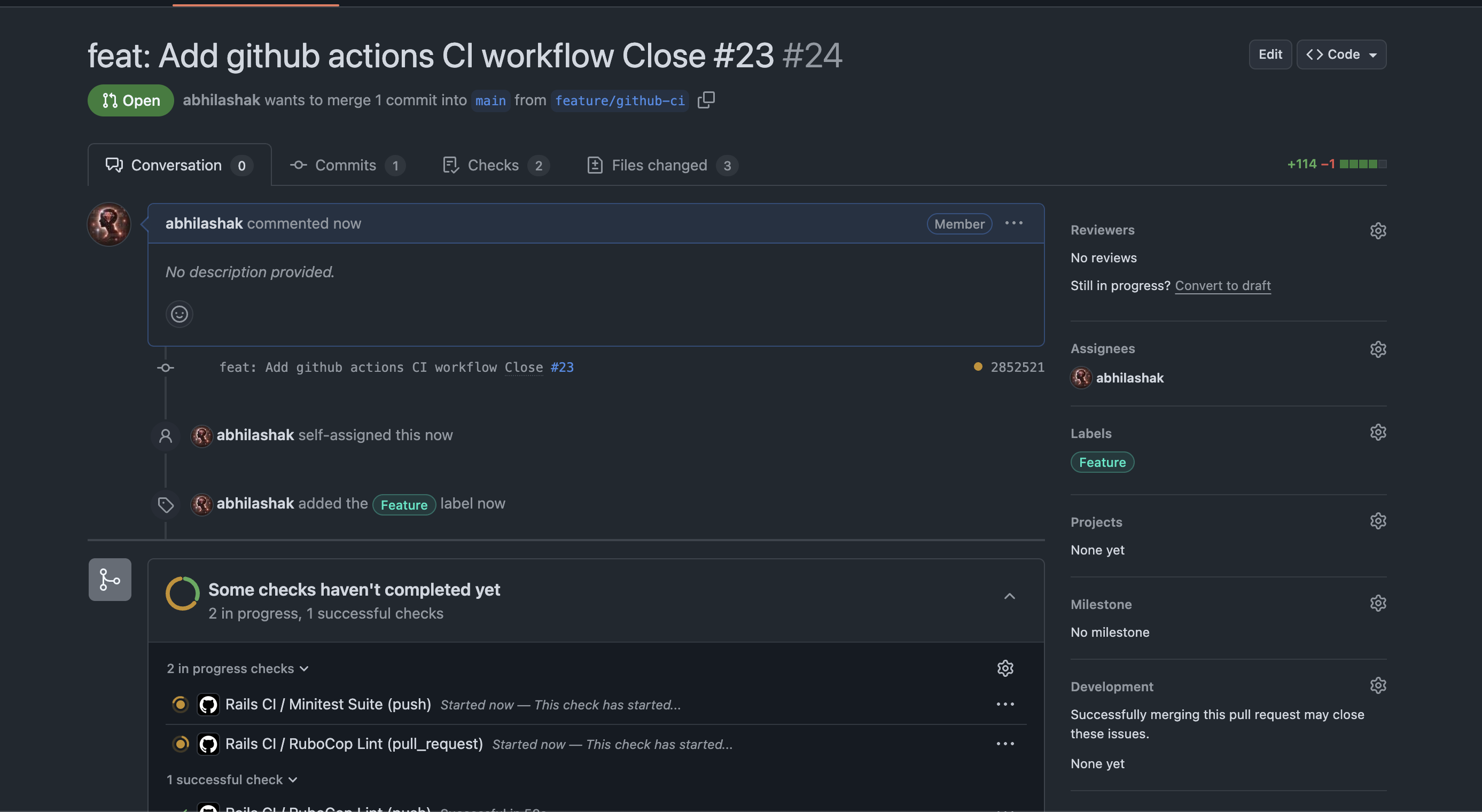
3️⃣ Open a Pull Request

  • Go to GitHub → your repository → create a pull request from feature/github-ci to main.

4️⃣ Watch GitHub Actions run

  • Go to the Pull Request page.
  • You should see a yellow dot / pending check under “Checks”.
  • Click the “Details” link next to the check (or go to the Actions tab) to see live logs.

✅ How to Know It’s Working

✔️ If all your jobs (e.g., RuboCop Lint, Minitest Suite) finish with green checkmarks, your CI setup is working!

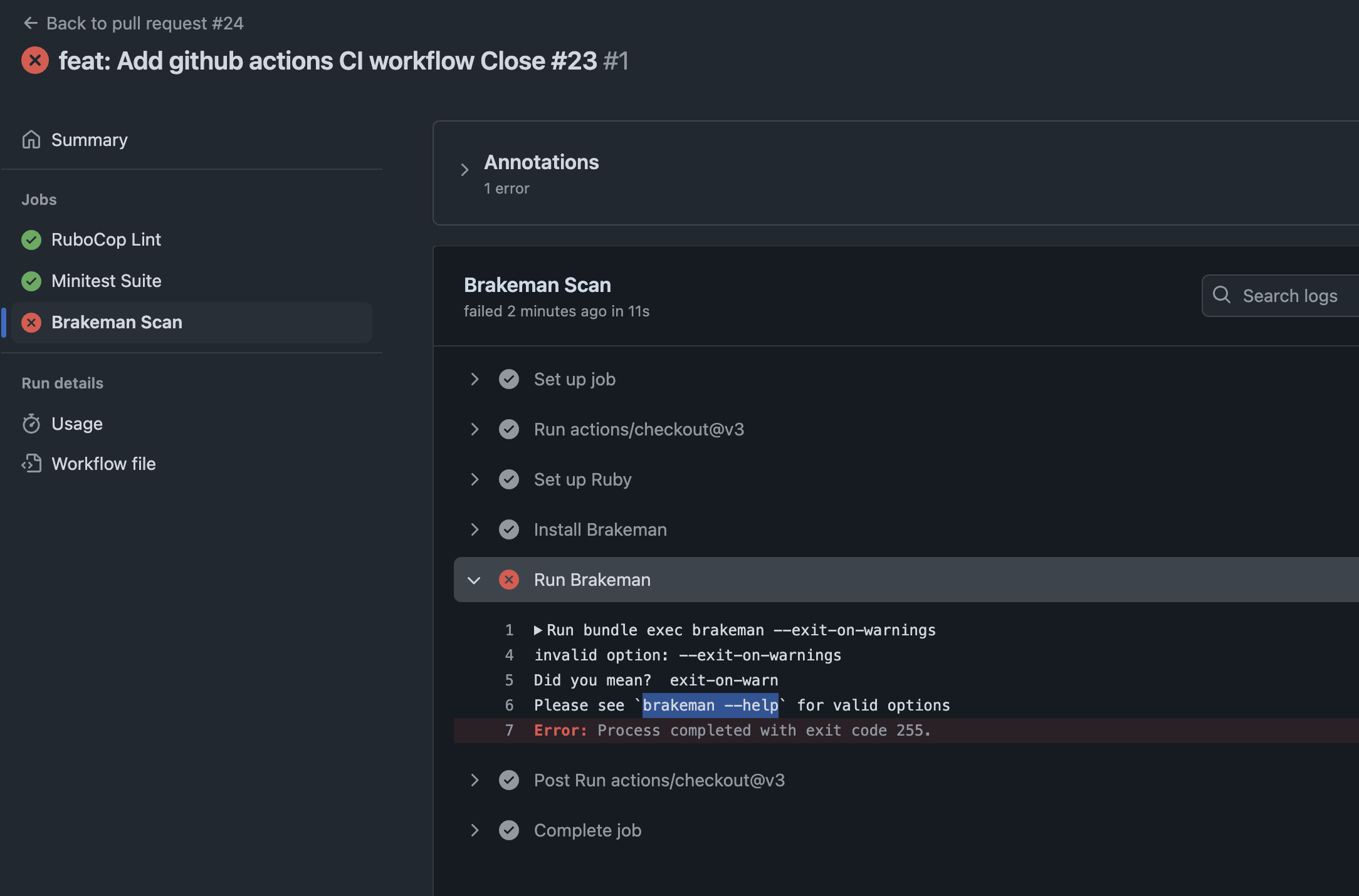
❌ If something fails, you’ll get a red X and the logs will show exactly what failed.

So what’s the problem. Check details.

Check brakeman help for further information about the option.

➜  design_studio git:(feature/github-ci) brakeman --help | grep warn
    -z, --[no-]exit-on-warn          Exit code is non-zero if warnings found (Default)
        --ensure-ignore-notes        Fail when an ignored warnings does not include a note

Modify the option and run again:

run: bundle exec brakeman --exit-on-warn

Push the code and check all checks are passing. ✅

🛠 How to Test Further

If you want to trigger CI without a PR, you can push directly to main:

git checkout main
git merge feature/setup-ci
git push origin main

Note: Make sure your .github/workflows/ci.yml includes:

on:
  push:
    branches: [main, 'feature/**']
  pull_request:
    branches: [main]

This ensures CI runs on both pushes and pull requests.

🧪 Pro Tip: Break It Intentionally

If you want to see CI fail, you can:

  • Add a fake RuboCop error (like an unaligned indent).
  • Add a failing test (assert false).
  • Push and watch the red X appear.

This is a good way to verify your CI is catching problems!


Happy Rails CI setup! 🚀

Rails 8 App: Comprehensive Guide 📑 to Write Controller Tests | 👓 Rspec – 20 Test Cases For Reference

Testing is a crucial part of ensuring the reliability and correctness of a Ruby on Rails 8 application. Controller tests verify the behaviour of your application’s controllers, ensuring that actions handle requests properly, return correct responses, and enforce security measures.

This guide explores the best practices in writing Rails 8 controller tests, references well-known Rails projects, and provides 20 test case examples—including 5 complex ones.

Setting Up the Testing Environment using Rspec

To effectively write controller tests, we use RSpec (the most popular testing framework in the Rails community) along with key supporting gems:

Recommended Gems

Add the following gems to your Gemfile under the :test group:

group :test do
  gem 'rspec-rails'  # Main testing framework
  gem 'factory_bot_rails'  # For test data setup
  gem 'database_cleaner-active_record'  # Cleans test database
  gem 'faker'  # Generates fake data
  gem 'shoulda-matchers'  # Provides one-liner matchers for common Rails functions
end

Run:

bundle install
rails generate rspec:install

Then, configure spec_helper.rb and rails_helper.rb to include necessary test configurations.

Types of Controller Tests

A controller test should cover various scenarios:

  1. Successful actions (index, show, create, update, destroy)
  2. Error handling (record not found, invalid params)
  3. Authentication & Authorization (user roles, access control)
  4. Redirections & Response types (HTML, JSON, Turbo Streams)
  5. Edge cases (empty parameters, SQL injection attempts)

Let’s dive into examples.

Basic Controller Tests

1. Testing Index Action

require 'rails_helper'

describe ArticlesController, type: :controller do
  describe 'GET #index' do
    it 'returns a successful response' do
      get :index
      expect(response).to have_http_status(:ok)
    end
  end
end

2. Testing Show Action with a Valid ID

describe 'GET #show' do
  let(:article) { create(:article) }
  it 'returns the requested article' do
    get :show, params: { id: article.id }
    expect(response).to have_http_status(:ok)
    expect(assigns(:article)).to eq(article)
  end
end

3. Testing Show Action with an Invalid ID

describe 'GET #show' do
  it 'returns a 404 for an invalid ID' do
    get :show, params: { id: 9999 }
    expect(response).to have_http_status(:not_found)
  end
end

4. Testing Create Action with Valid Parameters

describe 'POST #create' do
  it 'creates a new article' do
    expect {
      post :create, params: { article: attributes_for(:article) }
    }.to change(Article, :count).by(1)
  end
end

5. Testing Create Action with Invalid Parameters

describe 'POST #create' do
  it 'does not create an article with invalid parameters' do
    expect {
      post :create, params: { article: { title: '' } }
    }.not_to change(Article, :count)
  end
end

6. Testing Update Action

describe 'PATCH #update' do
  let(:article) { create(:article) }
  it 'updates an article' do
    patch :update, params: { id: article.id, article: { title: 'Updated' } }
    expect(article.reload.title).to eq('Updated')
  end
end

7. Testing Destroy Action

describe 'DELETE #destroy' do
  let!(:article) { create(:article) }
  it 'deletes an article' do
    expect {
      delete :destroy, params: { id: article.id }
    }.to change(Article, :count).by(-1)
  end
end

Here are the missing test cases (7 to 15) that should be included in your blog post:

8. Testing Redirection After Create

describe 'POST #create' do
  it 'redirects to the article show page' do
    post :create, params: { article: attributes_for(:article) }
    expect(response).to redirect_to(assigns(:article))
  end
end

9. Testing JSON Response for Index Action

describe 'GET #index' do
  it 'returns a JSON response' do
    get :index, format: :json
    expect(response.content_type).to eq('application/json')
  end
end

10. Testing JSON Response for Show Action

describe 'GET #show' do
  let(:article) { create(:article) }
  it 'returns the article in JSON format' do
    get :show, params: { id: article.id }, format: :json
    expect(response.content_type).to eq('application/json')
    expect(response.body).to include(article.title)
  end
end

11. Testing Unauthorized Access to Update

describe 'PATCH #update' do
  let(:article) { create(:article) }
  it 'returns a 401 if user is not authorized' do
    patch :update, params: { id: article.id, article: { title: 'Updated' } }
    expect(response).to have_http_status(:unauthorized)
  end
end

12. Testing Strong Parameters Enforcement

describe 'POST #create' do
  it 'does not allow mass assignment of protected attributes' do
    expect {
      post :create, params: { article: { title: 'Valid', admin_only_field: true } }
    }.to raise_error(ActiveModel::ForbiddenAttributesError)
  end
end

13. Testing Destroy Action with Invalid ID

describe 'DELETE #destroy' do
  it 'returns a 404 when the article does not exist' do
    delete :destroy, params: { id: 9999 }
    expect(response).to have_http_status(:not_found)
  end
end

14. Testing Session Persistence

describe 'GET #dashboard' do
  before { session[:user_id] = create(:user).id }
  it 'allows access to the dashboard' do
    get :dashboard
    expect(response).to have_http_status(:ok)
  end
end

15. Testing Rate Limiting on API Requests

describe 'GET #index' do
  before do
    10.times { get :index }
  end
  it 'returns a 429 Too Many Requests when rate limit is exceeded' do
    get :index
    expect(response).to have_http_status(:too_many_requests)
  end
end

Complex Controller 🎮 Tests

16. Testing Admin Access Control

describe 'GET #admin_dashboard' do
  context 'when user is admin' do
    let(:admin) { create(:user, role: :admin) }
    before { sign_in admin }
    it 'allows access' do
      get :admin_dashboard
      expect(response).to have_http_status(:ok)
    end
  end
  context 'when user is not admin' do
    let(:user) { create(:user, role: :user) }
    before { sign_in user }
    it 'redirects to home' do
      get :admin_dashboard
      expect(response).to redirect_to(root_path)
    end
  end
end

17. Testing Turbo Stream Responses

describe 'PATCH #update' do
  let(:article) { create(:article) }
  it 'updates an article and responds with Turbo Stream' do
    patch :update, params: { id: article.id, article: { title: 'Updated' } }, format: :turbo_stream
    expect(response.media_type).to eq Mime[:turbo_stream]
  end
end

Here are three additional complex test cases (18, 19, and 20) to include in your blog post:

18. Testing WebSockets with ActionCable

describe 'WebSocket Connection' do
  let(:user) { create(:user) }
  
  before do
    sign_in user
  end

  it 'successfully subscribes to a channel' do
    subscribe room_id: 1
    expect(subscription).to be_confirmed
    expect(subscription).to have_stream_from("chat_1")
  end
end

Why? This test ensures that ActionCable properly subscribes users to real-time chat channels.

19. Testing Nested Resource Actions

describe 'POST #create in nested resource' do
  let(:user) { create(:user) }
  let(:post) { create(:post, user: user) }

  it 'creates a comment under the correct post' do
    expect {
      post :create, params: { post_id: post.id, comment: { body: 'Nice post!' } }
    }.to change(post.comments, :count).by(1)
  end
end

Why? This test ensures correct behavior when working with nested resources like comments under posts.

20. Testing Multi-Step Form Submission

describe 'PATCH #update (multi-step form)' do
  let(:user) { create(:user, step: 'personal_info') }

  it 'advances the user to the next step in a multi-step form' do
    patch :update, params: { id: user.id, user: { step: 'address_info' } }
    expect(user.reload.step).to eq('address_info')
  end
end

Why? This test ensures users can progress through a multi-step form properly.

📝 Conclusion

This guide provides an extensive overview of controller testing in Rails 8, ensuring robust coverage for all possible scenarios. By following these patterns, your Rails applications will have reliable, well-tested controllers that behave as expected.

Happy Testing! 🚀

Setup 🛠 Rails 8 App – Part 14: Product Controller Test cases 🔍 For GitHub Actions

In an e-commerce application built with Ruby on Rails, controller tests ensure that your APIs and web interfaces behave as expected. In this post, we’ll explore our ProductsControllerTest suite that validates product creation, editing, deletion, and error handling—including associated product variants and image uploads.

Overview

Our controller is responsible for managing Product records and their associated ProductVariant. A Product may have multiple variants, but for simplicity, we’re focusing on creating a product with a primary variant. The test suite uses ActionDispatch::IntegrationTest for full-stack request testing and some pre-seeded fixtures (products(:one) and product_variants(:one)).

Integration tests (Rails 5+)

  • Inherit from ActionDispatch::IntegrationTest.
  • Spin up the full Rails stack (routing, middleware, controllers, views).
  • You drive them with full URLs/paths (e.g. get products_url) and can even cross multiple controllers in one test.

🧪 Fixture Setup

Before diving into the tests, here’s how we set up our test data using fixtures.

Product Fixture (test/fixtures/products.yml)

one:
  name: My Product
  description: "Sample description"
  brand: BrandOne
  category: men
  rating: 4.0
  created_at: <%= Time.now %>
  updated_at: <%= Time.now %>

Product Variant Fixture (test/fixtures/product_variants.yml)

one:
  product: one
  sku: "ABC123"
  mrp: 1500.00
  price: 1300.00
  discount_percent: 10.0
  size: "M"
  color: "Red"
  stock_quantity: 10
  specs: { material: "cotton" }
  created_at: <%= Time.now %>
  updated_at: <%= Time.now %>

We also include a sample image for upload testing:

📁 test/fixtures/files/sample.jpg

🧩 Breakdown of ProductsControllerTest

Here’s what we’re testing and why each case is important:

setup do … end

Runs before each test in the class. Use it to prepare any common test data or state.

class ProductsControllerTest < ActionDispatch::IntegrationTest
  setup do
    @product = products(:one)
    @variant = product_variants(:one)
  end

  # every test below can use @product and @variant
end

test "description" do … end

Defines an individual test case. The string describes what behaviour you’re verifying.

test "should get index" do
  get products_url
  assert_response :success
end

1. GET /products (index)

test "should get index" do
    get products_url
    assert_response :success
    # check products header exists
    assert_select "h1", /Products/i
    # check new product button exists
    assert_select "main div a.btn-new[href=?]", new_product_path,
                  text: "➕ New Product", count: 1
  end

✔️ Verifies the product listing page is accessible and renders a header. New product button also rendered.

assert_response

Verifies the HTTP status code returned by your request.
Common symbols:

  • :success (200)
  • :redirect (3xx)
  • :unprocessable_entity (422)
  • :not_found (404)
get new_product_url
assert_response :success

post products_url, params: invalid_params
assert_response :unprocessable_entity

assert_select

Inspects the server‐rendered HTML using CSS selectors.
Great for making sure particular elements and text appear.

get products_url
assert_select "h1", "Products"      # exact match
assert_select "h1", /Products/i     # regex match
assert_select "form[action=?]", products_path

2. GET /products/new

test "should get new" do
    get new_product_url
    assert_response :success
    assert_select "form"
    assert_select "main div a.btn-back[href=?]", products_path,
                  text: /Back to Products/, count: 1
  end

✔️ Ensures the new product form is available. Back button is rendered (for button text we use Reg Exp).

3. POST /products with valid product and variant

test "should create product with variant" do
  assert_difference([ "Product.count", "ProductVariant.count" ]) do
    post products_url, params: {
      product: {
        name: "New Product",
        ...
        images: [fixture_file_upload("test/fixtures/files/sample.jpg", "image/jpeg")],
        product_variant: { ... }
      }
    }
  end
   assert_redirected_to product_url(product)
   assert_equal 1, product.variants.count
   ....
end

✔️ Tests nested attributes, image file uploads, and variant creation in one go.

assert_difference

Ensures a given expression changes by an expected amount.
Often used to test side‐effects like record creation/deletion.

assert_difference "Product.count", +1 do
  post products_url, params: valid_product_params
end

assert_difference ["Product.count", "ProductVariant.count"], +1 do
  post products_url, params: nested_variant_params
end

assert_no_difference "Product.count" do
  post products_url, params: invalid_params
end

assert_redirected_to

Confirms that the controller redirected to the correct path or URL.

post products_url, params: valid_params
assert_redirected_to product_url(Product.last)

delete product_url(@product)
assert_redirected_to products_url

4. POST /products fails when variant is invalid

test "should not create product if variant invalid (missing required mrp)" do
  assert_no_difference([ "Product.count", "ProductVariant.count" ]) do
    post products_url, params: { ... 
        product: { ...
           product_variant: {
             ...
             mrp: nil, # Invalid
             ...
           }
        }
    }
  end
  assert_response :unprocessable_entity
end

✔️ Ensures validations prevent invalid data from being saved.

5. GET /products/:id

test "should show product" do
  get product_url(@product)
  assert_response :success
  assert_select "h2", @product.brand
  assert_select "h4", @product.name
end

✔️ Validates the product detail page renders correct content.

6. GET /products/:id/edit

test "should get edit" do
  get edit_product_url(@product)
  assert_response :success
  assert_select "form"
end

✔️ Confirms the edit form is accessible.

7. PATCH /products/:id with valid update

test "should update product and variant" do
  patch product_url(@product), params: {
    product: {
      name: "Updated Product",
      rating: 4.2,
      product_variant: {
        size: "XL",
        color: "Blue"
      }
    }
  }
  ...
  assert_equal "Updated Product", @product.name
  assert_equal 4.2, @product.rating
end

✔️ Tests simultaneous updates to product and its variant.

assert_equal

Checks that two values are exactly equal.
Use it to verify model attributes, JSON responses, or any Ruby object.

patch product_url(@product), params: update_params
@product.reload
assert_equal "Updated Name", @product.name
assert_equal 4.2, @product.rating

8. PATCH /products/:id fails with invalid data

test "should not update with invalid variant data" do
  patch product_url(@product), params: {
    product: {
      product_variant: { mrp: nil }
    }
  }
  assert_response :unprocessable_entity
end

✔️ Verifies that invalid updates are rejected and return 422.

9. DELETE /products/:id

test "should destroy product" do
  assert_difference("Product.count", -1) do
    delete product_url(@product)
  end
end

✔️ Ensures products can be deleted successfully.

10. Enforce unique SKU

test "should enforce unique SKU" do
  post products_url, params: {
    product: {
      ...,
      product_variant: {
        sku: @variant.sku, # duplicate
        ...
      }
    }
  }
  assert_response :unprocessable_entity
end

✔️ Tests uniqueness validation for variant SKUs to maintain data integrity.


Putting It All Together

Each of these building blocks helps compose clear, maintainable tests:

  1. setup prepares the ground.
  2. test names and isolates scenarios.
  3. assert_response and assert_redirected_to check HTTP behavior.
  4. assert_select inspects rendered views.
  5. assert_difference validates side-effects.
  6. assert_equal verifies precise state changes.

Refer for more here: https://github.com/rails/rails-dom-testing/blob/main/test/selector_assertions_test.rb

With these tools, you can cover every happy path and edge case in your Rails controllers – ensuring confidence in your application’s behaviour!

📌 Best Practices Covered

  • 🔁 Fixture-driven tests for consistency and speed
  • 🔍 Use of assert_select to test views
  • 🧩 Testing nested models and image uploads
  • 🚫 Validation enforcement with assert_no_difference
  • 🧪 Full CRUD test coverage with edge cases

📝 Summary

A well-tested controller gives you peace of mind when iterating or refactoring. With a test suite like this, you’re not only testing basic functionality but also ensuring that validations, associations, and user-facing forms behave as expected. You can also use Rspec for Test Cases. Check the post for Rspec examples: https://railsdrop.com/2025/05/04/rails-8-write-controller-tests-20-rspec-test-cases-examples/

Stay confident.

Enjoy Testing! 🚀

Rails 8 App: Setup Test DB in PostgreSQL | Write SQL Queries | Operators | Joins

Here’s a list of commonly used SQL comparison operators with brief explanations and examples:

📋 Basic Comparison Operators:

OperatorMeaningExampleResult
=Equal toWHERE age = 25Matches rows where age is 25
<>Not equal to (standard)WHERE status <> 'active'Matches rows where status is not 'active'
!=Not equal to (alternative)WHERE id != 10Same as <>, matches if id is not 10
>Greater thanWHERE salary > 50000Matches rows with salary above 50k
<Less thanWHERE created_at < '2024-01-01'Matches dates before Jan 1, 2024
>=Greater than or equalWHERE age >= 18Matches age 18 and above
<=Less than or equalWHERE age <= 65Matches age 65 and below

📋 Other Common Operators:

OperatorMeaningExample
BETWEENWithin a rangeWHERE price BETWEEN 100 AND 200
INMatch any value in a listWHERE country IN ('US', 'CA', 'UK')
NOT INNot in a listWHERE role NOT IN ('admin', 'staff')
IS NULLValue is nullWHERE deleted_at IS NULL
IS NOT NULLValue is not nullWHERE updated_at IS NOT NULL
LIKEPattern match (case-insensitive in some DBs)WHERE name LIKE 'J%'
ILIKECase-insensitive LIKE (PostgreSQL only)WHERE email ILIKE '%@gmail.com'

Now we’ve our products and product_variants schema, let’s re-explore all major SQL JOINs using these two related tables.

####### Products

   Column    |              Type              | Collation | Nullable |               Default
-------------+--------------------------------+-----------+----------+--------------------------------------
 id          | bigint                         |           | not null | nextval('products_id_seq'::regclass)
 description | text                           |           |          |
 category    | character varying              |           |          |
 created_at  | timestamp(6) without time zone |           | not null |
 updated_at  | timestamp(6) without time zone |           | not null |
 name        | character varying              |           | not null |
 rating      | numeric(2,1)                   |           |          | 0.0
 brand       | character varying              |           |          |

######## Product variants

      Column      |              Type              | Collation | Nullable |                   Default
------------------+--------------------------------+-----------+----------+----------------------------------------------
 id               | bigint                         |           | not null | nextval('product_variants_id_seq'::regclass)
 product_id       | bigint                         |           | not null |
 sku              | character varying              |           | not null |
 mrp              | numeric(10,2)                  |           | not null |
 price            | numeric(10,2)                  |           | not null |
 discount_percent | numeric(5,2)                   |           |          |
 size             | character varying              |           |          |
 color            | character varying              |           |          |
 stock_quantity   | integer                        |           |          | 0
 specs            | jsonb                          |           | not null | '{}'::jsonb
 created_at       | timestamp(6) without time zone |           | not null |
 updated_at       | timestamp(6) without time zone |           | not null |

💎 SQL JOINS with products and product_variants

These tables are related through:

product_variants.product_id → products.id

So we can use that for all join examples.

🔸 1. INNER JOIN – Show only products with variants
SELECT 
  p.name, 
  pv.sku, 
  pv.price 
FROM products p
INNER JOIN product_variants pv ON p.id = pv.product_id;

♦️ Only returns products that have at least one variant.

🔸 2. LEFT JOIN – Show all products, with variants if available
SELECT 
  p.name, 
  pv.sku, 
  pv.price 
FROM products p
LEFT JOIN product_variants pv ON p.id = pv.product_id;

♦️ Returns all products, even those with no variants (NULLs in variant columns).

🔸 3. RIGHT JOIN – Show all variants, with product info if available

(Less common, but useful if variants might exist without a product record)

SELECT 
  pv.sku, 
  pv.price, 
  p.name 
FROM products p
RIGHT JOIN product_variants pv ON p.id = pv.product_id;

🔸 4. FULL OUTER JOIN – All records from both tables
SELECT 
  p.name AS product_name, 
  pv.sku AS variant_sku 
FROM products p
FULL OUTER JOIN product_variants pv ON p.id = pv.product_id;

♦️ Shows all products and all variants, even when there’s no match.

🔸 5. SELF JOIN Example (for product_variants comparing similar sizes or prices)

Let’s compare variants of the same product that are different sizes.

SELECT 
  pv1.product_id,
  pv1.size AS size_1,
  pv2.size AS size_2,
  pv1.sku AS sku_1,
  pv2.sku AS sku_2
FROM product_variants pv1
JOIN product_variants pv2 
  ON pv1.product_id = pv2.product_id 
  AND pv1.size <> pv2.size
WHERE pv1.product_id = 101;  -- example product

♦️ Useful to analyze size comparisons or price differences within a product.

🧬 Complex Combined JOIN Example

Show each product with its variants, and include only discounted ones (price < MRP):

SELECT 
  p.name AS product_name,
  pv.sku,
  pv.price,
  pv.mrp,
  (pv.mrp - pv.price) AS discount_value
FROM products p
INNER JOIN product_variants pv ON p.id = pv.product_id
WHERE pv.price < pv.mrp
ORDER BY discount_value DESC;

📑 JOIN Summary with These Tables

JOIN TypeUse Case
INNER JOINOnly products with variants
LEFT JOINAll products, even if they don’t have variants
RIGHT JOINAll variants, even if product is missing
FULL OUTER JOINEverything — useful in data audits
SELF JOINCompare or relate rows within the same table

Let’s now look at JOIN queries with more realistic conditions using products and product_variants.

🦾 Advanced JOIN Queries with Conditions to practice

🔹 1. All products with variants in stock AND discounted

SELECT 
  p.name AS product_name,
  pv.sku,
  pv.size,
  pv.color,
  pv.stock_quantity,
  pv.mrp,
  pv.price,
  (pv.mrp - pv.price) AS discount_amount
FROM products p
JOIN product_variants pv ON p.id = pv.product_id
WHERE pv.stock_quantity > 0
  AND pv.price < pv.mrp
ORDER BY discount_amount DESC;

♦️ Shows available discounted variants, ordered by discount.

🔹 2. Products with high rating (4.5+) and at least one low-stock variant (< 10 items)

SELECT 
  p.name AS product_name,
  p.rating,
  pv.sku,
  pv.stock_quantity
FROM products p
JOIN product_variants pv ON p.id = pv.product_id
WHERE p.rating >= 4.5
  AND pv.stock_quantity < 10;

🔹 3. LEFT JOIN to find products with no variants or all variants out of stock

SELECT 
  p.name AS product_name,
  pv.id AS variant_id,
  pv.stock_quantity
FROM products p
LEFT JOIN product_variants pv 
  ON p.id = pv.product_id AND pv.stock_quantity > 0
WHERE pv.id IS NULL;

✅ This tells you:

  • Either the product has no variants
  • Or all variants are out of stock

🔹 4. Group and Count Variants per Product

SELECT 
  p.name AS product_name,
  COUNT(pv.id) AS variant_count
FROM products p
LEFT JOIN product_variants pv ON p.id = pv.product_id
GROUP BY p.name
ORDER BY variant_count DESC;

🔹 5. Variants with price-percentage discount more than 30%

SELECT 
  p.name AS product_name,
  pv.sku,
  pv.mrp,
  pv.price,
  ROUND(100.0 * (pv.mrp - pv.price) / pv.mrp, 2) AS discount_percent
FROM products p
JOIN product_variants pv ON p.id = pv.product_id
WHERE pv.price < pv.mrp
  AND (100.0 * (pv.mrp - pv.price) / pv.mrp) > 30;

🔹 6. Color-wise stock summary for a product category

SELECT 
  p.category,
  pv.color,
  SUM(pv.stock_quantity) AS total_stock
FROM products p
JOIN product_variants pv ON p.id = pv.product_id
WHERE p.category = 'Shoes'
GROUP BY p.category, pv.color
ORDER BY total_stock DESC;

These queries simulate real-world dashboard views: inventory tracking, product health, stock alerts, etc.


Happy SQL Query Writing! 🚀

Rails 8 App: Setup Test DB in PostgreSQL | Write SQL Queries

1. Add the test db and users table: https://railsdrop.com/2025/04/25/rails-8-app-postgresql-heap-vs-mysql-innodb-b-tree-indexing/

2. Add fake data into the table: https://railsdrop.com/2025/04/29/rails-8-app-postgresql-faker-extensions-for-rails/

Start Learn (Premium): https://railsdrop.com/sql-postgresql-queries-bitmap-seq-index-scan-db-clustering/

📌 Summary of all queries

Check: https://railsdrop.com/postgresql-queries-a-summary/


Read – Composite vs Individual indexes (Premium): https://railsdrop.com/sql-postgres-understanding-current-composite-index/

Read Create 1 million sample users: https://railsdrop.com/sql-postgresql-create-1-million-sample-users-data/

👉 1. SELECT – Basic Query

🔹 1. Select all columns:

SELECT * FROM users;

This gives you every row and every column in the users table.

🔹 2. Select specific columns:

SELECT username, email FROM users;

This limits the output to only username and email.

👉 2. ALTER – Modify Table Structure

The ALTER TABLE statement is used to add, delete, or modify columns in an existing table.

🔹 Example 1: Add a new column

Let’s add a column created_at of type timestamp:

ALTER TABLE users 
  ADD COLUMN created_at timestamp;

🔹 Example 2: Rename a column

Let’s rename phone_number to mobile:

ALTER TABLE users
  RENAME COLUMN phone_number TO mobile;
🔹 Example 3: Drop a column

Let’s say you want to remove the created_at column:

ALTER TABLE users
  DROP COLUMN created_at;
🔹 4. Modify specific columns:
UPDATE users
  SET mobile = '123456'
  WHERE mobile IS NULL;
  • Use UPDATE instead of ALTER when modifying data in a table.
  • ALTER is used for changing the structure/schema of a table (e.g., adding columns), not for updating data.

👉 3. DISTINCT – Remove Duplicate Values

The DISTINCT keyword is used to return only unique (non-duplicate) values in a result set.

🔹 Example 1: Distinct usernames
SELECT DISTINCT username FROM users;

This returns a list of unique usernames, removing any duplicates.

🔹 Example 2: Distinct combinations of username and email
SELECT DISTINCT username, email FROM users;
SELECT DISTINCT username from users WHERE username like '%quin%';
EXPLAIN ANALYSE SELECT DISTINCT username from users WHERE username like '%quin%';

This checks for uniqueness based on both username and email combined.


👉 4. WHERE – Filter Records + Major Combine Types (AND, OR, NOT)

The WHERE clause is used to filter records that meet a certain condition.

Let’s look at basic and combined conditions using our users table.

🔹 Example 1: Simple WHERE
SELECT * FROM users WHERE username = 'john_doe';

🔹 Example 2: AND – Combine multiple conditions (all must be true)
SELECT * FROM users 
WHERE username = 'quinton' AND email LIKE '%@gmail.com';

🔹 Example 3: OR – At least one condition must be true
SELECT * FROM users 
WHERE username = 'quinton' OR username = 'joaquin_hand';

🔹 Example 4: NOT – Negate a condition
SELECT * FROM users 
WHERE NOT email LIKE '%@example.com';

🔹 Example 5: Combine AND, OR, NOT (use parentheses!)
SELECT * FROM users 
WHERE (email like '%example%' OR email like '%test%') 
  AND NOT username = 'admin';


👉 5. ORDER BY – Sort the Results

And we’ll also look at combined queries afterward.

🔹 Example 1: Order by a single column (ascending)
SELECT * FROM users 
ORDER BY username;

🔹 Example 2: Order by a column (descending)
SELECT * FROM users 
ORDER BY email DESC;

🔹 Example 3: Order by multiple columns
SELECT * FROM users 
ORDER BY username ASC, email DESC;


👉 6. Combined Queries (UNION, INTERSECT, EXCEPT)

✅ These allow you to combine results from multiple SELECT statements.

⚠ Requirements:

  • Each query must return the same number of columns.
  • Data types must be compatible.
🔹 UNION – Combine results and remove duplicates
SELECT username FROM users WHERE email LIKE '%@example.com'
UNION
SELECT username FROM users WHERE username LIKE 'ton%';

🔹 UNION ALL – Combine results and keep duplicates
SELECT username FROM users WHERE email LIKE '%@gmail.com'
UNION ALL
SELECT username FROM users WHERE username LIKE 'test%';

🔹 INTERSECT – Return only common results
SELECT username FROM users 
  WHERE email LIKE '%@gmail.com'
INTERSECT
SELECT username FROM users 
  WHERE username LIKE 'test%';

SELECT username FROM users
  WHERE (email like '%example' OR email like '%test')
INTERSECT
SELECT username FROM users
  WHERE username like 'adam';
🔹 EXCEPT – Return results from the first query that are not in the second
SELECT username FROM users 
  WHERE email LIKE '%@example'
EXCEPT
SELECT username FROM users 
  WHERE (username like '%ada%' OR username like '%merlin%');


👉 7. IS NULL and IS NOT NULL – Handling Missing Data

These are used to check if a column contains a NULL value (i.e., no value).

🔹 Example 1: Users with a missing/have an email
# Find users with a missing email
SELECT * FROM users 
WHERE email IS NULL;

# Find 
SELECT * FROM users 
WHERE email IS NOT NULL;

🔹 Example 2: Users with no email and no mobile
SELECT * FROM users 
WHERE email IS NULL AND phone_number IS NULL;

🔹 Example 3: Users with either email or mobile missing
SELECT * FROM users 
WHERE email IS NULL OR phone_number IS NULL;

🔹 Example 4: Users who have an email and username starts with ‘adam’
SELECT * FROM users 
WHERE email IS NOT NULL AND username LIKE 'adam%';

🔹 Example 5: Users with email missing but username is not empty
SELECT * FROM users 
WHERE email IS NULL AND username IS NOT NULL;

🔹 Example 6: Users where email or mobile is null, but not both (exclusive or)
SELECT * FROM users 
WHERE (email IS NULL AND mobile IS NOT NULL)
   OR (email IS NOT NULL AND mobile IS NULL);


👉 8. LIMIT, SELECT TOP, SELECT TOP PERCENT (PostgreSQL-style)

In PostgreSQL, we use LIMIT instead of SELECT TOP.
(PostgreSQL doesn’t support TOP directly like SQL Server.)

🔹 Example 1: Limit number of results (first 10 rows)
SELECT * FROM users 
LIMIT 10;

🔹 Example 2: Combined with ORDER BY (top 5 newest usernames)
SELECT username FROM users 
  WHERE username IS NOT NULL
ORDER BY id DESC
LIMIT 5;

🔹 Example 3: Paginate (e.g., 11th to 20th row)
SELECT * FROM users 
ORDER BY id 
OFFSET 10 LIMIT 10;

🔔 Simulating SELECT TOP and SELECT TOP PERCENT in PostgreSQL

🔹 Example 4: Simulate SELECT TOP 1
SELECT * FROM users 
ORDER BY id 
LIMIT 1;

🔹 Example 5: Simulate SELECT TOP 10 PERCENT

To get the top 10% of users by id, you can use a subquery:

SELECT * FROM users
ORDER BY id
LIMIT (SELECT CEIL(COUNT(*) * 0.10) FROM users);

🔹 Example 6: Users with Gmail or Yahoo emails, ordered by ID, limit 5
SELECT id, username, email FROM users
WHERE email LIKE '%@gmail.com' OR email LIKE '%@yahoo.com'
AND username IS NOT NULL
ORDER BY id ASC
LIMIT 5;

Note: Without parentheses, AND has higher precedence than OR.

🔹 Better version with correct logic:
SELECT id, username, email FROM users
WHERE (email LIKE '%@gmail.com' OR email LIKE '%@yahoo.com')
  AND username IS NOT NULL
ORDER BY id ASC
LIMIT 5;


👉 9. Aggregation Functions: MIN, MAX, COUNT, AVG, SUM

These functions help you perform calculations on column values.

🔹 1. COUNT – Number of rows
SELECT COUNT(*) FROM users;

✔️ Total number of users.

SELECT COUNT(email) FROM users WHERE email IS NOT NULL;

✔️ Count of users who have an email.

🔹 2. MIN and MAX – Smallest and largest values
SELECT MIN(id) AS first_user, MAX(id) AS last_user FROM users;

🔹 3. AVG – Average (only on numeric fields)

Assuming id is somewhat sequential, we can do:

SELECT AVG(id) AS avg_id FROM users;

🔹 4. SUM – Total (again, only on numeric fields)
SELECT SUM(id) AS total_ids FROM users WHERE id < 1000;

Combined Queries with Aggregates

🔹 Example 1: Count users without email and with usernames starting with ‘test’
SELECT COUNT(*) FROM users 
WHERE email IS NULL AND username LIKE 'test%';

🔹 Example 2: Get min, max, avg ID of users with Gmail addresses
SELECT 
  MIN(id) AS min_id,
  MAX(id) AS max_id,
  AVG(id) AS avg_id
FROM users 
WHERE email LIKE '%@gmail.com';

🔹 Example 3: Count how many users per email domain
SELECT 
  SPLIT_PART(email, '@', 2) AS domain,
  COUNT(*) AS total_users
FROM users
WHERE email IS NOT NULL
GROUP BY domain
ORDER BY total_users DESC
LIMIT 5;

♦️ This query breaks email at the @ to group by domain like gmail.com, yahoo.com.

GROUP BY Course

Here’s the SQL query to get the maximum mark, minimum mark, and the email (or emails) of users grouped by each course:

Option 1: Basic GROUP BY with aggregate functions (only max/min mark per course, not emails)
SELECT
  course,
  MAX(mark) AS max_mark,
  MIN(mark) AS min_mark
FROM users
GROUP BY course;

Option 2: Include emails of users who have the max or min mark per course

(PostgreSQL-specific using subqueries and JOIN)

SELECT u.course, u.email, u.mark
FROM users u
JOIN (
  SELECT
    course,
    MAX(mark) AS max_mark,
    MIN(mark) AS min_mark
  FROM users
  GROUP BY course
) stats ON u.course = stats.course AND (u.mark = stats.max_mark OR u.mark = stats.min_mark)
ORDER BY u.course, u.mark DESC;

♦️ This second query shows all users who have the highest or lowest mark in their course, including ties.

Here’s the updated query that includes:

  • Course name
  • Emails of users with the maximum or minimum marks
  • Their marks
  • Average mark per course
SELECT
  u.course,
  u.email,
  u.mark,
  stats.max_mark,
  stats.min_mark,
  stats.avg_mark
FROM users u
JOIN (
  SELECT
    course,
    MAX(mark) AS max_mark,
    MIN(mark) AS min_mark,
    ROUND(AVG(mark), 2) AS avg_mark
  FROM users
  GROUP BY course
) stats ON u.course = stats.course AND (u.mark = stats.max_mark OR u.mark = stats.min_mark)
ORDER BY u.course, u.mark DESC;

Notes:
  • ROUND(AVG(mark), 2) gives the average mark rounded to two decimal places.
  • Users with the same max or min mark are all included.

Here’s the full query including:

  • Course
  • Email
  • Mark
  • Max/Min mark
  • Average mark
  • User count per course
SELECT
  u.course,
  u.email,
  u.mark,
  stats.max_mark,
  stats.min_mark,
  stats.avg_mark,
  stats.user_count
FROM users u
JOIN (
  SELECT
    course,
    MAX(mark) AS max_mark,
    MIN(mark) AS min_mark,
    ROUND(AVG(mark), 2) AS avg_mark,
    COUNT(*) AS user_count
  FROM users
  GROUP BY course
) stats ON u.course = stats.course AND (u.mark = stats.max_mark OR u.mark = stats.min_mark)
ORDER BY u.course, u.mark DESC;

♦️ This query gives you a full breakdown of top/bottom performers per course along with stats per group.

Here’s a version that adds the rank of each user within their course based on their mark (highest mark = rank 1), along with:

  • Course
  • Email
  • Mark
  • Rank (within course)
  • Max mark, Min mark, Average mark, User count per course
WITH ranked_users AS (
  SELECT
    u.*,
    RANK() OVER (PARTITION BY course ORDER BY mark DESC) AS rank_in_course
  FROM users u
),
course_stats AS (
  SELECT
    course,
    MAX(mark) AS max_mark,
    MIN(mark) AS min_mark,
    ROUND(AVG(mark), 2) AS avg_mark,
    COUNT(*) AS user_count
  FROM users
  GROUP BY course
)
SELECT
  r.course,
  r.email,
  r.mark,
  r.rank_in_course,
  cs.max_mark,
  cs.min_mark,
  cs.avg_mark,
  cs.user_count
FROM ranked_users r
JOIN course_stats cs ON r.course = cs.course
ORDER BY r.course, r.rank_in_course;

Key features:
  • Users are ranked per course using RANK() (supports ties).
  • The output includes all users, not just those with max/min marks.

NOTE: Here we can see output like:

    course    |                   email                   | mark | rank_in_course | max_mark | min_mark | avg_mark | user_count
--------------+-------------------------------------------+------+----------------+----------+----------+----------+------------
 IT           | lisandra.schoen@borer-effertz.test        | 1000 |              1 |     1000 |      100 |   543.04 |        796
 IT           | leona@jaskolski-jaskolski.test            | 1000 |              1 |     1000 |      100 |   543.04 |        796
 IT           | angle@ankunding-sauer.example             |  999 |              3 |     1000 |      100 |   543.04 |        796
 IT           | drucilla_okeefe@monahan.test              |  999 |              3 |     1000 |      100 |   543.04 |        796
 algebra      | natashia.langosh@luettgen.test            | 1000 |              1 |     1000 |      100 |   541.52 |        779
 algebra      | tiffany.tremblay@bergnaum.example         | 1000 |              1 |     1000 |      100 |   541.52 |        779
 algebra      | kristeen.nikolaus@crist.example           |  999 |              3 |     1000 |      100 |   541.52 |        779
 algebra      | domenic@predovic-dare.example             |  999 |              3 |     1000 |      100 |   541.52 |        779
 algebra      | kit@oconner.example                       |  999 |              3 |     1000 |      100 |   541.52 |        779
 architecture | tierra_reilly@botsford-okuneva.test       |  997 |              1 |      997 |      100 |   549.24 |        776
 architecture | celestine_reilly@bayer.example            |  996 |              2 |      997 |      100 |   549.24 |        776
 architecture | carson@kulas.example                      |  995 |              3 |      997 |      100 |   549.24 |        776
 botany       | hassan@towne.test                         | 1000 |              1 |     1000 |      103 |   554.07 |        760
 botany       | shaunna@hudson.test                       | 1000 |              1 |     1000 |      103 |   554.07 |        760
 botany       | sanford_jacobs@johnston.example           |  999 |              3 |     1000 |      103 |   554.07 |        760
 botany       | arnulfo_cremin@ernser.example             |  999 |              3 |     1000 |      103 |   554.07 |        760

The Ranks are not consistent. To avoid this we can use DENSE_RANK().

Here’s the updated query using DENSE_RANK() instead of RANK() — this avoids gaps in rank numbering when there are ties:

WITH ranked_users AS (
  SELECT
    u.*,
    DENSE_RANK() OVER (PARTITION BY course ORDER BY mark DESC) AS rank_in_course
  FROM users u
),
course_stats AS (
  SELECT
    course,
    MAX(mark) AS max_mark,
    MIN(mark) AS min_mark,
    ROUND(AVG(mark), 2) AS avg_mark,
    COUNT(*) AS user_count
  FROM users
  GROUP BY course
)
SELECT
  r.course,
  r.email,
  r.mark,
  r.rank_in_course,
  cs.max_mark,
  cs.min_mark,
  cs.avg_mark,
  cs.user_count
FROM ranked_users r
JOIN course_stats cs ON r.course = cs.course
WHERE r.rank_in_course <= 3
ORDER BY r.course, r.rank_in_course;

DENSE_RANK difference:
  • If 2 users tie for 1st place, the next gets rank 2 (not 3 like with RANK).
  • Ensures consistent top-N output when ties are frequent.

🔥 Boom, Bonus: To export the query result as a CSV file in PostgreSQL, you can use the \copy command in psql (PostgreSQL’s CLI), like this:

🧾 Export Top 3 Students per Course to CSV

\copy (
  WITH ranked_users AS (
    SELECT
      u.*,
      DENSE_RANK() OVER (PARTITION BY course ORDER BY mark DESC) AS rank_in_course
    FROM users u
  ),
  course_stats AS (
    SELECT
      course,
      MAX(mark) AS max_mark,
      MIN(mark) AS min_mark,
      ROUND(AVG(mark), 2) AS avg_mark,
      COUNT(*) AS user_count
    FROM users
    GROUP BY course
  )
  SELECT
    r.course,
    r.email,
    r.mark,
    r.rank_in_course,
    cs.max_mark,
    cs.min_mark,
    cs.avg_mark,
    cs.user_count
  FROM ranked_users r
  JOIN course_stats cs ON r.course = cs.course
  WHERE r.rank_in_course <= 3
  ORDER BY r.course, r.rank_in_course
) TO 'top_students_per_course.csv' WITH CSV HEADER;

✅ Requirements:
  • Run this in the psql shell.
  • The file top_students_per_course.csv will be saved in your local working directory (where psql was started).
  • Make sure PostgreSQL has write permissions to that directory.


👉 10. LIKE, %, _ – Pattern Matching in SQL

These are used to filter text using wildcards:

  • % = matches any sequence of characters (0 or more)
  • _ = matches exactly one character

🔹 Basic LIKE Queries

Example 1: Usernames starting with “admin”
SELECT * FROM users 
WHERE username LIKE 'admin%';

Example 2: Usernames ending with “bot”
SELECT * FROM users 
WHERE username LIKE '%bot';

Example 3: Usernames containing “test”
SELECT * FROM users 
WHERE username LIKE '%test%';

🔹 _ Single-character Wildcard

Example 4: 5-character usernames
SELECT * FROM users 
WHERE username LIKE '_____';

(Each _ stands for one character.)

Example 5: Emails starting with any single letter + “ohn” (e.g., “john”, “kohn”)
SELECT * FROM users 
WHERE username LIKE '_ohn';

Combined Queries with LIKE, %, _

🔹 Example 6: Users whose username contains “test” and email ends with “gmail.com”
SELECT * FROM users 
WHERE username LIKE '%test%' AND email LIKE '%@gmail.com';

🔹 Example 7: Users with 3-character usernames and missing email
SELECT * FROM users 
WHERE username LIKE '___' AND email IS NULL;

🔹 Example 8: Users with usernames that start with “a” or end with “x” and have a mobile number
SELECT * FROM users 
WHERE (username LIKE 'a%' OR username LIKE '%x') AND mobile IS NOT NULL;


👉 11. IN, NOT IN, BETWEEN – Set & Range Filters

These are used to filter based on a list of values (IN) or a range (BETWEEN).

🔹 1. IN – Match any of the listed values

SELECT * FROM users 
WHERE username IN ('admin', 'test_user', 'john_doe');

🔹 2. NOT IN – Exclude listed values

SELECT * FROM users 
WHERE username NOT IN ('admin', 'test_user');

🔹 3. BETWEEN – Match within a range (inclusive)

SELECT * FROM users 
WHERE id BETWEEN 100 AND 200;

♦️ Equivalent to: id >= 100 AND id <= 200

Combined Queries

🔹 Example 1: Users with username in a list and id between 1 and 500
SELECT * FROM users 
WHERE username IN ('alice', 'bob', 'carol') 
  AND id BETWEEN 1 AND 500;

🔹 Example 2: Exclude system users and select a range of IDs
SELECT id, username FROM users 
WHERE username NOT IN ('admin', 'system') 
  AND id BETWEEN 1000 AND 2000;

🔹 Example 3: Top 5 users whose email domains are in a specific list
SELECT * FROM users 
WHERE SPLIT_PART(email, '@', 2) IN ('gmail.com', 'yahoo.com', 'hotmail.com')
ORDER BY id
LIMIT 5;


👉 12. SQL Aliases – Renaming Columns or Tables Temporarily

Aliases help improve readability, especially in joins or when using functions.

🔹 1. Column Aliases

Use AS (optional keyword) to rename a column in the result.

Example 1: Rename username to user_name
SELECT username AS user_name, email AS user_email 
FROM users;

You can also omit AS:

SELECT username user_name, email user_email 
FROM users;

🔹 2. Table Aliases

Assign a short name to a table (very useful in joins).

Example 2: Simple alias for table
SELECT u.username, u.email 
FROM users u 
WHERE u.email LIKE '%@gmail.com';

🔹 3. Alias with functions

SELECT COUNT(*) AS total_users, MAX(id) AS latest_id 
FROM users;

Combined Query with Aliases

🔹 Example 4: Count Gmail users, alias result and filter
SELECT 
  COUNT(*) AS gmail_users 
FROM users u 
WHERE u.email LIKE '%@gmail.com';

🔹 Example 5: List usernames with shortened table name and domain extracted
SELECT 
  u.username AS name, 
  SPLIT_PART(u.email, '@', 2) AS domain 
FROM users u 
WHERE u.email IS NOT NULL 
ORDER BY u.username
LIMIT 10;


Rails 8 App: Setup Test DB in PostgreSQL | Faker | Extensions for Rails app, VSCode

Let’s try to add some sample data first to our database.

Step 1: Install pgxnclient

On macOS (with Homebrew):

brew install pgxnclient

On Ubuntu/Debian:

sudo apt install pgxnclient

Step 2: Install the faker extension via PGXN

pgxn install faker

I get issue with installing faker via pgxn:

~ pgxn install faker
INFO: best version: faker 0.5.3
ERROR: resource not found: 'https://api.pgxn.org/dist/PostgreSQL_Faker/0.5.3/META.json'

⚠️ Note: faker extension we’re trying to install via pgxn is not available or improperly published on the PGXN network. Unfortunately, the faker extension is somewhat unofficial and not actively maintained or reliably hosted.

🚨 You can SKIP STEP 3,4,5 and opt Option 2

Step 3: Build and install the extension into PostgreSQL

cd /path/to/pg_faker  # PGXN will print this after install
make
sudo make install

Step 4: Enable it in your database

Inside psql :

CREATE EXTENSION faker;

Step 5: Insert 10,000 fake users

INSERT INTO users (user_id, username, email, phone_number)
SELECT
  gs AS user_id,
  faker_username(),
  faker_email(),
  faker_phone_number()
FROM generate_series(1, 10000) AS gs;
Option 2: Use Ruby + Faker gem (if you’re using Rails or Ruby)

If you’re building your app in Rails, use the faker gem directly:

In Ruby:
require 'faker'
require 'pg'

conn = PG.connect(dbname: 'test_db')

(1..10_000).each do |i|
  conn.exec_params(
    "INSERT INTO users (user_id, username, email, phone_number) VALUES ($1, $2, $3, $4)",
    [i, Faker::Internet.username, Faker::Internet.email, Faker::PhoneNumber.phone_number]
  )
end

In Rails (for test_db), Create the Rake Task:

Create a file at:

lib/tasks/seed_fake_users.rake
# lib/tasks/seed_fake_users.rake

namespace :db do
  desc "Seed 10,000 fake users into the users table"
  task seed_fake_users: :environment do
    require "faker"
    require "pg"

    conn = PG.connect(dbname: "test_db")

    # If user_id is a serial and you want to reset the sequence after deletion, run:
    # conn.exec_params("TRUNCATE TABLE users RESTART IDENTITY")
    # delete existing users to load fake users
    conn.exec_params("DELETE FROM users")
    

    puts "Seeding 10,000 fake users ...."
    (1..10_000).each do |i|
      conn.exec_params(
        "INSERT INTO users (user_id, username, email, phone_number) VALUES ($1, $2, $3, $4)",
        [ i, Faker::Internet.username, Faker::Internet.email, Faker::PhoneNumber.phone_number ]
      )
    end
    puts "Seeded 10,000 fake users into the users table"
    conn.close
  end
end
# run the task
bin/rails db:seed_fake_users
For Normal Rails Rake Task:
# lib/tasks/seed_fake_users.rake

namespace :db do
  desc "Seed 10,000 fake users into the users table"
  task seed_fake_users: :environment do
    require 'faker'

    puts "🌱 Seeding 10,000 fake users..."

    users = []

    # delete existing users
    User.destroy_all

    10_000.times do |i|
      users << {
        user_id: i + 1,
        username: Faker::Internet.unique.username,
        email: Faker::Internet.unique.email,
        phone_number: Faker::PhoneNumber.phone_number
      }
    end

    # Use insert_all for performance
    User.insert_all(users)

    puts "✅ Done. Inserted 10,000 users."
  end
end
# run the task
bin/rails db:seed_fake_users

Now we will discuss about PostgreSQL Extensions and it’s usage.

PostgreSQL extensions are add-ons or plug-ins that extend the core functionality of PostgreSQL. They provide additional capabilities such as new data types, functions, operators, index types, or full features like full-text search, spatial data handling, or fake data generation.

🔧 What Extensions Can Do

Extensions can:

  • Add functions (e.g. gen_random_bytes() from pgcrypto)
  • Provide data types (e.g. hstore, uuid, jsonb)
  • Enable indexing techniques (e.g. btree_gin, pg_trgm)
  • Provide tools for testing and development (e.g. faker, pg_stat_statements)
  • Enhance performance monitoring, security, or language support

📦 Common PostgreSQL Extensions

ExtensionPurpose
pgcryptoCryptographic functions (e.g., hashing, random byte generation)
uuid-osspFunctions to generate UUIDs
postgisSpatial and geographic data support
hstoreKey-value store in a single PostgreSQL column
pg_trgmTrigram-based text search and indexing
citextCase-insensitive text type
pg_stat_statementsSQL query statistics collection
fakerGenerates fake but realistic data (for testing)

📥 Installing and Enabling Extensions

1. Install (if not built-in)

Via package manager or PGXN (PostgreSQL Extension Network), or compile from source.

2. Enable in a database

CREATE EXTENSION extension_name;

Example:

CREATE EXTENSION pgcrypto;

Enabling an extension makes its functionality available to the current database only.

🤔 Why Use Extensions?

  • Productivity: Quickly add capabilities without writing custom code.
  • Performance: Access to advanced indexing, statistics, and optimization tools.
  • Development: Generate test data (faker), test encryption (pgcrypto), etc.
  • Modularity: PostgreSQL stays lightweight while letting you add only what you need.

Here’s a categorized list (with a simple visual-style layout) of PostgreSQL extensions that are safe and useful for Rails apps in both development and production environments.

🔌 PostgreSQL Extensions for Rails Apps

# connect psql
psql -U username -d database_name

# list all available extensions
SELECT * FROM pg_available_extensions;

# eg. to install the hstore extension run
CREATE EXTENSION hstore;

# verify the installation
SELECT * FROM pg_extension;
SELECT * FROM pg_extension WHERE extname = 'hstore';

🔐 Security & UUIDs

ExtensionUse CaseSafe for Prod
pgcryptoSecure random bytes, hashes, UUIDs
uuid-osspUUID generation (v1, v4, etc.)

💡 Tip: Use uuid-ossp or pgcrypto to generate UUID primary keys (id: :uuid) in Rails.

📘 PostgreSQL Procedures and Triggers — Explained with Importance and Examples

PostgreSQL is a powerful, open-source relational database that supports advanced features like stored procedures and triggers, which are essential for encapsulating business logic inside the database.

🔹 What are Stored Procedures in PostgreSQL?

A stored procedure is a pre-compiled set of SQL and control-flow statements stored in the database and executed by calling it explicitly.

Purpose: Encapsulate business logic, reuse complex operations, improve performance, and reduce network overhead.

✅ Benefits of Stored Procedures:
  • Faster execution (compiled and stored in DB)
  • Centralized logic
  • Reduced client-server round trips
  • Language support: SQL, PL/pgSQL, Python, etc.
🧪 Example: Create a Procedure to Add a New User
CREATE OR REPLACE PROCEDURE add_user(name TEXT, email TEXT)
LANGUAGE plpgsql
AS $$
BEGIN
    INSERT INTO users (name, email) VALUES (name, email);
END;
$$;

▶️ Call the procedure:
CALL add_user('John Doe', 'john@example.com');


🔹 What are Triggers in PostgreSQL?

A trigger is a special function that is automatically executed in response to certain events on a table (like INSERT, UPDATE, DELETE).

Purpose: Enforce rules, maintain audit logs, auto-update columns, enforce integrity, etc.

✅ Benefits of Triggers:
  • Automate tasks on data changes
  • Enforce business rules and constraints
  • Keep logs or audit trails
  • Maintain derived data or counters

🧪 Example: Trigger to Log Inserted Users

1. Create the audit table:

CREATE TABLE user_audit (
    id SERIAL PRIMARY KEY,
    user_id INTEGER,
    name TEXT,
    email TEXT,
    created_at TIMESTAMP DEFAULT CURRENT_TIMESTAMP
);

2. Create the trigger function:

CREATE OR REPLACE FUNCTION log_user_insert()
RETURNS TRIGGER AS $$
BEGIN
    INSERT INTO user_audit (user_id, name, email)
    VALUES (NEW.id, NEW.name, NEW.email);
    RETURN NEW;
END;
$$ LANGUAGE plpgsql;

3. Create the trigger on users table:

CREATE TRIGGER after_user_insert
AFTER INSERT ON users
FOR EACH ROW
EXECUTE FUNCTION log_user_insert();

Now, every time a user is inserted, the trigger logs it in the user_audit table automatically.

📌 Difference: Procedures vs. Triggers

FeatureStored ProceduresTriggers
When executedCalled explicitly with CALLAutomatically executed on events
PurposeBatch processing, encapsulate logicReact to data changes automatically
ControlFull control by developerFire based on database event (Insert, Update, Delete)
ReturnsNo return or OUT parametersMust return NEW or OLD row in most cases

🎯 Why Are Procedures and Triggers Important?

✅ Use Cases for Stored Procedures:
  • Bulk processing (e.g. daily billing)
  • Data import/export
  • Account setup workflows
  • Multi-step business logic
✅ Use Cases for Triggers:
  • Auto update updated_at column
  • Enforce soft-deletes
  • Maintain counters or summaries (e.g., post comment count)
  • Audit logs / change history
  • Cascading updates or cleanups

🚀 Real-World Example: Soft Delete Trigger

Instead of deleting records, mark them as deleted = true.

CREATE OR REPLACE FUNCTION soft_delete_user()
RETURNS TRIGGER AS $$
BEGIN
  UPDATE users SET deleted = TRUE WHERE id = OLD.id;
  RETURN NULL; -- cancel the delete
END;
$$ LANGUAGE plpgsql;

CREATE TRIGGER before_user_delete
BEFORE DELETE ON users
FOR EACH ROW
EXECUTE FUNCTION soft_delete_user();

Now any DELETE FROM users WHERE id = 1; will just update the deleted column.

🛠️ Tools to Manage Procedures & Triggers

  • pgAdmin (GUI)
  • psql (CLI)
  • Code-based migrations (via tools like ActiveRecord or pg gem)

🧠 Summary

FeatureStored ProcedureTrigger
Manual/AutoManual (CALL)Auto (event-based)
FlexibilityComplex logic, loops, variablesQuick logic, row-based or statement-based
LanguagesPL/pgSQL, SQL, Python, etc.PL/pgSQL, SQL
Best forMulti-step workflowsAudit, logging, validation

Use Postgres RANDOM()

By using RANDOM() in PostgreSQL. If the application uses PostgreSQL’s built-in RANDOM() function to efficiently retrieve a random user from the database. Here’s why this is important:

  1. Efficiency: PostgreSQL’s RANDOM() is more efficient than loading all records into memory and selecting one randomly in Ruby. This is especially important when dealing with large datasets (like if we have 10000 users).
  2. Database-level Operation: The randomization happens at the database level rather than the application level, which:
  • Reduces memory usage (we don’t need to load unnecessary records)
  • Reduces network traffic (only one record is transferred)
  • Takes advantage of PostgreSQL’s optimized random number generation
  1. Single Query: Using RANDOM() allows us to fetch a random record in a single SQL query, typically something like:sqlApply to
SELECT * FROM users ORDER BY RANDOM() LIMIT 1

This is in contrast to less efficient methods like:

  • Loading all users and using Ruby’s sample method (User.all.sample)
  • Getting a random ID and then querying for it (which would require two queries)
  • Using offset with count (which can be slow on large tables)

🔍 Full Text Search & Similarity

ExtensionUse CaseSafe for Prod
pg_trgmTrigram-based fuzzy search (great with ILIKE & similarity)
unaccentRemove accents for better search results
fuzzystrmatchSoundex, Levenshtein distance✅ (heavy use = test!)

💡 Combine pg_trgm + unaccent for powerful search in Rails models using ILIKE.

📊 Performance Monitoring & Dev Insights

ExtensionUse CaseSafe for Prod
pg_stat_statementsMonitor slow queries, frequency
auto_explainLog plans for slow queries
hypopgSimulate hypothetical indexes✅ (dev only)

🧪 Dev Tools & Data Generation

ExtensionUse CaseSafe for Prod
fakerFake data generation for testing❌ Dev only
pgfakerCommunity alternative to faker❌ Dev only

📦 Storage & Structure

ExtensionUse CaseSafe for Prod
hstoreKey-value storage in a column
citextCase-insensitive text

💡 citext is very handy for case-insensitive email columns in Rails.

🗺️ Geospatial (Advanced)

ExtensionUse CaseSafe for Prod
postgisGIS/spatial data support✅ (big apps)

🎨 Visual Summary

+-------------------+-----------------------------+-----------------+
| Category          | Extension                   | Safe for Prod?  |
+-------------------+-----------------------------+-----------------+
| Security/UUIDs    | pgcrypto, uuid-ossp         | ✅              |
| Search/Fuzziness  | pg_trgm, unaccent, fuzzystr | ✅              |
| Monitoring        | pg_stat_statements          | ✅              |
| Dev Tools         | faker, pgfaker              | ❌ (Dev only)   |
| Text/Storage      | citext, hstore              | ✅              |
| Geo               | postgis                     | ✅              |
+-------------------+-----------------------------+-----------------+

PostgreSQL Extension for VSCode

# 1. open the Command Palette (Cmd + Shift + P)
# 2. Type 'PostgreSQL: Add Connection'
# 3. Enter the hostname of the database authentication details
# 4. Open Command Palette, type: 'PostgreSQL: New Query'

Enjoy PostgreSQL  🚀