
We should implement OpenRouter model fallbacks. I have received an email that is pointing to exactly the right mechanism.
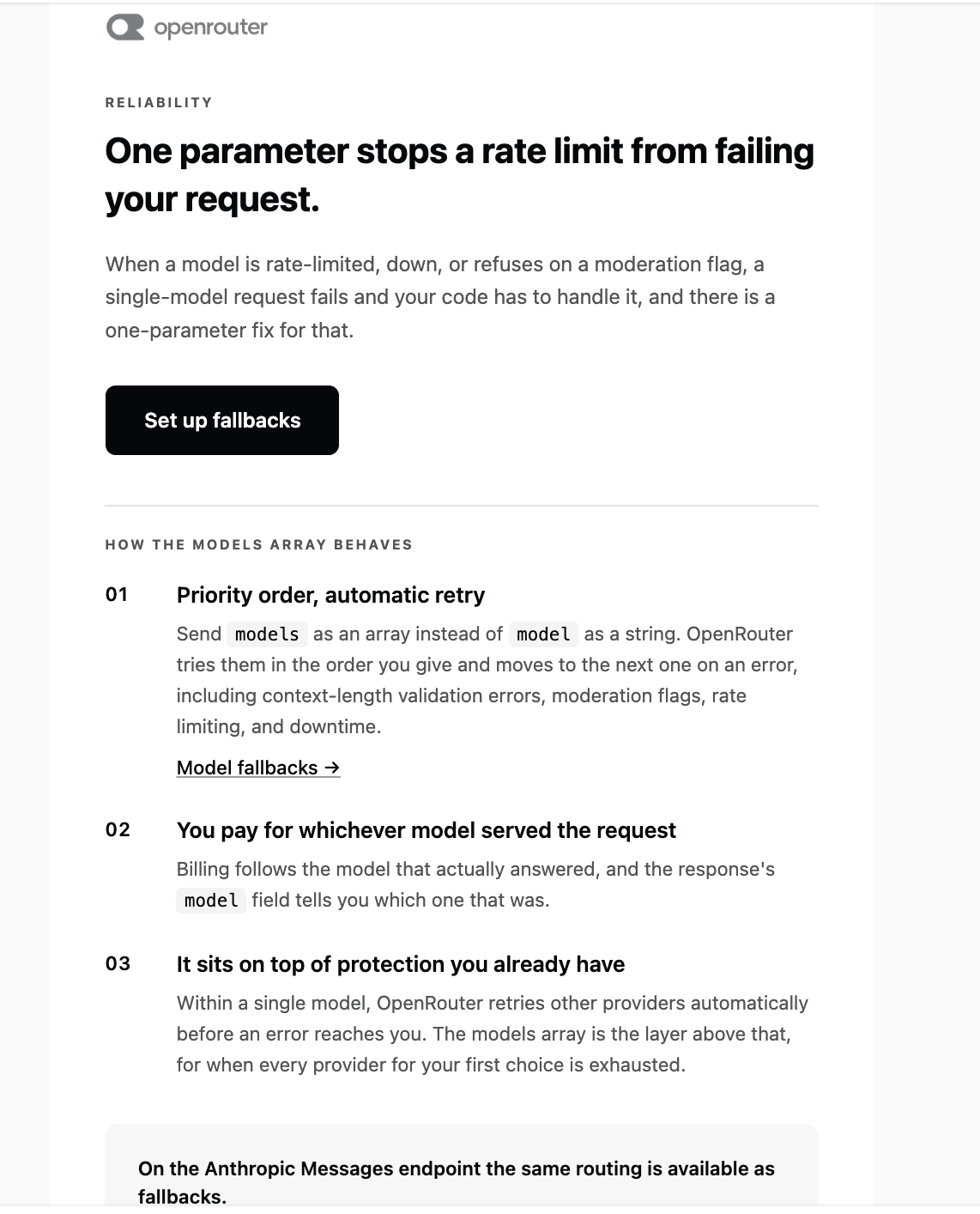
The important distinction is:
model= primary modelmodels= ordered fallback models- OpenRouter tries the models in order when the current one errors
- With the OpenAI Ruby SDK, OpenRouter’s
modelsextension should be passed throughextra_body. (OpenRouter)
Also, our previous openai/gpt-oss-20b:free error is precisely the kind of failure where a fallback chain is useful.
1. Don’t use openrouter/free
Let’s make the model selection explicit.
In Ai::Client:
PRIMARY_MODEL = "openai/gpt-oss-20b:free"FALLBACK_MODELS = [ "some-other-free-model:free", "another-free-model:free"].freeze
However, don’t blindly copy model names from an old tutorial, because OpenRouter’s free catalog changes. Its current model listing shows multiple free models and their availability/status. (OpenRouter)
For this reason, let’s first see what free models are currently available to your account/API.
2. Get the current free models
From your terminal:
curl https://openrouter.ai/api/v1/models
You can filter it on macOS with jq if installed:
➜  ai_assistant git:(main) ✗ curl -s https://openrouter.ai/api/v1/models | \
  jq '.data[] | select(.pricing.prompt == "0" and .pricing.completion == "0") | .id'
"inclusionai/ling-3.0-flash-sante:free"
"inclusionai/ling-3.0-flash-fin:free"
"dots-studio/dots-3-note-preview:free"
"liquid/lfm-2.5-2.6b:free"
"nvidia/nemotron-3.5-lightning:free"
"thinkingmachines/inkling-small:free"
"poolside/laguna-s-2.1:free"
"thinkingmachines/inkling:free"
"poolside/laguna-xs-2.1:free"
"cohere/north-mini-code:free"
"nvidia/nemotron-3.5-content-safety:free"
"nvidia/nemotron-3-ultra-550b-a55b:free"
"minimax/minimax-m3:free"
"nvidia/nemotron-3-nano-omni-30b-a3b-reasoning:free"
"google/gemma-4-26b-a4b-it:free"
"google/gemma-4-31b-it:free"
"google/lyria-3-pro-preview"
"google/lyria-3-clip-preview"
"minimax/minimax-m2.7:free"
"nvidia/nemotron-3-super-120b-a12b:free"
"openrouter/free"
This gives us the currently available zero-price model IDs instead of guessing.
Pick 2–3 general-purpose conversational models.
Avoid things whose purpose is:
moderationsafety classificationrerankingembeddingimage generation
Our earlier User Safety: safe response is exactly why.
3. Model fallback implementation
I would not use openrouter/free as our primary model anymore and definitely not nvidia/nemotron-3.5-content-safety, which is why you previously got the safety-classification output.
For our AI Assistant app, let’s use three general-purpose free models and let OpenRouter handle model-level fallback. OpenRouter documents that the models array is tried in order and with the OpenAI SDK it belongs inside extra_body. (OpenRouter)
Our free fallback chain
From the models we actually have available, I’d use:
MODELS = [
  "minimax/minimax-m3:free",
  "google/gemma-4-31b-it:free",
  "nvidia/nemotron-3-super-120b-a12b:free"
].freeze
The reason I’m choosing these is that they’re general instruction/chat models rather than specialized safety, embedding, or multimodal models. We are optimizing for learning reliability, not benchmarking model quality.
I would not use:
nvidia/nemotron-3.5-content-safety:free
because that’s the wrong task.
I would also avoid for this particular chat application:
cohere/north-mini-code:free
because we’re building a general assistant rather than a coding-only assistant.
And we won’t use:
openrouter/free
Change Ai::Client
Let’s simplify the configuration.
class Ai::Client
  MODELS = [
    "minimax/minimax-m3:free",
    "google/gemma-4-31b-it:free",
    "nvidia/nemotron-3-super-120b-a12b:free"
  ].freeze

  BASE_URL = "https://openrouter.ai/api/v1"

  def initialize
    api_key = Rails.application.credentials.dig(
      :openrouter,
      :api_key
    )

    raise "OpenRouter API key is missing" if api_key.blank?

    @client = OpenAI::Client.new(
      api_key: api_key,
      base_url: BASE_URL
    )
  end

  def chat(messages:)
    response = @client.chat.completions.create(
      model: MODELS.first,
      extra_body: {
        models: MODELS.drop(1)
      },
      messages: messages
    )

    {
      content: response.choices.first.message.content,
      model: response.model,
      input_tokens: response.usage&.prompt_tokens,
      output_tokens: response.usage&.completion_tokens
    }
  rescue OpenAI::Errors::RateLimitError => e
    raise Ai::RateLimitError, e.message
  rescue OpenAI::Errors::APITimeoutError => e
    raise Ai::TimeoutError, e.message
  rescue OpenAI::Errors::APIConnectionError => e
    raise Ai::ProviderError, e.message
  rescue OpenAI::Errors::APIStatusError => e
    raise Ai::ProviderError, e.message
  end
end
This produces the equivalent OpenRouter request:
{
  "model": "minimax/minimax-m3:free",
  "models": [
    "google/gemma-4-31b-it:free",
    "nvidia/nemotron-3-super-120b-a12b:free"
  ],
  "messages": [
    {
      "role": "user",
      "content": "Why Node.js as a backend?"
    }
  ]
}
OpenRouter then tries the models in order if the preceding model can’t serve the request. (OpenRouter)
Why model plus models?
This is worth understanding:
model: MODELS.first
is the primary model.
extra_body: { models: MODELS.drop(1)}
are the fallbacks.
So:
M3 ↓ unavailableGemma ↓ unavailableNemotron
If the request succeeds using Gemma, response.model tells us which model actually served the request. OpenRouter documents that the response’s model identifies the model used for the successful run. (OpenRouter)
Test it now
Start:
bin/rails c
Then:
client = Ai::Client.new
And:
result = client.chat( messages: [ { role: "user", content: "Why Node.js as a backend?" } ])=>{content: "# Why Node.js as a Backend?\n\nNode.js has become one of the most popular choices for backend development for several compelling reasons:\n\n## 1. **JavaScript Everywhere**\n- Use the same language (JavaScript) on both frontend and backend\n- Easier to share code between client and server\n- Single language for full-stack development reduces context switching\n\n## 2. **Non-Blocking, Event-Driven Architecture**\n- Built on Google's V8 JavaScript engine\n- Handles thousands of concurrent connections with a single thread\n- Ideal for:...skipping...=>> puts result[:model]minimax/minimax-m3:free=> nil
Then:
puts result[:content]puts result[:model]
You should now get an actual conversational answer.
Run it several times if you want to observe which model is serving your requests.
And this connects directly to our AiRequest
This is why we built the observability table earlier.
Imagine:
Requested:minimax/m3Actual:google/gemma-4-31b-it
Our admin dashboard should eventually show:
Requested Model minimax/minimax-m3:freeActual Model google/gemma-4-31b-it:freeStatus success
That’s a genuinely useful production metric.
OpenRouter documents that, when using the OpenAI SDK, its models parameter is passed through extra_body. (OpenRouter)
The routing becomes:
                 OpenRouter
                     │
                     ▼
           PRIMARY_MODEL
              /       \
           works      fails
            │           │
            ▼           ▼
          result     FALLBACK 1
                         │
                       fails
                         │
                         ▼
                    FALLBACK 2
OpenRouter says fallback can happen for provider downtime, rate limiting, moderation refusal and context-length errors, among other errors. (OpenRouter)
4. One thing we should NOT do
Don’t implement this:
begin call_model_arescue call_model_brescue call_model_cend
unless you have a very specific reason.
OpenRouter already provides model-level failover and doing the fallback manually would mean:
Your Rails app
      ↓
request A
      ↓
failure
      ↓
request B
while OpenRouter can perform this routing itself.
The provider also knows its own availability and provider-level routing state better than our Rails application does.
So:
Let OpenRouter handle model fallback; let Rails handle application-level error handling.
That’s a clean separation of responsibilities. (OpenRouter)
Where we are now
Our AI project has evolved into:
                    AI Rails Assistant
                           │
          ┌────────────────┼────────────────┐
          │                │                │
          ▼                ▼                ▼
      Chat UI             LLM             Admin
          │                │                │
          ▼                ▼                ▼
    Conversations       Ai::Client     Ai Requests
          │                │                │
          └────────────────┼────────────────┘
                           ▼
                       PostgreSQL
And this sets us up perfectly for the next stage.
Next: RAG + pgvector
We’ll start building the actual knowledge system:
PDF / Document
      ↓
Text extraction
      ↓
Chunks
      ↓
Embeddings
      ↓
pgvector
      ↓
Semantic search
      ↓
Relevant context
      ↓
LLM
That will be the biggest AI feature in this application and one of the most valuable things for our preparation.
to be continued..

