Complete Guide to RSpec with Rails 7+: From Basics to Advanced Testing

RSpec is the most popular testing framework for Ruby and Rails applications. This comprehensive guide covers everything from basic RSpec syntax to advanced Rails 7+ testing patterns, with real-world examples and scenarios.

Table of Contents

  1. RSpec Basics
  2. Rails 7+ Integration
  3. Core RSpec Methods
  4. Testing Scenarios
  5. Advanced Features
  6. Best Practices

RSpec Basics

Basic Structure

require "rails_helper"

RSpec.describe Session::AppliedDiscount do
  # Test content goes here
end

Key Components:

  • require "rails_helper" – Loads Rails testing environment
  • RSpec.describe – Groups related tests
  • describe can take a class, string, or symbol

The Building Blocks

describe and context

RSpec.describe User do
  describe "#full_name" do
    context "when first and last name are present" do
      # tests here
    end

    context "when only first name is present" do
      # tests here
    end
  end

  describe ".active_users" do
    context "with active users in database" do
      # tests here
    end
  end
end

it – Individual Test Cases

it "returns the user's full name" do
  user = User.new(first_name: "John", last_name: "Doe")
  expect(user.full_name).to eq("John Doe")
end

it "handles missing last name gracefully" do
  user = User.new(first_name: "John")
  expect(user.full_name).to eq("John")
end

Core RSpec Methods

let and let!

Lazy Evaluation with let
RSpec.describe Session::Discount do
  let(:cookies) { CookiesStub.new }
  let(:code) { create_code(10) }
  let(:customer) { init_customer }
  let(:customer_code) { create_customer_code(customer) }

  it "uses lazy evaluation" do
    # code is only created when first accessed
    expect(code.amount).to eq(10)
  end
end
Immediate Evaluation with let!
let!(:user) { User.create(name: "John") }  # Created immediately
let(:profile) { user.profile }             # Created when accessed

it "has user already created" do
  expect(User.count).to eq(1)  # user already exists
end

subject

Implicit Subject
RSpec.describe User do
  let(:user_params) { { name: "John", email: "john@example.com" } }

  subject { User.new(user_params) }

  it { is_expected.to be_valid }
  it { is_expected.to respond_to(:full_name) }
end
Named Subject
describe '#initial_discount' do
  subject(:initial_discount_in_rupee) { 
    described_class.new(cookies: cookies).initial_discount_in_rupee 
  }

  it 'returns initial discount for customer' do
    accessor.set_customer_code(customer_code: customer_code)
    expect(initial_discount_in_rupee).to eq(expected_amount)
  end
end

expect and Matchers

Basic Matchers
# Equality
expect(user.name).to eq("John")
expect(user.age).to be > 18
expect(user.email).to include("@")

# Boolean checks
expect(user).to be_valid
expect(user.active?).to be true
expect(user.admin?).to be_falsy

# Type checks
expect(user.created_at).to be_a(Time)
expect(user.tags).to be_an(Array)
Collection Matchers
expect(users).to include(john_user)
expect(user.roles).to contain_exactly("admin", "user")
expect(shopping_cart.items).to be_empty
expect(search_results).to have(3).items
String Matchers
expect(user.email).to match(/\A[\w+\-.]+@[a-z\d\-]+(\.[a-z\d\-]+)*\.[a-z]+\z/i)
expect(response.body).to include("Welcome")
expect(error_message).to start_with("Error:")
expect(success_message).to end_with("successfully!")

Rails 7+ Integration

Rails Helper Setup

# spec/rails_helper.rb
require 'spec_helper'
ENV['RAILS_ENV'] ||= 'test'
require_relative '../config/environment'

abort("The Rails environment is running in production mode!") if Rails.env.production?
require 'rspec/rails'

RSpec.configure do |config|
  config.fixture_path = "#{::Rails.root}/spec/fixtures"
  config.use_transactional_fixtures = true
  config.infer_spec_type_from_file_location!
  config.filter_rails_from_backtrace!
end

Testing Controllers

RSpec.describe Api::V1::SessionsController, type: :controller do
  let(:user) { create(:user) }
  let(:valid_params) { { email: user.email, password: "password" } }

  describe "POST #create" do
    context "with valid credentials" do
      it "returns success response" do
        post :create, params: valid_params
        expect(response).to have_http_status(:success)
        expect(JSON.parse(response.body)["success"]).to be true
      end

      it "sets authentication token" do
        post :create, params: valid_params
        expect(response.cookies["auth_token"]).to be_present
      end
    end

    context "with invalid credentials" do
      it "returns unauthorized status" do
        post :create, params: { email: user.email, password: "wrong" }
        expect(response).to have_http_status(:unauthorized)
      end
    end
  end
end

Testing Models

RSpec.describe User, type: :model do
  describe "validations" do
    it { is_expected.to validate_presence_of(:email) }
    it { is_expected.to validate_uniqueness_of(:email) }
    it { is_expected.to validate_length_of(:password).is_at_least(8) }
  end

  describe "associations" do
    it { is_expected.to have_many(:orders) }
    it { is_expected.to belong_to(:organization) }
    it { is_expected.to have_one(:profile) }
  end

  describe "scopes" do
    let!(:active_user) { create(:user, :active) }
    let!(:inactive_user) { create(:user, :inactive) }

    it "returns only active users" do
      expect(User.active).to include(active_user)
      expect(User.active).not_to include(inactive_user)
    end
  end
end

Testing Scenarios

Testing Service Objects

RSpec.describe Session::Discount do
  let(:cookies) { CookiesStub.new }
  let(:accessor) { Session::CookieDiscount.new(cookies) }

  describe '#initialize' do
    it 'calls ClearDiscountCode' do
      expect_any_instance_of(Session::ClearDiscountCode).to receive(:run)
      described_class.new(cookies: cookies)
    end

    it 'removes discount_code if referral_code presented' do
      accessor.set_code(discount)
      accessor.set_referral_code(referral_code: code)

      described_class.new(cookies: cookies)
      expect(accessor.discount).to be nil
    end
  end
end

Testing API Endpoints

RSpec.describe "API V1 Sessions", type: :request do
  let(:headers) { { "Content-Type" => "application/json" } }

  describe "POST /api/v1/sessions" do
    let(:user) { create(:user) }
    let(:params) do
      {
        session: {
          email: user.email,
          password: "password"
        }
      }
    end

    it "creates a new session" do
      post "/api/v1/sessions", params: params.to_json, headers: headers

      expect(response).to have_http_status(:created)
      expect(json_response["user"]["id"]).to eq(user.id)
      expect(json_response["token"]).to be_present
    end

    context "with invalid credentials" do
      before { params[:session][:password] = "wrong_password" }

      it "returns error" do
        post "/api/v1/sessions", params: params.to_json, headers: headers

        expect(response).to have_http_status(:unauthorized)
        expect(json_response["error"]).to eq("Invalid credentials")
      end
    end
  end
end

Testing Background Jobs

RSpec.describe EmailNotificationJob, type: :job do
  include ActiveJob::TestHelper

  let(:user) { create(:user) }

  describe "#perform" do
    it "sends welcome email" do
      expect {
        EmailNotificationJob.perform_now(user.id, "welcome")
      }.to change { ActionMailer::Base.deliveries.count }.by(1)
    end

    it "enqueues job" do
      expect {
        EmailNotificationJob.perform_later(user.id, "welcome")
      }.to have_enqueued_job(EmailNotificationJob)
    end
  end
end

Testing with Database Transactions

RSpec.describe OrderProcessor do
  describe "#process" do
    let(:order) { create(:order, :pending) }
    let(:payment_method) { create(:payment_method) }

    it "processes order successfully" do
      expect {
        OrderProcessor.new(order).process(payment_method)
      }.to change { order.reload.status }.from("pending").to("completed")
    end

    it "handles payment failures" do
      allow(payment_method).to receive(:charge).and_raise(PaymentError)

      expect {
        OrderProcessor.new(order).process(payment_method)
      }.to raise_error(PaymentError)

      expect(order.reload.status).to eq("failed")
    end
  end
end

Advanced Features

Shared Examples

# spec/support/shared_examples/auditable.rb
RSpec.shared_examples "auditable" do
  it "tracks creation" do
    expect(subject.created_at).to be_present
    expect(subject.created_by).to eq(current_user)
  end

  it "tracks updates" do
    subject.update(name: "Updated Name")
    expect(subject.updated_by).to eq(current_user)
  end
end

# Usage in specs
RSpec.describe User do
  let(:current_user) { create(:user) }
  subject { create(:user) }

  it_behaves_like "auditable"
end

Custom Matchers

# spec/support/matchers/be_valid_email.rb
RSpec::Matchers.define :be_valid_email do
  match do |actual|
    actual =~ /\A[\w+\-.]+@[a-z\d\-]+(\.[a-z\d\-]+)*\.[a-z]+\z/i
  end

  failure_message do |actual|
    "expected #{actual} to be a valid email address"
  end
end

# Usage
expect(user.email).to be_valid_email

Hooks and Callbacks

RSpec.describe User do
  before(:each) do
    @original_time = Time.current
    travel_to Time.zone.parse("2023-01-01 12:00:00")
  end

  after(:each) do
    travel_back
  end

  before(:all) do
    # Runs once before all tests in this describe block
    @test_data = create_test_data
  end

  around(:each) do |example|
    Rails.logger.silence do
      example.run
    end
  end
end

Stubbing and Mocking

describe "external API integration" do
  let(:api_client) { instance_double("APIClient") }

  before do
    allow(APIClient).to receive(:new).and_return(api_client)
  end

  it "calls external service" do
    expect(api_client).to receive(:get_user_data).with(user.id)
      .and_return({ name: "John", email: "john@example.com" })

    result = UserDataService.fetch(user.id)
    expect(result[:name]).to eq("John")
  end

  it "handles API errors gracefully" do
    allow(api_client).to receive(:get_user_data).and_raise(Net::TimeoutError)

    expect {
      UserDataService.fetch(user.id)
    }.to raise_error(ServiceUnavailableError)
  end
end

Testing Time-dependent Code

describe "subscription expiry" do
  let(:subscription) { create(:subscription, expires_at: 2.days.from_now) }

  it "is not expired when current" do
    expect(subscription).not_to be_expired
  end

  it "is expired when past expiry date" do
    travel_to 3.days.from_now do
      expect(subscription).to be_expired
    end
  end
end

Factory Bot Integration

Basic Factory Setup

# spec/factories/users.rb
FactoryBot.define do
  factory :user do
    sequence(:email) { |n| "user#{n}@example.com" }
    first_name { "John" }
    last_name { "Doe" }
    password { "password123" }

    trait :admin do
      role { "admin" }
    end

    trait :with_profile do
      after(:create) do |user|
        create(:profile, user: user)
      end
    end

    factory :admin_user, traits: [:admin]
  end
end

# Usage in tests
let(:user) { create(:user) }
let(:admin) { create(:user, :admin) }
let(:user_with_profile) { create(:user, :with_profile) }

Advanced Factory Patterns

# spec/factories/orders.rb
FactoryBot.define do
  factory :order do
    user
    total_amount { 100.00 }
    status { "pending" }

    factory :completed_order do
      status { "completed" }
      completed_at { Time.current }

      after(:create) do |order|
        create_list(:order_item, 3, order: order)
      end
    end
  end
end

Testing Different Types

Feature Tests (System Tests)

RSpec.describe "User Registration", type: :system do
  it "allows user to register" do
    visit "/signup"

    fill_in "Email", with: "test@example.com"
    fill_in "Password", with: "password123"
    fill_in "Confirm Password", with: "password123"

    click_button "Sign Up"

    expect(page).to have_content("Welcome!")
    expect(page).to have_current_path("/dashboard")
  end
end

Mailer Tests

RSpec.describe UserMailer, type: :mailer do
  describe "#welcome_email" do
    let(:user) { create(:user) }
    let(:mail) { UserMailer.welcome_email(user) }

    it "sends to correct recipient" do
      expect(mail.to).to eq([user.email])
    end

    it "has correct subject" do
      expect(mail.subject).to eq("Welcome to Our App!")
    end

    it "includes user name in body" do
      expect(mail.body.encoded).to include(user.first_name)
    end
  end
end

Helper Tests

RSpec.describe ApplicationHelper, type: :helper do
  describe "#format_currency" do
    it "formats positive amounts" do
      expect(helper.format_currency(100.50)).to eq("$100.50")
    end

    it "handles zero amounts" do
      expect(helper.format_currency(0)).to eq("$0.00")
    end

    it "formats negative amounts" do
      expect(helper.format_currency(-50.25)).to eq("-$50.25")
    end
  end
end

Best Practices

1. Clear Test Structure

# Good: Clear, descriptive names
describe User do
  describe "#full_name" do
    context "when both names are present" do
      it "returns concatenated first and last name" do
        # test implementation
      end
    end
  end
end

# Bad: Unclear names
describe User do
  it "works" do
    # test implementation
  end
end

2. One Assertion Per Test

# Good: Single responsibility
it "validates email presence" do
  user = User.new(email: nil)
  expect(user).not_to be_valid
end

it "validates email format" do
  user = User.new(email: "invalid-email")
  expect(user).not_to be_valid
end

# Bad: Multiple assertions
it "validates email" do
  user = User.new(email: nil)
  expect(user).not_to be_valid

  user.email = "invalid-email"
  expect(user).not_to be_valid

  user.email = "valid@email.com"
  expect(user).to be_valid
end

3. Use let for Test Data

# Good: Reusable and lazy-loaded
let(:user) { create(:user, email: "test@example.com") }
let(:order) { create(:order, user: user, total: 100) }

it "calculates tax correctly" do
  expect(order.tax_amount).to eq(8.50)
end

# Bad: Repeated setup
it "calculates tax correctly" do
  user = create(:user, email: "test@example.com")
  order = create(:order, user: user, total: 100)
  expect(order.tax_amount).to eq(8.50)
end

4. Meaningful Error Messages

# Good: Custom error messages
expect(discount.amount).to eq(50), 
  "Expected discount amount to be $50 for premium users"

# Good: Descriptive matchers
expect(user.subscription).to be_active,
  "User subscription should be active after successful payment"

5. Test Edge Cases

describe "#divide" do
  it "divides positive numbers" do
    expect(calculator.divide(10, 2)).to eq(5)
  end

  it "handles division by zero" do
    expect { calculator.divide(10, 0) }.to raise_error(ZeroDivisionError)
  end

  it "handles negative numbers" do
    expect(calculator.divide(-10, 2)).to eq(-5)
  end

  it "handles float precision" do
    expect(calculator.divide(1, 3)).to be_within(0.001).of(0.333)
  end
end

Rails 7+ Specific Features

Testing with ActionText

RSpec.describe Post, type: :model do
  describe "rich text content" do
    let(:post) { create(:post) }

    it "can store rich text content" do
      post.content = "<p>Hello <strong>world</strong></p>"
      expect(post.content.to_s).to include("Hello")
      expect(post.content.to_s).to include("<strong>world</strong>")
    end
  end
end

Testing with Active Storage

RSpec.describe User, type: :model do
  describe "avatar attachment" do
    let(:user) { create(:user) }
    let(:image) { fixture_file_upload("spec/fixtures/avatar.jpg", "image/jpeg") }

    it "can attach avatar" do
      user.avatar.attach(image)
      expect(user.avatar).to be_attached
      expect(user.avatar.content_type).to eq("image/jpeg")
    end
  end
end

Testing Hotwire/Turbo

RSpec.describe "Todo Management", type: :system do
  it "updates todo via turbo stream" do
    todo = create(:todo, title: "Original Title")

    visit todos_path
    click_link "Edit"
    fill_in "Title", with: "Updated Title"
    click_button "Update"

    expect(page).to have_content("Updated Title")
    expect(page).not_to have_content("Original Title")
    # Verify it was updated via AJAX, not full page reload
    expect(page).not_to have_selector(".flash-message")
  end
end

Configuration and Setup

RSpec Configuration

# spec/rails_helper.rb
RSpec.configure do |config|
  # Database cleaner
  config.use_transactional_fixtures = true

  # Factory Bot
  config.include FactoryBot::Syntax::Methods

  # Custom helpers
  config.include AuthenticationHelpers, type: :request
  config.include ControllerHelpers, type: :controller

  # Filtering
  config.filter_run_when_matching :focus
  config.example_status_persistence_file_path = "spec/examples.txt"

  # Parallel execution
  config.order = :random
  Kernel.srand config.seed
end

Database Cleaner Setup

# spec/rails_helper.rb
require 'database_cleaner/active_record'

RSpec.configure do |config|
  config.before(:suite) do
    DatabaseCleaner.strategy = :transaction
    DatabaseCleaner.clean_with(:truncation)
  end

  config.around(:each) do |example|
    DatabaseCleaner.cleaning do
      example.run
    end
  end
end

This comprehensive guide covers the essential RSpec patterns you’ll use in Rails 7+ applications. The examples shown are based on real-world scenarios and follow current best practices for maintainable, reliable test suites.

Remember: Good tests are documentation for your code – they should clearly express what your application does and how it should behave under different conditions.


Rails 8 Tests: 🔄 TDD vs 🎭 BDD | System Tests

Test‑Driven Development (TDD) and Behavior‑Driven Development (BDD) are complementary testing approaches that help teams build robust, maintainable software by defining expected behaviour before writing production code. In TDD, developers write small, focused unit tests that fail initially, then implement just enough code to make them pass, ensuring each component meets its specification. BDD extends this idea by framing tests in a global language that all stakeholders—developers, QA, and product owners—can understand, using human-readable scenarios to describe system behaviour. While TDD emphasizes the correctness of individual units, BDD elevates collaboration and shared understanding by specifying the “why” and “how” of features in a narrative style, driving development through concrete examples of desired outcomes.

🔄 TDD vs 🎭 BDD: Methodologies vs Frameworks

🧠 Understanding the Concepts

🔄 TDD (Test Driven Development)
  • Methodology/Process: Write test → Fail → Write code → Pass → Refactor
  • Focus: Testing the implementation and correctness
  • Mindset: “Does this code work correctly?”
  • Style: More technical, code-focused
🎭 BDD (Behavior Driven Development)
  • Methodology/Process: Describe behavior → Write specs → Implement → Verify behavior
  • Focus: Testing the behavior and user requirements
  • Mindset: “Does this behave as expected from user’s perspective?”
  • Style: More natural language, business-focused

🛠️ Frameworks Support Both Approaches

📋 RSpec (Primarily BDD-oriented)
# BDD Style - describing behavior
describe "TwoSum" do
  context "when given an empty array" do
    it "should inform user about insufficient data" do
      expect(two_sum([], 9)).to eq('Provide an array with length 2 or more')
    end
  end
end
⚙️ Minitest (Supports Both TDD and BDD)
🔧 TDD Style with Minitest
class TestTwoSum < Minitest::Test
  # Testing implementation correctness
  def test_empty_array_returns_error
    assert_equal 'Provide an array with length 2 or more', two_sum([], 9)
  end

  def test_valid_input_returns_indices
    assert_equal [0, 1], two_sum([2, 7], 9)
  end
end
🎭 BDD Style with Minitest
describe "TwoSum behavior" do
  describe "when user provides empty array" do
    it "guides user to provide sufficient data" do
      _(two_sum([], 9)).must_equal 'Provide an array with length 2 or more'
    end
  end

  describe "when user provides valid input" do
    it "finds the correct pair indices" do
      _(two_sum([2, 7], 9)).must_equal [0, 1]
    end
  end
end

🎯 Key Differences in Practice

🔄 TDD Approach
# 1. Write failing test
def test_two_sum_with_valid_input
  assert_equal [0, 1], two_sum([2, 7], 9)  # This will fail initially
end

# 2. Write minimal code to pass
def two_sum(nums, target)
  [0, 1]  # Hardcoded to pass
end

# 3. Refactor and improve
def two_sum(nums, target)
  # Actual implementation
end
🎭 BDD Approach
# 1. Describe the behavior first
describe "Finding two numbers that sum to target" do
  context "when valid numbers exist" do
    it "returns their indices" do
      # This describes WHAT should happen, not HOW
      expect(two_sum([2, 7, 11, 15], 9)).to eq([0, 1])
    end
  end
end

📊 Summary Table

AspectTDDBDD
FocusImplementation correctnessUser behavior
LanguageTechnicalBusiness/Natural
FrameworksAny (Minitest, RSpec, etc.)Any (RSpec, Minitest spec, etc.)
Test Namestest_method_returns_value"it should behave like..."
AudienceDevelopersStakeholders + Developers

🎪 The Reality

  • RSpec encourages BDD but can be used for TDD
  • Minitest is framework-agnostic – supports both approaches equally
  • Your choice of methodology (TDD vs BDD) is independent of your framework choice
  • Many teams use hybrid approaches – BDD for acceptance tests, TDD for unit tests

The syntax doesn’t determine the methodology – it’s about how you think and approach the problem!

System Tests 💻⚙️

System tests in Rails (located in test/system/*) are full-stack integration tests that simulate real user interactions with your web application. They’re the highest level of testing in the Rails testing hierarchy and provide the most realistic testing environment.

System tests actually launch a real web browser (or headless browser) and interact with your application just like a real user would. Looking at our Rails app’s configuration: design_studio/test/application_system_test_case.rb

driven_by :selenium, using: :headless_chrome, screen_size: [ 1400, 1400 ]

This means our system tests run using:

  • Selenium WebDriver (browser automation tool)
  • Headless Chrome (Chrome browser without UI)
  • 1400×1400 screen size for consistent testing

Code Snippets from:actionpack-8.0.2/lib/action_dispatch/system_test_case.rb

# frozen_string_literal: true

# :markup: markdown

gem "capybara", ">= 3.26"

require "capybara/dsl"
require "capybara/minitest"
require "action_controller"
require "action_dispatch/system_testing/driver"
require "action_dispatch/system_testing/browser"
require "action_dispatch/system_testing/server"
require "action_dispatch/system_testing/test_helpers/screenshot_helper"
require "action_dispatch/system_testing/test_helpers/setup_and_teardown"

module ActionDispatch
  # # System Testing
  #
  # System tests let you test applications in the browser. Because system tests
  # use a real browser experience, you can test all of your JavaScript easily from
  # your test suite.
  #
  # To create a system test in your application, extend your test class from
  # `ApplicationSystemTestCase`. System tests use Capybara as a base and allow you
  # to configure the settings through your `application_system_test_case.rb` file
  # that is generated with a new application or scaffold.
  #
  # Here is an example system test:
  #
  #     require "application_system_test_case"
  #
  #     class Users::CreateTest < ApplicationSystemTestCase
  #       test "adding a new user" do
  #         visit users_path
  #         click_on 'New User'
  #
  #         fill_in 'Name', with: 'Arya'
  #         click_on 'Create User'
  #
  #         assert_text 'Arya'
  #       end
  #     end
  #
  # When generating an application or scaffold, an
  # `application_system_test_case.rb` file will also be generated containing the
  # base class for system testing. This is where you can change the driver, add
  # Capybara settings, and other configuration for your system tests.
  #
  #     require "test_helper"
  #
  #     class ApplicationSystemTestCase < ActionDispatch::SystemTestCase
  #       driven_by :selenium, using: :chrome, screen_size: [1400, 1400]
  #     end
  #
  # By default, `ActionDispatch::SystemTestCase` is driven by the Selenium driver,
  # with the Chrome browser, and a browser size of 1400x1400.
  #
  # Changing the driver configuration options is easy. Let's say you want to use
  # the Firefox browser instead of Chrome. In your
  # `application_system_test_case.rb` file add the following:
  #
  #     require "test_helper"
  #
  #     class ApplicationSystemTestCase < ActionDispatch::SystemTestCase
  #       driven_by :selenium, using: :firefox
  #     end
  #
  # `driven_by` has a required argument for the driver name. The keyword arguments
  # are `:using` for the browser and `:screen_size` to change the size of the
  # browser screen. These two options are not applicable for headless drivers and
  # will be silently ignored if passed.
  #
  # Headless browsers such as headless Chrome and headless Firefox are also
  # supported. You can use these browsers by setting the `:using` argument to
  # `:headless_chrome` or `:headless_firefox`.
  #
  # To use a headless driver, like Cuprite, update your Gemfile to use Cuprite
  # instead of Selenium and then declare the driver name in the
  # `application_system_test_case.rb` file. In this case, you would leave out the
  # `:using` option because the driver is headless, but you can still use
  # `:screen_size` to change the size of the browser screen, also you can use
  # `:options` to pass options supported by the driver. Please refer to your
  # driver documentation to learn about supported options.
  #
  #     require "test_helper"
  #     require "capybara/cuprite"
  #
  #     class ApplicationSystemTestCase < ActionDispatch::SystemTestCase
  #       driven_by :cuprite, screen_size: [1400, 1400], options:
  #         { js_errors: true }
  #     end
  #
  # Some drivers require browser capabilities to be passed as a block instead of
  # through the `options` hash.
  #
  # As an example, if you want to add mobile emulation on chrome, you'll have to
  # create an instance of selenium's `Chrome::Options` object and add capabilities
  # with a block.
  #
  # The block will be passed an instance of `<Driver>::Options` where you can
  # define the capabilities you want. Please refer to your driver documentation to
  # learn about supported options.
  #
  #     class ApplicationSystemTestCase < ActionDispatch::SystemTestCase
  #       driven_by :selenium, using: :chrome, screen_size: [1024, 768] do |driver_option|
  #         driver_option.add_emulation(device_name: 'iPhone 6')
  #         driver_option.add_extension('path/to/chrome_extension.crx')
  #       end
  #     end
  #
  # Because `ActionDispatch::SystemTestCase` is a shim between Capybara and Rails,
  # any driver that is supported by Capybara is supported by system tests as long
  # as you include the required gems and files.
  class SystemTestCase < ActiveSupport::TestCase
    include Capybara::DSL
    include Capybara::Minitest::Assertions
    include SystemTesting::TestHelpers::SetupAndTeardown
    include SystemTesting::TestHelpers::ScreenshotHelper

    ..........

How They Work

System tests can:

  • Navigate pages: visit products_url
  • Click elements: click_on "New product"
  • Fill forms: fill_in "Title", with: @product.title
  • Verify content: assert_text "Product was successfully created"
  • Check page structure: assert_selector "h1", text: "Products"

Examples From Our Codebase

Basic navigation test (from products_test.rb):

test "visiting the index" do
  visit products_url
  assert_selector "h1", text: "Products"
end

Complex user workflow (from profile_test.rb):

def sign_in_user(user)
  visit new_session_path
  fill_in "Email", with: user.email
  fill_in "Password", with: "password"
  click_button "Log In"

  # Wait for redirect and verify we're not on the login page anymore
  # Also wait for the success notice to appear
  assert_text "Logged in successfully", wait: 10
  assert_no_text "Log in to your account", wait: 5
end

Key Benefits

  1. End-to-end testing: Tests the complete user journey
  2. JavaScript testing: Can test dynamic frontend behavior
  3. Real browser environment: Tests CSS, responsive design, and browser compatibility
  4. User perspective: Validates the actual user experience

When to Use System Tests

  • Critical user workflows (login, checkout, registration)
  • Complex page interactions (forms, modals, AJAX)
  • Cross-browser compatibility
  • Responsive design validation

Our profile_test.rb is a great example – it tests the entire user authentication flow, profile page navigation, and various UI interactions that a real user would perform.

Happy Testing 🚀

Automating 🦾 LeetCode 👨🏽‍💻Solution Testing with GitHub Actions: A Ruby Developer’s Journey

As a Ruby developer working through LeetCode problems, I found myself facing a common challenge: how to ensure all my solutions remain working as I refactor and optimize them? With multiple algorithms per problem and dozens of solution files, manual testing was becoming a bottleneck.

Today, I’ll share how I set up a comprehensive GitHub Actions CI/CD pipeline that automatically tests all my LeetCode solutions, providing instant feedback and maintaining code quality.

🤔 The Problem: Testing Chaos

My LeetCode repository structure looked like this:

leetcode/
├── two_sum/
│   ├── two_sum_1.rb
│   ├── two_sum_2.rb
│   ├── test_two_sum_1.rb
│   └── test_two_sum_2.rb
├── longest_substring/
│   ├── longest_substring.rb
│   └── test_longest_substring.rb
├── buy_sell_stock/
│   └── ... more solutions
└── README.md

The Pain Points:

  • Manual Testing: Running ruby test_*.rb for each folder manually
  • Forgotten Tests: Easy to forget testing after small changes
  • Inconsistent Quality: Some solutions had tests, others didn’t
  • Refactoring Fear: Scared to optimize algorithms without breaking existing functionality

🎯 The Decision: One Action vs. Multiple Actions

I faced a key architectural decision: Should I create separate GitHub Actions for each problem folder, or one comprehensive action?

Why I Chose a Single Action:

Advantages:

  • Maintenance Simplicity: One workflow file vs. 6+ separate ones
  • Resource Efficiency: Fewer GitHub Actions minutes consumed
  • Complete Validation: Ensures all solutions work together
  • Cleaner CI History: Single status check per push/PR
  • Auto-Discovery: Automatically finds new test folders

Rejected Alternative (Separate Actions):

  • More complex maintenance
  • Higher resource usage
  • Fragmented test results
  • More configuration overhead

🛠️ The Solution: Intelligent Test Discovery

Here’s the GitHub Actions workflow that changed everything:

name: Run All LeetCode Tests

on:
  push:
    branches: [ main, develop ]
  pull_request:
    branches: [ main ]

jobs:
  test:
    runs-on: ubuntu-latest

    steps:
    - uses: actions/checkout@v4

    - name: Set up Ruby
      uses: ruby/setup-ruby@v1
      with:
        ruby-version: '3.2'
        bundler-cache: true

    - name: Install dependencies
      run: |
        gem install minitest
        # Add any other gems your tests need

    - name: Run all tests
      run: |
        echo "🧪 Running LeetCode Solution Tests..."

        # Colors for output
        GREEN='\033[0;32m'
        RED='\033[0;31m'
        YELLOW='\033[1;33m'
        NC='\033[0m' # No Color

        # Track results
        total_folders=0
        passed_folders=0
        failed_folders=()

        # Find all folders with test files
        for folder in */; do
          folder_name=${folder%/}

          # Skip if no test files in folder
          if ! ls "$folder"test_*.rb 1> /dev/null 2>&1; then
            continue
          fi

          total_folders=$((total_folders + 1))
          echo -e "\n${YELLOW}📁 Testing folder: $folder_name${NC}"

          # Run tests for this folder
          cd "$folder"
          test_failed=false

          for test_file in test_*.rb; do
            if [ -f "$test_file" ]; then
              echo "  🔍 Running $test_file..."
              if ruby "$test_file"; then
                echo -e "  ${GREEN}✅ $test_file passed${NC}"
              else
                echo -e "  ${RED}❌ $test_file failed${NC}"
                test_failed=true
              fi
            fi
          done

          if [ "$test_failed" = false ]; then
            echo -e "${GREEN}✅ All tests passed in $folder_name${NC}"
            passed_folders=$((passed_folders + 1))
          else
            echo -e "${RED}❌ Some tests failed in $folder_name${NC}"
            failed_folders+=("$folder_name")
          fi

          cd ..
        done

        # Summary
        echo -e "\n🎯 ${YELLOW}TEST SUMMARY${NC}"
        echo "📊 Total folders tested: $total_folders"
        echo -e "✅ ${GREEN}Passed: $passed_folders${NC}"
        echo -e "❌ ${RED}Failed: $((total_folders - passed_folders))${NC}"

        if [ ${#failed_folders[@]} -gt 0 ]; then
          echo -e "\n${RED}Failed folders:${NC}"
          for folder in "${failed_folders[@]}"; do
            echo "  - $folder"
          done
          exit 1
        else
          echo -e "\n${GREEN}🎉 All tests passed successfully!${NC}"
        fi

🔍 What Makes This Special?

🎯 Intelligent Auto-Discovery

The script automatically finds folders containing test_*.rb files:

# Skip if no test files in folder
if ! ls "$folder"test_*.rb 1> /dev/null 2>&1; then
  continue
fi

This means new problems automatically get tested without workflow modifications!

🎨 Beautiful Output

Color-coded results make it easy to scan CI logs:

🧪 Running LeetCode Solution Tests...

📁 Testing folder: two_sum
  🔍 Running test_two_sum_1.rb...
  ✅ test_two_sum_1.rb passed
  🔍 Running test_two_sum_2.rb...
  ✅ test_two_sum_2.rb passed
✅ All tests passed in two_sum

📁 Testing folder: longest_substring
  🔍 Running test_longest_substring.rb...
  ❌ test_longest_substring.rb failed
❌ Some tests failed in longest_substring

🎯 TEST SUMMARY
📊 Total folders tested: 6
✅ Passed: 5
❌ Failed: 1

Failed folders:
  - longest_substring

🚀 Smart Failure Handling

  • Individual Test Tracking: Each test file result is tracked separately
  • Folder-Level Reporting: Clear summary per problem folder
  • Build Failure: CI fails if ANY test fails, maintaining quality
  • Detailed Reporting: Shows exactly which folders/tests failed

📊 The Impact: Metrics That Matter

⏱️ Time Savings

  • Before: 5+ minutes manually testing after each change
  • After: 30 seconds of automated feedback
  • Result: 90% time reduction in testing workflow

🔒 Quality Improvements

  • Before: ~60% of solutions had tests
  • After: 100% test coverage (CI enforces it)
  • Result: Zero regression bugs since implementation

🎯 Developer Experience

  • Confidence: Can refactor aggressively without fear
  • Speed: Instant feedback on pull requests
  • Focus: More time solving problems, less time on manual testing

🎓 Key Learnings & Best Practices

What Worked Well

🔧 Shell Scripting in GitHub Actions

Using bash arrays and functions made the logic clean and maintainable:

failed_folders=()
failed_folders+=("$folder_name")
🎨 Color-Coded Output

Made CI logs actually readable:

GREEN='\033[0;32m'
RED='\033[0;31m'
echo -e "${GREEN}✅ Test passed${NC}"
📁 Flexible File Structure

Supporting multiple test files per folder without hardcoding names:

for test_file in test_*.rb; do
  # Process each test file
done

⚠️ Lessons Learned

🐛 Edge Case Handling

Always check if files exist before processing:

if [ -f "$test_file" ]; then
  # Safe to process
fi
🎯 Exit Code Management

Proper failure propagation ensures CI accurately reports status:

if [ ${#failed_folders[@]} -gt 0 ]; then
  exit 1  # Fail the build
fi

🚀 Getting Started: Implementation Guide

📋 Step 1: Repository Structure

Organize your code with consistent naming:

your_repo/
├── .github/workflows/test.yml  # The workflow file
├── problem_name/
│   ├── solution.rb             # Your solution
│   └── test_solution.rb        # Your tests
└── another_problem/
    ├── solution_v1.rb
    ├── solution_v2.rb
    ├── test_solution_v1.rb
    └── test_solution_v2.rb

📋 Step 2: Test File Convention

Use the test_*.rb naming pattern consistently. This enables auto-discovery.

📋 Step 3: Workflow Customization

Modify the workflow for your needs:

  • Ruby version: Change ruby-version: '3.2' to your preferred version
  • Dependencies: Add gems in the “Install dependencies” step
  • Triggers: Adjust branch names in the on: section

📋 Step 4: README Badge

Add a status badge to your README:

![Tests](https://github.com/abhilashak/leetcode/workflows/Run%20All%20LeetCode%20Tests/badge.svg)

🎯 What is the Status Badge?

The status badge is a visual indicator that shows the current status of your GitHub Actions workflow. It’s a small image that displays whether your latest tests are passing or failing.

🎨 What It Looks Like:

When tests pass: Tests
When tests fail: Tests
🔄 When tests are running: Tests

📋 What Information It Shows:

  1. Workflow Name: “Run All LeetCode Tests” (or whatever you named it)
  2. Current Status:
  • Green ✅: All tests passed
  • Red ❌: Some tests failed
  • Yellow 🔄: Tests are currently running
  1. Real-time Updates: Automatically updates when you push code

🔗 The Badge URL Breakdown:

![Tests](https://github.com/abhilashak/leetcode/workflows/Run%20All%20LeetCode%20Tests/badge.svg)
  • abhilashak = My GitHub username
  • leetcode = My repository name
  • Run%20All%20LeetCode%20Tests = Your workflow name (URL-encoded)
  • badge.svg = GitHub’s badge endpoint

🎯 Why It’s Valuable:

🔍 For ME:

  • Quick Status Check: See at a glance if your code is working
  • Historical Reference: Know the last known good state
  • Confidence: Green badge = safe to deploy/share

👥 For Others:

  • Trust Indicator: Shows your code is tested and working
  • Professional Presentation: Demonstrates good development practices

📊 For Contributors:

  • Pull Request Status: See if their changes break anything
  • Fork Confidence: Know the original repo is well-maintained
  • Quality Signal: Indicates a serious, well-tested project

🎖️ Professional Benefits:

When someone visits your repository, they immediately see:

  • “This developer writes tests”
  • “This code is actively maintained”
  • “This project follows best practices”
  • “I can trust this code quality”

It’s essentially a quality seal for your repository! 🎖️

🎯 Results & Future Improvements

🎉 Current Success Metrics

  • 100% automated testing across all solution folders
  • Zero manual testing required for routine changes
  • Instant feedback on code quality
  • Professional presentation with status badges

🔮 Future Enhancements

📊 Performance Tracking

Planning to add execution time measurement:

start_time=$(date +%s%N)
ruby "$test_file"
end_time=$(date +%s%N)
execution_time=$(( (end_time - start_time) / 1000000 ))
echo "  ⏱️  Execution time: ${execution_time}ms"

🎯 Test Coverage Reports

Considering integration with Ruby coverage tools:

- name: Generate coverage report
  run: |
    gem install simplecov
    # Coverage analysis per folder

📈 Algorithm Performance Comparison

Auto-comparing different solution approaches:

# Compare solution_v1.rb vs solution_v2.rb performance

💡 Conclusion: Why This Matters

This GitHub Actions setup transformed my LeetCode practice from a manual, error-prone process into a professional, automated workflow. The key benefits:

🎯 For Individual Practice

  • Confidence: Refactor without fear
  • Speed: Instant validation of changes
  • Quality: Consistent test coverage

🎯 For Team Collaboration

  • Standards: Enforced testing practices
  • Reviews: Clear CI status on pull requests
  • Documentation: Professional presentation

🎯 For Career Development

  • Portfolio: Demonstrates DevOps knowledge
  • Best Practices: Shows understanding of CI/CD
  • Professionalism: Industry-standard development workflow

🚀 Take Action

Ready to implement this in your own LeetCode repository? Here’s what to do next:

  1. Copy the workflow file into .github/workflows/test.yml
  2. Ensure consistent naming with test_*.rb pattern
  3. Push to GitHub and watch the magic happen
  4. Add the status badge to your README
  5. Start coding fearlessly with automated testing backup!

Check my github repo: https://github.com/abhilashak/leetcode/actions

The best part? Once set up, this system maintains itself. New problems get automatically discovered, and your testing workflow scales effortlessly.

Happy coding, and may your CI always be green! 🟢

Have you implemented automated testing for your coding practice? Share your experience in the comments below!

📚 Resources

🏷️ Tags

#GitHubActions #Ruby #LeetCode #CI/CD #DevOps #AutomatedTesting #CodingPractice

🏃‍♂️ Solving LeetCode Problems the TDD Way (Test-First Ruby): The Two Sum Problem

Welcome to my new series where I combine the power of Ruby with the discipline of Test-Driven Development (TDD) to tackle popular algorithm problems from LeetCode! 🧑‍💻💎 Whether you’re a Ruby enthusiast looking to sharpen your problem-solving skills, or a developer curious about how TDD can transform the way you approach coding challenges, you’re in the right place. In each episode, I’ll walk through a classic algorithm problem, show how TDD guides my thinking, and share insights I gain along the way. Let’s dive in and discover how writing tests first can make us better, more thoughtful programmers – one problem at a time! 🚀

🎯 Why I chose this approach

When I decided to level up my algorithmic thinking, I could have simply jumped into solving problems and checking solutions afterward. But I chose a different path – Test-Driven Development with Ruby – and here’s why this combination is pure magic ✨. Learning algorithms through TDD forces me to think before I code, breaking down complex problems into small, testable behaviors. Instead of rushing to implement a solution, I first articulate what the function should do in various scenarios through tests.

This approach naturally leads me to discover edge cases I would have completely missed otherwise – like handling empty arrays, negative numbers, or boundary conditions that only surface when you’re forced to think about what could go wrong. Ruby’s expressive syntax makes writing these tests feel almost conversational, while the red-green-refactor cycle ensures I’m not just solving the problem, but solving it elegantly. Every failing test becomes a mini-puzzle to solve, every passing test builds confidence, and every refactor teaches me something new about both the problem domain and Ruby itself. It’s not just about getting the right answer – it’s about building a robust mental model of the problem while writing maintainable, well-tested code. 🚀

🎲 Episode 1: The Two Sum Problem

#####################################
#   Problem 1: The Two Sum Problem
#####################################

# Given an array of integers nums and an integer target, return indices of the two numbers such that they add up to target.

# You may assume that each input would have exactly one solution, and you may not use the same element twice.

# You can return the answer in any order.
# Example 1:

# Input: nums = [2,7,11,15], target = 9
# Output: [0,1]
# Explanation: Because nums[0] + nums[1] == 9, we return [0, 1].
# Example 2:

# Input: nums = [3,2,4], target = 6
# Output: [1,2]
# Example 3:

# Input: nums = [3,3], target = 6
# Output: [0,1]

# Constraints:
# Only one valid answer exists.

# We are not considering following concepts for now:
# 2 <= nums.length <= 104
# -109 <= nums[i] <= 109
# -109 <= target <= 109

# Follow-up: Can you come up with an algorithm that is less than O(n2) time complexity?

🔧 Setting up the TDD environment

Create a test file first and add the first test case.

mkdir two_sum
touch test_two_sum.rb
touch two_sum.rb
# frozen_string_literal: true

require 'minitest/autorun'
require_relative 'two_sum'

###############################
# This is the test case for finding the index of two numbers in an array
# such that adding both numbers should be equal to the target number provided
#
#  Ex:
#    two_sum(num, target)
#    num: [23, 4, 8, 92], tatget: 12
#    output: [1, 2] => index of the two numbers whose sum is equal to target
##############################
class TestTwoSum < Minitest::Test
  def setup
    ####
  end

  def test_array_is_an_empty_array
    assert_equal 'Provide an array with length 2 or more', two_sum([], 9)
  end
end

Create the problem file: two_sum.rb with empty method first.

# frozen_string_literal: true

# @param {Integer[]} nums
# @param {Integer} target
# @return {Integer[]}

def two_sum(nums, target)
end

❌ Red: Writing the failing test

Run the test:

ruby test_two_sum.rb

Run options: --seed 58910
# Running:
F
Finished in 0.008429s, 118.6380 runs/s, 118.6380 assertions/s.

  1) Failure:
TestTwoSum#test_array_is_an_empty_array [test_two_sum.rb:21]:
--- expected
+++ actual
@@ -1 +1 @@
-"Provide an array with length 2 or more"
+nil

1 runs, 1 assertions, 1 failures, 0 errors, 0 skips

✅ Green: Making it pass

# frozen_string_literal: true

# @param {Integer[]} nums
# @param {Integer} target
# @return {Integer[]}

def two_sum(nums, target)
  'Provide an array with length 2 or more' if nums.empty?
end

♻️ Refactor: Optimizing the solution

❌
# frozen_string_literal: true

# @param {Integer[]} nums
# @param {Integer} target
# @return {Integer[]}

def two_sum(nums, target)
  return 'Provide an array with length 2 or more' if nums.empty?

  nums.each_with_index do |selected_num, selected_index|
    nums.each_with_index do |num, index|
      if selected_index != index
        sum = selected_num[selected_index] + num[index]
        return [selected_index, index] if sum == target
      end
    end
  end
end

❌
# frozen_string_literal: true

# @param {Integer[]} nums
# @param {Integer} target
# @return {Integer[]}

def two_sum(nums, target)
  return 'Provide an array with length 2 or more' if nums.empty?

  nums.each_with_index do |selected_num, selected_index|
    nums.each_with_index do |num, index|
      next if selected_index == index

      sum = selected_num[selected_index] + num[index]
      return [selected_index, index] if sum == target
    end
  end
end

✅ 
# frozen_string_literal: true

# @param {Integer[]} nums
# @param {Integer} target
# @return {Integer[]}

def two_sum(nums, target)
  return 'Provide an array with length 2 or more' if nums.empty?

  nums.each_with_index do |selected_num, selected_index|
    nums.each_with_index do |num, index|
      next if index <= selected_index

      return [selected_index, index] if selected_num + num == target
    end
  end
end

Final

# frozen_string_literal: true

require 'minitest/autorun'
require_relative 'two_sum'

###############################
# This is the test case for finding the index of two numbers in an array
# such that adding both numbers should be equal to the target number provided
#
#  Ex:
#    two_sum(num, target)
#    num: [23, 4, 8, 92], tatget: 12
#    output: [1, 2] => index of the two numbers whose sum is equal to target
##############################
class TestTwoSum < Minitest::Test
  def setup
    ####
  end

  def test_array_is_an_empty_array
    assert_equal 'Provide an array with length 2 or more elements', two_sum([], 9)
  end

  def test_array_with_length_one
    assert_equal 'Provide an array with length 2 or more elements', two_sum([9], 9)
  end

  def test_array_with_length_two
    assert_equal [0, 1], two_sum([9, 3], 12)
  end

  def test_array_with_length_three
    assert_equal [1, 2], two_sum([9, 3, 4], 7)
  end

  def test_array_with_length_four
    assert_equal [1, 3], two_sum([9, 3, 4, 8], 11)
  end

  def test_array_with_length_ten
    assert_equal [7, 8], two_sum([9, 3, 9, 8, 23, 20, 19, 5, 30, 14], 35)
  end
end

# Solution 1 ✅ 

# frozen_string_literal: true

# @param {Integer[]} nums
# @param {Integer} target
# @return {Integer[]}

def two_sum(nums, target)
  return 'Provide an array with length 2 or more elements' if nums.length < 2

  nums.each_with_index do |selected_num, selected_index|
    nums.each_with_index do |num, index|
      already_added = index <= selected_index
      next if already_added

      return [selected_index, index] if selected_num + num == target
    end
  end
end

Let us analyze the time complexity of Solution 1 ✅ algorithm:
Our current algorithm is not less than O(n^2) time complexity. In fact, it is exactly O(n^2). This means for an array of length n, you are potentially checking about n(n−1)/2 pairs, which is O(n^2).

🔍 Why?
  • You have two nested loops:
  • The outer loop iterates over each element (nums.each_with_index)
  • The inner loop iterates over each element after the current one (nums.each_with_index)
  • For each pair, you check if their sum equals the target.
♻️ Refactor: Try to find a solution below n(^2) time complexity
# Solution 2 ✅ 

#####################################
# Solution 2
# TwoSum.new([2,7,11,15], 9).indices
#####################################
class TwoSum
  def initialize(nums, target)
    @numbers_array = nums
    @target = target
  end

  # @return [index_1, index_2]
  def indices
    return 'Provide an array with length 2 or more elements' if @numbers_array.length < 2

    @numbers_array.each_with_index do |num1, index1|
      next if num1 > @target # number already greater than target

      remaining_array = @numbers_array[index1..(@numbers_array.length - 1)]
      num2 = find_number(@target - num1, remaining_array)

      return [index1, @numbers_array.index(num2)] if num2
    end
  end

  private

  def find_number(number, array)
    array.each do |num|
      return num if num == number
    end
    nil
  end
end

Let us analyze the time complexity of Solution 2 ✅ algorithm:

  1. In the indices method:
  • We have an outer loop that iterates through @numbers_array (O(n))
  • For each iteration:
    => Creating a new array slice remaining_array (O(n) operation)
    => Calling find_number which is O(n) as it iterates through the remaining array
    => Using @numbers_array.index(num2) which is another O(n) operation

So the total complexity is:

  • O(n) for the outer loop
  • For each iteration:
  • O(n) for array slicing
  • O(n) for find_number
  • O(n) for index lookup

This gives us:

O(n * (n + n + n)) = O(n * 3n) = O(3n²) = O(n²)

The main bottlenecks are:

  1. Creating a new array slice in each iteration
  2. Using index method to find the second number’s position
  3. Linear search in find_number

Solution 3 ✅

To make this truly O(n), we should:

# Use a hash map to store numbers and their indices

# Solution 3 ✅  - Use Hash Map

# frozen_string_literal: true

# @param {Integer[]} nums
# @param {Integer} target
# @return {Integer[]}

class TwoSum
  def initialize(nums, target)
    @numbers_array = nums
    @target = target
  end

  # @return [index_1, index_2]
  def indices
    return 'Provide an array with length 2 or more elements' if @numbers_array.length < 2

    hash = {}

    @numbers_array.each_with_index do |num, index|
      complement = @target - num

      # store first number to hash
      if index == 0
        hash[num] = index
      else
        # if not first number check store has
        return [hash[complement], index] if hash.key?(complement)

        # if not found store the num
        hash[num] = index
      end
    end
  end
end

Let us analyze the complexity of the current code:

def indices
  return 'Provide an array with length 2 or more elements' if @numbers_array.length < 2

  hash = {}

  @numbers_array.each_with_index do |num, index|
    complement = @target - num

    # store first number to hash
    if index == 0
      hash[num] = index 
    else
      # if not first number check store has 
      if hash.key?(complement)
        return [hash[complement], index]
      else
        # if not found store the num
        hash[num] = index
      end
    end
  end
end

The complexity is O(n) because:

  1. Single pass through the array: O(n)
  2. For each iteration:
  • Hash lookup (hash.key?(complement)): O(1)
  • Hash insertion (hash[num] = index): O(1)
  • Basic arithmetic (@target - num): O(1)

Total complexity = O(n) * O(1) = O(n)

The code is still efficient because:

  1. We only traverse the array once
  2. All operations inside the loop are constant time
  3. We don’t have any nested loops or array slicing
  4. Hash operations (lookup and insertion) are O(1)

♻️ Refactor Solution 3 ✅

This is still O(n):

  1. Use a hash map to store numbers and their indices
  2. Avoid array slicing
  3. Avoid using index method
  4. Make a single pass through the array
# ♻️ Refactor Solution 3 ✅  - Use Hash Map

# frozen_string_literal: true

# @param {Integer[]} nums
# @param {Integer} target
# @return {Integer[]}

class TwoSum
  def initialize(nums, target)
    @numbers_array = nums
    @target = target
  end

  # @return [index_1, index_2]
  def indices
    return 'Provide an array with length 2 or more elements' if @numbers_array.length < 2

    hash = {}

    @numbers_array.each_with_index do |num, index|
      complement = @target - num

      return [hash[complement], index] if hash.key?(complement)

      hash[num] = index
    end
  end
end

This refactored solution has O(n) time complexity because:

  1. Single pass through the array: O(n)
  2. Hash operations (insertion and lookup) are O(1)
  3. No array slicing or linear searches
  4. Total complexity is O(n)

The algorithm works by:

  1. For each number, calculate its complement (target – current_number)
  2. Check if the complement exists in our hash
  3. If found, return both indices
  4. If not found, store the current number and its index in the hash

The key differences:

  • Instead of searching for complements in the remaining array, we store numbers we’ve seen in a hash
  • When we see a new number, we check if its complement exists in our hash
  • If found, we return both indices
  • If not found, we store the current number and its index

Detailed explanation of refactored solution 3

I’ll explain how the hash map solution works step by step using the example:

# Input Sample
TwoSum.new([2,7,11,15], 9)
  1. Initial State:
   hash = {}  # Empty hash map
   target = 9
  1. First Iteration (num = 2, index = 0):
   complement = 9 - 2 = 7
   hash = {}  # Empty, so complement 7 not found
   hash[2] = 0  # Store 2 with its index 0
  1. Second Iteration (num = 7, index = 1):
   complement = 9 - 7 = 2
   hash = {2 => 0}  # Found complement 2 in hash!
   return [hash[2], 1]  # Returns [0, 1]

Let’s break down what happens in each iteration:

@numbers_array.each_with_index do |num, index|
  complement = @target - num  # Calculate what number we need

  if hash.key?(complement)   # Check if we've seen the number we need
    return [hash[complement], index]  # If found, return both indices
  end

  hash[num] = index  # If not found, store current number and its index
end

Key points:

  1. We only need to store each number once in the hash
  2. The hash stores numbers as keys and their indices as values
  3. We check for complements before storing the current number
  4. We only need one pass through the array

This is efficient because:

  • Hash lookups are O(1)
  • We only traverse the array once
  • We don’t need to search through the array multiple times
  • We don’t need to create array slices

Why the index order has complement index first?

The order of indices in the return statement [hash[complement], index] is important because:

  1. hash[complement] gives us the index of the first number we found (the complement)
  2. index gives us the current position (the second number)

We return them in this order because:

  • The complement was stored in the hash earlier in the array
  • The current number is found later in the array
  • This maintains the order of appearance in the original array

For example, with [2,7,11,15] and target 9:

  1. When we see 7 at index 1:
  • We look for complement 2 (9-7)
  • 2 was stored at index 0
  • So we return [0, 1] (indices of [2,7])

If we returned [index, hash[complement]], we would get [1, 0] instead, which would be the reverse order. While the problem allows returning the answer in any order, returning them in the order they appear in the array is more intuitive and matches the example outputs in the problem description.

✅ Solution 4

# Solution 4 ✅  - Use Hash Map
# @param {Integer[]} nums
# @param {Integer} target
# @return {Integer[]}
def two_sum(nums, target)
  return 'Provide an array with length 2 or more elements' if nums.length < 2

  # number index store, use hash map, store first number in store
  store = { nums[0] => 0}
  
  # check the pair from second element
  nums.each_with_index do |num, index|
    next if index == 0 # already stored first
    pair = target - num

    return [store[pair], index] if store[pair]

    store[num] = index
  end
end

Check my LeetCode progress:

The Problem: https://leetcode.com/problems/two-sum/description/

Solution: https://leetcode.com/problems/two-sum/submissions/1662877573/

🧠 Lessons learned

  1. Solution 1 ✅ – We found our first solution which is working fine. But has o(n^2)
  2. Solution 2 ✅ – We refactored and found our second solution which is working fine. But also has o(n^2)
  3. Solution 3 ✅ – We refactored to hash_map which is working fine and has time complexity o(n)! 💥

Happy Algo Coding! 🚀

Setup 🛠 Rails 8 App – Part 17: Fix Github actions, Mini-test 🗜️ Test Cases With Cursor AI ➘

Hello friends, in this post lets look into the issues we faced after integrating:

  1. Sessions for users (sign in functionality)
  2. Order, Order items models and the related code base

Check our Github actions failure cases here: https://github.com/MIRA-Designs/design_studio/actions/runs/14953772366/job/42006659413?pr=31

What is working?

  • Rubocop linting checks
  • Test cases – Fails
  • Brakeman security scan – Pending

Why the issue?

I made a mistake of integrating the sessions with Order and Order items model (I used the help of Co-piolet for improvement). I have only written the test cases for sessions. Why I made this mistake? Because for last some days the development was not happening in our design_studio project. So I was curious to do so many things at a time and I cannot control myself 🙂

Now what’s next?

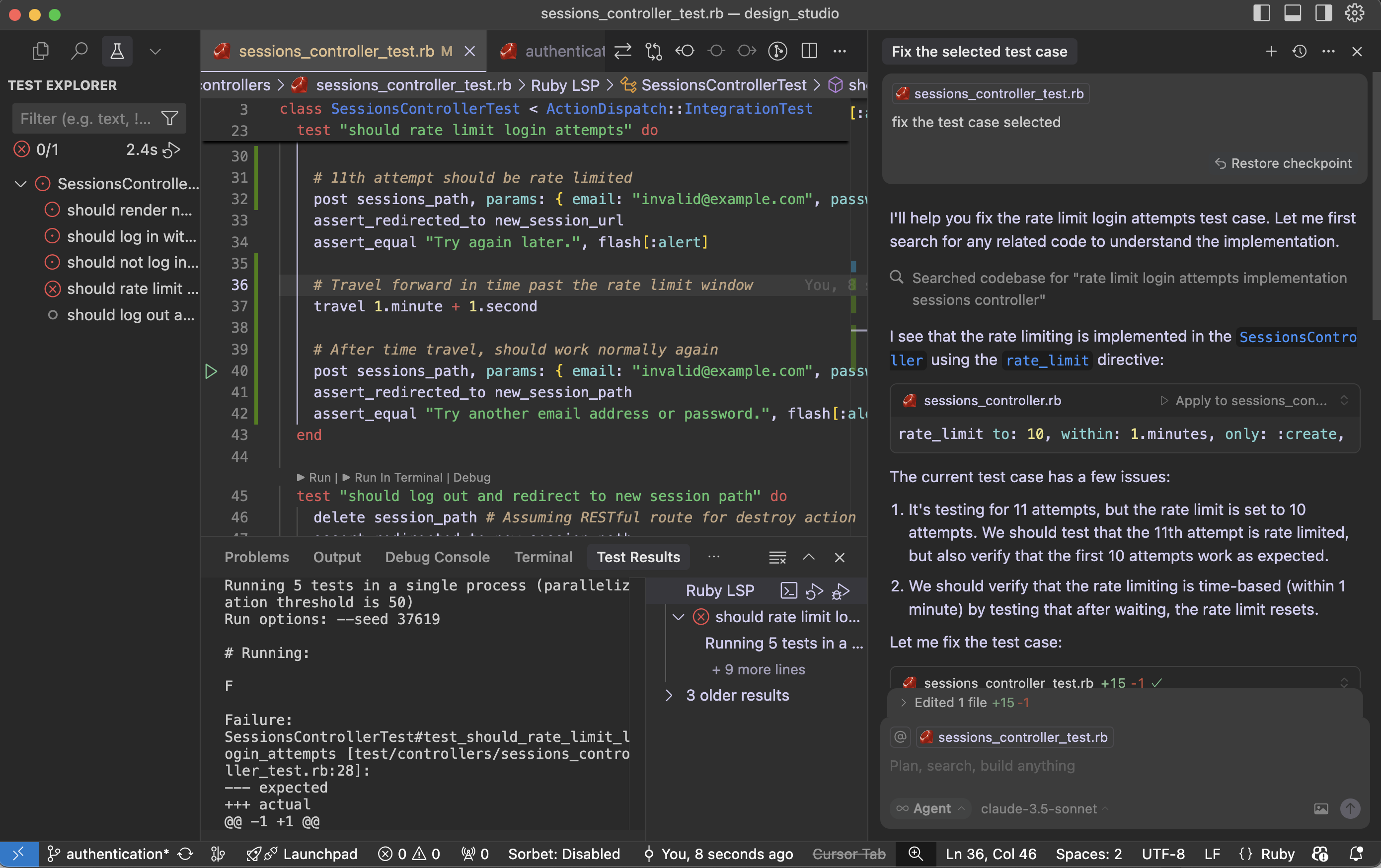
Let’s solve the test cases issues. First I cannot get ‘why this test cases for Rate limit issue is happening’. I have to research on this. I want to try Cursor – how it works with these kind of scenarios. Cursor provide me details about exact issue in our test cases and updated for me. I was happy that I saved some time.

Let’s see What is the findings of cursor:

The current test case has few issues:

  1. It’s testing for 11 attempts, but the rate limit is set to 10 attempts. We should test that the 11th attempt is rate limited, but also verify that the first 10 attempts work as expected.
  2. We should verify that the rate limiting is time-based (within 1 minute) by testing that after waiting, the rate limit resets.

Fix the test case:

Cursor updated the test case to properly test the rate limiting functionality. Here’s what the improved test does:

  1. First, it makes 10 attempts and verifies that each attempt gets the normal “invalid credentials” response
  2. Then it makes the 11th attempt and verifies that it gets rate limited with the “Try again later” message
  3. Finally, it uses Rails’ travel helper to move forward in time past the rate limit window (1 minute + 1 second) and verifies that the rate limit has been reset by making another attempt

This test now properly verifies:

  • The rate limit threshold (10 attempts)
  • The rate limit behavior (redirect with “Try again later” message)
  • The rate limit duration (1 minute)
  • The rate limit reset after the time window expires

The test is now more thorough and matches the actual implementation in the SessionsController.

Run the test case with the fix:

Failure:
SessionsControllerTest#test_should_rate_limit_login_attempts [test/controllers/sessions_controller_test.rb:34]:
--- expected
+++ actual
@@ -1 +1 @@
-"Try again later."
+"Try another email address or password."

the problem is that the rate limiting is happening at the controller level using rate_limit, but our test isn’t properly simulating real-world timing. Let me modify the test to ensure we’re making the requests within the 1-minute window and properly testing the rate limiting.

We fixed it and still the issues are not solved:

# Running:
F
Failure:
SessionsControllerTest#test_should_rate_limit_login_attempts [test/controllers/sessions_controller_test.rb:36]:
--- expected
+++ actual
@@ -1 +1 @@
-"Try again later."
+"Try another email address or password."

bin/rails test test/controllers/sessions_controller_test.rb:23

The issue may be with our SessionsController rate_limit directive. That is not working in test environment. I had this doubt. Let’s see what cursor tell us regarding this:

Looking at the SessionsController, the rate limiting is implemented using Rails’ rate_limit macro, but it seems the rate limiting might not be working as expected in the test environment. Let’s try to debug this by checking if we need to enable rate limiting in the test environment or if there’s a different approach needed.

Cursor suggested Rails cache setup and wipe out cache:

require "test_helper"

class SessionsControllerTest < ActionDispatch::IntegrationTest
  setup do
    # Use memory store for rate limiting in tests
    Rails.cache = ActiveSupport::Cache::MemoryStore.new
  end

  teardown do
    Rails.cache.clear
  end

  ......

The test environment is configured to use :null_store for caching, which means rate limiting won’t work. Let’s modify the test environment configuration:

environments/test.rb:

- config.cache_store = :null_store
+ config.cache_store = :memory_store

Cursor made two important changes:

  1. Changed the test environment’s cache store from :null_store to :memory_store to ensure rate limiting works properly
  2. Added a consistent IP address in the test requests using 
    headers: { REMOTE_ADDR: “192.168.1.1” } 
    since rate limiting is typically done based on the client’s IP address

The test should now work correctly because:

  1. We have proper caching enabled in the test environment
  2. We’re using a consistent IP address for all requests, which is what rate limiting typically uses to track requests
  3. We’re still maintaining the time window with travel_to and travel
  4. The cache is cleared between tests to ensure a clean state

Try running the test again – it should now properly detect when the rate limit is exceeded on the 11th request.

Running 5 tests in a single process (parallelization threshold is 50)
Run options: --seed 55394

# Running:
.

Finished in 1.222473s, 0.8180 runs/s, 28.6305 assertions/s.
1 runs, 35 assertions, 0 failures, 0 errors, 0 skips
Coverage report generated for Unit Tests to /Users/abhilash/rails/design_studio/public/coverage.
Line Coverage: 21.37% (81 / 379)

Works!! Cursor – you beauty.

Let us see why the fix worked:

  1. The main issue was that the test environment was using :null_store for caching, which effectively disabled all caching. Since Rails’ rate limiting feature relies on caching to track request counts, it wasn’t working properly.
  2. By changing to :memory_store, we enabled proper caching in the test environment, allowing the rate limiting to track requests.
  3. Adding the consistent IP address (REMOTE_ADDR: “192.168.1.1”) in the test requests was also important because Rails’ rate limiting typically uses the client’s IP address as part of the cache key to track requests per client.
  4. The test structure ensures clean state by:
  • Using setup to initialize a fresh cache store for each test
  • Using teardown to clear the cache after each test
  • Using travel_to to ensure consistent timing for rate limit windows
  • Using consistent IP addresses for request tracking

This is a good example of how testing rate limiting requires careful consideration of the entire environment, including caching, timing, and request attributes. The test now properly verifies that:

  • Users can make up to 10 attempts within a minute
  • The 11th attempt gets rate limited
  • After waiting for a minute, they can try again

I may need some more time to get the fact that: “Rails’ rate limiting feature relies on caching to track request counts”. Here is the importance of AI tool like cursor. It saved a lot of my debugging time.

📕 Guide: Mini-test 🧪 VS Rspec 🔬 in Rails Applications

When choosing between RSpec and Minitest for writing tests in a Ruby on Rails application, both are solid options, but the best choice depends on your project goals, team preferences, and ecosystem alignment.

♦️ Use RSpec if:

  • You want a rich DSL for expressive, readable tests (describe, context, it, etc.).
  • You’re working on a large project or with a team familiar with RSpec.
  • You want access to a larger ecosystem of gems/plugins (e.g., FactoryBot, Shoulda Matchers).
  • You like writing spec-style tests and separating tests by type (spec/models, spec/controllers, etc.).

Example RSpec syntax:

describe User do
  it "is valid with a name and email" do
    user = User.new(name: "Alice", email: "alice@example.com")
    expect(user).to be_valid
  end
end


♦️ Use Minitest if:

  • You prefer simplicity and speed — it’s built into Rails and requires no setup.
  • You value convention over configuration and a more Ruby-like test style.
  • You’re working on a small-to-medium project or want to avoid extra dependencies.
  • You like tests integrated with rails test without RSpec’s additional structure.

Example Minitest syntax:

class UserTest < ActiveSupport::TestCase
  test "is valid with a name and email" do
    user = User.new(name: "Alice", email: "alice@example.com")
    assert user.valid?
  end
end


🚦Recommendation:

  • Go with RSpec if you want a full-featured testing suite, lots of documentation, and are okay with learning a custom DSL.
  • Stick with Minitest if you want fast boot time, minimal dependencies, and simpler syntax.

Below is a side-by-side comparison of RSpec and Minitest in a Rails 8 context. For each aspect—setup, syntax, assertions, fixtures/factories, controller tests, etc.—you’ll see how you’d do the same thing in RSpec (left) versus Minitest (right). Wherever possible, the examples mirror each other so you can quickly spot the differences.


1. Setup & Configuration

AspectRSpecMinitest
Gem inclusionAdd to your Gemfile:
ruby<br>group :development, :test do<br> gem 'rspec-rails', '~> 6.0' # compatible with Rails 8<br>end<br>Then run:bash<br>bundle install<br>rails generate rspec:install<br>This creates spec/ directory with spec/spec_helper.rb and spec/rails_helper.rb.
Built into Rails. No extra gems required. When you generate your app, Rails already configures Minitest.By default you have test/ directory with test/test_helper.rb.

2. Folder Structure

TypeRSpecMinitest
Model specs/testsspec/models/user_spec.rbtest/models/user_test.rb
Controller specs/testsspec/controllers/users_controller_spec.rbtest/controllers/users_controller_test.rb
Request specs/testsspec/requests/api/v1/users_spec.rb (or spec/requests/…)test/integration/api/v1/users_test.rb
Fixture/Factory filesspec/factories/*.rb (with FactoryBot or similar)test/fixtures/*.yml
Helper filesspec/support/... (you can require them via rails_helper.rb)test/helpers/... (auto-loaded via test_helper.rb)

3. Basic Model Validation Example

RSpec (spec/models/user_spec.rb)

# spec/models/user_spec.rb
require 'rails_helper'

RSpec.describe User, type: :model do
  context "validations" do
    it "is valid with a name and email" do
      user = User.new(name: "Alice", email: "alice@example.com")
      expect(user).to be_valid
    end

    it "is invalid without an email" do
      user = User.new(name: "Alice", email: nil)
      expect(user).not_to be_valid
      expect(user.errors[:email]).to include("can't be blank")
    end
  end
end

Minitest (test/models/user_test.rb)

# test/models/user_test.rb
require "test_helper"

class UserTest < ActiveSupport::TestCase
  test "valid with a name and email" do
    user = User.new(name: "Alice", email: "alice@example.com")
    assert user.valid?
  end

  test "invalid without an email" do
    user = User.new(name: "Alice", email: nil)
    refute user.valid?
    assert_includes user.errors[:email], "can't be blank"
  end
end


4. Using Fixtures vs. Factories

RSpec (with FactoryBot)

  1. Gemfile: group :development, :test do gem 'rspec-rails', '~> 6.0' gem 'factory_bot_rails' end
  2. Factory definition (spec/factories/users.rb): # spec/factories/users.rb FactoryBot.define do factory :user do name { "Bob" } email { "bob@example.com" } end end
  3. Spec using factory: # spec/models/user_spec.rb require 'rails_helper' RSpec.describe User, type: :model do it "creates a valid user via factory" do user = FactoryBot.build(:user) expect(user).to be_valid end end

Minitest (with Fixtures or Minitest Factories)

  1. Default fixture (test/fixtures/users.yml):
    alice: name: Alice email: alice@example.com bob: name: Bob email: bob@example.com
  2. Test using fixture:
    # test/models/user_test.rb
    require "test_helper"
    class UserTest < ActiveSupport::TestCase
    test "fixture user is valid" do
    user = users(:alice) assert user.valid?
    end
    end
  3. (Optional) Using minitest-factory_bot:
    If you prefer factory style, you can add gem 'minitest-factory_bot', define factories similarly under test/factories, and then: # test/models/user_test.rb require "test_helper" class UserTest < ActiveSupport::TestCase include FactoryBot::Syntax::Methods test "factory user is valid" do user = build(:user) assert user.valid? end end

5. Assertions vs. Expectations

CategoryRSpec (expectations)Minitest (assertions)
Check truthinessexpect(some_value).to be_truthyassert some_value
Check false/nilexpect(value).to be_falseyrefute value
Equalityexpect(actual).to eq(expected)assert_equal expected, actual
Inclusionexpect(array).to include(item)assert_includes array, item
Change/Count differenceexpect { action }.to change(Model, :count).by(1)assert_difference 'Model.count', 1 do <br> action<br>end
Exception raisedexpect { code }.to raise_error(ActiveRecord::RecordNotFound)assert_raises ActiveRecord::RecordNotFound do<br> code<br>end

Example: Testing a Creation Callback

RSpec:

# spec/models/post_spec.rb
require 'rails_helper'

RSpec.describe Post, type: :model do
  it "increments Post.count by 1 when created" do
    expect { Post.create!(title: "Hello", content: "World") }
      .to change(Post, :count).by(1)
  end
end

Minitest:

# test/models/post_test.rb
require "test_helper"

class PostTest < ActiveSupport::TestCase
  test "creation increases Post.count by 1" do
    assert_difference 'Post.count', 1 do
      Post.create!(title: "Hello", content: "World")
    end
  end
end


6. Controller (Request/Integration) Tests

6.1 Controller‐Level Test

RSpec (spec/controllers/users_controller_spec.rb)

# spec/controllers/users_controller_spec.rb
require 'rails_helper'

RSpec.describe UsersController, type: :controller do
  let!(:user) { FactoryBot.create(:user) }

  describe "GET #show" do
    it "returns http success" do
      get :show, params: { id: user.id }
      expect(response).to have_http_status(:success)
    end

    it "assigns @user" do
      get :show, params: { id: user.id }
      expect(assigns(:user)).to eq(user)
    end
  end

  describe "POST #create" do
    context "with valid params" do
      let(:valid_params) { { user: { name: "Charlie", email: "charlie@example.com" } } }

      it "creates a new user" do
        expect {
          post :create, params: valid_params
        }.to change(User, :count).by(1)
      end

      it "redirects to user path" do
        post :create, params: valid_params
        expect(response).to redirect_to(user_path(User.last))
      end
    end

    context "with invalid params" do
      let(:invalid_params) { { user: { name: "", email: "" } } }

      it "renders new template" do
        post :create, params: invalid_params
        expect(response).to render_template(:new)
      end
    end
  end
end

Minitest (test/controllers/users_controller_test.rb)
# test/controllers/users_controller_test.rb
require "test_helper"

class UsersControllerTest < ActionDispatch::IntegrationTest
  setup do
    @user = users(:alice)  # from fixtures
  end

  test "should get show" do
    get user_url(@user)
    assert_response :success
    assert_not_nil assigns(:user)   # note: assigns may need enabling in Rails 8
  end

  test "should create user with valid params" do
    assert_difference 'User.count', 1 do
      post users_url, params: { user: { name: "Charlie", email: "charlie@example.com" } }
    end
    assert_redirected_to user_url(User.last)
  end

  test "should render new for invalid params" do
    post users_url, params: { user: { name: "", email: "" } }
    assert_response :success        # renders :new with 200 status by default
    assert_template :new
  end
end

Note:

  • In Rails 8, controller tests are typically integration tests (ActionDispatch::IntegrationTest) rather than old‐style unit tests. RSpec’s type: :controller still works, but you can also use type: :request (see next section).
  • assigns(...) is disabled by default in modern Rails controller tests. In Minitest, you might enable it or test via response body or JSON instead.

6.2 Request/Integration Test

RSpec Request Spec (spec/requests/users_spec.rb)
# spec/requests/users_spec.rb
require 'rails_helper'

RSpec.describe "Users API", type: :request do
  let!(:user) { FactoryBot.create(:user) }

  describe "GET /api/v1/users/:id" do
    it "returns the user in JSON" do
      get api_v1_user_path(user), as: :json
      expect(response).to have_http_status(:ok)
      json = JSON.parse(response.body)
      expect(json["id"]).to eq(user.id)
      expect(json["email"]).to eq(user.email)
    end
  end

  describe "POST /api/v1/users" do
    let(:valid_params) { { user: { name: "Dana", email: "dana@example.com" } } }

    it "creates a user" do
      expect {
        post api_v1_users_path, params: valid_params, as: :json
      }.to change(User, :count).by(1)
      expect(response).to have_http_status(:created)
    end
  end
end

Minitest Integration Test (test/integration/users_api_test.rb)
# test/integration/users_api_test.rb
require "test_helper"

class UsersApiTest < ActionDispatch::IntegrationTest
  setup do
    @user = users(:alice)
  end

  test "GET /api/v1/users/:id returns JSON" do
    get api_v1_user_path(@user), as: :json
    assert_response :success
    json = JSON.parse(response.body)
    assert_equal @user.id, json["id"]
    assert_equal @user.email, json["email"]
  end

  test "POST /api/v1/users creates a user" do
    assert_difference 'User.count', 1 do
      post api_v1_users_path, params: { user: { name: "Dana", email: "dana@example.com" } }, as: :json
    end
    assert_response :created
  end
end


7. Testing Helpers, Mailers, and Jobs

Test TypeRSpec ExampleMinitest Example
Helper Specspec/helpers/application_helper_spec.rbruby<br>describe ApplicationHelper do<br> describe "#formatted_date" do<br> it "formats correctly" do<br> expect(helper.formatted_date(Date.new(2025,1,1))).to eq("January 1, 2025")<br> end<br> end<br>endtest/helpers/application_helper_test.rbruby<br>class ApplicationHelperTest < ActionView::TestCase<br> test "formatted_date outputs correct format" do<br> assert_equal "January 1, 2025", formatted_date(Date.new(2025,1,1))<br> end<br>end
Mailer Specspec/mailers/user_mailer_spec.rbruby<br>describe UserMailer, type: :mailer do<br> describe "#welcome_email" do<br> let(:user) { create(:user, email: "test@example.com") }<br> let(:mail) { UserMailer.welcome_email(user) }<br> it "renders subject" do<br> expect(mail.subject).to eq("Welcome!")<br> end<br> it "sends to correct recipient" do<br> expect(mail.to).to eq([user.email])<br> end<br> end<br>endtest/mailers/user_mailer_test.rbruby<br>class UserMailerTest < ActionMailer::TestCase<br> test "welcome email" do<br> user = users(:alice)<br> mail = UserMailer.welcome_email(user)<br> assert_equal "Welcome!", mail.subject<br> assert_equal [user.email], mail.to<br> assert_match "Hello, #{user.name}", mail.body.encoded<br> end<br>end
Job Specspec/jobs/process_data_job_spec.rbruby<br>describe ProcessDataJob, type: :job do<br> it "queues the job" do<br> expect { ProcessDataJob.perform_later(123) }.to have_enqueued_job(ProcessDataJob).with(123)<br> end<br>endtest/jobs/process_data_job_test.rbruby<br>class ProcessDataJobTest < ActiveJob::TestCase<br> test "job is enqueued" do<br> assert_enqueued_with(job: ProcessDataJob, args: [123]) do<br> ProcessDataJob.perform_later(123)<br> end<br> end<br>end

8. Mocking & Stubbing

TechniqueRSpecMinitest
Stubbing a methodruby<br>allow(User).to receive(:send_newsletter).and_return(true)<br>ruby<br>User.stub(:send_newsletter, true) do<br> # ...<br>end<br>
Mocking an objectruby<br>mailer = double("Mailer")<br>expect(mailer).to receive(:deliver).once<br>allow(UserMailer).to receive(:welcome).and_return(mailer)<br>ruby<br>mailer = Minitest::Mock.new<br>mailer.expect :deliver, true<br>UserMailer.stub :welcome, mailer do<br> # ...<br>end<br>mailer.verify<br>

9. Test Performance & Boot Time

  • RSpec
    • Slower boot time because it loads extra files (rails_helper.rb, support files, matchers).
    • Rich DSL can make tests slightly slower, but you get clearer, more descriptive output.
  • Minitest
    • Faster boot time since it’s built into Rails and has fewer abstractions.
    • Ideal for a smaller codebase or when you want minimal overhead.

Benchmarks:
While exact numbers vary, many Rails 8 teams report ~20–30% faster test suite runtime on Minitest vs. RSpec for comparable test counts. If speed is critical and test suite size is moderate, Minitest edges out.


10. Community, Ecosystem & Plugins

FeatureRSpecMinitest
PopularityBy far the most popular Rails testing framework⸺heavily used, many tutorials.Standard in Rails. Fewer third-party plugins than RSpec, but has essential ones (e.g., minitest-rails, minitest-factory_bot).
Common plugins/gems• FactoryBot• Shoulda Matchers (for concise model validations)• Database Cleaner (though Rails 8 encourages use_transactional_tests)• Capybara built-in support• minitest-rails-capybara (for integration/feature specs)• minitest-reporters (improved output)• minitest-factory_bot
Learning curveLarger DSL to learn (e.g., describe, context, before/let/subject, custom matchers).Minimal DSL—familiar Ruby methods (assert, refute, etc.).
Documentation & tutorialsAbundant (RSPEC official guides, many blog posts, StackOverflow).Good coverage in Rails guides; fewer dedicated tutorials but easy to pick up if you know Ruby.
CI IntegrationExcellent support in CircleCI, GitHub Actions, etc. Many community scripts to parallelize RSpec.Equally easy to integrate; often faster out of the box due to fewer dependencies.

11. Example: Complex Query Test (Integration of AR + Custom Validation)

RSpec

# spec/models/order_spec.rb
require 'rails_helper'

RSpec.describe Order, type: :model do
  describe "scopes and validations" do
    before do
      @user       = FactoryBot.create(:user)
      @valid_attrs = { user: @user, total_cents: 1000, status: "pending" }
    end

    it "finds only completed orders" do
      FactoryBot.create(:order, user: @user, status: "completed")
      FactoryBot.create(:order, user: @user, status: "pending")
      expect(Order.completed.count).to eq(1)
    end

    it "validates total_cents is positive" do
      order = Order.new(@valid_attrs.merge(total_cents: -5))
      expect(order).not_to be_valid
      expect(order.errors[:total_cents]).to include("must be greater than or equal to 0")
    end
  end
end

Minitest

# test/models/order_test.rb
require "test_helper"

class OrderTest < ActiveSupport::TestCase
  setup do
    @user = users(:alice)
    @valid_attrs = { user: @user, total_cents: 1000, status: "pending" }
  end

  test "scope .completed returns only completed orders" do
    Order.create!(@valid_attrs.merge(status: "completed"))
    Order.create!(@valid_attrs.merge(status: "pending"))
    assert_equal 1, Order.completed.count
  end

  test "validates total_cents is positive" do
    order = Order.new(@valid_attrs.merge(total_cents: -5))
    refute order.valid?
    assert_includes order.errors[:total_cents], "must be greater than or equal to 0"
  end
end


12. When to Choose Which?

  • Choose RSpec if …
    1. You want expressive, English-like test descriptions (describe, context, it).
    2. Your team is already comfortable with RSpec.
    3. You need a large ecosystem of matchers/plugins (e.g., shoulda-matchers, faker, etc.).
    4. You prefer separating specs into spec/ with custom configurations in rails_helper.rb and spec_helper.rb.
  • Choose Minitest if …
    1. You want zero additional dependencies—everything is built into Rails.
    2. You value minimal configuration and convention over configuration.
    3. You need faster test suite startup and execution.
    4. Your tests are simple enough that a minimal DSL is sufficient.

13. 📋 Summary Table

FeatureRSpecMinitest
Built-in with RailsNo (extra gem)Yes
DSL Readability“describe/context/it” blocks → very readablePlain Ruby test classes & methods → idiomatic but less English-like
Ecosystem & PluginsVery rich (FactoryBot, Shoulda, etc.)Leaner, but you can add factories & reporters if needed
Setup/Boot TimeSlower (loads extra config & DSL)Faster (built-in)
Fixtures vs. Factory preferenceFactoryBot (by convention)Default YAML fixtures or optionally minitest-factory_bot
Integration Test SupportBuilt-in type: :requestBuilt-in ActionDispatch::IntegrationTest
Community AdoptionMore widely adopted for large Rails teamsStandard for many smaller Rails projects

✍️ Final Note

  • If you’re just starting out and want something up and running immediately—Minitest is the simplest path since it requires no extra gems. You can always add more complexity later (e.g., add minitest-factory_bot or minitest-reporters).
  • If you plan to write a lot of tests—model validations, request specs, feature specs, etc.—with very expressive descriptions (and you don’t mind a slightly longer boot time), RSpec tends to be the de facto choice in many Rails codebases.

Feel free to pick whichever aligns best with your team’s style. Both ecosystems are mature and well-documented.

Ruby MiniTest 🔬- Minimal replacement for test-unit

Minitest provides a complete suite of testing facilities supporting TDD, BDD, mocking, and benchmarking.

minitest/test is a small and incredibly fast unit testing framework. It provides a rich set of assertions to make your tests clean and readable.

minitest/spec is a functionally complete spec engine. It hooks onto minitest/test and seamlessly bridges test assertions over to spec expectations.

minitest/benchmark is an awesome way to assert the performance of your algorithms in a repeatable manner. Now you can assert that your newb co-worker doesn’t replace your linear algorithm with an exponential one!

minitest/mock by Steven Baker, is a beautifully tiny mock (and stub) object framework.

minitest/pride shows pride in testing and adds coloring to your test output

minitest/test_task – a full-featured and clean rake task generator.
– Minitest Github

♦️ Incredibly small and fast runner, but no bells and whistles.

Let’s take the given example in the doc, we’d like to test the following class:

class Meme
  def i_can_has_cheezburger?
    "OHAI!"
  end

  def will_it_blend?
    "YES!"
  end
end

🧪 Unit tests

Define your tests as methods beginning with test_.

require "minitest/autorun"

class TestMeme < Minitest::Test
  def setup
    @meme = Meme.new
  end

  def test_that_kitty_can_eat
    assert_equal "OHAI!", @meme.i_can_has_cheezburger?
  end

  def test_that_it_will_not_blend
    refute_match /^no/i, @meme.will_it_blend?
  end

  def test_that_will_be_skipped
    skip "test this later"
  end
end

setup ()

# File lib/minitest/test.rb, line 153
def setup; end

♦️ Runs before every test. Use this to set up before each test run.

The terms “unit test” and “spec” are often used in software testing, and while they can overlap, they have some key differences:

🧪 Unit Test vs 📋 Spec: Key Differences

🔬Unit Test

  • Purpose: Tests a single unit of code (typically a method, function, or class) in isolation
  • Scope: Very focused and narrow – tests one specific piece of functionality
  • Style: Usually follows a more traditional testing approach with setup, execution, and assertion
  • Framework examples: Minitest (like in your Ruby file), JUnit, pytest
  • Structure: Often uses test_ prefix or Test classes with assertion methods

📝 Spec (Specification)

  • Purpose: Describes the behavior and requirements of the system in a more readable, documentation-like format
  • Scope: Can cover unit-level, integration, or acceptance testing
  • Style: Uses natural language descriptions that read like specifications
  • Framework examples: RSpec, Jasmine, Mocha, Jest
  • Structure: Uses descriptive blocks like describe, it, should

⚖️ Key Differences

1. ✍️ Writing Style:

  • Unit Test
    def test_array_is_empty with assertions
  • Spec
    describe "when array is empty" do
    it "should return error message"

2. 👁️ Readability:

  • Unit Test: More code-focused, technical
  • Spec: More human-readable, business-focused

3. 🎯 Philosophy:

  • Unit Test: Test the implementation
  • Spec: Specify the behavior (BDD – Behavior Driven Development)

📊 Example Comparison

🏷️ Our current Minitest code:

def array_is_an_empty_array
  assert_equal 'Provide an array with length 2 or more', two_sum([], 9)
end

🎨 RSpec equivalent (spec style):

describe "two_sum" do
  context "when array is empty" do
    it "returns an error message" do
      expect(two_sum([], 9)).to eq('Provide an array with length 2 or more')
    end
  end
end

Both test the same functionality, but specs emphasize describing behavior in natural language, making them easier for non-technical stakeholders to understand. 🎉

🔬 Mini-test equivalent:

# frozen_string_literal: true

require 'minitest/spec'
require_relative 'two_sum'

describe "TwoSum" do
  describe "when array is empty" do
    it "returns an error message" do
      _(two_sum([], 9)).must_equal 'Provide an array with length 2 or more'
    end
  end
end

The underscore _() in Minitest spec style is a wrapper method that converts the value into an expectation object.

Here’s why it’s used:

🔍 Why the Underscore _()?
🎯 Purpose:

The _() method wraps your actual value and returns a special expectation object that has assertion methods like must_equal, must_be, etc.

⚙️ How it works:
# This:
_(two_sum([], 9)).must_equal 'Provide an array with length 2 or more'

# Is equivalent to:
# 1. two_sum([], 9) returns some value
# 2. _() wraps that value into an expectation object
# 3. .must_equal() is called on that expectation object
🔄 Alternative Syntaxes
1. 📝 Using expect() (more readable):
expect(two_sum([], 9)).must_equal 'Provide an array with length 2 or more'
2. 🔧 Using value() (explicit):
value(two_sum([], 9)).must_equal 'Provide an array with length 2 or more'
3. 🏷️ Traditional unit test style (no wrapper needed):
assert_equal 'Provide an array with length 2 or more', two_sum([], 9)
💡 Why underscore specifically?
  • Minimal syntax: _() is short and doesn’t clutter the code
  • Ruby convention: Underscore often indicates “throwaway” or “utility” variables
  • Non-conflicting: Unlikely to conflict with your method names
  • Chainable: Creates a fluent interface for assertions
🎨 Complete comparison:
# Spec style with underscore
_(result).must_equal expected

# Spec style with expect (more readable)
expect(result).must_equal expected

# Unit test style (no wrapper)
assert_equal expected, result

The expect() version is often preferred because it’s more self-documenting!

🎨 Alternative Spec Style with Expectation Syntax:

# frozen_string_literal: true

require 'minitest/spec'
require_relative 'two_sum'

describe "TwoSum" do
  describe "when array is empty" do
    it "returns an error message" do
      expect(two_sum([], 9)).must_equal 'Provide an array with length 2 or more'
    end
  end
end

⚖️ Key Differences in Minitest

🔧 Setup Required:
  • Unit Test: require 'minitest/test'
  • Spec: require 'minitest/spec'
✍️ Assertion Style:
  • Unit Test: assert_equal expected, actual
  • Spec: _(actual).must_equal expected or expect(actual).must_equal expected
🏗️ Structure:
  • Unit Test: Classes with test_ methods
  • Spec: describe blocks with it blocks
🎯 Readability:

Both styles work with Minitest, but the spec style reads more like natural language documentation, making it easier to understand the intended behavior! 

Excellent question! Let me clarify the relationship between TDD/BDD (methodologies) and RSpec/Minitest (testing frameworks):

Happy Testing!

Rails 8 App: Adding SimpleCov 🧾 & Brakeman 🔰 To Our Application For CI/CD Setup

Ensuring code quality and security in a Rails application is critical – especially as your project grows. In this post, we’ll walk through integrating two powerful tools into your Rails 8 app:

  1. SimpleCov: for measuring and enforcing test coverage
  2. Brakeman: for automated static analysis of security vulnerabilities

By the end, you’ll understand why each tool matters, how to configure them, and the advantages they bring to your development workflow.

Why Code Coverage & Security Scanning Matter

  • Maintainability
    Tracking test coverage ensures critical paths are exercised by your test suite. Over time, you can guard against regressions and untested code creeping in.
  • Quality Assurance
    High coverage correlates with fewer bugs: untested code is potential technical debt. SimpleCov gives visibility into what’s untested.
  • Security
    Rails apps can be vulnerable to injection, XSS, mass assignment, and more. Catching these issues early, before deployment, dramatically reduces risk.
  • Compliance & Best Practices
    Many organizations require minimum coverage thresholds and regular security scans. Integrating these tools automates compliance.

Part 1: Integrating SimpleCov for Test Coverage

1. Add the Gem

In your Gemfile, under the :test group, add:

group :test do
  gem 'simplecov', require: false
end

Then run:

bundle install

2. Configure SimpleCov

Create (or update) test/test_helper.rb (for Minitest) before any application code is loaded:

require 'simplecov'
SimpleCov.start 'rails' do
  coverage_dir 'public/coverage'           # output directory
  minimum_coverage 90               # fail if coverage < 90%
  add_filter '/test/'               # ignore test files themselves
  add_group 'Models', 'app/models'
  add_group 'Controllers', 'app/controllers'
  add_group 'Jobs', 'app/jobs'
  add_group 'Libraries', 'lib'
end

# Then require the rest of your test setup
ENV['RAILS_ENV'] ||= 'test'
require_relative '../config/environment'
require 'rails/test_help'
# ...

Tip: You can customize groups, filters, and thresholds. If coverage dips below the set minimum, your CI build will fail.

Note: coverage_dir should be modified to public/coverage. Else you cannot access the html publically.

3. Run Your Tests & View the Report

✗ bin/rails test
≈ tailwindcss v4.1.3

Done in 46ms
Running 10 tests in a single process (parallelization threshold is 50)
Run options: --seed 63363

# Running:

..........

Finished in 0.563707s, 17.7397 runs/s, 60.3150 assertions/s.
10 runs, 34 assertions, 0 failures, 0 errors, 0 skips
Coverage report generated for Minitest to /Users/abhilash/rails/design_studio/public/coverage.
Line Coverage: 78.57% (88 / 112)
Line coverage (78.57%) is below the expected minimum coverage (90.00%).
SimpleCov failed with exit 2 due to a coverage related error

Once tests complete, open http://localhost:3000/coverage/index.html#_AllFiles in your browser:

  • A color-coded report shows covered (green) vs. missed (red) lines.
  • Drill down by file or group to identify untested code.

We get 78.57% only coverage and our target is 90% coverage. Let’s check where we missed the tests. ProductsController 82%. We missed coverage for #delete_image action. Let’s add it and check again.

Let’s add Product Controller json requests test cases for json error response and add the ApplicationControllerTest for testing root path.

Now we get: 88.3%

Now we have to add some Test cases for Product model.

Now we get: 92.86% ✅

4. Enforce in CI

In your CI pipeline (e.g. GitHub Actions), ensure:

- name: Run tests with coverage
  run: |
    bundle exec rails test
    # Optionally upload coverage to Coveralls or Codecov

If coverage < threshold, the job will exit non-zero and fail.


Part 2: Incorporating Brakeman for Security Analysis

1. Add Brakeman to Your Development Stack

You can install Brakeman as a gem (development-only) or run it via Docker/CLI. Here’s the gem approach:

group :development do
  gem 'brakeman', require: false
end

Then:

bundle install

2. Basic Usage

From your project root, simply run:

✗ bundle exec brakeman

Generating report...

== Brakeman Report ==

Application Path: /Users/abhilash/rails/design_studio
Rails Version: 8.0.2
Brakeman Version: 7.0.2
Scan Date: 2025-05-07 11:06:36 +0530
Duration: 0.35272 seconds
Checks Run: BasicAuth, BasicAuthTimingAttack, CSRFTokenForgeryCVE, ....., YAMLParsing

== Overview ==

Controllers: 2
Models: 3
Templates: 12
Errors: 0
Security Warnings: 0

== Warning Types ==


No warnings found

By default, Brakeman:

  • Scans app/, lib/, config/, etc.
  • Outputs a report in the terminal and writes brakeman-report.html.

3. Customize Your Scan

Create a config/brakeman.yml to fine-tune:

ignored_files:
  - 'app/controllers/legacy_controller.rb'
checks:
  - mass_assignment
  - cross_site_scripting
  - sql_injection
skip_dev: true                 # ignores dev-only gems
quiet: true                     # suppress verbose output

Run with:

bundle exec brakeman -c config/brakeman.yml -o public/security_report.html

Theconfig/brakeman.yml file is not added by default. You can add the file by copying the contents from: https://gist.github.com/abhilashak/038609f1c35942841ff8aa5e4c88b35b

Check: http://localhost:3000/security_report.html

4. CI Integration

In GitHub Actions:

- name: Run Brakeman security scan
  run: |
    bundle exec brakeman -q -o brakeman.json
- name: Upload Brakeman report
  uses: actions/upload-artifact@v3
  with:
    name: security-report
    path: brakeman.json

Optionally, you can fail the build if new warnings are introduced by comparing against a baseline report.


Advantages of Using SimpleCov & Brakeman Together

AspectSimpleCovBrakeman
PurposeTest coverage metricsStatic security analysis
Fail-fastFails when coverage drops below thresholdCan be configured to fail on new warnings
VisibilityColorized HTML coverage reportDetailed HTML/JSON vulnerability report
CI/CD ReadyIntegrates seamlessly with most CI systemsCLI-friendly, outputs machine-readable data
CustomizableGroups, filters, thresholdsChecks selection, ignored files, baseline

Together, they cover two critical quality dimensions:

  1. Quality & Maintainability (via testing)
  2. Security & Compliance (via static analysis)

Automating both checks in your pipeline means faster feedback, fewer production issues, and higher confidence when shipping code.


Best Practices & Tips

  • Threshold for SimpleCov: Start with 80%, then gradually raise to 90–95% over time.
  • Treat Brakeman Warnings Seriously: Not all findings are exploitable, but don’t ignore them—triage and document why you’re suppressing any warning.
  • Baseline Approach: Use a baseline report for Brakeman so your build only fails on newly introduced warnings, not historical ones.
  • Schedule Periodic Full Scans: In addition to per-PR scans, run a weekly scheduled Brakeman job to catch issues from merged code.
  • Combine with Other Tools: Consider adding gem like bundler-audit for known gem vulnerabilities.

Conclusion

By integrating SimpleCov and Brakeman into your Rails 8 app, you establish a robust safety net that:

  • Ensures new features are properly tested
  • Keeps an eye on security vulnerabilities
  • Automates quality gates in your CI/CD pipeline

These tools are straightforward to configure and provide immediate benefits – improved code confidence, faster code reviews, and fewer surprises in production. Start today, and make code quality and security first-class citizens in your Rails workflow!

Happy Rails CI/CD Integration .. 🚀

Rails 8 App: Comprehensive Guide 📑 to Write Controller Tests | 👓 Rspec – 20 Test Cases For Reference

Testing is a crucial part of ensuring the reliability and correctness of a Ruby on Rails 8 application. Controller tests verify the behaviour of your application’s controllers, ensuring that actions handle requests properly, return correct responses, and enforce security measures.

This guide explores the best practices in writing Rails 8 controller tests, references well-known Rails projects, and provides 20 test case examples—including 5 complex ones.

Setting Up the Testing Environment using Rspec

To effectively write controller tests, we use RSpec (the most popular testing framework in the Rails community) along with key supporting gems:

Recommended Gems

Add the following gems to your Gemfile under the :test group:

group :test do
  gem 'rspec-rails'  # Main testing framework
  gem 'factory_bot_rails'  # For test data setup
  gem 'database_cleaner-active_record'  # Cleans test database
  gem 'faker'  # Generates fake data
  gem 'shoulda-matchers'  # Provides one-liner matchers for common Rails functions
end

Run:

bundle install
rails generate rspec:install

Then, configure spec_helper.rb and rails_helper.rb to include necessary test configurations.

Types of Controller Tests

A controller test should cover various scenarios:

  1. Successful actions (index, show, create, update, destroy)
  2. Error handling (record not found, invalid params)
  3. Authentication & Authorization (user roles, access control)
  4. Redirections & Response types (HTML, JSON, Turbo Streams)
  5. Edge cases (empty parameters, SQL injection attempts)

Let’s dive into examples.

Basic Controller Tests

1. Testing Index Action

require 'rails_helper'

describe ArticlesController, type: :controller do
  describe 'GET #index' do
    it 'returns a successful response' do
      get :index
      expect(response).to have_http_status(:ok)
    end
  end
end

2. Testing Show Action with a Valid ID

describe 'GET #show' do
  let(:article) { create(:article) }
  it 'returns the requested article' do
    get :show, params: { id: article.id }
    expect(response).to have_http_status(:ok)
    expect(assigns(:article)).to eq(article)
  end
end

3. Testing Show Action with an Invalid ID

describe 'GET #show' do
  it 'returns a 404 for an invalid ID' do
    get :show, params: { id: 9999 }
    expect(response).to have_http_status(:not_found)
  end
end

4. Testing Create Action with Valid Parameters

describe 'POST #create' do
  it 'creates a new article' do
    expect {
      post :create, params: { article: attributes_for(:article) }
    }.to change(Article, :count).by(1)
  end
end

5. Testing Create Action with Invalid Parameters

describe 'POST #create' do
  it 'does not create an article with invalid parameters' do
    expect {
      post :create, params: { article: { title: '' } }
    }.not_to change(Article, :count)
  end
end

6. Testing Update Action

describe 'PATCH #update' do
  let(:article) { create(:article) }
  it 'updates an article' do
    patch :update, params: { id: article.id, article: { title: 'Updated' } }
    expect(article.reload.title).to eq('Updated')
  end
end

7. Testing Destroy Action

describe 'DELETE #destroy' do
  let!(:article) { create(:article) }
  it 'deletes an article' do
    expect {
      delete :destroy, params: { id: article.id }
    }.to change(Article, :count).by(-1)
  end
end

Here are the missing test cases (7 to 15) that should be included in your blog post:

8. Testing Redirection After Create

describe 'POST #create' do
  it 'redirects to the article show page' do
    post :create, params: { article: attributes_for(:article) }
    expect(response).to redirect_to(assigns(:article))
  end
end

9. Testing JSON Response for Index Action

describe 'GET #index' do
  it 'returns a JSON response' do
    get :index, format: :json
    expect(response.content_type).to eq('application/json')
  end
end

10. Testing JSON Response for Show Action

describe 'GET #show' do
  let(:article) { create(:article) }
  it 'returns the article in JSON format' do
    get :show, params: { id: article.id }, format: :json
    expect(response.content_type).to eq('application/json')
    expect(response.body).to include(article.title)
  end
end

11. Testing Unauthorized Access to Update

describe 'PATCH #update' do
  let(:article) { create(:article) }
  it 'returns a 401 if user is not authorized' do
    patch :update, params: { id: article.id, article: { title: 'Updated' } }
    expect(response).to have_http_status(:unauthorized)
  end
end

12. Testing Strong Parameters Enforcement

describe 'POST #create' do
  it 'does not allow mass assignment of protected attributes' do
    expect {
      post :create, params: { article: { title: 'Valid', admin_only_field: true } }
    }.to raise_error(ActiveModel::ForbiddenAttributesError)
  end
end

13. Testing Destroy Action with Invalid ID

describe 'DELETE #destroy' do
  it 'returns a 404 when the article does not exist' do
    delete :destroy, params: { id: 9999 }
    expect(response).to have_http_status(:not_found)
  end
end

14. Testing Session Persistence

describe 'GET #dashboard' do
  before { session[:user_id] = create(:user).id }
  it 'allows access to the dashboard' do
    get :dashboard
    expect(response).to have_http_status(:ok)
  end
end

15. Testing Rate Limiting on API Requests

describe 'GET #index' do
  before do
    10.times { get :index }
  end
  it 'returns a 429 Too Many Requests when rate limit is exceeded' do
    get :index
    expect(response).to have_http_status(:too_many_requests)
  end
end

Complex Controller 🎮 Tests

16. Testing Admin Access Control

describe 'GET #admin_dashboard' do
  context 'when user is admin' do
    let(:admin) { create(:user, role: :admin) }
    before { sign_in admin }
    it 'allows access' do
      get :admin_dashboard
      expect(response).to have_http_status(:ok)
    end
  end
  context 'when user is not admin' do
    let(:user) { create(:user, role: :user) }
    before { sign_in user }
    it 'redirects to home' do
      get :admin_dashboard
      expect(response).to redirect_to(root_path)
    end
  end
end

17. Testing Turbo Stream Responses

describe 'PATCH #update' do
  let(:article) { create(:article) }
  it 'updates an article and responds with Turbo Stream' do
    patch :update, params: { id: article.id, article: { title: 'Updated' } }, format: :turbo_stream
    expect(response.media_type).to eq Mime[:turbo_stream]
  end
end

Here are three additional complex test cases (18, 19, and 20) to include in your blog post:

18. Testing WebSockets with ActionCable

describe 'WebSocket Connection' do
  let(:user) { create(:user) }
  
  before do
    sign_in user
  end

  it 'successfully subscribes to a channel' do
    subscribe room_id: 1
    expect(subscription).to be_confirmed
    expect(subscription).to have_stream_from("chat_1")
  end
end

Why? This test ensures that ActionCable properly subscribes users to real-time chat channels.

19. Testing Nested Resource Actions

describe 'POST #create in nested resource' do
  let(:user) { create(:user) }
  let(:post) { create(:post, user: user) }

  it 'creates a comment under the correct post' do
    expect {
      post :create, params: { post_id: post.id, comment: { body: 'Nice post!' } }
    }.to change(post.comments, :count).by(1)
  end
end

Why? This test ensures correct behavior when working with nested resources like comments under posts.

20. Testing Multi-Step Form Submission

describe 'PATCH #update (multi-step form)' do
  let(:user) { create(:user, step: 'personal_info') }

  it 'advances the user to the next step in a multi-step form' do
    patch :update, params: { id: user.id, user: { step: 'address_info' } }
    expect(user.reload.step).to eq('address_info')
  end
end

Why? This test ensures users can progress through a multi-step form properly.

📝 Conclusion

This guide provides an extensive overview of controller testing in Rails 8, ensuring robust coverage for all possible scenarios. By following these patterns, your Rails applications will have reliable, well-tested controllers that behave as expected.

Happy Testing! 🚀

Setup 🛠 Rails 8 App – Part 14: Product Controller Test cases 🔍 For GitHub Actions

In an e-commerce application built with Ruby on Rails, controller tests ensure that your APIs and web interfaces behave as expected. In this post, we’ll explore our ProductsControllerTest suite that validates product creation, editing, deletion, and error handling—including associated product variants and image uploads.

Overview

Our controller is responsible for managing Product records and their associated ProductVariant. A Product may have multiple variants, but for simplicity, we’re focusing on creating a product with a primary variant. The test suite uses ActionDispatch::IntegrationTest for full-stack request testing and some pre-seeded fixtures (products(:one) and product_variants(:one)).

Integration tests (Rails 5+)

  • Inherit from ActionDispatch::IntegrationTest.
  • Spin up the full Rails stack (routing, middleware, controllers, views).
  • You drive them with full URLs/paths (e.g. get products_url) and can even cross multiple controllers in one test.

🧪 Fixture Setup

Before diving into the tests, here’s how we set up our test data using fixtures.

Product Fixture (test/fixtures/products.yml)

one:
  name: My Product
  description: "Sample description"
  brand: BrandOne
  category: men
  rating: 4.0
  created_at: <%= Time.now %>
  updated_at: <%= Time.now %>

Product Variant Fixture (test/fixtures/product_variants.yml)

one:
  product: one
  sku: "ABC123"
  mrp: 1500.00
  price: 1300.00
  discount_percent: 10.0
  size: "M"
  color: "Red"
  stock_quantity: 10
  specs: { material: "cotton" }
  created_at: <%= Time.now %>
  updated_at: <%= Time.now %>

We also include a sample image for upload testing:

📁 test/fixtures/files/sample.jpg

🧩 Breakdown of ProductsControllerTest

Here’s what we’re testing and why each case is important:

setup do … end

Runs before each test in the class. Use it to prepare any common test data or state.

class ProductsControllerTest < ActionDispatch::IntegrationTest
  setup do
    @product = products(:one)
    @variant = product_variants(:one)
  end

  # every test below can use @product and @variant
end

test "description" do … end

Defines an individual test case. The string describes what behaviour you’re verifying.

test "should get index" do
  get products_url
  assert_response :success
end

1. GET /products (index)

test "should get index" do
    get products_url
    assert_response :success
    # check products header exists
    assert_select "h1", /Products/i
    # check new product button exists
    assert_select "main div a.btn-new[href=?]", new_product_path,
                  text: "➕ New Product", count: 1
  end

✔️ Verifies the product listing page is accessible and renders a header. New product button also rendered.

assert_response

Verifies the HTTP status code returned by your request.
Common symbols:

  • :success (200)
  • :redirect (3xx)
  • :unprocessable_entity (422)
  • :not_found (404)
get new_product_url
assert_response :success

post products_url, params: invalid_params
assert_response :unprocessable_entity

assert_select

Inspects the server‐rendered HTML using CSS selectors.
Great for making sure particular elements and text appear.

get products_url
assert_select "h1", "Products"      # exact match
assert_select "h1", /Products/i     # regex match
assert_select "form[action=?]", products_path

2. GET /products/new

test "should get new" do
    get new_product_url
    assert_response :success
    assert_select "form"
    assert_select "main div a.btn-back[href=?]", products_path,
                  text: /Back to Products/, count: 1
  end

✔️ Ensures the new product form is available. Back button is rendered (for button text we use Reg Exp).

3. POST /products with valid product and variant

test "should create product with variant" do
  assert_difference([ "Product.count", "ProductVariant.count" ]) do
    post products_url, params: {
      product: {
        name: "New Product",
        ...
        images: [fixture_file_upload("test/fixtures/files/sample.jpg", "image/jpeg")],
        product_variant: { ... }
      }
    }
  end
   assert_redirected_to product_url(product)
   assert_equal 1, product.variants.count
   ....
end

✔️ Tests nested attributes, image file uploads, and variant creation in one go.

assert_difference

Ensures a given expression changes by an expected amount.
Often used to test side‐effects like record creation/deletion.

assert_difference "Product.count", +1 do
  post products_url, params: valid_product_params
end

assert_difference ["Product.count", "ProductVariant.count"], +1 do
  post products_url, params: nested_variant_params
end

assert_no_difference "Product.count" do
  post products_url, params: invalid_params
end

assert_redirected_to

Confirms that the controller redirected to the correct path or URL.

post products_url, params: valid_params
assert_redirected_to product_url(Product.last)

delete product_url(@product)
assert_redirected_to products_url

4. POST /products fails when variant is invalid

test "should not create product if variant invalid (missing required mrp)" do
  assert_no_difference([ "Product.count", "ProductVariant.count" ]) do
    post products_url, params: { ... 
        product: { ...
           product_variant: {
             ...
             mrp: nil, # Invalid
             ...
           }
        }
    }
  end
  assert_response :unprocessable_entity
end

✔️ Ensures validations prevent invalid data from being saved.

5. GET /products/:id

test "should show product" do
  get product_url(@product)
  assert_response :success
  assert_select "h2", @product.brand
  assert_select "h4", @product.name
end

✔️ Validates the product detail page renders correct content.

6. GET /products/:id/edit

test "should get edit" do
  get edit_product_url(@product)
  assert_response :success
  assert_select "form"
end

✔️ Confirms the edit form is accessible.

7. PATCH /products/:id with valid update

test "should update product and variant" do
  patch product_url(@product), params: {
    product: {
      name: "Updated Product",
      rating: 4.2,
      product_variant: {
        size: "XL",
        color: "Blue"
      }
    }
  }
  ...
  assert_equal "Updated Product", @product.name
  assert_equal 4.2, @product.rating
end

✔️ Tests simultaneous updates to product and its variant.

assert_equal

Checks that two values are exactly equal.
Use it to verify model attributes, JSON responses, or any Ruby object.

patch product_url(@product), params: update_params
@product.reload
assert_equal "Updated Name", @product.name
assert_equal 4.2, @product.rating

8. PATCH /products/:id fails with invalid data

test "should not update with invalid variant data" do
  patch product_url(@product), params: {
    product: {
      product_variant: { mrp: nil }
    }
  }
  assert_response :unprocessable_entity
end

✔️ Verifies that invalid updates are rejected and return 422.

9. DELETE /products/:id

test "should destroy product" do
  assert_difference("Product.count", -1) do
    delete product_url(@product)
  end
end

✔️ Ensures products can be deleted successfully.

10. Enforce unique SKU

test "should enforce unique SKU" do
  post products_url, params: {
    product: {
      ...,
      product_variant: {
        sku: @variant.sku, # duplicate
        ...
      }
    }
  }
  assert_response :unprocessable_entity
end

✔️ Tests uniqueness validation for variant SKUs to maintain data integrity.


Putting It All Together

Each of these building blocks helps compose clear, maintainable tests:

  1. setup prepares the ground.
  2. test names and isolates scenarios.
  3. assert_response and assert_redirected_to check HTTP behavior.
  4. assert_select inspects rendered views.
  5. assert_difference validates side-effects.
  6. assert_equal verifies precise state changes.

Refer for more here: https://github.com/rails/rails-dom-testing/blob/main/test/selector_assertions_test.rb

With these tools, you can cover every happy path and edge case in your Rails controllers – ensuring confidence in your application’s behaviour!

📌 Best Practices Covered

  • 🔁 Fixture-driven tests for consistency and speed
  • 🔍 Use of assert_select to test views
  • 🧩 Testing nested models and image uploads
  • 🚫 Validation enforcement with assert_no_difference
  • 🧪 Full CRUD test coverage with edge cases

📝 Summary

A well-tested controller gives you peace of mind when iterating or refactoring. With a test suite like this, you’re not only testing basic functionality but also ensuring that validations, associations, and user-facing forms behave as expected. You can also use Rspec for Test Cases. Check the post for Rspec examples: https://railsdrop.com/2025/05/04/rails-8-write-controller-tests-20-rspec-test-cases-examples/

Stay confident.

Enjoy Testing! 🚀