📦 Sprockets vs 🧵 Propshaft in Ruby on Rails 7/8 – What’s the Difference?

When working with asset pipelines in Ruby on Rails 7 and 8, you might encounter Sprockets and Propshaft—two asset handling libraries. While both aim to serve static assets like JavaScript, CSS, images, and fonts, they do so in different ways.

This post will walk you through what each does, how they differ, and when you might want to use one over the other.


📦 What is Sprockets?

Sprockets is the original Rails asset pipeline system, introduced way back in Rails 3.1. It allows developers to:

  • Concatenate and minify JavaScript and CSS
  • Preprocess assets using things like SCSS, CoffeeScript, ERB, etc.
  • Fingerprint assets for cache busting
  • Compile assets at deploy time

It works well for traditional Rails applications where the frontend and backend are tightly coupled.

Pros:

  • Mature and stable
  • Rich preprocessing pipeline (SCSS, CoffeeScript, ERB, etc.)
  • Supports advanced directives like //= require_tree .

Cons:

  • Complex internal logic
  • Slower compilation times
  • Relies on a manifest file that can get messy
  • Tightly coupled with older Rails asset practices

🧵 What is Propshaft?

Propshaft is the newer asset pipeline introduced by the Rails team as an alternative to Sprockets. It focuses on simplicity and modern best practices. Propshaft was added as an optional asset pipeline starting in Rails 7 and is included by default in some new apps.

Design Philosophy:
Propshaft aims to work like a static file server with fingerprinting and logical path mapping, rather than a full asset compiler.

Key Features:

  • Uses logical paths (e.g., /assets/application.css)
  • No preprocessing pipeline by default (but supports it via extensions like Tailwind or Sass)
  • Supports digesting (fingerprinting) of assets
  • Leaner and faster than Sprockets
  • Easier to integrate with modern JavaScript bundlers (like importmaps, esbuild, or webpack)

Pros:

  • Lightweight and fast
  • Easier to debug
  • Works great with importmaps and Hotwire
  • Modern, forward-looking approach

Cons:

  • No advanced preprocessing by default
  • Limited plugin ecosystem (still maturing)
  • Doesn’t support old Sprockets directives

🔍 Key Differences at a Glance

FeatureSprocketsPropshaft
Introduced InRails 3.1Rails 7
Default in RailsRails 6 and earlierOptional from Rails 7+
Preprocessing SupportYes (SCSS, ERB, CoffeeScript, etc.)No (only raw assets by default)
SpeedSlowerFaster
Configuration ComplexityHigherMinimal
Plugin EcosystemLarge and matureNew and growing
Use With Importmaps/HotwireCan work, but heavierIdeal
DebuggingHarder due to complexityEasier

🧰 When Should You Use Sprockets?

Choose Sprockets if:

  • You are upgrading a legacy Rails app
  • Your project already relies on Sprockets
  • You use heavy asset preprocessing
  • You need compatibility with gems that depend on Sprockets

⚡ When Should You Use Propshaft?

Choose Propshaft if:

  • You are starting a new Rails 7/8 project
  • You use Importmaps or Hotwire/Turbo
  • You prefer faster and simpler asset handling
  • You don’t need complex preprocessing

Propshaft pairs particularly well with modern frontend workflows like Tailwind CSS (via build tools) or StimulusJS (with importmaps).

🛠️ Switching from Sprockets to Propshaft

If you’re migrating, here are basic steps:

  1. Remove sprockets-rails gem from your Gemfile: # Gemfile # gem "sprockets-rails"
  2. Add propshaft: gem "propshaft"
  3. Update config/application.rb: config.assets.resolver = Propshaft::Resolver.new( paths: [Rails.root.join("app/assets")] )
  4. Remove app/assets/config/manifest.js (used by Sprockets)
  5. Move all assets to the correct logical paths under app/assets
  6. Use digested URLs as needed (asset_path("application.css") etc.)

🧪 Real Example in Rails 8

Here’s how your application.html.erb might look using Propshaft:

<%= stylesheet_link_tag "application", "data-turbo-track": "reload" %>
<%= javascript_include_tag "application", "data-turbo-track": "reload", defer: true %>

And your app/assets/builds/application.css could be compiled via Tailwind or SCSS using a toolchain.


🧠 Final Thoughts

Sprockets has served Rails well for over a decade, but Propshaft is the new lightweight future. If you’re starting fresh, Propshaft is a strong choice, especially when used alongside Hotwire, Importmaps, or modern JS bundlers.

However, don’t feel pressured to switch if your current Sprockets setup works fine—Rails continues to support both.


✨ TL;DR

  • Sprockets = older, feature-rich, best for legacy apps
  • Propshaft = newer, minimal, better for modern workflows

Choose based on your app’s needs and complexity. Cheers! 🚀

Design Studio – Rails 8 e-commerce application: Integrate active admin

Now let’s create an admin interface for our e-commerce Application.

We have a well-structured e-commerce Rails application with:

Models: User, Product, ProductVariant, Order, OrderItem
Authentication: Custom session-based auth with user roles (customer/admin)
Authorization: Already has admin role checking

Admin Interface Recommendations

Here are the best options for Rails admin interfaces, ranked by suitability for our project:

  1. ActiveAdmin (Recommended ⭐)
    Best fit for e-commerce with complex associations
    Excellent filtering, search, and batch operations
    Great customization options and ecosystem
    Handles your Product → ProductVariant → OrderItem relationships well
  2. Administrate (Modern Alternative)
    Clean, Rails-way approach by Thoughtbot
    Good for custom UIs, less configuration
    More work to set up initially
  3. Rails Admin (What you asked about)
    Quick setup but limited customization
    Less actively maintained
    Good for simple admin needs
  4. Avo (Modern Premium)
    Beautiful modern UI
    Some features require paid version

    https://avohq.io/rails-admin
    https://docs.avohq.io/3.0/

Choose ActiveAdmin for our e-commerce application. Let’s integrate it with our existing authentication system

Add in Gemfile:

gem "activeadmin"
gem "sassc-rails" # Required for ActiveAdmin
gem "image_processing", "~> 1.2" # For variant processing if not already present

Bundle Install and run the Active Admin Generator:

$ bundle install
$ rails generate active_admin:install --skip-users
definition of Rules was here
create app/assets/javascripts/active_admin.js
create app/assets/stylesheets/active_admin.scss
create db/migrate/20250710083516_create_active_admin_comments.rb

Migration File created by Active Admin:

class CreateActiveAdminComments < ActiveRecord::Migration[8.0]
  def self.up
    create_table :active_admin_comments do |t|
      t.string :namespace
      t.text   :body
      t.references :resource, polymorphic: true
      t.references :author, polymorphic: true
      t.timestamps
    end
    add_index :active_admin_comments, [ :namespace ]
  end

  def self.down
    drop_table :active_admin_comments
  end
end

Run database migration:

$ rails db:migrate

in app/initializers/active_admin.rb

# This setting changes the method which Active Admin calls
  # within the application controller.
  config.authentication_method = :authenticate_admin_user!
....
# This setting changes the method which Active Admin calls
  # (within the application controller) to return the currently logged in user.
  config.current_user_method = :current_admin_user
....
 # Default:
  config.logout_link_path = :destroy_session_path

in app/controllers/application_controller.rb

private

  def authenticate_admin_user!
    require_authentication
    ensure_admin
  end

  def current_admin_user
    Current.user if Current.user&.admin?
  end

Run the active admin user, product generator:

rails generate active_admin:resource User
rails generate active_admin:resource Product
rails generate active_admin:resource ProductVariant
rails generate active_admin:resource Order
rails generate active_admin:resource OrderItem

Let’s update all the active admin resources with fields, filters, attributes, panels etc.

Let’s add accepts_nested_attributes_for :variants, allow_destroy: true in Product Model.

accepts_nested_attributes_for is a Rails feature that allows a parent model to accept and process attributes for its associated child models through nested parameters. Here’s what it does:

What it enables:

  1. Nested Forms: You can create/update a Product and its ProductVariants in a single form submission
  2. Mass Assignment: Allows passing nested attributes through strong parameters
  3. CRUD Operations: Create, update, and delete associated records through the parent

In our Product model

class Product < ApplicationRecord
  has_many :variants, dependent: :destroy, class_name: "ProductVariant"
  accepts_nested_attributes_for :variants, allow_destroy: true
end

What this allows:

Before: You’d need separate forms/requests for Product and ProductVariant

# Create product first
product = Product.create(name: "T-Shirt", brand: "Nike")

# Then create variants separately
product.variants.create(size: "M", color: "Red", sku: "NIKE-001-M-RED")
product.variants.create(size: "L", color: "Blue", sku: "NIKE-001-L-BLUE")

After: You can do it all in one go:

Product.create(
  name: "T-Shirt",
  brand: "Nike",
  variants_attributes: [
    { size: "M", color: "Red", sku: "NIKE-001-M-RED" },
    { size: "L", color: "Blue", sku: "NIKE-001-L-BLUE" }
  ]
)

In ActiveAdmin context:

This enables the nested form I created in app/admin/products.rb:

f.inputs "Product Variants" do
  f.has_many :variants, allow_destroy: true, new_record: true do |v|
    v.input :size
    v.input :color
    v.input :sku
    # ... other variant fields
  end
end
The allow_destroy: true option:
  • Allows deleting associated records by passing _destroy: ‘1’
  • Essential for updating existing products with variants
Strong Parameters:

In the controller, you need to permit the nested attributes:

permit_params :name, :brand, :category, 
              variants_attributes: [:id, :size, :color, :sku, :mrp, :discount_percent, :_destroy]

Propshaft vs Sprockets

We have an error after integrating ActiveAdmin:

 Rendered layout layouts/application.html.erb (Duration: 13.9ms | GC: 0.5ms)
Completed 500 Internal Server Error in 118ms (ActiveRecord: 28.7ms (1 query, 0 cached) | GC: 27.0ms)

ActionView::Template::Error (undefined method 'load_path' for an instance of Sprockets::Environment)
Caused by: NoMethodError (undefined method 'load_path' for an instance of Sprockets::Environment)

Information for: ActionView::Template::Error (undefined method 'load_path' for an instance of Sprockets::Environment):
    14:     <link rel="icon" href="/icon.svg" type="image/svg+xml">
    15:     <link rel="apple-touch-icon" href="/icon.png">

This error occurs because Rails 8 uses Propshaft by default, but ActiveAdmin requires Sprockets. There’s a conflict between the two asset pipelines. Let’s fix this by switching to Sprockets completely:

Add in Gemfile:

# Use Sprockets for asset pipeline (required for ActiveAdmin)
gem "sprockets-rails"

$ bundle install

# application.rb

# Use Sprockets for asset pipeline
config.assets.enabled = true

Let’s create an admin user for testing our ActiveAdmin:

# seed.rb
# Create admin user
admin_user = User.find_or_create_by(email: "admin@designstudio.com") do |user|
  user.password = "password123"
  user.role = "admin"
end

puts "Admin user created: #{admin_user.email}" if admin_user.persisted?

# run seed
✗ rails db:seed

✅ We have Successfully Integrated ActiveAdmin with Nested Attributes!

I’ve successfully converted your Rails application to use nested attributes (variants_attributes) across the entire stack and integrated ActiveAdmin as your admin interface. Here’s what I accomplished:

🔧 What I Fixed & Updated:

1. Asset Pipeline Issue:

  • Switched from Propshaft to Sprockets (required for ActiveAdmin)
  • Updated Gemfile and application configuration
  • Fixed the load_path error you encountered

2. Model Changes:

  • Added accepts_nested_attributes_for :variants, allow_destroy: true to Product model

3. Controller Updates:

  • Changed from singular product_variant to plural variants_attributes
  • Simplified create/update actions to use Rails nested attributes handling
  • Updated strong parameters to permit nested variant attributes

4. View Improvements:

  • Updated product form to handle multiple variants with JavaScript
  • Added “Add Another Variant” functionality
  • Implemented proper nested form fields for all variant attributes

5. ActiveAdmin Configuration:

  • Set up authentication using your existing user system
  • Created comprehensive admin resources for all models
  • Added nested variant management in product forms
  • Built an informative dashboard with key metrics

🎯 Admin Features You Now Have:

  1. Dashboard – Key metrics, recent activity, revenue overview
  2. User Management – Role management, order history
  3. Product Management – Full CRUD with image uploads and nested variants
  4. Order Management – Status updates, batch actions
  5. Inventory Management – ProductVariant and OrderItem tracking

🔑 Admin Access:

  • URL: http://localhost:3000/admin
  • Email: admin@designstudio.com
  • Password: password123

📊 Comparison vs Rails Admin:

ActiveAdmin Advantages:

  • ✅ Better for complex e-commerce relationships
  • ✅ Excellent filtering and search capabilities
  • ✅ Powerful batch operations
  • ✅ Highly customizable forms and views
  • ✅ Active development and community

Rails Admin:

  • ❌ Less actively maintained
  • ❌ Limited customization options
  • ❌ Not as suitable for complex nested relationships

🚀 What’s Working Now:

  1. Nested Variants: Create/edit products with multiple variants in one form
  2. Image Management: Upload multiple product images
  3. Order Processing: Admin can update order statuses with batch actions
  4. User Management: Promote users to admin, view order history
  5. Dashboard Analytics: Revenue tracking, popular products, recent activity

Visit /admin to explore your new admin interface, Cheers!

Check docs: https://activeadmin.info/0-installation.html

⚠️ Tailwind UI Issue after moving to Sprockets

The issue is with <%= stylesheet_link_tag "/tailwind/application.css", "data-turbo-track": "reload" %> where we are trying to load Tailwind CSS from an incorrect path. The tailwindcss-rails gem serves Tailwind CSS differently. Let me fix this:

ls -la app/assets/tailwind/
curl -I http://localhost:3000/tailwind/application.css
rails routes | grep -i tailwind

The issue is that the /tailwind/application.css path is returning 404. The tailwindcss-rails gem works differently. Let’s check how it’s configured and fix this:

find . -name "*.css" -path "*/public/*" | head -10
rails assets:precompile

Now let’s test if the Tailwind CSS is properly accessible:

curl -I http://localhost:3000/assets/tailwind/application.css

The issue is that with the tailwindcss-rails gem, Tailwind CSS gets compiled into the main application.css file rather than a separate file. Let’s check the current asset manifest and fix the layout:

rails assets:precompile
bundle exec tailwindcss build

The Tailwind CSS is already built and located in app/assets/builds/tailwind.css. Let’s fix the configuration:

rails assets:precompile
curl -I http://localhost:3000/assets/tailwind.css

The issue has been fixed. The Tailwind CSS is now properly accessible. Here’s what I did to resolve the problem:

  1. Identified the issue: The Tailwind CSS was being incorrectly referenced as /tailwind/application.css in the layout file, but it wasn’t being served properly through the asset pipeline.
  2. Found the correct location: Discovered that the tailwindcss-rails gem builds the CSS file to app/assets/builds/tailwind.css.
  3. Fixed the asset pipeline configuration:
  • Updated app/assets/config/manifest.js to include //= link_tree ../builds which includes the built Tailwind CSS
  • Removed the incorrect tailwind/application.css reference
  1. Updated the layout file:
  • Changed from <%= stylesheet_link_tag "/tailwind/application.css" %>
  • To the correct <%= stylesheet_link_tag "tailwind", "data-turbo-track": "reload" %>
  1. Verified the fix:
  • Successfully precompiled assets
  • Confirmed that http://localhost:3000/assets/tailwind.css returns a 200 OK status

Install Rails Icons 🍁

For better font-awesome assets, lets add rails-icons gem:

# Rails Icons - Modern icon library support
gem "rails_icons"

$ rails generate rails_icons:install --help
$ rails generate rails_icons:install --libraries=heroicons

$ npm install @fortawesome/fontawesome-free

How to migrate from the CDN to Rails Icons

For a production Rails application, it’s generally better to use a gem rather than a CDN for Font Awesome. Here’s why:

CDN Issues:

  • External dependency (can fail if CDN is down)
  • Privacy concerns (external requests)
  • No version control
  • Requires internet connection
  • Not cacheable with your assets

Gem Benefits:

  • Self-hosted (no external dependencies)
  • Better performance (served with your assets)
  • Version control
  • Works offline
  • Follows Rails conventions
  • Better for production

Based on my research, adding a gem is definitely the better approach for a production Rails application. Here are the best options:

Option 1: Modern approach with npm package (Recommended)

Since we’re using Rails 8 with modern tooling, I’d recommend using the npm package:

yarn add @fortawesome/fontawesome-free
npm --version
which node

However, given your current setup, I’d recommend Option 2 which is more Rails-native:

Option 2: Rails Icons gem (Recommended for our setup)

This is a modern gem that supports Font Awesome and other icon libraries with a clean Rails API:

bundle install
rails generate rails_icons:install --help
rails generate rails_icons:install --libraries=heroicons

Let’s remove the CDN and set up Rails Icons properly. Since we’re already using Font Awesome extensively, let’s add Font Awesome as a custom library:

rails generate rails_icons:initializer --custom=fontawesome
npm install @fortawesome/fontawesome-free
find node_modules/@fortawesome/fontawesome-free -name "*.svg" -type f | head -5
cp -r node_modules/@fortawesome/fontawesome-free/svgs/* app/assets/svg/icons/fontawesome/

Rails Icons is now properly set up instead of the CDN. Here’s what we’ve accomplished:

What’s Changed:

  1. Removed the Font Awesome CDN link (no more external dependency)
  2. Added rails_icons gem with Heroicons as the default library
  3. Added Font Awesome as a custom library with all variants (solid, regular, brands)
  4. Self-hosted all icons through Rails asset pipeline

What is Ransack?

Ransack is a popular Ruby gem that provides powerful search and filtering capabilities for Rails applications. It’s commonly used with ActiveAdmin (which your app uses) to create searchable, filterable, and sortable data tables.

Ransackable Attributes and Associations

ransackable_attributes

This method defines which model attributes can be searched, filtered, or sorted through Ransack. It’s a security feature that prevents unauthorized access to sensitive data.

def self.ransackable_attributes(auth_object = nil)
  %w[id email role created_at updated_at password_reset_token password_reset_sent_at]
end

What it does:

  • Allows searching/filtering by id, email, role, created_at, updated_at, etc.
  • Prevents searching by sensitive fields like password_digest
  • The auth_object parameter can be used for role-based access control

ransackable_associations

This method defines which model associations can be used in Ransack queries.

def self.ransackable_associations(auth_object = nil)
  %w[orders sessions]
end

What it does:

  • Allows searching/filtering by related models (e.g., “users who have orders”)
  • Enables joins and complex queries across associations

Why This Matters for Security

Without these methods, Rails 7+ will raise warnings or errors because Ransack needs explicit permission to search certain fields. This prevents:

  1. Information disclosure – Searching sensitive fields like passwords
  2. Performance issues – Searching on unindexed or inappropriate fields
  3. Unauthorized access – Accessing data through unexpected query parameters

Example Usage in ActiveAdmin

In your ActiveAdmin dashboard, this enables features like:

# In app/admin/users.rb
ActiveAdmin.register User do
  # Users can now search by email, role, etc.
  # Users can filter by orders, sessions
  # Users can sort by created_at, updated_at
end

In Our User Model

Looking at your User model:

def self.ransackable_attributes(auth_object = nil)
  %w[id email role created_at updated_at password_reset_token password_reset_sent_at]
end

def self.ransackable_associations(auth_object = nil)
  %w[orders sessions]
end

This means:

  • ✅ Admins can search users by email, role, creation date
  • ✅ Admins can filter users by their orders or sessions
  • ✅ Admins can sort users by any of these attributes
  • ❌ Admins cannot search by password_digest (secure)
  • ❌ Admins cannot search by other sensitive fields

Benefits

  1. Security: Explicit control over what can be searched
  2. Performance: Only searchable fields need indexes
  3. Usability: Provides powerful admin interface features
  4. Compliance: Helps meet data protection requirements

Migration Guide:

Old CDN way:

<i class="fas fa-user"></i>          <!-- solid -->
<i class="far fa-star"></i>          <!-- regular -->
<i class="fab fa-facebook-f"></i>    <!-- brands -->

New Rails Icons way:

<%= icon "user", library: "fontawesome", variant: "solid", class: "size-6" %>
<%= icon "star", library: "fontawesome", variant: "regular", class: "size-6" %>
<%= icon "facebook-f", library: "fontawesome", variant: "brands", class: "size-6" %>

Or use modern Heroicons (recommended for new icons):

<%= icon "user", class: "size-6" %>
<%= icon "star", class: "size-6" %>
<%= icon "heart", class: "size-6" %>

Benefits:

  • No external dependencies (works offline)
  • Better performance (served with your assets)
  • Version control over icons
  • Multiple libraries (Font Awesome + Heroicons + more)
  • Consistent API across all icon libraries
  • Better for production and privacy

Our application should work exactly the same now, but with better performance and no external dependencies! You can gradually migrate icons from <i class="fas fa-x"> to <%= icon "x", library: "fontawesome", variant: "solid" %> as needed.

Asset Issue Again

✅ Final Fix Applied:

Added //= link_tree ../../javascript .js to the manifest, which tells Sprockets to include all JavaScript files from the app/javascript directory tree.

✅ What’s Working Now:

  1. All CSS files properly compiled:
  • tailwind.css ✅
  • application.css ✅
  • active_admin.css ✅
  1. All JavaScript files properly compiled:
  • application.js ✅
  • controllers/application.js ✅
  • controllers/decorative_background_controller.js ✅
  • controllers/hello_controller.js ✅
  • controllers/index.js ✅
  1. Asset Pipeline fully functional:
  • Sprockets serving all assets correctly
  • Proper cache headers and ETags
  • All asset links declared in manifest

🎯 Current Status:

Our Rails application now has:

  • ✅ Modern asset pipeline with Sprockets + Importmap
  • ✅ Tailwind CSS for styling (self-hosted)
  • ✅ ActiveAdmin for administration
  • ✅ Rails Icons instead of Font Awesome CDN
  • ✅ Stimulus controllers for JavaScript functionality
  • ✅ All assets properly precompiled and served

Check Github: Active admin changes

📋 Clean Commit History Summary:

  1. ✅ Phase 1: feat: Add Rails Icons gem with Font Awesome and Heroicons support #94
  • Replaced Font Awesome CDN with self-hosted icons
  • Added Rails Icons with unified API for multiple icon libraries
  1. ✅ Phase 2: task: Migrate from Propshaft to Sprockets asset pipeline #96
  • Switched from Propshaft to Sprockets for ActiveAdmin compatibility
  • Fixed asset compilation and linking issues
  1. ✅ Phase 3: feat: Integrate ActiveAdmin for comprehensive admin interface #94
  • Complete ActiveAdmin setup with authentication
  • Full admin resources for all e-commerce models
  1. ✅ Phase 4: fix: Resolve ActiveAdmin PostgreSQL and Ransack security issues #94
  • Fixed PostgreSQL GROUP BY errors in dashboard
  • Added Ransack security configuration for all models

🚀 Our ActiveAdmin is now fully functional!

You should now be able to:

  • ✅ Access the admin dashboard at localhost:3000/admin
  • ✅ View analytics and statistics without GROUP BY errors
  • ✅ Search and filter all resources safely with Ransack
  • ✅ Manage Users, Products, Variants, Orders, and Order Items
  • ✅ Use nested attributes for product variants
  • ✅ Perform batch operations and advanced filtering

Test it out: Visit localhost:3000/admin and log in with your admin credentials to see the beautiful, fully-functional admin interface! 🎯

to be continued 🚀…

Rails 8 App: Create an Academic software app using SQL without using ActiveRecord- Part 3

In this episode we move on from creating the tables with constraints, foreign keys, proper indexes, enums, reversing each migrations, seeded data etc. Now let’s check our seeded data with some ui tool that help us smell and modify our db data.

Setup a UI tool for analysing SQL and data

W’re using PostgreSQL. Here are the best SQL GUI tools for pure SQL data analysis and manipulation on macOS:

🏆 Top Recommendations for SQL Analysis

1. TablePlus ⭐️ (Highly Recommended)

  • Best for: Fast SQL queries, data filtering, before/after comparisons
  • Strengths:
    Lightning-fast query execution
    Excellent data filtering UI with SQL query builder
    Beautiful native macOS interface
    Export to CSV/JSON/SQL
    Query history and favorites
    Cost: Free tier (2 tabs), Pro $89
    Perfect for: Your use case of checking seeded data

2. Postico (macOS Native)

  • Best for: PostgreSQL-specific features and analysis
  • Strengths:
    Built specifically for PostgreSQL
    Excellent for large dataset analysis
    Advanced filtering and sorting
    Beautiful data visualization
    Cost: $49 (one-time)
    PostgreSQL-optimized: Uses all PostgreSQL features

3. pgAdmin (Free, Official)

  • Best for: Advanced PostgreSQL administration and complex queries
  • Strengths:
    Official PostgreSQL tool
    Advanced query planner visualization
    Excellent for performance analysis
    Complete database management
    Cost: Free
    Learning curve: Steeper but very powerful

4. DBeaver (Free, Cross-platform)

  • Best for: Advanced SQL analysis and scripting
  • Strengths:
    Powerful SQL editor with autocomplete
    Data export in multiple formats
    Query execution plans
    Visual query builder
    Cost: Free (Community), Pro $10/month
    Great for: Complex data analysis workflows

Quick Setup Commands

For TablePlus (easiest to get started):

# Install via Homebrew
brew install --cask tableplus

For pgAdmin:

# Install via Homebrew
brew install --cask pgadmin4

For Postico:

# Install via Homebrew
brew install --cask postico

🔧 Connection Details You’ll Need

Your PostgreSQL connection details:

  • Host: localhost (default)
  • Port: 5432 (default)
  • Database: academic_sql_software_development
  • Username: Your macOS username (default)
  • Password: None (default for local development)

💡 Pro Tips for Data Analysis

Once connected, you can:

  1. Check seeded data:
   SELECT COUNT(*) FROM users;
   SELECT COUNT(*) FROM orders;
   SELECT COUNT(*) FROM products;
  1. Analyze relationships:
   SELECT 
     u.first_name, u.last_name, 
     COUNT(o.id) as order_count
   FROM users u 
   LEFT JOIN orders o ON u.id = o.user_id 
   GROUP BY u.id, u.first_name, u.last_name
   ORDER BY order_count DESC;
  1. Filter and export specific datasets for before/after comparisons

My Recommendation: Start with TablePlus – it’s the most intuitive for our workflow of checking and filtering seeded data, with excellent performance for the data volumes we’re working with (10k users, 5k orders, etc.).

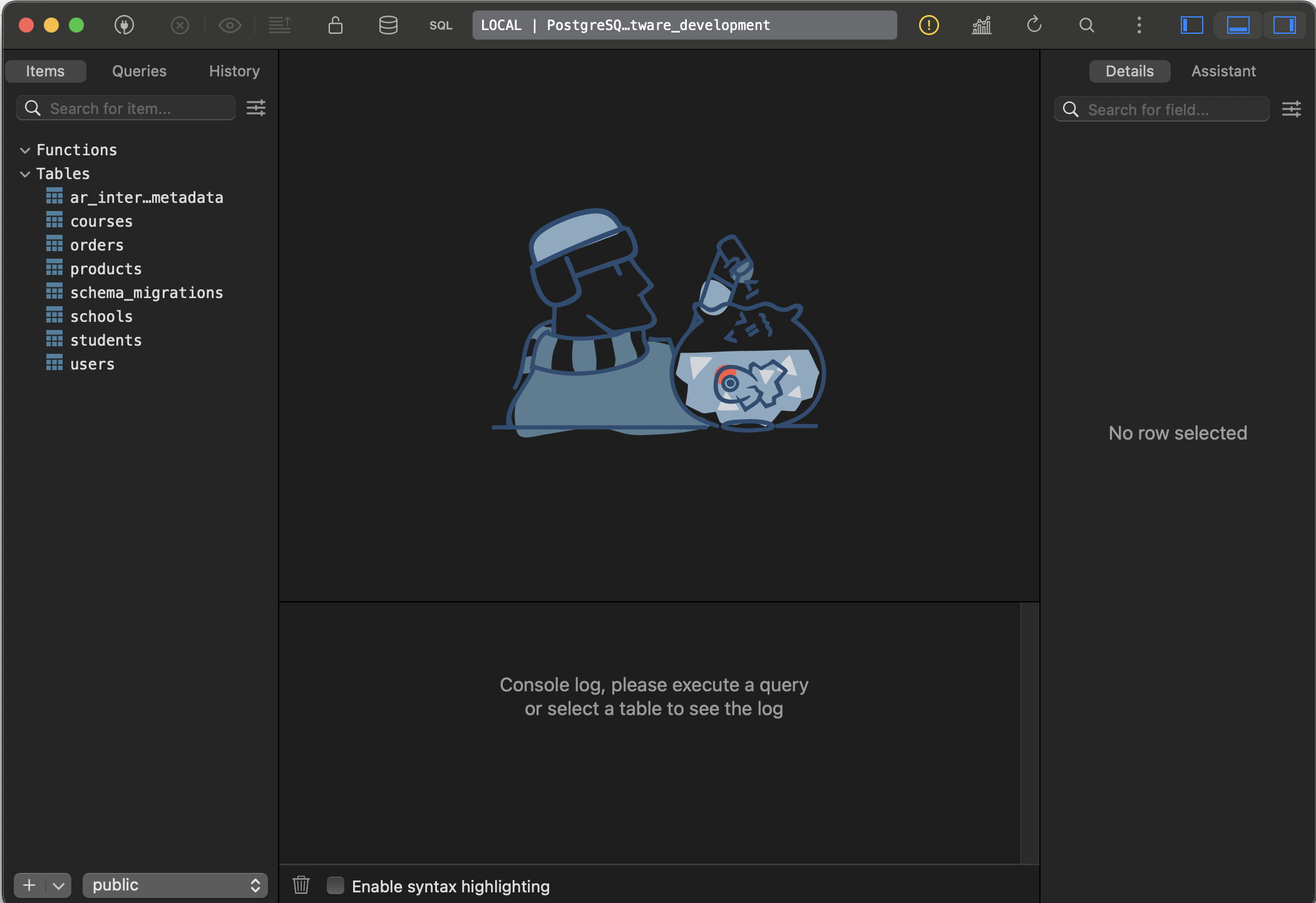
Let’s Go with TablePlus 🥳

🚀 Step 1: Install TablePlus

brew install --cask tableplus

📊 Step 2: Check Our Database Schema

 We have a great setup for learning SQL with realistic relationships. Let’s create a progressive SQL learning path using our actual data.

🔗 Step 3: Connect to Your Database

TablePlus Connection Details:

  • Host: localhost
  • Port: 5432
  • Database: academic_sql_software_development
  • User: (your macOS username)
  • Password: (leave blank)

📚 SQL Learning Path: Basic to Advanced

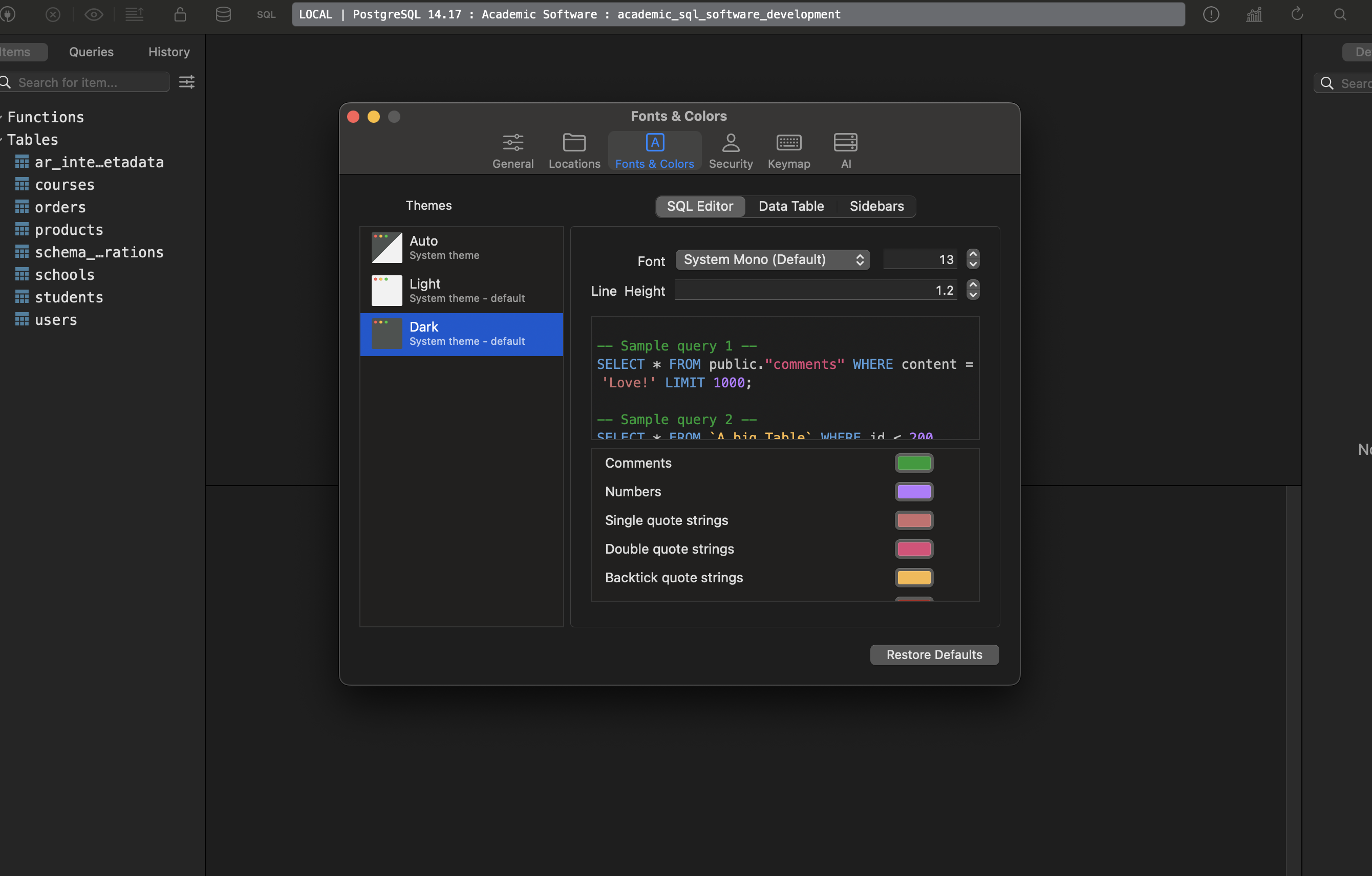
Change Font size, colour, theme etc:

Level 1: Basic SELECT Queries

-- 1. View all users
SELECT * FROM users LIMIT 10;

-- 2. Count total records
SELECT COUNT(*) FROM users;
SELECT COUNT(*) FROM orders;
SELECT COUNT(*) FROM products;

-- 3. Filter data
SELECT first_name, last_name, email 
FROM users 
WHERE gender = 'female' 
LIMIT 10;

-- 4. Sort data
SELECT first_name, last_name, date_of_birth 
FROM users 
ORDER BY date_of_birth DESC 
LIMIT 10;

-- 5. Filter with conditions
SELECT title, price, category 
FROM products 
WHERE price > 50 AND category = 'men' 
ORDER BY price DESC;

Level 2: Basic Aggregations

-- 1. Count by category
SELECT category, COUNT(*) as product_count 
FROM products 
GROUP BY category;

-- 2. Average prices by category
SELECT category, 
       AVG(price) as avg_price,
       MIN(price) as min_price,
       MAX(price) as max_price
FROM products 
GROUP BY category;

-- 3. Users by gender
SELECT gender, COUNT(*) as user_count 
FROM users 
WHERE gender IS NOT NULL
GROUP BY gender;

-- 4. Products with low stock
SELECT COUNT(*) as low_stock_products 
FROM products 
WHERE stock_quantity < 10;

Level 3: Inner Joins

-- 1. Users with their orders
SELECT u.first_name, u.last_name, u.email, o.id as order_id, o.created_at
FROM users u
INNER JOIN orders o ON u.id = o.user_id
ORDER BY o.created_at DESC
LIMIT 20;

-- 2. Orders with product details
SELECT o.id as order_id, 
       p.title as product_name, 
       p.price, 
       p.category,
       o.created_at
FROM orders o
INNER JOIN products p ON o.product_id = p.id
ORDER BY o.created_at DESC
LIMIT 20;

-- 3. Complete order information (3-table join)
SELECT u.first_name, u.last_name,
       p.title as product_name,
       p.price,
       p.category,
       o.created_at as order_date
FROM orders o
INNER JOIN users u ON o.user_id = u.id
INNER JOIN products p ON o.product_id = p.id
ORDER BY o.created_at DESC
LIMIT 20;

Level 4: Left Joins (Show Missing Data)

-- 1. All users and their order count (including users with no orders)
SELECT u.first_name, u.last_name, u.email,
       COUNT(o.id) as order_count
FROM users u
LEFT JOIN orders o ON u.id = o.user_id
GROUP BY u.id, u.first_name, u.last_name, u.email
ORDER BY order_count DESC;

-- 2. Users who haven't placed any orders
SELECT u.first_name, u.last_name, u.email, u.created_at
FROM users u
LEFT JOIN orders o ON u.id = o.user_id
WHERE o.id IS NULL
ORDER BY u.created_at DESC;

-- 3. Products that have never been ordered
SELECT p.title, p.price, p.category, p.stock_quantity
FROM products p
LEFT JOIN orders o ON p.id = o.product_id
WHERE o.id IS NULL
ORDER BY p.price DESC;

Level 5: Advanced Aggregations & Grouping

-- 1. Top customers by order count
SELECT u.first_name, u.last_name,
       COUNT(o.id) as total_orders,
       SUM(p.price) as total_spent
FROM users u
INNER JOIN orders o ON u.id = o.user_id
INNER JOIN products p ON o.product_id = p.id
GROUP BY u.id, u.first_name, u.last_name
HAVING COUNT(o.id) > 1
ORDER BY total_spent DESC
LIMIT 10;

-- 2. Most popular products
SELECT p.title, p.category, p.price,
       COUNT(o.id) as times_ordered,
       SUM(p.price) as total_revenue
FROM products p
INNER JOIN orders o ON p.id = o.product_id
GROUP BY p.id, p.title, p.category, p.price
ORDER BY times_ordered DESC
LIMIT 10;

-- 3. Monthly order analysis
SELECT DATE_TRUNC('month', o.created_at) as month,
       COUNT(o.id) as order_count,
       COUNT(DISTINCT o.user_id) as unique_customers,
       SUM(p.price) as total_revenue
FROM orders o
INNER JOIN products p ON o.product_id = p.id
GROUP BY DATE_TRUNC('month', o.created_at)
ORDER BY month;

Level 6: Student Enrollment Analysis (Complex Joins)

-- 1. Students with their course and school info
SELECT u.first_name, u.last_name,
       c.title as course_name,
       s.title as school_name,
       st.enrolment_date
FROM students st
INNER JOIN users u ON st.user_id = u.id
INNER JOIN courses c ON st.course_id = c.id
INNER JOIN schools s ON st.school_id = s.id
ORDER BY st.enrolment_date DESC
LIMIT 20;

-- 2. Course popularity by school
SELECT s.title as school_name,
       c.title as course_name,
       COUNT(st.id) as student_count
FROM students st
INNER JOIN courses c ON st.course_id = c.id
INNER JOIN schools s ON st.school_id = s.id
GROUP BY s.id, s.title, c.id, c.title
ORDER BY student_count DESC;

-- 3. Schools with enrollment stats
SELECT s.title as school_name,
       COUNT(st.id) as total_students,
       COUNT(DISTINCT st.course_id) as courses_offered,
       MIN(st.enrolment_date) as first_enrollment,
       MAX(st.enrolment_date) as latest_enrollment
FROM schools s
LEFT JOIN students st ON s.id = st.school_id
GROUP BY s.id, s.title
ORDER BY total_students DESC;

Level 7: Advanced Concepts

-- 1. Subqueries: Users who spent more than average
WITH user_spending AS (
  SELECT u.id, u.first_name, u.last_name,
         SUM(p.price) as total_spent
  FROM users u
  INNER JOIN orders o ON u.id = o.user_id
  INNER JOIN products p ON o.product_id = p.id
  GROUP BY u.id, u.first_name, u.last_name
)
SELECT first_name, last_name, total_spent
FROM user_spending
WHERE total_spent > (SELECT AVG(total_spent) FROM user_spending)
ORDER BY total_spent DESC;

-- 2. Window functions: Ranking customers
SELECT u.first_name, u.last_name,
       COUNT(o.id) as order_count,
       SUM(p.price) as total_spent,
       RANK() OVER (ORDER BY SUM(p.price) DESC) as spending_rank
FROM users u
INNER JOIN orders o ON u.id = o.user_id
INNER JOIN products p ON o.product_id = p.id
GROUP BY u.id, u.first_name, u.last_name
ORDER BY spending_rank
LIMIT 20;

-- 3. Case statements for categorization
SELECT u.first_name, u.last_name,
       COUNT(o.id) as order_count,
       CASE 
         WHEN COUNT(o.id) >= 5 THEN 'VIP Customer'
         WHEN COUNT(o.id) >= 2 THEN 'Regular Customer'
         ELSE 'New Customer'
       END as customer_type
FROM users u
LEFT JOIN orders o ON u.id = o.user_id
GROUP BY u.id, u.first_name, u.last_name
ORDER BY order_count DESC;

Level 8: Self-Joins & Advanced Analysis

-- 1. Find users enrolled in the same course (pseudo self-join)
SELECT DISTINCT 
       u1.first_name || ' ' || u1.last_name as student1,
       u2.first_name || ' ' || u2.last_name as student2,
       c.title as course_name
FROM students s1
INNER JOIN students s2 ON s1.course_id = s2.course_id AND s1.user_id < s2.user_id
INNER JOIN users u1 ON s1.user_id = u1.id
INNER JOIN users u2 ON s2.user_id = u2.id
INNER JOIN courses c ON s1.course_id = c.id
ORDER BY c.title, student1
LIMIT 20;

-- 2. Complex business question: Multi-role users
SELECT u.first_name, u.last_name, u.email,
       COUNT(DISTINCT o.id) as orders_placed,
       COUNT(DISTINCT st.id) as courses_enrolled,
       CASE 
         WHEN COUNT(DISTINCT o.id) > 0 AND COUNT(DISTINCT st.id) > 0 THEN 'Customer & Student'
         WHEN COUNT(DISTINCT o.id) > 0 THEN 'Customer Only'
         WHEN COUNT(DISTINCT st.id) > 0 THEN 'Student Only'
         ELSE 'No Activity'
       END as user_type
FROM users u
LEFT JOIN orders o ON u.id = o.user_id
LEFT JOIN students st ON u.id = st.user_id
GROUP BY u.id, u.first_name, u.last_name, u.email
ORDER BY orders_placed DESC, courses_enrolled DESC;

🎯 Our Learning Strategy:

  1. Start with Level 1-2 in TablePlus to get comfortable
  2. Progress through each level – try to understand each query before moving on
  3. Modify the queries – change filters, add fields, etc.
  4. Create your own variations based on business questions

to be continued … 🚀

Rails 8 App: Create an Academic software app using SQL without using ActiveRecord- Part 2 | students | courses | schools

Design: Our Students Table -> course -> school

We need a UNIQUE constraint on user_id because:

  • One student per user (user_id should be unique)
  • Multiple students per course (course_id can be repeated)

Check Migration Files:

Key Changes:

  1. ✅ Added UNIQUE constraint: CONSTRAINT uk_students_user_id UNIQUE (user_id)
  2. 🔧 Fixed typos:
  • TIMSTAMPTIMESTAMP
  • stidentsstudents

📈 Optimized indexes: No need for user_id index since UNIQUE creates one automatically

Business Logic Validation:

  • user_id: One student per user ✅
  • course_id: Multiple students per course ✅
  • school_id: Multiple students per school ✅

This ensures referential integrity and business rules are enforced at the database level!


📁 Schema Storage Options:

Rails allows you to store the schema in SQL format instead of the default Ruby format. Let me explain the options and why you’d choose each:

1. Ruby Format (Default)

# db/schema.rb
ActiveRecord::Schema[8.0].define(version: 2025_07_09_074552) do
  enable_extension "pg_catalog.plpgsql"

  create_table "users", force: :cascade do |t|
    t.string "first_name", limit: 100, null: false
    t.string "email", limit: 150, null: false
    t.datetime "created_at", null: false
    t.index ["email"], name: "idx_users_email"
  end
end

2. SQL Format

-- db/structure.sql
CREATE EXTENSION IF NOT EXISTS pg_catalog.plpgsql;

CREATE TYPE gender_enum AS ENUM ('male', 'female', 'not-specified');

CREATE TABLE users (
    id bigserial PRIMARY KEY,
    first_name varchar(100) NOT NULL,
    email varchar(150) NOT NULL,
    created_at timestamp NOT NULL DEFAULT CURRENT_TIMESTAMP
);

CREATE UNIQUE INDEX idx_users_email ON users(email);

Check structure.sql File: Github: db/structure.sql

🔧 How to Switch to SQL Format:

Add this to config/application.rb:

module AcademicSqlSoftware
  class Application < Rails::Application
    # ... existing config ...

    # Use SQL format for schema
    config.active_record.schema_format = :sql
  end
end

Then regenerate the schema:

# Generate SQL schema file
rails db:schema:dump

This will create db/structure.sql instead of db/schema.rb.

Comparison Table:

FeatureRuby Format (schema.rb)SQL Format (structure.sql)
Default✅ Yes❌ No
Database Agnostic✅ Yes❌ No (DB-specific)
Custom SQL Features❌ Limited✅ Full support
Views❌ No✅ Yes
Stored Procedures❌ No✅ Yes
Triggers❌ No✅ Yes
Custom Types/ENUMs❌ Limited✅ Full support
Partial Indexes❌ Limited✅ Yes
Check Constraints❌ Limited✅ Yes
Version Control✅ Easy to diff⚠️ Harder to diff
Readability✅ Ruby-like⚠️ Raw SQL

When to Use Each:

Choose SQL Format When:

  • ✅ Using PostgreSQL-specific features (ENUMs, arrays, JSONB operators)
  • ✅ Need database views, triggers, or stored procedures
  • ✅ Using complex constraints (CHECK, partial indexes)
  • ✅ Working with custom data types
  • ✅ Team is SQL-proficient

Choose Ruby Format When:

  • ✅ Want database portability (switching between PostgreSQL/MySQL/SQLite)
  • ✅ Team prefers Ruby syntax
  • ✅ Using standard Rails features only
  • ✅ Need easier version control diffs

For Our Project:

I recommend SQL format because you’re using:

  • ✅ PostgreSQL ENUMs (gender_enum, category_enum) – Rails 8 supports this
  • ✅ Custom constraints (CHECK (price > 0)) – Rails 8 supports this
  • ✅ Complex foreign key relationships
  • ✅ Raw SQL migrations

Our config/application.rb should include:

config.active_record.schema_format = :sql

Then run:

rails db:schema:dump

This will give us full control over PostgreSQL features while maintaining schema consistency! 🎯

🌱 Seed Data

1. Let’s refactor the seed file into modular components. I’ll create separate seeder classes for each model type and organize them properly.

2. Let’s me create individual seeder classes for each model, the seeders for the dependent models (orders and students), refactor the main seeds.rb file to use the new modular structure, create a documentation file for the new modular structure.

3. I’ve successfully refactored our seed file into a modular, maintainable architecture. Here’s what we’ve created:

🎯 Modular Seed System Overview

📁 File Structure:

db/
├── seeds.rb                    # Main orchestrator (now 20 lines vs 246!)
└── seeds/
    ├── README.md              # Complete documentation
    ├── base_seeder.rb         # Shared functionality & config
    ├── users_seeder.rb        # User creation logic
    ├── products_seeder.rb     # Product creation logic  
    ├── courses_seeder.rb      # Course creation logic
    ├── schools_seeder.rb      # School creation logic
    ├── orders_seeder.rb       # Order creation (with dependencies)
    └── students_seeder.rb     # Student creation (with constraints)

Key Benefits:

✅ Separation of Concerns:
  • Each model has its own dedicated seeder class
  • Clear responsibility boundaries
  • Easy to modify individual model generation
✅ Maintainability:
  • Single file changes vs monolithic seed file
  • Inheritance from BaseSeeder for shared functionality
  • Comprehensive documentation
✅ Flexibility:
  • Easy to add new models
  • Environment-specific configuration
  • Configurable record counts
✅ Robustness:
  • Proper dependency handling
  • Constraint compliance (stock, unique keys)
  • Error handling and validation

📋 Usage Examples:

# Basic seeding
rails db:seed

# Clear data first
CLEAR_DATA=true rails db:seed

# Scale up for testing
# Edit USERS_COUNT in base_seeder.rb then:
rails db:seed

Check my Github Seed File: Seed File – Academic SQL App

🛠️ Commit the Refactored System:

# Stage all the new modular files
git add db/seeds.rb \
        db/seeds/

# Commit with comprehensive message
git commit -m "Refactor seed system into modular architecture" -m "

Modular Structure:
- Split monolithic seeds.rb into focused seeder classes
- Create BaseSeeder with shared functionality and configuration
- Separate concerns: each model has dedicated seeder
- Add comprehensive documentation in seeds/README.md

Benefits:
- Maintainability: Easy to modify individual model generation
- Flexibility: Simple to add new models or adjust data
- Robustness: Proper dependency handling and constraint compliance
- Testability: Individual seeders can be tested in isolation

Features:
- Environment-specific behavior (auto-clear in development)
- Smart constraint handling (stock validation, unique keys)
- Progress indicators and comprehensive reporting
- Configurable record counts via constants

Files:
- db/seeds.rb: Main orchestrator (20 lines vs 246)
- db/seeds/base_seeder.rb: Shared functionality & config
- db/seeds/*_seeder.rb: Individual model seeders
- db/seeds/README.md: Complete documentation

The system is now ready for production use and easy to extend."

🎉 What We Can Do Now:

Scale Easily:

# In base_seeder.rb - change these and run rails db:seed
USERS_COUNT = 10_000
PRODUCTS_COUNT = 1_000  
ORDERS_COUNT = 50_000

Add New Models: Create new_model_seeder.rb, inherit from BaseSeeder, add to orchestration.

Customize Data: Edit individual seeder constants and attribute methods.

Test Components:

users = UsersSeeder.create_users
products = ProductsSeeder.create_products

Our seed system is now enterprise-ready with clean architecture, comprehensive documentation, and infinite scalability! 🚀

Possible Refactoring

Now Let’s move the helper methods to a dedicated helper folder for better organization. I’ll create a helpers directory and move the shared utility methods there.

Here’s how to refactor your seed helper methods into a new helpers folder under db/seeds:

  1. Create a directory:
    db/seeds/helpers/
  2. Move all shared/random data methods (like random_gender, random_category, etc.) into a module, e.g. db/seeds/helpers/data_generators.rb:
# db/seeds/helpers/data_generators.rb
module DataGenerators
  def random_gender
    ['male', 'female', 'not-specified'].sample
  end

  def random_category
    ['men', 'women', 'kids', 'infants'].sample
  end

  def random_date_of_birth
    Date.today - rand(18..80).years - rand(365).days
  end

  def random_phone
    "+1#{rand(100..999)}-#{rand(100..999)}-#{rand(1000..9999)}"
  end

  def random_price
    [9.99, 19.99, 29.99, 49.99, 99.99, 199.99, 299.99, 499.99].sample
  end

  def random_stock
    [0, 5, 10, 25, 50, 100, 500].sample
  end

  def random_past_date(days_ago_max = 365)
    Date.today - rand(1..days_ago_max).days
  end
end
  1. In your seeders and base seeder, require and include the helper:
# At the top of each seeder or in base_seeder.rb
require_relative 'helpers/data_generators'

class UsersSeeder < BaseSeeder
  extend DataGenerators
  # ... now you can call random_gender, random_category, etc.
end
  1. Remove the helper methods from BaseSeeder and use the module instead.

Summary:

  • Move all shared/random data methods to db/seeds/helpers/data_generators.rb as a module.
  • require_relative and extend or include the module in your seeders.
  • This keeps your seed logic clean and DRY!

Our BaseSeeder still contains all the random data and progress helper methods, which are now in db/seeds/helpers/data_generators.rb and db/seeds/helpers/ui_helpers.rb.

Here’s what we should do:

  • Remove all the methods at the bottom of BaseSeeder that are now in the helpers.
  • At the top of base_seeder.rb, require the helper modules.
  • If you want to use the helpers as class methods, use extend for each module.

Here’s the refactor plan:

  1. Remove:
  • random_gender
  • random_category
  • random_date_of_birth
  • random_phone
  • random_price
  • random_stock
  • random_past_date
  • progress_indicator
  1. Add at the top:
   require_relative 'helpers/data_generators'
   require_relative 'helpers/ui_helpers'
   extend DataGenerators
   extend UiHelpers

Changes Made:

  1. In UiHelpers:
    • Removed the hardcoded print_summary and print_verification methods.
    • Ensured print_summary_box and print_verification_stats are ready to accept data.
  2. In BaseSeeder:
    • Now dynamically creates a summary_data hash with the final record counts.
    • Creates a verification_stats hash with key metrics.
    • Calls UiHelpers.print_summary_box and UiHelpers.print_verification_stats, passing in the data.

Benefits of this Refactor:

  • More Flexible: You can now easily add or remove items from the summary and verification sections just by changing the hashes in BaseSeeder.
  • Decoupled: The UiHelpers module is now purely for presentation and has no knowledge of your specific models.
  • Cleaner Code: The logic is now clearly separated—BaseSeeder gathers the data, and UiHelpers displays it.

Now the BaseSeeder is clean and only contains orchestration logic and configuration. All random data and UI/progress helpers are now properly delegated to the new helper modules.

We can now use these helpers in any seeder by calling random_gender,  progress_indicator, etc., thanks to the extend statements. This makes our seed system much more modular, maintainable, and DRY!

That’s a great suggestion for further refactoring. It makes sense to keep all data-related logic, including aggregation for summaries, within the DataGenerators helper.

Let’s proceed. I’ll move the hash construction into new methods inside db/seeds/helpers/data_generators.rb and then update BaseSeeder to call them.
Now that the data generation has been moved, I’ll update the BaseSeeder to call the new methods.

Issues Fixed:

  1. UiHelpers method calls: All seeder files were calling progress_indicator directly, but since the methods in UiHelpers are defined as class methods, they needed to be prefixed with UiHelpers.. Fixed in:
  • UsersSeeder
  • ProductsSeeder
  • CoursesSeeder
  • SchoolsSeeder
  • OrdersSeeder
  • StudentsSeeder
  1. DataGenerators references: The BaseSeeder was trying to call DataGenerators.summary_data and DataGenerators.verification_stats, but that file was deleted. I updated it to use the local summary_data and verification_stats methods that were already defined in the BaseSeeder class.

Seeding Results:

  • 10,000 users created
  • 1,000 products created
  • 50 courses created
  • 25 schools created
  • 5,000 orders created
  • 5,000 students created

The verification stats show proper data relationships:

  • 4,004 users have orders
  • 647 products have been ordered
  • 756 products are active
  • 200 students per school (average)
  • 100 students per course (average)

Final Architecture:

  1. DataGenerators: Is now responsible for all data-related tasks, including generating random primitive data (random_phone) and creating aggregated summary data (summary_data, verification_stats).
  2. UiHelpers: Is responsible for all presentation logic, taking data as input and printing it to the console in a formatted way.
  3. Individual Seeders (UsersSeeder, etc.): Responsible for the business logic of creating a specific type of record, using helpers for data and UI.
  4. BaseSeeder: The main orchestrator. It knows the correct order to call the individual seeders and delegates all data and UI tasks to the appropriate helpers.
  5. seeds.rb: The single entry point that kicks off the entire process.

to be continued … 🚀

String 𓍯 operations using Ruby 💎methods

Let’s find out solutions to some ruby coding problems that can help us to manipulate over a String in Ruby.

Learn About the following topics to solve the below problems:

Ruby String scan: https://railsdrop.com/2012/07/07/ruby-string-method-scan/


🧪 Q1: Ruby String Manipulation

Prompt:

Write a method reverse_words that takes a string and returns a new string where the order of words is reversed, but the characters within each word stay in the same order.

Words are separated by spaces. Preserve exact spacing between words (multiple spaces too).

Examples:

reverse_words("hello world")             #=> "world hello"
reverse_words("  good   morning  ruby ") #=> " ruby  morning   good  "

✏️ Answer:

def reverse_words(str)
  str.scan(/\s+|\S+/).reverse.join
end

Explanation:

  • str.scan(/\s+|\S+/) splits the string into tokens that are either a word or a space block (preserves exact spacing).
  • .reverse reverses their order.
  • .join merges them back into a single string.

Sample Test Cases:

puts reverse_words("hello world")             # => "world hello"
puts reverse_words("  good   morning  ruby ") # => " ruby  morning   good  "
puts reverse_words("one")                     # => "one"
puts reverse_words("")                        # => ""


🧪 Q2: Normalize Email Addresses

Prompt:

Write a method normalize_email that normalizes email addresses using the following rules (similar to Gmail):

  1. Ignore dots (.) in the username part.
  2. Remove everything after a plus (+) in the username.
  3. Keep the domain part unchanged.

The method should return the normalized email string.

Examples:

normalize_email("john.doe+work@gmail.com")     # => "johndoe@gmail.com"
normalize_email("alice+spam@company.org")      # => "alice@company.org"
normalize_email("bob.smith@domain.co.in")      # => "bobsmith@domain.co.in"

✏️ Answer:

def normalize_email(email)
  local, domain = email.split("@")
  local = local.split("+").first.delete(".")
  "#{local}@#{domain}"
end

Explanation:

  • split("@") separates username from domain.
  • split("+").first keeps only the part before +.
  • .delete(".") removes all dots from the username.
  • Concatenate with the domain again.

Test Cases:

puts normalize_email("john.doe+work@gmail.com")     # => "johndoe@gmail.com"
puts normalize_email("alice+spam@company.org")      # => "alice@company.org"
puts normalize_email("bob.smith@domain.co.in")      # => "bobsmith@domain.co.in"
puts normalize_email("simple@domain.com")           # => "simple@domain.com"


to be continued.. 🚀

Guide: Integrating React.js ⚛️ into a Rails 8 Application – Part 2: Install React | Add esbuild, Jsx | Integrate React View

Throw back:

rails new design_studio_react --database=postgresql -j esbuild --skip-hotwire

Here’s what our Rails app looks like after skipping Hotwire with the --skip-hotwire flag:

Current JavaScript/Node.js Setup (Clean & Minimal)

📦 Package Management:

  • package.json – Clean setup with only esbuild script
  • .node-version – Node.js version 24.1.0
  • No dependencies – Ready for React installation

📁 JavaScript File Structure (Ultra-Clean):

app/javascript/
└── application.js          # Empty entry point (2 lines total!)

app/javascript/application.js content:

// Entry point for the build script in your package.json

🚫 What Got Successfully Removed:

  • No Turbo/Stimulus imports in application.js
  • No controllers/ directory at all
  • No Hotwire gems in Gemfile (only jsbundling-rails remains)
  • No @hotwired/turbo-rails or @hotwired/stimulus dependencies

⚙️ Configuration Files (Minimal – Only 4):

  1. package.json – esbuild build script only
  2. .node-version – Node.js version pinning
  3. Procfile.dev – Development processes (js: yarn build --watch)
  4. app/javascript/application.js – Empty entry point

🔧 esbuild Configuration:

{
  "scripts": {
    "build": "esbuild app/javascript/*.* --bundle --sourcemap --format=esm --outdir=app/assets/builds --public-path=/assets"
  }
}

📂 Build Output:

  • app/assets/builds/ – Contains only .keep file (empty, ready for bundles)

🎯 HTML Integration:

<!-- Still includes the JavaScript module correctly -->
<%= javascript_include_tag "application", "data-turbo-track": "reload", type: "module" %>

(Note: data-turbo-track is just an HTML attribute for cache busting, not the Turbo library)

# create db
✗ rails db:migrate

# run react-rails-app in port 3001
✗ rails s -p 3001

🚀 Next Steps: Install & Setup React

Step 1: Install react, react-dom

Your app is now perfectly clean for React! Just run:

brew install yarn
yarn add react react-dom # check node_modules/ folder for what is installed
yarn add --dev @types/react @types/react-dom  # Optional: for TypeScript support, check node_modules/@types folder

Status: ✅ Minimal JavaScript foundation – No Hotwire bloat, perfect React starting point!

Now that we have a clean Rails app with esbuild setup, here’s our step-by-step roadmap to get React working:

Step 2: Create Your First React Component

Create a simple React component to test the setup:

mkdir app/javascript/components

Then create app/javascript/components/App.jsx:

import React from 'react';

function App() {
  return (
    <div>
      <h1>React is Working!</h1>
      <p>Welcome to your Rails + React app</p>
    </div>
  );
}

export default App;

Step 3: Update JavaScript Entry Point

Modify app/javascript/application.js to render React:

// Entry point for the build script in your package.json
import React from 'react';
import { createRoot } from 'react-dom/client';
import App from './components/App';

document.addEventListener('DOMContentLoaded', () => {
  const container = document.getElementById('react-root');
  if (container) {
    const root = createRoot(container);
    root.render(<App />);
  }
});

Step 4: Create a Controller & Route

Generate a home controller:

rails generate controller Home index

Step 5: Add React Root to View

Update app/views/home/index.html.erb:

<div id="react-root"></div>

Step 6: Set Root Route

Update config/routes.rb:

Rails.application.routes.draw do
  root "home#index"
  # ... other routes
end

Step 7: Start Development

# update Procfile.dev assign port 3001
web: env RUBY_DEBUG_OPEN=true bin/rails server -p 3001
# run our rails-react app by

✗ bin/dev
21:15:27 web.1  | started with pid 12619
21:15:27 js.1   | started with pid 12620
21:15:27 js.1   | yarn run v1.22.22
21:15:27 js.1   | $ esbuild app/javascript/*.* --bundle --sourcemap --format=esm --outdir=app/assets/builds --public-path=/assets --watch
21:15:27 js.1   | /bin/sh: esbuild: command not found
21:15:27 js.1   | error Command failed with exit code 127.
21:15:27 js.1   | info Visit https://yarnpkg.com/en/docs/cli/run for documentation about this command.
21:15:27 web.1  | => Booting Puma
..........

🎯 What This Gives Us:

  • ✅ React components in app/javascript/components/
  • ✅ esbuild automatically bundles JSX
  • ✅ Hot reloading with yarn build --watch
  • ✅ Rails serves your React app

🚨 Error Analysis:

  1. Rails server started fine ✅ (port 3001)

🔧 Solution: Install JavaScript Dependencies

You need to install esbuild and other JavaScript dependencies first:

yarn install

📋 Files yarn install Checks:

1. Primary: package.json

{
  "name": "app",
  "private": true,
  "scripts": {
    "build": "esbuild app/javascript/*.* --bundle --sourcemap --format=esm --outdir=app/assets/builds --public-path=/assets"
  },
  "dependencies": {
    "react": "^19.1.0",           # ✅ Already added
    "react-dom": "^19.1.0"       # ✅ Already added  
  },
  "devDependencies": {
    "@types/react": "^19.1.8",      # ✅ Already added
    "@types/react-dom": "^19.1.6"   # ✅ Already added
  }
}

2. Lockfile: yarn.lock

  • Ensures exact versions for reproducible installs
  • Contains resolved URLs and integrity hashes

🚨 The Problem: Missing esbuild!

Our package.json calls esbuild in the build script, but esbuild is not listed as a dependency anywhere!

Rails should have added it, but didn’t. We need to add esbuild:

yarn add --dev esbuild

🔧 What yarn install does:

  1. Reads package.json for dependency list
  2. Reads yarn.lock for exact versions (if exists)
  3. Downloads packages to node_modules/
  4. Updates yarn.lock with new resolutions

Current issue: Our build script expects esbuild command, but it’s not installed in node_modules/.bin/esbuild

Solution: Add esbuild as a dev dependency!

Solved~ and start servers: Error Again!

x bin/dev

* Listening on http://[::1]:3001
22:54:43 web.1  | Use Ctrl-C to stop
22:54:44 js.1   | ✘ [ERROR] The JSX syntax extension is not currently enabled
22:54:44 js.1   |
22:54:44 js.1   |     app/javascript/application.js:11:16:
22:54:44 js.1   |       11 │     root.render(<App />);
22:54:44 js.1   |          ╵                 ^
22:54:44 js.1   |
22:54:44 js.1   |   The esbuild loader for this file is currently set to "js" but it must be set to "jsx" to be able to parse JSX syntax. You can use "--loader:.js=jsx" to do that.
22:54:44 js.1   |
22:54:44 js.1   | 1 error
22:54:44 js.1   | [watch] build finished, watching for changes..

This error occurs because esbuild doesn’t know how to handle JSX syntax! The <App /> is JSX, but esbuild needs to be configured to transform it.

🚨 Problem: esbuild can’t process JSX syntax

Your application.js contains JSX (<App />), but esbuild isn’t configured to transform JSX!

JSX (JavaScript XML) is a syntax extension for JavaScript, commonly used with React, that allows you to write HTML-like code within JavaScript files.

🔧 Solution: Configure esbuild for JSX

Update your package.json build script to handle JSX:

# add this to build
--jsx=automatic --loader:.js=jsx 

Fixed! Added JSX support:

What I added:

  • --jsx=automatic – Enables React’s automatic JSX runtime
  • --loader:.js=jsx – Treats .js files as JSX files

📝 What this means:

  • ✅ esbuild can now process <App /> syntax
  • ✅ You don’t need to import React in every JSX file
  • ✅ Your .js files can contain JSX
bin/dev

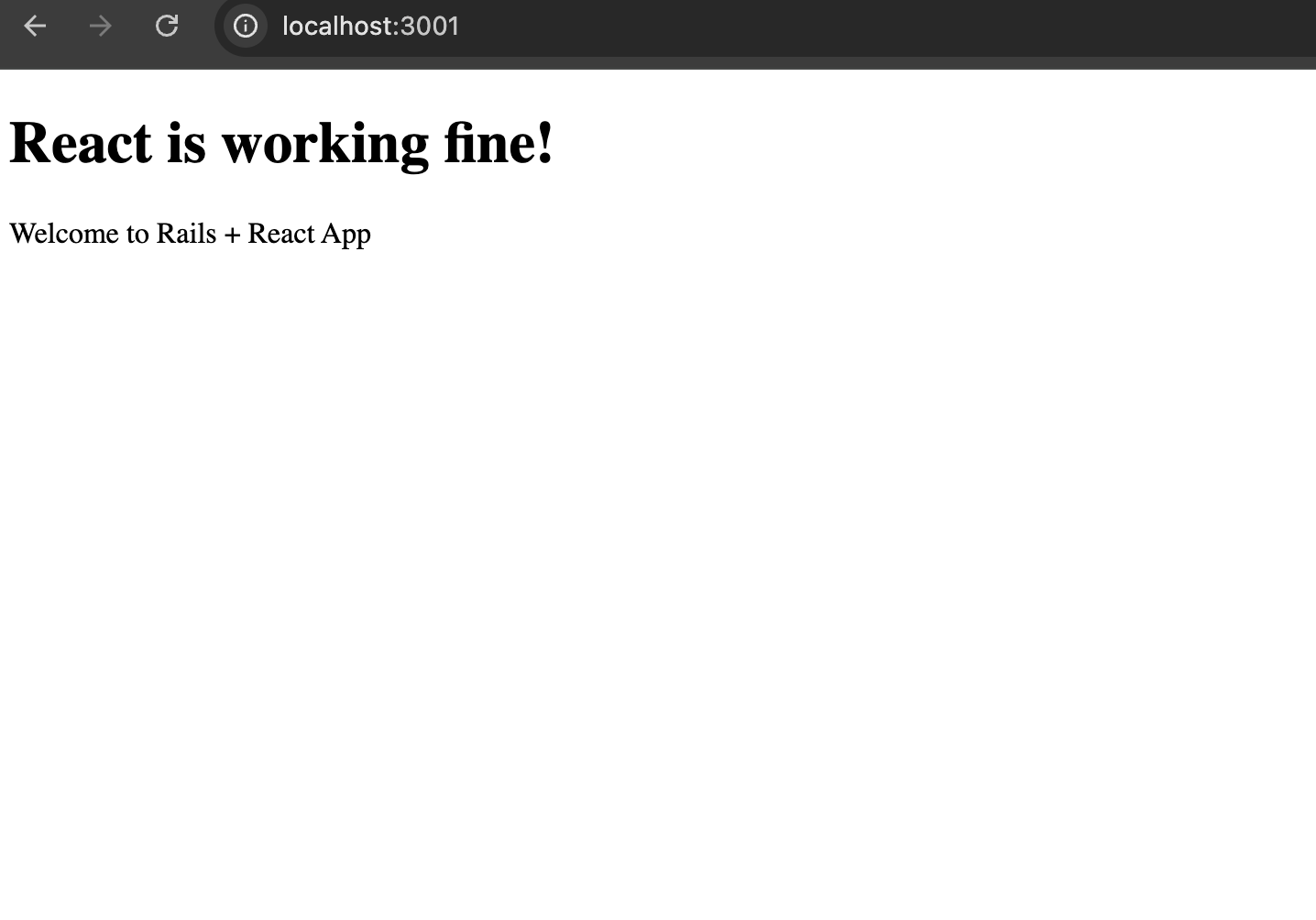
Whola!!

Let’s see in Part 3. Happy React configuration! 🚀

Software Architect Guide: Layering An Application

𝐐) Why is Layering an Application Important in a Project?

Layering an application is a fundamental architectural principle where the codebase is divided into logical layers, each with a clear responsibility. This approach brings several benefits during the execution of a project:

1. Separation of Concerns (SoC)

  • Each layer handles a specific responsibility:
    • UI/Presentation Layer: Handles user interaction
    • Business Logic Layer: Implements application rules
    • Data Access Layer: Manages data storage and retrieval
      ✅ This makes the codebase easier to reason about and reduces interdependency.

2. Maintainability

  • You can update or refactor one layer (e.g., switch databases or UI frameworks) without deeply affecting the others.
    ✅ Makes the system easier to modify and debug over time.

3. Testability

  • Layers make unit testing and integration testing cleaner.
  • You can test business logic without hitting the database or UI.

4. Scalability

  • Different layers can scale independently.
    • Example: You might scale out your API layer separately from your database layer.
      ✅ Allows for horizontal scaling and performance tuning.

5. Reusability

  • Code in a layered architecture (like service or domain logic) can be reused across different contexts (e.g., web, mobile, CLI)
    ✅ Promotes DRY (Don’t Repeat Yourself) principles.

6. Security and Access Control

  • Sensitive operations can be isolated in backend or service layers, reducing risk of direct access from external sources.

7. Team Collaboration

  • Teams can work in parallel on different layers:
    • Frontend team builds the UI layer
    • Backend team develops business logic and APIs
      ✅ Leads to faster development cycles

Great! Here’s a diagram + real-world example of a layered architecture using a Ruby on Rails backend and a React frontend, typical for a full-stack application.


🎯 Example: Layered Architecture for an E-Commerce System

We’ll use a basic feature: placing an order.

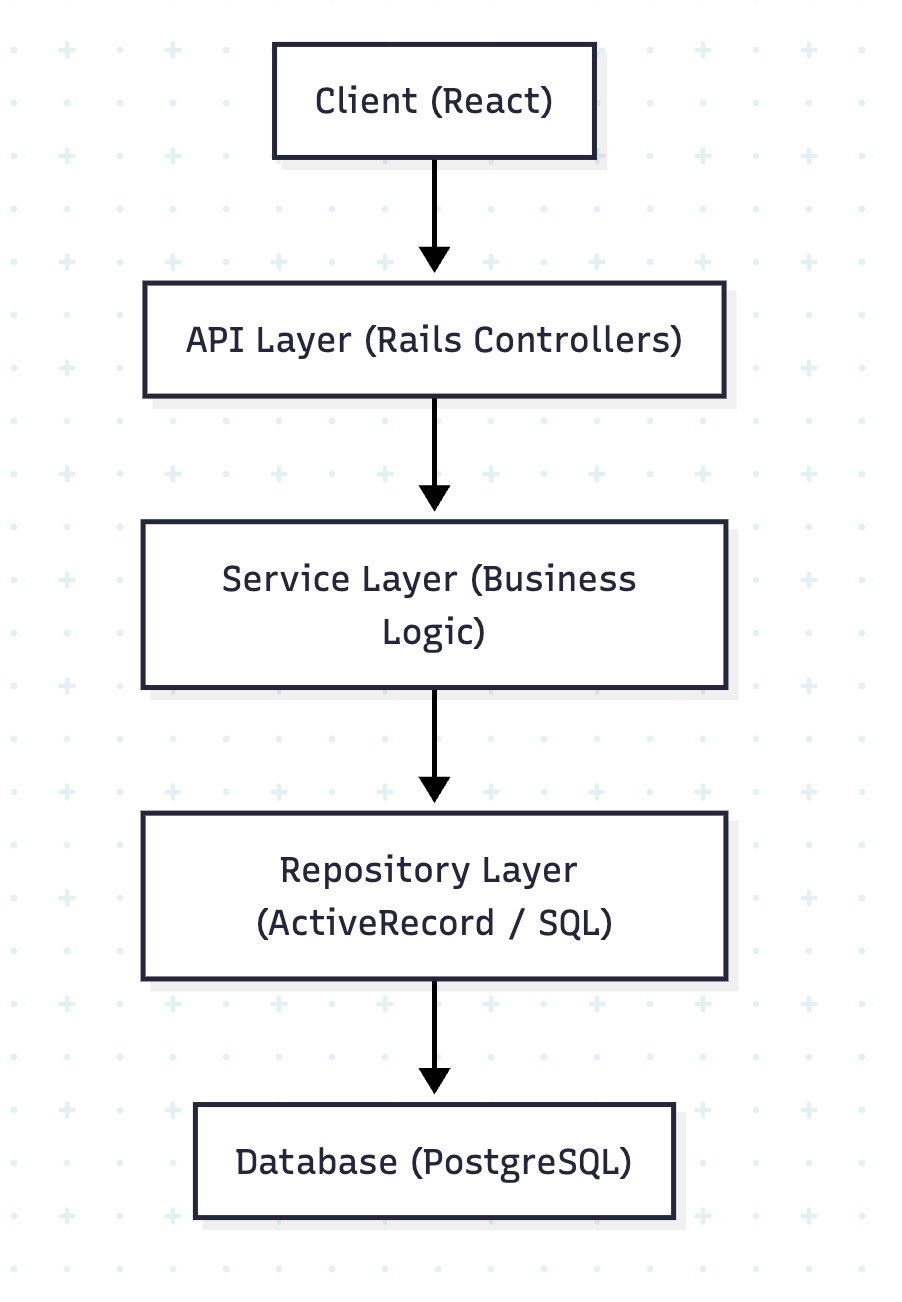
🧱 Layered Architecture (Concept Diagram)


💡 Layer Descriptions

LayerRoleTech/Tool
Client LayerUI & User InteractionReact, Redux
API LayerReceives requests, validates input, returns JSONRails Controllers
Service LayerCore business logic (e.g., payment, inventory, discount rules)Plain Ruby classes
Repository LayerData access, querying, persistenceActiveRecord, SQL
Database LayerStores persistent dataPostgreSQL, Redis, etc.

📦 Rails Example (Placing an Order)

1. React (Client Layer)

// POST /api/v1/orders
axios.post('/api/v1/orders', {
  product_id: 101,
  quantity: 2
});

2. Rails Controller (API Layer)

# app/controllers/orders_controller.rb
def create
  result = OrderService.new(params).place_order
  if result.success?
    render json: result.order, status: :created
  else
    render json: { error: result.error }, status: :unprocessable_entity
  end
end

3. Service Layer (Business Logic)

# app/services/order_service.rb
class OrderService
  def initialize(params)
    @params = params
  end

  def place_order
    product = Product.find(@params[:product_id])
    return OpenStruct.new(success?: false, error: 'Out of stock') if product.stock < @params[:quantity]

    order = Order.create!(product_id: product.id, quantity: @params[:quantity])
    product.decrement!(:stock, @params[:quantity])
    OpenStruct.new(success?: true, order: order)
  end
end

4. Repository Layer (Handled via ActiveRecord)

# ActiveRecord abstracts DB operations
Product.find(id)
Order.create!(...)


✅ Benefits in Action

  • 🔍 Separation: Business logic is not tied to the controller.
  • 🧪 Testable: You can test OrderService without hitting the API.
  • ♻️ Reusable: Service can be reused by background jobs or APIs.
  • 🔧 Flexible: You can switch from React to React Native without changing the backend.
  • Download pdf of this Architecture:

📌 Conclusion

Layering is important not just for writing clean code but also for building scalable, testable, and maintainable software systems. It provides clear boundaries, enhances agility, and allows teams to deliver high-quality features with confidence.


Software Architect Guide:💡 Understanding Design Patterns & Anti-Patterns in Ruby

In the world of software development, design patterns and anti-patterns play a critical role in writing maintainable, clean, and scalable code. As a Ruby developer, mastering these concepts will help you design robust applications and avoid common pitfalls.


What are Design Patterns?

Design patterns are time-tested, reusable solutions to common problems in software design. They aren’t code snippets but conceptual templates you can adapt based on your needs. Think of them as architectural blueprints.

🧱 Common Ruby Design Patterns

1. Singleton Pattern

the_logger = Logger.new
class Logger
  @@instance = Logger.new

  def self.instance
    @@instance
  end

  private_class_method :new
end

Use when only one instance of a class should exist (e.g., logger, configuration manager).

🧠 What is the Singleton Pattern?

The Singleton Pattern ensures that only one instance of a class exists during the lifetime of an application. This is useful for managing shared resources like:

  • a logger (so logs are not duplicated or misdirected),
  • a configuration manager (so all parts of the app read/write the same config),
  • or a database connection pool.

🔍 Why private_class_method :new?

This line prevents other parts of the code from calling Logger.new, like this:

Logger.new  # ❌ Will raise a NoMethodError

So, you’re restricting object creation from outside the class.

Q) Then how do you get an object of Logger?

By using a class method like Logger.instance that returns the only instance of the class.

✅ Full Singleton Example in Ruby

class Logger
  # Create and store the single instance
  @@instance = Logger.new

  # Provide a public way to access that instance
  def self.instance
    @@instance
  end

  # Prevent external instantiation
  private_class_method :new

  # Example method
  def log(message)
    puts "[LOG] #{message}"
  end
end

# Usage
logger1 = Logger.instance
logger2 = Logger.instance

logger1.log("Singleton works!")

puts logger1.object_id == logger2.object_id  # true

🧾 Explanation:

  • @@instance = Logger.new: Creates the only instance when the class is loaded.
  • Logger.instance: The only way to access that object.
  • private_class_method :new: Prevents creation of new objects using Logger.new.
  • logger1 == logger2: ✅ True, because they point to the same object.

💬 Think of a Real-World Example

Imagine a central control tower at an airport:

  • There should only be one control tower instance managing flights.
  • If each plane connected to a new tower, it would be chaos!

The Singleton pattern in Ruby ensures there’s just one control tower (object) shared globally.


2. Observer Pattern

class Order
  include Observable

  def place_order
    changed
    notify_observers(self)
  end
end

class EmailNotifier
  def update(order)
    puts "Email sent for order #{order.id}"
  end
end

order = Order.new
order.add_observer(EmailNotifier.new)
order.place_order

Use when one change in an object should trigger actions in other objects.

🔁 Observer Pattern in Ruby – Explained in Detail

The Observer Pattern is a behavioral design pattern that lets one object (the subject) notify other objects (the observers) when its state changes.

Ruby has built-in support for this through the Observable module in the standard library (require 'observer').

How it Works

  1. The Subject (e.g., Order) includes the Observable module.
  2. The subject calls:
    • changed → marks the object as changed.
    • notify_observers(data) → notifies all subscribed observers.
  3. Observers (e.g., EmailNotifier) implement an update method.
  4. Observers are registered using add_observer(observer_object).

🧪 Complete Working Example

require 'observer'

class Order
  include Observable
  attr_reader :id

  def initialize(id)
    @id = id
  end

  def place_order
    puts "Placing order #{@id}..."
    changed                      # Mark this object as changed
    notify_observers(self)       # Notify all observers
  end
end

class EmailNotifier
  def update(order)
    puts "📧 Email sent for Order ##{order.id}"
  end
end

class SMSNotifier
  def update(order)
    puts "📱 SMS sent for Order ##{order.id}"
  end
end

# Create subject and observers
order = Order.new(101)
order.add_observer(EmailNotifier.new)
order.add_observer(SMSNotifier.new)

order.place_order

# Output:
# Placing order 101...
# 📧 Email sent for Order #101
# 📱 SMS sent for Order #101

🧠 When to Use the Observer Pattern

  • You have one object whose changes should automatically update other dependent objects.
  • Examples:
    • UI updates in response to data changes
    • Logging, email, or analytics triggers after a user action
    • Notification systems in event-driven apps

Updated Observer Pattern

require 'observer'

class Order
  include Observable
  attr_reader :id

  def initialize(id)
    @id = id
  end

  def place_order
    changed
    notify_observers(self)
  end
end

class EmailNotifier
  def update(order)
    puts "📧 Email sent for Order ##{order.id}"
  end
end

order = Order.new(42)
order.add_observer(EmailNotifier.new)
order.place_order

What’s Happening?

  • Order includes the Observable module to gain observer capabilities.
  • add_observer registers an observer object.
  • When place_order is called:
    • changed marks the state as changed.
    • notify_observers(self) triggers the observer’s update method.
  • EmailNotifier reacts to the change — in this case, it simulates sending an email.

🧩 Use this pattern when one change should trigger multiple actions — like sending notifications, logging, or syncing data across objects.

Check: https://docs.ruby-lang.org/en/2.2.0/Observable.html

3. Decorator Pattern

class SimpleCoffee
  def cost
    2
  end
end

class MilkDecorator
  def initialize(coffee)
    @coffee = coffee
  end

  def cost
    @coffee.cost + 0.5
  end
end

coffee = MilkDecorator.new(SimpleCoffee.new)
puts coffee.cost  # => 2.5

Add responsibilities to objects dynamically without modifying their code.


🔄 4. Strategy Pattern

The Strategy Pattern allows choosing an algorithm’s behaviour at runtime. This pattern is useful when you have multiple interchangeable ways to perform a task.

✅ Example: Text Formatter Strategies

Let’s say you have a system that outputs text in different formats — plain, HTML, or Markdown.

❌ Before Using Strategy Pattern — Hardcoded Conditional Formatting

class TextFormatter
  def initialize(format)
    @format = format
  end

  def format(text)
    case @format
    when :plain
      text
    when :html
      "<p>#{text}</p>"
    when :markdown
      "**#{text}**"
    else
      raise "Unknown format: #{@format}"
    end
  end
end

# Usage
formatter1 = TextFormatter.new(:html)
puts formatter1.format("Hello, World")       # => <p>Hello, World</p>

formatter2 = TextFormatter.new(:markdown)
puts formatter2.format("Hello, World")       # => **Hello, World**

⚠️ Problems With This Approach

  • All formatting logic is stuffed into one method.
  • Adding a new format (like XML) means modifying this method (violates Open/Closed Principle).
  • Not easy to test or extend individual formatting behaviors.
  • Harder to maintain and violates SRP (Single Responsibility Principle).

This sets the stage perfectly to apply the Strategy Pattern, where each format becomes its own class with a clear responsibility.

Instead of writing if/else logic everywhere, use strategy objects:

# Strategy Interface
class TextFormatter
  def self.for(format)
    case format
    when :plain
      PlainFormatter.new
    when :html
      HtmlFormatter.new
    when :markdown
      MarkdownFormatter.new
    else
      raise "Unknown format"
    end
  end
end

# Concrete Strategies
class PlainFormatter
  def format(text)
    text
  end
end

class HtmlFormatter
  def format(text)
    "<p>#{text}</p>"
  end
end

class MarkdownFormatter
  def format(text)
    "**#{text}**"
  end
end

# Usage
def render_text(text, format)
  formatter = TextFormatter.for(format)
  formatter.format(text)
end

puts render_text("Hello, world", :html)     # => <p>Hello, world</p>
puts render_text("Hello, world", :markdown) # => **Hello, world**

📌 Why It’s Better

  • Adds new formats easily without changing existing code.
  • Keeps formatting logic isolated in dedicated classes.
  • Follows the Open/Closed Principle.

💳 Strategy Pattern in Rails: Payment Gateway Integration

Here’s a Rails-specific Strategy Pattern example. This example uses a service to handle different payment gateways (e.g., Stripe, PayPal, Razorpay), which are chosen dynamically based on configuration or user input.

Problem:

You want to process payments, but the actual logic differs depending on which gateway (Stripe, PayPal, Razorpay) is being used. Avoid if/else or case all over your controller or service.

✅ Solution Using Strategy Pattern

# app/services/payment_processor.rb
class PaymentProcessor
  def self.for(gateway)
    case gateway.to_sym
    when :stripe
      StripeGateway.new
    when :paypal
      PaypalGateway.new
    when :razorpay
      RazorpayGateway.new
    else
      raise "Unsupported payment gateway"
    end
  end
end

# app/services/stripe_gateway.rb
class StripeGateway
  def charge(amount, user)
    # Stripe API integration here
    puts "Charging #{user.name} ₹#{amount} via Stripe"
  end
end

# app/services/paypal_gateway.rb
class PaypalGateway
  def charge(amount, user)
    # PayPal API integration here
    puts "Charging #{user.name} ₹#{amount} via PayPal"
  end
end

# app/services/razorpay_gateway.rb
class RazorpayGateway
  def charge(amount, user)
    # Razorpay API integration here
    puts "Charging #{user.name} ₹#{amount} via Razorpay"
  end
end

# app/controllers/payments_controller.rb
class PaymentsController < ApplicationController
  def create
    user = User.find(params[:user_id])
    gateway = params[:gateway] # e.g., 'stripe', 'paypal', etc.
    amount = params[:amount].to_i

    processor = PaymentProcessor.for(gateway)
    processor.charge(amount, user)

    render json: { message: \"Payment processed via #{gateway.capitalize}\" }
  end
end

✅ Benefits in Rails Context

  • Keeps your controller slim and readable.
  • Each gateway integration is encapsulated in its own class.
  • Easy to test, extend, and maintain (open/closed principle).
  • Avoids future code smell like “Shotgun Surgery”.

⚠️ What are Anti-Patterns?

Anti-patterns are poor programming practices or ineffective solutions that seem helpful at first but cause long-term issues like unmaintainable code or hidden bugs.

Common Ruby Anti-Patterns

🧨 1. God Object

A class that knows too much or does too much.

class UserManager
  def create_user
    # logic
  end

  def send_email
    # unrelated responsibility
  end

  def generate_report
    # another unrelated responsibility
  end
end

Fix: Follow the Single Responsibility Principle. Split into smaller, focused classes.


🧨 Shotgun Surgery

Tiny changes require touching many different places in code.

# Example of Shotgun Surgery - Business rule spread across many files

# In order.rb
class Order
  def eligible_for_discount?
    user.vip? && total > 1000
  end
end

# In invoice.rb
class Invoice
  def apply_discount(order)
    if order.user.vip? && order.total > 1000
      # apply discount logic
    end
  end
end

# In email_service.rb
class EmailService
  def send_discount_email(order)
    if order.user.vip? && order.total > 1000
      # send congratulatory email
    end
  end
end

Here, the logic user.vip? && total > 1000 is repeated in multiple places. If the discount eligibility rules change (e.g., change the threshold to 2000 or add a new condition), you’ll have to update every occurrence.

✅ Fix: Centralize the Logic

class DiscountPolicy
  def self.eligible?(order)
    order.user.vip? && order.total > 1000
  end
end

Now all files can use DiscountPolicy.eligible?(order), ensuring consistency and easier maintenance.


3. Spaghetti Code

Unstructured and difficult-to-follow code.

def calculate_discount(user, items)
  if user.vip?
    # deeply nested logic
    total = items.sum { |i| i.price }
    total * 0.2
  else
    if user.new_customer?
      total = items.sum { |i| i.price }
      total * 0.1
    else
      total = items.sum { |i| i.price }
      total * 0.05
    end
  end
end

This code is hard to read, hard to extend, and violates SRP (Single Responsibility Principle).

Fix: Break into smaller methods, use polymorphism or strategy patterns.

✅ Refactored with Strategy Pattern

# Strategy Interface
class DiscountStrategy
  def self.for(user)
    if user.vip?
      VipDiscount.new
    elsif user.new_customer?
      NewCustomerDiscount.new
    else
      RegularDiscount.new
    end
  end
end

# Concrete Strategies
class VipDiscount
  def apply(items)
    total = items.sum(&:price)
    total * 0.2
  end
end

class NewCustomerDiscount
  def apply(items)
    total = items.sum(&:price)
    total * 0.1
  end
end

class RegularDiscount
  def apply(items)
    total = items.sum(&:price)
    total * 0.05
  end
end

# Usage
def calculate_discount(user, items)
  strategy = DiscountStrategy.for(user)
  strategy.apply(items)
end

🎯 Benefits

  • No nested conditionals
  • Easy to add new discount types (open/closed principle)
  • Each class has one responsibility
  • Testable and readable

🔍 How to Detect Anti-Patterns in Ruby Code

  1. Code Smells:
    • Long methods
    • Large classes
    • Repetition (DRY violations)
    • Deep nesting
  2. Code Review Checklist:
    • Is each class doing only one thing?
    • Can this method be broken down?
    • Are we repeating business logic?
    • Is the code testable?
  3. Use Static Analysis Tools:
    • Rubocop for style and complexity checks
    • Reek for code smells
    • Flog for measuring code complexity

🛠 How to Refactor Anti-Patterns

  • Use Service Objects: Extract complex logic into standalone classes.
  • Apply Design Patterns: Choose the right pattern that matches your need (Strategy, Adapter, etc).
  • Keep Methods Small: Limit to a single task; ideally under 10 lines.
  • Write Tests First: Test-driven development (TDD) helps spot untestable designs.

🎯 Conclusion

Understanding design patterns and identifying anti-patterns is crucial for writing better Ruby code. While patterns guide you toward elegant solutions, anti-patterns warn you about common mistakes. With good design principles, automated tools, and thoughtful reviews, your Ruby codebase can remain healthy, scalable and developer-friendly.


Happy Designing Ruby! ✨

Software Architect Guide: Designing a RESTful API for a 🌐 Multi-Tenant Blogging Platform

Building a multi-tenant blogging platform requires thoughtful design of the API to ensure clarity, scalability, and security. In this post, we’ll explore a RESTful API design including versioning, nested resources, and authentication, using clear examples and best practices.


🧩 Understanding the Requirements

Before diving into endpoints, let’s break down what the platform supports:

  • Multiple tenants (e.g., organizations, teams)
  • Each tenant has users
  • Users can create blogs, and each blog has posts
  • Posts can have comments
  • Authentication is required

📁 Versioning

We’ll use URI-based versioning:

/api/v1/

This helps manage breaking changes cleanly.


🔐 Authentication

We’ll use token-based authentication (e.g., JWT or API keys). Each request must include:

Authorization: Bearer <token>

📌 Base URL

https://api.blogcloud.com/api/v1

📚 API Endpoint Design

🔸 Tenants

Tenants are top-level entities.

  • GET /tenants – List all tenants (admin only)
  • POST /tenants – Create a new tenant
  • GET /tenants/:id – Show tenant details
  • PATCH /tenants/:id – Update tenant
  • DELETE /tenants/:id – Delete tenant

🔸 Users (Scoped by tenant)

  • GET /tenants/:tenant_id/users – List users for tenant
  • POST /tenants/:tenant_id/users – Create user
  • GET /tenants/:tenant_id/users/:id – Show user
  • PATCH /tenants/:tenant_id/users/:id – Update user
  • DELETE /tenants/:tenant_id/users/:id – Delete user

🔸 Blogs (Belong to users)

  • GET /tenants/:tenant_id/users/:user_id/blogs – List blogs
  • POST /tenants/:tenant_id/users/:user_id/blogs – Create blog
  • GET /tenants/:tenant_id/users/:user_id/blogs/:id – Show blog
  • PATCH /tenants/:tenant_id/users/:user_id/blogs/:id – Update blog
  • DELETE /tenants/:tenant_id/users/:user_id/blogs/:id – Delete blog

🔸 Posts (Belong to blogs)

  • GET /blogs/:blog_id/posts – List posts
  • POST /blogs/:blog_id/posts – Create post
  • GET /blogs/:blog_id/posts/:id – Show post
  • PATCH /blogs/:blog_id/posts/:id – Update post
  • DELETE /blogs/:blog_id/posts/:id – Delete post

🔸 Comments (Belong to posts)

  • GET /posts/:post_id/comments – List comments
  • POST /posts/:post_id/comments – Add comment
  • DELETE /posts/:post_id/comments/:id – Delete comment

❓Question: what is the full url of comments?

No, the full URL for comments should not be:

https://api.blogcloud.com/api/v1/tenants/:tenant_id/users/:user_id/blogs/posts/:post_id/comments

That nesting is too deep and redundant, because:

  • By the time you’re at a post, you already implicitly know which blog/user/tenant it’s under (assuming proper authorization).
  • Posts have unique IDs across the system (or at least within blogs), so we don’t need the entire hierarchy in every request.

✅ Correct RESTful URL for Comments

If your post_id is unique (or unique within a blog), the cleanest design is:

https://api.blogcloud.com/api/v1/posts/:post_id/comments

or, if you prefer to keep blog_id context:

https://api.blogcloud.com/api/v1/blogs/:blog_id/posts/:post_id/comments

Use that second version only if post_id is not globally unique, and you need the blog context.

🔁 Recap of Comments Endpoints

ActionHTTP VerbEndpoint
List commentsGET/api/v1/posts/:post_id/comments
Create commentPOST/api/v1/posts/:post_id/comments
Delete commentDELETE/api/v1/posts/:post_id/comments/:id

🧠 Design Rule of Thumb

  • ✅ Keep URLs meaningful and shallow.
  • ❌ Don’t over-nest resources unless it’s needed to enforce scoping or clarify context.

📥 Example: Create a Blog Post

Request:

POST /blogs/123/posts
Authorization: Bearer <token>
Content-Type: application/json

{
  "title": "Why REST APIs Still Matter",
  "body": "In this post, we explore the benefits of RESTful design..."
}

Response:

201 Created
{
  "id": 456,
  "title": "Why REST APIs Still Matter",
  "body": "In this post, we explore the benefits of RESTful design...",
  "created_at": "2025-07-03T10:00:00Z"
}


✅ Best Practices Followed

  • Nesting: Resources are nested to show ownership (e.g., blogs under users).
  • Versioning: Prevents breaking old clients.
  • Consistency: Same verbs and JSON structure everywhere.
  • Authentication: Every sensitive request requires a token.

🧠 Final Thoughts

Designing a RESTful API for a multi-tenant app like a blogging platform requires balancing structure and simplicity. By properly scoping resources, using versioning, and enforcing auth, you build an API that’s powerful, secure, and easy to maintain.

Bonus Tip: Document your API using tools like Swagger/OpenAPI to make onboarding faster for new developers.

You are an awesome Architect 🚀

Rails 8 App: Create an Academic software app using SQL without using ActiveRecord – Part 1 | users | products | orders

Let’s create a Rails 8 app which use SQL queries with raw SQL instead of ActiveRecord. Let’s use the full Rails environment with ActiveRecord for infrastructure, but bypass AR’s ORM features for pure SQL writing. Let me guide you through this step by step:

Step 1: Create the Rails App with ActiveRecord and PostgreSQL (skipping unnecessary components)

rails new academic-sql-software --database=postgresql --skip-action-cable --skip-jbuilder --skip-solid --skip-kamal

What we’re skipping and why:

  • –skip-action-cable: No WebSocket functionality needed
  • –skip-jbuilder: No JSON API views needed for our SQL practice app
  • –skip-solid: Skips Solid Cache and Solid Queue (we don’t need caching or background jobs)
  • –skip-kamal: No deployment configuration needed

What we’re keeping:

  • ActiveRecord: For database connection management and ActiveRecord::Base.connection.execute()
  • ActionController: For creating web interfaces to display our SQL query results
  • ActionView: For creating simple HTML pages to showcase our SQL learning exercises
  • PostgreSQL: Our database for practicing advanced SQL features

Why this setup is perfect for App with raw SQL:

  • Minimal Rails app focused on database interactions
  • Full Rails environment for development conveniences
  • ActiveRecord infrastructure without ORM usage
  • Clean setup without unnecessary overhead

=> Open config/application.rb and comment the following for now:

# require "active_job/railtie"
...
# require "active_storage/engine"
...
# require "action_mailer/railtie"
# require "action_mailbox/engine"
...
# require "action_cable/engine"

=> Open config/environments/development.rb config/environments/production.rb config/environments/test.rb comment action_mailer

🤔 Why I am using ActiveRecord (even though I don’t want the ORM):

  • Database Connection Management: ActiveRecord provides robust connection pooling, reconnection handling, and connection management
  • Rails Integration: Seamless integration with Rails console, database tasks (rails db:create, rails db:migrate), and development tools
  • Raw SQL Execution: We get ActiveRecord::Base.connection.execute() which is perfect for our raw SQL writing.
  • Migration System: Easy table creation and schema management with migrations (even though we’ll query with raw SQL)
  • Database Configuration: Rails handles database.yml configuration, environment switching, and connection setup
  • Development Tools: Access to Rails console for testing queries, database tasks, and debugging

Our Learning Strategy: We’ll use ActiveRecord’s infrastructure but completely bypass its ORM methods. Instead of Student.where(), we’ll use ActiveRecord::Base.connection.execute("SELECT * FROM students WHERE...")

Step 2: Navigate to the project directory

cd academic-sql-software

Step 3: Verify PostgreSQL setup

# Check if PostgreSQL is running
brew services list | grep postgresql
# or
pg_ctl status

Database Foundation: PostgreSQL gives us advanced SQL features:

  • Complex JOINs (INNER, LEFT, RIGHT, FULL OUTER)
  • Window functions (ROW_NUMBER, RANK, LAG, LEAD)
  • Common Table Expressions (CTEs)
  • Advanced aggregations and subqueries

Step 4: Install dependencies

bundle install

What this gives us:

  • pg gem: Pure PostgreSQL adapter (already included with --database=postgresql)
  • ActiveRecord: For connection management only
  • Rails infrastructure: Console, generators, rake tasks

Step 5: Create the PostgreSQL databases

✗ rails db:create
Created database 'academic_sql_software_development'
Created database 'academic_sql_software_test

Our Development Environment:

  • Creates academic_sql_software_development and academic_sql_software_test
  • Sets up connection pooling and management
  • Enables us to use Rails console for testing queries: rails console then ActiveRecord::Base.connection.execute("SELECT 1")

Our Raw SQL Approach:

# We'll use this pattern throughout our app:
connection = ActiveRecord::Base.connection
result = connection.execute("SELECT s.name, t.subject FROM students s INNER JOIN teachers t ON s.teacher_id = t.id")

Why not pure pg gem:

  • Would require manual connection management
  • No Rails integration (no console, no rake tasks)
  • More boilerplate code for connection handling
  • Loss of Rails development conveniences

Why not pure ActiveRecord ORM:

  • We want to do SQL query writing, not ActiveRecord methods.
  • Need to understand database performance implications.
  • Want to practice complex queries that might be harder to express in ActiveRecord.

Step 6: Create Users table

mkdir -p db/migrate
class CreateUsers < ActiveRecord::Migration[8.0]
  def up
    # create users table
    execute <<~SQL
      CREATE TABLE users (
        id INT,
        username VARCHAR(200),
        email VARCHAR(150),
        phone_number VARCHAR(20)
      );
    SQL
  end

  def down
    execute <<~SQL
      DROP TABLE users;
    SQL
  end
end

class CreateOrders < ActiveRecord::Migration[8.0]
  def up
    # create table orders
    execute <<~SQL
    SQL
  end

  def down
    execute <<~SQL
    SQL
  end
end

execute <<~SQL is a Rails migration method that allows you to run raw SQL statements. Let me break it down:

Components:

  1. execute – A Rails migration method that executes raw SQL directly against the database
  2. <<~SQL – Ruby’s “squiggly heredoc” syntax for multi-line strings that automatically strips leading whitespace (read: https://www.rubyguides.com/2018/11/ruby-heredoc/)

Usage:

class SomeMigration < ActiveRecord::Migration[8.0]
  def change
    execute <<~SQL
      CREATE INDEX CONCURRENTLY idx_users_email_lower 
      ON users (LOWER(email));
    SQL
  end
end

Why use it?

  • Database-specific features: When you need PostgreSQL-specific syntax, MySQL features, etc.
  • Complex SQL: For operations that Rails DSL doesn’t support easily
  • Performance: Direct SQL can sometimes be more efficient
  • Raw SQL requirements: When you specifically need to write SQL (as mentioned in our requirement)

Example for creating a users table with raw SQL:

class CreateUsers < ActiveRecord::Migration[8.0]
  def up
    execute <<~SQL
      CREATE TABLE users (
        id BIGSERIAL PRIMARY KEY,
        name VARCHAR(255) NOT NULL,
        email VARCHAR(255) NOT NULL,
        created_at TIMESTAMP NOT NULL DEFAULT CURRENT_TIMESTAMP,
        updated_at TIMESTAMP NOT NULL DEFAULT CURRENT_TIMESTAMP
      );

      CREATE UNIQUE INDEX idx_users_email ON users(email);
    SQL
  end

  def down
    execute <<~SQL
      DROP TABLE IF EXISTS users;
    SQL
  end
end

The <<~SQL heredoc ends when it encounters the closing SQL keyword, and the ~ strips indentation so your SQL can be properly formatted within the Ruby code.

Q) 🤔 Is it a best practise to repeat the database constraints in model validation in Rails? DB level vs App level? or both?

Best Practice: Use BOTH 🎯

Why both levels are recommended:

Database Level (Last Line of Defense)

-- Database constraints
price DECIMAL(10,2) NOT NULL CHECK (price > 0),
category product_category NOT NULL,
title VARCHAR(250) NOT NULL

Pros:

  • Data integrity guarantee – No bad data can enter, ever
  • Performance – Database enforces constraints efficiently
  • Bulletproof – Protects against bulk operations, direct SQL, data imports
  • Concurrency safe – Prevents race conditions
  • Multi-application protection – If other apps access same DB

Application Level (User Experience)

validates :price, presence: true, numericality: { greater_than: 0 }
validates :category, inclusion: { in: %w[men women kids infants] }

Pros:

  • User-friendly errors – “Price must be greater than 0” vs “CHECK constraint violated”
  • Better UX – Validation before form submission
  • Easier testing – Can unit test validations
  • Conditional logic – Complex business rules
  • Framework features – Callbacks, custom validators

Real-world scenarios where each matters:

Database saves you when:

# Bulk operations bypass Rails validations
Product.update_all(price: -10)  # DB constraint prevents this

# Direct SQL injection attempts
# DB constraints are your last line of defense

App validations save you when:

# User gets friendly error instead of:
# PG::CheckViolation: ERROR: new row violates check constraint
@product = Product.new(price: -5)
@product.valid? # => false
@product.errors.full_messages # => ["Price must be greater than 0"]

Practical Implementation:

class Product < ApplicationRecord
  # App-level validations for UX
  validates :title, presence: true, length: { maximum: 250 }
  validates :price, presence: true, numericality: { greater_than: 0 }
  validates :category, inclusion: { in: %w[men women kids infants] }

  # Don't duplicate precision validation if DB handles it
  # The DECIMAL(10,2) constraint is sufficient at DB level
end
-- DB-level constraints for data integrity
CREATE TABLE products (
  id BIGSERIAL PRIMARY KEY,
  title VARCHAR(250) NOT NULL,
  price DECIMAL(10,2) NOT NULL CHECK (price > 0),
  category product_category NOT NULL,
  -- DB handles precision automatically with DECIMAL(10,2)
);

What NOT to duplicate:

  • Precision constraintsDECIMAL(10,2) handles this perfectly
  • Data type validation – DB enforces INTEGER, BOOLEAN, etc.
  • Complex regex patterns – Better handled in app layer

Conclusion:

Use both, but strategically:

  • Database: Core data integrity, type constraints, foreign keys
  • Application: User experience, business logic, conditional rules
  • Don’t over-duplicate simple type/precision constraints that DB handles well

This approach gives you belt and suspenders protection with optimal user experience.

to be continued … 🚀