
Ensuring code quality and security in a Rails application is critical – especially as your project grows. In this post, we’ll walk through integrating two powerful tools into your Rails 8 app:
- SimpleCov: for measuring and enforcing test coverage
- Brakeman: for automated static analysis of security vulnerabilities
By the end, you’ll understand why each tool matters, how to configure them, and the advantages they bring to your development workflow.
Why Code Coverage & Security Scanning Matter
- Maintainability
Tracking test coverage ensures critical paths are exercised by your test suite. Over time, you can guard against regressions and untested code creeping in. - Quality Assurance
High coverage correlates with fewer bugs: untested code is potential technical debt. SimpleCov gives visibility into what’s untested. - Security
Rails apps can be vulnerable to injection, XSS, mass assignment, and more. Catching these issues early, before deployment, dramatically reduces risk. - Compliance & Best Practices
Many organizations require minimum coverage thresholds and regular security scans. Integrating these tools automates compliance.
Part 1: Integrating SimpleCov for Test Coverage
1. Add the Gem
In your Gemfile, under the :test group, add:
group :test do
  gem 'simplecov', require: false
end
Then run:
bundle install
2. Configure SimpleCov
Create (or update) test/test_helper.rb (for Minitest) before any application code is loaded:
require 'simplecov'
SimpleCov.start 'rails' do
  coverage_dir 'public/coverage'           # output directory
  minimum_coverage 90               # fail if coverage < 90%
  add_filter '/test/'               # ignore test files themselves
  add_group 'Models', 'app/models'
  add_group 'Controllers', 'app/controllers'
  add_group 'Jobs', 'app/jobs'
  add_group 'Libraries', 'lib'
end

# Then require the rest of your test setup
ENV['RAILS_ENV'] ||= 'test'
require_relative '../config/environment'
require 'rails/test_help'
# ...
Tip: You can customize groups, filters, and thresholds. If coverage dips below the set minimum, your CI build will fail.
Note: coverage_dir should be modified to public/coverage. Else you cannot access the html publically.
3. Run Your Tests & View the Report
✗ bin/rails test
≈ tailwindcss v4.1.3

Done in 46ms
Running 10 tests in a single process (parallelization threshold is 50)
Run options: --seed 63363

# Running:

..........

Finished in 0.563707s, 17.7397 runs/s, 60.3150 assertions/s.
10 runs, 34 assertions, 0 failures, 0 errors, 0 skips
Coverage report generated for Minitest to /Users/abhilash/rails/design_studio/public/coverage.
Line Coverage: 78.57% (88 / 112)
Line coverage (78.57%) is below the expected minimum coverage (90.00%).
SimpleCov failed with exit 2 due to a coverage related error
Once tests complete, open http://localhost:3000/coverage/index.html#_AllFiles in your browser:
- A color-coded report shows covered (green) vs. missed (red) lines.
- Drill down by file or group to identify untested code.
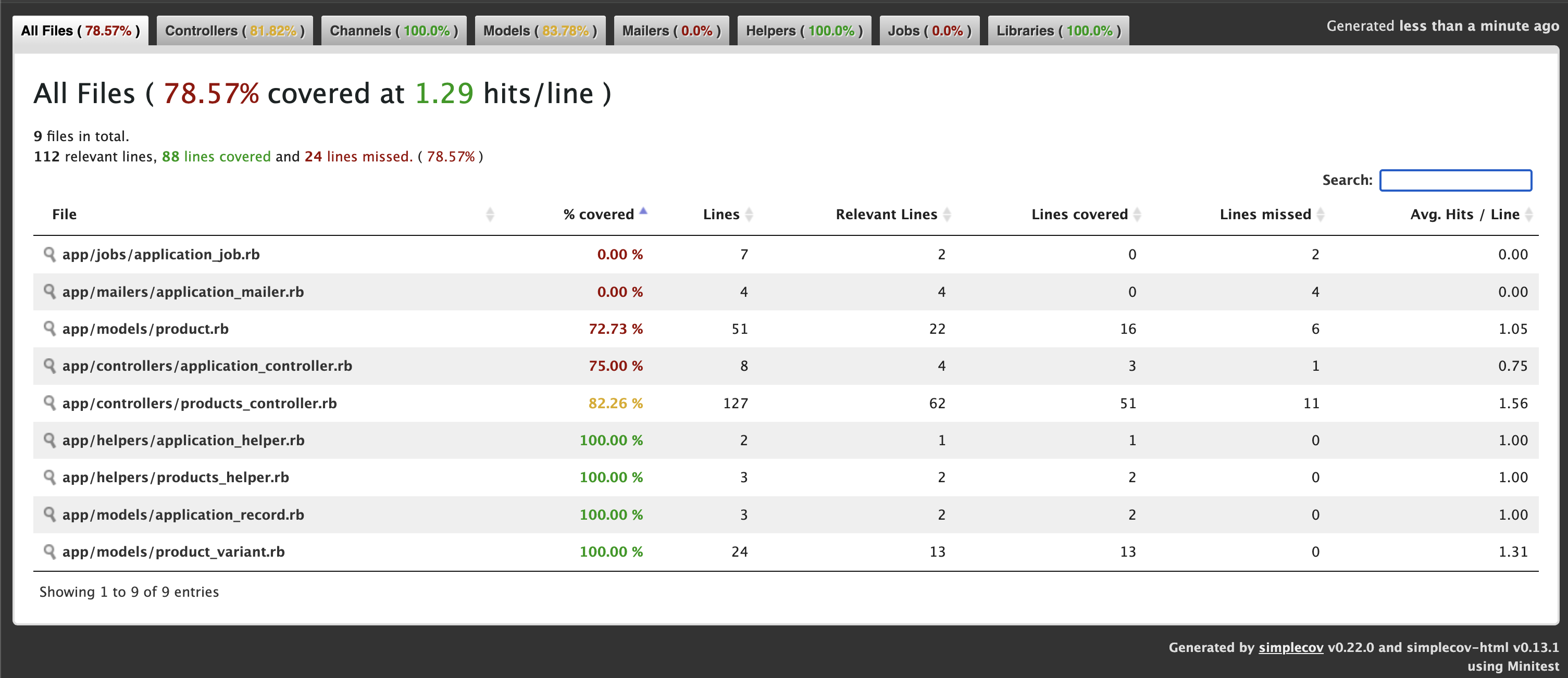
We get 78.57% only coverage and our target is 90% coverage. Let’s check where we missed the tests. ProductsController 82%. We missed coverage for #delete_image action. Let’s add it and check again.
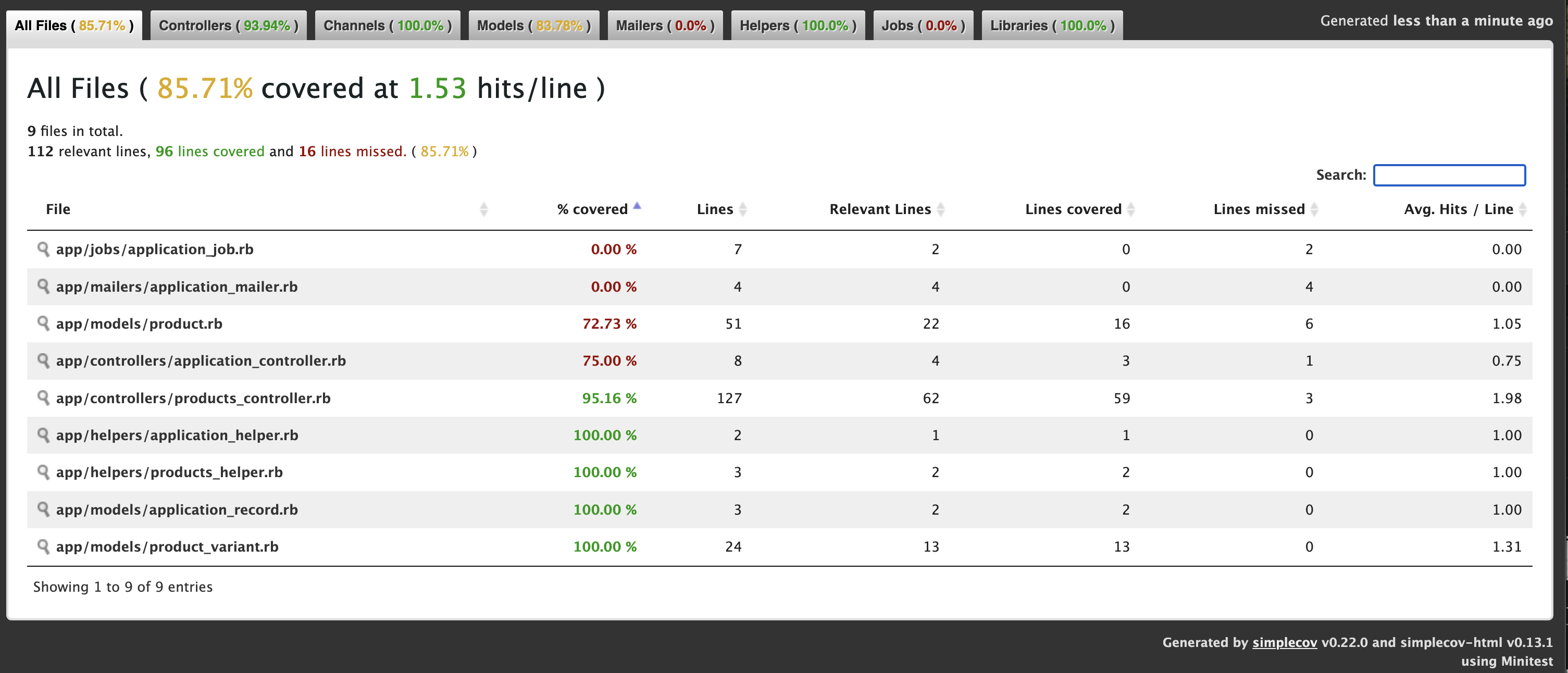
Let’s add Product Controller json requests test cases for json error response and add the ApplicationControllerTest for testing root path.
Now we get: 88.3%

Now we have to add some Test cases for Product model.
Now we get: 92.86% ✅

4. Enforce in CI
In your CI pipeline (e.g. GitHub Actions), ensure:
- name: Run tests with coverage
  run: |
    bundle exec rails test
    # Optionally upload coverage to Coveralls or Codecov
If coverage < threshold, the job will exit non-zero and fail.
Part 2: Incorporating Brakeman for Security Analysis
1. Add Brakeman to Your Development Stack
You can install Brakeman as a gem (development-only) or run it via Docker/CLI. Here’s the gem approach:
group :development do
  gem 'brakeman', require: false
end
Then:
bundle install
2. Basic Usage
From your project root, simply run:
✗ bundle exec brakeman

Generating report...

== Brakeman Report ==

Application Path: /Users/abhilash/rails/design_studio
Rails Version: 8.0.2
Brakeman Version: 7.0.2
Scan Date: 2025-05-07 11:06:36 +0530
Duration: 0.35272 seconds
Checks Run: BasicAuth, BasicAuthTimingAttack, CSRFTokenForgeryCVE, ....., YAMLParsing

== Overview ==

Controllers: 2
Models: 3
Templates: 12
Errors: 0
Security Warnings: 0

== Warning Types ==


No warnings found
By default, Brakeman:
- Scans
app/,lib/,config/, etc. - Outputs a report in the terminal and writes
brakeman-report.html.
3. Customize Your Scan
Create a config/brakeman.yml to fine-tune:
ignored_files:
  - 'app/controllers/legacy_controller.rb'
checks:
  - mass_assignment
  - cross_site_scripting
  - sql_injection
skip_dev: true                 # ignores dev-only gems
quiet: true                     # suppress verbose output
Run with:
bundle exec brakeman -c config/brakeman.yml -o public/security_report.html
Theconfig/brakeman.yml file is not added by default. You can add the file by copying the contents from: https://gist.github.com/abhilashak/038609f1c35942841ff8aa5e4c88b35b
Check: http://localhost:3000/security_report.html
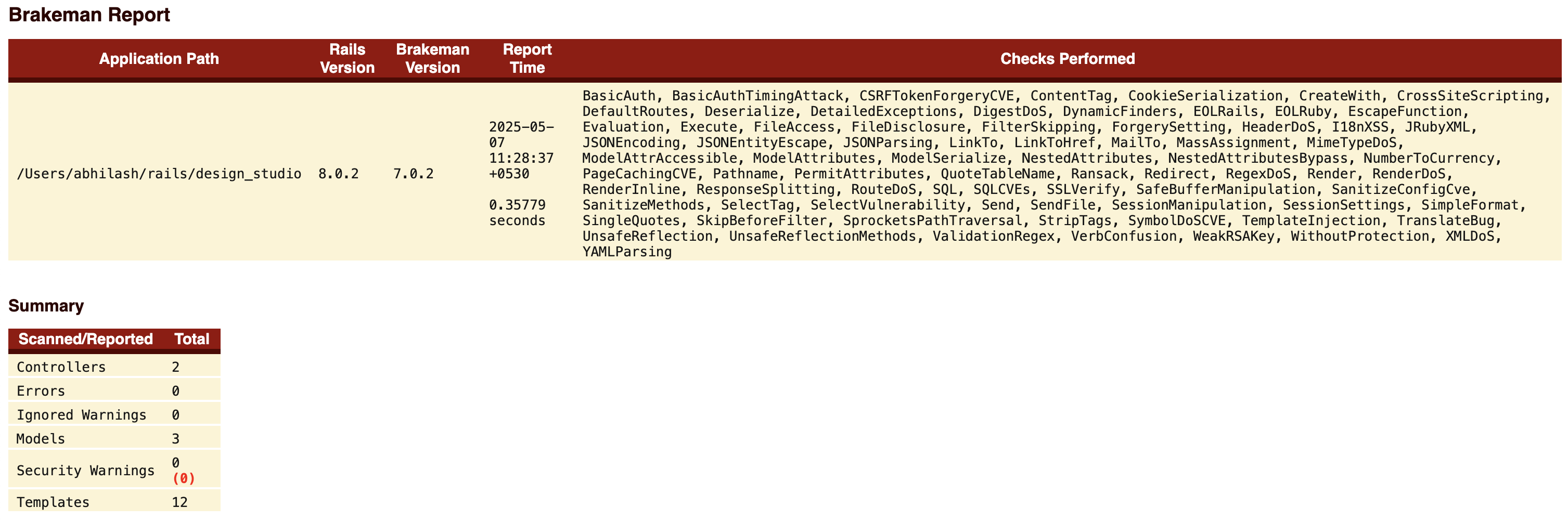
4. CI Integration
In GitHub Actions:
- name: Run Brakeman security scan
  run: |
    bundle exec brakeman -q -o brakeman.json
- name: Upload Brakeman report
  uses: actions/upload-artifact@v3
  with:
    name: security-report
    path: brakeman.json
Optionally, you can fail the build if new warnings are introduced by comparing against a baseline report.
Advantages of Using SimpleCov & Brakeman Together
| Aspect | SimpleCov | Brakeman |
|---|---|---|
| Purpose | Test coverage metrics | Static security analysis |
| Fail-fast | Fails when coverage drops below threshold | Can be configured to fail on new warnings |
| Visibility | Colorized HTML coverage report | Detailed HTML/JSON vulnerability report |
| CI/CD Ready | Integrates seamlessly with most CI systems | CLI-friendly, outputs machine-readable data |
| Customizable | Groups, filters, thresholds | Checks selection, ignored files, baseline |
Together, they cover two critical quality dimensions:
- Quality & Maintainability (via testing)
- Security & Compliance (via static analysis)
Automating both checks in your pipeline means faster feedback, fewer production issues, and higher confidence when shipping code.
Best Practices & Tips
- Threshold for SimpleCov: Start with 80%, then gradually raise to 90–95% over time.
- Treat Brakeman Warnings Seriously: Not all findings are exploitable, but don’t ignore them—triage and document why you’re suppressing any warning.
- Baseline Approach: Use a baseline report for Brakeman so your build only fails on newly introduced warnings, not historical ones.
- Schedule Periodic Full Scans: In addition to per-PR scans, run a weekly scheduled Brakeman job to catch issues from merged code.
- Combine with Other Tools: Consider adding gem like bundler-audit for known gem vulnerabilities.
Conclusion
By integrating SimpleCov and Brakeman into your Rails 8 app, you establish a robust safety net that:
- Ensures new features are properly tested
- Keeps an eye on security vulnerabilities
- Automates quality gates in your CI/CD pipeline
These tools are straightforward to configure and provide immediate benefits – improved code confidence, faster code reviews, and fewer surprises in production. Start today, and make code quality and security first-class citizens in your Rails workflow!
Happy Rails CI/CD Integration .. 🚀
 The Rails Drop