Below is a practical, production-ready approach that covers controller hooks, controllers, models/libs, background jobs, and more—illustrated with a real scenario from Session::CouponCode.
Core principles
Keep transport (HTTP, JSON) in controllers; keep domain logic in models/libs.
Map known, expected failures to specific HTTP statuses.
Log unexpected failures; return a generic message to clients.
Centralize API error rendering in a base controller.
1) A single error boundary for all API controllers
Create a base Error::ApiError and rescue it (plus a safe catch‑all) in your ApiController.
# lib/error/api_error.rb
module Error
  class ApiError < StandardError
    attr_reader :status, :details
    def initialize(message, status = :unprocessable_entity, details: nil)
      super(message)
      @status  = status
      @details = details
    end
  end
end
Order matters. Specific rescue_from before StandardError.
This pattern avoids duplicating rescue_from across controllers and keeps HTML controllers unaffected.
2) Errors in before actions
Because before_action runs inside controllers, the same rescue_from handlers apply.
Two patterns:
Render in the hook for simple guard clauses:
before_action :require_current_client

def require_current_client
  return if current_client
  render json: { success: false, error: 'require_login' }, status: :unauthorized
end
Raise a domain/auth error and let rescue_from handle JSON:
# lib/error/unauthorized_error.rb
module Error
  class UnauthorizedError < Error::ApiError
    def initialize(message = 'require_login') = super(message, :unauthorized)
  end
end

before_action :require_current_client

def require_current_client
  raise Error::UnauthorizedError unless current_client
end
Prefer raising if you want consistent global handling and logging.
3) Errors inside controllers
Use explicit renders for happy-path control flow; raise for domain failures:
def create
  form = CreateThingForm.new(params.require(:thing).permit(:name))
  result = CreateThing.new(form: form).call

  if result.success?
    render json: { success: true, thing: result.thing }, status: :created
  else
    # Known domain failure → raise an ApiError to map to 422
    raise Error::ApiError.new(result.message, :unprocessable_entity, details: result.details)
  end
end
Common controller exceptions (auto-mapped above):
ActionController::ParameterMissing → 400
ActiveRecord::RecordNotFound → 404
ActiveRecord::RecordInvalid → 422
ActiveRecord::RecordNotUnique → 409
4) Errors in models, services, and libs
Do not call render here. Either:
Return a result object (Success/Failure), or
Raise a domain‑specific exception that the controller maps to an HTTP response.
Example from our scenario, Session::CouponCode:
# lib/error/session/coupon_code_error.rb
module Error
  module Session
    class CouponCodeError < Error::ApiError; end
  end
end
# lib/session/coupon_code.rb
class Session::CouponCode
  def discount_dollars
    # ...
    case
    when coupon_code.gift_card?
      # ...
    when coupon_code.discount_code?
      # ...
    when coupon_code.multiorder_discount_code?
      # ...
    else
      raise Error::Session::CouponCodeError, 'Unrecognized discount code'
    end
  end
end
Then, in ApiController, the specific handler (or the Error::ApiError handler) renders JSON with a 422.
This preserves separation: models/libs raise; controllers decide HTTP.
5) Other important surfaces
ActiveJob / Sidekiq
Prefer retry_on, discard_on, and job‑level rescue with logging.
Return no HTTP here; jobs are async.
class MyJob < ApplicationJob
  retry_on Net::OpenTimeout, wait: 10.seconds, attempts: 3
  discard_on Error::ApiError
  rescue_from(StandardError) { |e| Rollbar.error(e) }
end
Mailers
Use rescue_from to avoid bubble‑ups crashing deliveries:
class ApplicationMailer < ActionMailer::Base
  rescue_from Postmark::InactiveRecipientError, Postmark::InvalidEmailRequestError do
    # no-op / log
  end
end
Routing / 404
For APIs, keep 404 mapping at the controller boundary with rescue_from ActiveRecord::RecordNotFound.
For HTML, config.exceptions_app = routes + ErrorsController.
Middleware / Rack
For truly global concerns, use middleware. This is rarely necessary for controller-scoped API errors in Rails.
Validation vs. Exceptions
Use validations (ActiveModel/ActiveRecord) for expected user errors.
Raise exceptions for exceptional conditions (invariants violated, external systems fail unexpectedly).
6) Observability
Always log unexpected errors in the catch‑all (StandardError).
Building a multi-tenant blogging platform requires thoughtful design of the API to ensure clarity, scalability, and security. In this post, we’ll explore a RESTful API design including versioning, nested resources, and authentication, using clear examples and best practices.
🧩 Understanding the Requirements
Before diving into endpoints, let’s break down what the platform supports:
Multiple tenants (e.g., organizations, teams)
Each tenant has users
Users can create blogs, and each blog has posts
Posts can have comments
Authentication is required
📁 Versioning
We’ll use URI-based versioning:
/api/v1/
This helps manage breaking changes cleanly.
🔐 Authentication
We’ll use token-based authentication (e.g., JWT or API keys). Each request must include:
Authorization: Bearer <token>
📌 Base URL
https://api.blogcloud.com/api/v1
📚 API Endpoint Design
🔸 Tenants
Tenants are top-level entities.
GET /tenants – List all tenants (admin only)
POST /tenants – Create a new tenant
GET /tenants/:id – Show tenant details
PATCH /tenants/:id – Update tenant
DELETE /tenants/:id – Delete tenant
🔸 Users (Scoped by tenant)
GET /tenants/:tenant_id/users – List users for tenant
POST /tenants/:tenant_id/users – Create user
GET /tenants/:tenant_id/users/:id – Show user
PATCH /tenants/:tenant_id/users/:id – Update user
DELETE /tenants/:tenant_id/users/:id – Delete user
🔸 Blogs (Belong to users)
GET /tenants/:tenant_id/users/:user_id/blogs – List blogs
POST /tenants/:tenant_id/users/:user_id/blogs – Create blog
GET /tenants/:tenant_id/users/:user_id/blogs/:id – Show blog
PATCH /tenants/:tenant_id/users/:user_id/blogs/:id – Update blog
DELETE /tenants/:tenant_id/users/:user_id/blogs/:id – Delete blog
Use that second version only if post_id is not globally unique, and you need the blog context.
🔁 Recap of Comments Endpoints
Action
HTTP Verb
Endpoint
List comments
GET
/api/v1/posts/:post_id/comments
Create comment
POST
/api/v1/posts/:post_id/comments
Delete comment
DELETE
/api/v1/posts/:post_id/comments/:id
🧠 Design Rule of Thumb
✅ Keep URLs meaningful and shallow.
❌ Don’t over-nest resources unless it’s needed to enforce scoping or clarify context.
📥 Example: Create a Blog Post
Request:
POST /blogs/123/posts
Authorization: Bearer <token>
Content-Type: application/json

{
  "title": "Why REST APIs Still Matter",
  "body": "In this post, we explore the benefits of RESTful design..."
}
Response:
201 Created
{
  "id": 456,
  "title": "Why REST APIs Still Matter",
  "body": "In this post, we explore the benefits of RESTful design...",
  "created_at": "2025-07-03T10:00:00Z"
}
✅ Best Practices Followed
Nesting: Resources are nested to show ownership (e.g., blogs under users).
Versioning: Prevents breaking old clients.
Consistency: Same verbs and JSON structure everywhere.
Authentication: Every sensitive request requires a token.
🧠 Final Thoughts
Designing a RESTful API for a multi-tenant app like a blogging platform requires balancing structure and simplicity. By properly scoping resources, using versioning, and enforcing auth, you build an API that’s powerful, secure, and easy to maintain.
Bonus Tip: Document your API using tools like Swagger/OpenAPI to make onboarding faster for new developers.
Modern web and mobile applications demand secure APIs. Traditional session-based authentication falls short in stateless architectures like RESTful APIs. This is where Token-Based Authentication and JWT (JSON Web Token) shine. In this blog post, we’ll explore both approaches, understand how they work, and integrate them into a Rails 8 application.
🔐 1. What is Token-Based Authentication?
Token-based authentication is a stateless security mechanism where the server issues a unique, time-bound token after validating a user’s credentials. The client stores this token (usually in local storage or memory) and sends it along with each API request via HTTP headers.
✅ Key Concepts:
Stateless: No session is stored on the server.
Scalable: Ideal for distributed systems.
Tokens can be opaque (random strings).
Algorithms used:
Token generation commonly uses SecureRandom.
🔎 What is SecureRandom?
SecureRandom is a Ruby module that generates cryptographically secure random numbers and strings. It uses operating system facilities (like /dev/urandom on Unix or CryptGenRandom on Windows) to generate high-entropy values that are safe for use in security-sensitive contexts like tokens, session identifiers, and passwords.
For example:
SecureRandom.hex(32) # generates a 64-character hex string (256 bits)
In Ruby, if you encounter the error:
(irb):5:in '<main>': uninitialized constant SecureRandom (NameError)
Did you mean?  SecurityError
It means the SecureRandom module hasn’t been loaded. Although SecureRandom is part of the Ruby Standard Library, it’s not automatically loaded in every environment. You need to explicitly require it.
✅ Solution
Add the following line before using SecureRandom:
require 'securerandom'
Then you can use:
SecureRandom.hex(16) # => "a1b2c3d4e5f6..."
📚 Why This Happens
Ruby does not auto-load all standard libraries to save memory and load time. Modules like SecureRandom, CSV, OpenURI, etc., must be explicitly required if you’re working outside of Rails (like in plain Ruby scripts or IRB).
In a Rails environment, require 'securerandom' is typically handled automatically by the framework.
🛠️ Tip for IRB
If you’re experimenting in IRB (interactive Ruby shell), just run:
require 'securerandom'
SecureRandom.uuid  # or any other method
This will eliminate the NameError.
🔒 Why 256 bits?
A 256-bit token offers a massive keyspace of 2^256 combinations, making brute-force attacks virtually impossible. The higher the bit-length, the better the resistance to collision and guessing attacks. Most secure tokens range between 128 and 256 bits. While larger tokens are more secure, they consume more memory and storage.
⚠️ Drawbacks:
SecureRandom tokens are opaque and must be stored on the server (e.g., in a database) for validation.
Token revocation requires server-side tracking.
👷️ Implementing Token-Based Authentication in Rails 8
Step 1: Generate User Model
rails g model User email:string password_digest:string token:string
rails db:migrate
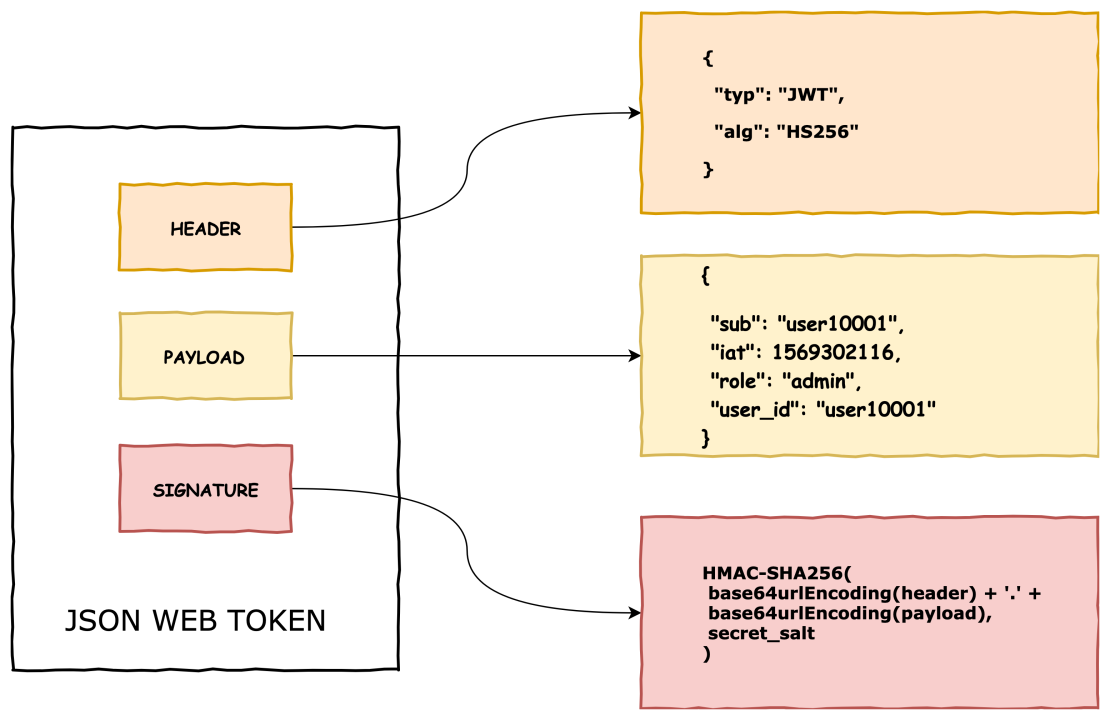
JWT is an open standard for secure information exchange, defined in RFC 7519.
🔗 What is RFC 7519?
RFC 7519 is a specification by the IETF (Internet Engineering Task Force) that defines the structure and rules of JSON Web Tokens. It lays out how to encode claims in a compact, URL-safe format and secure them using cryptographic algorithms. It standardizes the way information is passed between parties as a JSON object.
data = "#{base64_header}.#{base64_payload}"
# => "eyJhbGciOiJIUzI1NiIsInR5cCI6IkpXVCJ9.eyJ1c2VyX2lkIjoxMjMsImV4cCI6MTcxNzcwMDAwMH0"
🔹 Step 3: Generate Signature using HMAC SHA-256
require 'openssl'
require 'base64'

signature = OpenSSL::HMAC.digest('sha256', secret, data)
# => binary format

encoded_signature = Base64.urlsafe_encode64(signature).gsub('=', '')
# => This is the third part of JWT
# => e.g., "NLoeHhY5jzUgKJGKJq-rK6DTHCKnB7JkPbY3WptZmO8"
✅ Final JWT:
<header>.<payload>.<signature>
Anyone receiving this token can:
Recompute the signature using the same secret key
If it matches the one in the token, it’s valid
If it doesn’t match, the token has been tampered
❓ Is SHA-256 used for encoding or encrypting?
❌ SHA-256 is not encryption. ❌ SHA-256 is not encoding either. ✅ It is a hash function: one-way and irreversible.
It’s used in HMAC to sign data (prove data integrity), not to encrypt or hide data.
✅ Summary:
Purpose
SHA-256 / HMAC SHA-256
Encrypts data?
❌ No
Hides data?
❌ No (use JWE for that)
Reversible?
❌ No
Used in JWT?
✅ Yes (for signature)
Safe?
✅ Very secure if secret is strong
🎯 First: The Big Misunderstanding — Why JWT Isn’t “Encrypted”
JWT is not encrypted by default.
It is just encoded + signed. You can decode the payload, but you cannot forge the signature.
🧠 Difference Between Encoding, Encryption, and Hashing
Concept
Purpose
Reversible?
Example
Encoding
Make data safe for transmission
✅ Yes
Base64
Encryption
Hide data from unauthorized eyes
✅ Yes (with key)
AES, RSA
Hashing
Verify data hasn’t changed
❌ No
SHA-256, bcrypt
🔓 Why can JWT payload be decoded?
Because the payload is only Base64Url encoded, not encrypted.
Example:
{
  "user_id": 123,
  "role": "admin"
}
When sent in JWT, it becomes:
eyJ1c2VyX2lkIjoxMjMsInJvbGUiOiJhZG1pbiJ9
✅ You can decode it with any online decoder. It’s not private, only structured and verifiable.
🔐 Then What Protects the JWT?
The signature is what protects it.
It proves the payload hasn’t been modified.
The backend signs it with a secret key (HMAC SHA-256 or RS256).
If anyone tampers with the payload and doesn’t have the key, they can’t generate a valid signature.
🧾 Why include the payload inside the JWT?
This is the brilliant part of JWT:
The token is self-contained.
You don’t need a database lookup on every request.
You can extract data like user_id, role, permissions right from the token!
✅ So yes — it’s just a token, but a smart token with claims (data) you can trust.
This is ideal for stateless APIs.
💡 Then why not send payload in POST body?
You absolutely can — and often do, for data-changing operations (like submitting forms). But that’s request data, not authentication info.
JWT serves as the proof of identity and permission, like an ID card.
You put it in the Authorization header, not the body.
📦 Is it okay to send large payloads in JWT?
Technically, yes, but not recommended. Why?
JWTs are sent in every request header — that adds bloat.
Bigger tokens = slower transmission + possible header size limits.
If your payload is very large, use a token to reference it in DB or cache, not store everything in the token.
⚠️ If the secret doesn’t match?
Yes — that means someone altered the token (probably the payload).
If user_id was changed to 999, but they can’t recreate a valid signature (they don’t have the secret), the backend rejects the token.
🔐 Then When Should We Encrypt?
JWT only signs, but not encrypts.
If you want to hide the payload:
Use JWE (JSON Web Encryption) — a different standard.
Or: don’t put sensitive data in JWT at all.
🔁 Summary: Why JWT is a Big Deal
✅ Self-contained authentication
✅ Stateless (no DB lookups)
✅ Signed — so payload can’t be tampered
❌ Not encrypted — anyone can see payload
⚠️ Keep payload small and non-sensitive
🧠 One Last Time: Summary Table
Topic
JWT
POST Body
Used for
Authentication/identity
Submitting request data
Data type
Claims (user_id, role)
Form/input data
Seen by user?
Yes (Base64-encoded)
Yes
Security
Signature w/ secret
HTTPS
Stored where?
Usually in browser (e.g. localStorage, cookie)
N/A
Think of JWT like a sealed letter:
Anyone can read the letter (payload).
But they can’t forge the signature/stamp.
The receiver checks the signature to verify the letter is real and unmodified.
🧨 Yes, JWT Payload is Visible — and That Has Implications
The payload of a JWT is only Base64Url encoded, not encrypted.
This means anyone who has the token (e.g., a user, a man-in-the-middle without HTTPS, or a frontend dev inspecting in the browser) can decode it and see:
It doesn’t prevent others from reading the payload, but it prevents them from modifying it (thanks to the signature).
It allows stateless auth without needing a DB lookup on every request.
It’s useful for microservices where services can verify tokens without a central auth store.
🧰 Best Practices for JWT Payloads
Treat the payload as public data.
Ask yourself: “Is it okay if the user sees this?”
Never trust the token blindly on the client.
Always verify the signature and claims server-side.
Use only identifiers, not sensitive context.
For example, instead of embedding full permissions: { "user_id": 123, "role": "admin" } fetch detailed permissions on the backend based on role.
Encrypt the token if sensitive data is needed.
Use JWE (JSON Web Encryption), or
Store sensitive data on the server and pass only a reference (like a session id or user_id).
📌 Bottom Line
JWT is not private. It is only protected from tampering, not from reading.
So if you use it in your app, make sure the payload contains only safe, public information, and that any sensitive logic (like permission checks) happens on the server.
# app/services/json_web_token.rb
class JsonWebToken
  def self.encode(payload, exp = 24.hours.from_now)
    payload[:exp] = exp.to_i
    JWT.encode(payload, JWT_SECRET, 'HS256')
  end

  def self.decode(token)
    body = JWT.decode(token, JWT_SECRET, true, { algorithm: 'HS256' })[0]
    HashWithIndifferentAccess.new body
  rescue
    nil
  end
end
Step 4: Sessions Controller for JWT
# app/controllers/api/v1/sessions_controller.rb
class Api::V1::SessionsController < ApplicationController
  def create
    user = User.find_by(email: params[:email])
    if user&.authenticate(params[:password])
      token = JsonWebToken.encode(user_id: user.id)
      render json: { jwt: token }, status: :ok
    else
      render json: { error: 'Invalid credentials' }, status: :unauthorized
    end
  end
end
Step 5: Authentication in Application Controller
# app/controllers/application_controller.rb
class ApplicationController < ActionController::API
  before_action :authenticate_request

  def authenticate_request
    header = request.headers['Authorization']
    token = header.split(' ').last if header
    decoded = JsonWebToken.decode(token)
    @current_user = User.find_by(id: decoded[:user_id]) if decoded
    render json: { error: 'Unauthorized' }, status: :unauthorized unless @current_user
  end
end
🌍 How Token-Based Authentication Secures APIs
🔒 Benefits:
Stateless: Scales well
Works across domains
Easy to integrate with mobile/web clients
JWT is tamper-proof and verifiable
⚡ Drawbacks:
Token revocation is hard without server tracking (esp. JWT)
Long-lived tokens can be risky if leaked
Requires HTTPS always
📆 Final Thoughts
For most Rails API-only apps, JWT is the go-to solution due to its stateless, self-contained nature. However, for simpler setups or internal tools, basic token-based methods can still suffice. Choose based on your app’s scale, complexity, and security needs.
When building a Rails API app, you typically need token-based authentication instead of cookie-based sessions (which are more common in full-stack Rails apps). Here are the most common authentication mechanisms you can use in a Rails API-only application:
How it works: After login, the server issues a JWT token which the client must include in the Authorization header (Bearer <token>) in subsequent requests.
Pros:
Stateless, scalable.
Widely supported across mobile and frontend frameworks.
Cons:
Tokens can’t be invalidated easily without extra measures (e.g., a blacklist).
b. Token-based Auth with Devise + TokenAuthenticatable
POST /login
Content-Type: application/json

{
  "email": "test@example.com",
  "password": "password123"
}
Response:
{ "token": "eyJhbGciOi..." }
Step 3: Use Token in Authenticated Request
GET /profile
Authorization: Bearer eyJhbGciOi...
🔒 Extras You Might Add Later
Token expiration errors
Refresh tokens
Token revocation (e.g., a blacklist table)
Roles/permissions inside the token (e.g., admin claims)
Let’s now write RSpec tests for the JWT-based authentication flow we just set up in your Rails API app.
Assumptions
You already have:
A User model with email and password_digest
An AuthController with login
A UsersController with a protected profile action
JWT auth logic in JsonWebToken
🔧 Step 1: Add RSpec & Factory Bot
In your Gemfile (if not already added):
group :development, :test do
  gem 'rspec-rails'
  gem 'factory_bot_rails'
end

group :test do
  gem 'faker'
end
Then install:
bundle install
rails generate rspec:install
🏭 Step 2: Setup Factory for User
spec/factories/users.rb:
FactoryBot.define do
  factory :user do
    email { Faker::Internet.email }
    password { 'password123' }
    password_confirmation { 'password123' }
  end
end
🧪 Step 3: Auth Request Specs
spec/requests/auth_spec.rb:
require 'rails_helper'

RSpec.describe 'Authentication', type: :request do
  let!(:user) { create(:user, password: 'password123') }

  describe 'POST /login' do
    context 'with valid credentials' do
      it 'returns a JWT token' do
        post '/login', params: { email: user.email, password: 'password123' }

        expect(response).to have_http_status(:ok)
        expect(JSON.parse(response.body)).to include('token')
      end
    end

    context 'with invalid credentials' do
      it 'returns unauthorized' do
        post '/login', params: { email: user.email, password: 'wrong' }

        expect(response).to have_http_status(:unauthorized)
        expect(JSON.parse(response.body)).to include('error')
      end
    end
  end
end
🔒 Step 4: Profile (Protected) Request Specs
spec/requests/users_spec.rb:
require 'rails_helper'

RSpec.describe 'Users', type: :request do
  let!(:user) { create(:user) }
  let(:token) { JsonWebToken.encode(user_id: user.id) }

  describe 'GET /profile' do
    context 'with valid token' do
      it 'returns user profile' do
        get '/profile', headers: { 'Authorization' => "Bearer #{token}" }

        expect(response).to have_http_status(:ok)
        json = JSON.parse(response.body)
        expect(json['email']).to eq(user.email)
      end
    end

    context 'without token' do
      it 'returns unauthorized' do
        get '/profile'
        expect(response).to have_http_status(:unauthorized)
      end
    end

    context 'with invalid token' do
      it 'returns unauthorized' do
        get '/profile', headers: { 'Authorization' => 'Bearer invalid.token' }
        expect(response).to have_http_status(:unauthorized)
      end
    end
  end
end
📦 Final Tips
Run tests with: bundle exec rspec
You can stub JsonWebToken.decode in unit tests if needed to isolate auth logic.



 The Rails Drop