A composite primary key is a primary key that consists of two or more columns to uniquely identify each row in a database table. While individual columns within the composite key can contain duplicate values across different rows, the combined values of those columns must be entirely unique.
Key Characteristics
No NULL values: Just like a standard primary key, none of the columns making up a composite key can contain NULL values.
One Primary Key per table: A table can still only have one primary key constraint, but that single constraint is distributed across multiple columns.
Common Use Cases: They are frequently used in many-to-many junction tables (e.g., matching student_id and course_id in an enrollment table) or line-item tables (e.g., combining order_id and item_number)
Diagram:
students
    |
    |
enrollments
    |
    |
courses
Rails
classStudent<ApplicationRecord
has_many:enrollments
has_many:courses, through::enrollments
end
classCourse<ApplicationRecord
has_many:enrollments
has_many:students, through::enrollments
end
classEnrollment<ApplicationRecord
belongs_to:student
belongs_to:course
end
Senior-Level Insight
Most Rails developers stop at:
has_many
belongs_to
Strong backend engineers understand:
Association
↓
Foreign Key
↓
Constraint
↓
Index
↓
Storage
That understanding helps you:
debug production issues
optimize queries
design schemas
answer interview questions confidently
Interview Questions
Try answering without looking.
Q1
Difference between:
PRIMARYKEY
and
UNIQUE
Q2
Can a table have multiple UNIQUE constraints?
Q3
Can a table have multiple PRIMARY KEYS?
Q4
How is a one-to-one relationship implemented in PostgreSQL?
Q5
Why should foreign keys exist even when Rails validations exist?
Q6
What problem does a join table solve?
Practical Lab (Run Everything)
Create a fresh database:
CREATE DATABASE interview_sql_day1;
Connect:
\c interview_sql_day1
Create:
users
profiles
orders
students
courses
enrollments
Insert sample data.
Then practice:
SELECT*FROM users;
SELECT*FROM orders;
SELECT*FROM profiles;
SELECT*FROM enrollments;
Try intentionally violating:
PRIMARY KEY
UNIQUE
NOT NULL
FOREIGN KEY
and observe PostgreSQL’s error messages.
A senior engineer learns a lot from database errors.
Homework
Exercise 1
Create:
authors
books
One author → many books
Add proper foreign keys.
Exercise 2
Create:
employees
employee_details
One-to-one relationship.
Exercise 3
Create:
movies
actors
movie_actors
Many-to-many relationship.
Insert:
3 movies
5 actors
Create relationships.
Exercise 4
For every relationship above, write the equivalent Rails models and associations.
Day 2 Preview
Next we’ll cover the foundation of everything in SQL:
SELECT Queries
Including:
SELECT
WHERE
ORDER BY
LIMIT
OFFSET
DISTINCT
IN
BETWEEN
LIKE
ILIKE
NULL handling
plus PostgreSQL execution behavior and ActiveRecord equivalents.
To truly master equality in Ruby, you need to look at four distinct methods. Beyond == and ===, Ruby uses eql? for strict value and type checking, and equal? for strict object identity.
Here is how they stack up:
Method / Operator
Purpose
Strictness Level
Core Behavior
==
Value Equality
Loose
Returns true if values are equivalent (e.g., 1 == 1.0 is true).
===
Case Equality
Contextual
Used in case/when. Checks membership, type matching, or regex matching (Class === instance).
eql?
Hash Key Equality
Strict
Checks if values and types match. Used by Ruby under the hood to look up keys in a Hash.
equal?
Object Identity
Absolute
Checks if both sides point to the exact same object in memory (object_id). Never override this.
1. Hash Equality (eql?)
While == will convert numbers to compare them, eql? requires them to be the exact same class.
1==1.0# => true
1.eql?(1.0) # => false (Integer vs Float)
# Why it matters: Hash keys use eql?
hash= {}
hash[1] ="Integer One"
hash[1.0] ="Float One"
putshash.keys# => [1, 1.0] (They are treated as completely separate keys!)
2. Identity Equality (equal?)
This is the ultimate test of identity. It checks if the two variables point to the same slot in your computer’s memory.
str1="hello"
str2="hello"
str1==str2# => true (Same value)
str1.equal?(str2) # => false (Different objects in memory)
str3=str1
str1.equal?(str3) # => true (Both variables point to the exact same object)
How to Override Equality in Custom Classes
When you build your own objects, Ruby doesn’t automatically know what makes two instances “equal.” By default, custom objects inherit == from Object, which behaves like equal? (identity checking).
To fix this, you should override ==. When you override ==, it is best practice to also alias it to ===.
Here is a clean, modern implementation for a custom class:
classProduct
attr_reader:id, :name
definitialize(id, name)
@id=id
@name=name
end
# 1. Define custom value equality
def==(other)
# Ensure the other object is actually a Product or subclass
returnfalseunlessother.is_a?(Product)
# Consider them equal if their IDs match
self.id==other.id
end
# 2. Make case equality behave exactly the same way
alias_method:===, :==
end
prod1=Product.new(101, "Laptop")
prod2=Product.new(101, "MacBook Pro") # Same ID, different name string
# Testing our custom equality
putsprod1==prod2# => true (Because IDs match)
putsprod1===prod2# => true (Works seamlessly in case statements!)
Ruby Equality: In Detail
Ruby gives you four ways to compare things. Most developers use == everywhere and wonder why things break. Here’s what’s actually happening under the hood – and when to reach for each one.
The Four Operators at a Glance
Method
Question it asks
Default defined in
==
Are you equivalent in value?
BasicObject
===
Do you belong to this category?
Object (delegates to ==)
eql?
Same value and type?
Object (delegates to ==)
equal?
Are you the exact same object in memory?
BasicObject (never override)
== – Value Equality (The Workhorse)
This is what you use 95% of the time. == asks: are these equivalent?
1==1.0# => true (Integer vs Float, Ruby coerces)
"hello"=="hello"# => true (same content, different objects)
[1, 2] == [1, 2] # => true
The key thing: == is just a method. Every class can override it. Here’s what that looks like:
Watch out: If you override ==, also override hash or your objects will break in hashes and sets. More on that below.
=== – Case Equality (The Pattern Matcher)
This one is subtle. === powers case/when and asks: does the right side belong to the category defined by the left side?
# Under the hood, case/when calls ===
casestatus_code
when200# Integer#=== → 200 === 200
when300..399# Range#=== → range.include?(code)
when/^5\d{2}/# Regexp#=== → regex.match?(code)
end
Each class defines what “belonging” means:
(1..10) ===5# => true - range membership
/\d+/==="123"# => true - regex match
String==="hello"# => true - is it an instance of String?
:ok===:ok# => true - falls back to ==
You can exploit this directly:
matchers= [Integer, /error/, (500..599)]
matchers.any? { |m| m===value } # polymorphic dispatch, zero if/else
Rule of thumb: Don’t call === explicitly in most code. It’s a framework-level tool. Let case/when use it.
eql? – Type-Strict Equality
eql? asks: same value AND same type?
1==1.0# => true (== coerces)
1.eql?(1.0) # => false (different types)
1.eql?(1) # => true
"a".eql?("a") # => true
The critical contract: eql? and hash are paired. Ruby uses eql? to resolve hash key collisions. If two objects are eql?, they must return the same hash value.
# This is why 1 and 1.0 are NOT the same Hash key
h= {}
h[1] ="integer"
h[1.0] ="float"
h# => {1 => "integer", 1.0 => "float"} - two separate keys!
1.hash# => some_number
1.0.hash# => different_number (on most Ruby versions)
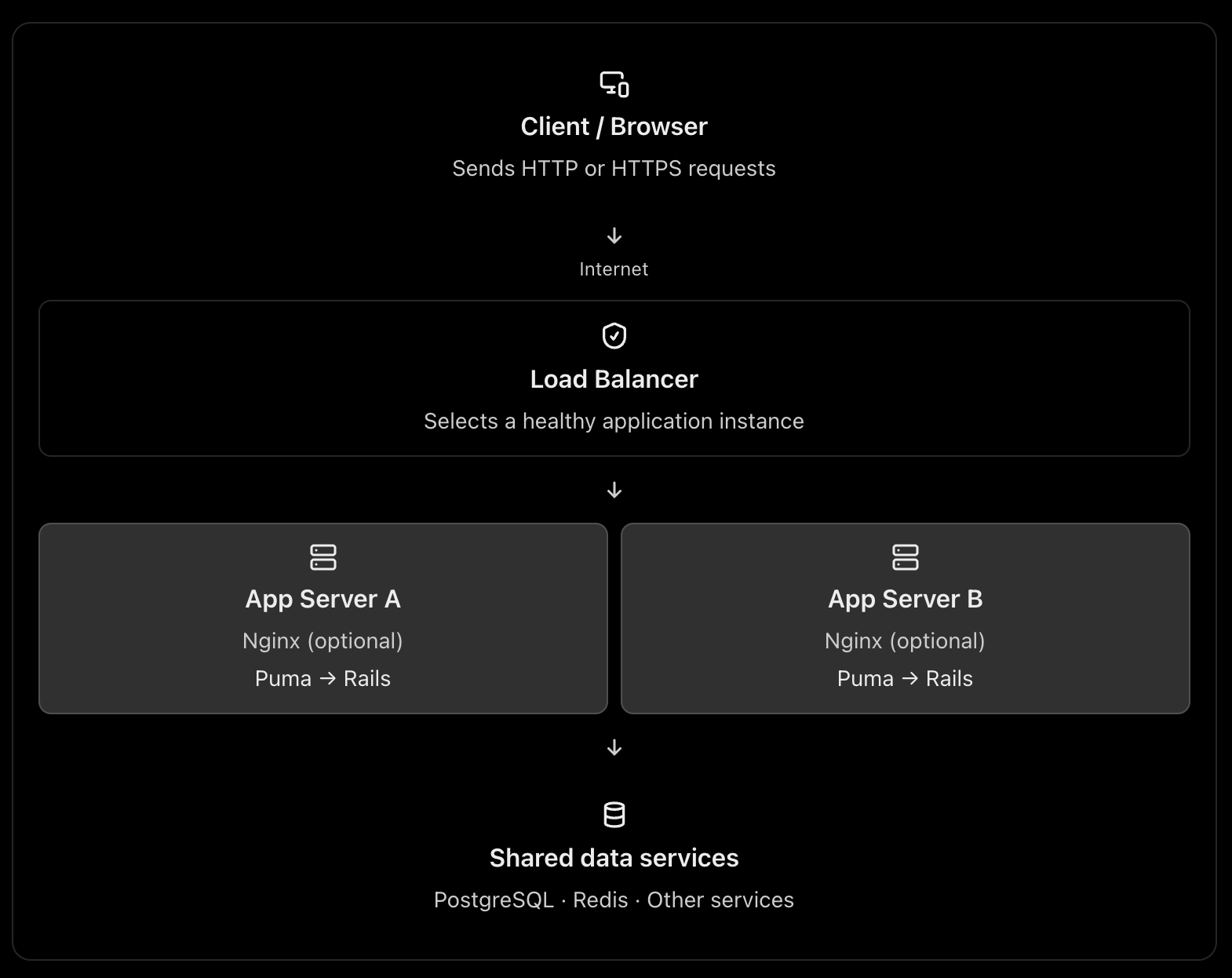
The key idea is this: Nginx/Apache, load balancers, and application servers have different responsibilities, but some of their responsibilities overlap. You don’t always need all three.
Let’s understand this using a Ruby on Rails application, since it makes the architecture easier to relate to real production deployments.
1. What happens when a user sends a request?
Suppose a user opens your application:
GET https://shop.example.com/products
The browser sends the request over the internet. Something must receive that request, decide where it should go, and return the response.
A typical production architecture looks like this:
This is one possible architecture, not a requirement for every web application. A load balancer can route directly to the application servers, and Nginx can itself act as a load balancer. See the official NGINX reverse proxy documentation and load-balancing documentation.
2. What is Nginx or Apache used for?
Nginx and Apache are web servers. They can also act as reverse proxies, routing requests to an application server such as Puma in Rails.
Think of Nginx as the reception desk of your application server.
It can receive a request, handle certain tasks itself, or forward the request to Rails.
A. Serving static files
Consider these requests:
GET /assets/application-abc123.css
GET /images/logo.png
GET /products
The first two requests may only need static files. They do not necessarily require Rails to execute any application code.
Nginx can serve those files directly. The third request typically needs Rails to query the database and build a response.
This avoids spending Rails application capacity on work that a web server can do efficiently. A CDN can serve many of these static assets even earlier in the request path. NGINX static-content documentation
B. Acting as a reverse proxy
Your Rails application might run on Puma at:
127.0.0.1:3000
Nginx listens on the public HTTP/HTTPS ports and forwards dynamic requests to Puma.
Browser
|
| HTTPS :443
v
Nginx
|
| HTTP on localhost:3000
v
Puma
|
v
Rails controllers → models → database
Nginx receives the response from Puma and sends it back to the browser.
C. Handling infrastructure concerns
Depending on its configuration, Nginx can also help with:
TLS/HTTPS termination.
Request and response buffering.
Compression and caching.
Request-size limits and timeouts.
Routing by hostname or URL path.
These capabilities help keep infrastructure concerns separate from your Rails business logic. They do require appropriate configuration; Nginx does not automatically solve every security or performance problem.
What about Apache?
Apache can serve static files, terminate TLS, reverse proxy requests, and distribute traffic. Nginx is a common choice for this role, but Apache is also valid.
You normally choose Nginx or Apache for a given reverse-proxy role, rather than installing both by default.
3. What is a load balancer?
A load balancer distributes incoming traffic across multiple application instances instead of sending every request to a single instance.
Imagine your Rails application is running on one server with Puma.
10,000 requests
|
v
Rails Server A
If the traffic grows, that single server may run out of CPU, memory, or available request-processing capacity.
You can run multiple application instances:
                10,000 requests
                       |
                       v
                Load Balancer
                 /          \
                v            v
          Rails Server A  Rails Server B
             Puma             Puma
The load balancer chooses a target according to its configured routing algorithm and health information. If a target becomes unhealthy, a properly configured load balancer can stop directing new requests to it. AWS Elastic Load Balancing documentation
Why is this useful?
Horizontal scaling: Add more application instances when traffic increases.
High availability: A failed instance does not necessarily take down the entire application.
Health checks: Avoid routing new requests to unhealthy instances.
Controlled deployments: Replace or remove instances gradually, when your deployment strategy supports it.
A load balancer does not make an individual Rails request faster by itself. Its main purpose is to distribute work and improve availability and scalability.
4. Why not send requests directly to the application server?
You absolutely can. The question is whether doing so is appropriate for your deployment.
For example, you could expose Puma directly:
Browser → Puma :3000 → Rails → PostgreSQL
This is technically possible. In a small deployment or a managed platform, it can be perfectly reasonable.
But consider what happens in a more demanding production environment.
Concern
App server directly exposed
Reverse proxy / load balancer
Static files
May consume app-server capacity
Can be served separately
HTTPS
Must be configured at the app or another layer
Can terminate TLS at the proxy/LB
Multiple instances
Needs a routing strategy
Can distribute traffic
Unhealthy instances
Needs separate handling
Can use health checks
Request limits and buffering
Depends on app server
Can be handled at the proxy
Application isolation
Public app-server port may be exposed
Can keep app instances on private networks
The architectural reason is separation of responsibilities. Puma is responsible for accepting requests and running your Rails application. The proxy or load balancer handles traffic-management responsibilities around it.
One caveat: the proxy is not automatically a security boundary. You still need firewall rules, correct forwarded-header handling, application security, and suitable network configuration.
5. The three architectures you should know
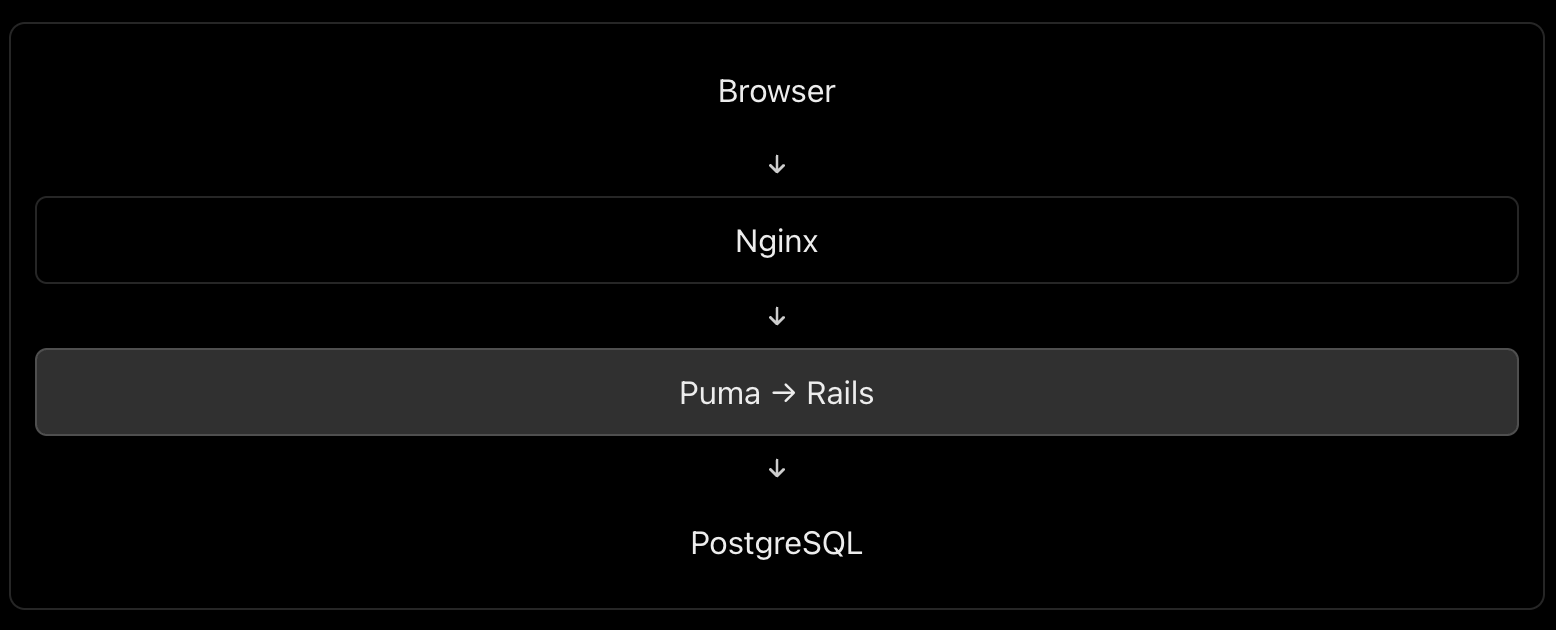
Architecture A: One server – small application
Everything may run on one virtual machine, although PostgreSQL could be a separate managed service.
Here, Nginx acts as a reverse proxy, but it is not distributing traffic across multiple machines. This is a reasonable starting point for many Rails applications.
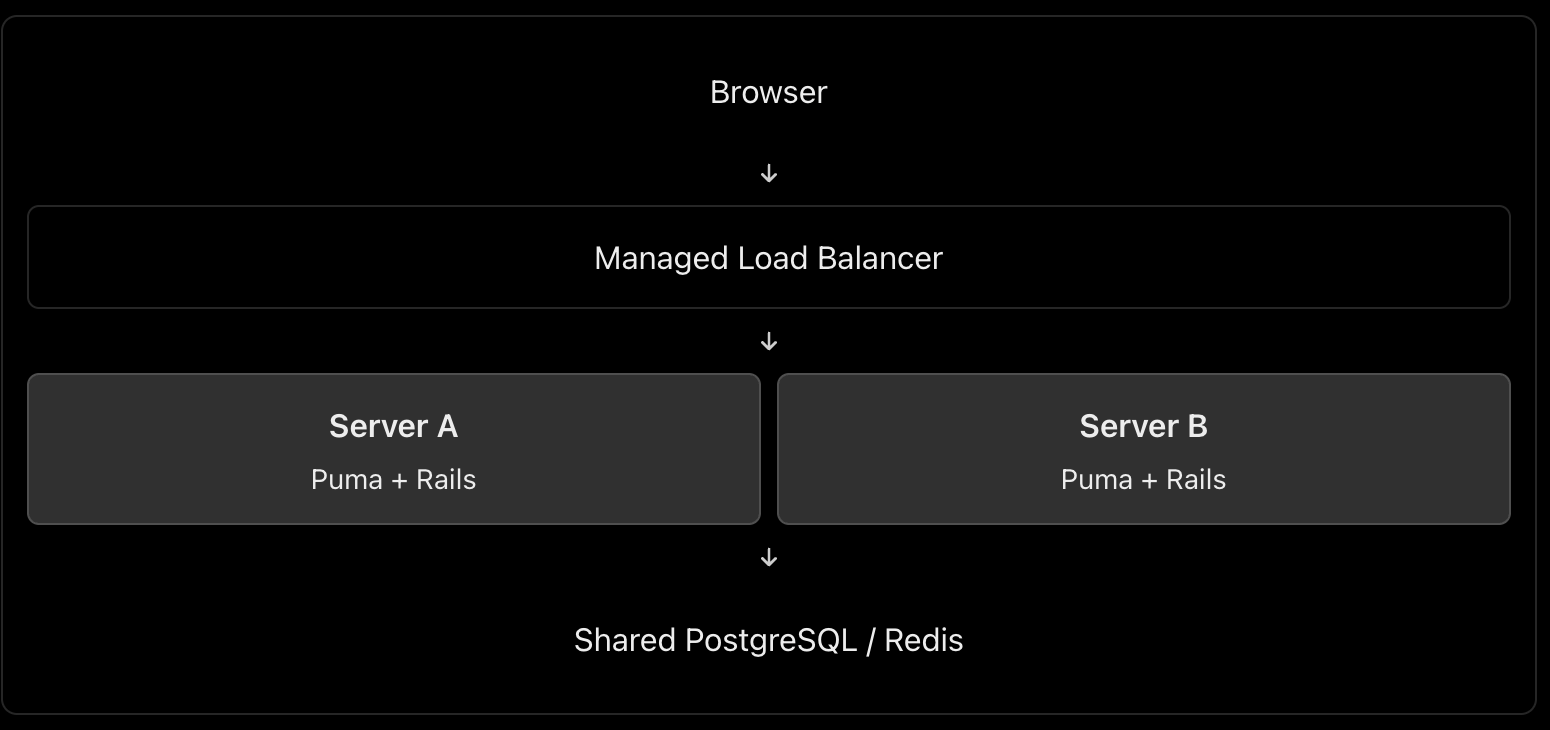
Architecture B: Multiple servers – production scaling
In this architecture, you might use AWS Application Load Balancer or Google Cloud Load Balancing in front of multiple application instances.
Do you also need Nginx on each application server? Not necessarily. The managed load balancer can route traffic directly to Puma or the application container, if that setup is supported and correctly secured. Add Nginx when you need the functionality it provides.
Architecture C: Larger application with a CDN
Browser
|
v
CDN / WAF
|
v
Managed Load Balancer
|
+---- Rails Instance A
|
+---- Rails Instance B
|
+---- Rails Instance C
|
v
Managed PostgreSQL
Redis / Background Jobs
This setup adds edge caching and potentially web-application firewall protection before traffic reaches the load balancer. Static assets can be served from the CDN, while dynamic requests are sent to Rails.
The exact design depends on your cloud provider, traffic volume, reliability targets, and operational budget.
6. Can Nginx itself be a load balancer?
Yes. This is an important int. point.
Nginx can reverse-proxy requests to one application instance or load-balance them across several upstream instances. These are two uses of the same technology. NGINX load-balancing documentation
This configuration illustrates Nginx distributing requests between two upstream Rails application servers. It is a simplified example, not a complete production configuration; TLS, trusted proxy settings, health monitoring, timeouts, and network restrictions must be addressed as appropriate.
Notice that a load balancer describes a role, not necessarily a separate physical server or a separate technology.
7. What is the best architecture for a Rails application?
My default recommendation would be:
Small application or early-stage product: Nginx → Puma → Rails, with PostgreSQL. Keep it simple.
Production application requiring horizontal scaling and high availability: A managed load balancer → multiple Rails instances, plus a managed database and shared services where needed. Use Nginx on the instances only when its features justify it.
High-traffic application: Add a CDN/WAF, caching, background workers, monitoring, and database scaling according to measured bottlenecks.
For a cloud-hosted Rails application, I would generally prefer a managed load balancer over maintaining my own public-facing load-balancing tier, when the platform offers one that meets the requirements.
The most important things are not the number of components but eliminating single points of failure where required, protecting application instances from unintended public access, monitoring performance, and scaling the actual bottleneck.
Int. answer
You could summarize it this way:
“Nginx or Apache acts as a web server and reverse proxy. It can serve static assets, terminate TLS, and forward dynamic requests to an application server such as Puma. A load balancer distributes incoming requests among multiple healthy application instances, improving scalability and availability. Nginx can also perform load balancing itself, so they don’t necessarily have to be separate components. For a small Rails application, Nginx → Puma is sufficient. For a horizontally scaled production application, I’d typically use a managed load balancer in front of multiple application instances, with Nginx on each instance only if needed.”
That demonstrates that you understand both the purpose of each component and when the extra infrastructure is worth the complexity.
Explain the following
1. How do you replicate application server instances? Is containerization best?
Yes, containers are an excellent default for many modern deployments, but they are not mandatory.
Suppose your Rails application runs on Puma.
                    Load Balancer
                   /      |      \
                  v       v       v
              Rails A  Rails B  Rails C
              Puma     Puma     Puma
                  \       |       /
                   PostgreSQL
Each instance runs the same application version.
How to implement it
Containerize the Rails app using Docker. Build an image containing Ruby, gems, application code and required runtime dependencies.
Deploy multiple replicas using a platform such as AWS ECS, Kubernetes, or a managed container service.
Put a load balancer in front to route requests to healthy instances.
Keep instances stateless. Store persistent data in PostgreSQL, shared cache/session stores in Redis when needed, and uploaded files in object storage such as S3.
Configure health checks, monitoring and autoscaling. Deploy new application versions through a controlled rollout.
Docker documents the use of production deployment configurations and orchestration for scaling applications. Docker production guide
Important: Replicating a server manually is possible, but deploying the same immutable image is more consistent and repeatable. You can also replicate virtual machines without containers.
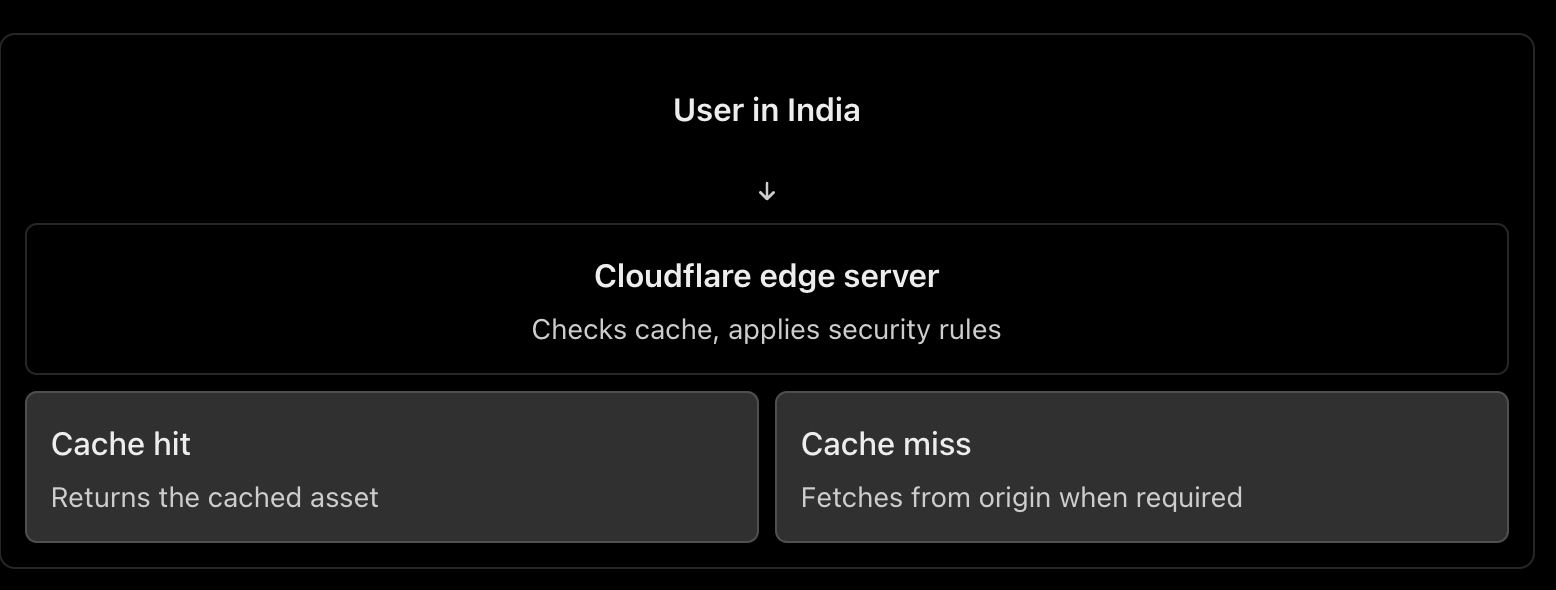
2. What does a CDN do? What is Cloudflare?
A CDN (Content Delivery Network) caches and serves content from locations distributed around the world.
For example, your Rails application serves a product page containing JavaScript, CSS and product images. Cloudflare can cache eligible assets closer to users, reducing response latency, origin traffic and bandwidth usage. HTML pages containing personalized data should not be cached indiscriminately. Cloudflare CDN documentation
Other Cloudflare benefits
DNS hosting: Manage domain records.
DDoS protection: Help absorb or mitigate abusive traffic.
Web Application Firewall (WAF): Filter requests matching security rules.
TLS/HTTPS: Manage certificates and encrypt client connections.
Load balancing: Route traffic to healthy origins or regions.
How does Cloudflare work as a load balancer?
You configure a load balancer with pools of origins and health monitors.
For example:
shop.example.com
|
v
Cloudflare Load Balancer
|
+------ Region A (healthy)
| |
| App servers
|
+------ Region B (healthy)
|
App servers
Cloudflare can steer traffic between these origins according to the configured policy and health. If an origin becomes unhealthy, it can stop sending traffic to it. Cloudflare Load Balancing
Remember: CDN caching and load balancing are different jobs. Cloudflare can provide both, but load balancing is a separate feature from basic CDN proxying.
3. What is DNS, and how do we configure it?
DNS (Domain Name System) translates human-readable domain names into information needed to locate services on the internet.
For example:
shop.example.com
|
v
DNS lookup
|
v
IP address / destination
|
v
Web server or load balancer
Common DNS records include:
Record
Purpose
Example
A
Maps a name to an IPv4 address
shop.example.com → 203.0.113.10
AAAA
Maps a name to an IPv6 address
Maps to an IPv6 address
CNAME
Points a name to another hostname
www → shop.example.com
MX
Specifies mail servers
Email delivery
TXT
Stores text used for verification and email security
Domain verification, SPF
Configuration steps
Register a domain through a domain registrar.
Choose a DNS provider, such as Cloudflare or your cloud provider.
Configure the domain’s authoritative nameservers at the registrar if switching DNS providers.
Create the required records. For example, point shop.example.com to your public load balancer, or to Cloudflare when its proxy is enabled.
Verify the records and configure the appropriate TTL (how long DNS answers can be cached).
Cloudflare explains the common record types and how to create them in its DNS documentation.
One distinction: DNS resolves names; it does not process the HTTP request itself. DNS round-robin using multiple IPs is not equivalent to a health-aware load balancer.
4. How do we configure HTTPS, and how does it work?
HTTPS is HTTP carried over TLS (Transport Layer Security).
Setup
Obtain a TLS certificate for your domain from a trusted certificate authority, such as Let’s Encrypt, or use a suitable managed certificate.
Configure the public-facing server or load balancer to listen on HTTPS, normally port 443.
Configure certificate renewal.
Redirect HTTP traffic to HTTPS and enable HSTS after verifying the HTTPS deployment.
If a CDN or load balancer sits in front of Rails, configure encryption on the upstream connection as well.
How TLS works
When a browser connects over HTTPS:
The browser and server negotiate TLS parameters.
The server presents its certificate.
The browser checks the certificate’s validity and domain name.
They securely establish session keys.
HTTP data is encrypted and protected against undetected modification while in transit.
TLS protects the connection. It does not automatically secure your database, authenticate application users, or eliminate application vulnerabilities. MDN: TLS
With Cloudflare
The connection normally has two segments:
Browser ← HTTPS/TLS → Cloudflare
Cloudflare ← HTTPS/TLS → Origin server
Choose Full (strict) when possible. It encrypts both segments and validates the origin certificate. Avoid a configuration that encrypts only the browser-to-Cloudflare connection while leaving the Cloudflare-to-origin connection unencrypted. Cloudflare encryption modes
5. What happens when a user types HTTP vs HTTPS?
Suppose the user enters http://shop.example.com.
The browser connects using HTTP, normally on port 80.
The server or proxy responds with a permanent redirect, such as 301, to https://shop.example.com.
The browser makes a new connection over HTTPS on port 443.
HTTP :80
|
| 301 redirect
v
HTTPS :443
|
v
Rails application
Important: The initial HTTP request is not encrypted, even if it gets redirected immediately. Enable HSTS after HTTPS is correctly configured. Browsers that have learned the HSTS policy will automatically upgrade subsequent HTTP attempts to HTTPS. MDN: HSTS and HTTP redirection
If the user enters HTTPS directly and the certificate is invalid or expired, the browser will show a security warning or block the connection.
6. How do you prevent security issues even after enabling HTTPS?
HTTPS protects data in transit, but attackers can still exploit vulnerable application code, stolen credentials, exposed servers and incorrect permissions.
Use multiple layers of protection:
Keep the OS, web server, Rails, Ruby and dependencies patched.
Configure firewalls so only required ports are accessible.
Do not expose database ports publicly.
Use least-privilege database accounts and secure secret management.
Add WAF rules, rate limiting and DDoS protection.
Enforce authentication, authorization and input validation in Rails.
Monitor logs, suspicious activity, failed logins and security alerts.
For a useful checklist, follow the current OWASP Top 10: 2025, which includes broken access control, security misconfiguration, software supply-chain failures, cryptographic failures and injection.
7. Major web security concerns and how to handle them
Here is the short, point-by-point checklist you asked for.
Security concern
Where to protect
What to do
DDoS and abusive traffic
Cloudflare / edge
Enable DDoS protection, appropriate WAF rules and rate limits.
Exposed servers and ports
Firewall / network
Expose only required ports; restrict origin access to trusted upstreams.
TLS misconfiguration
CDN / load balancer / web server
Use valid certificates, HTTPS redirects and TLS on upstream connections.
Injection and XSS
Rails application
Use safe database queries, validate inputs and encode output.
Broken access control / IDOR
Rails application
Check resource-level authorization on every sensitive operation.
Brute-force attacks
Edge / Rails
Rate-limit authentication endpoints, use MFA where appropriate and detect repeated failures.
Vulnerable dependencies
CI/CD pipeline
Scan and patch dependencies; review changes and protect the build pipeline.
Data leaks and secrets exposure
Rails / database / logging
Restrict database access, manage secrets safely and redact sensitive logs.
Set request body-size limits, sensible timeouts and appropriate rate limits.
Configure correct proxy headers and trust only known upstreams.
Avoid exposing server version details and unnecessary endpoints.
C. Load balancer / Cloudflare
Enable health checks and route only to healthy backends.
Use TLS between the load balancer and application servers where appropriate.
Restrict direct access to the origin so attackers cannot simply bypass Cloudflare’s protections.
Configure WAF rules, DDoS mitigation and rate limits.
Ensure client IP headers are trusted only when they come from the configured proxy.
Use least-privilege credentials and monitor security events.
D. Database / infrastructure
Keep PostgreSQL on a private network.
Use least-privilege database roles and encrypted connections where required.
Store secrets outside source control and rotate them when exposed.
Patch servers and containers, enforce access controls, monitor logs and test backups.
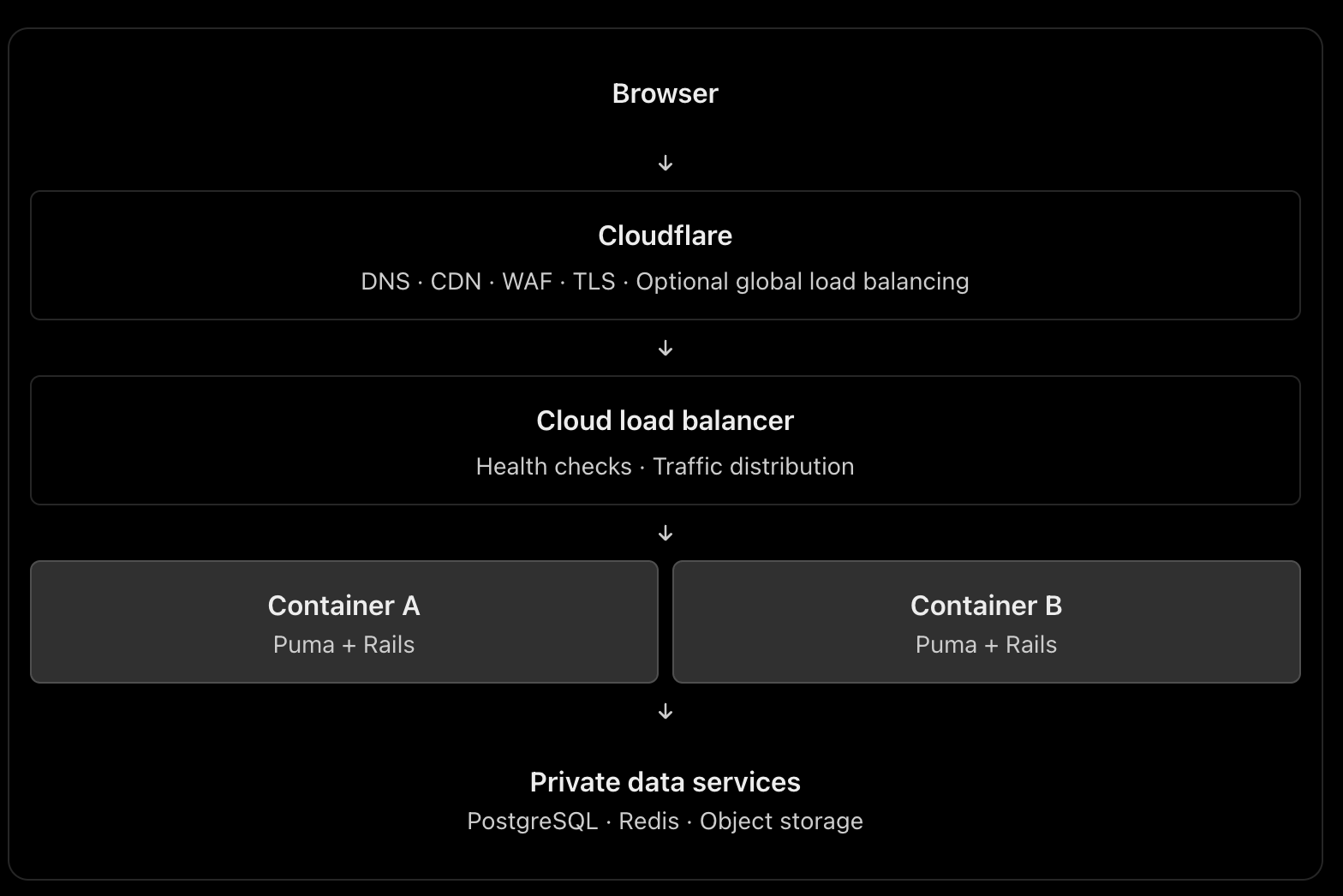
Recommended architecture to remember
This is a scalable reference architecture, not a requirement to use every component. For a smaller application, you may use Cloudflare plus one server running Nginx and Puma. Add managed load balancing and multiple replicas when availability and traffic requirements justify them. If Cloudflare performs global load balancing, the additional cloud load balancer may or may not be necessary.
The principal engineering lesson: HTTPS protects communication, Cloudflare helps protect and accelerate traffic, a load balancer distributes work, and Rails must still enforce application-level security. No single component replaces the others.
When it comes to building robust and maintainable applications, writing test cases is a crucial practice. In this guide, I will walk you through writing effective test cases for a Ruby on Rails model using a common model name, “Task.” The concepts discussed here are applicable to any model in your Rails application.
Why Write Test Cases?
Writing test cases is essential for several reasons:
Bug Detection: Test cases help uncover and fix bugs before they impact users.
Regression Prevention: Tests ensure that new code changes do not break existing functionality.
Documentation: Well-written test cases serve as documentation for your codebase, making it easier for other developers to understand and modify the code.
Refactoring Confidence: Tests provide the confidence to refactor code knowing that you won’t introduce defects.
Collaboration: Tests facilitate collaboration within development teams by providing a common set of expectations.
Now, let’s dive into creating test cases for a Ruby on Rails model.
Model: Task
We will use a model called “Task” as an example. Tasks might represent items on a to-do list, items in a project management system, or any other entity that requires tracking and management.
Setting Up the Environment
Before writing test cases, ensure that your Ruby on Rails application is set up correctly with the testing framework of your choice. Rails typically uses MiniTest or RSpec for testing. For this guide, we’ll use MiniTest.
# Gemfile
group :test do
  gem 'minitest'
  # Other testing gems...
end
After updating your Gemfile, run bundle install to install the testing gems. Ensure your test database is set up and up-to-date by running bin/rails db:test:prepare.
Writing Test Cases
Model Validation
The first set of test cases should focus on validating the model’s attributes. For our Task model, we might want to ensure that the title is present and within an acceptable length range.
# test/models/task_test.rb

require 'test_helper'

class TaskTest < ActiveSupport::TestCase
  test "should not save task without title" do
    task = Task.new
    assert_not task.save, "Saved the task without a title"
  end

  test "should save task with valid title" do
    task = Task.new(title: "A valid task title")
    assert task.save, "Could not save the task with a valid title"
  end
end
Testing Associations
In Rails, models often have associations with other models. For example, a Task might belong to a User. You can write test cases to ensure these associations work correctly.
# test/models/task_test.rb

class TaskTest < ActiveSupport::TestCase
  # ...

  test "task should belong to a user" do
    user = User.create(name: "John")
    task = Task.new(title: "Task", user: user)
    assert_equal user, task.user, "Task does not belong to the correct user"
  end
end
Custom Model Methods
If your model contains custom methods, ensure they behave as expected. For example, if you have a method that returns the completion status of a task, test it.
# test/models/task_test.rb

class TaskTest < ActiveSupport::TestCase
  # ...

  test "task should return completion status" do
    task = Task.new(title: "Task", completed: false)
    assert_equal "Incomplete", task.completion_status
    task.completed = true
    assert_equal "Complete", task.completion_status
  end
end
Scopes
Scopes allow you to define common queries for your models. Write test cases to ensure scopes return the expected results.
# test/models/task_test.rb

class TaskTest < ActiveSupport::TestCase
  # ...

  test "completed scope should return completed tasks" do
    Task.create(title: "Completed Task", completed: true)
    Task.create(title: "Incomplete Task", completed: false)

    completed_tasks = Task.completed
    assert_equal 1, completed_tasks.length
    assert_equal "Completed Task", completed_tasks.first.title
  end
end
Running Tests
You can run your tests with the following command:
bin/rails test
This command will execute all the test cases you’ve written in your test files.
Conclusion
Writing test cases is an essential practice in building reliable and maintainable Ruby on Rails applications. In this guide, we’ve explored how to write effective test cases for a model using a common model name, “Task.” These principles can be applied to test any model in your Rails application.
By writing comprehensive test cases, you ensure that your application functions correctly, maintains quality over time, and makes collaboration within your development team more efficient.
I am working on a project where we face issues in an ancestral path data in PostgreSql DB. Working with hierarchical data in PostgreSQL often involves dealing with ancestry paths stored as delimited strings. This comprehensive guide explores how to extract specific values from ancestry columns and utilize them effectively in join operations, complete with practical examples, troubleshooting tips and how I fixed the issues.
PostgreSQL’s robust string manipulation capabilities make it ideal for handling complex hierarchical data structures. When working with ancestry values stored in text columns, you often need to extract specific parts of the hierarchy for data analysis, reporting, or joining operations.
This article demonstrates how to:
✨ Extract values from ancestry strings using regular expressions
🔗 Perform efficient joins on extracted ancestry data
🛡️ Handle edge cases and avoid common pitfalls
⚡ Optimize queries for better performance
❓ Problem Statement
📊 Scenario
Consider a projects table with an ancestry column containing hierarchical paths like:
Extract the last integer value from the ancestry path
Use this value in a JOIN operation to fetch parent project data
Handle edge cases like NULL values and malformed strings
🏗️ Understanding the Data Structure
📁 Table Structure
CREATE TABLE projects (
    id BIGINT PRIMARY KEY,
    name VARCHAR(255) NOT NULL,
    ancestry TEXT,  -- Stores parent hierarchy as "id1/id2/id3"
    created_at TIMESTAMP DEFAULT NOW()
);

-- Sample data
INSERT INTO projects (id, name, ancestry) VALUES
    (1, 'Root Project', NULL),
    (2, 'Department A', '1'),
    (3, 'Team Alpha', '1/2'),
    (4, 'Task 1', '1/2/3'),
    (5, 'Subtask 1A', '1/2/3/4');
🧭 Ancestry Path Breakdown
Project ID
Name
Ancestry
Immediate Parent
1
Root Project
NULL
None (root)
2
Department A
1
1
3
Team Alpha
1/2
2
4
Task 1
1/2/3
3
5
Subtask 1A
1/2/3/4
4
🔧 Solution Overview
🎯 Core Approach
🔍 Pattern Matching: Use regex to identify the last number in the ancestry string
✂️ Value Extraction: Extract the matched value using regexp_replace()
🔄 Type Conversion: Cast the extracted string to the appropriate numeric type
🔗 Join Operation: Use the converted value in JOIN conditions
📝 Basic Query Structure
SELECT projects.*
FROM projects
LEFT OUTER JOIN projects AS parent_project
    ON CAST(
        regexp_replace(projects.ancestry, '.*\/(\d+)$', '\1')
        AS BIGINT
    ) = parent_project.id
WHERE projects.ancestry IS NOT NULL;
📝 Regular Expression Deep Dive
🎯 Pattern Breakdown: .*\/(\d+)$
Let’s dissect this regex pattern:
.*      -- Match any characters (greedy)
\/      -- Match literal forward slash
(\d+)   -- Capture group: one or more digits
$       -- End of string anchor
📊 Pattern Matching Examples
Ancestry String
Regex Match
Captured Group
Result
"6/4/5/3"
5/3
3
✅ 3
"1/2"
1/2
2
✅ 2
"9"
No match
–
❌ Original string
"abc/def"
No match
–
❌ Original string
🔧 Alternative Regex Patterns
-- For single-level ancestry (no slashes)
regexp_replace(ancestry, '^(\d+)$', '\1')

-- For extracting first parent instead of last
regexp_replace(ancestry, '^(\d+)\/.*', '\1')

-- For handling mixed delimiters (/ or -)
regexp_replace(ancestry, '.*[\/\-](\d+)$', '\1')
💻 Implementation Examples
🔧 Example 1: Basic Parent Lookup
-- Find each project with its immediate parent information
SELECT
    p.id,
    p.name AS project_name,
    p.ancestry,
    parent.id AS parent_id,
    parent.name AS parent_name
FROM projects p
LEFT OUTER JOIN projects parent
    ON CAST(
        regexp_replace(p.ancestry, '.*\/(\d+)$', '\1')
        AS BIGINT
    ) = parent.id
WHERE p.ancestry IS NOT NULL
ORDER BY p.id;
Expected Output:
 id | project_name | ancestry | parent_id | parent_name
----+--------------+----------+-----------+-------------
  2 | Department A | 1        |         1 | Root Project
  3 | Team Alpha   | 1/2      |         2 | Department A
  4 | Task 1       | 1/2/3    |         3 | Team Alpha
  5 | Subtask 1A   | 1/2/3/4  |         4 | Task 1
🎯 Example 2: Handling Edge Cases
-- Robust query that handles all edge cases
SELECT
    p.id,
    p.name AS project_name,
    p.ancestry,
    CASE
        WHEN p.ancestry IS NULL THEN 'Root Level'
        WHEN p.ancestry !~ '.*\/(\d+)$' THEN 'Single Parent'
        ELSE 'Multi-level'
    END AS hierarchy_type,
    parent.name AS parent_name
FROM projects p
LEFT OUTER JOIN projects parent ON
    CASE
        -- Handle multi-level ancestry
        WHEN p.ancestry ~ '.*\/(\d+)$' THEN
            CAST(regexp_replace(p.ancestry, '.*\/(\d+)$', '\1') AS BIGINT)
        -- Handle single-level ancestry
        WHEN p.ancestry ~ '^\d+$' THEN
            CAST(p.ancestry AS BIGINT)
        ELSE NULL
    END = parent.id
ORDER BY p.id;
📈 Example 3: Aggregating Child Counts
-- Count children for each project
WITH parent_child_mapping AS (
    SELECT
        p.id AS child_id,
        CASE
            WHEN p.ancestry ~ '.*\/(\d+)$' THEN
                CAST(regexp_replace(p.ancestry, '.*\/(\d+)$', '\1') AS BIGINT)
            WHEN p.ancestry ~ '^\d+$' THEN
                CAST(p.ancestry AS BIGINT)
            ELSE NULL
        END AS parent_id
    FROM projects p
    WHERE p.ancestry IS NOT NULL
)
SELECT
    p.id,
    p.name,
    COUNT(pcm.child_id) AS direct_children_count
FROM projects p
LEFT JOIN parent_child_mapping pcm ON p.id = pcm.parent_id
GROUP BY p.id, p.name
ORDER BY direct_children_count DESC;
-- ✅ Correct: Cast only the extracted value
CAST(
    regexp_replace(projects.ancestry, '.*\/(\d+)$', '\1')
    AS BIGINT
) = parent.id
❌ Error 2: Unexpected Results with Single-Level Ancestry
Problem: Single values like "9" don’t match the pattern .*\/(\d+)$
Solution:
-- ✅ Handle both multi-level and single-level ancestry
CASE
    WHEN ancestry ~ '.*\/(\d+)$' THEN
        CAST(regexp_replace(ancestry, '.*\/(\d+)$', '\1') AS BIGINT)
    WHEN ancestry ~ '^\d+$' THEN
        CAST(ancestry AS BIGINT)
    ELSE NULL
END
❌ Error 3: NULL Ancestry Values Causing Issues
Problem: NULL values can cause unexpected behaviour in joins
Solution:
-- ✅ Explicitly handle NULL values
WHERE ancestry IS NOT NULL
AND ancestry != ''
🛡️ Complete Error-Resistant Query
SELECT
    p.id,
    p.name AS project_name,
    p.ancestry,
    parent.id AS parent_id,
    parent.name AS parent_name
FROM projects p
LEFT OUTER JOIN projects parent ON
    CASE
        WHEN p.ancestry IS NULL OR p.ancestry = '' THEN NULL
        WHEN p.ancestry ~ '.*\/(\d+)$' THEN
            CAST(regexp_replace(p.ancestry, '.*\/(\d+)$', '\1') AS BIGINT)
        WHEN p.ancestry ~ '^\d+$' THEN
            CAST(p.ancestry AS BIGINT)
        ELSE NULL
    END = parent.id
ORDER BY p.id;
⚡ Performance Considerations
📊 Indexing Strategies
-- Create index on ancestry for faster pattern matching
CREATE INDEX idx_projects_ancestry ON projects (ancestry);

-- Create partial index for non-null ancestry values
CREATE INDEX idx_projects_ancestry_not_null
ON projects (ancestry)
WHERE ancestry IS NOT NULL;

-- Create functional index for extracted parent IDs
CREATE INDEX idx_projects_parent_id ON projects (
    CASE
        WHEN ancestry ~ '.*\/(\d+)$' THEN
            CAST(regexp_replace(ancestry, '.*\/(\d+)$', '\1') AS BIGINT)
        WHEN ancestry ~ '^\d+$' THEN
            CAST(ancestry AS BIGINT)
        ELSE NULL
    END
) WHERE ancestry IS NOT NULL;
🔄 Query Optimization Tips
🎯 Use CTEs for Complex Logic
WITH parent_lookup AS (
    SELECT
        id,
        CASE
            WHEN ancestry ~ '.*\/(\d+)$' THEN
                CAST(regexp_replace(ancestry, '.*\/(\d+)$', '\1') AS BIGINT)
            WHEN ancestry ~ '^\d+$' THEN
                CAST(ancestry AS BIGINT)
        END AS parent_id
    FROM projects
    WHERE ancestry IS NOT NULL
)
SELECT p.*, parent.name AS parent_name
FROM parent_lookup p
JOIN projects parent ON p.parent_id = parent.id;
⚡ Consider Materialized Views for Frequent Queries
CREATE MATERIALIZED VIEW project_hierarchy AS
SELECT
    p.id,
    p.name,
    p.ancestry,
    CASE
        WHEN p.ancestry ~ '.*\/(\d+)$' THEN
            CAST(regexp_replace(p.ancestry, '.*\/(\d+)$', '\1') AS BIGINT)
        WHEN p.ancestry ~ '^\d+$' THEN
            CAST(p.ancestry AS BIGINT)
    END AS parent_id
FROM projects p;

-- Refresh when data changes
REFRESH MATERIALIZED VIEW project_hierarchy;
🛠️ Advanced Techniques
🔍 Extracting Multiple Ancestry Levels
-- Extract all ancestry levels as an array
SELECT
    id,
    name,
    ancestry,
    string_to_array(ancestry, '/') AS ancestry_array,
    -- Get specific levels
    split_part(ancestry, '/', 1) AS level_1,
    split_part(ancestry, '/', 2) AS level_2,
    split_part(ancestry, '/', -1) AS last_level
FROM projects
WHERE ancestry IS NOT NULL;
🧮 Calculating Hierarchy Depth
-- Calculate the depth of each project in the hierarchy
SELECT
    id,
    name,
    ancestry,
    CASE
        WHEN ancestry IS NULL THEN 0
        ELSE array_length(string_to_array(ancestry, '/'), 1)
    END AS hierarchy_depth
FROM projects
ORDER BY hierarchy_depth, id;
🌳 Building Complete Hierarchy Paths
-- Recursive CTE to build full hierarchy paths
WITH RECURSIVE hierarchy_path AS (
    -- Base case: root projects
    SELECT
        id,
        name,
        ancestry,
        name AS full_path,
        0 AS level
    FROM projects
    WHERE ancestry IS NULL

    UNION ALL

    -- Recursive case: child projects
    SELECT
        p.id,
        p.name,
        p.ancestry,
        hp.full_path || ' → ' || p.name AS full_path,
        hp.level + 1 AS level
    FROM projects p
    JOIN hierarchy_path hp ON
        CASE
            WHEN p.ancestry ~ '.*\/(\d+)$' THEN
                CAST(regexp_replace(p.ancestry, '.*\/(\d+)$', '\1') AS BIGINT)
            WHEN p.ancestry ~ '^\d+$' THEN
                CAST(p.ancestry AS BIGINT)
        END = hp.id
)
SELECT * FROM hierarchy_path
ORDER BY level, id;
✅ Best Practices
🎯 Data Validation
✅ Validate Ancestry Format on Insert/Update
-- Add constraint to ensure valid ancestry format
ALTER TABLE projects
ADD CONSTRAINT check_ancestry_format
CHECK (
    ancestry IS NULL
    OR ancestry ~ '^(\d+)(\/\d+)*$'
);
🔍 Regular Data Integrity Checks
-- Find orphaned projects (ancestry points to non-existent parent)
SELECT p.id, p.name, p.ancestry
FROM projects p
WHERE p.ancestry IS NOT NULL
AND NOT EXISTS (
    SELECT 1 FROM projects parent
    WHERE parent.id = CASE
        WHEN p.ancestry ~ '.*\/(\d+)$' THEN
            CAST(regexp_replace(p.ancestry, '.*\/(\d+)$', '\1') AS BIGINT)
        WHEN p.ancestry ~ '^\d+$' THEN
            CAST(p.ancestry AS BIGINT)
    END
);
🛡️ Error Handling
-- Function to safely extract parent ID
CREATE OR REPLACE FUNCTION extract_parent_id(ancestry_text TEXT)
RETURNS BIGINT AS $$
BEGIN
    IF ancestry_text IS NULL OR ancestry_text = '' THEN
        RETURN NULL;
    END IF;

    IF ancestry_text ~ '.*\/(\d+)$' THEN
        RETURN CAST(regexp_replace(ancestry_text, '.*\/(\d+)$', '\1') AS BIGINT);
    ELSIF ancestry_text ~ '^\d+$' THEN
        RETURN CAST(ancestry_text AS BIGINT);
    ELSE
        RETURN NULL;
    END IF;
EXCEPTION
    WHEN OTHERS THEN
        RETURN NULL;
END;
$$ LANGUAGE plpgsql IMMUTABLE;

-- Usage
SELECT p.*, parent.name AS parent_name
FROM projects p
LEFT JOIN projects parent ON extract_parent_id(p.ancestry) = parent.id;
📊 Monitoring and Maintenance
-- Query to analyze ancestry data quality
SELECT
    'Total Projects' AS metric,
    COUNT(*) AS count
FROM projects

UNION ALL

SELECT
    'Projects with Ancestry' AS metric,
    COUNT(*) AS count
FROM projects
WHERE ancestry IS NOT NULL

UNION ALL

SELECT
    'Valid Ancestry Format' AS metric,
    COUNT(*) AS count
FROM projects
WHERE ancestry ~ '^(\d+)(\/\d+)*$'

UNION ALL

SELECT
    'Orphaned Projects' AS metric,
    COUNT(*) AS count
FROM projects p
WHERE p.ancestry IS NOT NULL
AND extract_parent_id(p.ancestry) NOT IN (SELECT id FROM projects);
📝 Conclusion
Working with ancestry data in PostgreSQL requires careful handling of string manipulation, type conversion, and edge cases. By following the techniques outlined in this guide, you can:
🎯 Key Takeaways
🔍 Use robust regex patterns to handle different ancestry formats
🛡️ Always handle edge cases like NULL values and malformed strings
⚡ Consider performance implications and use appropriate indexing
✅ Implement data validation to maintain ancestry integrity
🔧 Create reusable functions for complex extraction logic
💡 Final Recommendations
🎯 Test thoroughly with various ancestry formats
📊 Monitor query performance and optimize as needed
🔄 Consider alternative approaches like ltree for complex hierarchies
📚 Document your ancestry format for team members
🛠️ Implement proper error handling in production code
The techniques demonstrated here provide a solid foundation for working with hierarchical data in PostgreSQL. Whether you’re building organizational charts, category trees, or project hierarchies, these patterns will help you extract and manipulate ancestry data effectively and reliably! 🚀
When working with React and handling events, it’s crucial to understand the difference between e.target and e.currentTarget. While they may seem similar at first glance, they have distinct roles and behaviors. In this blog post, we’ll delve into the details of these event properties and explore when to use each one.
e.target: The Originating Element e.target refers to the element that triggered the event or where the event originated from. It represents the specific DOM element that the user interacted with, such as clicking a button or typing in an input field. It provides direct access to properties and attributes of that element.
e.currentTarget: The Bound Element On the other hand, e.currentTarget refers to the element to which the event handler is attached. It remains constant, regardless of which element triggered the event. In most cases, e.currentTarget and e.target are the same element, especially when you attach the event handler directly to the target element.
Differences in Markup Structure One important distinction arises when your markup structure involves nested elements or event delegation. If the event handler is attached to a parent element and an event occurs within one of its child elements, e.target will point to the specific child element, while e.currentTarget will reference the parent element. This behavior is particularly useful when you want to handle events for multiple elements within a container and need to determine which child element triggered the event.
Practical Use Cases 4.1 Individual Element Control: When you have multiple input elements, such as multiple text fields or checkboxes, and want to handle their changes individually, you should typically use e.target.value to access the specific value of the element that triggered the event. This ensures that you’re updating the correct state or performing the appropriate actions for that particular element. 4.2 Event Delegation: In scenarios where you use event delegation, attaching a single event handler to a parent element to handle events from its child elements, e.currentTarget.value can be useful. It allows you to access the value of the parent element, which can be helpful when you want to track changes or perform actions based on the parent element’s state.
Conclusion:
Understanding the nuances between e.target and e.currentTarget in React is crucial for properly handling events and accessing the relevant elements and their properties. By grasping these differences, you can write more effective event handlers and ensure your application responds accurately to user interactions. Remember that e.target refers to the element where the event originated, while e.currentTarget represents the element to which the event handler is bound. Utilize this knowledge to build robust and interactive React applications.
Hopefully, this blog post clarifies the distinction between e.target and e.currentTarget in React and helps you write better event handling code.
PostgreSQL, also known as Postgres, is a powerful and feature-rich relational database management system. One of its notable features is the array aggregation function, array_agg, which allows you to aggregate values from multiple rows into a single array. In this blog post, we’ll explore how array_agg works, its applications, and considerations for performance.
How Does array_agg Work?
The array_agg function takes an expression as an argument and returns an array containing the values of that expression for all the rows that match the query. Let’s illustrate this with an example.
Consider a table called employees with columns id, name, and department. Suppose we want to aggregate all the names of employees belonging to the “Sales” department into an array. We can achieve this using the following query:
SELECT array_agg(name) AS sales_employees
FROM employees
WHERE department = 'Sales';
The result of this query will be a single row with a column named sales_employees, which contains an array of all the names of employees in the “Sales” department.
Usage of array_agg with Subqueries
The ability to get an array as the output opens up various possibilities, especially when used in subqueries. You can leverage this feature to aggregate data from related tables or filter results based on complex conditions.
For instance, imagine you have two tables, orders and order_items, where each order can have multiple items. You want to retrieve a list of orders along with an array of item names for each order. The following query achieves this:
SELECT o.order_id, (
  SELECT array_agg(oi.item_name)
  FROM order_items oi
  WHERE oi.order_id = o.order_id
) AS item_names
FROM orders o;
In this example, the subquery within the main query’s select list utilizes array_agg to aggregate item names from the order_items table, specific to each order.
Complex Query Example Using array_agg
To demonstrate a more complex scenario, let’s consider a database that stores books and their authors. We have three tables: books, authors, and book_authors (a join table that associates books with their respective authors).
Suppose we want to retrieve a list of books along with an array of author names for each book by alphabetical order. We can achieve this using a query that involves joins and array_agg:
SELECT b.title, array_agg(a.author_name ORDER BY a.author_name ASC) AS authors
FROM books b
JOIN book_authors ba ON b.book_id = ba.book_id
JOIN authors a ON ba.author_id = a.author_id
GROUP BY b.book_id;
In this query, we join the tables based on their relationships and use array_agg to aggregate author names into an array for each book. The GROUP BY clause ensures that each book’s array of author names is grouped correctly.
Performance Considerations
While array_agg is a powerful function, it’s essential to consider its performance implications, especially when working with large datasets. Aggregating values into arrays can be computationally intensive, and the resulting array can consume significant memory.
If you anticipate working with large result sets or complex queries involving array_agg, it’s worth optimizing your database schema, indexing relevant columns, and analyzing query performance using PostgreSQL’s built-in tools.
Additionally, consider whether array_agg is the most efficient solution for your specific use case. Sometimes, alternative approaches, such as using temporary tables or custom aggregate functions, might offer better performance.
Conclusion
The array_agg function in PostgreSQL provides a powerful mechanism for aggregating values into arrays. It offers flexibility and opens up opportunities for various applications, including subqueries and complex data manipulations. However, when working with large datasets, it’s crucial to be mindful of potential performance implications and explore optimization strategies accordingly.
In the world of Ruby programming, we often encounter scenarios where we need to work with dates. Ruby provides us with two methods, Date.current and Date.today, to retrieve the current date. Although they may appear similar at first glance, understanding their differences can help us write more accurate and reliable code. Let’s explore the reasons behind their existence, where we can use them, and the potential pitfalls we might encounter.
Why are there two different methods? Ruby’s Date.current and Date.today methods exist to handle different time zone considerations. When developing applications using the Ruby on Rails framework, it’s crucial to account for the possibility of multiple time zones. Rails provides a simple and consistent way to handle time zone-related operations, and these two methods are part of that feature set.
Where can we use them? a) Date.current: This method is specifically designed for Rails applications. It returns the current date in the time zone specified by the application’s configuration. It ensures that the date obtained is consistent across the entire application, regardless of the server or machine executing the code. Date.current is particularly useful when dealing with user interactions, scheduling, or any scenario where consistent time zone handling is necessary.
b) Date.today: This method retrieves the current date based on the default time zone of the server or machine where the code is running. It is not limited to Rails applications and can be used in any Ruby program. However, when working in a Rails application, it’s generally recommended to use Date.current to maintain consistent time zone handling.
Problems when using each method: Using these methods incorrectly or without understanding their differences can lead to unexpected results: a) Inconsistent time zones: If a Rails application is deployed across multiple servers or machines with different default time zones, using Date.today may produce inconsistent results. It can lead to situations where the same code yields different dates depending on the server’s time zone.
b) Time zone misconfigurations: In Rails applications, failing to properly set the application’s time zone can result in incorrect date calculations. It’s crucial to configure the desired time zone in the application’s configuration file, ensuring that Date.current returns the expected results.
Conclusion:
Understanding the nuances between Date.current and Date.today in Ruby can greatly improve the accuracy and reliability of our code, particularly in Rails applications. By using Date.current, we ensure consistent time zone handling throughout the application, regardless of the server or machine executing the code. Carefully considering the appropriate method to use based on the specific context can prevent common pitfalls related to time zone inconsistencies.
List of commands to remember using postgres DB managment system.
Login, Create user and password
# login to psql client
psql postgres # OR
psql -U postgres
create database mydb; # create db
create user abhilash with SUPERUSER CREATEDB CREATEROLE encrypted password 'abhilashPass!';
grant all privileges on database mydb to myuser; # add privileges
Connect to DB, List tables and users, functions, views, schema
\l # lists all the databases
\c dbname # connect to db
\dt # show tables
\d table_name # Describe a table
\dn # List available schema
\df #  List available functions
\dS [your_table_name] # List triggers
\dv # List available views
\du # lists all user accounts and roles
\du+ # is the extended version which shows even more information.
Show history, save to file, edit using editor, execution time, help
SELECT version(); # version of psql
\g  # Execute the previous command
\s # Command history
\s filename # save Command history to a file
\i filename # Execute psql commands from a file
\? # help on psql commands
\h ALTER TABLE # To get help on specific PostgreSQL statement
\timing #  Turn on/off query execution time
\e # Edit command in your own editor
\e [function_name] # It is more useful when you edit a function in the editor. Do \df for functions
\o [file_name] # send all next query results to file
    \o out.txt
    \dt
    \o # switch
    \dt
Change output, Quit psql
# Switch output options
\a command switches from aligned to non-aligned column output.
\H command formats the output to HTML format.
\q # quit psql