
Git is a version control system and a very good friend of a developer. Todays all projects are very much depend on git. What’s the use of git? If a programmer develops a project he want to take copies of the progressing project at stage by stage. Using git we can ‘commit’ the project by giving comments like ‘first commit’ , ‘second commit’ etc. When a programmer deletes a file, he can recover the file using git. Git uses a tree structure to hold the data. It has a parent repository called master branch. We can change the branch to another and can process the data. Multiple branches are using when working on a projects with multiple developers. This branch master is unaltered when working on another branch. Download .rpm packages from RPM packages, and .deb packages from Debian Packages
Author: Abhilash
Hi, I’m Abhilash! A seasoned web developer with 15 years of experience specializing in Ruby and Ruby on Rails. Since 2010, I’ve built scalable, robust web applications and worked with frameworks like Angular, Sinatra, Laravel, Node.js, Vue and React.
Passionate about clean, maintainable code and continuous learning, I share insights, tutorials, and experiences here. Let’s explore the ever-evolving world of web development together!
Turtle graphics programming in python
Using python’s tkinter module we can create a logo style programs. To do this in python import the module tkinter. Draw the class turtle. Initialize the turtle class with coordinates and angle. Write a function draw_turtle. Draw three straight lines to form a triangle. Write another function delete_turtle to delete the lines. To move forward write mv_fwd function with a parameter ‘distance’. In this function first delete the turtle, draw a line to that distance and redraw the turtle. Preserve the angle.

Visit my github location for source code – http://github.com/abhilashak/logo_in_python
To rotate write rt_lt and rt_rt functions. First delete the existing turtle. From the angle this function calculates the position of new turtle. Redraw it. rt_rt is just the negative angle of rt_lt.
My project in Web application field – Graph colouring Algorithm
Today the web applications have a great value. Anyone can access the application and do their jobs through the web. Hosting the application require a server, that manages the request and stores the data. Here the google appengine does the job. Google app engine is a cloud environment that provides the server-side services we want. Here the application is a graph colouring technique which takes a graph and provides a proper colour to each of the nodes according to the vertex colouring algorithm. This algorithm is implemented in python.
The front end of the project is a HTML5 page. It uses the web application languages javascript and jquery. Here the front-end consists of a html5 canvas and the control buttons. We can draw an undirected graph in the canvas using the control buttons. These buttons are created in html5 page. The program code resides in two files. One html5 file and one javascript file.
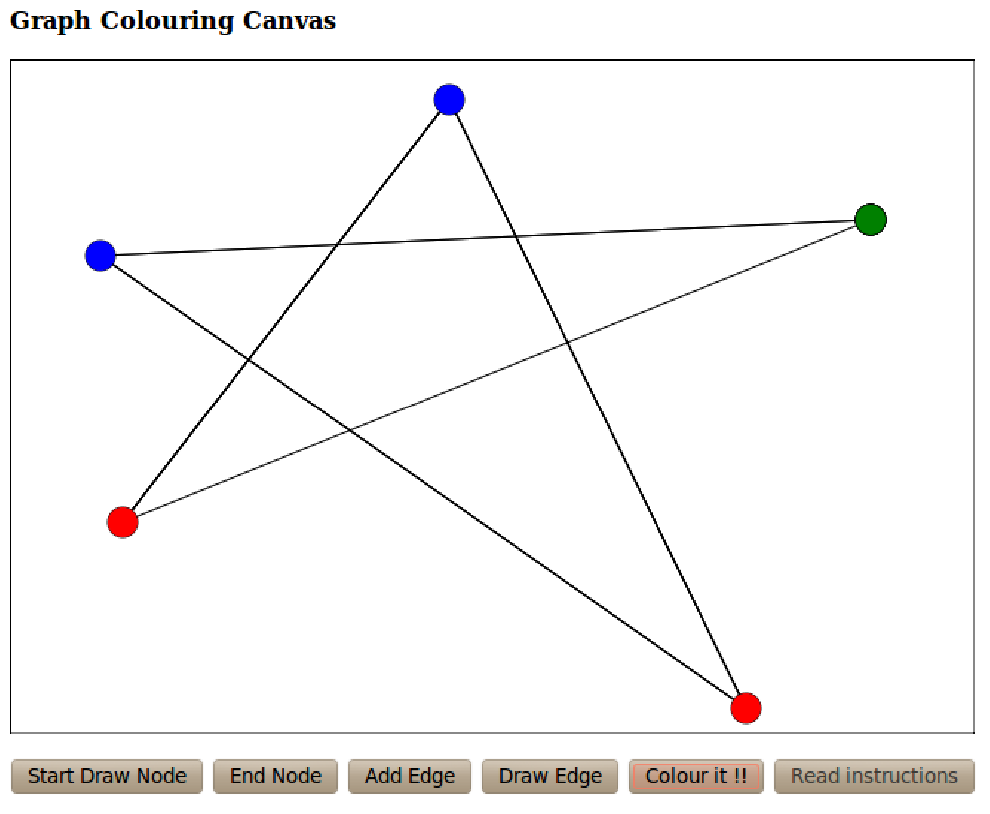
A html5 canvas is created using the canvas tag in html5 file. It contains the id and the size of the canvas. Using this id we can obtain the context of the canvas. Specifing this context it creates, the colour of the canvas, style etc. The html5 page displays the canvas and the buttons when it loads.
Visit my github location to get the project code : http://github.com/abhilashak/project_graph_color
Visit my application at : http://colourthegraph.appspot.com/canvas/se11.html
Usually the term graph colouring algorithm indicates the vertex-colouring algorithm even though other algorithms are exists such as edge-colouring algorithm. The input of the graph colouring algorithm is the adjacentcy list of each node. It gives the nodes with the proper colour.
This Algorithm keeps a set of colours and the ‘availability list’ of colours for each node. First it takes each node in the order. It then checks the adjacentcy list of that node. If the first node in the list is coloured, it deletes that colour from the availability list. Then takes the next node from the adjacentcy list and the process continues. Last assigns the first colour in the availability list. This ensures the algorithm to take smallest number of colours.
What is padding in C?
In C what is meant by padding of bits? Consider the following structure,
struct number {
int a;
char b;
int c;
};
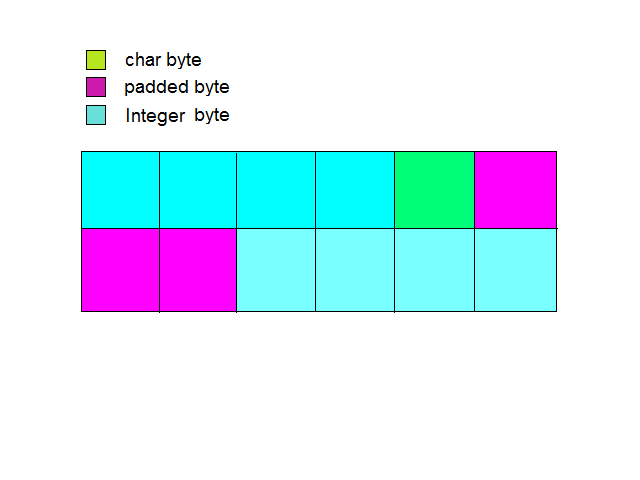
What is the size of this structure? An integer takes 4 bytes, char takes 1 and the third integer 4 bytes. Total 9 bytes. This is wrong. We can see the size of the structure is 12 bytes. What happens here? the compiler pads 3 bytes to char element. This is for proper alignment. In a 32 bit processor it checks the next data only after 32 bits. Else the compiler will have related problems. Now the compiler knows each data is 4 bytes wider. So the benefits.
Is the study of pointers in C is easy?
Here explains a little about pointers. Yes the pointers are easy, of course. But take care in your building path. If you go through pointers deeply, you will see the complexity.
In C address is only for l-values. It can be a variable or something. If we assign p = &a, the type of p is int * – pointer to an integer. type of ‘a’ is int and type of ‘&a’ is int *. C language is a weakly typed language. ie when we use assignment, C allows to assign the right most thing to the left most without checking the types of these two.
int *p;
p = 1;
*p = 10;
Consider the above statements in C. We declared p as a pointer variable. Then 1 is assigned to p. In the third statement 10 is assigning to the memory location 1. What about the memory location 1, is there exists a memory address 1. Usually not. If yes, of course it isn’t accessible. OS allows the program to access only within a particular memory location. This is Memory protection. If OS takes no care about memory protection what happens? In that system so many programs are running and two programs want to store data on say 2000 th location then what happens? The programs access wrong data.
int *p;
p = 0;
*p = 10;
By executing above statements there is no error at compile time. Why? C takes zero as a pointer.
Its easy to go further.
HTML5
It is not a totally new version of HTML 4 . It support the features of HTML 4 and is a collection of individual features like canvas, video, geolocation etc. We can interacts with javascript through DOM (Document Object Model). It does not have any special notation to handle features like video. The API defines this. Upgrading to HTML5 need only change the doctype.
!DOCTYPE html
It defines new semantics like article, section, footer etc.
Local Storage :
HTML5 provides local storage. It stores information on the mechine, this allows the sites to retrieve it later.
Programming in UNIX Environment : Using the shell
A greater than sign ‘>’ followed by a name makes a file of that name. the -n option of echo command is for omiting the newline. the ‘-l’ option for the ‘who’ command shows the details of users. The shell is a command like all unix commands. It is represented by ‘sh’.
$ > file //creates a file named file.
$ echo -n you are lucky
$ echo /* //prints the all the folders in root (not recursively)
$ echo \* //prints a ‘*’ character
$ who -l
Programming in python : Classes
Create a class as follows,
>>> class abc():
… a = 1
… b = 2
…
create x as an instance of the class abc,
>>> x = abc()
>>> x
>>> x.b
2
Create another class with a function definition,
>>> class abc():
… a = 3
… b = 4
… def fun():
… print ‘hello’
…
>>> x = abc()
>>> x.a
3
>>> x.b
4
>>> x.fun()
Traceback (most recent call last):
File “”, line 1, in
TypeError: fun() takes no arguments (1 given)
We cannot call the function in class abc, as an attribute of x. x has no such an attribute. But the address of x is already given by the interpreter as a parameter to that function. Usually we give an extra parameter ‘self’, have no special meaning.
>>> class abc():
… a = 1
… b = 2
… def fun(self):
… p = 5
… q = 6
… print ‘hello’
…
>>> x = abc()
>>> x.a
>>> 1
>>> x.p
>>> x.fun()
The above statement causes an error. Because x has no attribute p. ‘x.fun()’ cannot print hello, so little changes are needed to our code and is shown below.
>>> class abc():
… x = 1
… y = 2
… def fun(self):
… self.p = 3
… self.q = 4
… print ‘Hello’
…
>>> m = abc()
>>> m.p
Traceback (most recent call last):
File “”, line 1, in
AttributeError: abc instance has no attribute ‘p’
Here the interpreter says that the abc instance has no attribute ‘p’.’p’ is an attribute of the function ‘fun’. So create an instance of abc and pass the address of m to ‘self’.
>>> m = abc()
>>> m .fun()
Hello
Programming in UNIX Environment : Commands – sort, tail, cmp, diff
The command ‘sort’ is for sorting the line of the text. ‘tail’ prints the last ten lines of the file. ‘cmp’ for showing the difference between the files. It shows only the first difference. But ‘diff’ shows all the difference between two files.
sort filename1 file2
sort -r // reverse normal order.
sort -n // numeric order.
sort -f // fold upper and lower case together.
sort -b // Ignore the leading blanks.
tail filename // prints last 10 lines.
tail -3 filename // print last 3 lines.
cmp filename1 filename2 // prints only the 1st difference.
diff filen1 filen2 // prints all differences.
pwd – For printing current working directory.
cp – For copying a file.
cp /home/abhi/Pclass/num.c num.c
ed /home/abhi/Pclass/num.c
Programming in UNIX Environment : Commands – mv, rm, wc, grep
The ‘mv’ command is using for renaming. And ‘rm’ command for removing files. ‘wc’ for counting lines,words,characters. The ‘grep’ command is for searching a word. ‘-v’ for searching all words except the indicating word in a line.
mv filename newname
rm filename1 filename2
wc filename1 filename2 // count lines,words,characters.
wc -l //only counts the new lines.
wc -w //print the word count.
wc -m //print the character counts.
wc -c //printf the byte counts.
grep int filename // for searching the word int.
grep -v int filename // all except int.
 The Rails Drop